
Unlock Google Ads Optimizer: Maximize ROI & Cut Costs in 2026
Unlock Google Ads Optimizer: Maximize ROI & Cut Costs in 2026


So, what exactly is a Google Ads optimizer? It's not some magic button or a single, specific tool. Think of it as a combination of systems, strategies, and tools all working together to make your campaigns run smarter, not harder. The main goal is simple: get more conversions and stop overspending.
Decoding Your Campaign's Personal Trainer
Trying to manage a Google Ads account without some form of optimization is like driving through a huge, unfamiliar city with a crumpled paper map. You'll spend all your time looking down, getting stuck in traffic, and making wrong turns. It’s slow, incredibly frustrating, and you’ll burn a lot of fuel (and money) getting nowhere fast.
A Google Ads optimizer is your campaign’s personal GPS. It crunches countless real-time signals—what users are searching for, what your competitors are bidding, and how your ads have performed in the past—to find the quickest, most efficient route to your goal. Instead of you sitting there manually tweaking bids for thousands of keywords, an optimizer does it in the blink of an eye.
In short, an optimizer's job is to handle the nonstop, complex decisions so you can focus on the big picture. It automates the grunt work to save you time and boost your return on investment (ROI).
This frees you up from the nitty-gritty and lets you put your energy where it really counts: crafting better ad copy, refining your strategy, and growing your business. If you need a refresher on the basics of the platform itself, this ultimate guide to Google Ads for ecommerce is a great place to start.
So, What Do These Optimizers Actually Do?
At their core, every Google Ads optimizer is designed to handle tasks that are just too massive or happen too quickly for any human to manage effectively on their own.
To make sense of it all, it helps to break down the different types of optimizers you'll encounter. Here’s a quick look at the main categories.
A Quick Look at Google Ads Optimizer Types
| Optimizer Type | Primary Function | Best For |
|---|---|---|
| Google Automated Bidding | Sets bids in real-time to meet a specific goal (e.g., Target CPA, Maximize conversions). | Advertisers who want to hand off the complex bidding process to Google's AI. |
| Google Ads Scripts | Automates repetitive account tasks with custom JavaScript code. | Experienced users who need to automate very specific, custom account rules. |
| Google Recommendations | Provides AI-generated suggestions to improve campaign performance. | Finding quick wins and low-hanging fruit identified by Google's system. |
| Third-Party Tools | Offers advanced automation for workflows like keyword management and reporting. | Businesses looking to automate beyond Google's native features for a competitive edge. |
As you can see, each type of optimizer serves a different purpose, from simple bid management to highly customized automation.
Ultimately, these tools all aim to streamline your workflow. They can be generally grouped into a few key categories:
- Google's Built-in AI: This is everything inside the Google Ads platform itself, like its automated bidding strategies and the suggestions you see in the Recommendations tab.
- Automated Scripts: These are custom pieces of code you can run in your account to automate very specific tasks, like pausing ads that aren't performing well.
- Third-Party Tools: This category includes specialized software, like Keywordme, that offers automation and insights that go far beyond what’s available natively in Google Ads, especially for tasks like negative keyword management.
We'll dive into each of these next, so you can figure out which ones make the most sense for your business and your goals.
Using Google's Built-In Optimization Tools
Before you even think about third-party software, it’s worth mastering the powerful optimization tools Google gives you right out of the box. Getting a handle on these is the first real step toward making your ad budget work smarter, not harder.
The two big players here are Automated Bidding and the Recommendations tab. Together, they act as a native google ads optimizer built directly into your account.
Think of Google’s AI as a super-fast auctioneer who has an uncanny sense of what every single click is worth. Automated Bidding basically lets this AI take the wheel on the dizzying, real-time bidding process. Instead of you manually tweaking bids, you just tell Google what your main goal is, and it gets to work.
Of course, "telling Google your goal" means choosing the right bidding strategy. Understanding what each one really does is crucial to making the automation work for you, not against you.
Leveraging Automated Bidding Strategies
Let's break down some of the most common bidding strategies in plain English. Each one is a different instruction you're giving Google's algorithm.
- Maximize Conversions: This is you telling Google, "Just get me the most conversions you can with the budget I have." It’s a fantastic starting point for new campaigns when you're still gathering data and figuring out what works.
- Target CPA (Cost Per Acquisition): With this, your instruction is more specific: "I need conversions, but I absolutely cannot pay more than X amount for each one." You set your price, and the AI does its best to hit that target.
- Target ROAS (Return On Ad Spend): This is the go-to for e-commerce or any business that tracks direct revenue. You're basically telling the AI, "For every dollar I put in, I need to get a certain amount back."
The right choice always circles back to your core business objectives. If you want to dig a bit deeper into the mechanics, you might like our guide on what automated optimization in Google Ads is.
Your Personalized AI Consultant
While automated bidding is busy in the auction trenches, the Recommendations tab acts more like your own personal AI consultant. It’s constantly scanning your account, looking for easy wins and growth opportunities, and then presents them to you with an "Optimization Score."
Don't dismiss this score as just another number. It's a real-time health check for your account. Acting on these suggestions—which can be anything from spotting keyword gaps to improving your ad copy—can give you an almost immediate performance boost.
The impact isn't just theoretical, either. Google has documented that advertisers who act on recommendations and improve their account-level optimization score by just 10 points see a median 14% increase in conversions. Top-tier accounts, often scoring 85/100 or higher, consistently outperform those with lower scores. You can read more about how these campaign recommendations drive results.
How Responsive Search Ads Automate Success
Remember the old days of endlessly split-testing one ad variation against another? Thankfully, those days are long gone. Responsive Search Ads (RSAs) have completely changed the game, and they're one of the most powerful optimizers Google has given us.
Think of RSAs as giving Google's AI a box of creative LEGOs. Instead of building one single, static ad, you hand over a collection of up to 15 different headlines and 4 unique descriptions. From there, the machine goes to work, acting like a relentless copywriter that tests thousands of tiny ad combinations 24/7.
The real magic is how the AI mixes and matches your headlines and descriptions in real time. It custom-builds an ad for every single search, quickly learning which combinations click with different types of people. The result? Higher click-through rates (CTR) and much better performance for you.
How RSAs Became an Essential Optimizer
This move from static ads to dynamic, machine-learning-driven creative was a seismic shift. When Google Ads introduced RSAs back in July 2018, they were essentially handing the keys to ad assembly over to their AI. It didn't take long for studies to show that RSAs delivered 10-15% higher CTRs on average compared to the old expanded text ads. If you're a history buff, you can explore how automation changed digital advertising at Silverback Strategies.
This has fundamentally changed our role as advertisers. We've moved away from tedious manual testing and can now focus on the high-level strategy: coming up with a truly diverse set of compelling messages.
So, how do you get the most out of this google ads optimizer? It all comes down to feeding the machine a wide variety of high-quality ingredients.
- Create Genuinely Different Headlines: Don’t just write fifteen versions of the same thing. Make sure you include your main keywords, but also toss in headlines that highlight unique selling points, feature a strong call to action, or build trust with a little social proof.
- Vary Your Descriptions: Use the description space to tell a bigger story. One description could dig into product features, while another paints a picture of the benefits your customer will experience.
- Pin with Purpose (or Not at All): You have the option to "pin" a headline or description to a specific position, which is useful for legal disclaimers or brand taglines that must appear. But for maximum optimization, it’s usually best to give Google's AI total freedom to test every possible combination.
Think of it this way: when you give the system a rich and varied buffet of creative options, you empower the algorithm to uncover winning ad combinations you would have never thought to test yourself. It's the perfect partnership of human creativity and machine intelligence.
At the end of the day, RSAs are a non-negotiable part of any modern Google Ads strategy. They automate the once-grueling task of ad copy testing, letting you get better results with far less manual work. If you're looking for more ways to solve ad copy testing challenges, check out our solutions for ad copy testing challenges.
Gaining an Edge with Third-Party Optimizer Tools
While Google's own tools give you a fantastic foundation, most seasoned advertisers eventually hit a wall. This is where third-party optimizers come in. They aren't meant to replace Google’s features, but to build on top of them, giving you a much-needed boost in speed and precision.
Think of it this way: these tools are built to automate the most mind-numbing, time-sucking tasks that eat up your day. Imagine trying to clean up a messy search term report. It can take hours of manual work, but a dedicated google ads optimizer tool can turn that into a job that takes just a few clicks.
These platforms aren't trying to do everything. Instead, they focus on being masters of very specific, high-impact jobs that Google’s interface just doesn’t handle all that well. For agencies and businesses managing serious ad spend, this gives them a real leg up, allowing them to scale their efforts and spend more time on strategy instead of being buried in spreadsheets.
Automating the Tedious but Critical Tasks
So, what does that actually look like day-to-day? A good third-party tool like Keywordme can completely change how you manage your accounts.
- Automated Negative Keyword Building: The tool can scan a messy search term report in seconds, flagging irrelevant queries that are just burning through your budget. It then helps you build a negative keyword list to stop the bleeding. This task alone can save you thousands in wasted ad spend.
- Bulk Match Type Management: Have you ever tried to change the match types for hundreds of keywords at once? It’s a nightmare. A proper tool lets you do this in bulk, making sure your account is structured tightly and efficiently.
- Ad Group Expansion Opportunities: These tools are brilliant at finding gold in your existing search data. They'll spot new, high-potential keywords and help you build out new, tightly-themed ad groups to capture more of the right kind of traffic.
Here’s a quick look at how a specialized tool can make a complicated task feel simple.
This kind of interface is designed to help you make decisions fast. You can quickly sort search terms into negatives or new keywords with a single click. That clarity and efficiency are what make third-party tools so valuable—they turn painful analysis into a simple process.
The goal is to get you out of the weeds of manual work and back to thinking strategically. When a tool handles the "how," you're free to focus on the "why"—like refining your audience targeting, writing better ads, and planning your next big campaign.
Finding the Right Fit for Your Workflow
By taking these repetitive but crucial tasks off your plate, a dedicated google ads optimizer frees up your most valuable asset: your time. You can finally stop wrestling with spreadsheets and start making the bigger decisions that actually move the needle.
When you're handling multiple accounts or running complex campaigns, this kind of efficiency isn't just a nice-to-have; it's essential for growing your business. If you're looking for ways to get more out of your advertising, you might find our guide on picking the right Google Ads PPC tool really helpful.
Choosing the Right Google Ads Optimizer for You
Okay, let's be real. With all the options out there—automated bidding, scripts, third-party tools—picking the right Google Ads optimizer can feel like you're staring at a giant wall of switches, not sure which one to flip. How do you figure out what's actually going to work for your business without wasting a ton of time and money?
The truth is, the "best" choice really comes down to your team, your budget, and what you’re trying to achieve. Do you have a developer on standby to manage complex scripts? Or do you need a tool your marketing specialist can just pick up and run with tomorrow? Answering that one question can immediately point you in the right direction.
Key Factors in Your Decision
When you're trying to cut through the noise, just focus on what problems you actually need to solve. A few simple questions can help you zero in on the right tool for the job.
- Ease of Use: Let's face it, a powerful tool is completely useless if your team finds it too confusing. Does it feel intuitive, or does it feel like you need a data science degree just to find the login button?
- Time-Saving Potential: Where are you bleeding the most time? If you're spending hours every week sifting through messy search term reports, then a tool that automates negative keyword management should jump to the top of your list.
- Scalability: You need something that can grow with you. Will this solution work just as well when you're managing one hundred accounts as it does for the one you have now?
The best Google Ads optimizer for you is the one that solves your biggest headaches without creating new ones. It should make your life easier, not add another layer of complexity.
Here's a simple flowchart that shows how to think about your options based on the amount of grunt work you're currently doing.
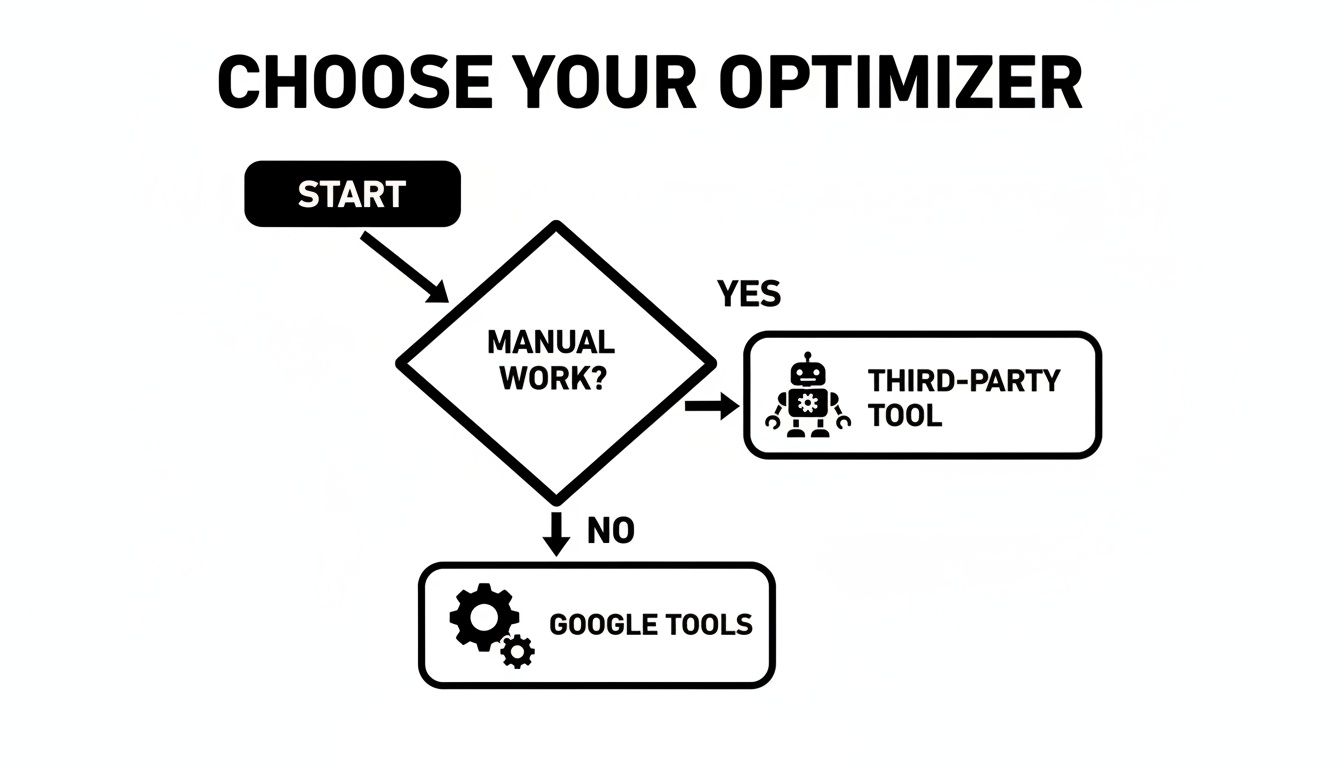
The flowchart lays it out pretty clearly. If the soul-crushing manual tasks are burying your team, a dedicated third-party tool is probably your fastest path back to sanity and efficiency.
Google Native Tools vs Third-Party Optimizer Tools
At the end of the day, your choice really boils down to this: sticking with Google's built-in features or bringing in a specialized platform. One isn't necessarily "better" than the other—they're just built for different jobs.
This table breaks down the main differences you'll find between the two approaches.
| Feature | Google Native Tools (e.g., Recommendations) | Third-Party Tools (e.g., Keywordme) |
|---|---|---|
| Primary Focus | General campaign improvements and bidding AI. | Automating specific, time-consuming workflows like keyword cleanup and expansion. |
| Cost | Free to use (included with your Google Ads account). | Paid subscription (often with a free trial to prove its value). |
| Workflow Efficiency | Offers suggestions but still requires manual implementation for many tasks. | Drastically reduces manual work with one-click actions and bulk processing. |
| Best For | Advertisers with smaller accounts or those just starting to explore optimization. | Agencies, in-house teams, and anyone managing multiple or large-scale accounts. |
Here's the bottom line: Google's tools are fantastic for handling high-level bidding and offering broad suggestions. But for the deep, time-sucking workflow automation—like turning a massive, messy search term report into a perfectly clean negative keyword list—a specialized tool like Keywordme has a massive edge.
It’s specifically designed to fill the gaps in Google's own interface, helping you get more done in less time and truly scale your management efforts.
Quick Wins to Boost Your Campaigns Right Now
Theory is one thing, but sometimes you just need to roll up your sleeves and make a change that gets results today. If you're looking for an immediate performance lift, here are a few simple moves you can make without getting lost in the technical weeds. These are the quick wins that get the ball rolling.
Your first port of call should be Google’s own Recommendations tab. Think of it as a personalized to-do list that the AI builds just for you. Don't blindly accept everything, but pay close attention to the suggestions with a high potential impact. They're often low-hanging fruit that can give your Optimization Score and campaign performance a nice little bump.
Your Quick-Win Checklist
Next up, make it a regular habit to dig through your search term reports. This is where you see the actual queries people typed before clicking your ad, and trust me, it’s a goldmine for fast optimizations.
- Hunt for Negative Keywords: Spot any search queries that are totally irrelevant to what you offer? Add them as negative keywords immediately. It's the quickest way to stop wasting your budget on clicks that were never going to convert anyway.
- Beef Up Your Responsive Search Ads: Are you giving Google's AI enough creative juice to work with? Make sure your RSAs are packed with a wide variety of compelling headlines and descriptions. The more options the google ads optimizer has, the better it can tailor the perfect ad for each search.
- Tighten Up Your Ad Group Themes: Take a hard look at your ad groups. An ad group for "men's running shoes" has no business having keywords for "women's hiking boots." Keeping themes tight and specific directly improves ad relevance, boosts your Quality Score, and ultimately, your bottom line.
Focusing on these core tasks creates a simple but incredibly effective optimization routine. This isn't about complex algorithms; it's about consistent, practical actions that add up over time.
To keep refining your approach, you can dive deeper into effective PPC Marketing strategies that are proven to drive sales and improve overall performance.
Frequently Asked Questions
Got a few lingering questions about Google Ads optimizers? It's a good sign—it means you're thinking strategically. Let's tackle some of the most common ones I hear from marketers.
Can a Google Ads Optimizer Run My Campaigns on Autopilot?
Not a chance. And honestly, you wouldn't want it to.
Think of an optimizer as an incredibly smart co-pilot, not the pilot. It can analyze data, adjust bids, and flag issues faster than any human ever could. But it still needs you—the expert—to set the destination.
You're the one who defines the goals, writes the compelling ad copy, and ultimately decides if the campaign is heading in the right direction. Your strategy and oversight are what make the automation so effective in the first place.
How Long Until I See Results from an Optimizer?
This is the big one, right? The honest answer is: it depends.
Google's own automated bidding needs a "learning period," which is usually about 5-7 days. During this time, it’s just gathering data, so don't panic if things look a little wobbly.
With a workflow tool like Keywordme, you'll feel the time-saving benefits right away. As for performance gains like a better CPA or ROAS, give it about 2-4 weeks. That's usually enough time for the small, daily optimizations to start compounding and show real, measurable impact.
Are Third-Party Google Ads Optimizers Expensive?
This is a question of value, not just cost. A good tool shouldn't feel like an expense; it should feel like an investment that pays for itself.
Here's a simple way to think about it: If a tool saves you 10 hours of grunt work a month or cuts your wasted ad spend by 15-20%, it's already putting money back in your pocket.
Most solid tools, including Keywordme, offer a free trial. This is your chance to see the ROI for yourself before you ever pull out a credit card.
Ready to trade hours of tedious manual work for a few simple clicks? Keywordme is built to clean up your accounts, boost your ROI, and help you focus on the strategy that matters. Give it a try—it's free for seven days. See the difference for yourself at https://www.keywordme.io.
.svg)