
Master Google Ads Optimisation: Boost Your ROI in 2026
Master Google Ads Optimisation: Boost Your ROI in 2026


When we talk about Google Ads "optimisation," it's not just about tweaking a few bids and calling it a day. It’s the ongoing work of refining your campaigns to get better results—more leads, more sales, and a higher return on investment—while ruthlessly cutting out the wasted spend.
First Things First: Build a Rock-Solid Foundation
Before you even think about fancy bidding strategies or split-testing ad copy, you need to get your foundation right. Let's be honest, a lot of Google Ads accounts are a mess. They've been built and managed by different people over time, leading to tangled campaigns and data you just can't trust.
This is where we start. We’re going on a diagnostic mission to audit your account, clean up the clutter, and set the stage for real growth. This isn't about generic tips; it's about building a solid, data-driven structure that lets Google's algorithm actually work for you, not against you.
This whole process boils down to three core pillars: a clean account structure, bulletproof tracking, and laser-focused keywords. Get these right, and everything else becomes easier.
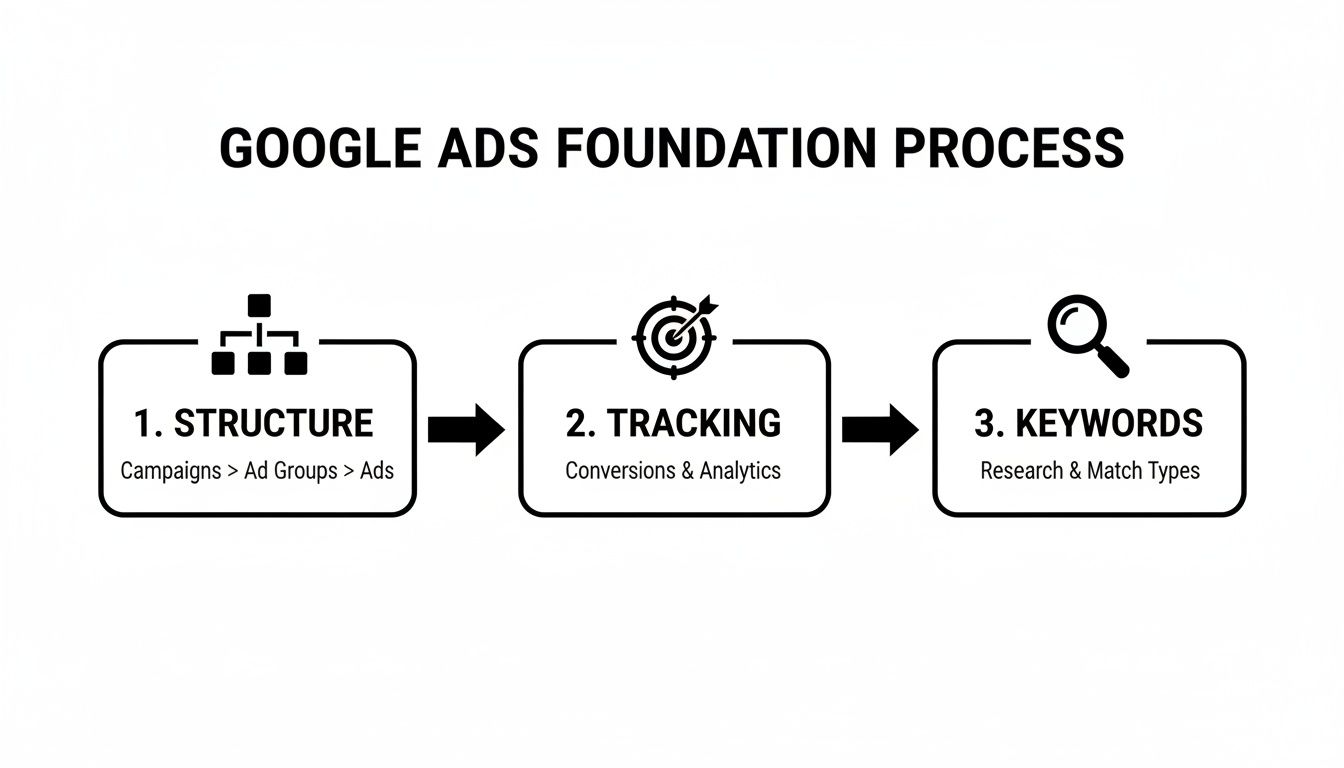
Think of it like building a house. You wouldn't put up walls on a shaky foundation, right? The same logic applies here. These three elements are completely interconnected, and a weakness in one will undermine the others.
What's Really Happening Inside Your Account?
So, where do you begin? The first step is always a thorough account audit. This is your chance to pop the hood and see what's actually working and, more importantly, what’s burning a hole in your budget.
This initial check-up doesn’t need to be a week-long project. You're looking for the most obvious red flags to get the biggest wins, fast. Below is a quick checklist to guide your initial audit. It covers the core areas that have the most immediate impact on performance.
Your Initial Account Health Checklist
| Audit Area | What to Check | Why It Matters for ROI |
|---|---|---|
| Campaign Structure | Is it logical and themed? Or just a random mix of ad groups? | A clean structure gives you better control over budgets and makes performance easier to analyze. |
| Conversion Tracking | Are you 100% confident your conversion data is accurate? Is it tracking what matters? | Inaccurate data means you're optimizing for the wrong things, wasting money on what you think is working. |
| Keyword Targeting | Are you targeting relevant, high-intent keywords? Or are you attracting window shoppers? | Irrelevant clicks are the fastest way to drain your budget with zero return. |
Getting these basics right is non-negotiable. Without a solid handle on them, any other "optimization" you do is just pure guesswork. This is the difference between flying blind and having a clear dashboard telling you exactly what to do next.
Why Clean Data is Your Biggest Asset
Let's be clear: in 2026, the quality of your data is everything. Google's automation is incredibly powerful—with over 80% of advertisers now using Smart Bidding—but it’s only as good as the data you feed it. Garbage in, garbage out.
I’ve seen it happen time and again: someone tries to "simplify" by centralizing campaigns, but they end up mixing good data with bad. This "pollutes" the learning signals for the algorithm, and performance slowly but surely drifts in the wrong direction. For a deeper dive into these trends, it's worth checking out a complete guide to Google Advertising.
A messy account structure and unreliable data are the two biggest killers of ROI in Google Ads. You can't optimize what you can't measure, and you can't scale what isn't organized.
Fixing these foundational issues is the single most impactful thing you can do for your account’s performance. It’s where tools like Keywordme come in handy, helping you run this entire diagnostic check in minutes, not days. It pinpoints exactly where the leaks are so you can stop guessing and start making smart, data-backed decisions.
Stop Bleeding Your Budget with Smarter Keyword Management
If your Google Ads budget feels like it’s evaporating into thin air, I can almost guarantee sloppy keyword management is the culprit. This is, hands down, where most ad spend goes to die. It’s time to get surgical, and that means one thing: diving headfirst into your search terms report. Forget everything else for a moment—this report is the single most valuable source of truth in your entire account.
Your mission here is simple but critical. You're on a treasure hunt with two objectives: find and eliminate the "junk" search terms burning cash on totally irrelevant clicks, and uncover the hidden gems—those high-performing queries that are actually converting and deserve a bigger slice of your budget.
Forget the soul-crushing routine of exporting thousands of rows into a spreadsheet. I’ve been there, and it’s a nightmare. There’s a much smarter way to handle this. By cleaning up what people are actually typing to trigger your ads, you directly improve traffic quality, boost your click-through rate (CTR), and start getting way more bang for your buck.
Get a Grip on Your Match Types
A massive part of this cleanup comes down to mastering keyword match types. Honestly, they’re your primary steering wheel for controlling who sees your ads. Using them wrong is like leaving the front door wide open and inviting a flood of unqualified traffic to come in and drain your wallet.
Let's quickly go over the big three and how I actually use them in practice:
- Broad Match: This gives Google the most creative freedom, showing your ads for searches that are only loosely related to your keyword. I use this one with extreme caution, usually in its own dedicated campaign, just to fish for new keyword ideas. But you absolutely must have a rock-solid negative keyword strategy in place to keep it from running wild.
- Phrase Match: This is the sweet spot—a fantastic balance between reach and control. Your ads show for searches that include the meaning of your keyword. It’s a brilliant workhorse for most campaigns, catching all the relevant variations without being too restrictive.
- Exact Match: This is your scalpel. It gives you the tightest control, showing ads only for searches with the exact same meaning or intent as your keyword. I reserve this for my proven, top-converting terms to maximize ROI and ensure my budget is spent only on the most qualified clicks.
Think of it like fishing. Broad match is a giant net—you'll catch a lot, but most of it will be junk you have to throw back. Phrase match is a smaller, more specialized net, and exact match is a spear, letting you target only the specific fish you came for.
The real secret to a high-performing account isn't just about finding good keywords. It's about strategically applying the right match type to control traffic quality and funnel your budget toward what’s already proven to work.
From Manual Mayhem to Automated Mastery
The old-school way of doing this is a total grind. You download a report, pull your hair out filtering it in Excel, find negative terms, find good terms, copy them, and then manually upload everything back into Google Ads with the right match types. It’s painfully slow, boring, and ridiculously easy to make a costly mistake.
A smarter workflow lets you do all of this in one spot. This is where you can see all your search terms at a glance and instantly decide what to do with them.
Instead of juggling spreadsheets, imagine seeing a junk term and adding it to a negative list with a single click. Or spotting a high-converting search query and immediately adding it as a new phrase or exact match keyword. This isn't just about saving time; it's about making better, faster decisions that have a real impact on your bottom line.
If you want to dig deeper into the nuances of this, check out our guide on AdWords keyword optimization. You'll see how a streamlined approach can completely change the game.
Let’s Get Your Negative Keyword Workflow on Autopilot

We've talked about how the search terms report is the single source of truth for Google Ads optimisation. So, how do we use that truth to actively defend our ad spend?
Enter negative keywords. They are your best, and often first, line of defense against irrelevant clicks that drain your budget.
But let's be honest: managing them by hand is a total nightmare. The old-school method of downloading massive spreadsheets, sifting through thousands of queries, and then uploading lists back into Google Ads is painfully slow and clunky. It’s a chore most advertisers put off, which means their accounts are constantly leaking money.
It’s time to stop reacting and start preventing. Building and scaling your negative keyword lists systematically is what separates the high-performing accounts from the rest. It's time to put this critical task on cruise control.
Think in Themes, Not Just Individual Terms
One of the biggest traps I see advertisers fall into is getting way too specific. They spot a bad search query like "free plumbing course" and simply add that exact phrase as a negative. That's like putting a tiny bandage on a gaping wound.
A much smarter way to play defense is to identify negative themes. In that example, the real problem isn't just that one search—it's the intent behind it. The themes are "free" and "course."
By adding these broader terms as negatives (at the right campaign or ad group level, of course), you proactively block hundreds of similar searches before they ever get a chance to waste your money.
Get ahead of the game by looking for these common patterns in your junk traffic:
- Informational Intent: Keywords like "how to," "what is," "examples," or "DIY."
- Job Seekers: Any search containing "jobs," "careers," "salary," or "hiring."
- Wrong Price Point: If you're selling premium products, words like "free," "cheap," or "open source" are your worst enemy.
This thematic approach saves an incredible amount of time and money down the line. You’re no longer just playing whack-a-mole with bad clicks; you're building a fortress.
Make Automation Your New Best Friend
Now for the real game-changer: automating this entire process. You should absolutely be checking your search terms report constantly as part of your Google Ads optimisation routine, but it shouldn't feel like a manual grind.
Imagine scanning your report and, with a single click, adding a junk term as a negative keyword to the perfect list. No more copying, pasting, or fumbling through different screens in the Google Ads interface.
The goal isn't just to find negative keywords. It's to make the process of finding and adding them so effortless that it becomes a consistent, daily habit instead of a dreaded quarterly task.
This is exactly what modern tools are for. With a simple tool like the Keywordme Chrome plugin, you can completely overhaul this workflow. It plugs right into your search terms report, letting you add negatives instantly as you find them. This is more than a time-saver; it’s a fundamental shift in how you protect your ad spend.
A One-Click Workflow That Actually Works
So what does this look like in the real world? You’re in your search terms report, and you spot a query that’s clearly burning cash.
Instead of the old, clunky process, you just:
- Click a button right next to the bad search term.
- Instantly add it as a negative to a campaign, ad group, or one of your shared lists.
- That's it. You move on to the next one.
This turns a 30-minute chore into a 30-second reflex. By making it this easy, you'll naturally manage your negatives more often, leading to cleaner traffic, a better Quality Score, and a much healthier account. If you want to see this in more detail, you can learn more about how to add negative keywords more efficiently in our guide. This streamlined approach is key to getting consistent results and a higher ROI.
Dialing In Your Bids, Budgets, and Performance Max Campaigns
Alright, so you’ve cleaned up your keywords and have a solid negative keyword strategy in place. That’s huge—you've essentially plugged the biggest leaks in your ad spend. Now it's time to get smarter with how you spend the money you're saving. This is where we talk bidding, budgets, and the ever-important Performance Max (PMax).
These days, optimizing a Google Ads account is less about painstakingly adjusting bids by hand and more about giving Google’s AI the right instructions. But here’s the catch: if you give it the wrong instructions, you're telling a very powerful machine to chase the wrong goals.
Choosing the Right Bidding Strategy for Your Goals
Think of your bidding strategy as the brain of your campaign. It’s what tells Google how to spend your budget to get what you want. While there are a bunch of options, they mostly fall into a few key objectives.
- Maximize Conversions: This is a fantastic starting point. You're basically telling Google, "Get me as many leads or sales as you can within this budget." It's perfect when you're focused on raw volume and don't have enough data yet for more advanced strategies.
- Target CPA (Cost Per Acquisition): This is my go-to for most lead-gen campaigns. You tell Google, "I'm willing to pay, on average, $50 for a new lead." The algorithm will then hunt for conversions at or around that cost. You just need to know what a lead is worth to your business.
- Target ROAS (Return On Ad Spend): The holy grail for e-commerce. With this, you’re setting a specific return you want for every dollar spent. For example, a 400% ROAS target means you want to make $4 in revenue for every $1 of ad spend. Just know this absolutely requires accurate conversion value tracking to work.
The goal is to match your bidding strategy to your actual business goals. Don't get caught up chasing a low CPA if what you really need is to maximize total revenue. Be honest about what a "win" looks like, and pick the model that gets you there. If you're struggling to figure out how to set and manage these funds, you can learn more about managing Google Ads budgets in our detailed guide.
Winning with Performance Max
You can't talk about modern Google Ads optimisation without bringing up Performance Max. It's not an exaggeration to say it has taken over. By 2025, usage had already jumped to 71% of advertisers, up from 60% the year before. It's clear that PMax is now a central piece of the puzzle. You can discover more insights about these advertising benchmarks on Fluency.inc.
PMax is an all-in-one campaign type that spans Google's entire network—Search, Display, YouTube, Gmail, you name it. It's completely driven by AI, which means the data signals you feed it are everything.
The biggest mistake I see people make with PMax is treating it like a black box you "set and forget." It's an incredibly powerful engine, but it needs high-quality fuel. That fuel is clean, relevant data.
Think about it. If you dump all your products, services, and audiences into one massive PMax campaign, you create "signal pollution." The AI gets confused trying to find a customer who is interested in a running shoe and a hiking boot and a dress shoe all at the same time. Performance tanks.
The secret is to structure your PMax campaigns into tightly-themed asset groups. This means grouping similar products or audiences together so you're sending a clear signal.
For instance:
- PMax Campaign 1: Running Shoes (Assets: videos of runners, copy about performance, audience signals for marathon runners).
- PMax Campaign 2: Hiking Boots (Assets: images of mountain trails, copy about durability, audience signals for outdoor adventurers).
When you do this, you’re feeding the algorithm clean, consistent signals. It helps the AI learn much faster and find your ideal customers more effectively across all of Google's channels. This is where your human strategy meets machine execution—you provide the structure, and the AI provides the scale.
Test Ad Copy and Landing Pages That Actually Convert
Getting traffic to your website feels good, but it's only half the battle. If those clicks aren't turning into leads or sales, you’re essentially just paying for window shoppers. This is where your ad copy and landing pages step into the spotlight. They’re the one-two punch in any Google Ads optimisation strategy that truly works.
It’s not about some massive, one-time overhaul. The real secret is a steady rhythm of testing, learning, and making small, smart tweaks. A great ad earns the click, and a killer landing page closes the deal. When those two are in sync, you'll see your conversion rates start to climb.
The Art of Writing Ad Copy That Grabs Attention
Think of your ad copy as your 3-second elevator pitch on a crowded search results page. Your headlines and descriptions have to do more than just state what you sell; they need to connect with what the searcher actually wants right now.
Start by digging into the search terms triggering your ads. What's the problem someone is trying to solve? Speak directly to that. If someone is frantically searching for an “emergency plumber near me,” a headline like “24/7 Emergency Plumbers | We Can Be There in 60 Mins” is going to win every time over a generic “Plumbing Services Inc.”
You should always be testing. Google's responsive search ads (RSAs) make this a no-brainer. You feed the system up to 15 headlines and 4 descriptions, and Google's algorithm does the heavy lifting, mixing and matching to find the winning combos. Your job is just to supply it with great ingredients.
Your ad is a promise. Your landing page is the fulfillment of that promise. If there's a disconnect, you'll see a ton of clicks but a conversion rate that makes you want to cry.
We've all seen this classic mistake. An ad screams "50% Off Sale," but the link dumps you on the generic homepage. The user is instantly confused, can't find the offer, and bounces. Message match isn't a "nice-to-have"; it's non-negotiable.
Turning Your Landing Page into a Conversion Machine
The moment a user clicks your ad, the baton is passed to the landing page. Its job is singular: get the user to do one specific thing—fill out a form, buy a product, or pick up the phone. Everything on that page must serve that one goal.
Here are the non-negotiables for a high-converting landing page:
- A Clear Headline: It needs to instantly reassure the user they’re in the right place by echoing your ad's message.
- A Compelling Value Proposition: Answer the "What's in it for me?" question within the first five seconds. Don't make them work for it.
- A Frictionless User Experience: The page has to be fast, look great on a phone, and be dead simple to use. If someone has to pinch and zoom to find the "submit" button, you've already lost.
- A Single, Obvious Call-to-Action (CTA): Don't create a paradox of choice. Give them one clear next step with an action-oriented button like "Get Your Free Quote" or "Download the Guide Now."
And just like with your ad copy, you need to be testing your landing page elements constantly. You'd be amazed at the impact small changes can have. Test your headline, your CTA button color, the number of form fields, or the hero image. A simple A/B test will give you hard data on what works, helping you make smarter decisions.
A Framework for Continuous Testing
So, where do you begin? The key is not to test everything at once, which can muddy your results. Instead, pick one thing you think will make the biggest difference and start there. To get your creative juices flowing, here are some common testing ideas for both your ads and landing pages.
Ad Copy vs Landing Page Test Ideas
| Element to Test | Ad Copy Example | Landing Page Example |
|---|---|---|
| Headline | Question-based vs. Benefit-driven | "Get a Free Quote" vs. "See Your Price in 60 Seconds" |
| Call-to-Action (CTA) | "Learn More" vs. "Shop Now" | Button color (e.g., green vs. orange) |
| Value Proposition | "Save 25% Today" vs. "Free Shipping on All Orders" | Highlighting different features or benefits |
| Social Proof | "Join 10,000+ Happy Customers" | Including customer testimonials vs. trust badges |
Pick one element from the table that you hypothesize will have the biggest impact. Run your test until you have statistically significant data, declare a winner, and implement it. Then, pick your next test. This simple cycle of continuous improvement is the engine that drives effective Google Ads optimisation, ensuring you're always getting more from every dollar spent.
Your Google Ads Optimisation Questions Answered
We’ve walked through the entire framework, but I know there are always those lingering questions. After years in the trenches with Google Ads, I hear the same ones crop up again and again.
So, let's dive into a few of the most common questions I get from clients and fellow marketers. I'll give you the straight-up, no-fluff answers I've learned from experience.
How Often Should I Perform a Google Ads Optimisation Audit?
Think of your big, deep-dive audits as a quarterly check-up. This is your chance to zoom out and look at the whole forest, not just the trees. Every quarter, you should be asking the big questions: Are our bidding strategies still making sense for our business goals? Is the campaign structure getting messy? A quarterly review keeps your high-level strategy on the rails.
But the real work—the stuff that truly moves the needle—happens on a much faster rhythm.
You need to get into a weekly and monthly groove.
- Every Week: You absolutely have to live in your search terms report. This is where you hunt down and block irrelevant terms that are just burning your cash. It's also the perfect time for a quick budget check to make sure you're pacing correctly.
- Every Month: This is your time to analyze trends. Are certain ad groups picking up steam while others are fizzling out? It’s also a great moment to look at your ad copy performance and start brainstorming your next A/B test.
The secret is finding a consistent rhythm. Making small, constant tweaks is way more effective than doing a massive, disruptive overhaul every six months. It’s about account health, preventing small fires from turning into huge problems.
What Is the Fastest Way to Fix a Failing Google Ads Campaign?
When a campaign is nose-diving, your first job is triage. You have to stop the bleeding, and that means cutting wasted spend with a vengeance. Forget everything else until you’ve plugged the leaks.
Your first—and for now, only—stop is the Search Terms Report. Seriously, ignore the rest. Go in there and find every single irrelevant search term that has cost you money, even if it's just a few cents. Add every last one of them as a negative keyword. This one move can have a massive, immediate impact.
Once the bleeding has slowed, look for these usual suspects:
- Problem Keywords: Are your broad match keywords acting like a firehose for junk traffic? Either pause them or tighten the leash by switching to Phrase or Exact match.
- Budget Misallocation: Is one terrible ad group sucking up half your budget while your best performers are starved for cash? Be ruthless. Pause the underperformers and immediately shift that money to your proven winners.
You're not trying to rebuild the entire campaign right now. You're just applying pressure to the biggest wounds.
Can I Trust Google's Automated Recommendations for Optimisation?
My advice here is always the same: trust, but verify. The recommendations tab can be a decent place to find ideas, but you can't forget Google's primary motive. Many of those suggestions are designed to get you to spend more money and adopt their latest automated features.
Some recommendations, like adding new keywords it found in your search terms, can be genuinely helpful. But others, like blindly applying a "Maximize Clicks" bid strategy, could completely torch your goal of generating profitable leads.
You have to put on your detective hat for every single suggestion. Ask yourself, "Does this actually align with my strategy and my goals?" Never, ever just click "Apply All." Your own expertise and knowledge of your business are what separate smart automation from letting a robot drive your account off a cliff.
Why Is My Conversion Rate So Low Despite Getting Lots of Clicks?
A high click-through rate (CTR) paired with a dismal conversion rate almost always signals one thing: a massive disconnect between your ad and your landing page.
It’s a classic bait-and-switch, even if it's unintentional. You're writing a check with your ad that your landing page can't cash.
First, go back to your search terms. Are you paying for clicks from people with real intent? If you see a lot of vague, "just looking" kinds of search queries, your negative keyword game isn't strong enough. You're paying for curious browsers, not motivated buyers.
Next, put your landing page under a microscope.
- Does the main headline on the page mirror the promise you made in your ad copy?
- Is your call-to-action (CTA) obvious and easy to find, or is it buried?
- Is the page lightning-fast on mobile? Does it load in under three seconds?
This gap between ad promise and landing page reality is one of the biggest conversion killers out there. Closing that gap is a non-negotiable part of any real Google Ads optimisation strategy.
Ready to stop the manual grind and start optimising your Google Ads account up to 10x faster? Keywordme gives you the tools to clean up junk terms, find winning keywords, and manage your campaigns with one-click efficiency.
.svg)