
Mastering Google Ads Budgets: A Practical Guide
Mastering Google Ads Budgets: A Practical Guide


Trying to get a handle on your Google Ads budgets? You’re not the only one. It’s a common stumbling block, but your budget is more than just a number—it's the financial engine that drives your entire campaign. Getting this right is the first real step toward seeing a solid return on your ad spend.
Getting to Grips with Google Ads Budgets

At its core, a Google Ads budget is simply the cash you're prepared to spend on a campaign. The most basic concept you need to wrap your head around is the average daily budget. This is the amount you tell Google you’re comfortable spending, on average, each day.
Think of it as a daily allowance for your ads. If you set it to $20, you’re telling Google, "Go find me customers, but don't spend more than about twenty bucks a day." This simple setting keeps you from blowing your whole monthly budget on a single Tuesday morning.
So, Why an "Average" Daily Budget?
Google is pretty specific with its wording here. It’s an average because your daily spend will actually fluctuate. On a busy Friday when everyone is searching for your products, Google might spend up to twice your daily budget—say, $40. It sounds a bit alarming at first, but it’s actually a good thing. The system is designed to seize those high-traffic opportunities when they pop up.
To keep things balanced, on a slow Sunday, Google will pull back and spend less. Here’s the critical part to remember:
You will never pay more in a month than your daily budget multiplied by 30.4 (the average number of days in a month). Google calls this your monthly spending limit, and they guarantee you won't be charged a penny more.
This gives you the best of both worlds: flexibility to spend more when it counts, without ever torpedoing your monthly finances. If you’re just starting out, you can explore more foundational Google Ads topics to really solidify your understanding.
Setting the Stage for Success
Smart budget management is about much more than plugging in a number and hoping for the best. It’s about building a financial strategy that directly supports your business goals. For a bigger picture on how this fits into your overall marketing efforts, looking into comprehensive paid advertising services can give you some valuable context.
Nailing your budget from day one is crucial for a few key reasons:
- It creates predictability. You know your maximum financial exposure, which makes planning so much easier.
- It controls your campaign's pacing. A solid budget ensures your ads are showing up all day long, not just for a few hours in the morning.
- It affects your data. If your budget is too small, you won't get enough clicks and conversions to make informed decisions about what’s working and what isn’t.
Getting this foundational piece right is your first real win. From here, we can start digging into the different types of budgets and figure out which one makes the most sense for you.
Alright, you've got the hang of the "average daily budget" concept. Now comes the real question: how do you actually apply it? In Google Ads, you've got two main paths you can take. You can either give each campaign its own daily budget, or you can group a bunch of campaigns under one single shared budget.
This isn't just a minor setting—it fundamentally changes how your money gets spent and how nimble your account can be.
Think of it like this: a daily budget is like giving each of your kids a separate, fixed weekly allowance. It’s perfect for controlling exactly what each one spends. On the other hand, a shared budget is like putting all that allowance money into one big family jar for activities. One week, you might spend more on a movie for one kid, and the next, you might spend it on a new book for another. It all comes from the same pot.
Which one is right for you? It really boils down to your account structure and what you're trying to achieve.
The Case for Daily Budgets
Setting a separate daily budget for each campaign gives you the ultimate control. This approach is your best friend when you have campaigns with wildly different priorities or performance goals.
Let's say you have a campaign for a massive flagship product launch. That's your golden goose. You absolutely don't want some small, experimental campaign siphoning funds away from it. By setting individual Google Ads budgets, you're building a fortress around that spend, making sure your most important initiatives always have the fuel they need to run.
A daily budget is usually the way to go when:
- You have high-priority campaigns: If a campaign is make-or-break for your business—like a Black Friday sale or that big launch—you want to guarantee it has its own dedicated spend. No sharing.
- You're testing new strategies: Dabbling with a new bidding strategy or some bold ad copy? Isolate it with its own budget. This keeps your experiment from messing with the performance of your tried-and-true campaigns.
- You're targeting different regions: If you have separate campaigns for different countries, where click costs can vary dramatically, individual budgets stop a high-cost region like New York City from eating the entire budget meant for the whole country.
This method gives you stability and predictability, but it has a downside: it can be rigid. If one campaign has a slow day and doesn't spend its full budget, that money just sits there. It can't be passed over to another campaign that might be crushing it and could have used the extra cash.
The Power of Shared Budgets
A shared budget brings a lot more flexibility and efficiency to the table, especially when you're managing spend across multiple campaigns. Instead of setting a bunch of individual limits, you create one central budget that several campaigns can pull from throughout the day.
Google's algorithm then does the heavy lifting, automatically sending the money to whichever campaign has the most opportunity at any given moment. This is a total game-changer for accounts with several similar campaigns.
Imagine you're running five campaigns, each for a different product category. On Tuesday, search interest for "running shoes" might spike, while "hiking boots" is quiet. A shared budget lets Google instantly pivot, shifting money to the running shoe campaign to capture that demand. You maximize your results without having to constantly move budgets around yourself.
Think of a shared budget as a financial safety net. It ensures your total spend is used as effectively as possible, preventing your star campaigns from hitting their budget cap early while your underperformers sit on a pile of unspent cash.
This approach is especially helpful if you're still working out how much to spend on Google Ads, as it lets performance naturally guide your budget allocation.
Daily Budget vs. Shared Budget: Which Is Right for You?
To make the choice a bit clearer, let's put these two strategies head-to-head. As you look over the table, think about your own account structure, your campaigns, and your overall advertising goals.
Ultimately, there's no single "best" answer. Many advanced advertisers use a hybrid approach, putting their most critical campaigns on dedicated daily budgets while grouping their other, more similar campaigns into shared budget pools. It's all about finding the right balance of control and flexibility for your specific needs.
How Your Budget and Bidding Strategy Work Together
Think of your Google Ads budget as the gas in your car's tank and your bidding strategy as how hard you're pressing the accelerator. You absolutely need both working in sync to get where you're going without sputtering to a halt or burning through fuel recklessly. Your budget sets the hard spending limit, but your bid strategy is what tells Google how to spend that money to hit your goals.
Getting this relationship right is everything. A tiny budget paired with a super aggressive bid strategy, like Maximize conversions, can blow through your cash before most people have had their morning coffee, leaving your ads invisible for the rest of the day. On the flip side, a huge budget combined with a timid, overly cautious bid strategy might go mostly unspent. That’s just leaving opportunity on the table.
The Push and Pull of Bidding and Budgets
Every bid strategy has its own personality, and each one interacts with your budget in a unique way. Some are built to aggressively spend your full daily budget to hit a target, while others are more conservative, only entering an auction when a specific cost-per-acquisition or return-on-ad-spend goal seems achievable.
Understanding this dynamic is the secret to mastering your Google Ads budgets. Let's break down how a few of the most common bid strategies play with your daily spending limit.
- Manual CPC: You're in complete control here. You set the absolute maximum you're willing to pay for a single click. Your budget gets spent based on how many clicks you can get at or below that price, which is always shifting based on the auction's competition. If your bids are too low for the market, you might not spend your full budget.
- Maximize Clicks: This automated strategy is like telling Google, "Get me the most website visitors you can for this money." It's essentially flooring the accelerator. Google will spend your budget as fast as it can to drive traffic, which is great for volume but might not always be the most cost-effective approach.
- Target CPA (Cost Per Acquisition): With this one, you tell Google the average amount you're willing to pay for a conversion. The algorithm then hunts for auctions it believes will lead to a conversion at or below your target. This can make daily spend fluctuate wildly; on days with fewer high-probability conversion opportunities, it might spend very little.
The core idea is that your budget is the what (what you'll spend) and your bid strategy is the how (how you'll spend it). Aligning them ensures you’re not just spending money, but spending it smartly to move your business forward.
If you’re trying to nail this down for an online store, this guide on PPC for Ecommerce: The No-Fluff Guide to Driving Scalable Revenue is a fantastic resource.
Finding the Right Balance for Peak Performance
So, how do you match the right bid strategy to your budget? It all comes back to your main goal. Are you after raw website traffic, qualified leads, or profitable sales? Your answer changes everything.
The diagram below helps visualize different ways to think about budgeting—whether you're assigning one "wallet" to a single campaign or pooling your funds to let Google's automation find the best opportunities across a few.
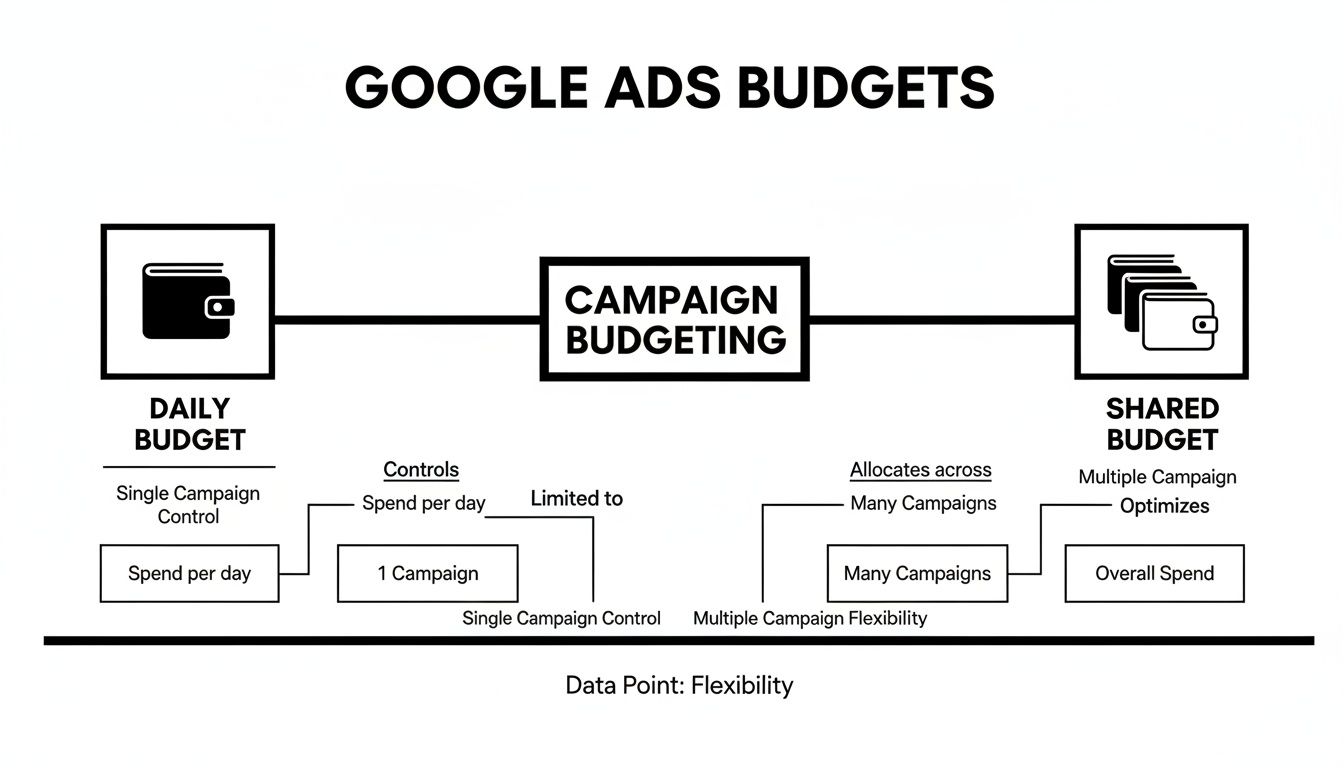
This visual really drives home the difference between the tight control of a daily budget and the fluid flexibility of a shared one. Your choice of bidding strategy will have a massive impact on how either of these budget types performs.
For instance, if you're using a value-based bidding strategy like Target ROAS (Return On Ad Spend), you have to give the campaign a big enough budget to learn and find those high-value users. Starving a smart bidding strategy of budget is like hiring a world-class chef and only giving them salt and pepper to work with. They need ingredients to create a masterpiece. For a deeper dive into all the different bidding options, check out our complete guide on PPC bid management.
Ultimately, your goal is to find that sweet spot where your budget is big enough to fuel your chosen bidding strategy without being wasteful. Start by aligning your strategy with your most important KPI, set a reasonable budget, and watch the performance data like a hawk. Be ready to adjust both as you see how they interact in the live, unpredictable world of Google Ads auctions.
Actionable Frameworks For Setting Your Budget
Alright, we’ve covered the "what" and the "how," but now it’s time for the million-dollar question: how much should you actually spend? Moving from theory to practice can feel like a huge leap, but it really doesn't have to be. Instead of just picking a number out of thin air, there are a few solid frameworks you can lean on to set your Google Ads budgets with confidence.
The trick is to anchor your budget to a real business goal. Are you trying to get a certain number of leads? Drive a specific amount of revenue? Just throwing money at Google without a clear target is the fastest way to burn through it.
Let's walk through a few practical ways to figure this out.
Work Backward From Your Goals
This is hands-down one of the most effective methods because it directly ties your ad spend to what you want to achieve. It’s all about reverse-engineering your target.
Start with your revenue goal. Let's say you want to generate $5,000 in new sales from Google Ads next month.
Here’s how you could break it down:
- Figure out your Average Order Value (AOV): Let's assume your AOV is $100. To hit $5,000 in revenue, you'll need 50 sales ($5,000 / $100). Simple enough.
- Know your website's conversion rate: If your site typically turns 2% of visitors into customers, you'll need 2,500 clicks to get those 50 sales (50 / 0.02).
- Estimate your average Cost Per Click (CPC): If your average CPC is around $2, your total budget would need to be $5,000 (2,500 clicks x $2).
Suddenly, your budget isn't just a random expense. It's a calculated investment designed to produce a specific return.
Analyze Your Market And Competitors
Another smart move is to figure out what a "reasonable" budget even looks like in your industry. While you can't peek into your competitors' accounts, you can get a pretty good feel for the landscape. Tools like Ahrefs or SEMrush can give you estimates on competitor traffic and ad spend, which at least provides a baseline.
You also have to be realistic about your business size. For small businesses just dipping their toes in, a monthly budget is typically between $1,000 and $3,000—enough to get meaningful traffic if you're smart about it. Mid-market brands often allocate $3,000 to $15,000 a month, balancing growth with ROI. The big enterprise players? They're often spending over $20,000 and slicing up budgets by region or product line. To get a better sense of where you might fit in, you can explore more data on how different businesses handle their CPC budgets and ROI.
This context helps you set a budget that's competitive enough to actually get you in the game, without going all-in before you have solid performance data.
Use Forecasting Tools
Don't forget that Google gives you tools to help with this. The Keyword Planner isn't just for research; its forecasting feature is incredibly useful for budget planning.
You can feed it a list of your target keywords, and Google will spit out estimates for potential clicks, impressions, and average CPCs at different budget levels. It even has a handy slider, so you can see how the projections change as you move your hypothetical daily budget up or down.
While these forecasts are just estimates, they are grounded in a massive amount of historical auction data. They provide a data-backed starting point that is far more reliable than pure guesswork, helping you set initial Google Ads budgets that are realistic for your target market.
The most important thing I can tell you is this: start with a test budget. No matter which framework you use, your first budget is really just an educated guess. Run your campaigns for a few weeks with a modest, controlled budget. The real-world data you gather—your actual CPCs, conversion rates, and ROAS—is the only source of truth that matters.
Once you have that data, you can start making informed decisions, confidently scaling up what works and pulling back on what doesn’t. This cycle of testing, learning, and adjusting is the real secret to managing a successful budget.
How to Stop Accidentally Burning Through Your Ad Budget
I’ve seen it countless times: advertisers hemorrhaging money on Google Ads without a clue it’s even happening. It's usually not one big, obvious blunder. Instead, it’s a slow, steady drip of small, silent leaks that can completely drain your Google Ads budgets over time. Let's look at how to find and plug these leaks before they sink your campaigns for good.
One of the sneakiest traps is setting your budget too low. It feels like the safe, cautious thing to do, but it can absolutely throttle your campaign's performance right out of the gate. When you choke the budget, Google flags your campaign with that dreaded "Limited by budget" status.
This is Google's polite way of saying, "Hey, we've found more customers for you, but we have to stop showing your ads because we're hitting the spending cap you set." It’s like telling a star salesperson they can only make calls for an hour a day. They’ll never hit their potential.
That "Limited by budget" warning isn't just a notification—it's a performance killer. It starves your campaigns of the very data they need for smart bidding to learn and optimize, trapping you in a frustrating cycle of mediocre results.
The Silent Killer: Paying for Clicks That Will Never Convert
Now, even if you have a perfectly healthy budget, you can still blow a staggering amount of it on the wrong clicks. This almost always comes down to neglecting your negative keywords. Think of these as your campaign's bouncer—they keep the wrong crowd out.
Let's say you sell premium, handcrafted leather boots. Without a solid negative keyword list, you could easily end up paying for clicks from people searching for "cheap rubber boot repair," "free boot polishing," or "jobs at a boot factory." These people are never, ever going to buy from you, yet every single click costs you money. It might seem like pennies, but over a few weeks or months, it adds up to a huge chunk of wasted ad spend.
Taking Back Control of Your Spend
Protecting your ad budget isn't a one-and-done task; it requires a bit of ongoing vigilance. The good news is that plugging these leaks is straightforward once you build a few good habits into your routine. Here’s how you can get started right away:
- Dig Into Your Search Terms Report Every Week: Seriously, don't skip this. This report shows you the exact search queries people typed that triggered your ads. You'll probably be shocked by some of the irrelevant stuff you're paying for.
- Build an Army of Negative Keywords: See a junk search term? Add it as a negative keyword immediately. Smart PPC pros even build out "pre-launch" negative lists with obvious budget-wasters like "free," "jobs," "reviews," and "pictures."
- Don't "Set It and Forget It": Your budget is not a crockpot. Markets shift, and performance fluctuates. If one campaign is knocking it out of the park while another is sputtering, don't be afraid to move money over to the winner.
Sifting through thousands of search terms to clean up an account can be a real grind, especially for larger campaigns. This is where specialized tools can be a lifesaver. A platform like Keywordme, for example, is built to automate the whole process of finding and killing off these wasteful searches.
By plugging directly into your account, it can build powerful negative keyword lists in a tiny fraction of the time it would take to do it manually. It effectively finds and seals the leaks in your ad spend, turning a tedious chore into an efficient, automated process. This ensures your Google Ads budgets are focused only on clicks that have a real shot at turning into customers. It's all about working smarter, not harder, to make every dollar count.
Fine-Tuning Your Spend: How to Pace and Optimize Your Google Ads Budget

Getting your initial budget set up is a big deal, but honestly, it’s just the starting gun. The real magic in Google Ads happens after you launch—in the day-to-day, week-to-week grind of optimizing and pacing your spend. This isn't a "set it and forget it" game; it's about actively managing your investment to squeeze every last drop of value out of it.
Think of it like being the captain of a ship. You've got a set amount of fuel (your budget) to get to a specific destination (your business goals). Your job is to constantly check the weather, adjust the sails, and make sure that fuel is being burned as efficiently as possible to move you forward.
Use Ad Scheduling to Spend Money When It Counts
Let’s be real: not all hours of the day are created equal. Your customers have rhythms. They search, shop, and convert at specific times. If you're spending your budget evenly 24/7, you're almost certainly wasting money. This is where ad scheduling becomes your best friend.
Dive into your campaign data and look for the patterns. You can pinpoint the exact hours and days your conversions spike. Maybe you sell B2B software and notice that things really heat up between 10 AM and 4 PM on weekdays, but the weekends are a ghost town. Ad scheduling lets you tell Google, "Hey, let's go all-in during these peak times and pull way back when nobody's buying."
It’s a simple tweak, but it ensures your ads are front and center when it matters most, stopping those low-intent, middle-of-the-night clicks from eating up your budget.
Double Down on Your Winners by Reallocating Funds
No matter how carefully you structure your account, some campaigns are just going to perform better than others. It's inevitable. A huge mistake I see all the time is letting an underperforming campaign slowly bleed out cash while a star performer is constantly being held back by its budget limit.
Active budget management means being a little ruthless.
Don’t be afraid to slash the budget on a campaign that isn’t working and move that money over to one that’s crushing it. This is the fastest way to boost your account's overall ROI without spending a single extra dollar.
This isn’t a one-and-done decision, either. It’s an ongoing process. Make it a weekly habit to review your campaign performance. If Campaign A is getting a fantastic CPA but is "limited by budget," while Campaign B is struggling to break even, move the money. It's that simple. Actively feeding your winners is a core principle of smart Google Ads budgets.
Stay on Top of Pacing and Seasonal Trends
Your market is always changing, so your budget needs to be flexible. Holidays, seasonal shifts, and big industry events can cause massive swings in search volume. A smart advertiser sees these changes coming and adjusts their budget before it happens. Just think about a flower shop's ad budget in the week leading up to Valentine's Day versus a random Tuesday in August.
To get a handle on this, you need to live in Google’s budget report. This is your dashboard for pacing. It shows you exactly how your campaigns are spending against your daily and monthly targets and even projects where you'll end up. It helps you answer the big questions: "Are we on track to spend our full monthly budget?" or "Is that one campaign burning through cash way too fast?"
With over 80% of businesses globally using Google Ads, this is a competitive space where efficiency wins. A PPC manager handling multiple accounts might take a $2,000 monthly budget, for example, and split it with $1,500 for Search and $500 for Display to hit a $20 CPA goal, all while shooting for that industry-average 8:1 return. You can explore more about Google Ads cost benchmarks to see how typical numbers stack up.
This is also where tools can give you a serious edge. Let’s say your budget report shows a specific ad group is converting like crazy. You need to act on that insight—fast. A tool like Keywordme can help you build out that high-performing ad group with fresh, high-intent keywords up to 10x faster than doing it manually. It closes the loop between finding an insight and taking action, turning a good idea into more profit in minutes, not hours. It's all about making your Google Ads budgets work smarter, not just harder.
Answering Your Top Google Ads Budget Questions
Even with the best-laid plans, Google Ads budgets can be a bit of a head-scratcher. It's a complex beast, and a few common questions seem to trip up even seasoned advertisers. Let's clear the air and tackle the ones we hear most often.
What Happens If My Budget Is Too Low?
This is probably one of the most common rookie mistakes, and it can seriously hamstring your campaign before it even gets going. If your budget is too low, you'll almost certainly see that dreaded "Limited by budget" status pop up in your account.
Think of it this way: Google sees a ton of people you could be reaching, but you've told it to stop spending before it can show your ads to all of them. Your ads show up sporadically, you miss out on a ton of valuable clicks from people ready to buy, and your automated bidding strategies never get enough data to learn what works. It’s like trying to win a race with the parking brake on.
Can Google Spend More Than My Daily Budget?
Yes, it absolutely can! And believe it or not, this is a good thing. On days when search traffic for your keywords is buzzing, Google might spend up to twice your average daily budget to make sure you don't miss out.
But don't panic—there's a built-in safety net. Google guarantees you will never pay more than your monthly spending limit. This magic number is your average daily budget multiplied by 30.4 (the average number of days in a month). This gives the algorithm flexibility to chase opportunities day-to-day while keeping your overall monthly costs completely predictable.
The key takeaway is that daily spend can fluctuate, but your monthly ad cost is capped. This protects your overall advertising budget while giving the algorithm room to perform.
How Often Should I Change My Google Ads Budgets?
There’s no one-size-fits-all answer here, but a good rule of thumb is to check your budget pacing at least weekly to make sure things are on track.
The big thing to avoid is knee-jerk reactions. Don't go slashing or boosting budgets based on one good or bad day. You want to make significant changes based on performance trends over a longer period, typically two to four weeks. Adjust your budgets when you see a clear opportunity—like a star campaign that's constantly budget-capped—or when it's time to shift funds from a dud to a proven winner. Consistency is everything.
Stop wasting time and money on the wrong clicks. Keywordme automates the cleanup of junk search terms, builds powerful negative keyword lists, and helps you expand your best ad groups up to 10x faster. Start your free 7-day trial and see the difference.
.svg)