
Google Ads Keyword Expansion Strategy: A 2026 Guide
Google Ads Keyword Expansion Strategy: A 2026 Guide


SEO Title: Google Ads Keyword Expansion Strategy
Meta Description: Google Ads keyword expansion strategy for 2026: mine search terms, control match types, use negatives, scale with automation, prune waste.
Most accounts don't have a keyword problem. They have a process problem.
You launch a campaign with a clean seed list. A few weeks later, the account is stuffed with random additions, broad terms are leaking spend, and the Search terms report looks like a junk drawer. Nothing feels clearly broken, but profitability gets softer every month. That's where a lot of teams are sitting right now.
A solid Google Ads keyword expansion strategy fixes that by treating expansion as a cycle, not a shopping spree. You mine real queries, structure them properly, defend the account with negatives, let automation help where it proves effective, and then cut back what no longer earns its place. Growth comes from discipline, not from piling on more keywords.
Beyond Guesswork A Data-Driven Expansion Engine
Chaotic expansion usually starts with good intentions. Someone sees a few missed queries, adds them quickly, tests a handful of broader terms, then keeps layering in ideas from competitors, keyword tools, and internal brainstorms. A month later, the account has more keywords but less clarity.
That approach fails because it confuses coverage with control. More keywords can increase reach, but reach without structure creates overlap, vague ad relevance, and poor filtering. You stop learning from the account because too many variables are changing at once.
What a real expansion engine looks like
A useful system does three things in order:
- Pulls candidates from live search behavior
- Validates them before rollout
- Adds them in a way that can be measured and reversed
That sequence matters. If you skip straight to adding ideas, you flood the account with guesses. If you rely only on planning tools, you miss the language buyers already use in your own campaigns.
Google's internal research found that keyword expansion strategies using broad match with Smart Bidding delivered a 15% increase in conversion volume versus campaigns using only exact or phrase match. The same research also reported 2.3x more search terms triggered within the first 30 days for campaigns using automated keyword expansion, across over 50,000 global advertiser accounts in markets including the US, UK, and Germany, according to Google's internal findings in the 2023 Search Ads Best Practices Report cited in the verified data above.
That doesn't mean "add broad and hope." It means smart expansion works when it is paired with bidding logic, query review, and account hygiene.
Practical rule: Expansion should only happen when you already know how you'll review search terms, where the new keyword will live, and what would make you pause it later.
The accounts that scale cleanly don't chase every possible variation. They build a repeatable engine. That's the foundation for everything else.
Mining the Search Terms Report for Gold
A campaign starts spending on broad match. Two weeks later, the Search terms report shows what Google matched, and that report is where expansion decisions should happen.
The strongest keyword candidates usually come from live queries that already earned impressions, clicks, and, in some cases, conversions. That matters because expansion is not just about adding more terms. It is about finding queries that deserve promotion, filtering out waste, and feeding cleaner signals back into the account before automation runs too far.
What to look for first
I sort search terms into three groups right away:
- Promote. Queries with conversions, strong commercial intent, or very tight alignment with the offer
- Watch. Queries with good engagement but not enough proof yet
- Exclude. Queries with weak intent, bad fit, or obvious irrelevance
This step saves a lot of bad additions.
A clicked query is not automatically a keyword to add. Plenty of search terms attract curiosity clicks and then go nowhere. If the wording suggests research, jobs, free options, DIY intent, or a different product category, it belongs on the negative side of the ledger, not in expansion.
A review routine that holds up at scale
Use the same pass every time so the account does not drift.
Start with conversion evidence
Search terms with actual conversions get reviewed first. They have already cleared the hardest test.Check intent before click volume
A lower-volume query with clear buying language often beats a high-click term that is too broad to monetize well.Read the query, not just the metrics
Numbers help, but wording decides fit. "Software for accountants" and "what is accounting software" can look similar in a spreadsheet and behave very differently after the click.Add negatives during the same review
Do not save cleanup for later. Expansion and pruning should happen in the same workflow.Look for repeated modifiers
Useful growth often shows up as patterns such as "near me," "for ecommerce," "enterprise," "pricing," or a recurring problem statement. Those patterns are often more valuable than any single query.
If you want a more tactical process for turning query data into additions, this guide on finding new keywords from the Search terms report walks through the workflow inside Google Ads.
How to judge a candidate quickly
You do not need a complicated scoring system. You need a consistent standard.
| Signal | What it usually means |
|---|---|
| Conversions present | Strong addition candidate |
| Clear commercial modifier | Worth testing if the landing page matches |
| High impressions, weak relevance | Likely negative keyword material |
| Repeated theme across multiple queries | Potential new keyword cluster |
| Good CTR, poor post-click results | Curiosity term, not a growth term |
I also check whether the query can support its own bid logic later. If a term performs differently enough that I would want separate targets, separate ad copy, or different landing page treatment, it is a better candidate for promotion. If I would manage it exactly the same as existing traffic, I often leave it as a matched query and keep watching.
The trade-off people miss
Adding a keyword gives you more control. It also creates more maintenance.
That trade-off matters more now because modern Google Ads accounts often rely on Smart Bidding and broader matching. Some queries should stay as search terms if automation is already finding them efficiently and they do not need separate treatment. Others should be promoted because they are too important to leave buried inside mixed traffic. The job is to separate those two cases, not to harvest every related phrase.
The trap to avoid
Bulk exports create false progress. A long keyword list looks productive, but if those additions do not improve control, relevance, or profitability, they only add noise.
Use the Search terms report as a filter. Promote the queries that show buyer intent and fit the business. Exclude the ones that waste spend. Leave the rest under observation until they earn a stronger decision.
Structuring for Success Ad Groups and Match Types
A messy account usually does not break all at once. It slips. Search terms convert, then CPA drifts up because the same intent is split across ad groups, ads stop matching the query closely, and bidding learns from mixed signals.
Structure is what turns expansion into profit.
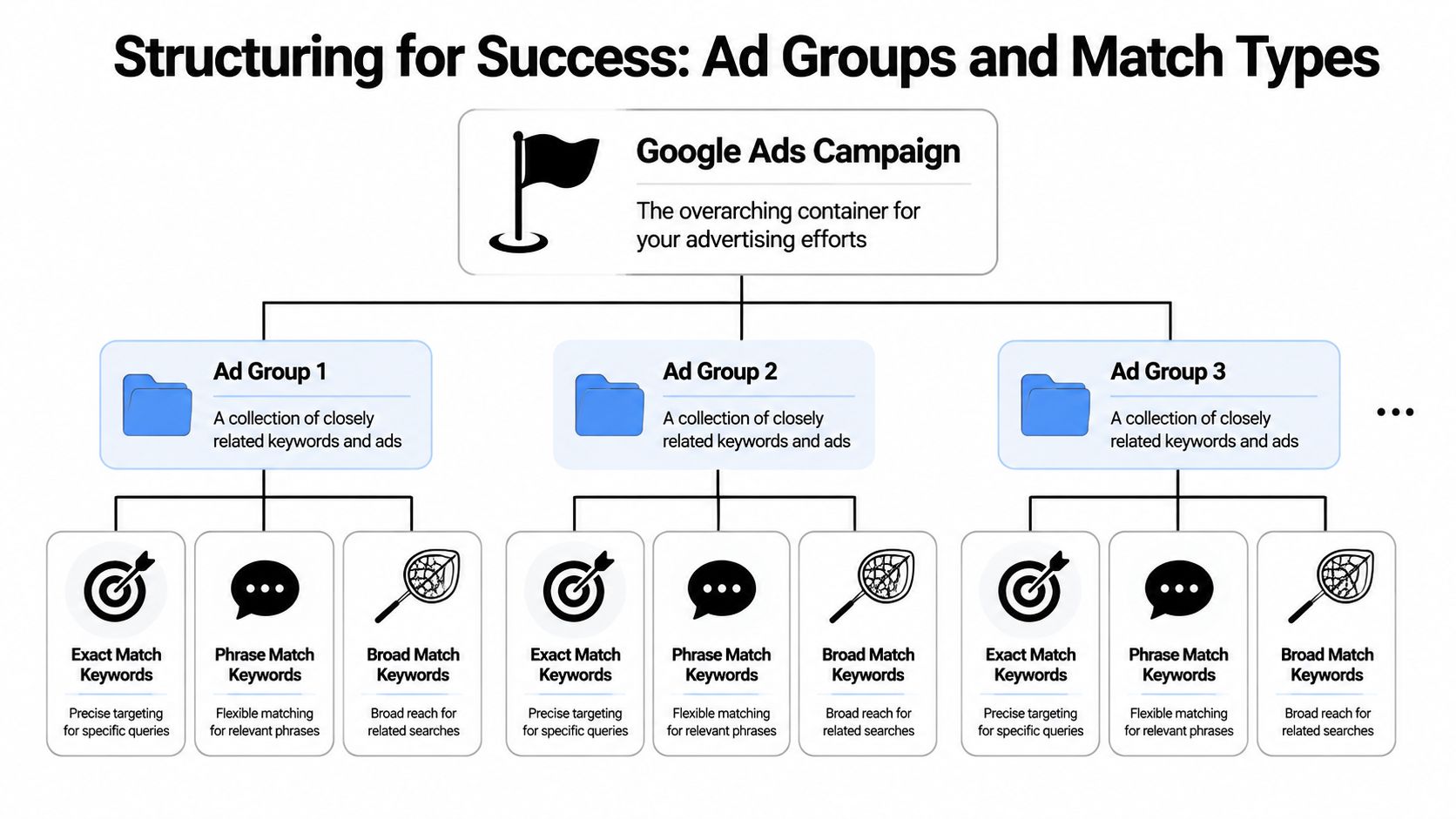
Build around intent, not exports
New keywords should be grouped by meaning and management need. If the same ad, landing page, and bid logic can serve a set of terms, they belong together. If they need different treatment, split them.
That is why tightly themed ad groups still beat convenience-based grouping. I do not care whether ten terms came from the same export tab. I care whether they reflect the same buyer problem.
A practical way to cluster them:
- Problem-aware terms that describe the pain point
- Product terms tied to the actual offer
- Comparison terms used by buyers evaluating options
- Use-case terms shaped around a task, workflow, or scenario
This keeps ad copy relevant without rebuilding the account every week.
SKAGs can still work, but only in narrow cases. Use them when one query has enough volume, margin, or strategic value to justify dedicated ads and its own landing page. For everything else, small themed ad groups are easier to scale and easier to maintain.
Match types should serve a purpose
Match types are not just traffic settings. They define how much control you keep and how much discovery you hand to Google.
A simple operating model works well in real accounts:
- Exact match for proven terms that deserve tight control
- Phrase match for themes where close variants still match the same intent
- Broad match for exploration after tracking, negatives, and bidding are dependable
That order matters. Exact and phrase give cleaner signals early. Broad becomes more useful later, once the account has enough conversion data and the campaign structure can absorb variation without creating waste.
If you want a clear refresher on the mechanics, this guide to Google Ads keyword match types covers how they behave in practice.
Use Google's tools, but do not let them choose your structure
Keyword Planner is useful for estimating volume and pressure-testing whether a new theme has enough scale to matter. It can suggest terms. It cannot decide how your account should be organized.
That decision comes down to control. Ask what you would do differently if this term became its own keyword or ad group. Would you change the ad angle? Bid more aggressively? Send it to a different page? Apply a different target later? If the answer is no across the board, keep the structure simpler.
A quick filter before you add anything
Use three questions before creating a new ad group or assigning a match type:
| Question | If yes | If no |
|---|---|---|
| Does this term need distinct ad copy or a different landing page? | Create a separate theme or ad group | Keep it in an existing cluster |
| Do I want separate bidding or budget priority for it later? | Give it cleaner structure now | Leave it grouped |
| Can tracking and negatives support broader reach safely? | Test phrase or broad deliberately | Stay with tighter matching |
The point of structure is not neatness. It is signal quality.
Accounts grow faster when expansion follows a cycle: add terms that deserve control, group them by intent, give each match type a job, then prune whatever no longer earns its place.
Your Defensive Wall Mastering Negative Keywords
Keyword expansion without negatives is expensive optimism. You open more doors, but you don't station anyone at the entrance.
Historical data from the World Privacy Forum and the DMA found that expansion without proper negative keyword filtering led to a 27% increase in wasted ad spend, while campaigns that expanded in phases and updated negative lists from search term reports improved ROI by 15% over six months, based on the verified data provided above.
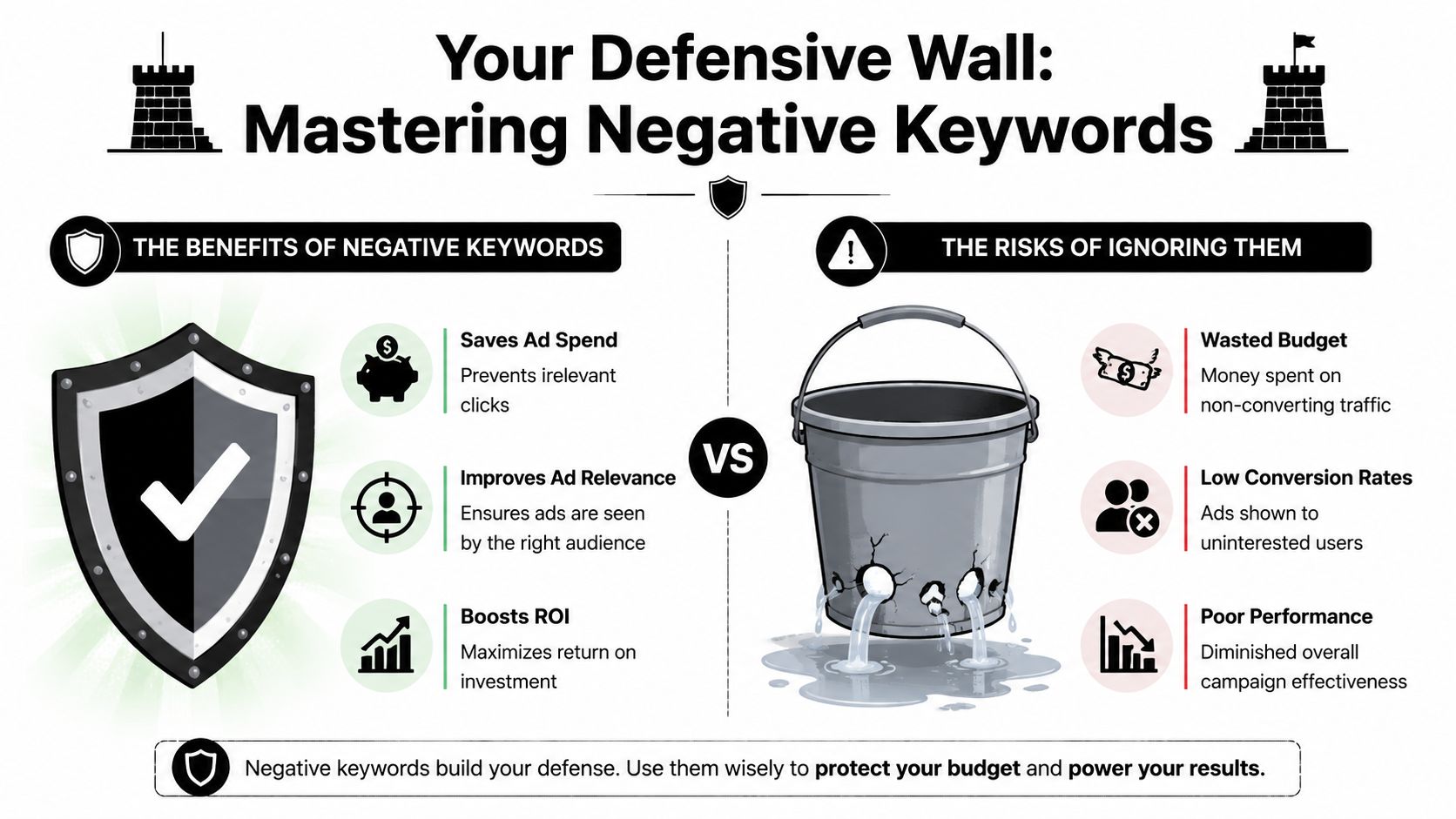
That should settle the old idea that negatives are just cleanup. They're not cleanup. They're a profit control system.
Build the wall before traffic leaks
A strong negative strategy starts before launch, not after the account wastes budget.
Create exclusions from three angles:
- Irrelevant intent such as research-heavy, DIY, or support-seeking terms that don't fit the campaign goal
- Bad-fit qualifiers like free, jobs, meaning, template, used, or other modifiers that attract the wrong audience
- Internal overlap risks where one campaign can steal traffic meant for another
Shared negative lists help a lot here. If the same irrelevant pattern can hurt multiple campaigns, don't fix it one ad group at a time.
Budget defense rule: Every time you widen keyword coverage, increase your negative keyword attention at the same time.
For ongoing cleanup, this walkthrough on Google Ads negative keywords covers the operational side well.
How to spot negative candidates quickly
When reviewing queries, don't only ask, "Could this be a new keyword?" Ask, "Should this query ever trigger my ad again?"
The second question protects margin.
A useful way to work is to flag negatives in categories:
Clearly irrelevant
The search isn't about your offer. Add the exclusion and move on.Commercially weak
Related topic, wrong intent. Useful for content maybe, not for paid search.Structurally misplaced
The query fits the business, but not this campaign or ad group. Use a negative to route traffic correctly.
Before going further, this video gives a practical look at negative keyword handling in Google Ads:
Why this matters more as you scale
Broadening an account always increases ambiguity. More search variation means more chances to match useful demand, but also more chances to pay for noise.
Negative keywords keep your expansion strategy honest. They force you to define what the campaign is for, who it's for, and what traffic does not belong. That's why mature accounts usually spend less time debating "how many keywords to add" and more time deciding which traffic deserves access.
Scaling with Smart Bidding and Broad Match
Manual expansion and automation aren't opposing strategies anymore. In a healthy account, they do different jobs.
Manual work identifies intent, themes, exclusions, and structure. Automation helps absorb query variation and bid in auctions you couldn't manage by hand. That's the operating model that makes sense in current Google Ads accounts.
Google's internal research found that using broad match with Smart Bidding led to a 15% increase in conversion volume compared with campaigns using only exact or phrase match, according to the verified data above. That's meaningful, but only when the account has good conversion signals and active negative management.
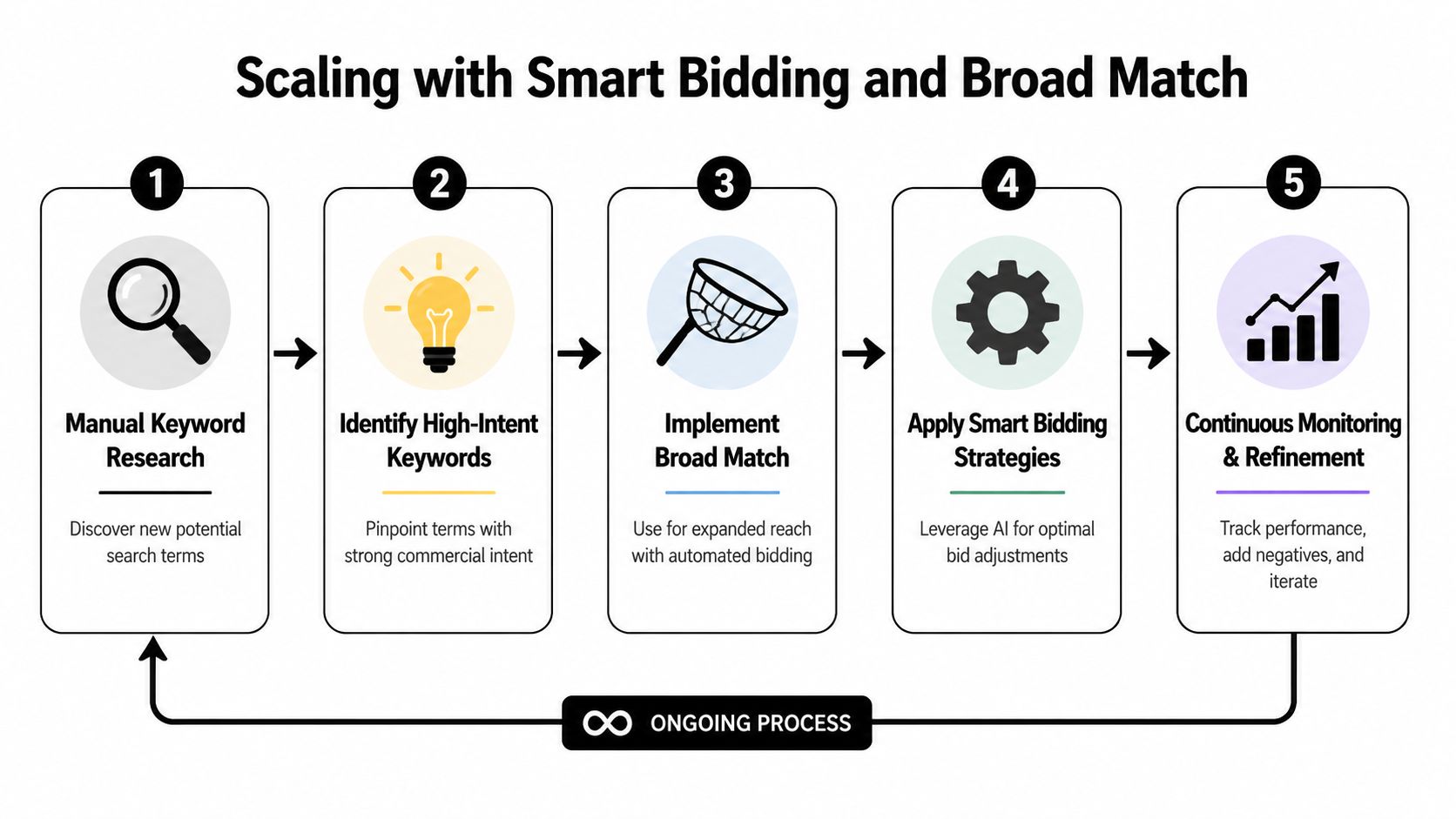
Where broad match actually fits
Broad match is not the place to begin blind discovery in a fragile account. It's better used after you already understand:
- which themes convert
- which modifiers signal real intent
- which negatives are mandatory
- which landing pages can carry broader traffic without falling apart
When those pieces are in place, broad match becomes a scaling lever rather than a gamble.
The modern workflow
A sensible progression looks like this:
| Stage | Main focus |
|---|---|
| Early testing | Mine exact and phrase data for clean intent signals |
| Mid-stage growth | Consolidate winning themes into strong ad groups |
| Controlled scaling | Introduce broad match on validated themes with Smart Bidding |
| Ongoing management | Mine search terms, add exclusions, tighten structure |
Recent Google-owned guidance around keyword strategy and forecasting points in this direction. Automation now changes how much manual list-building you need. In many accounts, the better use of time is stronger query mining, tighter exclusions, and cleaner structure instead of endless manual keyword additions.
Broad match works best when you've already taught the account what good traffic looks like.
If you're trying to think through the bigger shift in workflow, this practical guide to AI in marketing is useful because it frames automation as a system you direct, not a button you trust blindly.
What doesn't work
Two habits usually cause trouble:
- Adding broad too early when tracking is weak or the offer is still unproven
- Using automation as an excuse to stop reviewing search terms
Smart Bidding can help you scale. It cannot replace judgment about relevance, exclusions, and campaign design. The advertisers who get the most from automation are usually the ones who maintain the tightest operating discipline around it.
The Pruning Phase When to Stop Expanding
More keywords are not automatically better. At some point, they become administrative clutter, intent dilution, and budget drag.
That part gets ignored because expansion feels productive. Pruning feels like retreat. In practice, pruning is often what restores profitability.
Recent practitioner guidance argues that one of the most overlooked questions in paid search is when to stop expanding and switch to pruning, and that scale often comes more from new products or new demand pools than from endlessly adding keywords, as discussed in this practitioner rebuttal on Google Ads scaling.
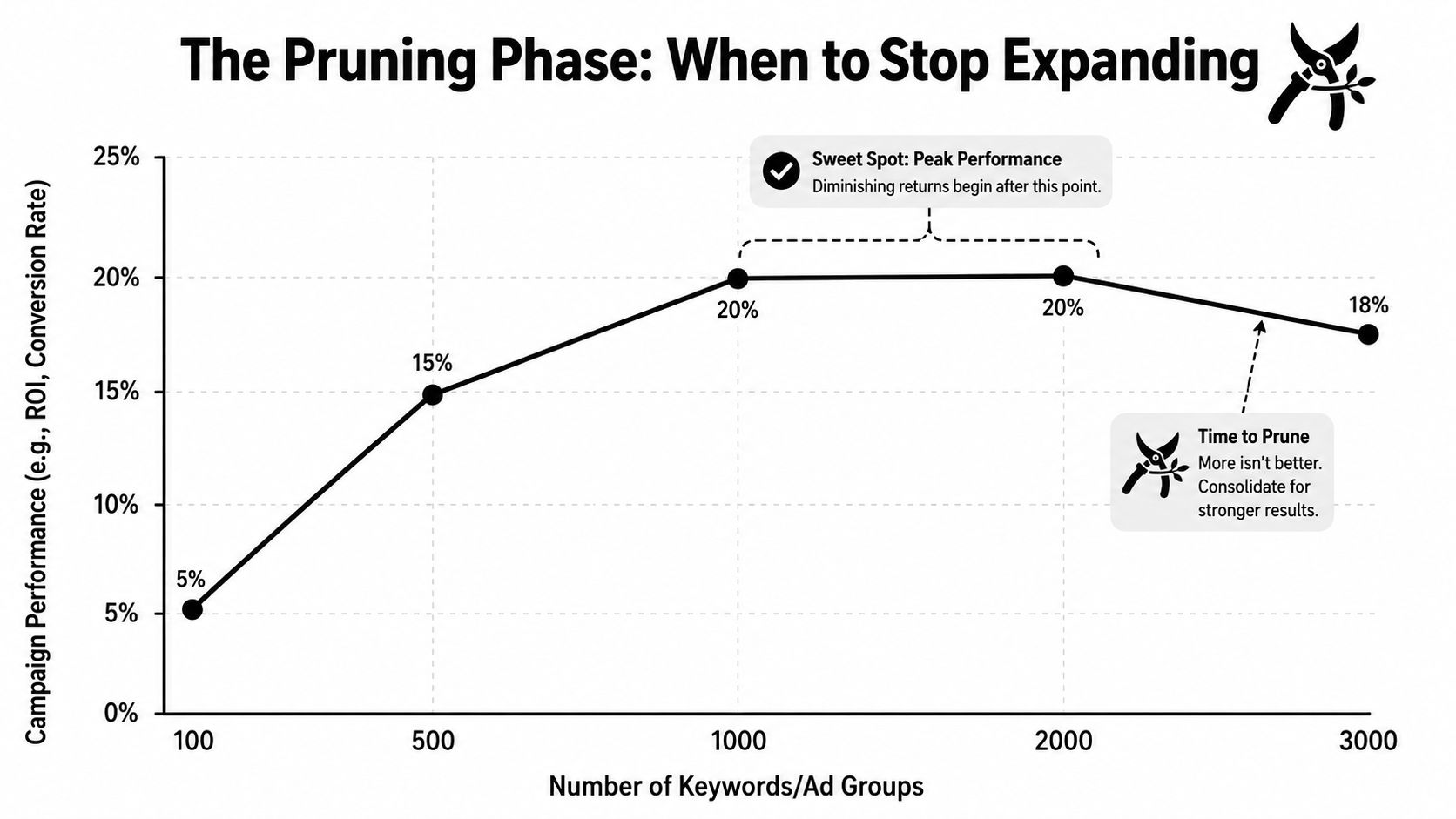
Signs you've crossed from growth into bloat
Watch for patterns like these:
- Search terms keep widening but quality slips
- New ad groups overlap with existing winners
- Reporting gets harder, not clearer
- You keep adding terms but don't gain new demand pockets
Those are account management signals, not just keyword signals. They tell you the expansion engine is producing too much noise.
A practical pruning routine
You don't need a dramatic cleanup project. You need a repeating review habit.
Use a short checklist:
- Pause terms that attract impressions but never become credible opportunities
- Consolidate near-duplicate ad groups that split data
- Cut themes that no longer match the business priority
- Move budget and attention toward new categories, offers, or landing page angles when keyword expansion plateaus
Many teams get stuck when they keep trying to squeeze more volume from the same semantic territory instead of admitting that the next layer of growth may have to come from a different offer or a different slice of demand.
If a keyword exists only because it might work someday, it probably doesn't belong in an active campaign today.
The contrarian view that usually helps
In mature accounts, pruning is not the opposite of scaling. It's part of scaling.
A disciplined Google Ads keyword expansion strategy has four repeating motions: find, validate, structure, and remove. If the remove step is missing, the account gets heavier every quarter. Not stronger. Just heavier.
Common Keyword Expansion Questions Answered
Some keyword expansion decisions are straightforward. The annoying ones live in the gray area. These are the questions that come up most often when an account is already active and you're trying to grow it without breaking what works.
FAQ on Advanced Keyword Expansion
| Question | Answer |
|---|---|
| Should I add every converting search term as a keyword? | No. Add it when it represents a repeatable theme you want more control over, or when it deserves dedicated ad copy and bidding treatment. Some converting queries are one-offs, and they can stay as captured traffic instead of becoming managed keywords. |
| When should I test broad match? | Test it after your account has reliable conversion tracking, stable campaign structure, and a negative keyword routine. Broad match is a scaling layer, not a substitute for foundation work. |
| How often should I review search terms for expansion? | Weekly or every other week is a practical rhythm when you're actively expanding. That keeps the account tied to live intent without turning query review into a daily distraction. |
One final point. Expansion isn't a badge of effort. It's a resource allocation decision. If the next keyword doesn't improve coverage, relevance, or learnings, skip it.
Keywordme fits this workflow if you want a faster way to turn search term data into action inside Google Ads. It helps with search term cleanup, keyword expansion, match type handling, and negative list building without the usual copy-paste grind. You can see how it works at Keywordme.
.svg)