
Google Ads Broad Match Wasting Money? Fix It in 2026
Google Ads Broad Match Wasting Money? Fix It in 2026


Clicks are climbing. Search terms look busy. Spend keeps moving. But lead quality feels worse, branded traffic is getting weird, and the campaigns that used to be dependable suddenly look “volatile.”
That's the moment when a lot of advertisers start asking the right question: is Google Ads broad match wasting money, or is something else broken?
Usually, broad match isn't the only issue. It's the trigger that exposes weak structure, thin negative keyword coverage, and bad query hygiene. Worse, it doesn't just burn budget on junk clicks. It can also muddy attribution, crowd out better traffic, and put your ads in searches that don't fit how you want the brand to appear.
The Silent Budget Killer in Your Google Ads Account
A common pattern shows up in audits. Broad match starts as a convenience. Someone wants more reach, launches a few broad keywords, leaves Google room to “learn,” and the account gets busier fast. The problem is that more activity can look like progress when it's really just more expensive noise.

The waste is not small. Industry experts estimate that advertisers waste approximately $11 billion per year on unnecessary branded clicks and internal competition alone, and unmanaged broad match often makes that problem worse, as noted in this analysis of Google Ads self-competition and waste.
Why broad match waste hides so well
Broad match can fail because it often produces metrics managers are trained to notice first: more impressions, more clicks, and more search term variety. None of that guarantees commercial intent.
When broad match is loose, Google can match queries that are semantically related but commercially wrong. That means a person researching a topic can trigger an ad meant for a buyer. The account logs the click. The dashboard shows engagement. The sales pipeline gets nothing useful.
Practical rule: If search term relevance drops, your optimization data gets worse before your team fully notices the revenue impact.
That's the hidden part many advertisers miss. Bad broad match doesn't only waste spend today. It corrupts the query data you use to make future decisions. If your search term reports are full of mixed intent, your next round of keyword expansion, ad copy testing, and landing page decisions starts from polluted input.
The damage goes beyond wasted clicks
There's also a brand problem. Broad match can place your ads on searches that feel adjacent in Google's eyes but off-positioning in the actual market. That includes competitor-adjacent searches, low-intent educational queries, and ambiguous phrases that don't reflect your offer.
In practice, that creates three separate leaks:
- Budget leakage through irrelevant clicks and internal overlap
- Attribution leakage because conversion paths get filled with weak-intent traffic
- Brand leakage when ads appear on searches that don't support how you want to be found
If your account feels busy but less predictable, consider looking here first.
Is Broad Match Really the Culprit? How to Diagnose Waste
Don't pause broad match just because performance feels off. Prove it.
The evidence is usually sitting in the Search Terms Report, and once you know what to look for, the pattern gets obvious. You're not only looking for irrelevant queries. You're looking for intent drift, keyword overlap, and signs that broad match is stealing budget from cleaner traffic.
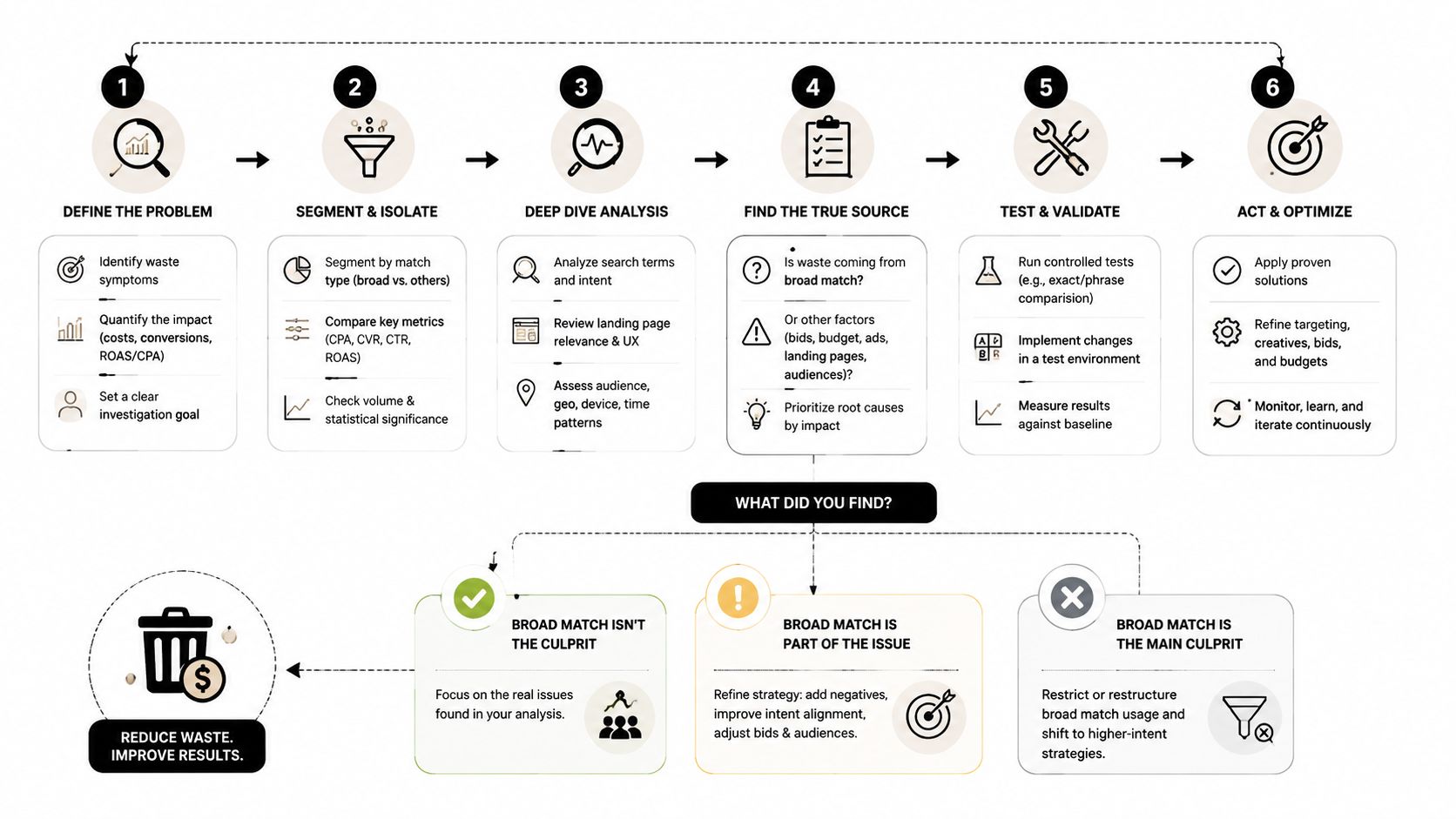
Start with the Search Terms Report
Pull the report and sort it like an auditor, not like someone hunting for a few obvious negatives. Review themes, not just individual terms. If you need a clean process, this guide to the Google Ads Search Terms Report workflow is a useful reference for structuring the review.
Look for these red flags:
- Intent mismatch. Queries that are informational when your keyword is transactional. A searcher may want definitions, examples, reviews, or history, while your campaign is trying to drive a sale or lead.
- Competitor adjacency. Terms that mention competing brands, alternatives, or comparisons that your campaign wasn't meant to target.
- Semantic drift. Searches that are loosely related by language, but not by buying intent.
- Repeated variants of bad traffic. One junk query is annoying. A cluster of similar junk queries means the keyword is structurally too loose.
- Broad taking credit for terms you already own elsewhere. This one matters more than many advertisers realize.
Check for overlap, not just irrelevance
One of the most expensive broad match problems is cannibalization. You already have exact or phrase keywords for high-intent searches, but broad match enters the same territory and grabs traffic that should have gone through a more controlled path.
A documented account analysis found that broad match generated lower ROAS and cannibalized 35% of the budget from higher-performing phrase-match keywords, showing that the true cost can be opportunity cost, not just wasted clicks, according to this phrase match versus broad match analysis.
That's why I like to review search terms against existing keyword coverage. If a broad keyword keeps matching to searches you already target in phrase or exact, it's not discovering net-new demand. It's just introducing mess.
Broad match often looks like expansion in the interface when it's really redistribution inside your own account.
Run a controlled test instead of arguing in Slack
If there's internal debate about whether broad match is helping, isolate it. Split broad match into its own ad group or campaign where possible. Keep budgets, ads, landing pages, and geo settings as controlled as you can. Then compare it against phrase or exact on three things:
| What to compare | What a healthy result looks like | What trouble looks like |
|---|---|---|
| Search term quality | Tight relevance and clear buying intent | Mixed intent and irrelevant themes |
| Query overlap | New, useful demand | Traffic already covered elsewhere |
| Revenue efficiency | Quality traffic holds up after clicks | More clicks, weaker return |
If you're doing a full account review, this broader perspective on improving ROI with marketing audits is worth keeping in mind. Broad match waste rarely sits alone. It usually shows up alongside tracking issues, campaign overlap, and weak exclusions.
Your Step-by-Step Remediation Plan
Once you've confirmed the leak, fix it in layers. Don't start by flipping every broad keyword off and calling it done. Some broad terms uncover useful search behavior. The job is to separate the signal from the junk, then lock the account down so the same waste doesn't return next week.

Audit queries in batches
Review search terms by theme first. That's faster and more accurate than treating each line item as a separate mystery.
A practical workflow looks like this:
Tag obvious junk immediately
Irrelevant intent, education-only searches, DIY terms, job seekers, support queries, and anything unrelated to the offer should be marked fast.Group similar bad queries together
If one root concept keeps repeating, build a negative around the pattern, not just the single phrase.Separate weak from irrelevant
Weak terms aren't always negative candidates. Some need lower bids, tighter match types, or isolation. Irrelevant terms usually need exclusion.Promote proven search terms out of broad match
If a query is commercially strong, move it into phrase or exact so you can write tighter ads and protect it from broad drift.
For hands-on cleanup, this walkthrough on how to add negative keywords in Google Ads is useful if you want a more tactical checklist.
Choose the right negative keyword level
A lot of cleanup work fails because negatives get added in the wrong place. The term gets blocked somewhere, but not where it matters most.
Use this simple framework:
- Ad group level for sculpting tightly related themes when one ad group should block a query but another should still be eligible.
- Campaign level when the whole campaign should never show for that intent. This is often the right choice for brand exclusions, research intent, or cross-campaign separation.
- Account level for universal junk that never belongs anywhere in the account.
Audit note: If you keep adding the same negative in multiple places, the account structure probably needs cleanup, not just more exclusions.
Restructure match types before they overlap again
Broad match waste gets expensive when accounts let multiple match types chase the same search with no guardrails. The cleaner setup is usually simple:
| Query type | Better home for it | Why |
|---|---|---|
| Proven buyer intent | Exact match | Maximum control over intent and messaging |
| Strong but varied intent | Phrase match | Controlled reach without full looseness |
| Exploration or discovery | Broad match, isolated | Useful for testing only when monitored closely |
If your account mixes broad, phrase, and exact in a way that allows constant overlap, clean separation matters more than fancy bidding tweaks.
Repair the data, not just the spend
This part gets skipped too often. After broad match pollutes search terms for a while, the damage isn't only in wasted clicks. It's in the conclusions teams draw from dirty data.
Do a short reset:
- Review conversion paths tied to the broad traffic themes
- Re-check ad copy assumptions that may have been influenced by irrelevant queries
- Tighten landing page mapping so high-intent terms go to pages built for action
- Revisit attribution logic if broad traffic inflated top-of-funnel interactions without real commercial value
That's how you stop the next bad optimization cycle before it starts.
Automating Your Defense with Keywordme
Manual search term work is still valuable. It also gets tedious fast.
Anyone who manages multiple campaigns knows the routine. Export report. Sort terms. Tag junk. Build negatives. Fix match types. Copy. Paste. Format. Double-check. Miss one pattern. Repeat next week. The process works, but it eats time and invites mistakes when volume gets heavy.

Where manual cleanup breaks down
The biggest issue isn't effort alone. It's consistency.
One person uses phrase-match negatives. Another adds exact negatives only. Someone forgets to promote a strong query into a dedicated ad group. Another person exports the wrong date range and builds exclusions from incomplete data. None of those mistakes look dramatic in the moment, but they stack up.
Automation helps most in the parts of the workflow that are repetitive and formatting-heavy:
- Cleaning junk search terms without manually rebuilding lists
- Applying match types in bulk instead of editing one keyword at a time
- Building negative lists faster when patterns repeat across campaigns
- Turning real search terms into structured keyword actions before they get lost
Why the workflow matters more than the feature list
A good PPC tool shouldn't just save clicks in the interface. It should reduce the number of decision errors a team makes under pressure.
That's why workflow design matters. If your process for defending against broad match waste depends on spreadsheets, Slack threads, and memory, the account stays exposed. A tighter system gives you a repeatable path from search term review to exclusion, promotion, and match-type control.
If you want to see what that looks like in practice, this overview of how to automate Google Ads keyword management connects the dots between search term cleanup, negative list building, and campaign expansion.
The best automation in PPC doesn't replace judgment. It removes the repetitive work that makes good judgment harder to apply consistently.
Used that way, automation becomes defense. Not convenience. It helps teams catch broad match drift earlier, act faster, and keep account structure from slipping back into chaos.
Proactive Strategies to Prevent Future Budget Leaks
Broad match isn't always wrong. Unsupervised broad match is.
There are situations where broad match can help, especially when the account has strong conversion tracking, disciplined negatives, and enough control elsewhere to absorb exploration. But some advertisers should treat it as a tightly managed test, not a default setting.
When broad match is usually a bad bet
Broad match gets dangerous when the offer is specialized, the budget is tight, or the account doesn't have strong negative keyword hygiene. Experts warn that running broad match without proper negative keywords “guarantees wasted money,” and one example shows how ads for industrial welding equipment can appear on searches for basic home repair tools in this review of when to use and avoid broad match.
That warning lines up with what shows up in audits. Specialized products need semantic precision. Broad match often treats language similarity as buyer similarity, and those are not the same thing.
A safer set of rules
If you choose to use broad match, keep the guardrails clear:
- Use it for discovery, not as your foundation. High-intent terms belong in phrase or exact once they prove themselves.
- Pair it with active negative keyword management. Broad without negatives is just outsourced targeting.
- Isolate it from your core performers. Don't let broad compete freely with your best exact and phrase traffic.
- Watch query quality, not just click volume. The point is better demand discovery, not more traffic for its own sake.
- Be stricter in niche or high-consideration categories. Ambiguous matching hurts more when every click is expensive or lead quality matters.
Build a structure that protects itself
You don't prevent waste by reacting faster forever. You prevent it by making the account harder to break.
A resilient setup usually includes:
| Structural choice | Why it helps |
|---|---|
| Separate campaigns by intent | Reduces overlap and mixed signals |
| Match type discipline | Keeps proven terms under control |
| Shared negative logic | Stops repeated junk from re-entering |
| Regular query reviews | Catches drift before it spreads |
The practical goal is simple. Broad match should have to earn trust. It should never get unlimited freedom just because Google can spend the budget.
From Wasting Money to Winning with Precision
If your account has that uneasy mix of high activity and low confidence, broad match is one of the first places to investigate. Not because it's always bad, but because it can hide several problems at once: wasted clicks, stolen budget from better queries, dirtier attribution, and weaker brand positioning.
The fix is rarely glamorous. It's disciplined account work. Review search terms closely. Block junk at the right level. Move valuable queries into tighter match types. Keep campaign structure clean enough that one search triggers the right path.
That's where performance stabilizes.
The advertisers who get broad match under control usually stop chasing volume for its own sake. They start protecting intent, protecting data quality, and protecting spend. That shift changes the whole account. Decisions get clearer. Reporting gets more trustworthy. Budget starts working with the strategy instead of against it.
If you're tired of cleaning search terms by hand, Keywordme gives you a faster way to turn messy search query data into usable keyword actions. It helps you clean junk terms, build negative keyword lists, apply match types, and expand campaigns from real search data without the usual copy-paste grind. For teams trying to stop google ads broad match wasting money, it's a practical way to move from reactive cleanup to a cleaner, more controlled workflow.
.svg)