
Mastering Facebook Advertising Charges 2026
Mastering Facebook Advertising Charges 2026


Meta charged your card again. You paused the campaign days ago, maybe weeks ago, and now there's a fresh line item that looks random, vague, and a little suspicious. If you've ever stared at a bank statement wondering whether Facebook ads are billing you correctly or whether your ad account has gone sideways, you're not alone.
A lot of confusion around Facebook advertising charges comes from one simple problem. Most advertisers understand the ad itself, but not the billing logic behind it. They know how to launch a campaign, pick an audience, and set a budget. Then the payment side kicks in with thresholds, delayed charges, available funds, invoice line items, and auction-based pricing that doesn't behave like a normal subscription.
That's where people get stuck. A charge appears after a campaign ends. Another charge is smaller than expected. An invoice total doesn't seem to match the date range they had in mind. The platform makes sense once you know the rules, but until then it feels like trying to read a utility bill written in shorthand.
If you're troubleshooting strange debits, tightening spend controls, or training a teammate who's new to Meta billing, this guide should help. I'm going to walk through the moving parts in plain English, the same way I'd explain them to a junior PPC manager on their first week in the account. If fraudulent clicks are part of your worry, it also helps to review how to think about preventing click fraud alongside billing checks, because traffic quality and billing confidence often get tangled together in practice.
That Awful Feeling of an Unexpected Facebook Charge
The classic scenario goes like this. You launch a campaign, watch it spend for a bit, pause it, and move on. Later, your card gets hit with a Facebook charge you weren't expecting. Your first thought usually isn't, “Ah, this must be a threshold-triggered billing event tied to previously accrued ad costs.” Your first thought is, “What on earth is this?”
That reaction makes sense. Facebook ad billing doesn't feel like Netflix or your phone bill. It isn't a neat, fixed monthly payment with one predictable amount. It behaves more like a tab at a busy cafe. You keep ordering throughout the day, and the system settles the tab when certain conditions are met, not always when you personally expect it to.
What makes this worse is timing. Charges can show up after the campaign is no longer active, which makes people assume the charge itself is wrong. Sometimes it isn't wrong at all. It's just late, or it's the final cleanup charge from spend that already happened.
A confusing charge is not automatically an unauthorized charge. Often, it's an authorized ad cost arriving on a billing schedule you didn't realize was in play.
That doesn't mean you should trust every charge blindly. It means you need a process. Before you dispute anything, check whether the campaign ran, whether spend accumulated before it was paused, and whether Meta was waiting to process the payment. Most panic comes from a missing mental model, not from a missing transaction.
There's also a second layer to the confusion. Many advertisers mix up three separate things: what the ad cost, when Meta decided to charge, and how that charge was funded. Those are related, but they aren't the same. Once you separate them, the billing picture gets much easier to read.
How Facebook Decides What You Pay Core Billing Models
Before you can make sense of the charge on your card, you need to know what Facebook was billing you for in the first place. In practice, most advertisers run into three common pricing ideas: CPM, CPC, and CPA.
Think of them like different ways to pay for attention.
If you buy CPM, you're paying for visibility. That's like renting a billboard on a highway. People may notice it or ignore it, but you're paying for the chance to be seen. If you buy CPC, you're paying when someone clicks. That's closer to paying only when a person walks up to your storefront. CPA goes further. You care about a completed action, like an app install or another conversion event, so the spend is tied to a deeper outcome.
Facebook ad billing models at a glance
| Billing Model | What You Pay For | Best For |
|---|---|---|
| CPM | 1,000 impressions | Awareness and reach campaigns |
| CPC | Clicks | Traffic-focused campaigns |
| CPA | A completed action | Conversion-driven campaigns |
The market benchmark gives you a useful frame of reference. In 2024, the average CPM reached about $8.96 and the average CPC was $0.58 across multiple verticals and locations, according to Business of Apps' Facebook ads cost benchmarks. That same benchmark notes strong regional differences, with the United States at $1.12 CPC and India at $0.15 per mobile app install.
Why these models feel different in real accounts
A new advertiser often expects one universal Facebook price. That's not how it works. Your campaign objective nudges the system toward a different kind of result, and each result has a different cost pattern.
- CPM fits awareness work: If your goal is broad exposure, paying for impressions is normal.
- CPC suits traffic campaigns: This model is easier for teams that want a clearer line between spend and visits.
- CPA is outcome-focused: It can be attractive, but it also depends heavily on event quality, setup, and enough volume for the system to learn.
If you're comparing Facebook and Instagram campaign planning side by side, this overview of how to advertise on Facebook and Instagram is a useful companion because campaign setup choices influence how these billing models play out.
Practical rule: Don't ask, “What does Facebook charge?” Ask, “What am I asking Facebook to optimize for?” The billing model follows that decision.
For day-to-day account work, this matters because two campaigns with the same budget can produce very different charges per result. Not because one is broken, but because each one is paying for a different type of outcome.
The Ad Auction How Your Costs Are Really Calculated
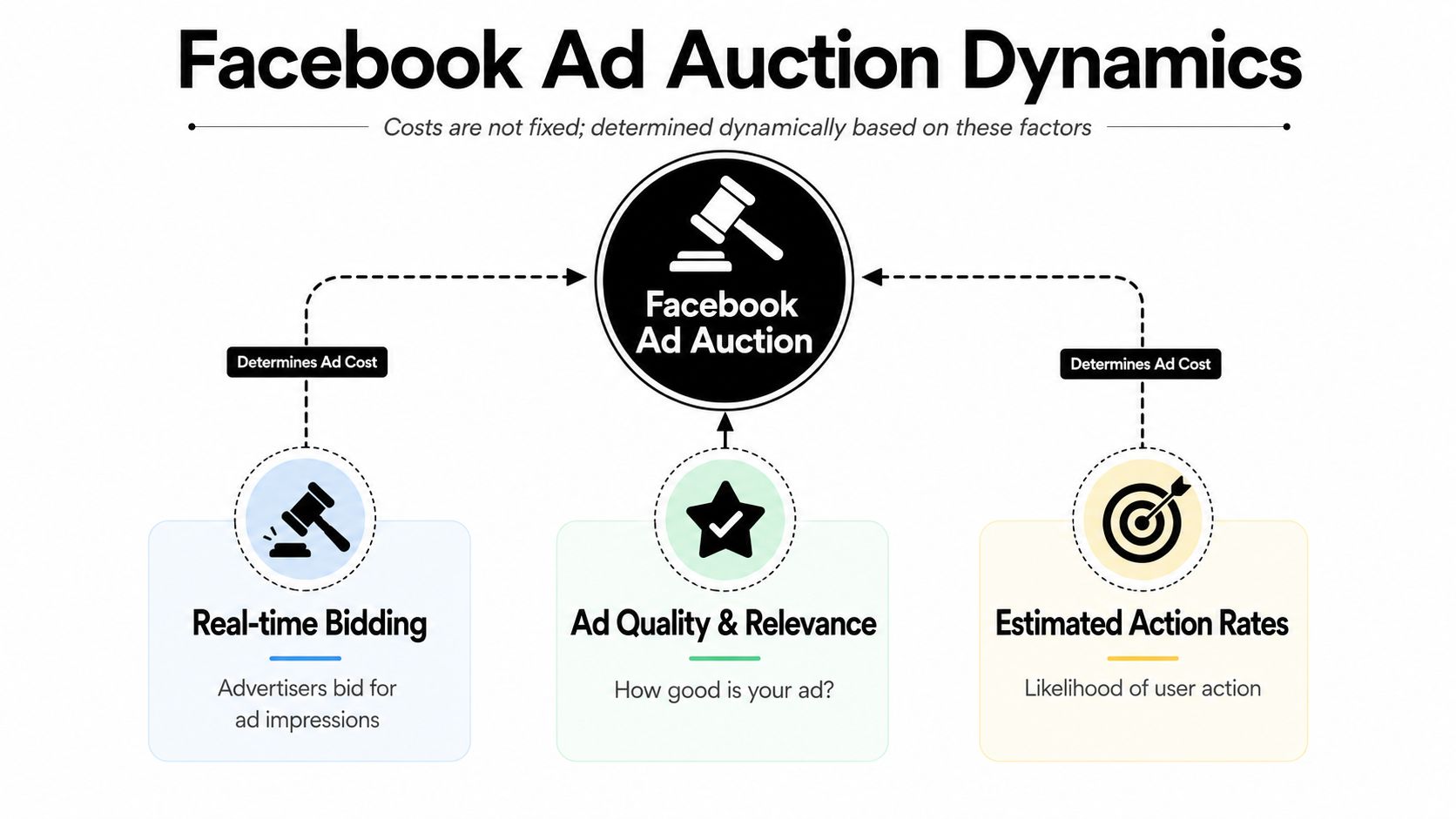
Facebook doesn't use a fixed price list where every click costs the same and every impression costs the same. It runs an auction. Every eligible ad competes in real time for the chance to show to a user.
That's the part many people miss. You're not buying shelf space with a posted price. You're stepping into an auction house where the platform weighs more than just your bid.
The three signals that shape the price
Meta says its ad cost structure is driven by a real-time auction based on bid price, estimated action rates, and ad quality, and that the final charge is usually the minimum bid required to win rather than your exact bid, as explained in Meta's business help documentation.
Here's the plain-English version:
- Your bid: What you're willing to pay, directly or indirectly through the bidding strategy.
- Estimated action rate: How likely Meta thinks a person is to do the thing you want, like click or convert.
- Ad quality: How relevant and useful your ad seems compared with competing ads.
If you've ever watched two houses sell at auction, this will feel familiar. The biggest bid matters, sure, but so does the confidence that the sale will close. Meta wants to show ads that users are likely to respond to, not just ads from the advertiser shouting the loudest.
Why better creative can lower your costs
A lot of teams try to solve high costs by raising budgets or fiddling with bids. Sometimes that helps. Often it doesn't. If the creative is weak or the message doesn't match the audience, you can end up paying more just to force a mediocre ad into circulation.
That's why ad quality matters so much. A sharper hook, cleaner offer, stronger landing page match, and better audience alignment can improve the way the auction evaluates your ad. In practical terms, that can lower the effective price needed to win impressions.
Here's a useful visual explanation of the auction mechanics:
Higher spend doesn't automatically beat higher relevance. In Meta's auction, a better ad can be cheaper and win more often.
The takeaway for account managers is simple. If costs are climbing, don't only inspect the budget panel. Review the ad itself. Check the audience fit. Look at whether the objective matches the landing page experience. In Facebook advertising charges, the invoice is often the symptom. The auction inputs are where the cause lives.
When Facebook Charges You Billing Thresholds and Cycles
Most billing confusion isn't about ad performance. It's about timing.
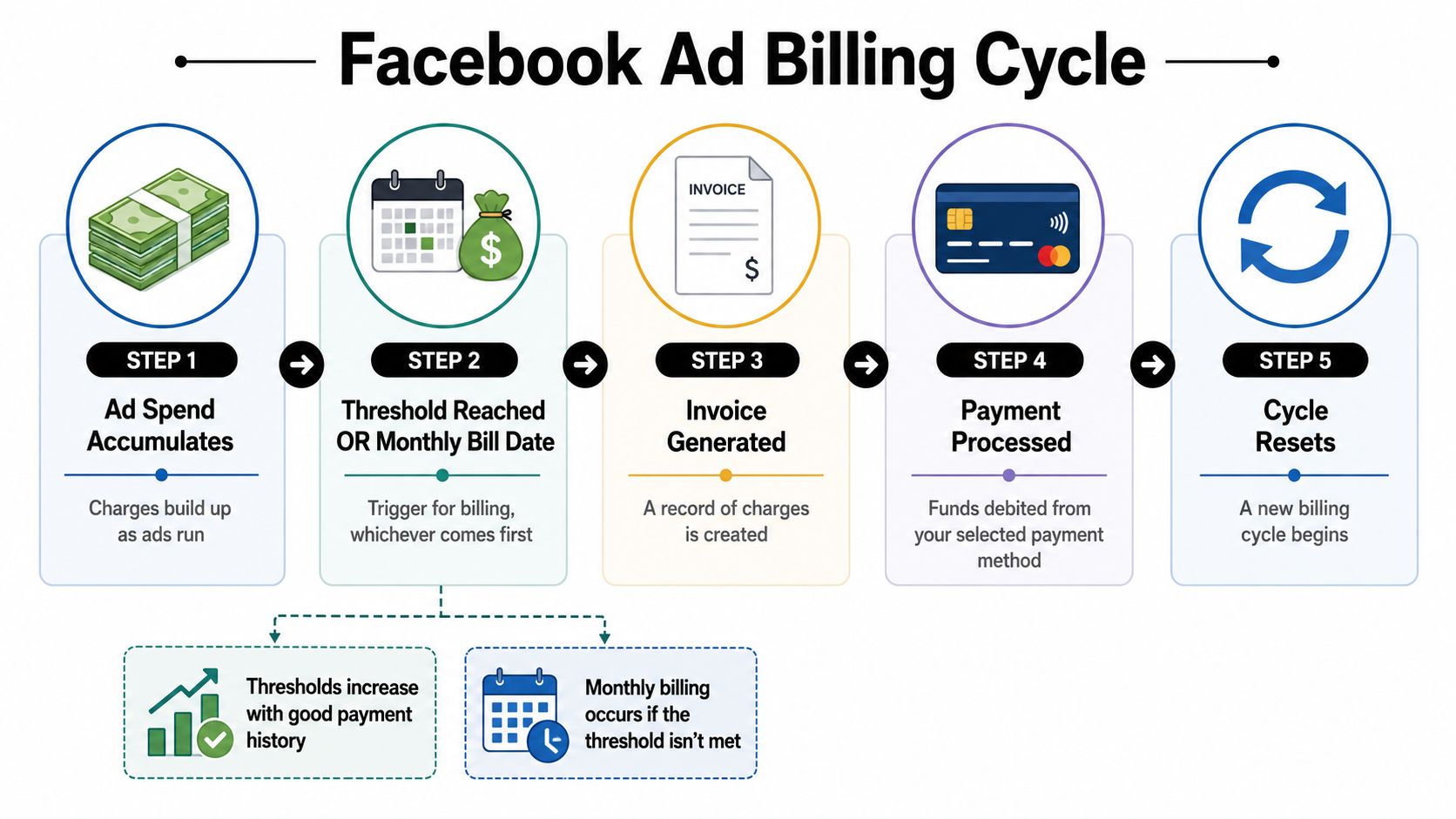
Facebook automatically charges advertisers when spend reaches a billing threshold, not on a neat fixed date, and then charges again on the monthly bill date for any leftover balance, according to this explanation of Facebook ad billing thresholds and monthly billing. That's why charges can appear multiple times in one month or show up after you thought things were done.
Think of it like a running tab
A cafe tab is the easiest analogy here. You keep ordering, and the tab grows. The cafe might ask you to settle up once the tab hits a certain level. If you never hit that level, they still ask you to pay when you leave.
Facebook billing works in a similar way:
- Ads run and spend accumulates
- The account hits a billing threshold, or the monthly bill date arrives
- Meta processes the charge
- Any remaining balance rolls into the next trigger point
This is why a high-spend campaign may produce more frequent card charges. It isn't necessarily a sign that something doubled. It can mean the account crossed the threshold more quickly.
Why a paused campaign can still lead to a later charge
People often assume pausing a campaign should instantly stop all billing activity. It stops new delivery, yes. But it doesn't erase the spend that already accumulated and hasn't been processed yet.
That's the piece that catches newer teams off guard. They pause the campaign on Tuesday, then see a charge later and assume the campaign must still be live. Sometimes the campaign is fully paused and the charge is just the billing cycle catching up.
A simple routine helps here:
- Check the campaign status: Confirm whether it's active, paused, or ended.
- Review the billing section: Match the charge date to the invoice date, not just the campaign pause date.
- Look for leftover balance: Small leftover amounts are often collected on the monthly bill date.
If your spend pattern changes, your charge pattern changes too. Facebook billing is event-driven, not calendar-driven.
Once you get used to that, the “random charge” feeling starts to fade. It's not random. It's just tied to Meta's billing triggers rather than your own internal reporting rhythm.
Finding and Reading Your Facebook Ad Invoices
When something looks off, your invoice is the first place to check. Not your bank app. Not a Slack message from finance. The invoice.
The good news is that Facebook does give you the paper trail. The less-good news is that many people never learn how to read it properly, so they stare at the billing page and still feel lost.
Where to look inside Ads Manager
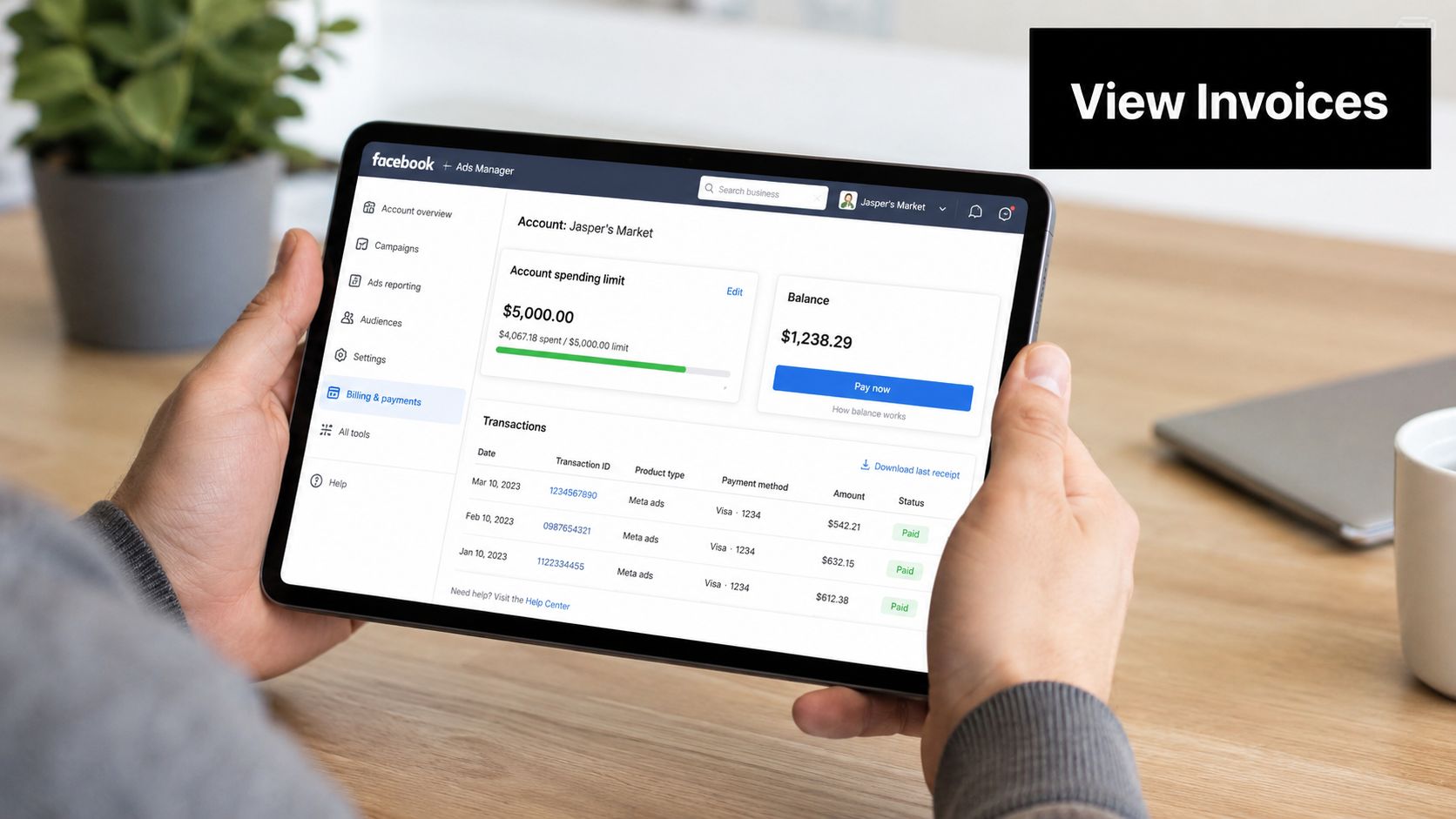
The path is usually straightforward once you know where Meta hides it.
- Open Ads Manager
- Go to Billing or Billing & payments
- Open Payment activity
- Select the relevant date range
- Open the charge record or download the invoice
If you manage several ad accounts, double-check you're in the correct one before you start comparing totals. A lot of “billing errors” are really account-selection mistakes.
What the line items usually mean
Invoices can look more technical than they are. Start with the obvious items and work outward.
- Amount spent: The spend attached to the billing event or invoice period.
- Campaign or account reference: The identifier that helps connect spend to the right account activity.
- Adjustments: Credits, corrections, or other changes that affect the final total.
- Payment method: The card or funding source Meta attempted to use.
- Billing date: The date the invoice was created or the payment was processed.
If your finance team handles reconciliation, it can help to standardize invoice review rather than checking everything by hand every time. For teams drowning in documents, DigiParser's invoice solution is a practical reference point for automating invoice processing workflows and reducing manual review errors.
A fast audit routine that actually works
When I train new PPC managers, I tell them to verify invoices in this order:
- Dates first: Make sure the billing date and the campaign reporting window aren't being mixed up.
- Account second: Confirm the charge belongs to the correct ad account and payment method.
- Adjustments last: Credits and minor corrections can make totals look odd if you skip straight to the final amount.
You don't need to memorize every invoice field. You just need a calm checklist and a habit of comparing like with like. Bank transaction dates, campaign dates, and invoice dates are related, but they aren't interchangeable.
Why You Have Unexpected Facebook Ad Charges
This is the part that drives people nuts. A charge appears, the amount looks unfamiliar, and the campaign isn't even running anymore. It feels fraudulent. Sometimes it is suspicious and should be escalated. Often, though, there's a billing explanation hiding underneath the confusion.
Users frequently report small, unexpected Facebook ad charges long after campaigns end, and that delayed billing behavior is a known source of confusion because Meta may process pending costs later, as discussed in this Reddit thread on delayed Facebook ad charges.
The delayed charge phenomenon
The biggest mistaken assumption is this: people think Facebook charges instantly as ads run. It often doesn't.
Instead, spend can accumulate first and get processed later. That creates the odd experience of seeing a charge after the ad activity feels “over.” The account holder thinks, “I stopped everything already,” while Meta thinks, “I'm now collecting the balance generated earlier.”
That's why delayed charges feel creepy. The time gap breaks the mental connection between ad delivery and payment.
A late charge can be real ad spend arriving late, not a new round of ad spend.
Available funds and automatic billing confusion
There's another quirk that catches advertisers, especially in accounts that use prepaid funds. Meta can use available funds first before charging the payment method, which makes the timing of bank-visible charges harder to follow, according to Meta's billing help on adding funds and payment behavior.
Here's where people get tripped up:
- Available funds are consumed first: That can make spend happen without an immediate card charge.
- The card may be hit later: If available funds run low or a remaining balance needs collection, the actual bank transaction can appear after the ad activity you were watching.
- The visibility is uneven: Ads Manager may show spend clearly while your card statement lags behind.
This is especially frustrating because people naturally use their bank feed as the truth source. For Facebook advertising charges, the bank feed is only part of the story. Ads Manager and billing records usually tell you more.
What to check before calling it fraud
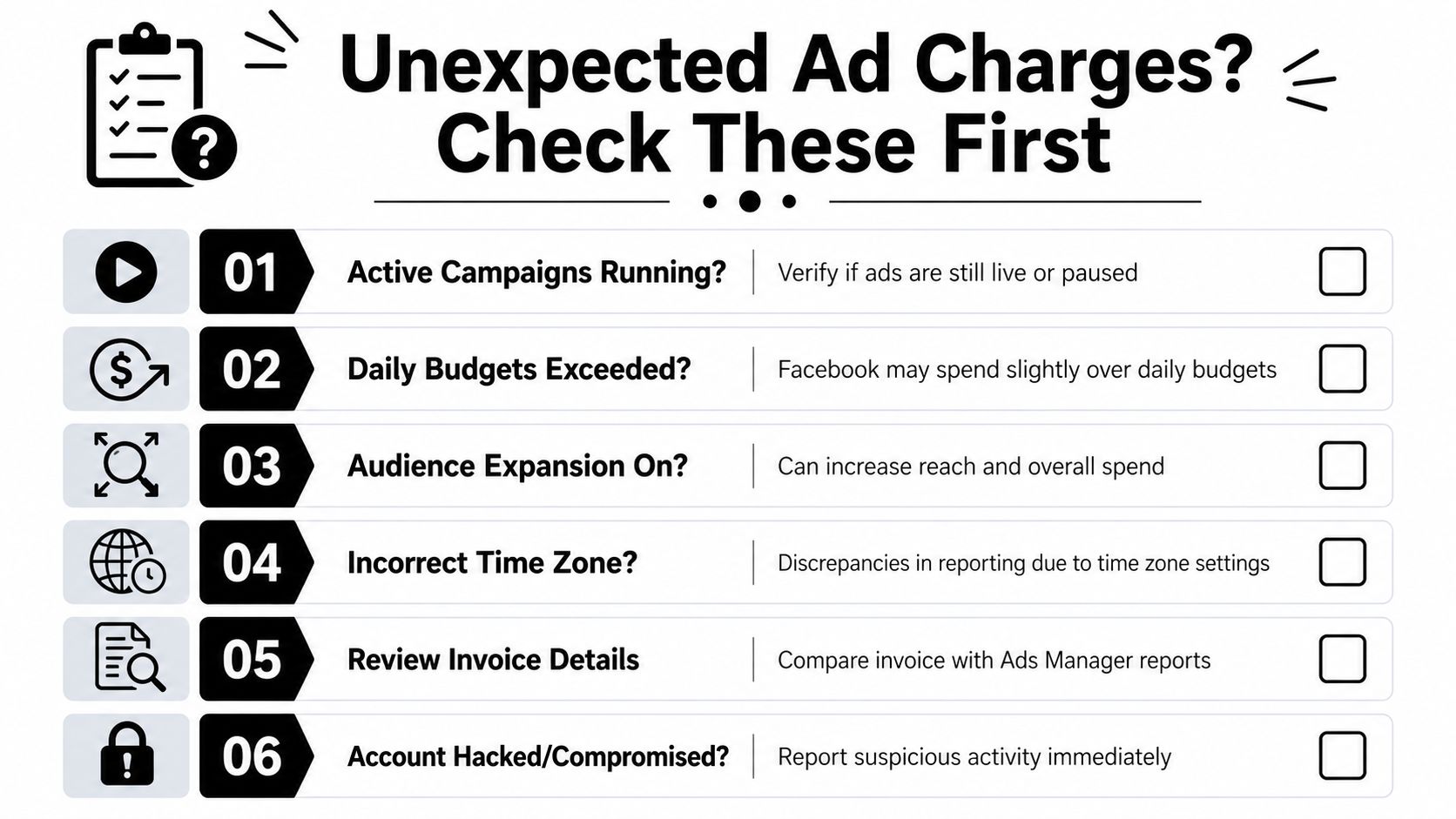
Not every strange charge is legitimate, and you should absolutely lock things down if the account looks compromised. But before escalating, check these basics:
- Was there unbilled prior spend?
- Did available funds cover part of the activity first?
- Is the payment tied to a threshold or leftover billing event?
- Does the invoice match the account and billing profile you expected?
If those all line up, the charge may be annoying but valid. If they don't, move fast. Review account access, payment methods, billing history, and active campaigns right away.
Practical Steps to Control Your Facebook Ad Spend
Understanding billing is half the job. The other half is setting up the account so surprises happen less often.
A lot of spend problems come from loose controls. Teams launch campaigns with decent targeting but weak guardrails. Then a threshold gets hit, a delayed charge lands, and everyone treats the platform like it acted on its own. Usually, the account was allowed to roam too freely.
Use the budget rules Meta already gives you
Meta's system has hard-coded minimums that matter. According to Lyfe Marketing's breakdown of Facebook ad costs and budget minimums, the platform requires a minimum daily spend of 5 times your cost-per-result goal to reliably pursue that target. Their example is simple: a $5 goal requires a $25 minimum daily spend. The same source says the minimum budget is $1 for impression-based bidding and $5 for click-based bidding.
That matters because underfunded campaigns don't just perform poorly. They can create messy expectations. You tell the system to hit a result target, but you don't give it enough budget to learn properly. Then the billing feels erratic because delivery is unstable.
A cleaner control checklist
Use these controls before a campaign goes live, not after the finance team starts asking questions.
- Set an account spending limit: This is your backstop. If campaigns drift, the account still has a ceiling.
- Use campaign budgets deliberately: Advantage Campaign Budget can help centralize spend, but don't treat automation like supervision.
- Create automated rules: Pause ads when cost trends go the wrong way or when delivery no longer matches your goal.
- Align the objective with reality: Don't choose a deep conversion goal if your setup or budget can't support it.
- Review benchmarks before planning: If you need a market reference point, this guide to average Facebook ad spend can help frame expectations without relying on guesswork.
If you're already trying to tighten paid media efficiency across channels, it's also worth looking at ad spend optimization software so your spend controls aren't limited to one platform.
The mindset shift that helps most
The best Facebook advertisers don't just “watch spend.” They design the account so spend has fewer chances to surprise them. They reconcile invoices regularly. They know which payment method is active. They use limits, rules, and naming discipline. They understand that billing issues are usually process issues wearing a finance costume.
That's what gives you peace of mind. Not hope. Structure.
If your paid media team wants tighter control over wasted spend, cleaner optimization workflows, and fewer messy surprises in campaign management, Keywordme is worth a look. It helps marketers cut junk traffic, manage negative keywords faster, and streamline optimization work that usually eats up hours in Google Ads.
.svg)