
Explain Pay Per Click Advertising Like a Pro
Explain Pay Per Click Advertising Like a Pro


Let's break down what pay-per-click (PPC) advertising is all about, without the jargon. Think of it this way: PPC is a way to buy visits to your website, instead of trying to "earn" them through the slow-and-steady race of search engine optimization (SEO).
So, What Is Pay-Per-Click Advertising, Really?
Imagine you run a boutique shop selling rare houseplants. Instead of just setting up your store and hoping people find it, you get to place a giant, flashing sign right in front of a botanical garden convention. But here’s the best part: you only pay for the sign when someone sees it and walks directly into your store.
That’s PPC in a nutshell. You’re putting your business right in front of people at the exact moment they’re searching for what you sell. It’s a powerful way to connect with customers who are ready to buy, right now.
Before we dive deeper, let's get the core concepts straight. Understanding these terms is the first step to mastering your PPC campaigns.
PPC Core Concepts at a Glance
This table breaks down the fundamental terms every marketer needs to know to get started with PPC advertising.
These concepts are the building blocks of every successful PPC strategy. Once you've got a handle on them, you can start putting them into action.
The Real Engine Behind PPC: The Ad Auction
At its heart, pay-per-click runs on an auction system managed by search engines like Google and Microsoft Bing. You bid on the keywords you think your customers are typing into that search bar.
When someone hits "Enter," a lightning-fast auction kicks off behind the scenes to decide whose ads get shown and where they rank.
But it’s not just a highest-bidder-wins game. Search engines also look at how relevant and high-quality your ad is. This "Quality Score" is a game-changer because it means a smaller business with a fantastic ad can actually outrank a huge company with a lazy one. It keeps the playing field surprisingly level.
Why Marketers Can’t Get Enough of PPC
So, what’s the big deal? PPC is so popular because it delivers speed, control, and crystal-clear data. You can launch a campaign and start seeing traffic roll in the very same day—something that’s just not possible with most other marketing channels.
This speed and control are why businesses are pouring money into paid search.
Pay-per-click advertising has become a massive industry. Global spending recently hit $190.5 billion, a huge 12.8% jump from the previous year. And it's not slowing down, with forecasts predicting it will reach $218.3 billion while growing at a steady 8.5% annually.
These numbers tell a simple story: PPC delivers results. It gives you complete control over your budget, who you target, and what your message is, all while feeding you real-time data to make smarter decisions. To get a better sense of how all these pieces fit together, take a look at our guide on what is an ad campaign. The insights you gain from a well-run PPC campaign can inform your entire business strategy, not just your ads.
How the PPC Ad Auction Actually Works
Ever wonder what happens in that split second between you hitting "search" and the results popping up? It’s not magic. It’s a blistering-fast auction where companies are all vying for your attention. But to really get what pay per click is all about, you have to understand that the winner isn't just the one with the deepest pockets. The whole system is built to reward relevance.
Forget a traditional auction where the highest bidder wins. It’s much more like a talent show. The performer with the biggest budget doesn't just automatically get the best spot. The judges—in this case, the search engine—are looking at both their financial backing (the bid) and their actual talent (how good and relevant the ad is).
This simple flow chart breaks down the journey from a search query to a sale.
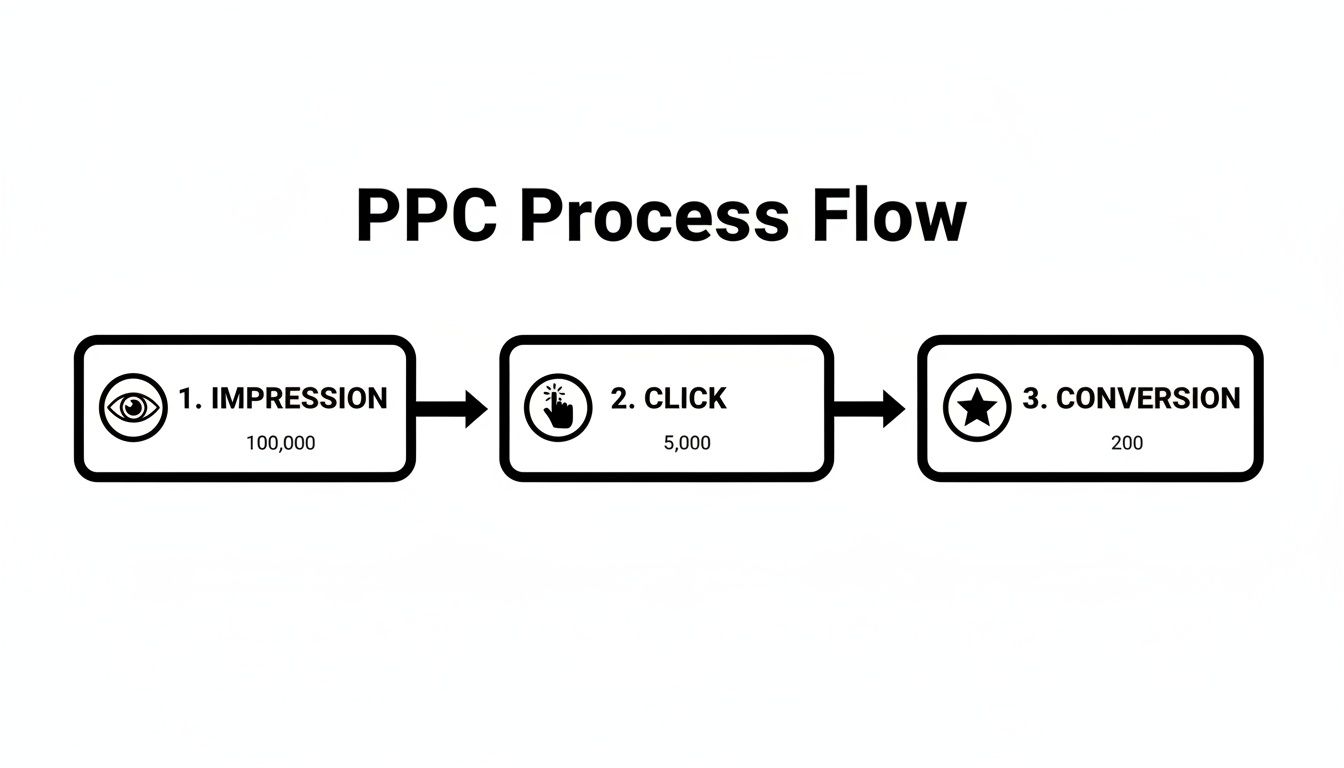
You can see how each step—impression, click, and conversion—builds on the last. It’s all about turning a user's intent into a real business result.
Your Bid and Your Quality Score
So, what determines who gets those top ad spots? It boils down to two key things: your maximum bid and your Quality Score.
Your max bid is easy enough to understand—it's simply the most you're willing to shell out for a single click on your ad. But the Quality Score? That's where the real game is played. This is Google's rating of how good your ad, keywords, and landing page are, all rolled into one.
A high Quality Score is your way of telling Google that your ad is a fantastic match for what someone is looking for. It's made up of three main parts:
- Expected Click-Through Rate (CTR): Based on past performance, how likely are people to click your ad when they see it?
- Ad Relevance: Does your ad copy actually make sense for the keyword someone just typed in?
- Landing Page Experience: After someone clicks, does your website deliver on the promise of the ad? Is it helpful and easy to use?
Google takes these factors and spits out a score from 1 to 10. A high score is a massive advantage because Google wants to show useful ads. They’ll actually reward you for it.
Calculating Your Ad Rank
Okay, let's put it all together. To figure out where your ad shows up on the page, the search engine calculates your Ad Rank. The formula is refreshingly simple but incredibly powerful:
Ad Rank = (Your Maximum Bid) x (Your Quality Score)
The advertiser with the highest Ad Rank score nabs the #1 spot, the second-highest gets the next one, and so on down the page. This simple multiplication is the secret sauce that lets a smart, small business outrank a lazy giant with a massive budget.
Let's look at a quick example.
Even though Bob is willing to pay way more per click, Sally’s perfect 10/10 Quality Score blows his Ad Rank out of the water. The result? Smart Sally wins the top ad position while paying less for it.
This is the very heart of what makes PPC so powerful. It’s not just a spending contest; it’s a game of relevance and quality. Nail the user experience, and you can win without breaking the bank.
Choosing the Right Keywords and Match Types
Alright, let's talk about the real engine of your PPC campaigns: keywords. Think of them as the bridge between what someone types into Google and the ad you’ve worked so hard on. If that bridge is shaky, nobody gets across.
Getting this right isn't just about picking good words; it's about controlling how Google uses them. That’s where keyword match types become your best friend.
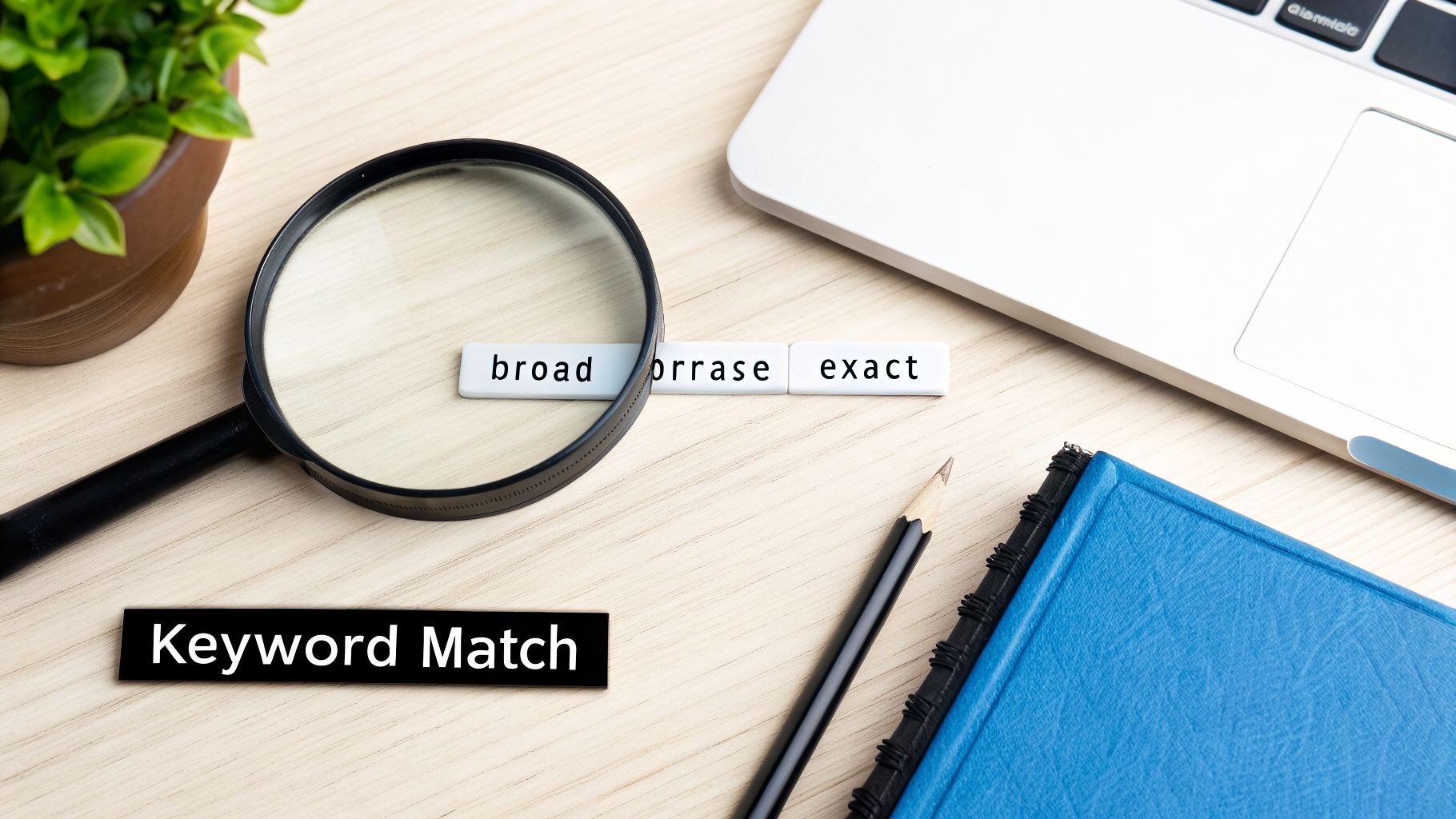
Each match type is like a setting on a nozzle, letting you control how wide or narrow you spray your ads. This control is absolutely essential for protecting your budget and making sure your ads land in front of the right people.
The Three Main Match Types
Your entire keyword strategy boils down to how you use these three options. They each have a different job to do, and the best campaigns use a smart mix of all three. Let's break them down.
- Broad Match: This is the default setting and, honestly, the loosest cannon of the bunch. It casts the widest possible net. Your ad might show up for searches that are just related to your keyword, including synonyms, misspellings, and stuff you never even thought of. It's great for discovering new search terms, but it can burn through your budget with irrelevant clicks if you leave it unchecked.
- Phrase Match: This one gives you a lot more control. Your ad appears when a search includes the meaning of your keyword. Someone can add words before or after your phrase, but the core intent has to be there. It’s a fantastic middle ground, giving you a good balance of reach and relevance.
- Exact Match: As the name suggests, this is your sharpshooter. Your ad will only show for searches that share the exact same meaning or intent as your keyword. This gives you maximum control and usually leads to the highest conversion rates, but you'll have much lower search volume and might miss out on some valuable long-tail queries.
A classic rookie mistake is just setting everything to broad match and hoping for the best. You'll get a ton of impressions, sure, but you'll also pay for a lot of clicks from people who have zero interest in what you're selling. For a much deeper dive, our guide on Google Ads keyword match types is a great read.
Keyword Match Types Compared
To make it even clearer, here’s a simple table to help you decide which match type to use and when.
Choosing the right mix is part art, part science. Start with phrase and exact for your core terms, and use broad sparingly for research.
Your Secret Weapon: Negative Keywords
Now, let's talk about the true MVP of budget protection: negative keywords. These are the words and phrases you tell Google to never show your ads for.
Imagine you sell premium "leather running shoes." The last thing you want is to pay for clicks from people searching for "free running shoes" or "how to repair leather shoes." By adding "free" and "repair" to your negative keyword list, you instantly block your ads from showing on those irrelevant searches and stop wasting money.
Think about this: a good Quality Score can slash your cost-per-click by 30-50%. The industry average is a measly 6.2/10, so getting to an 8 or higher gives you a massive edge. A huge part of that score is ad relevance, which negative keywords directly improve. And with the top ad spot getting an average CTR of 7.94%, you can't afford to be irrelevant. You can learn more about how these PPC statistics impact campaigns.
Building a strong negative keyword list is one of the highest-impact things you can do for your account. It sharpens your targeting, boosts your CTR, and forces every single dollar you spend to work harder.
The problem is, finding all these negative keywords manually by digging through search term reports is a total grind. This is where a tool like keywordme is a game-changer. It helps you spot and exclude irrelevant search terms and apply the right match types in bulk, turning hours of tedious spreadsheet work into a few simple clicks. By automating the cleanup, you can finally get back to focusing on the big-picture strategy.
Measuring the Metrics That Actually Matter
Launching a PPC campaign without tracking the right numbers is like trying to fly a plane blind. You might be moving, but you have no clue if you're headed for a five-star resort or a mountainside. To really get a handle on PPC, you have to look past the vanity stats like impressions and get down to the numbers that actually hit your bottom line.
These are your Key Performance Indicators (KPIs), and they tell the real story of what’s working and what’s just burning through your budget. Think of them as the vital signs for your campaign's health.
Moving Beyond Clicks to Conversions
The most important mental shift you can make is from asking, "How many people clicked my ad?" to "How many people actually did the thing I wanted them to do?" This focus on actions, or conversions, is what separates rookies from pros.
So, what counts as a conversion? Anything you decide is valuable to your business.
- A completed sale on your e-commerce site
- A "Request a Quote" form fill for a local service
- A phone call that came directly from your ad
- A newsletter signup or a whitepaper download
Getting your tracking set up correctly is the absolute foundation of all this. If you're noticing that your numbers look a little funky between platforms, it’s worth digging into why you might be seeing a Google Ads Conversion Discrepancy GA4.
The Big Three: CPA, CTR, and ROAS
While you could track dozens of different metrics, you'll drive yourself crazy. Instead, let's zero in on the three that give you the clearest picture of your performance.
1. Click-Through Rate (CTR)
CTR is simply the percentage of people who see your ad and actually click on it. It’s your first and best indicator of whether your ad copy and targeting are resonating with your audience. A low CTR is a big red flag that something is off.
The Math: (Total Clicks / Total Impressions) x 100 = CTR
A high CTR is fantastic because it signals to Google that users find your ad relevant. This can boost your Quality Score, which often leads to paying less for each click. It’s a win-win.
2. Cost Per Acquisition (CPA)
Also called Cost Per Conversion, this is the average amount of money you have to spend to get one new customer or lead. Honestly, this might be the most important number on the board for judging profitability. If your CPA is higher than what a customer is worth, you’re losing money on every conversion. Period.
The Math: Total Ad Spend / Total Conversions = CPA
Knowing your target CPA is everything. You have to know what a customer is worth to your business before you can decide what you can afford to pay to get one. If you want to dive deeper into these numbers, our guide on making sense of pay-per-click reports is a great place to start.
3. Return on Ad Spend (ROAS)
This is the big one. ROAS tells you how much revenue you're generating for every single dollar you put into advertising. It’s the ultimate bottom-line metric that proves whether your ad budget is an investment or an expense. A ROAS of 4:1, for instance, means you’re making $4 in revenue for every $1 you spend.
The Math: (Total Revenue from Ads / Total Ad Spend)
While a sky-high ROAS is what we all dream of, what’s considered "good" can vary wildly between industries. The goal is to make sure your ROAS is high enough to cover not just your ad spend, but also the cost of your products or services, leaving you with a healthy profit.
PPC isn't just a Google game anymore. The field is exploding across different platforms, with Google Ads still holding a massive 69.04% global share, but Microsoft Ads claiming over 10%, Amazon’s ad revenue soaring to between $65-70.8 billion, and TikTok becoming a major player for reaching younger audiences. No matter where you run your ads, mastering these core metrics is the key to winning.
Avoiding Common and Costly PPC Mistakes
Jumping into pay-per-click advertising without a solid plan can feel like wandering through a minefield blindfolded. So many businesses, with the best intentions, end up burning through their ad budgets by making the same classic mistakes. The good news is, once you know what to look for, these traps are completely avoidable.
This isn't about some high-level, abstract theory. It’s about dodging the simple errors that silently drain your budget. Think of this as the inside scoop that separates the profitable campaigns from the expensive hobbies. Getting these fundamentals right from the start builds a strong foundation for everything else.
Sending Traffic to the Wrong Place
One of the most common—and expensive—mistakes is directing all your ad traffic straight to your homepage. Your homepage is built for a general audience; it’s your digital storefront window. But your ad is for a specific person with a specific need, and they expect a specific destination.
If someone clicks your ad for "waterproof hiking boots," they should land on a page showing only waterproof hiking boots. Sending them to your company's "About Us" page or a massive catalog of every shoe you carry just creates confusion. That confusion almost always leads to them hitting the back button, and you just paid for that click.
The Solution: Use dedicated landing pages for your ads. A great landing page has one goal and one goal only: to get that visitor to take action. It needs to mirror the message in your ad and present a single, unmissable call to action (CTA).
Creating a straight, relevant line from your ad to the desired action dramatically boosts your chances of getting the conversion you paid for. It's a simple fix with a massive impact.
Ignoring Your Negative Keyword List
We’ve talked about negative keywords, but it's impossible to stress their importance enough. Not actively managing a negative keyword list is like leaving your shop's back door unlocked for people who have zero intention of ever buying anything.
You’ll find yourself paying for clicks from people looking for jobs, freebies, DIY tutorials, or products you don’t even sell. For example, a company selling brand-new software might waste money on clicks for "free software download" or "software developer jobs." Every single one of those clicks is 100% wasted money.
- Check Your Search Terms Report: Make this a weekly ritual. Get in there and see what people are actually typing to trigger your ads.
- Spot the Misfits: Look for any search queries that are clearly not a match for your products or services.
- Add Them as Negatives: Pop those terms right into your negative keyword list. This stops you from paying for those same irrelevant clicks ever again.
This simple, regular maintenance is one of the highest-impact things you can do in your ad account.
Writing Lazy and Uninspired Ad Copy
Think of your ad as a three-second elevator pitch to a potential customer. If it’s bland, generic, and blends in with every other ad on the page, it’s going to be invisible. People don't click on ads; they click on answers to their problems.
Stop writing ad copy that just lists features. Instead, focus on the benefits and talk directly to what the searcher is looking for. What’s in it for them? Why should they pick you over the other nine options staring them in the face?
Here’s how to fix it:
- Put your keyword in the headline. This instantly signals relevance.
- Shout out your unique selling point. Do you offer "Free Next-Day Shipping," "24/7 Expert Support," or a "50-Year Warranty"? Say it!
- Use a strong call to action. Tell people exactly what to do next: "Shop the Sale," "Get Your Free Quote," or "Download the Guide."
You should always be A/B testing different versions of your ads. You'd be surprised how a tiny tweak in wording can lead to a huge jump in your click-through rate and, ultimately, your bottom line.
How to Optimize Your Campaigns for Maximum ROI
Getting your campaign live is just getting to the starting line. The real race is won through consistent, smart optimization. This is how you transform a campaign that’s just "running" into one that actively grows your business and makes you money. It’s all about tweaking, testing, and refining.
This ongoing process of improvement is what separates the amateurs from the pros. It's where you take all the data your campaigns are generating and use it to make smarter decisions, driving down costs and pushing your profits up.
Let's dive into a few core strategies for getting the best possible return on your investment.
A/B Testing Your Way to Better Ads
Never assume your first ad is your best ad. A/B testing, or split testing, is simply running two slightly different versions of an ad to see which one performs better. Think of it as letting your audience vote with their clicks.
For example, you could test two headlines: one might push a discount, while the other highlights a key benefit. By running both, you get undeniable data on what message actually grabs more attention and gets the click.
A/B testing is a non-stop process. Once you find a winner, you don't just stop. You make that winning ad your new "control" and immediately start testing a new challenger against it. This cycle of continuous improvement is the secret to staying ahead.
Strategically Adjusting Your Bids
Setting your bids and forgetting them is a recipe for disaster. You'll either overpay for clicks or miss out on valuable traffic. Smart bid management is all about reacting to the performance data as it comes in.
Is a particular keyword bringing in a lot of high-value conversions? It might be time to increase your bid on that term to lock in a better ad position and capture more of that profitable traffic.
On the flip side, if a keyword is getting plenty of clicks but zero conversions, you should lower your bid or even pause it altogether to stop wasting money.
Understanding the bigger picture of PPC management for small business is essential for this. It puts these day-to-day bidding tactics into a broader, more actionable context so you can truly maximize your ROI.
Uncovering Gems in Your Search Terms Report
Your Search Terms Report is a goldmine. Seriously. This is where you see the exact queries people typed into Google right before they clicked your ad. This report reveals two critical things:
- Costly Duds: You'll find completely irrelevant searches that are burning through your budget. Add these to your negative keyword list immediately.
- Hidden Gems: You'll discover new, high-converting keyword ideas you hadn't even thought of. These are perfect candidates to add to your ad groups.
Manually sifting through this report can feel endless, especially for larger accounts. This is exactly where a tool like keywordme makes a massive difference. It helps you quickly spot the junk terms, expand your campaigns with proven keywords, and assign the right match types—all from one dashboard. It dramatically speeds up your optimization workflow so you can focus on strategy, not spreadsheets.
Got Questions About PPC? We've Got Answers
Alright, even after breaking down the essentials, there are always a few questions that pop up. Let's dig into some of the most common ones people have when they're first getting their feet wet with pay-per-click ads. This should clear up any final bits of confusion and get you ready to dive in.
How Much Should I Spend on PPC?
This is the big one, isn't it? The honest answer is there's no magic number. A smart starting point is simply an amount you're comfortable experimenting with while you gather some initial data. Think of it less as a fixed cost and more as an investment in learning.
The real metric to obsess over is your Cost Per Acquisition (CPA). Once you nail down how much it costs to land a new customer—and you know that cost is profitable—you can scale your budget with confidence. The best strategy is always to start small, prove it works, and then pour gas on the fire.
How Long Does It Take for PPC to Work?
One of the best things about PPC is speed. You're not waiting around for months like you might with SEO. A new campaign can start pulling in traffic and data almost immediately. Seriously, you can see clicks start rolling in within a few hours of hitting "launch."
But let's be clear: getting clicks isn't the same as getting results.
It usually takes a few weeks to a couple of months of steady testing and tweaking to really dial things in. This is your data-gathering phase—you're refining your targeting, polishing your ad copy, and building out that all-important negative keyword list to hit a positive Return on Ad Spend (ROAS).
Is PPC Better Than SEO?
Ah, the classic debate. It’s kind of like asking if a hammer is better than a screwdriver. They're both essential tools, but you use them for different jobs. The real pros know they work best together.
- PPC is your sprinter. It’s built for speed and precision, perfect for driving immediate, highly targeted traffic when you need predictable results fast.
- SEO is your marathon runner. It’s the long game, a strategy for building up sustainable, organic traffic that pays off for years to come.
The most powerful marketing engines use both. PPC gives you incredibly valuable keyword data—showing you exactly which search terms are making you money—that you can then feed directly into your SEO strategy. It’s the perfect one-two punch for immediate wins and lasting success.
Ready to stop wasting time on manual keyword cleanup and start maximizing your ad spend? keywordme turns hours of tedious work into a few simple clicks. With our intuitive tool, you can clean junk terms, expand ad groups, and apply match types faster than ever before. Start your free 7-day trial and see the difference.
.svg)