
Enhanced Conversions for Leads: A Practical Setup Guide
Enhanced Conversions for Leads: A Practical Setup Guide


You've probably seen the pattern. A campaign looks healthy in Google Ads, the lead form keeps filling, and the dashboard starts to look reassuring. Then the CRM tells a different story. Sales is working a pile of names, many records are low quality, and the deals that matter are buried several stages deeper where standard website tracking can't see them.
That gap is where enhanced conversions for leads earns its keep. Google describes it as an upgraded form of offline conversion import that uses user-provided data like email addresses or phone numbers to reconnect ad interactions with later-stage outcomes, so you can improve measurement and bidding when the sale happens off the website after the first lead is captured. In practical terms, you are no longer asking Google to optimize for a form fill and hoping that means revenue. You are feeding it the actual commercial result.
The catch is that the setup does not end with the tag. In real accounts, the result depends on what happens between the form, the CRM, and the conversion action you send back to Google Ads. If lead status mapping is sloppy, if data hygiene is weak, or if match rates are poor, the pipeline can look configured and still fail to produce useful signals.
That is why the CRM-to-Google Ads path matters more than the checkbox in the interface. The accounts that perform well usually have clear rules for which leads count, clean identifiers at capture, and a way to diagnose where the match process breaks before bidding starts learning from bad inputs.
Why Your Lead Form Tracking Is Probably Lying to You
A lead form can look healthy in Google Ads while the underlying pipeline is already leaking value. The dashboard shows activity, the forms keep coming in, and everyone sees movement. The CRM often tells a different story. Sales is sorting through names that never qualify, follow-up is inconsistent, and the accounts that matter are only identifiable after the lead has moved through internal stages that standard website tracking cannot see.
That mismatch is the reason enhanced conversions for leads matters. It lets Google match hashed first-party lead data back to ad interactions and signed-in users, then use those downstream outcomes for measurement and bidding, instead of treating every form submission as if it had the same business value.
Practical rule: if your sales team doesn't treat every form fill as valuable, Google shouldn't either.
The difference shows up fast in account performance. If you optimize only for raw lead volume, Smart Bidding can get very good at finding people who submit forms. That does not mean it is finding people who become qualified opportunities, booked demos, or closed customers. In lead gen, the signal usually lives after the handoff, not at the form submission.
The clean mental model is simple. A click starts the journey, a form capture creates a lead, and the CRM decides whether that lead has actual value. Enhanced conversions for leads gives Google Ads a way to learn from that CRM outcome instead of guessing from top-of-funnel signals alone.
If your current setup stops at the website, start with the fundamentals first. A solid starting point is the Google Ads conversion tracking guide on Keywordme, then build the offline side once the base tracking is stable. Clean lead data also matters here, which is why teams that care about match quality usually pair the setup with tools like Email Validation API before the CRM ever starts sending signals back.
Enhanced Conversions for Leads vs Enhanced Conversions for Web
A lot of PPC teams get tripped up here because the product names sound close enough to swap. They are not the same thing, and using the wrong one leads to the wrong expectations about what Google can learn from your conversion data.
Enhanced conversions for leads is built around CRM outcomes. It uses hashed first-party identifiers from lead records so Google Ads can connect ad interactions to later business results such as qualified leads and closed customers, while enhanced conversions for web is designed to improve measurement for actions that happen on the site itself. The difference is not just technical, it changes what you can optimize toward.
The practical split is simple. Web tracking asks what happened on the website. Lead tracking asks what happened after the lead moved into sales.
| Feature | Enhanced Conversions for Leads | Enhanced Conversions for Web |
|---|---|---|
| Primary use | CRM outcomes, qualified leads, closed customers | On-site conversions like form fills or calls |
| Data signal | Hashed identifiers from first-party lead data | Hashed first-party data from website activity |
| Best fit | Sales cycles that finish in the CRM | Direct-response sites and onsite conversion flows |
| Matching logic | Uses hashed identifiers instead of only GCLIDs | Strengthens attribution for web-based actions |
| Main goal | Optimize for downstream value | Improve measurement on the website |
Use the lead version when the sale happens after qualification, not when the form submit itself is the business goal.
That distinction shows up in real accounts very quickly. A SaaS team, a law firm, and a local service business can all collect leads from the same landing page, but their conversion paths are different enough that the same measurement setup will not work equally well for all three. If the CRM decides which leads are real opportunities, the lead version matches that structure. If the site action itself is the conversion, the web version fits better.
The trade-off is usually between simplicity and business accuracy. Web setup is easier to reason about because the conversion happens immediately on the site, but it can miss the downstream value that sales teams care about. Lead setup is more dependent on CRM hygiene, stage mapping, and reliable uploads, which means more moving parts and more ways for the match rate to fall apart.
If your pipeline depends on later CRM stages, the lead version matches how the business earns money. If the conversion happens on the site itself, the web version is the better fit. They are related, but they solve different measurement problems.
Setting Up the Data Capture and Hashing Pipeline
The pipeline succeeds or fails on what you capture before anything reaches Google Ads. Google says the workflow can be built with Google Tag Manager, Google Ads Data Manager, or the Google Ads API, and the input should be first-party lead data such as email addresses, phone numbers, or mailing addresses. For the upload path itself, the Google Ads Help documentation and the Google Ads API upload flow describe the main options.
Start with the form, not the upload. If the lead form does not capture the same fields consistently, the rest of the setup is already compromised. I often see teams add an email validation step before the record ever lands in the CRM, using a service such as the Email Validation API from BillionVerify to cut down on obvious bad data before matching begins.
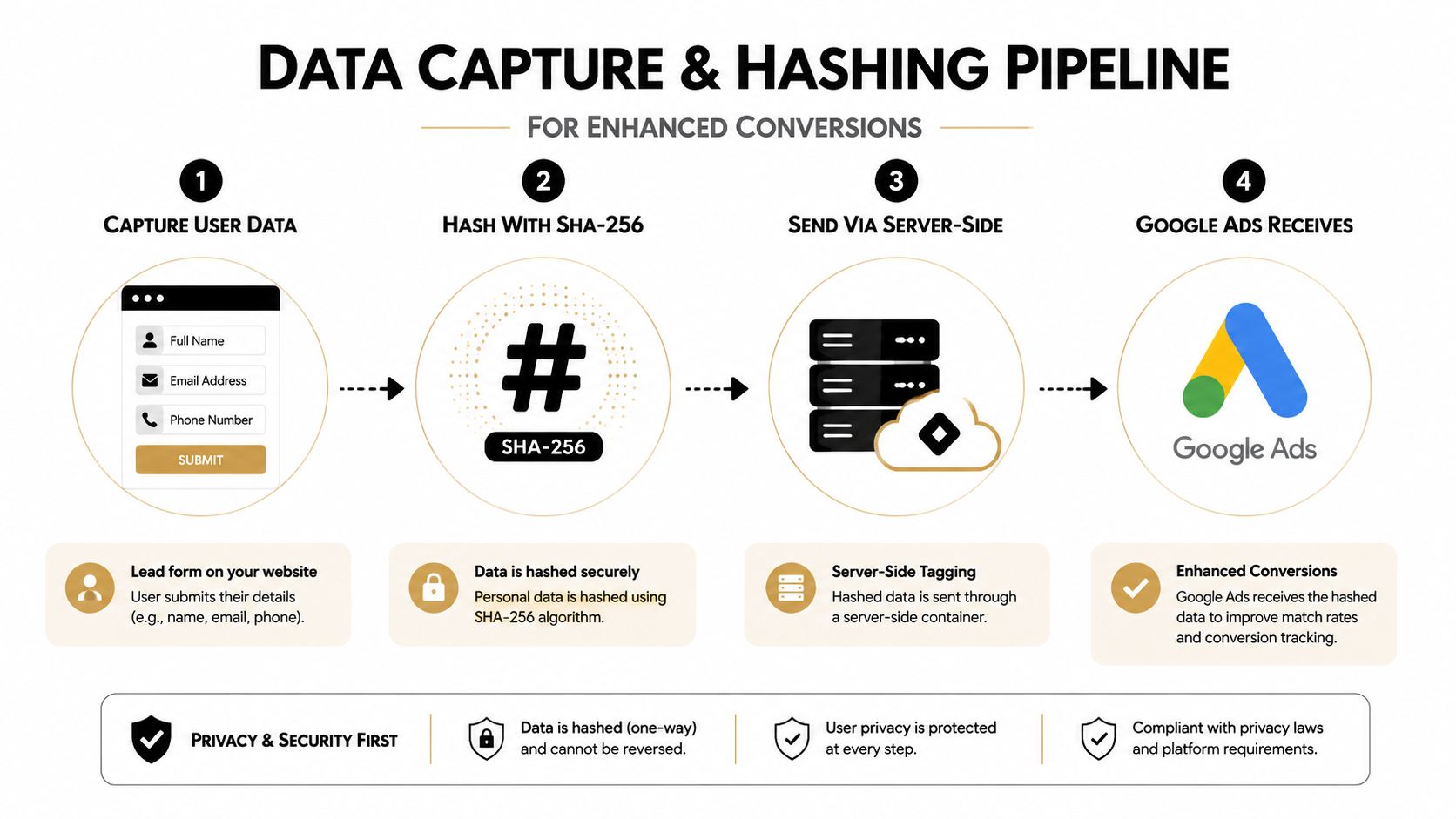
The Google Ads API path is stricter than many teams expect. Google describes a three-step process, normalize and hash user-provided data such as email address, phone number, and mailing address, then populate ClickConversion objects with that normalized and hashed data, then import those objects through the ConversionUploadService and review the imports. That order matters because the API expects the payload in a specific format before upload. The Google Ads API upload flow lays out that sequence clearly.
Client-side capture and server-side handling
For teams using GTM or a server-side tagging container, the core work is making sure the lead fields move from the form to the backend without getting altered. The form submit should pass consistent identifiers into your data layer or server event, and those identifiers should be normalized before hashing. That means the CRM, the tag, and the upload job all need to agree on what a valid record looks like.
Practical rule: hash after normalization, not before. Mixed casing, extra spaces, and inconsistent formatting are small mistakes that create big matching problems.
Consent still matters here. Hashing does not replace permission, it only changes how approved data is handled for matching. If the capture flow does not line up with your consent framework, the technical setup may run while the governance side becomes a liability.
What the field set should look like
Google's documentation points to email, phone number, and mailing address as user-provided data inputs for this workflow. In practice, better data density usually gives matching a better chance than a thin, inconsistent record. Accuracy still beats volume, because a messy CRM field can do more harm than leaving a field out.
The source of truth has to stay intact as well. If the CRM rewrites names, changes formats, or merges contacts too aggressively, the upload data can drift away from the original lead submission. That is usually where match quality starts to fall apart.
For teams that need a practical walkthrough of form capture mechanics, the guide to tracking form submissions in Google Ads is a useful companion once the offline flow is defined.
Mapping CRM Stages to Conversion Actions That Matter
Raw form fills are a noisy proxy for value. A better setup starts by asking which CRM stages correlate with real commercial intent, then sending only those stages back as conversion actions.
The strategic mistake is easy to spot. Teams wire every submission into Google Ads, then wonder why Smart Bidding optimizes toward volume instead of opportunity quality. A better approach is to define the true optimization event as a qualified lead or a later CRM milestone, not just a top-of-funnel record.
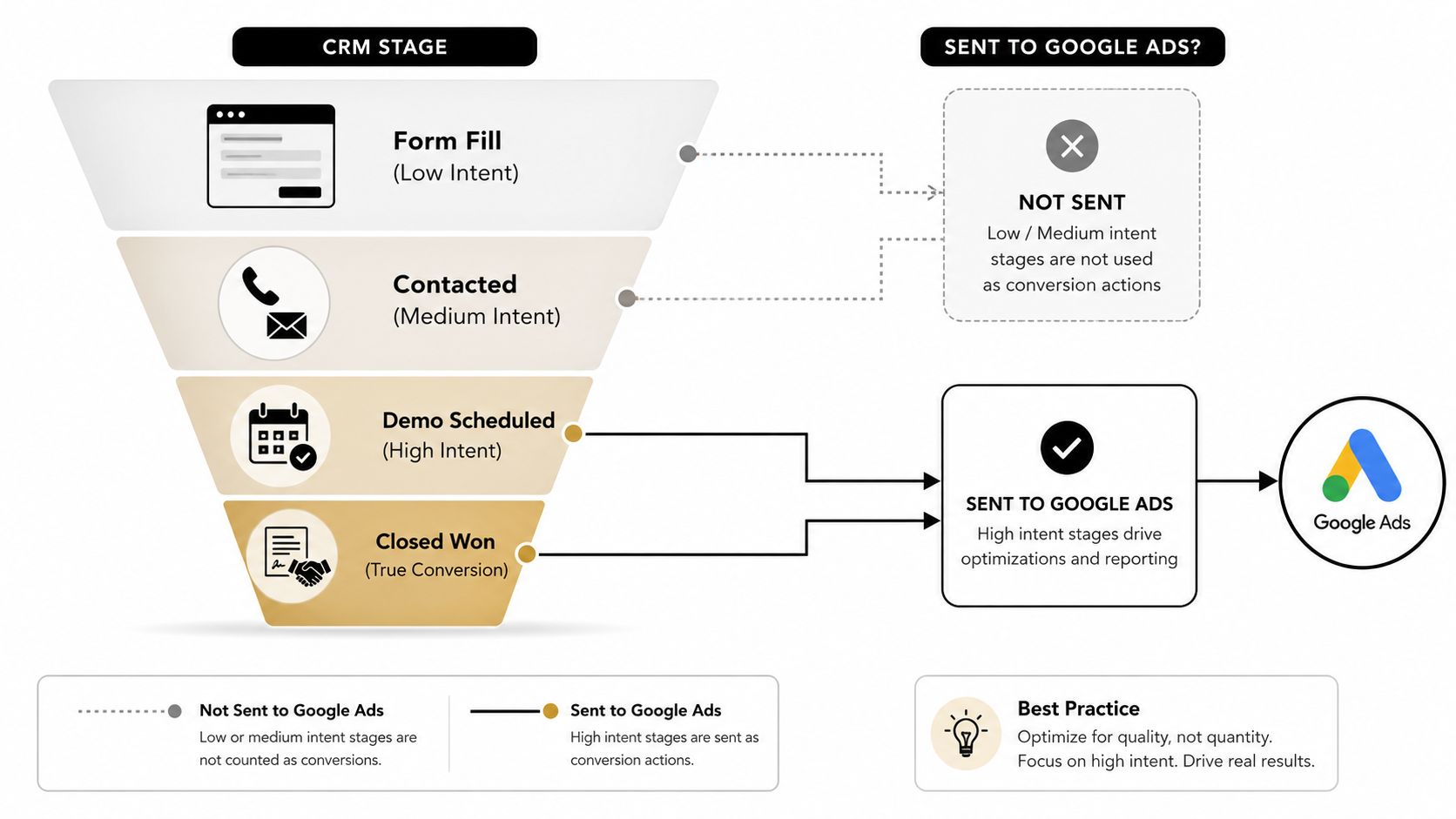
The best mapping usually starts with a simple audit of the pipeline. Look at where leads become sales-accepted, where meetings get booked, and where closed-won appears. Those are the stages worth testing as Google Ads conversion actions, because they reflect business value rather than administrative motion.
How different businesses should think about the mapping
A SaaS team may care most about demo scheduled or sales-qualified lead. A professional services firm may care more about consultation booked. A local lead gen operation may care about a contacted or quoted stage if that is where deals start to separate from noise.
The point is not to force every business into the same stage taxonomy. The point is to send back the stage that best represents real commercial progress in that specific funnel.
If sales does not trust a stage, do not optimize toward it.
CRM hygiene becomes a bidding problem, not just a reporting problem. Inconsistent lead status mapping means one contact can appear as “new,” “working,” and “qualified” in ways that confuse the upload logic and distort the conversion action definition.
A clean setup gives each meaningful stage a clear place in Google Ads. A messy setup makes the algorithm learn the wrong lesson, and once that happens, the spend often follows the noise instead of the revenue.
Testing Your Pipeline and Measuring Real Lift
A live setup should prove itself before it earns more budget. In practice, I start by sending a small set of known leads through the import path, then I watch the pipeline over time instead of trusting the first clean upload.
The test is simple. Confirm that the right leads reach Google Ads, check that the identifiers match cleanly, and look for evidence that bidding is learning from actual commercial outcomes rather than raw form activity.
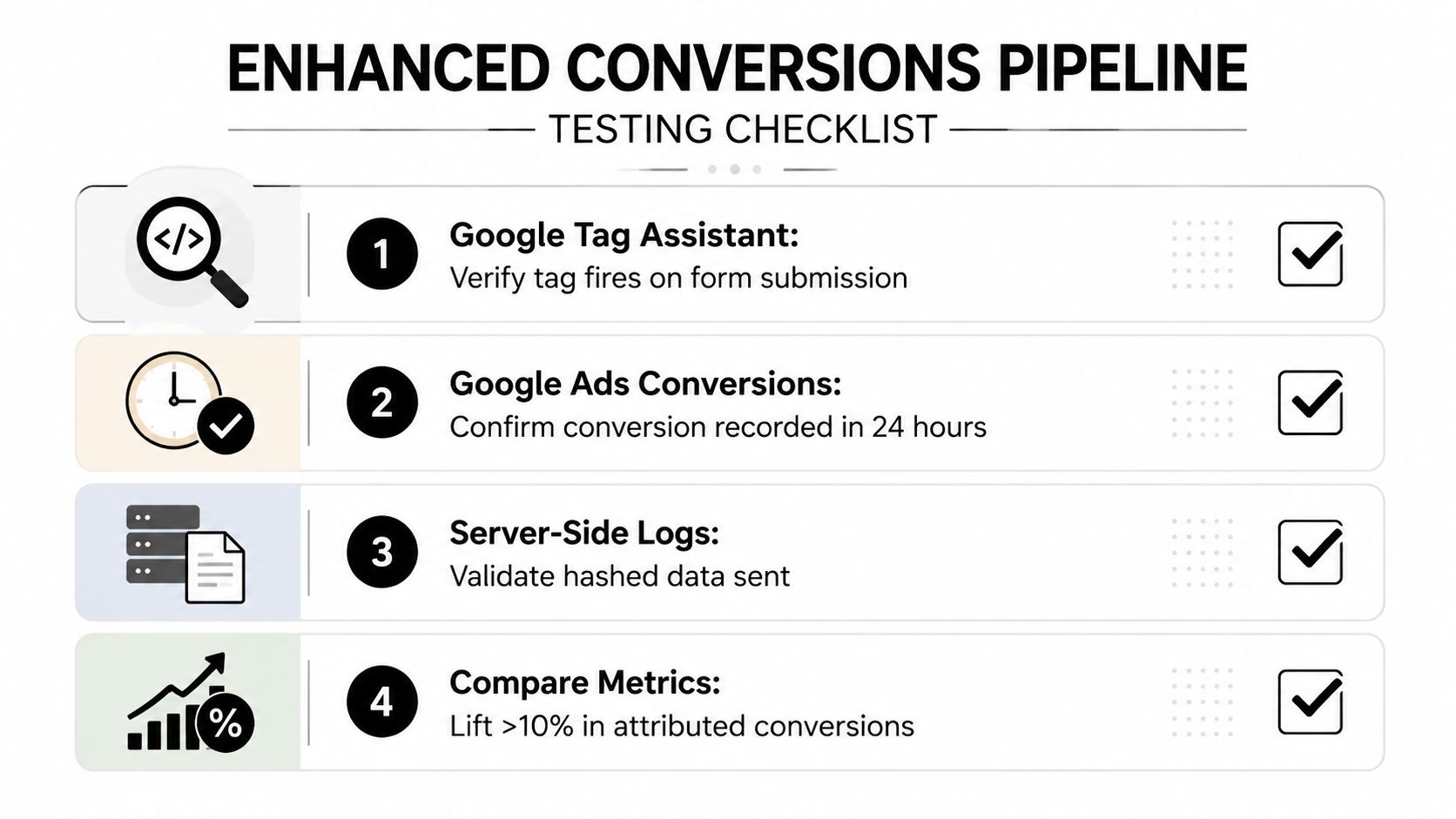
I usually start by testing imports against five known form submissions and checking whether the match rate is above 30%. After that, I review diagnostics after about two weeks, then I look again after 4 to 6 weeks to see whether Smart Bidding is changing query quality and lead qualification rate in the right direction.
What to inspect first
Start with import diagnostics before you chase bidding theory. If match quality is weak, the problem usually sits upstream in capture, formatting, or CRM consistency, not in the bid strategy.
Then check whether the conversion action reflects value. If you send back weak stages, the model can still follow the rules you gave it and still produce the wrong kind of growth.
The attribution view matters too, because the CRM data you send back needs to line up with the rest of your measurement stack. If reporting is fragmented, use the framework in the cross-channel attribution guide so the offline signal does not become an isolated island.
How to read the result
A healthy pipeline does more than record conversions. It changes the shape of the traffic that wins, which is the part many teams miss when they stop at tag setup.
You should see the algorithm move away from easy, low-intent signals and toward the clicks that create better leads. That shift is the closest thing to real lift in this setup, because it shows the CRM-to-Google Ads loop is feeding back useful information instead of just logging activity.
The key is patience with discipline. Check the mechanics early, then judge the bidding outcome only after the learning window has had time to settle. That is how you separate a working implementation from a lucky first week.
Troubleshooting the Failures That Quietly Kill Performance
The failures that hurt this setup usually don't look dramatic. The form still submits, the CRM still stores the lead, and Google Ads still shows activity. The problem is that the pipeline is broken in a way that keeps the model from learning the right thing.
Weak form capture is the most common starting point. If the email field never makes it into the data layer, or it is inconsistent across pages and templates, the upload loses the identifier it needs to match the lead back to ad interactions.
Common breakpoints and fixes
- Weak form-data capture: the email or phone field isn't passed cleanly from the form to the tagging layer. Fix it by standardizing the field mapping and testing every form variant, including hidden fields and multi-step forms.
- Inconsistent CRM status mapping: leads get stuck in intermediate stages, or one sales rep uses a status that another rep never touches. Fix it by defining a single stage schema and locking the upload rule to specific statuses.
- Bad imports: the data loads, but the records are malformed or misaligned enough to confuse the model. Fix it by validating a small sample before scaling and reviewing import diagnostics on a schedule.
- Consent gaps: data gets hashed, but the lead was never collected under the right permission framework. Fix it by tying the capture process to your consent rules before any upload is attempted.
Bad imports are especially painful because they can degrade model behavior instead of failing loudly. A pipeline can look active while feeding Google Ads low-value or mismatched records, which is worse than having no signal at all.
The failure point is often the handoff between the CRM and Google Ads. Lead status mapping, field normalization, and import hygiene decide whether the system receives a useful conversion signal or just another batch of records that do not describe commercial quality.
If the CRM stage is wrong, the bidding outcome will be wrong too.
Privacy missteps deserve the same attention as technical errors. Hashing does not replace consent, and it does not make inaccurate data useful. If the collection standard is weak, the matching standard will not save it.
Best Practices for Agencies and In-House Teams
The teams that get lasting value from this setup treat it like an operating system, not a one-time technical task. They review CRM-to-Google Ads sync health regularly, keep the stage mapping documented, and update the conversion definitions when the sales process changes.
That discipline matters even more in agency work. Different clients use different CRMs, different stage labels, and different sales handoffs, so a working setup in one account can fail in another if the data model isn't documented.
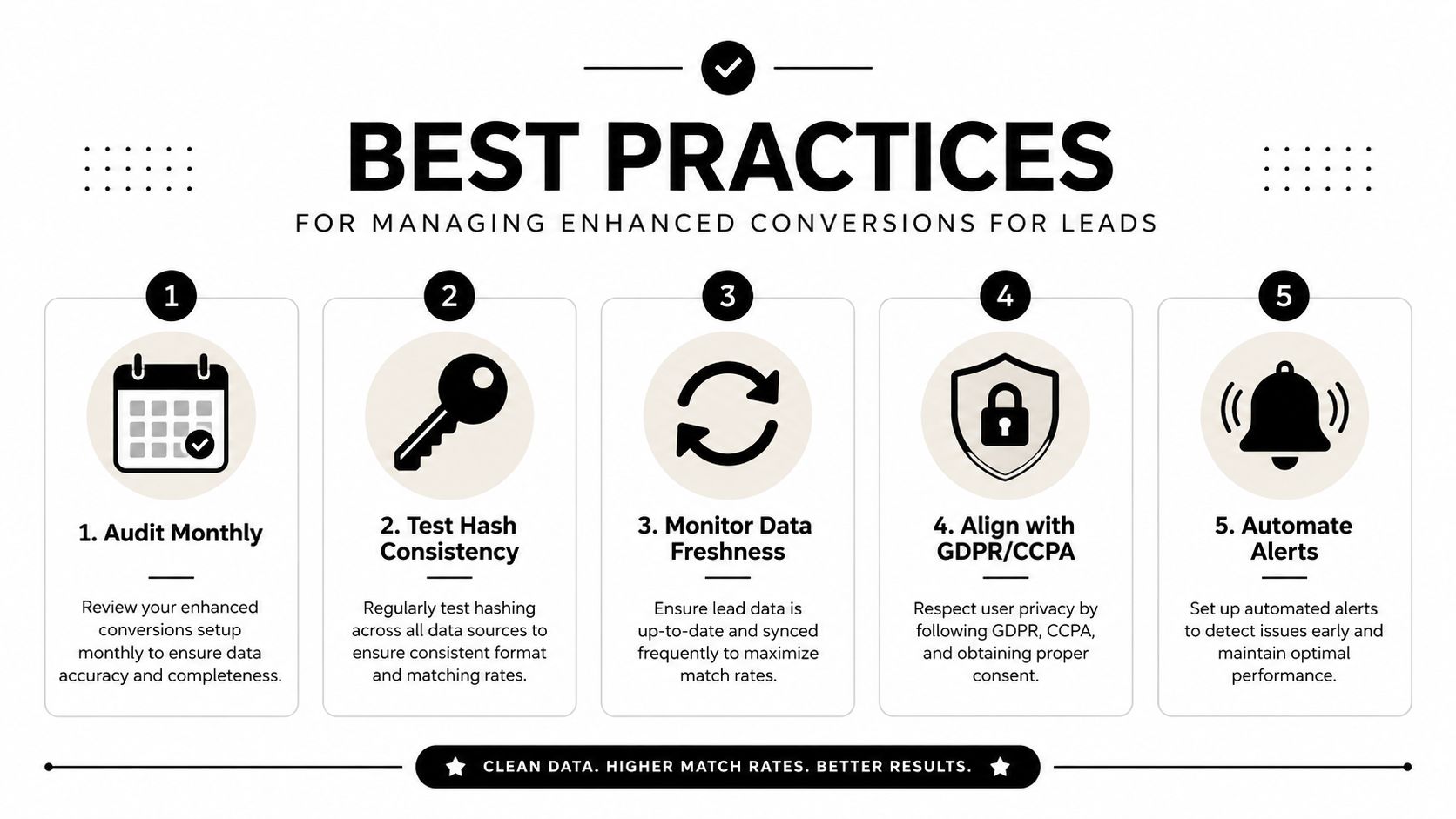
What good teams keep doing
- Audit monthly: check whether CRM stages still reflect real commercial value.
- Test hash consistency: confirm that the same lead data produces consistent normalized output.
- Monitor data freshness: stale syncs create stale learning.
- Align with GDPR and CCPA: privacy compliance needs to be part of the workflow, not an afterthought.
- Automate alerts: if the pipeline stalls, someone should know before budget drifts.
Documentation saves time later. When the person who set up the pipeline leaves, the account should still have a clear record of what fields are captured, which stages are uploaded, and how the matching logic is validated.
The bigger shift is strategic. Enhanced conversions for leads pushes teams away from optimizing for volume and toward optimizing for value, which is where first-party data strategies are heading anyway. The accounts that win are the ones that keep the CRM clean enough for Google Ads to learn from it.
If you want a cleaner Google Ads setup, better lead quality signals, and fewer hours lost to broken CRM-to-platform handoffs, visit Keywordme. Keywordme helps PPC teams tighten the keyword side of Google Ads while they build more reliable measurement on the conversion side, so your campaigns can scale on better data instead of guesswork.
.svg)