
Display Ad Targeting: Setup, Optimization, and Cuts
Display Ad Targeting: Setup, Optimization, and Cuts


You've got a display campaign spending steadily, the impression count looks healthy, and the dashboard even reports a few conversions. Then you inspect the placement report and discover that much of the budget went to mobile apps, low-intent content, and audiences that were never likely to become customers. Display ad targeting isn't primarily a reach exercise. It's a method for deciding which impressions deserve money.
The strongest accounts treat targeting as a spend-reduction discipline. They start with audiences that carry intent, use contextual and placement signals where user identity is limited, exclude waste before it accumulates, and test one change at a time. That approach matters because display click-through rates are usually low, so downstream conversion quality matters far more than a large impression total. Google reports that Display targeting tells the system who to reach or where ads should appear, which makes every targeting choice an allocation decision, not a cosmetic campaign setting. Google's explanation of Display targeting is a useful reference before making structural changes.
Why Most Display Budget Disappears
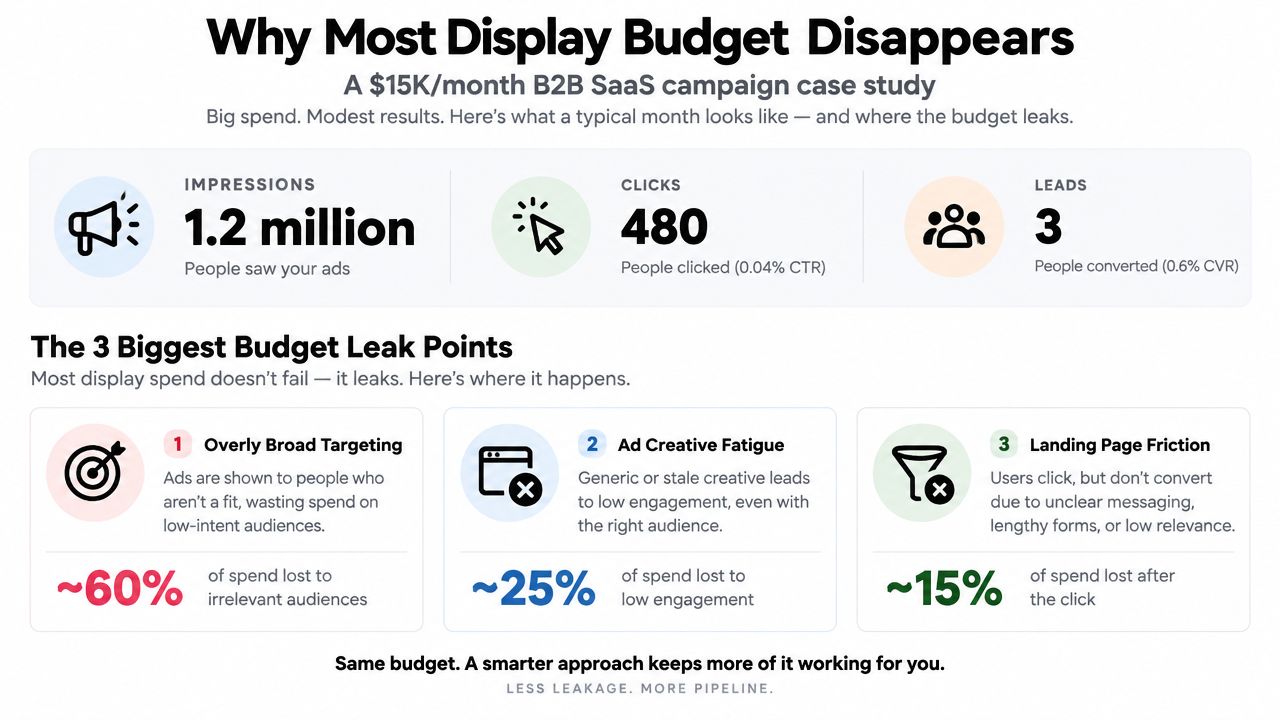
A B2B SaaS campaign can spend $15,000 per month, generate 1.2 million impressions and 480 clicks, then produce only three leads. The report looks active, yet the pipeline contribution remains nearly invisible. That pattern usually signals a targeting and placement problem, not a shortage of reach.
Waste enters through three routes. Broad audience defaults deliver ads to users with little connection to the offer. Automated placements send impressions to low-quality apps and sites where commercial intent is weak. Loose contextual matching puts a relevant-looking ad beside content unrelated to a buying moment.
The Google Display Network reaches over 90% of internet users, according to Google's Display Network overview. That scale benefits campaigns with clear controls, but it makes loose targeting expensive. Even a $0.50 CPM can consume a meaningful share of the monthly budget when delivery repeatedly reaches irrelevant placements.
Audit rule: Treat every impression as a purchase that needs a reason, not as free exposure.
Reduce spend before expanding reach. Set a defined audience, review placement quality, and tighten topics and contextual signals. Separate prospecting from remarketing so a high-intent pool cannot conceal weak cold traffic. For cookieless or privacy-limited delivery, keep contextual signals, first-party audience inputs, and placement controls available rather than depending on one identity signal.
Creative can create another efficiency leak. Sound targeting still underperforms when the message hierarchy is unclear, text is difficult to read, or the layout fails on mobile screens. Teams producing new assets can use this 2026 banner design workflow to organize production before testing creative against targeting.
Search captures an active query. Display reaches people during another activity, so it needs tighter controls around intent and exposure. This search ads versus display ads comparison clarifies why display should be judged by qualified actions, not traffic volume alone.
The Four Targeting Layers in Google Display
A display account can have strong creative and still waste spend if every targeting control serves the same vague goal. Google Display gives you four practical layers: audiences, contextual signals, placements, and topics. Assign each one a specific job, then remove the layer that adds reach without improving qualified actions.
Audiences identify the user
Audience targeting defines who should receive the ad. Available options include demographic groups, affinity audiences, in-market audiences, and custom segments. A custom segment can combine competitor URLs with category keywords. An in-market segment uses Google's interpretation of recent commercial interest.
Audience signals work best when the user's relationship with the brand changes the offer or bid. A pricing-page visitor should not automatically share a message with someone who only read a general industry article. Separate those groups when recency, creative, frequency, or bid strategy differs. Privacy-first planning also means keeping first-party audience inputs useful without assuming a single identity signal will remain available.
Context identifies the content
Contextual targeting evaluates whether the page relates to the offer. Add keywords or URLs that describe the subject, then review the pages Google selects for semantic relevance. It gives cold campaigns a way to reach relevant environments when personal signals are incomplete or unavailable.
Contextual targeting reaches the content environment, not verified user intent. Matching words can still place an ad on a weak page, so exclusions and placement reviews remain necessary. The distinction is explained in this guide to contextual advertising. For cookieless delivery, contextual signals should stay in the account as a dependable control, not as a last-minute substitute.
Placements identify the inventory
Managed placements let you select specific websites, apps, or YouTube channels. They suit professional audiences with identifiable media habits, and they can protect spend when certain publishers consistently produce qualified engagement. The trade-off is limited scale. A short placement list may offer strong relevance while creating higher auction pressure or too little delivery.
Review app and site performance separately. A placement that produces inexpensive clicks can still be a poor purchase if users leave quickly or fail to complete the intended action. Keep placements only when their post-click quality supports the cost.
Topics provide broad coverage
Topics group pages into broad content categories assigned by Google. They can support awareness campaigns that need a defined subject area without selecting every site manually. For performance activity, topics usually need another control because the category may extend well beyond the buying context. Use them to test a controlled expansion, not to justify unrestricted reach.
| Layer | Best Use Case | Main Risk |
|---|---|---|
| Audiences | Remarketing and modeled prospecting | Small or stale lists |
| Contextual | Cold reach around relevant content | Superficial page matches |
| Placements | High-intent vertical sites and channels | Limited scale or expensive inventory |
| Topics | Broad awareness | Category scope becomes too loose |
Optimized targeting can find additional users from signals such as landing-page keywords. Treat it as a delivery choice, not a reason to remove account controls. Add audience or keyword signals when they reflect the conversion you value, and compare results against a controlled baseline before allowing more reach.
Layering all four methods does not automatically improve efficiency. Restrictions can multiply, shrink delivery, and force the campaign into fragile auctions. Build a hierarchy around spend reduction first, then retain only the signals that improve conversion quality or provide a workable privacy-first fallback.
Choosing Audience Types That Actually Convert
Audience selection should follow intent, not the number of options available in the interface. In most accounts, retargeting comes first, modeled audiences follow, and broad cold prospecting gets the smallest initial allocation.
Retargeting includes site visitors, cart abandoners, and video viewers. These users have already interacted with the brand, but recency still matters. A recent pricing-page visitor and an old blog reader shouldn't necessarily share the same bid or creative. A retargeting list under 1,000 users often burns budget against the same small pool, so merge it with a more useful recency group or pause it until the list has enough depth.
Lookalike or similar-audience segments use converters as a starting point for finding users with related characteristics. They're most useful when the seed contains genuine customers rather than every visitor. In practice, the quality of the conversion action determines whether the model expands toward valuable prospects or toward cheap, shallow interactions.
In-market and affinity audiences support cold prospecting. In-market audiences reflect commercial interest, while affinity audiences describe broader interests and habits. The former usually deserves priority for direct-response testing. The latter can support awareness, but it needs stronger creative and tighter measurement because interest doesn't equal readiness.
Industry benchmark data reports 0.73% CTR for first-party data plus lookalike targeting, 0.68% for behavioral retargeting, 0.62% for dynamic product retargeting, 0.30% for contextual targeting, and 0.19% for broad audience targeting. Those figures come from the programmatic display benchmark dataset, and they're useful as directional comparisons, not promises for an individual account.
| Audience Type | Indicative CTR | Indicative Conv. Rate | When to Lead With It |
|---|---|---|---|
| Retargeting | 0.68% to 0.70% | Validate against account data | Existing visitors and viewers |
| Lookalike or similar | About 0.73% | Validate against account data | Strong converter seed |
| In-market or affinity | Broadly variable | Validate against account data | Cold prospecting |
A practical starting allocation is 60% retargeting, 30% lookalikes, and 10% in-market audiences, but that split shouldn't become a rule you defend after the data disagrees. High-ticket B2B campaigns with a small remarketing pool may need to invert the balance and place more budget into qualified prospecting.
For account structure and audience setup, the Google Ads audience targeting guide can help teams map segments to ad groups. The next control is exclusion. Even a strong audience will waste impressions if converters, customers, and irrelevant inventory remain eligible.
Exclusions That Stop Wasted Impressions
Exclusions belong in the initial targeting plan, not in a cleanup queue. A campaign that adds audiences but leaves poor placements, existing customers, and internal traffic eligible is still buying impressions it doesn't need.
Begin with the placement report. Review the previous 30 days, identify domains that consumed more than 10% of spend without converting, and add those domains to the account-level excluded placement list. Account-level exclusions prevent the same inventory from leaking into other campaigns and ad groups. Campaign-level exclusions are still useful when one product has a different tolerance for a placement, but they shouldn't be the only line of defense.
Build negative audiences deliberately
Exclude users who have already completed the desired action. That usually includes converters, current customers, employees, and internal traffic. A customer upsell campaign may need a separate audience rather than a blanket exclusion, so align the exclusion with the commercial objective.
Frequency caps control repetition before the user experience deteriorates. A practical starting point is three impressions per user per day for prospecting and seven for retargeting. These are operating guardrails, not verified performance benchmarks. Adjust them after reviewing conversion rate, assisted actions, creative fatigue, and exposure by audience.
Check inventory and topic boundaries
Add topic exclusions for adjacent categories that attract attention but not buyers. A business software advertiser may need to exclude entertainment, games, or general reference content, depending on the placement report and brand-safety requirements.
| Exclusion Type | Apply At | Typical Threshold | Common Mistake |
|---|---|---|---|
| Placement | Account or campaign | Spend without qualified conversion | Removing only one ad group |
| Converter audience | Campaign or ad group | Completed target action | Paying for a completed journey |
| Customer audience | Campaign or ad group | Existing relationship | Blocking legitimate upsell activity |
| Topic | Campaign | Irrelevant content category | Excluding too broadly |
| Frequency | Campaign | Repeated daily exposure | Using one cap for every audience |
Use Audience Manager and campaign settings to verify how exclusions interact with targeting signals. Display can evaluate multiple signals for a single impression, and the interface doesn't always make precedence obvious. If delivery changes unexpectedly, inspect the audience, content, placement, location, language, and exclusion settings together instead of assuming the algorithm made the decision alone.
When to Simplify Targeting and Go Broader
A campaign can lose performance by becoming too selective. A small remarketing pool, limited conversion data, and stacked audience, topic, and placement restrictions may leave too few eligible impressions. Delivery then narrows, auctions become more expensive, and the system receives too little conversion volume to optimize reliably.
Privacy restrictions make that trade-off sharper. Google states that, in restricted data-processing mode, Display and DV360 ads use contextual and placement targeting, while interest-based, demographic, and remarketing-list targeting are not permitted. Google's policy documentation also describes added serving restrictions for sensitive custom segments, creatives, and landing pages.
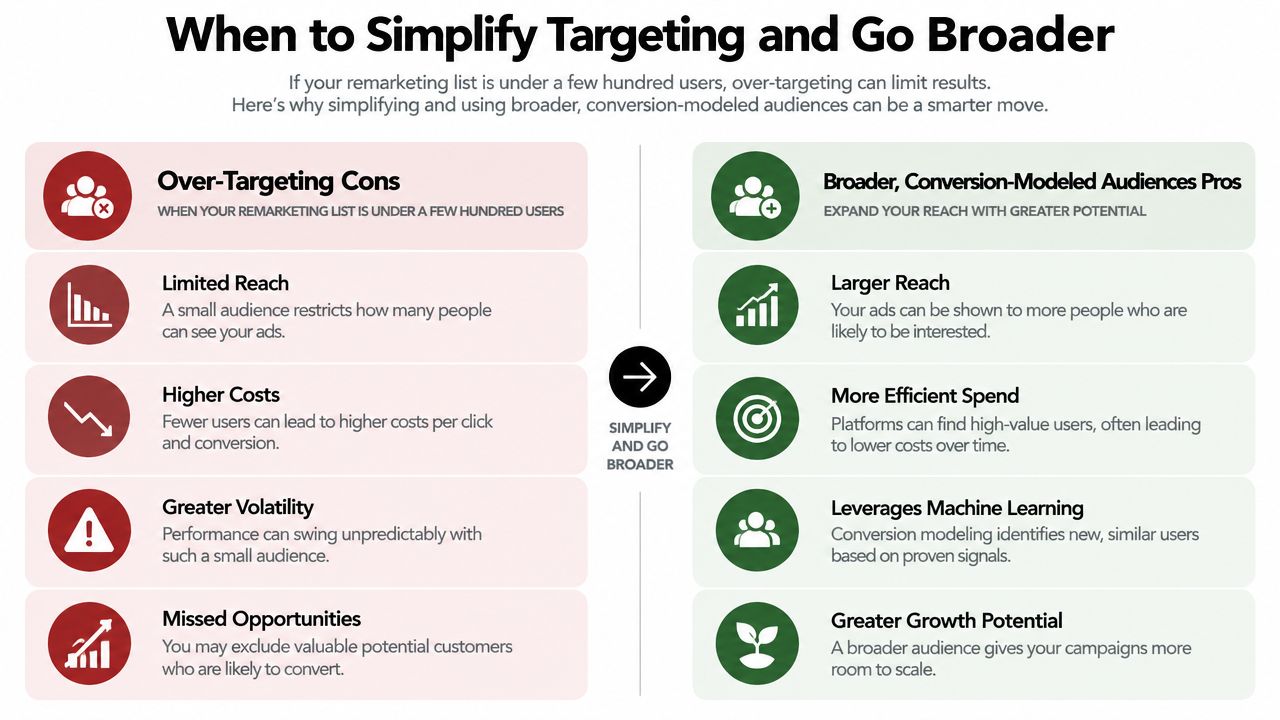
Simplify when restrictions remove more reach than they remove waste. Use one broad audience, or place an audience in observation where the campaign setup permits it. Give automated targeting enough eligible inventory to learn from real conversion volume. Keep creative, landing page, and conversion action stable, so targeting changes remain distinguishable from other account changes.
Practical judgment: Broader targeting is a deliberate spend-control decision when audience data is thin, not a sign that the account has failed.
Contextual relevance becomes more useful as consent rates fall and remarketing pools shrink. A neutral study found that contextual targeting offset about 44% of the conversion-rate decline and 42% of the revenue-per-click loss linked to the absence of personal data. The American Marketing Association's privacy and display analysis provides context for those findings.
Match the setup to available signal. Use a reliable converter seed when one exists. If the seed is tiny, modeled audiences weaken, or privacy controls remove identity signals, reduce targeting layers and rely more on contextual and placement controls. Keep exclusions, inventory quality, and a meaningful conversion action in place. Broader delivery still requires active management.
Testing Targeting Changes the Right Way
A targeting test can produce a higher CTR while wasting more money. Google Display Network benchmarks report an overall average CTR of 0.46%, compared with 0.07% for standard cold-audience display and 0.7% for retargeting in another benchmark set. The cited display benchmark summary shows why click growth is a weak reason to expand reach. Treat each test as a spend-reduction exercise: identify which eligible impressions can be removed without reducing qualified conversions. Build privacy and cookieless contingencies into the setup by keeping contextual, placement, and first-party conversion signals available when identity-based audiences shrink.
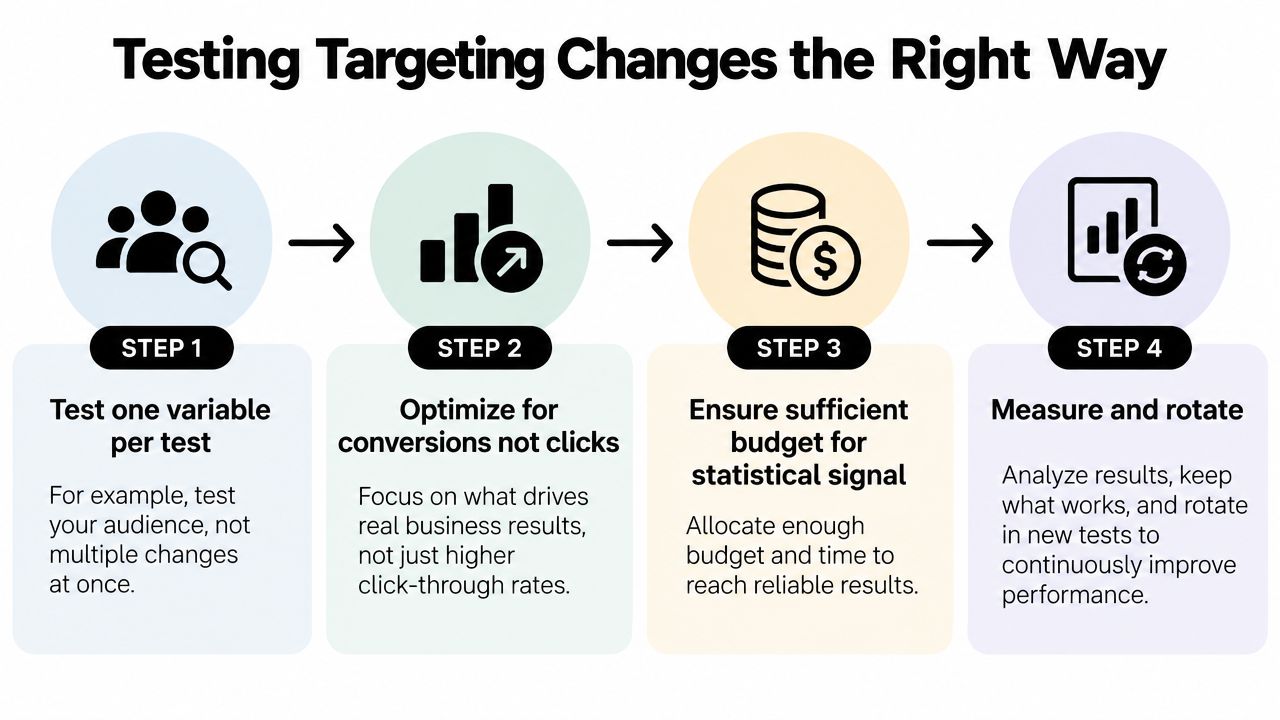
Start with one variable. Add a lookalike layer, remove a topic, change a frequency cap, or alter placement controls, but do not combine those changes in one experiment. Record the hypothesis, pre-test baseline, exact setting changed, and metric that will decide the outcome.
Use a controlled rotation
Campaign experiments in the same Google Ads account usually limit structural differences and auction overlap. If separate campaigns are necessary, use shared budgets and identical creatives where possible. Keep bidding, landing pages, conversion actions, locations, languages, and schedules stable unless one is the test variable.
Hold the test through at least two business cycles at 95% confidence when conversion volume supports that standard. A small dataset cannot justify a conclusive result. Mark sparse-data outcomes as directional and avoid scaling a small apparent win.
Judge targeting on conversion cost, qualified conversion volume, and incremental conversions. CTR can reveal delivery or creative problems, but it should not decide whether an audience receives more budget. Research has linked precise targeting with stronger ad effectiveness, while a separate field study reported a median 17% increase in site visits and an 8% increase in conversions when display creative and targeting worked together. The same cited display advertising research summary highlights intrusiveness risk, so frequency and placement quality belong in the test design. Use contextual controls when consent loss or cookie restrictions weaken audience signals.
A structured audience targeting guide helps document test variables and guardrails. Keep a change log after every rotation. Over time, it shows which signals produced qualified actions and which merely increased delivery.
Use this walkthrough as a visual reminder of how to isolate and measure audience tests.
Quick Wins and Final Sanity Checks
The quickest savings usually come from subtraction. Before adding another audience, verify where the current budget is going, which users already converted, and whether reported conversions represent incremental demand. Treat privacy protection as part of this audit, not as a later contingency.
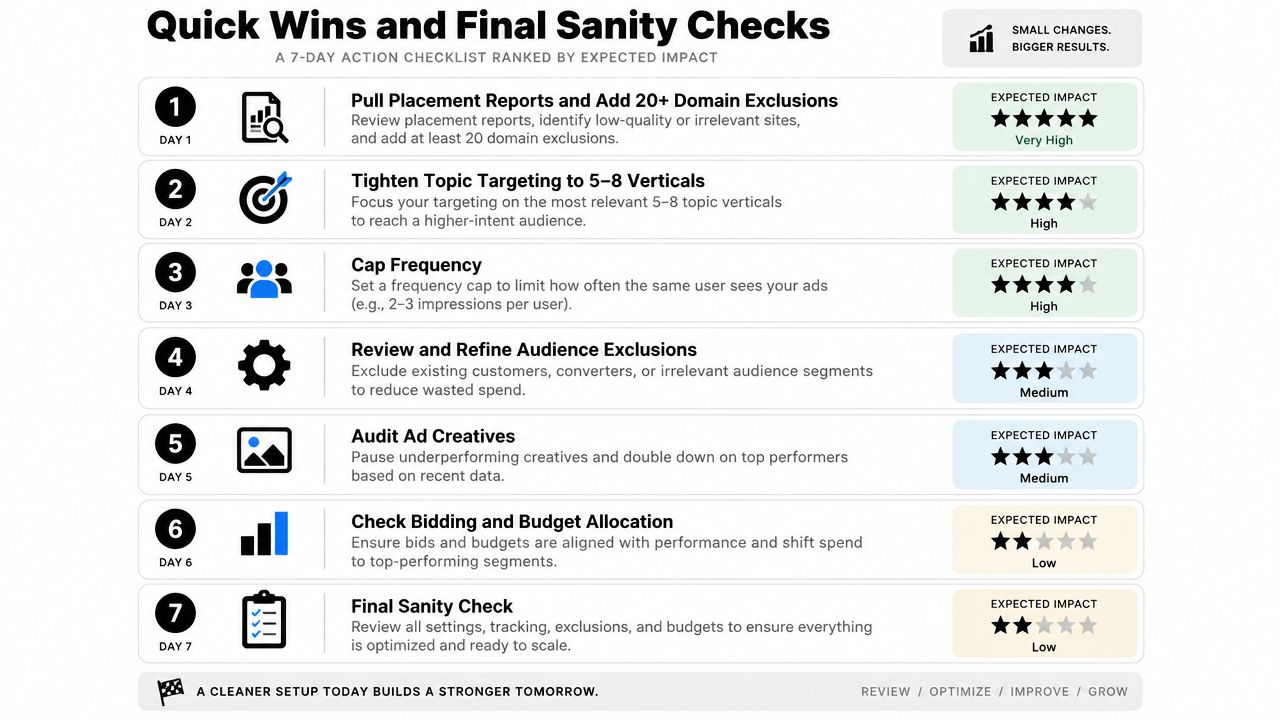
A seven-day operating checklist
- Day one, pull placement reports. Add at least 20 domain exclusions when the audit confirms those domains are irrelevant or wasteful. Check whether conversions cluster in three placements or spread across 30.
- Day two, tighten topics. Reduce the campaign to 5 to 8 relevant verticals that match the buying context. Separate categories tied to a commercial problem from those that are merely adjacent.
- Day three, cap frequency. Start with three exposures per user per day for prospecting and review retargeting separately. Confirm that repetition reinforces the offer instead of teaching users to ignore it.
- Day four, segment remarketing by recency. Separate recent product or pricing visitors from older content readers. Check whether branded traffic is inflating the conversion rate.
- Day five, inspect demographics. Apply demographic bid adjustments only when the account has enough conversion evidence to support them. Base the decision on customer quality, not click volume.
- Day six, validate privacy contingencies. When consent rates fall below 60%, switch to contextual-only targeting and review publisher-defined audiences as a cookieless substitute. The 60% threshold is an operating rule, not a universal benchmark.
- Day seven, test incremental lift. Compare qualified conversions with the pre-change baseline before increasing budget. Confirm that targeting created additional demand rather than claiming conversions that would have happened anyway.
Planning for cookieless delivery should happen before signal loss forces a rushed rebuild. Prepare contextual, placement, and publisher-defined options, then document which signals can be removed without weakening measurement or reach.
Keywordme supports related Google Ads work by helping teams manage search-term cleanup, negative keyword lists, match types, and campaign expansion from account data. It does not replace placement or audience analysis, but it can reduce manual PPC administration while the team evaluates display inventory and incremental lift.
The final decision is straightforward. Do not scale because impressions are available. Scale after signal strength, audience overlap, placement quality, exclusion coverage, and incremental conversion value make the spend defensible.
Use Keywordme to organize surrounding Google Ads optimization while you audit display targeting and remove waste. Start the seven-day free trial, clean up negative keyword workflows, and give the team more time to test audience and inventory decisions that affect pipeline.
.svg)