
Digital Marketing Keywords: The PPC Playbook
Digital Marketing Keywords: The PPC Playbook


The most popular advice about digital marketing keywords is also the least useful: build a large list, group similar phrases, and revisit it when the campaign needs attention. That approach treats a search term like a label. In paid search, it's closer to a live signal from a real person, an auction, and a landing page that either fits the request or doesn't.
A useful PPC keyword strategy follows what people type, what those queries cost, which searches produce business value, and which ones drain budget. Historical data helps with planning, but the search terms report tells you what happened in the auction. That distinction changes how you build campaigns, write ads, add negatives, and decide whether automation deserves more room to operate.
Rethinking Digital Marketing Keywords for Modern PPC
A keyword list isn't a strategy. It's an input.
Google Ads historical metrics provide past 12-month average monthly searches, approximate monthly search volume, competition level, competition index, and bid percentiles for keywords, as described in this overview of digital marketing keywords and historical planning data. Those fields help you understand demand and auction pressure before launch, but they don't tell you exactly which wording, qualification, or problem a person will bring to the search box today.
That's why I treat keywords as measurable assets with a search history, not permanent campaign decorations. A term can look attractive during research and still attract poor traffic once matched against real queries. Another phrase can appear too narrow in planning data yet reveal strong commercial intent when it starts generating qualified searches.
Historical data is a planning layer
Historical metrics are useful for deciding whether a theme deserves a campaign, an ad group, or a content asset. They're also useful for comparing locations and languages, since keyword planning can be adapted to geo-targeted and language-specific campaigns at scale.
But averages hide variation. Search demand changes with seasonality, product awareness, competitors, and the language people use to describe a problem. Bid percentiles and competition indicators show auction conditions, not profitability. Profitability still depends on the relationship between the query, the ad, the landing page, the conversion, and the value of that conversion.
The practical implication is simple:
- Use planning data to form a hypothesis.
- Use live search terms to test that hypothesis.
- Use conversion value and waste to decide what stays.
Campaign structure should follow evidence
A mature account turns search behavior into structure. Relevant queries can become new ad groups, stronger ad themes, or dedicated landing pages. Irrelevant queries can become negatives. Ambiguous queries may stay under observation until enough evidence exists to make a confident decision.
This is the operating logic behind growth-focused PPC campaigns, where campaign expansion and efficiency depend on more than adding keywords. The strongest accounts connect research, query analysis, and budget decisions in one loop.
Practical rule: Never ask only, “Did this keyword get clicks?” Ask, “What did people mean when they searched, and did that meaning fit the business?”
Mapping Search Intent in a Conversational Era
Searchers increasingly use long-tail, conversational, and problem-oriented queries. Trend coverage for 2026 describes movement toward conversational searches, answers delivered inside the search engine, and longer comparison and solution-focused phrasing, as discussed in this 2026 search keyword trend analysis.
That shift makes static keyword lists fragile. A person looking for project management software might search “project management software,” then “what's the easiest project management tool for a remote team,” then “Asana versus ClickUp for a small agency.” Those queries share a market, but they don't share the same immediate need. One is broad discovery, one is problem-led research, and one is commercial comparison.
Build themes around the decision
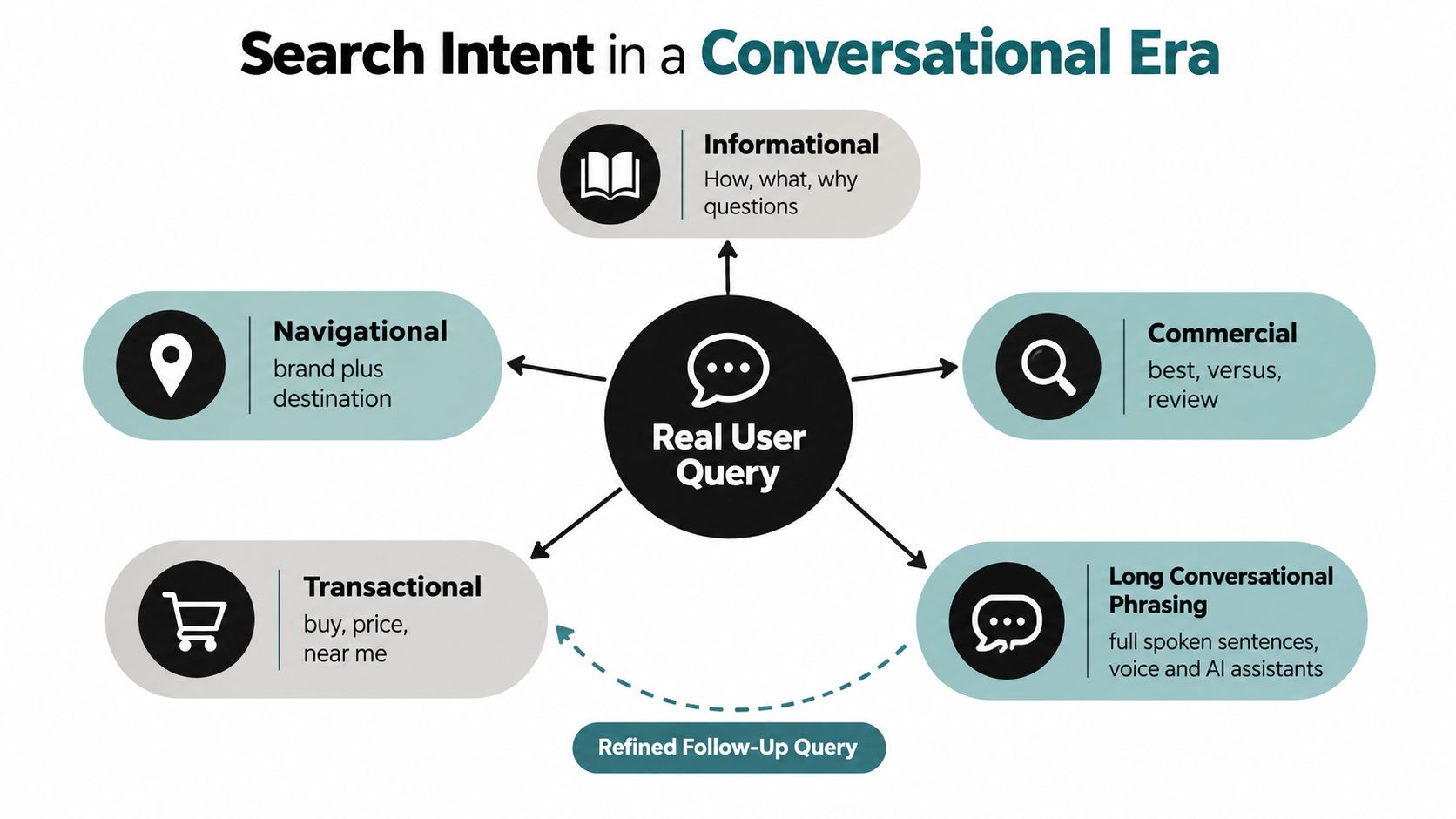
Start with the customer's decision, not the keyword length. I generally separate query themes into five practical groups:
- Informational queries ask how, what, or why. They're useful for education, guides, and early-stage content, but a direct-response ad may struggle unless the offer answers the question.
- Navigational queries seek a known brand, product, or destination. These searches often deserve precise routing to the relevant page.
- Commercial queries include comparisons, reviews, alternatives, and “best” language. They often need proof, differentiation, and a page built for evaluation.
- Transactional queries include pricing, purchasing, booking, demos, or local action. These should usually connect to a conversion-focused landing page.
- Long conversational queries describe a complete situation. They often reveal the user's constraints, such as team size, location, budget preference, or technical requirement.
The same product can appear in all five groups, but the ad promise shouldn't be identical. A pricing query needs price clarity or a credible next step. A pain-point query needs reassurance that the page understands the problem.
Connect query themes to destinations
Create a simple intent map with four columns:
| Query theme | User need | Ad angle | Landing page |
|---|---|---|---|
| Problem-oriented | Understand a difficulty | Outcome or solution | Educational service page |
| Comparison | Choose between options | Differentiator and proof | Comparison or alternatives page |
| Pricing | Assess affordability | Pricing clarity | Pricing or plan page |
| Transactional | Take action | Direct call to action | Conversion page |
This mapping prevents a common failure: sending every query to the same generic service page. It also gives the Search terms report a useful role. New phrases don't merely expand a list. They reveal how customers describe the decision in their own language.
For a practical workflow focused on turning actual search behavior into campaign improvements, use search term optimization as the operating reference. The important habit is to preserve the query's meaning while deciding whether it belongs in an ad group, a landing-page theme, or an exclusion.
Mastering Match Types as a Query Control System
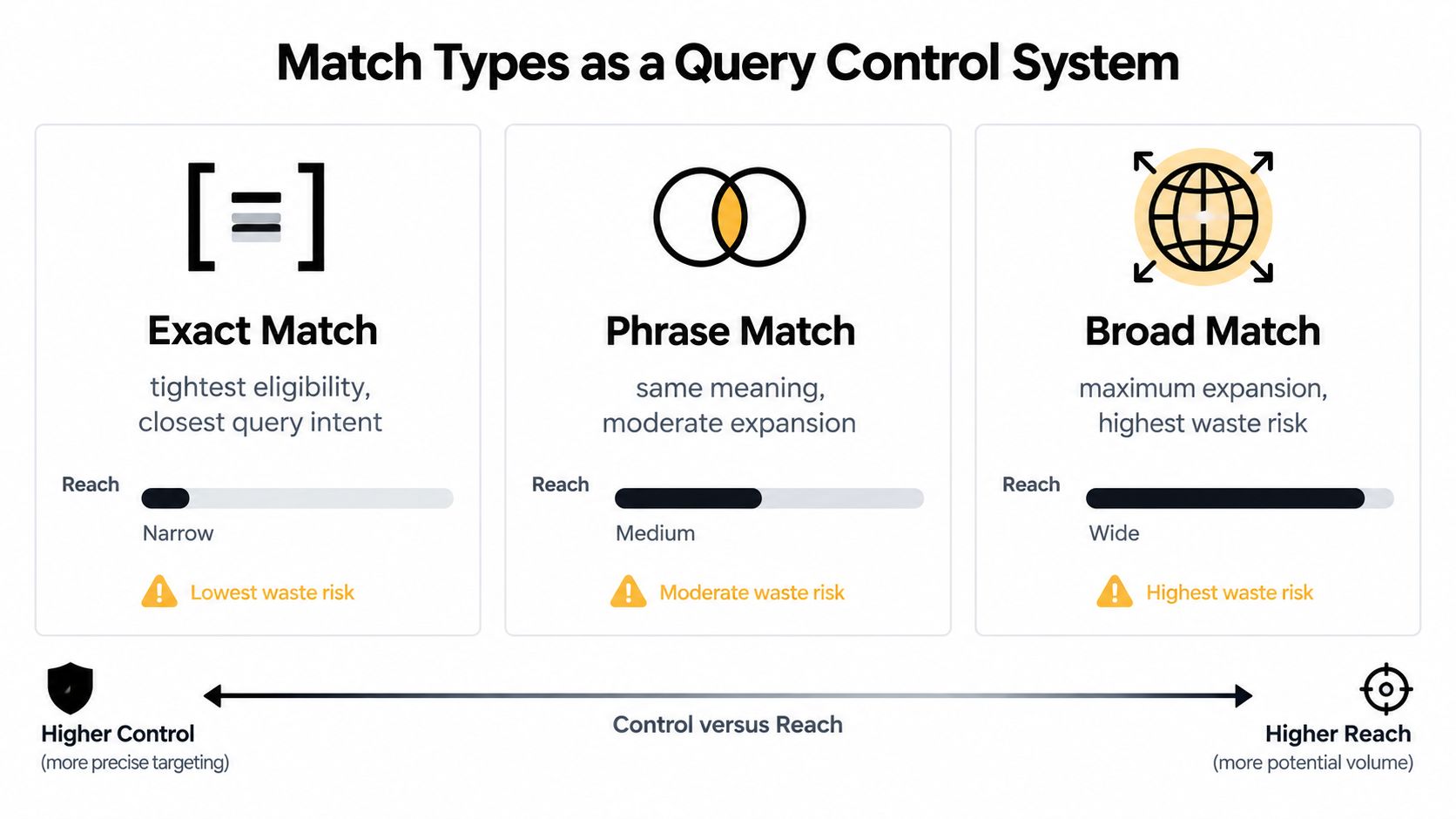
Match types determine how closely a search must relate to a keyword before an ad can enter the auction. They're not decorative labels, and they shouldn't be assigned once and ignored. They're controls that determine how much discovery, relevance, and cleanup your account will require.
Google's documentation explains that the Search terms report shows the actual query, matched keyword, and match type, which gives advertisers the evidence needed to refine coverage. The details are available in Google Ads keyword matching guidance.
Choose the control level deliberately
Exact match concentrates on same-meaning intent. It's useful when the query theme is proven, the economics are clear, and relevance matters more than exploration.
Phrase match allows more expansion while preserving a meaningful relationship to the keyword. It can help discover variations that retain the original commercial idea, but it still needs regular query review.
Broad match reaches the widest set of related searches. That wider reach can uncover valuable language and new demand, but it also increases the need for conversion-quality signals, careful monitoring, and negative keyword maintenance.
The mistake is treating broad as automatically better for scale or exact as automatically safer. The correct choice depends on how much discovery the account can absorb and how quickly the team can evaluate the resulting traffic.
Use a query review loop
A reliable review process looks like this:
- Open the Search terms report and separate queries by intent theme.
- Compare conversion value and waste, not clicks alone.
- Promote useful language into a better-fitting ad group or keyword.
- Tighten coverage when a match type repeatedly brings weak relevance.
- Keep discovery open where queries are commercially useful but wording is still emerging.
For instance, a broad keyword around accounting software might uncover searches for freelancers, contractors, or small firms. Those groups may deserve separate ad messages and landing pages. If the same keyword also attracts courses, jobs, or free templates, the account needs exclusions rather than more ad copy.
A deeper explanation of this control model is available in the Google Ads keyword match type guide. The core principle is to let observed intent decide whether you expand or restrict matching.
Scaling Negative Keywords to Fight Automation Waste
Negative keywords are the account's waste-suppression layer. They stop irrelevant searches from continuing to compete for budget, but they work best when applied with enough precision to avoid blocking legitimate discovery.
Google Ads supports broad, phrase, and exact negative keyword matching in Search campaigns. Its documentation also explains how the Search terms report identifies the keyword and match type that triggered a query, which makes systematic exclusions possible through Google's negative keyword guidance.
Start with costly, non-converting themes
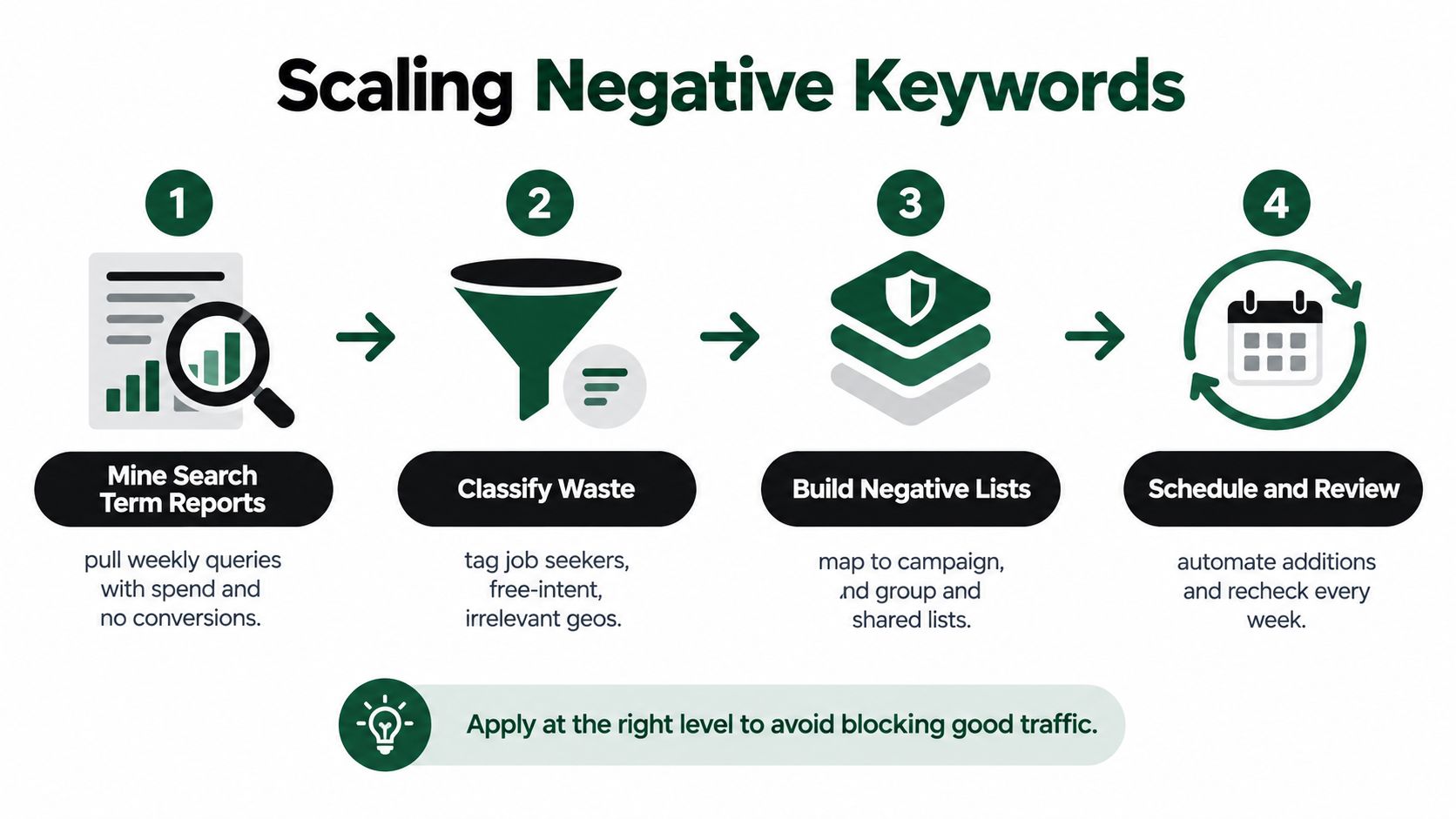
Sort search terms by cost, then inspect queries that have spent meaningfully without producing a conversion. Don't automatically negate every unfamiliar phrase. First classify what made the traffic unsuitable:
- Job-seeking language, such as careers, salary, or hiring terms.
- Free-intent language, when the business sells a paid product.
- Research-only language, when the campaign is built for immediate purchase.
- Irrelevant geography, where service areas don't apply.
- Wrong product category, especially where a broad term has multiple meanings.
- Existing-customer support, if the campaign targets acquisition rather than account help.
A query that is irrelevant across the whole account may belong on a shared negative list. A query that's unsuitable only for one campaign should be excluded at the campaign level. A query that conflicts with one ad group but remains valuable elsewhere may need an ad-group negative instead.
Scale without overblocking
Negative lists need hierarchy. Account-wide exclusions should contain terms that are almost never commercially relevant. Campaign-level lists should reflect the offer, geography, or audience. Ad-group exclusions should resolve overlap between closely related themes.
Google Ads Help notes that Performance Max negative keyword capacity expanded from 100 to 10,000 per campaign in March 2025, and shared negative lists were added in August 2025, as documented in Google Ads negative keyword updates. More capacity doesn't remove the need for judgment. It makes governance more important, especially when multiple campaigns use similar themes.
A useful safeguard: Apply the narrowest negative match that solves the problem, then check whether the exclusion removes valid variants.
Review the report on a recurring schedule. Add clear waste to the correct list, record why it was excluded, and revisit borderline terms rather than allowing automation to make every decision invisibly. The aim isn't maximum blocking. It's controlled relevance.
For campaign teams that need a repeatable structure for building and maintaining exclusions, the negative keyword lists workflow is a useful reference point.
Integrating Keyword Workflows into Daily PPC Operations
Keyword strategy fails in the handoff between analysis and execution. A specialist may identify a valuable query, but if adding it requires exporting rows, changing formatting, checking match syntax, and updating several campaigns manually, the account gets optimized less often than it should.
Use a repeatable operating rhythm
A practical PPC workflow can stay compact:
- Collect query evidence. Pull recent Search terms report data and separate useful, ambiguous, and clearly irrelevant searches.
- Label intent. Mark each query as informational, comparison-led, pricing-focused, transactional, navigational, or problem-oriented.
- Promote winners. Add recurring high-intent language to a suitable ad group with an ad and landing page that match the query.
- Classify waste. Decide whether the term belongs in an ad-group, campaign, or shared negative list.
- Check overlap. Make sure new keywords don't compete with existing ad groups or send different intents to one page.
- Record the decision. A short note about why a query was promoted or excluded prevents repeated debate later.
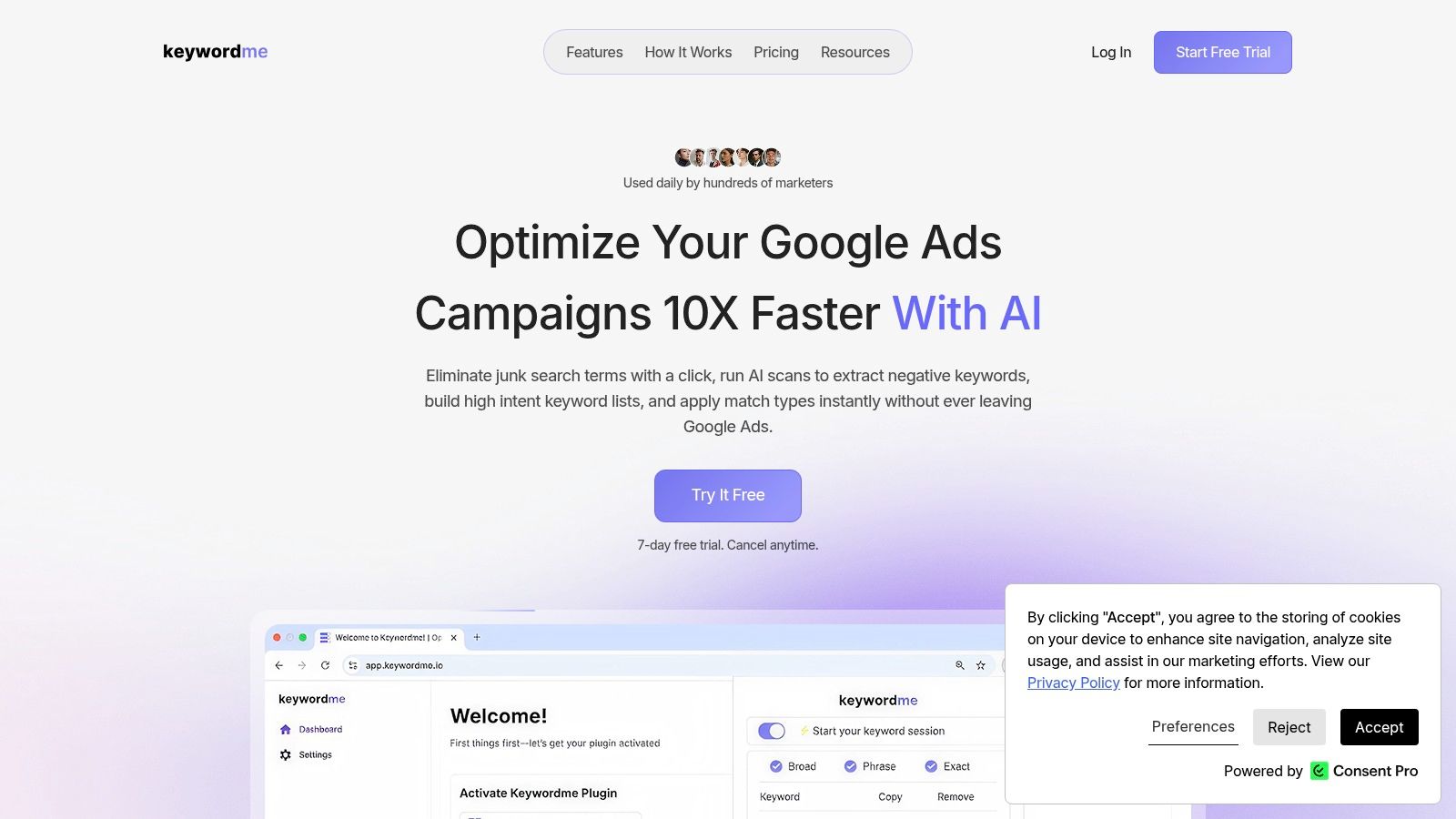
Keywordme can be used as one option for this workflow. Its Chrome plugin supports cleaning junk search terms, applying exact, phrase, and broad match types, building negative keyword lists, and handling keyword changes in bulk directly in Google Ads. That removes much of the manual formatting and copy-and-paste work that slows recurring optimization.
The useful distinction is between automation that performs a defined action and automation that decides what the business values. Let a tool handle formatting, bulk application, and list construction. Keep the final judgment about intent, eligibility, and commercial fit with the person managing the account.
A short visual walkthrough can make the operating sequence easier to follow:
The workflow should also include landing-page checks. A query promoted into an ad group isn't a win if the destination doesn't answer the user's specific concern. Review the promise in the ad, the first visible content on the page, the conversion action, and the exclusion logic together.
Adapting Keyword Strategies Across Digital Channels
A core offering doesn't carry one universal keyword strategy across every channel. Search captures expressed intent. Display often uses audience and contextual signals. Social platforms generally depend more on audience characteristics, interests, engagement, and creative response than on a typed query.
Consider a business selling cybersecurity software. On Google Search, “cybersecurity software for small business pricing” deserves a direct commercial treatment. The ad can address plans, implementation, and a clear next step. A separate search theme around “how to protect a small business from ransomware” may need educational copy and a guide, unless the offer solves that urgent problem.
One offering, several channel roles
On display, the same cybersecurity theme may become contextual coverage around security publications, business technology content, or pages discussing risk management. The wording isn't a direct response to a search query, so the creative must establish the problem quickly and give the audience a reason to engage.
On social, the team might build audiences around small-business operators, technology decision-makers, or people who engaged with security content. The keyword research still helps shape the language used in headlines and creative, but it doesn't function as a simple one-to-one targeting list.
A useful channel translation looks like this:
| Channel | Primary signal | Keyword role | Typical message |
|---|---|---|---|
| Search | Explicit query | Capture intent | “Get protection for your business” |
| Display | Context and audience | Shape topic relevance | “See how businesses reduce security risk” |
| Social | Audience and engagement | Inform creative and segmentation | “Security guidance for growing teams” |
Keep measurement aligned with the channel
Search terms can expose the exact language that signals readiness. Display and social require a broader reading of performance, including audience quality, content engagement, assisted actions, and retargeting behavior. Don't force every channel to use the same last-click standard when the channel serves a different role.
For B2B campaigns, LinkedIn analytics tools can help teams evaluate professional audience activity and connect content engagement with broader campaign analysis. The toolset matters less than the discipline: use search queries to refine intent, then use channel-specific audience evidence to decide where that intent belongs next.
The strongest cross-channel teams maintain one shared vocabulary for customer problems, comparisons, prices, and solutions. They then adapt targeting, creative, destination pages, and measurement to the mechanics of each platform.
Building a Sustainable Keyword Optimization Engine
The durable advantage doesn't come from creating the largest keyword list. It comes from building a system that learns from real search behavior and turns that evidence into better coverage and less waste.
Audit the account with a focused checklist:
- Intent alignment: Does each major query theme have the right ad and landing page?
- Match control: Are exact, phrase, and broad match doing distinct jobs?
- Search-term evidence: Are recurring valuable queries promoted into stronger structures?
- Negative coverage: Are irrelevant themes excluded at the narrowest useful level?
- Ownership: Does someone review query data consistently and document decisions?
- Automation boundaries: Are tools executing repeatable tasks without replacing commercial judgment?
Historical keyword metrics remain valuable for planning demand, competition, and bids. They shouldn't become a substitute for the Search terms report. The report shows how your campaign interacts with actual language, including the unexpected phrasing that research tools can't fully predict.
The operating mindset: Research creates the hypothesis. Search terms create the evidence. Optimization turns evidence into structure.
That loop supports more confident scaling because every expansion has a reason and every exclusion has a classification. It also makes account health easier to explain to clients, stakeholders, and future team members. Instead of saying a keyword “seemed relevant,” you can show the query theme, the match behavior, the conversion context, and the action taken.
Review your current reports, identify the most expensive irrelevant themes, and check whether your landing pages reflect the intent behind your strongest queries. Then turn those findings into a recurring PPC routine rather than a one-time cleanup.
Keywordme brings keyword research, search-query analysis, match-type application, and negative keyword handling into a Google Ads workflow built for recurring optimization. Visit Keywordme to see how its Chrome-based tools can reduce manual cleanup and help you act on query-level evidence faster.
.svg)