
Dallas Pay Per Click Costs, Setup and Local Wins
Dallas Pay Per Click Costs, Setup and Local Wins


In 2025, Dallas legal pay per click campaigns commonly faced CPCs of $120 to $250 or more, with a suggested competition budget of at least $20,000 per month, according to More Than Scaling's Texas market guide. That number reframes Dallas pay per click fast. You're not buying cheap traffic and hoping. You're bidding for a phone call that has to become a signed case, a booked repair, or a consult your team can reach. If the click can't turn into work inside your service area, its price is irrelevant. It's waste at any cost.
Dallas Pay Per Click Costs by Trade
Start with the national number, then throw it away for planning. V Digital Services' Dallas PPC page reports that the average Google Ads cost per click across industries reached approximately $5.26 in 2025, an increase of nearly 13% year over year. The same page cites a Bureau of Labor Statistics internet-advertising price index that increased from 102.958 in 2023 to 124.380 in 2025, a 20.8% rise over that two-year period.
That average mixes cheap informational clicks with expensive local lead auctions. Dallas legal, home services, finance, and similar categories don't live near $5.26. When several firms want the same injured driver, burst pipe, or broken AC unit in the same ZIP codes, geography and commercial intent stack on top of each other. Each bidder knows one closed job can pay for many clicks, so bids climb until the math gets uncomfortable.
| Market or keyword | Typical CPC | Volume or budget note | What it covers |
|---|---|---|---|
| US Google Ads average, 2025 | About $5.26 | Up nearly 13% year over year | All industries, not Dallas-only |
| US internet-ad price index | Not a CPC; index 124.380 | Up 20.8% from 102.958 in 2023 | Broad ad-price pressure |
| Emergency plumber, Dallas | $113.03 | About 480 searches a month | One home-services query |
| Dallas legal campaigns | $120 to $250 or more | At least $20,000 a month suggested | Competitive legal lead gen |
| Texas legal services | $15 to $65 | Statewide range across practice areas | Wider state legal range |
| Personal injury, Dallas and Houston | Often over $100 | Large-metro injury auctions | High-intent injury terms |
Read the rows like an owner
In 2025, the Dallas keyword "emergency plumber" was listed at $113.03 per click and 480 monthly searches, according to Helium SEO's Dallas PPC page. That's one query, not the whole plumbing market. Still, it tells you the shape of the auction. Ten clicks can cost more than a small repair ticket, so your close rate and average job value decide whether the keyword belongs in the account.
Legal shows why statewide ranges mislead. In 2025, legal-services CPCs in Texas were estimated at $15 to $65, while personal-injury attorney keywords in Dallas and Houston could exceed $100 per click, according to EL Digital Group's Texas PPC guide. A general legal term in a smaller market and a Dallas injury term are different products. The searcher, case value, and number of bidders aren't comparable.
Why Dallas stays crowded
In 2024, Dallas had approximately 1.33 million residents, according to More Than Scaling's Dallas page, citing the U.S. Census Bureau. That's the city alone, before suburbs enter the auction. Demand is deep enough to support specialists, franchises, lead sellers, and national brands bidding on the same emergency searches.
In 2024, more than 57% of advertising budgets for Dallas businesses were allocated to digital advertising, according to Agency Partner's Dallas marketing trends report. Money keeps moving into channels where owners can see a click, call, or form. That doesn't guarantee profit. It means you'll rarely get an uncontested auction for a valuable local service.
Budget test: Pick your trade's row, estimate how many clicks produce one real opportunity, then ask whether one closed job covers those clicks plus sales time.
None of these figures is a quote for next month. Your actual cost moves with query intent, device, Quality Score components, seasonality, location, and competing bids. A storm, heat wave, court deadline, or new rollup entering the market can change the auction before your monthly report arrives.
Use benchmarks to sanity-check your economics, not to set a target CPC. Our guide to cost per lead benchmarks for home services is useful for that next step because cost per lead still isn't the finish line. You need cost per booked, servable job. A $40 click that never closes is worse than a $140 click that fills tomorrow's route.
How Location Changes the Auction
Think of the same plumber standing on three street corners. Downtown, ten competitors wave at the same homeowner. In a suburb, four competitors show up and the homeowner needs a different service. Outside the service area, the plumber pays to join a conversation he can't finish. Same business, same basic ad, three different auctions.
That's how paid search works. A person types a commercial query, Google checks which keywords match, and eligible advertisers enter an auction for that moment. There isn't a shelf price for "plumber Dallas." The price forms when the search happens, based on who's eligible and how relevant each ad looks for that specific request.
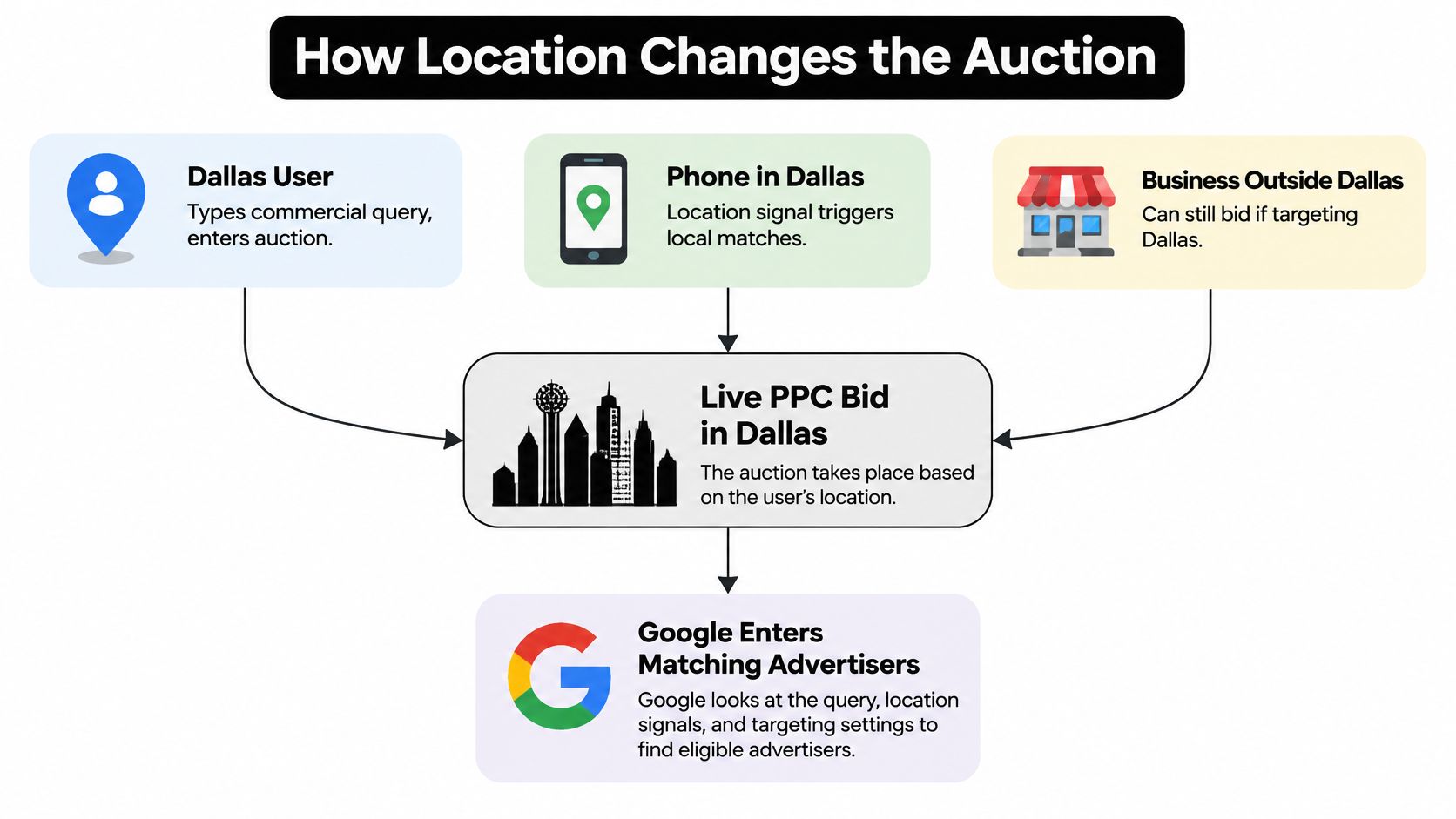
The location signal sits inside that decision, and the diagram below shows how those signals feed one live bid.
Location is not just a filter
Google's Ad Rank explanation states that Ad Rank calculations consider the searcher's location at the time of the query, along with device, time, search-term characteristics, competing ads, and other user signals. So a search inside Dallas, one from a surrounding suburb, and one from outside your service area can produce different positions and costs even when the words look identical.
Don't compare CPC across places without also checking device, time, and query intent. A mobile emergency search at 7 p.m. isn't the same auction as a desktop research search at lunch. If you average them together, you'll blame geography for what timing or intent caused.
Targeting settings decide who's allowed into those auctions, which is why Google Ads presence vs interest location targeting matters before you touch bids. Someone physically in Dallas and someone elsewhere researching Dallas can have very different value to a service business. Your setting should match how customers buy, not default to the widest reach.
Quality Score points at the weak part
Google's Quality Score guide describes Quality Score as a 1 to 10 diagnostic based on expected click-through rate, ad relevance, and landing-page experience, with each component evaluated against advertisers showing for the same keyword during the previous 90 days. Google also says Quality Score itself is not an auction input. Chasing the displayed number misses the point.
Read the three components like a mechanic reads warning lights:
- Below-average expected CTR: Your ad promise isn't compelling for that query, so searchers choose another result.
- Low ad relevance: The keyword and ad are only loosely connected, usually because one ad group covers too many intents.
- Weak landing-page experience: The page doesn't continue the promise, loads poorly, hides the next step, or sends every visitor to a generic homepage.
Fix the weak component and the actual auction signals can improve. Tighten the ad group, repeat the service the person typed, and send the click to a page about that job in that area. Don't rewrite everything because a diagnostic shows a four. Find which leg of the stool is short, fix that leg, then judge calls and booked work.
When to Split Dallas from Nearby Cities
A cheaper click in a nearby suburb can be a worse buy than an expensive click five minutes from your crew. That's the central Dallas problem. Owners look at a city report, see Plano or Frisco costing less than Dallas proper, and push budget north. Then dispatch spends longer driving, arrival windows slip, and customers call the next company before your tech parks.
DFW isn't one compact market with a single buyer. V Digital Services' Dallas PPC guide specifically describes the need to distinguish downtown Dallas, northern suburbs, and Fort Worth because the metro is geographically dispersed. The same source reports that 55% of places in the region grew at least 5% between 2020 and 2025, while 22% declined. A metro average hides both fast-growing pockets and places losing demand.
Use economics, not the city name
Keep areas together when close rate, average ticket, and drive time look alike. Split them when any one of those three breaks away. City boundaries matter only because they often proxy for housing stock, income, travel time, competition, or which crew serves the job. If those underlying economics match, a split adds management work without adding control.
Say a Dallas HVAC company gets cheaper clicks in Frisco but books fewer same-day repairs because the route is already full. Those clicks aren't a bargain. The company pays for demand it can't serve quickly. Meanwhile, a pricier click near an idle Dallas crew can become revenue today. Bid for capacity you can fulfill, not for a map that looks ambitious.
| Area | Why it differs | Keep with Dallas when | Split when |
|---|---|---|---|
| Dallas proper | Core demand and shorter trips for many city businesses | Close rate and drive time match the rest of the account | A neighborhood inside the city books far worse than the average |
| Plano | Northern suburb, different drive time and housing mix | The crew already covers it at the same margin | Clicks are cheap but appointments no-show or sit outside the route |
| Frisco | Fast-growth north market, not the same buyer as downtown | Ticket size and close rate match Dallas | Growth brings volume the team cannot staff |
| Fort Worth | Separate city on the other side of the metro | A west-side team already serves it profitably | Dallas bids are being spent on jobs nobody will drive to |
Build the report before you split
Don't split on a hunch after one bad week. Compare Dallas proper, Plano, Frisco, and Fort Worth on the numbers that reach the bank account:
- Impression share: Are you even present often enough to judge the area?
- Search-term intent: Do buyers name neighborhoods, suburbs, or "near me" instead of Dallas?
- Booked appointments: How many clicks become scheduled work?
- Revenue and close rate: Does the area produce jobs your team wins at a healthy ticket?
- Wasted clicks: How much spend never becomes a quote, consult, or appointment?
Wait for enough conversion volume before you apply separate budgets or bid adjustments. Splitting too early leaves each campaign starved for data and makes ordinary variation look like a trend. Splitting too late lets one strong area subsidize a weak one until the blended report looks acceptable.
Exclude cities you won't serve. Don't exclude every query that lacks the word Dallas, because plenty of buyers search "emergency plumber near me" while standing in your best neighborhood. Geography belongs in targeting and exclusions. The query still needs room to describe the job naturally.
If dispatch would refuse the address, that place doesn't belong in the same bid as your core area.
How to Build a Dallas Search Campaign
Build your first campaign around one trade, one service area, and one action you can count. The process graphic below gives the short version before we walk through the details.
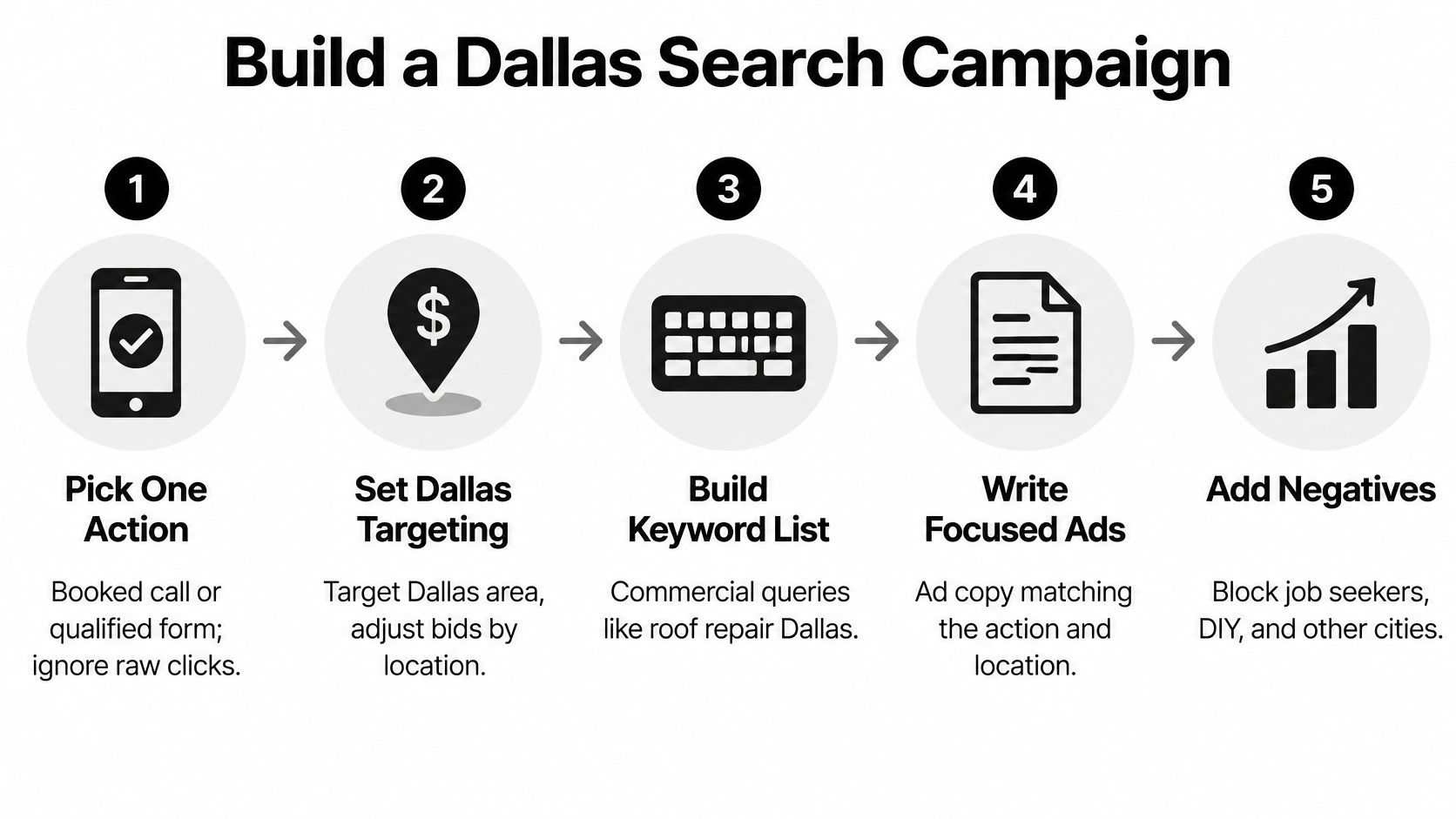
Use a home-services company as the example, say an HVAC firm that serves Dallas proper and Plano but not Fort Worth. Each step below prevents a specific leak. Skip one and you'll usually pay to discover why it was there.
The ten-step build
- Pick the one action that counts. Choose a booked call or qualified form, not raw clicks. This prevents optimizing toward curious visitors who never ask for service.
- Name the exact service area. Target Dallas only, or Dallas plus named cities your crew serves. Use a radius only if every address inside that circle is servable, which prevents a neat map from buying bad drive time.
- Group keywords by one intent per ad group. Separate emergency repair from new system installation and maintenance plans. Each ad can then repeat the job the searcher typed instead of offering a generic "HVAC services" promise.
- Start with exact and phrase match on money terms. Add broad match only after you're reviewing search terms on schedule. That order prevents the account from buying creative interpretations of your service before you have controls in place.
- Write ads around the service and place. Say "Same-Day AC Repair in Dallas" when that's true, and put the next step in the ad. Don't cram every suburb into one headline, because the ad starts sounding like a coverage list instead of an answer.
- Send each intent to a matching page. The page should repeat the offer, show the area served, prove the company can do the work, and make calling or booking obvious on a phone. A homepage forces the visitor to restart the search they just finished.
- Set a test budget you can afford to lose. Give the campaign enough daily budget to gather data for about two weeks, and sanity-check it against your trade's likely CPC rather than a national average. In an expensive trade, a tiny budget may buy only a handful of clicks and teach you almost nothing.
- Turn on conversion tracking before spending. Track qualified forms and calls, including call tracking if most jobs start by phone. Launching first and fixing tracking later leaves you arguing from screenshots and memory.
- Load a starter negative list. Block services you don't offer, cities you don't serve, and obvious junk modifiers such as free, DIY, jobs, and salary. You won't catch everything on day one, but you shouldn't pay tuition for searches you could predict.
- Check search terms after a few days. Look for wrong services, wrong places, job seekers, and research queries. Waiting until month-end turns a small cleanup into a budget postmortem.
The short video below is a useful visual walkthrough to keep beside the checklist while you assemble the first version.
Know when the build is ready
You're ready to launch when a stranger can read the ad and landing page and answer three questions without guessing. What do you sell? Where do you serve it? What should I do next? If the page says Dallas but the campaign also targets an area dispatch hates, you're not ready. If the ad promises emergency repair but the page leads with a maintenance special, you're not ready.
Don't launch five services across the whole metro just because Google makes it easy to add locations. A narrow first campaign produces cleaner evidence. You can expand into the next city or service after the first one proves it can book work at a cost your margins survive.
Negatives and Search Terms That Waste Spend
Say a Dallas roofer wants "roof repair" searches. A week later, the search terms report shows "roofing jobs," "roofing salary," "how to patch a roof DIY," and "roof repair Fort Worth," even though the crew never crosses into Fort Worth. Every one of those clicks looks roofing-related. None is a homeowner ready to hire this company.
The frustrated check in the image below is usually when owners discover that related doesn't mean profitable.

The default that catches people out
Google's Search terms report guide states that negative keywords added from that report to a Search campaign are added as negative exact match by default. Google also warns that the selected type should not accidentally prevent ads from showing for relevant searches. That default is safe, but it's narrow. Clicking "add as negative" on one bad query may block only that precise wording, leaving the whole theme alive.
Negative keywords also don't automatically expand into close variants, synonyms, or singular and plural versions. Google's negative keyword match type guide explains that negative broad match blocks a search containing all negative-keyword terms even if their order changes, negative phrase match blocks searches containing the terms in the same order even when additional words appear, and negative exact match blocks only the exact terms in the same order without extra words.
| Match type | What it blocks | Roofer example |
|---|---|---|
| Negative exact | Only those exact words in that order, with nothing extra | jobs blocks "jobs" but leaves "roofing jobs" live |
| Negative phrase | Those words in order, with extra words allowed around them | roofing jobs blocks "best roofing jobs in Dallas" |
| Negative broad | Any search containing all the terms, in any order | salary roofer blocks "roofer salary" and "salary for a roofer" |
Block the theme, not your paycheck
For the roofer, exclude the jobs and salary themes at a match type broad enough to catch the variants you see. Exclude DIY when you sell done-for-you repairs, not tutorials. Exclude Fort Worth if the crew won't serve it. Leave "near me" and served neighborhood names alone, because those are often how ready buyers phrase the job.
Be careful with a phrase negative like "repair." It would also block the money term you built the campaign to buy. Broad negatives need the same discipline. A word can be junk in one context and valuable in another, so check the full queries before you ban a term across the account.
Once the basics are clean, advanced Google Ads optimization tactics from AdCrunch can help you think beyond one-off exclusions toward list structure and recurring review habits. The weekly habit is simple. Sort search terms by cost, find themes that can't become jobs, add each theme at the right match type, then confirm your core services still receive impressions.
In a market where one bad click can cost as much as a service call fee, negative keywords aren't housekeeping. They're margin protection. Add the variants that appear, including plurals and word-order changes where needed, instead of assuming Google will infer your intent. It won't infer an exclusion you didn't write.
Measure Booked Jobs Not Just Form Fills
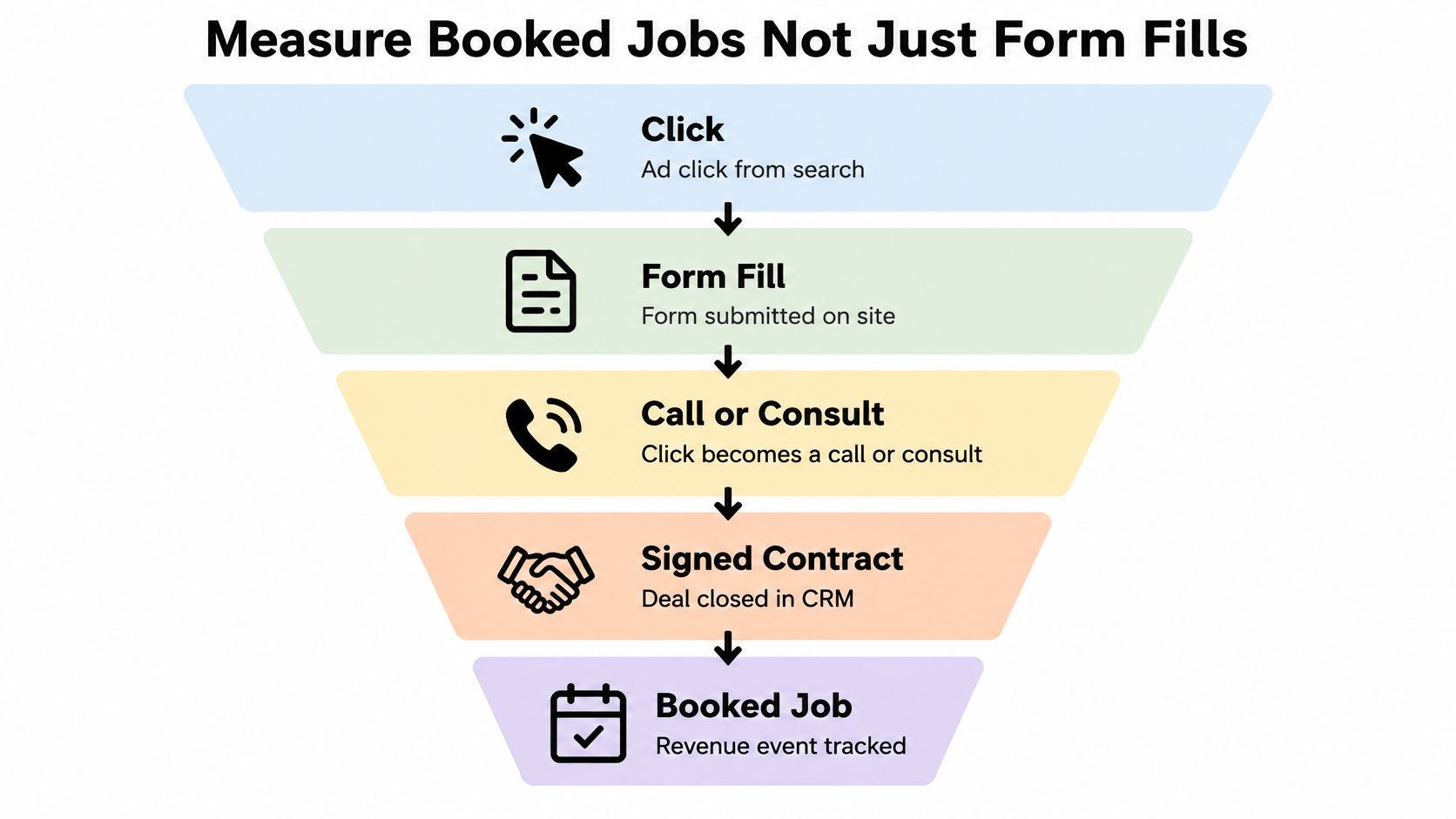
Judging a Dallas lawyer or plumber campaign on form fills is like judging a sales rep on handshakes. It's activity, not revenue. The expensive categories often finish offline through a call, consult, inspection, signed contract, or CRM stage. If your report stops at the form, your best keyword can look weak and your worst keyword can look efficient.
The funnel below shows why the click is only the first event worth counting, not the result you should buy more of blindly.
Connect the click to the CRM
Google's conversion tracking overview states that offline conversion import can connect CRM outcomes such as completed applications or signed contracts back to advertising interactions. Google's privacy guidance also recommends combining sitewide tagging, enhanced conversions, Consent Mode, and Google Analytics 4 to improve first-party measurement. That stack doesn't replace sales discipline. It gives qualified outcomes a path back to the keyword that started them.
Follow a simple decision path:
- Label every call and form. Mark it qualified, unqualified, or unknown, and make the person answering the phone use the same definitions every time.
- Import qualified outcomes. Send booked appointments, signed jobs, or retained cases back to Google Ads so bidding can learn from value, not volume. Our walkthrough on how to import offline conversions from a CRM into Google Ads covers the mechanics.
- Compare cost per opportunity. A keyword with cheap forms and no booked jobs loses to a pricey keyword that fills the calendar.
- Hunt measurement gaps. Check untagged calls, swapped tracking numbers, missing click identifiers, and consent settings that never fired before you blame the keyword.
Don't prune a theme after three days of form data if your sales cycle takes three weeks.
The opposite mistake is just as costly. Don't keep a theme because it produces plenty of calls if nobody can invoice those callers. Sort keywords by qualified opportunities, booked revenue, and close rate by area. A research-stage query may deserve patience when it later becomes a consult. A bargain query with a long trail of wrong numbers, renters who can't authorize work, and addresses outside the route does not.
Even outside local services, the discipline is the same. Continuum Solutions' discussion of measurable ad performance for ecommerce is a useful reminder that platforms optimize toward the outcome you feed them. Feed Google form fills and it finds more form fillers. Feed it booked, qualified revenue events and your bid decisions start from a much better definition of success. Change bids only after the CRM, not the click report, says the keyword earns its keep.
Hold the Budget Until the Leaks Are Fixed
Don't raise the budget because a campaign feels promising. Raise it only when the math survives your real service area. Take your trade's typical CPC, estimate clicks per qualified opportunity, apply your close rate, and compare the resulting cost per booked job with the margin on that job. If the numbers fail, more spend just buys the failure faster.
Run these four checks first:
- Service-area check: Every campaign targets only places dispatch will serve, and any split reflects close rate, ticket size, or drive time.
- Search-term check: Last week's expensive junk themes are excluded at the right negative match type, starting with the biggest waste.
- Measurement check: Bidding learns from qualified calls and signed jobs, not raw form fills.
- Economics check: Cost per opportunity in each area stays below the most you can pay per booked job.
Write down that maximum cost per booked job for each service area before you spend more. It's your stop line. If a suburb pushes past it because crews arrive late or buyers close poorly, cut or separate the bid even if its clicks look cheap beside the national average. Cheap and unprofitable is still unprofitable.
One leak is easy to overlook. If qualified visitors land on a slow page that buries the call button, you're paying auction prices for a weak finish. Web Mage's comparison of agency, freelancer or SaaS speed fixes can help you decide who should handle that work, but don't scale traffic into a page that wastes it.
For the cleanup itself, the Keywordme Pro plan costs $12 per seat per month and includes one-click negative keyword list building, instant keyword match type configuration, negative and positive keyword management, search term-based campaign expansion, help center access, and chat support. Signing up for the free trial gives instant access to the Keywordme Chrome plugin. Use whatever workflow your team will repeat, because a one-time cleanup decays as new queries arrive.
End with the Monday check. After new negatives go live, confirm your core service still gets impressions and qualified calls. A cleanup that chokes the money term isn't discipline. It's a self-inflicted outage. Hold every campaign that fails the checks, and put new money only behind areas and keywords that already book work profitably.
Ready to clean up the search terms draining your Dallas campaigns without copying rows into spreadsheets? Keywordme helps you build negative keyword lists, set match types in one click, and expand from real search-term data inside Google Ads. Start the free trial, connect your workflow, and spend your next budget increase only on clicks that can become booked jobs.
