
Bulk Keyword Research for PPC Ads
Bulk Keyword Research for PPC Ads


You've got a search terms report open, a spreadsheet full of near-duplicates, and a campaign that keeps spending on queries nobody intended to target. One row looks promising, the next is irrelevant, and the next hundred need a decision before the budget disappears. That's the daily reality of PPC teams managing keyword data at scale.
Bulk keyword research replaces one-by-one inspection with a repeatable process. You collect ideas and real query data, clean the list, evaluate intent, apply the right match types, and push the useful output back into Google Ads without living in copy-and-paste mode. The important shift isn't just finding more keywords. It's making better decisions across a large dataset.
Why Manual Keyword Checks Are Killing Your ROI
Staring at a spreadsheet with thousands of search terms feels productive because every row receives attention. In practice, manual review often creates a dangerous illusion of control. You spend time formatting variations, removing duplicates, and checking obvious junk while high-value patterns remain buried lower in the export.
The problem gets worse as campaigns multiply. A single account may contain branded queries, product searches, research questions, competitor terms, employment searches, support requests, and locations that your business doesn't serve. Reviewing each query individually makes prioritization inconsistent. One irrelevant phrase gets excluded, another slips through, and the same judgment gets repeated across several files.
Practical rule: If your workflow depends on someone manually copying every keyword into a new sheet, it won't scale reliably.
The case for scale is clear. Microsoft Advertising's keyword ideas can include monthly searches, competition, average CPC, and ad impression share in exportable or API-based data, while Google Keyword Planner has long used a 12-month search-volume window for evaluating demand. Keyword research reporting also estimates that long-tail keywords account for roughly 70% of search traffic, making broad list evaluation more useful than focusing only on obvious head terms.
The same reporting puts average keyword research time at 12 hours per week for marketers. That's a substantial operational burden when the work still ends with manual formatting and account uploads. The better approach is to aggregate terms, compare standardized metrics, and rank queries by relevance and commercial value before a person spends time on the final review.
A bulk workflow also exposes opportunities that manual checking tends to miss. Related long-tail queries may have lower individual volume, but they can reveal specific product needs, locations, problems, or buying stages. For teams refining their wider PPC process, the distinction between manual and automated PPC optimization is especially useful because automation should remove repetitive handling, not replace judgment.
If you're building prompts or repeatable analysis templates around this work, Prompt Builder SEO tips can help structure the research process. The tool doesn't decide whether a query belongs in your campaign. It can, however, make the instructions and review criteria more consistent.
Gathering the Right Data Sources for Scale
A reliable bulk keyword research file usually combines planning data with observed search behavior. Keyword Planner and similar platforms help you expand a topic and compare demand. The Search Terms report shows what people typed before your ads appeared. Treating either source as complete creates blind spots.
Start with a small set of commercial seed topics. The practical workflow documented by Search Atlas recommends beginning with 5–10 seed keywords, generating an initial set of 200–300 related keywords, then refining and clustering the output. Its bulk keyword research workflow is useful because it starts with themes instead of attempting to invent every variation manually.
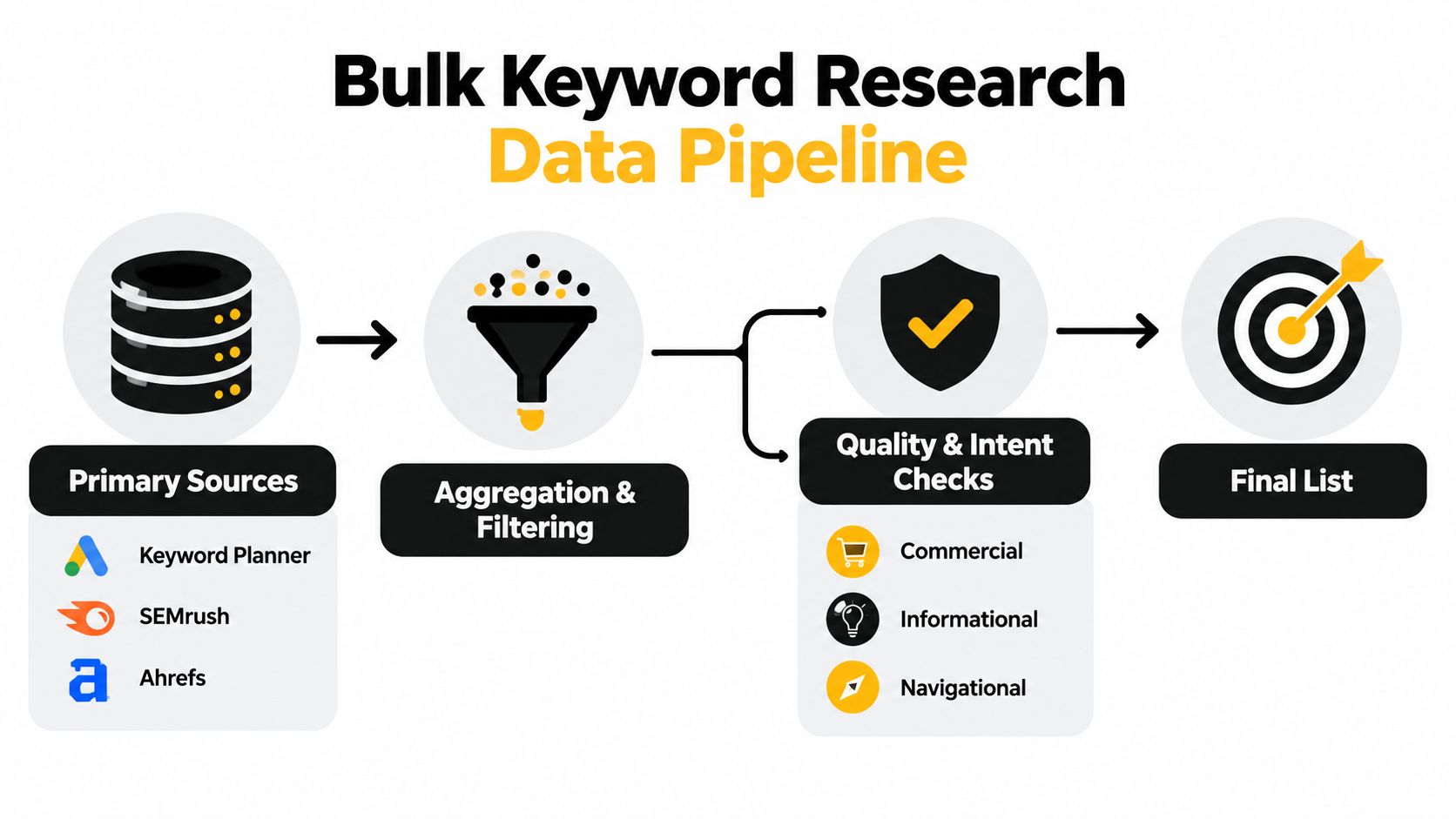
Build the source file in layers
Pull planning metrics first. Depending on the platform, your export may include:
- Demand indicators: Monthly searches and historical search patterns help establish whether a topic has sustained interest.
- Auction context: Competition, average CPC, and ad impression share provide paid-search context.
- Geographic settings: Keep country, region, language, and network settings attached to every export.
- Actual queries: The Google Ads Search Terms report records the searches that triggered ads, which makes it more actionable than an idea list alone.
Google describes the Search Terms report as the place to inspect actual queries and use the Match type column to understand how closely each query relates to the account's targeting. That connection matters. A planner can suggest an attractive phrase, but the report can reveal that your ads are already appearing for a different, less relevant variation.
Keep source labels in separate columns rather than merging everything into one anonymous keyword field. Mark whether a term came from a planner, a search term report, autocomplete expansion, or an imported account list. This makes later decisions auditable and helps you avoid mistaking estimated demand for proven account behavior.
Before clustering, remove duplicates and preserve useful metadata. A clean bulk file should let you answer three questions quickly: Where did this term come from, what intent does it express, and what action should follow? Guidance on how keyword research tools work can help teams understand why different platforms produce different kinds of suggestions and metrics.
Filtering and Clustering High-Intent Queries
Raw volume doesn't tell you whether a keyword deserves budget. A query can attract plenty of searches and still be useless if it signals curiosity, employment intent, free-resource hunting, or a location your business can't serve. Bulk keyword research works when filtering happens before campaign expansion.
A practical filter starts with business relevance, not a volume threshold. Ask whether the query names a product, service, problem, use case, location, or buying action that your landing page can satisfy. Then check whether the language supports the offer. “Pricing,” “quote,” “near me,” “service,” and product-specific terms may indicate commercial intent, but the exact meaning depends on the account and market.
Use a decision sequence
A useful review order looks like this:
- Remove obvious mismatches. Delete unrelated industries, job searches, definitions, tutorials, free alternatives, and unsupported products.
- Check the destination. Keep a term only if the landing page answers the query without forcing the visitor to reinterpret the offer.
- Score business value. Consider margin, lead quality, sales coverage, service area, and customer eligibility.
- Separate intent groups. Cluster terms into commercial, informational, navigational, local, competitor, and brand themes.
- Write around the cluster. Ad copy and landing pages should match the shared intent, not merely repeat a keyword.
Search Atlas recommends filtering and clustering large lists after expansion, while SEO Stuff warns that volume and difficulty cutoffs need relevance and intent checks. Its large-scale keyword expansion guidance reflects a common PPC failure: a spreadsheet looks impressive because it contains thousands of rows, but most rows don't improve targeting.
The same issue appears in local campaigns. A term with strong commercial language can still be worthless if the location is wrong or implied geography doesn't match the service area. For a more focused framework, find high intent local keywords before adding location-modified terms to a regional campaign.
Filtering test: If you can't explain the query's business value and its intended landing page in one sentence, don't promote it into the active keyword set.
Cluster by meaning, not spelling alone. “Emergency plumber,” “plumber emergency,” and “urgent plumbing repair” may belong together, while “how to fix a leaking tap” belongs in a different intent group even though the topic overlaps. Clustering this way keeps ads specific and prevents broad themes from swallowing distinct customer needs.
Mastering Negative Match Types in Bulk
Adding negative keywords protects budget, but bulk exclusion requires care. The wrong match type can block useful searches, while an overly narrow negative can leave an entire junk pattern active.
Google Ads supports broad, phrase, and exact negative keywords for Search campaigns. Each type behaves differently, and negative keywords don't match close variants or other expansions, so you shouldn't assume one exclusion covers every related query.
| Match Type | How It Blocks Queries | Best Used For |
|---|---|---|
| Broad negative | Blocks searches containing all negative terms, in any order | A clearly unwanted combination where word order shouldn't matter |
| Phrase negative | Blocks searches containing the exact phrase in the same order | A recurring phrase pattern that should stay excluded |
| Exact negative | Blocks only the exact query | A single confirmed junk search where nearby variations may be valuable |
The Google Ads Search Terms report is the right place to identify exclusions because it shows the actual query and its relationship to account keywords. Start by grouping unwanted searches rather than adding every row independently. If several queries contain the same clearly irrelevant phrase, a phrase or broad negative may remove more waste with less maintenance.
The technical trap appears during implementation. When you add negative keywords from the Search Terms report, Google Ads adds them as negative exact match by default. The official Google Ads guidance on adding negative keywords makes that default important: bulk-adding a list doesn't automatically create broad exclusions.
Use exact negatives when the query is an isolated mistake and nearby searches could still convert. Use phrase negatives when the unwanted wording is stable and appears inside longer queries. Use broad negatives only after checking that the combined words themselves are consistently irrelevant, because broad blocking can remove searches that don't look identical to the original row.
Google's explanation of negative keyword match types also notes that close variants aren't included. Review spelling variations, singular and plural forms, and related wording separately. Keep a change log with the query, chosen match type, reason, campaign, and review date. That record makes it easier to reverse an overbroad exclusion before it suppresses valuable demand.
Avoiding the Volume Trap Across Markets
More keywords don't automatically create more conversions. Across countries and languages, the same translated concept can carry different commercial meaning, competition, seasonality, and geographic relevance. A large list can hide those differences rather than solve them.
The most common mistake is comparing market volumes as if the numbers were interchangeable. A keyword with attractive demand in one country may describe a different product category elsewhere, attract users outside your service area, or reflect seasonal interest that won't persist. Bulk research across markets needs normalization before prioritization.
Keep market context attached to every term
Separate exports by country, language, location targeting, currency context, and time window. Don't merge them into a single ranking column and assume the biggest number deserves the first budget allocation. Compare related terms within the same market first, then evaluate whether the commercial intent transfers.
Local wording deserves its own review. People may use different product names, abbreviations, service descriptions, or location formats even when they speak the same language. Translation can preserve the dictionary meaning while losing the way buyers search. Native review, search term evidence, and landing-page alignment matter more than a mechanically translated list.
Seasonality creates another trap. A short-term spike can make a keyword look like a durable opportunity when it's tied to a particular event, holiday, weather pattern, or buying cycle. Trend data can help identify that behavior, but the decision should still account for inventory, sales capacity, and the period in which the offer is relevant.

LSI Graph's discussion of bulk keyword research across markets highlights the operational challenge of comparing languages, geographies, and time windows. Some tools now emphasize coverage across 190+ countries and bulk trend data, but wider coverage doesn't remove the need for interpretation.
Use a market-level scorecard rather than a global keyword leaderboard. Include relevance, commercial intent, local fit, landing-page readiness, competition, and evidence from actual queries. A smaller list with clear intent is easier to structure, write ads for, and monitor than a huge multilingual file built around inflated volume.
Automating Your Export and Implementation Workflow
The final bottleneck usually appears after the research is finished. You've filtered the list, separated positives from negatives, and chosen match types, but the output still needs formatting before Google Ads can use it. That's where copy-and-paste fatigue turns a sound strategy into an error-prone weekly chore.
Build the workflow around a consistent handoff. Export the source data, clean duplicates, label intent, approve positive keywords, separate negative candidates, assign match types, and keep the final files organized by campaign and market. Keywordme provides bulk paste and match handling for large keyword lists, including formatting and applying exact, phrase, or broad match types before copying or downloading the result.
The point isn't to automate every decision. A tool should handle repetitive formatting and list operations while the PPC manager decides whether a query fits the offer, landing page, and account structure. That division protects judgment without preserving unnecessary manual labor.
For teams with more complex integrations, an automation agency can help connect recurring exports, review queues, and implementation steps. Smaller teams can still gain most of the benefit by standardizing a weekly search-term cleanup and keeping one documented exclusion policy.
Google Ads Editor remains useful when you need broader account changes. This guide to using Google Ads Editor for bulk changes fits naturally into the implementation stage, especially when the approved keyword file affects multiple campaigns or ad groups.
A short walkthrough can help your team see how the process fits together before changing an account.
Keep automation accountable with a simple audit trail. Save the original export, the cleaned version, the approved additions, the negative list, and the implementation date. That gives you a clear rollback path and makes performance reviews more useful because you can connect account changes to the underlying search-term evidence.
Keywordme helps PPC teams turn messy search-term data into usable keyword and negative lists, apply match types in bulk, and reduce manual formatting across Google Ads workflows. Visit Keywordme to see how it can fit into your next bulk keyword research and cleanup cycle.
.svg)