
How Do Keyword Research Tools Work? a Practical Guide
How Do Keyword Research Tools Work? a Practical Guide


You've launched a Google Ads campaign, built a tidy keyword list, and expected relevant searches to follow. Instead, impressions arrive without conversions, search terms look only loosely related, and the keyword planner's estimates don't quite match what you see in the account. The natural question is, how do keyword research tools work, and why can't a logical list predict real search behavior?
The answer sits inside a data pipeline. Keyword tools collect search signals, clean and organize them, attach estimates such as volume and CPC, then turn the results into decisions you can use in Google Ads or SEO. Those numbers are useful, but they're not a direct counter of every search. They're modeled inputs that need context, testing, and human judgment.
When a Keyword List Becomes a Real-World Search Signal
An ecommerce advertiser launches a Google Ads campaign around “wireless earbuds.” The phrase fits the product and seems likely to attract relevant shoppers. After launch, impressions appear, but conversions do not. The advertiser must then separate several possibilities: a weak landing page, an unconvincing offer, or a keyword that combines too many different intents.
A hand-picked list is a hypothesis about demand, not a complete picture of it. It records the phrases a marketer expects potential customers to use. It does not confirm that people choose those exact words, share the same buying goal, or want the same type of product.
Real queries spread in several directions. One person searches for a brand, another names a feature, and another uses a misspelling or looks for a replacement part. Someone else types a problem such as “earbuds keep falling out,” or asks about battery life, compatibility, or noise cancellation. The broad product phrase places these motivations under one tidy label, even though they may require different ads, landing pages, or exclusions.
Practical rule: A keyword describes the topic you selected. A search term reveals the language and intent a user brought to the auction.
Keyword research tools connect that planned view with observed search signals. Starting from a seed phrase, they return related terms and estimates such as average monthly search volume, CPC, advertiser competition, and trend data. Google Keyword Planner also associates keyword ideas with historical trends and suggested bid estimates. PPC teams can use those outputs to expand a list, compare demand, and decide which themes deserve testing.
The same distinction matters for SEO. A technically sound site can miss demand when its content uses only the marketer's vocabulary. Guidance such as Sibley Digital consultancy insights places keyword choices within the wider technical and search context, rather than treating them as an isolated task.
Keywordme can support the next practical step by reducing repetitive search-term cleanup and keyword expansion work. The marketer still reviews intent and fit, but the tool can help turn scattered query language into candidates for new ad groups, added keywords, or exclusions.
The result is a decision aid, not a perfect answer. A keyword tool retrieves signals, compares patterns, and helps marketers choose what to test in Google Ads.
How Keyword Research Tools Collect and Process Data
Keyword platforms operate through a data pipeline. Raw search inputs enter at one end, then the system cleans them, adds market signals, groups related phrases, and stores the results in a database you can filter. The important work happens between collection and display, because each processing choice affects the keywords you may test in Google Ads.
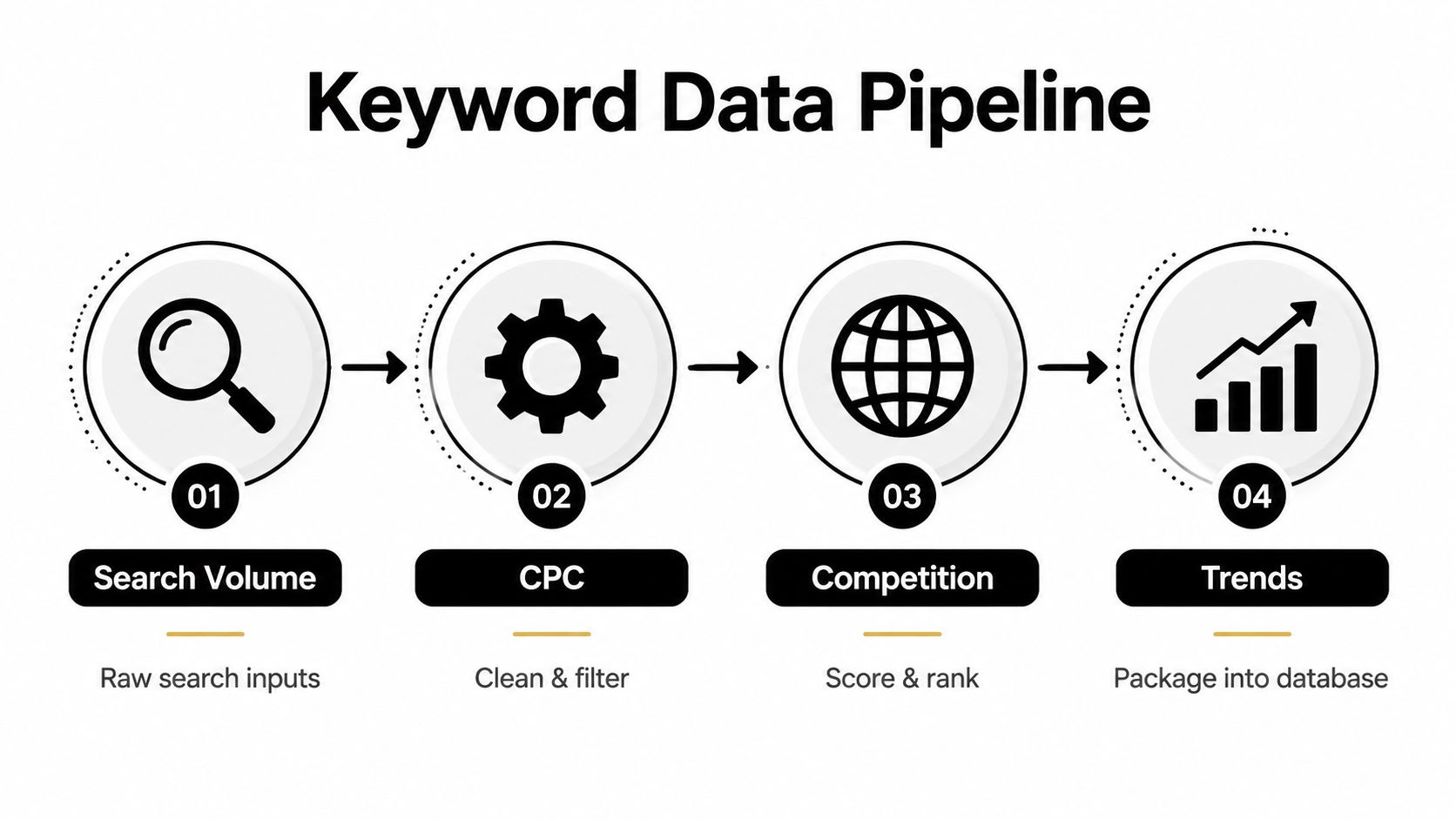
The four input streams
Official platform data comes through APIs and planning systems. Google Ads Keyword Planner can provide related terms, trend information, and bid estimates, while other providers may draw from Bing or licensed third-party sources. These results are usually aggregated, so they support campaign planning without showing every daily change.
Search-result and suggestion collection records language visible in search interfaces. A tool may examine result pages, related searches, or autocomplete suggestions to find phrases people enter. Autocomplete reflects the search engine's own suggestions and can expose newer wording, but it is still not a complete demand count.
Clickstream and panel data uses aggregated browsing activity to estimate how people search and click across websites. This can reveal behavior that a planner does not show directly. The sample may still underrepresent particular audiences, devices, markets, or query types, so treat the output as an estimate rather than a census.
Proprietary expansion systems start with a seed keyword and generate related ideas through linguistic relationships, historical databases, competitor observations, or modeled associations. A broad expansion helps uncover possible ad-group themes, but a related phrase is not automatically commercially valuable.
Before metrics are attached, tools normalize the inputs. They remove duplicates, standardize capitalization, handle punctuation, detect language, and decide whether stop words matter. “Running-shoes” might be grouped with “running shoes,” while a non-English phrase may need separate treatment from an English campaign.
The system then connects each query with fields such as volume, CPC, competition, trend history, location, device, intent, and possible match-type groupings. For practical setup steps, see this Google Keyword Planner walkthrough. These fields help marketers choose seeds to expand, split themes into ad groups, adjust targeting, or flag terms for later review.
Search visibility may also extend beyond traditional result pages. This overview of Perplexity SEO tracking tools provides context for monitoring newer search environments and the changing places where people discover information.
Keywordme can reduce repetitive search-term cleanup and keyword expansion work after the data is collected. A marketer still checks intent, relevance, and business fit, while the tool helps organize scattered query language into candidates for new keywords, ad groups, or exclusions.
Downstream metrics are only as reliable as the source mix and processing choices behind them. Two tools can therefore disagree without either being automatically broken. Treat the output as decision support for Google Ads testing, not as a perfect record of demand.
What the Main Keyword Metrics Actually Mean
Keyword metrics look precise because they appear in columns, scores, and charts. Their real value comes from understanding what each one measures, what it estimates, and what it leaves out.
Search volume generally represents estimated query demand, often expressed as an average over a period rather than a live counter. Tools may combine planner data, clickstream samples, and modeled interpolation to fill gaps. Keywords Everywhere's search-volume explanation highlights an important limitation: a 12-month average can smooth away seasonality and newer changes in query behavior.
CPC reflects auction-side pricing signals. It can rise when advertisers compete for commercially valuable traffic, but a displayed bid estimate isn't a promise about your actual cost per click. Your account history, targeting, quality, competition, and ad relevance still influence what happens in the auction.
Competition and difficulty are relative indicators. In PPC, competition can describe advertiser participation. In SEO, difficulty may incorporate ranking-page strength, referring domains, SERP features, and other observations. Neither score guarantees traffic, conversions, or profitability.
Trend data adds time context. It helps you distinguish a temporary spike from a recurring seasonal pattern or a demand curve that appears to be developing. Google Keyword Planner has offered historical metrics for the past year, and Search Engine Watch's historical insights notes that custom historical ranges can extend back to 2016. Semrush reports monthly historical keyword data in some databases going back to January 2012, but coverage varies by database and market.
Consider “affordable running shoes.” A tool might show encouraging demand and moderate CPC, yet the practical opportunity changes by location, device, and intent. In one market, searchers may want a product page. In another, the phrase may attract comparison shoppers. A mobile search with local context can behave differently from a desktop research query.
| Metric | What It Measures | How to Read It |
|---|---|---|
| Search volume | Estimated query demand | Use it as a directional demand signal, not an exact count |
| CPC | Auction-side bid or pricing cues | Treat it as a commercial context signal, not a guaranteed cost |
| Competition | Advertiser activity or ranking pressure | Compare terms within the same market and campaign purpose |
| Difficulty | Relative challenge associated with visibility | Pair it with SERP review, relevance, and conversion evidence |
| Trend | Demand movement over time | Look for seasonality, persistence, and emerging shifts |
The best workflow treats metrics as inputs to judgment. A high-volume term can be less useful than a smaller, highly specific query that matches your product and buyer.
Filtering, Grouping, and Scoring Keyword Lists
A raw export becomes useful through three operations: filtering, grouping, and scoring. Each one answers a different question.
Filtering removes what you can't use
Filtering applies hard rules before deeper review. You might set a minimum volume threshold, exclude terms above a CPC ceiling, limit results to a language or location, or remove branded phrases from a non-brand campaign. You can also eliminate irrelevant categories, research-only wording, and terms that conflict with the landing page.
This stage protects attention. A long list can feel productive while hiding the few phrases that fit the offer.
Grouping turns variations into themes
Grouping bundles related queries into topics that can become ad groups, landing-page themes, or content clusters. Some tools use lexical similarity, some compare search-result overlap, and others use semantic or embedding-based relationships.
Take “running shoes.” A useful system may separate:
- Trail running shoes, where terrain is central to intent.
- Budget running shoes, where price sensitivity leads the query.
- Running shoes for flat feet, where a user seeks a specific fit or support feature.
Those phrases share a product category, but they shouldn't automatically share the same ad, landing page, or bid logic.
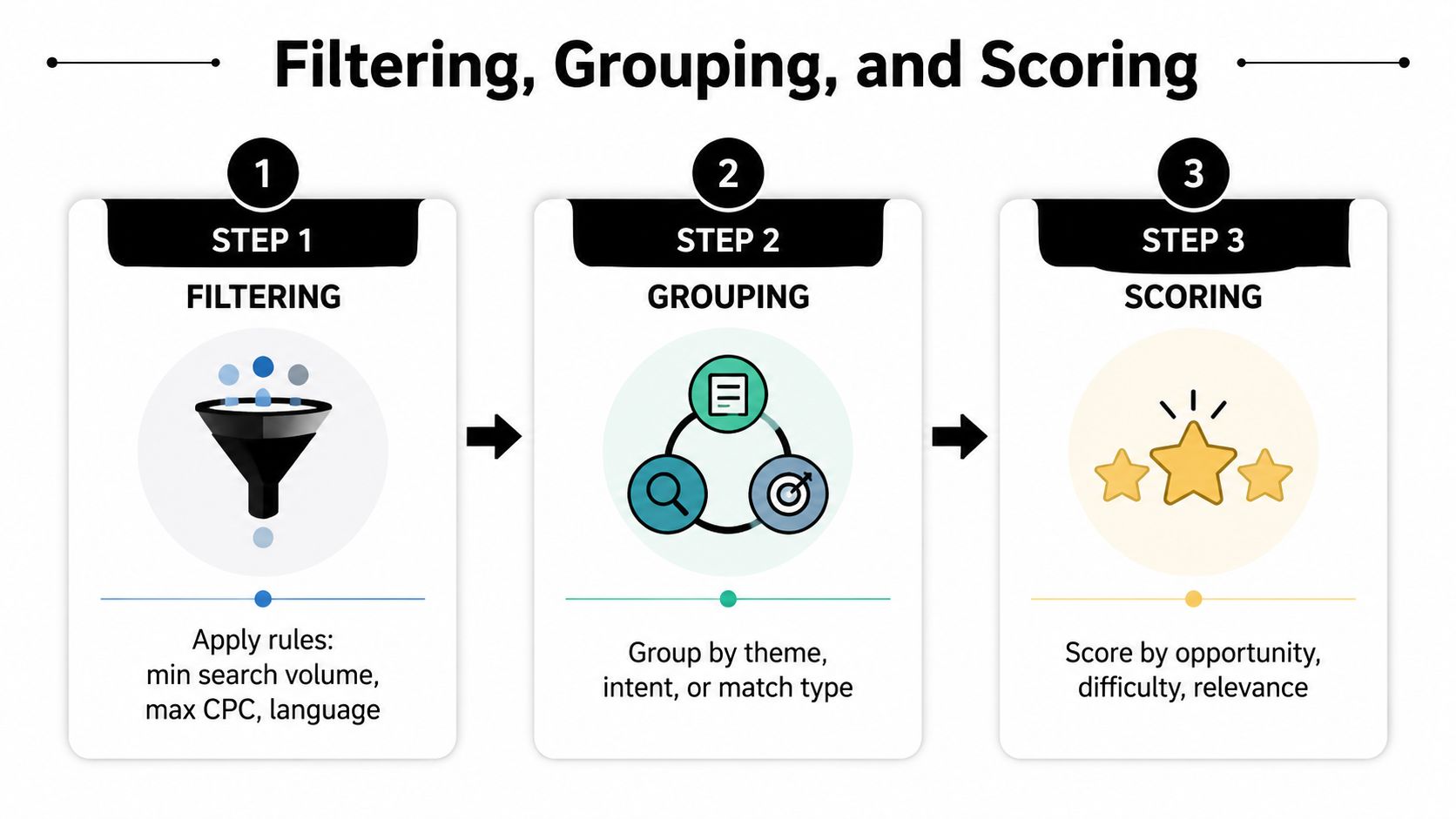
Scoring prioritizes useful opportunities
Scoring layers relevance, intent, and difficulty onto the filtered groups. A tool may calculate a weighted score or use a trained model, but the output still needs inspection. Relevance should carry more weight than raw volume when several terms share a broad theme but point to different needs.
Google's matching framework also affects organization. Since Google Ads consolidated positive match types into broad, phrase, and exact in July 2021, campaign tools need to map queries according to how closely they relate to a keyword. This explanation of Google Ads keywords and match types describes how that logic influences campaign structure.
Negative keywords add the other side of the system. They tell the platform which searches should be excluded, using broad, phrase, or exact negative matching in Search campaigns, as documented in Google's negative-keyword guidance. A strong keyword workflow therefore doesn't just find more terms. It identifies which terms belong together and which traffic should never enter the campaign.
Turning Google Ads Search Terms into Better Keywords
Google Ads gives you three broad ways to manage the path from search behavior to campaign structure. The right choice depends on how much control you need and how much review time you have.
At the loose end, you can leave automated recommendations or auto-apply settings active. Google may add related queries as exact or phrase keywords within existing ad groups. This reduces manual work, but it also places more responsibility on your exclusions and monitoring.
The middle approach is a recurring review. You export search terms, inspect them in a spreadsheet, promote strong queries into the relevant ad group, and add irrelevant terms to a negative list. It's slower, but the reviewer can evaluate wording, intent, landing-page fit, and business value together.
The tightest approach uses deliberate restructuring. You pause poor-fit queries, split emerging themes into dedicated ad groups, and layer negative lists at account, campaign, and ad-group scope. Google explains that the Search terms report contains the actual queries that triggered ads, the matched keyword, and the match type. Search terms report documentation makes that relationship clear.
A plumber provides a simple example. Repeated searches for “how to unclog a drain” may indicate useful information-seeking behavior but poor fit for an emergency service campaign, so the advertiser can add the phrase as a campaign-level negative. Repeated “24 hour plumber Brooklyn” searches show a tighter service and location intent, so the advertiser could create an exact-match keyword in a dedicated ad group, assuming the landing page and service area support it.
| Control Level | Action on “24 hour plumber Brooklyn” | Action on “how to unclog a drain” | Reviewer |
|---|---|---|---|
| Automated | Allow a related keyword suggestion into the relevant group | Rely on existing exclusions or later monitoring | Google Ads system plus marketer oversight |
| Scheduled manual review | Promote it after checking intent and landing-page fit | Add it to the appropriate negative list | PPC manager |
| Tight structural control | Create a dedicated exact-match group and tailored ad | Add a scoped negative and check related variants | PPC manager and account owner |
The search-term report is valuable because it turns assumptions into observed inputs. Google's Search Ads 360 guidance also describes selecting terms directly to add them as negative keywords or save them into a negative list.
Accuracy Limits, Biases, and Common Misconceptions
The most dangerous keyword mistake is assuming that high volume plus low difficulty equals an automatic winner. A keyword can look attractive in a dashboard and still fail because the searcher wants information, the SERP answers the question immediately, or the query doesn't match the product.
Volume is usually an estimate built from blended inputs. Clickstream panels, publisher data, planning data, and extrapolation can all contribute, and each source has its own coverage limits. High-traffic industries may be easier for providers to model than small markets. Long-tail, voice-style, or newly emerging queries can receive less representation or arrive with a delay.
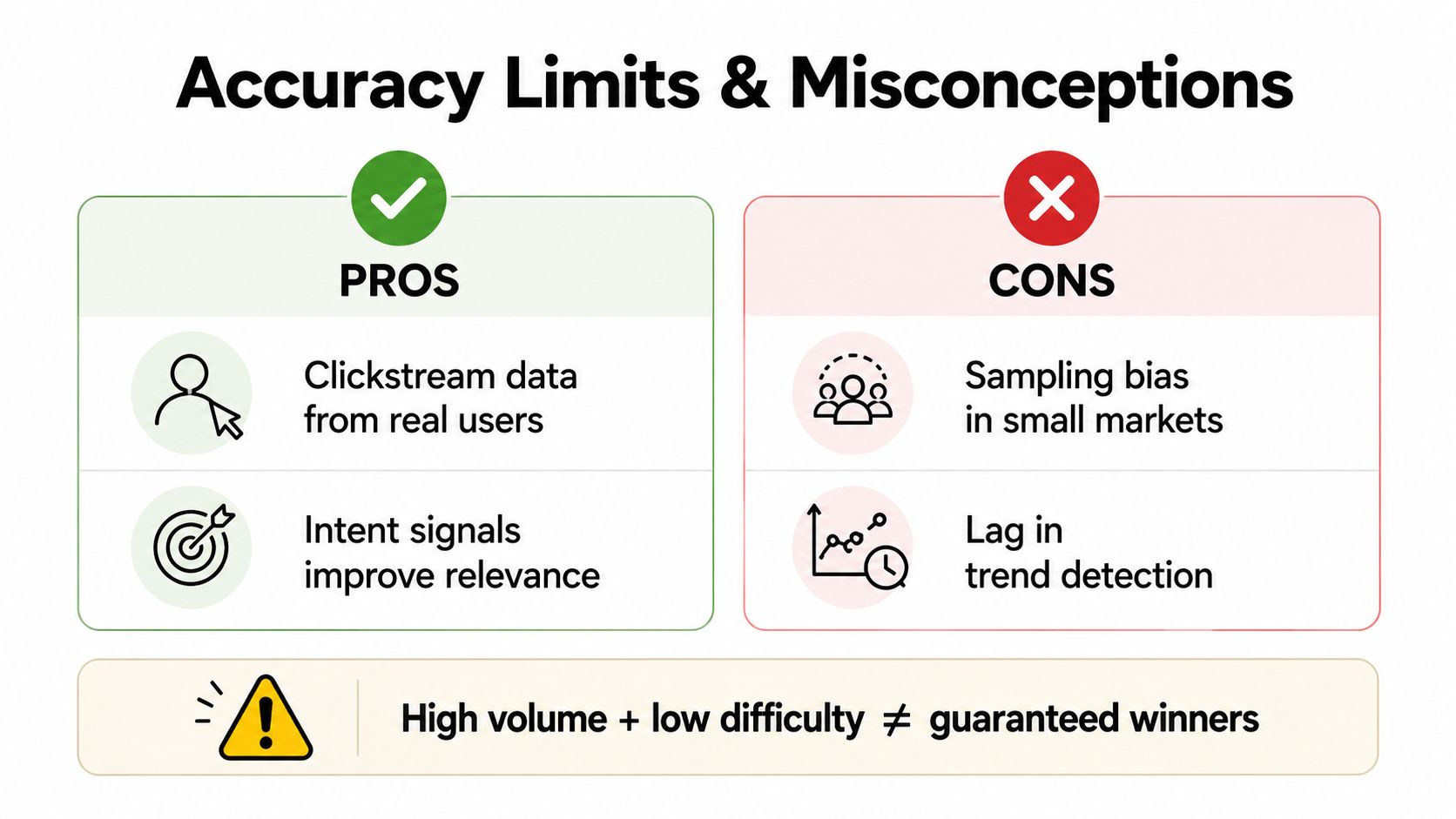
CPC and difficulty have similar boundaries. CPC reflects auction competitiveness, not your final cost or conversion rate. Difficulty describes relative visibility pressure, not guaranteed return. A term can be easy to rank for and commercially weak, or expensive in paid search while producing strong leads.
Clicks matter more than impressions alone
Search results increasingly include features that can satisfy a query before a user visits a website. Ads, local packs, product results, and question panels can change how much click opportunity remains. Ahrefs Keywords Explorer reflects this broader direction by including click-oriented and zero-click considerations alongside traditional volume views.
That changes the decision. A large informational query may attract learners, while a more specific service query can bring fewer searches but stronger buying intent. Your own conversion data, CPA, search-term quality, and landing-page behavior should override any single third-party score.
A useful test: Ask what the user wants to do next, then check whether your campaign or page gives them that next step.
How Keywordme Automates the Repetitive Keyword Workflow
A PPC manager inherits a Search campaign with thousands of raw search terms. The account contains useful queries, irrelevant research phrases, close variants, and terms that belong in different ad groups. The manager doesn't need another giant export. They need a faster way to sort decisions without losing control.
Keywordme can connect to a Google Ads account, retrieve recent search-term data, and organize terms into practical review buckets. Likely additions, likely negatives, and uncertain terms can be handled separately, while expansion suggestions are grouped around ad-group themes. That turns an unstructured queue into a review list.

The automation layer can handle scheduled syncing, rule-based exclusions, intent tagging, match-type assignment, and bulk formatting. A manager might define rules that flag employment searches, DIY questions, or unrelated product uses for review, while sending high-intent service phrases toward keyword expansion.
The system doesn't remove responsibility from the marketer. Every proposed addition, negative, or structural change still needs human review against the offer, geography, budget, landing page, and conversion evidence. The advantage is compression of repetitive triage, not blind publishing.
For a broader look at reducing manual keyword work, see how to automate keyword research.
The following video adds a visual way to think about the workflow and the search-term decisions that follow:
A Practical Framework for Using Keyword Research Results
Use a four-part decision loop after every research session.
First, cross-check estimates against first-party evidence. Compare tool outputs with Google Ads search terms, actual conversions, CPA, lead quality, and landing-page behavior. Third-party volume can help you choose where to look, but your account tells you what happened under your targeting and offer.
Second, prioritize intent and business value. Ask whether the query signals discovery, comparison, purchase, urgent service, or an unrelated need. A lower-volume phrase with clear commercial intent may deserve attention before a broad category term with uncertain relevance.
Third, define match and exclusion rules before launch. Decide which themes belong in broad, phrase, or exact groups. Build negative coverage for known non-buying searches, then check whether the exclusions are too narrow or too aggressive.
Fourth, review on a fixed cadence and feed the results back. Search behavior changes, and a campaign's own query data becomes more useful as it accumulates. Promote strong terms, separate new themes, remove waste, and update the assumptions behind your next research pass.
Save this compact checklist:
- Demand: Is the volume signal directional and relevant to the market?
- Intent: Does the query match the action you want?
- Economics: Does the CPC context fit your margin and acquisition goal?
- Structure: Does the term belong in a distinct ad group or landing page?
- Control: Are match types and negative keywords defined?
- Evidence: Have real conversions confirmed the opportunity?
You can also compare workflows and feature categories in this guide to the best keyword research tools. Keyword tools organize evidence. They don't replace the judgment that turns evidence into a profitable campaign.
Keywordme helps PPC teams pull search-term data into a focused workflow, identify keyword expansion opportunities, assign match types, and build negative keyword lists without repetitive spreadsheet formatting. Visit Keywordme to see how you can review and organize Google Ads keyword decisions more efficiently while keeping final approval in your hands.
.svg)