
Boost ROI: Building Keyword Lists for Google Ads
Boost ROI: Building Keyword Lists for Google Ads


You build a keyword list, launch the campaign, and feel pretty good about it. Then the Search Terms report comes in and the confidence disappears fast. Half the queries look off-topic, a few are only loosely related, and some are the kind of searches you'd never want to pay for in the first place.
That outcome usually isn't a bidding problem. It starts earlier. Most advertisers treat building keyword lists for Google Ads like a research task when it's really an account-structure task plus an ongoing control system. Exporting ideas from Keyword Planner is easy. Turning that export into something that can hold profit over time is the part that separates a clean account from a messy one.
The difference is governance. Good keyword lists aren't static. They get grouped by intent, assigned the right match types, and cleaned constantly with negatives. That work is less exciting than brainstorming seed terms, but it's what keeps traffic relevant and spend under control.
Why Most Google Ads Keyword Lists Fail
Most keyword lists fail because they start as a dump and stay a dump.
A team grabs a batch of ideas from Keyword Planner, adds a few obvious variants, maybe tosses them into ad groups by product category, and calls it done. On paper, that looks organized. In practice, it creates ad groups that mix different intents, different levels of buying readiness, and different levels of relevance.
The one-time build mindset
The biggest mistake is treating the list as finished the moment it goes live. Google Ads doesn't work that way. Search behavior shifts, broad queries wander, and user language always turns out messier than the spreadsheet suggested.
When advertisers skip governance, they usually run into the same problems:
- Mixed intent in one ad group: Terms for research, comparison, and buying all trigger the same ads.
- Loose relevance: The keyword is close enough to match, but not close enough to convert well.
- No negative plan: Irrelevant traffic gets discovered after spend is already gone.
- Too much faith in volume: High-volume ideas get added even when they don't fit the offer.
A keyword list can look comprehensive and still be operationally weak.
Collection is not the same as control
Google Ads rewards structure. If your ad group theme is muddy, ad copy gets generic. If ad copy gets generic, traffic quality gets softer. If traffic quality gets softer, optimization gets harder because you're trying to diagnose performance inside a mixed bag of intent.
That's why building keyword lists for Google Ads isn't really about finding more terms. It's about deciding which searches deserve their own cluster, which need different match types, and which should never trigger an ad at all.
Here's the blunt version.
| Weak approach | Strong approach |
|---|---|
| Export keywords and upload | Export, filter, cluster, govern |
| Organize by broad category only | Organize by intent and theme |
| Add broad match without guardrails | Use broad with active negative control |
| Review occasionally | Review search terms routinely |
What actually holds up
The accounts that stay profitable usually follow a simple rule. Every keyword has to earn its place twice. First at build time, then again after real search term data comes in.
That mindset changes everything. You stop asking, "How many keywords can I add?" and start asking, "Which terms can I control, map to an ad, and maintain without waste?" That's the core job.
Laying the Groundwork Research and Idea Generation
The early stage should be messy on purpose. You're not trying to produce a polished campaign yet. You're trying to collect enough raw material that the final list reflects the way buyers search, not just the way your team describes the product internally.
Google's own documentation makes the intended workflow pretty clear. Keyword Planner is built to help advertisers "build keyword lists" for Search campaigns, generate keyword ideas, estimate traffic, and organize terms using match types, ad groups, and negative keywords, according to Google Ads Keyword Planner guidance.

Start with seed terms from the business, not the tool
Keyword Planner is useful, but it shouldn't be your brain. Start with the language already closest to revenue.
Pull seed terms from places like these:
- Sales calls: Phrases prospects use when they describe the problem in plain English.
- Support tickets: Repeated wording around product features, issues, and use cases.
- Site navigation: Service names, category names, product names, and solution pages.
- Internal search or on-site search logs: Real terms visitors already type when they're on your site.
- Competitor positioning: Not to copy blindly, but to spot adjacent search language.
A lot of wasted spend starts with keyword research that's disconnected from customer language. Teams fall in love with industry terminology while buyers search using simpler, less polished wording.
Use Keyword Planner the right way
Once you have seed terms, use Keyword Planner to expand, not decide. Google's tool is especially useful for branching into related ideas, checking location-specific demand, and building lists for major markets where wording changes by country, city, or region.
A practical workflow looks like this:
- Enter a small set of high-confidence seed terms.
- Export a wide batch of related ideas.
- Repeat with category-level terms, feature terms, and problem-aware terms separately.
- Keep location modifiers separate if geography matters.
- Build one large master sheet before any hard filtering.
If you want a companion read on the research side, this guide to AdWords keyword research is a useful place to compare workflows.
Field note: The first export is supposed to be noisy. If it's already tidy, you probably started too narrow.
Pull from more than one intent layer
A healthy master list includes more than direct-buying phrases. That doesn't mean every intent belongs in the same campaign. It means your research phase should capture them before structure filters them apart.
Use different buckets such as:
- Transactional terms: These usually indicate active buying or hiring intent.
- Commercial investigation terms: Comparison-style searches often matter, but they need their own treatment.
- Problem-aware searches: People may not know your product category yet, but they know the pain.
- Branded and competitor-adjacent ideas: Sometimes useful, sometimes not. Still worth evaluating.
- Local modifiers: Essential for service businesses and regional campaigns.
Go wide first, then earn your way in
At the start, volume is only one signal. Fit matters more. A keyword with clear business relevance is usually more valuable than a flashy suggestion that's only loosely connected to the offer.
Google also warns against making lists too narrow because that can limit reach, but the opposite mistake is more common. Advertisers go broad without a clear plan for later cleanup. That's why the master list should be expansive, while the launch list should be selective.
The research phase is not where discipline shows up. Discipline starts when you begin cutting.
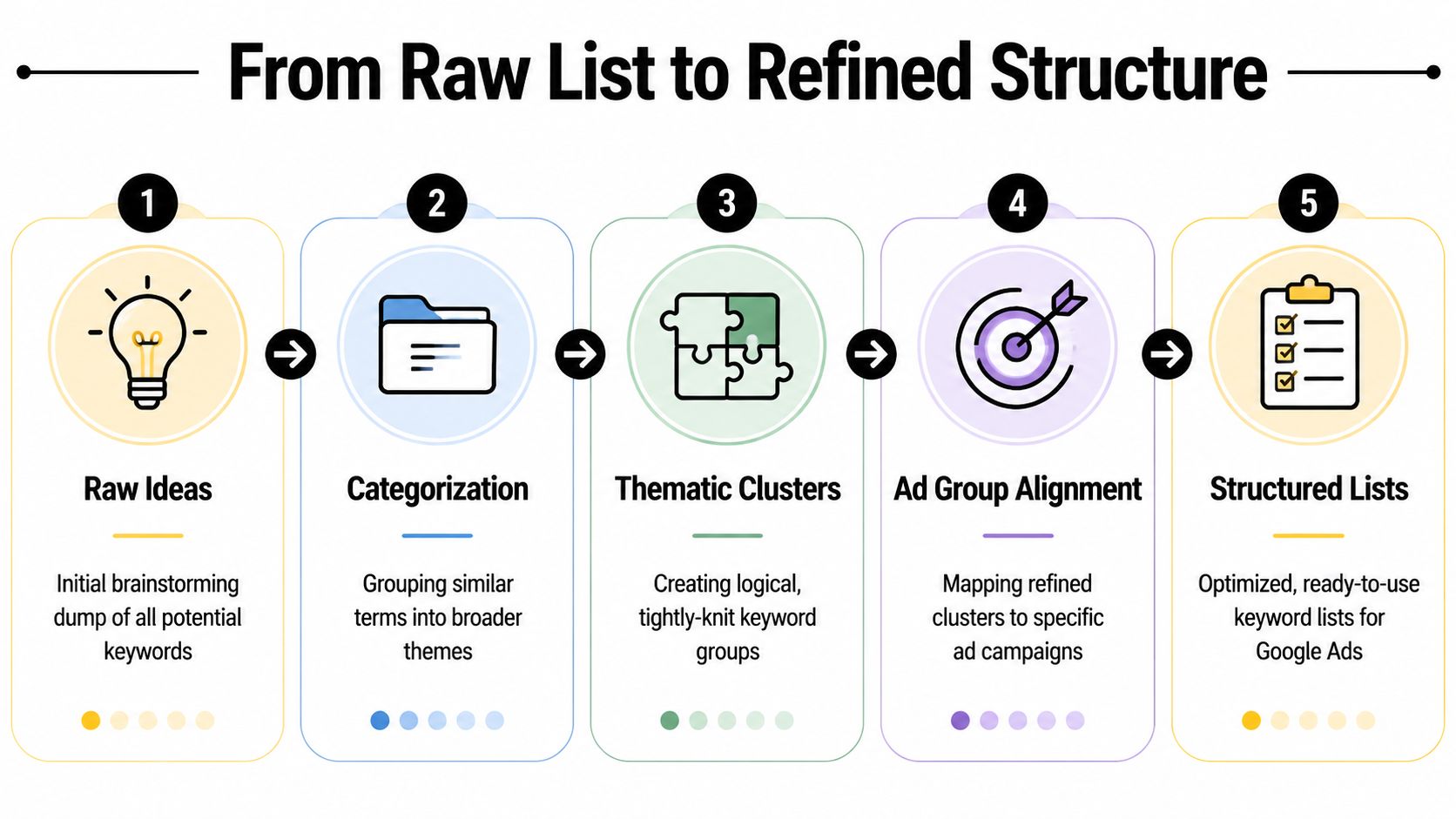
From Raw List to Refined Structure
A giant keyword sheet is not an asset yet. It's inventory. It only becomes useful when you turn it into clusters that can support relevant ads, landing pages, and bidding decisions.
The cleanest modern workflow starts with intent clustering. Google positions Keyword Planner as a tool for keyword ideas and performance estimates, and practitioner workflows build on that by grouping terms into tightly related themes instead of chasing volume alone, as described in Google's Keyword Planner business overview.
Group by intent, not just wording
A lot of advertisers still organize lists by surface similarity. If two keywords contain the same noun, they go in the same ad group. That sounds neat, but it creates weak relevance fast.
Consider these searches:
- buy crm software
- best crm for small business
- crm pricing
- what is a crm
- free crm templates
All of them contain the same core topic. They do not belong in one ad group. The user behind each search wants something different. One is ready to evaluate vendors. One wants basic education. Another may only want a free resource.
What a strong ad group looks like
Single Keyword Ad Groups are mostly overkill for most accounts. What works better is the single-theme ad group. Tight enough to keep ad copy relevant, broad enough to stay manageable.
A practical test helps here.
| If the keywords in one ad group... | Then the group is probably... |
|---|---|
| Would need different headlines to feel relevant | Too broad |
| Share the same user goal | Tight enough |
| Would send to different landing pages | Too broad |
| Can use the same negatives and match type plan | Structurally sound |
For deeper examples, these advanced keyword grouping techniques line up well with this theme-based approach.
A simple clustering process
Use a pass/fail mindset. Every keyword should answer three questions:
- What is the user trying to do? Learn, compare, buy, book, call, or solve.
- Can one ad speak clearly to all terms in this cluster?
- Can one landing page satisfy the whole cluster without feeling generic?
If the answer to either of the last two is no, split the group.
Here's a practical way to label clusters:
- Core solution terms: Direct searches for the product or service.
- Use-case terms: Searches tied to a specific application or scenario.
- Comparison terms: Searches where the user is evaluating options.
- Local intent terms: Searches with city, region, or "near me" style language.
- Low-fit informational terms: Usually better excluded or separated very carefully.
A quick visual can help when you're mapping the list:
The best ad groups feel obvious in hindsight. When you read the keyword set, the ad practically writes itself.
What to stop doing
Some habits create clutter no matter how much cleanup you do later.
- Don't group by broad product family alone. That's how mixed-intent traffic sneaks in.
- Don't force every variation into one bucket. Similar wording doesn't guarantee similar intent.
- Don't build structure around search volume first. Traffic without relevance is just a faster way to waste budget.
This stage is where building keyword lists for Google Ads turns from research into architecture. If the architecture is weak, optimization becomes expensive and slow.
Controlling Traffic with Match Types and Negatives
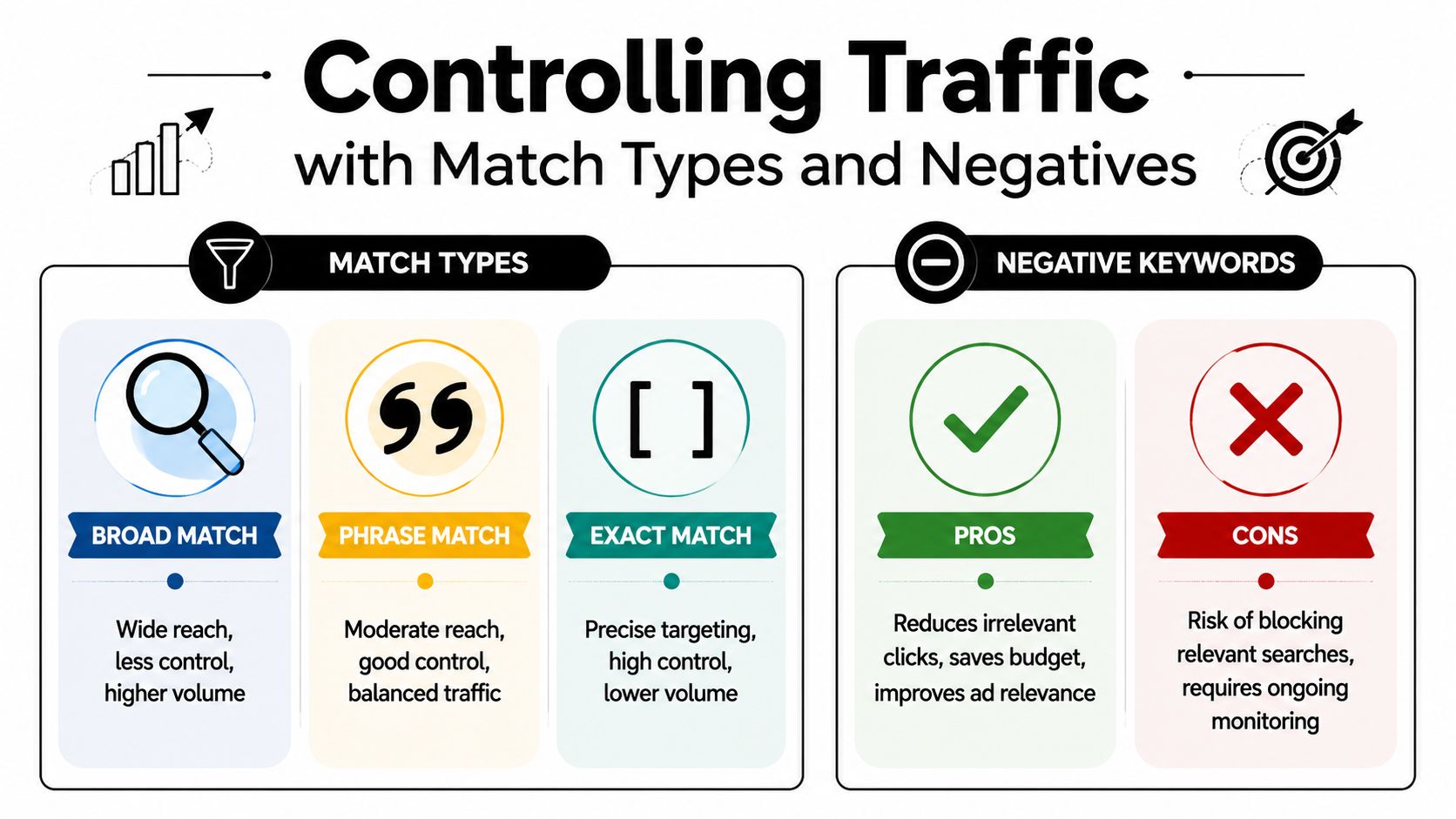
Once the structure is in place, traffic control decides whether that structure holds up under real search behavior. Match types open doors. Negative keywords close the wrong ones. You need both.
Most explanations stop at definitions of exact, phrase, and broad. That's basic knowledge. The essential work is deciding how those match types work together inside a living account and how aggressively you maintain the negative layer behind them.
Match types are a traffic-shaping system
Broad, phrase, and exact each do something different. The mistake is assigning one by habit.
Here's the practical lens:
- Broad match is useful for discovery. It can uncover search patterns you wouldn't have added manually.
- Phrase match usually gives a better middle ground when you want reach without opening the floodgates.
- Exact match is where control is highest and query intent is usually easiest to evaluate.
A lot of accounts need all three. They just don't need them used casually.
The case for match type governance
One of the more useful operating ideas here is match type governance. That means you don't set match types once and leave them alone. You rotate them based on what the query data proves.
A cited practitioner summary notes that broad match can drive up to 15% more conversion volume, but can also raise cost per acquisition by 20% to 30% without disciplined negative exclusions, according to this guide discussing Google Ads keyword research and match type rotation.
That trade-off is real. Broad can uncover demand. It can also surface junk faster than any other setting in the account.
Practical rule: If you use broad for discovery, pair it with frequent Search Terms review and active negative maintenance. Otherwise, you're buying research the expensive way.
How to combine match types without losing control
A clean setup often looks like this:
| Keyword role | Match type tendency | Why |
|---|---|---|
| Proven high-intent terms | Exact and phrase | Protect relevance and control |
| Discovery terms in tight themes | Broad, with guardrails | Find new query variants |
| Ambiguous or expensive terms | Phrase or exact first | Reduce waste while learning |
| Terms with a history of drift | Exact plus negatives | Stop repeat irrelevance |
This is also where tools can remove a lot of manual drag. For example, Keywordme's negative keyword workflow guide is relevant if you're trying to clean search terms, assign match types, and bulk-manage keyword actions inside Google Ads without endless copy-paste.
Negatives do more than block junk
Negative keywords aren't just a cleanup tool. They're part of list design.
Used well, they do three things at once:
- Protect intent: They stop unrelated or low-fit searches from entering a valuable ad group.
- Separate themes: They reduce overlap between ad groups that would otherwise compete with each other.
- Preserve signal quality: Cleaner traffic makes keyword-level performance easier to judge.
There are two negative lists generally needed.
The universal negative list
These are the obvious exclusions that apply across much of the account. Depending on the business, this may include job seekers, support queries, freebies, DIY intent, or purely informational terms that never fit a paid click.
Build this list early. It saves money immediately.
The ad-group negative list
More advanced control comes into play. If you have separate groups for different themes, you often need negatives to keep them from bleeding into each other.
Example. If one ad group targets a "pricing" theme and another targets a "demo" theme, each may need cross-negatives so queries route to the more relevant destination.
Good negative hygiene doesn't just remove bad traffic. It improves routing inside the account.
Weekly maintenance beats heroic cleanups
The worst negative keyword workflow is waiting until the account is a mess and then trying to clean everything in one giant audit.
A lighter, repeatable process works better:
- Review Search Terms on a schedule.
- Flag irrelevant queries for negatives.
- Promote strong search terms into positive keywords when they fit a real cluster.
- Recheck match type coverage after each round of cleanup.
- Split ad groups when one cluster starts attracting too many different intents.
That rhythm is what turns a launch list into a managed system.
Expanding and Pruning Your Keyword Lists Over Time
The Search Terms report is where keyword strategy stops being theoretical. It shows what Google matched, how users phrased intent, and where your structure is either holding or leaking.
This is also where a lot of wasted effort gets exposed. One Google Ads educator notes that teams often remove at least 50% of exported keyword ideas and sometimes as much as 80% before finalizing ad groups, and many practitioners use a floor of 30 monthly searches per keyword when filtering early-stage lists, according to this practitioner video on Google Ads keyword research. That lines up with real account work. Most of the initial list doesn't deserve a long-term place.
What to prune
Pruning isn't about being ruthless for the sake of it. It's about removing terms that create management overhead without clear payoff.
Look for patterns like these:
- Queries that repeatedly miss intent: They may be relevant on paper but wrong in practice.
- Keywords that attract too many weak variants: Even after negatives, some terms stay sloppy.
- Clusters that can't support relevant ads: If the theme is still muddy, the problem is structural.
- Thin demand terms: Some keywords are so marginal that they distract from higher-signal work.
A keyword doesn't stay in the account because it sounded good during research. It stays because live data keeps justifying it.
What to expand
The Search Terms report is also the best source of keyword expansion because it reflects current behavior, not guesses. When a query keeps showing up with strong intent and clean relevance, that is usually a better candidate than a random idea from a brainstorming session.
Good expansion candidates often share these traits:
| Search term pattern | Likely action |
|---|---|
| Strong fit, repeated relevance | Add as a keyword in the right cluster |
| Strong fit but slightly different theme | Create a new ad group |
| Valuable modifier appears often | Build a new themed subgroup |
| Irrelevant but recurring | Add as negative |
Keep the review cycle manageable
Manual review gets ugly fast in larger accounts. That's why workflow matters almost as much as judgment.
A simple operating rhythm works well:
- Pull recent search terms regularly
- Label each as add, negate, ignore, or watch
- Push winners into the correct match type
- Update negatives before bad patterns spread
- Revisit ad group structure when a theme starts splitting
For teams managing lots of volume, one practical option is to use a tool like Keywordme to sort search terms into positives and negatives, apply match types, and reduce manual formatting work inside Google Ads. The point isn't automation for its own sake. The point is shortening the gap between what the data reveals and what gets changed in the account.
Search terms tell you what your keyword list really is. Your spreadsheet only tells you what you hoped it would be.
The hidden win in ongoing pruning
Pruning makes expansion better. When irrelevant traffic gets blocked, the remaining search term data becomes easier to trust. That means your next round of keyword additions is based on cleaner evidence, not noise.
This is the part many advertisers skip because it isn't flashy. But once you get into the habit, building keyword lists for Google Ads stops feeling like a setup project and starts working like a repeatable operating system.
Building Your Keyword List Is Just the Beginning
The first list is only a draft. That's the mindset shift that makes paid search easier to manage and a lot more profitable.
If you treat keyword building like a one-time task, the account slowly drifts. Match types loosen relevance. search terms expand in directions you didn't intend. Old assumptions stay in the campaign long after buyer behavior changes. Then the team starts chasing symptoms like rising costs or weak lead quality when the actual issue is that the keyword system hasn't been maintained.
What durable accounts do differently
The strongest Google Ads accounts usually follow a simple cycle:
- Research widely
- Cluster by intent
- Control with match types and negatives
- Review search terms
- Prune and expand continuously
That sounds basic, but most underperforming accounts break the cycle after step one.
The real asset is the governed list
A useful keyword list isn't just a set of terms. It's a governed asset. It has structure, match type logic, exclusions, and a review process attached to it. That's what allows an account to scale without turning into a traffic-quality problem.
If you're serious about building keyword lists for Google Ads that drive profit, focus less on the initial export and more on what happens after launch. The market tells you what belongs in the account. Your job is to listen, route traffic correctly, and cut the waste fast.
The advertisers who do that consistently don't just get cleaner reports. They get a more stable account, clearer signals, and better decisions.
If you're tired of cleaning search terms by hand, Keywordme gives PPC teams a practical way to turn messy query data into organized keyword actions. It helps with negative keyword handling, match type assignment, and ad group expansion inside Google Ads, which is useful when your keyword list needs ongoing governance instead of one more spreadsheet.
SEO Title: Building Keyword Lists for Google Ads
Meta Description: Building keyword lists for Google Ads takes more than exports. Learn how to structure, govern, prune, and expand lists that drive better ROI.
.svg)