
Adwords Keyword Research: A Modern Playbook for 2024+
Adwords Keyword Research: A Modern Playbook for 2024+


AdWords keyword research is all about getting inside your customer's head. You're trying to figure out the exact words and phrases they type into Google so you can show up with the perfect ad at the perfect time. The goal is always to find those high-intent keywords—the ones that signal someone is ready to buy—so your ad budget goes toward clicks that actually convert.
Why Your AdWords Keyword Research Needs a Major Overhaul
Let's cut to the chase. The old keyword research playbook is gathering dust on the shelf. If you're still spending hours hunting for exact match keywords and painstakingly organizing them in spreadsheets, you're fighting a battle that's already over. Google's own AI is now calling the shots, and it's time to adapt.
This isn't some small algorithm tweak. It's a seismic shift in how search actually works. AI-powered features are fundamentally changing how people look for things online, and that means we have to change how we build our campaigns. It's really that simple.
The New Search Landscape
The numbers don't lie. A massive 58% of users are already using Google's AI Mode, with 89% of them saying the AI Overviews are incredibly helpful. That's a huge deal. People feel their search experience has improved by 84%.
But here's the kicker for us advertisers: as people ask AI more conversational, long-winded questions, the click-through rates on traditional blue-link search results have cratered. We're talking a 61% drop since mid-2024.
You just can't ignore that. It hits your budget, your clicks, and your bottom line. The era of building a rigid, static keyword list and letting it run is officially dead.
The real challenge now isn't just about finding keywords. It's about understanding the intent behind the messy, conversational way people actually search. You have to start thinking in themes to capture queries you've never even seen before.
To put this shift in perspective, take a look at how the core strategies have evolved.
The Old Way vs The New Way of Keyword Research
This table quickly breaks down the old, outdated tactics versus the modern approach you need to be using today.
Seeing the side-by-side comparison makes it clear: clinging to old methods is a recipe for wasted ad spend and missed opportunities.
Moving From Lists to Themes
The winning formula today is all about shifting from granular keyword lists to flexible, theme-based ad groups. Instead of just targeting "running shoes," you build your campaigns around broader concepts like "marathon training footwear" or "beginner trail running gear."
This approach just works better in the current environment.
- It speaks the AI's language: Structuring your campaigns this way helps Google’s AI understand context, allowing it to match your ads to a much wider array of relevant, conversational searches.
- It catches brand-new queries: Google has said that 15% of all searches are new every single day. Thematic campaigns are perfectly positioned to capture these new and unpredictable queries.
- It boosts your relevance: When your ad groups are built around a central theme, your ads and landing pages are naturally more relevant, which improves your Quality Score and brings down your costs.
This isn't just a nice theory; it's a necessary survival tactic. If you're looking for a complete walkthrough on how to put these new rules into practice, a great place to start is Mastering Google AdWords. This guide will help you adapt, optimize, and start winning in this new era of search.
Building Your Foundation with Keyword Themes
Let's be real. Tossing a thousand random keywords into a Google Ads campaign and hoping for the best is a recipe for disaster. If you want to build a campaign that actually scales and makes you money, you have to stop obsessing over individual keywords and start thinking in keyword themes.
This whole approach is about getting inside your customer's head. Instead of just chasing search volume, you're focusing on the core problems and goals that drive their searches. When you build a campaign this way, you're essentially speaking Google AI's language, which is how you get rewarded with better performance.
From Customer Problems to Seed Lists
Before you even think about opening a keyword tool, I want you to do something that feels a bit old-school. Grab a whiteboard or just a blank document and start mapping out the problems your product actually solves.
Think from your customer's perspective. What's keeping them up at night? What are they trying to accomplish?
Let's say we're selling running shoes. Our brainstorming session might look something like this:
- Someone needs a durable shoe to survive their first marathon training block.
- A weekend warrior is looking for something rugged for muddy trails.
- A total beginner wants a comfortable, supportive shoe for their first couch-to-5k.
- A competitive runner needs a feather-light shoe for race day.
See? We're not talking keywords yet. These are real human scenarios, and each one hints at a completely different buying intent. This is the gold you'll use to build out your initial keyword themes.
Creating Your Initial Keyword Themes
Now it's time to turn those customer scenarios into the foundational pillars of your campaign. These themes are what will give your ad groups structure and purpose.
Taking our running shoe example, those scenarios naturally become themes:
- Theme 1: Marathon Training Shoes
- Theme 2: Trail Running Shoes
- Theme 3: Beginner Running Footwear
- Theme 4: Racing Flats
These themes are infinitely more powerful than a generic seed term like "running shoes" because they come pre-loaded with user intent. Getting this part right is everything—it ensures your ad groups will be laser-focused from day one.
A well-defined keyword theme is basically the blueprint for a killer ad group. It signals to Google exactly who you're targeting and proves your ad is the perfect solution for their search. This is the secret sauce for a high Quality Score.
With these core themes in hand, you're ready to start building out your actual keyword list.
Expanding Themes with Keyword Planner
Okay, now you can open up Google's Keyword Planner. But we're going to use it strategically. Instead of just dumping in broad terms, you’ll let your new themes guide the discovery process.
Take one of your themes, like "marathon training shoes," and plug it in. The goal here isn't to just grab every suggestion with a high search volume. You're on the hunt for keywords that are semantically related to your core theme.
You’re basically looking for all the different ways a person might phrase the same need. For our "marathon training shoes" theme, Keyword Planner might spit out ideas like:
- "best long distance running shoes"
- "durable shoes for marathon"
- "high mileage running shoes"
- "cushioned running shoes for training"
All of these are a perfect match for the original intent. You’ll just repeat this process for each theme, building out separate, tightly-knit lists of keywords. This is a core part of what’s known as keyword clustering, and it’s way more effective than just mixing everything together. If you want to go deeper on this, check out these best practices for keyword clustering.
When you follow this thematic approach, every single keyword in your ad group is directly connected. The result is hyper-relevant ads that earn higher click-through rates, better Quality Scores, and a campaign that's actually profitable.
Mining for Gold in Your Search Terms Report
If you think your keyword research is done once campaigns go live, I've got some news for you. The real work is just getting started, and the magic happens inside your Google Ads account—specifically, in the Search Terms Report.
This isn't just another data table. It's like getting a direct look over your customer's shoulder, showing you the exact, unfiltered words they're typing into the search bar. This is where your initial keyword list gets a reality check. You’ll uncover long-tail gems your competitors completely missed and, just as importantly, spot all the junk terms that are quietly eating your budget.
Finding Keyword Gems and Eliminating Waste
Your main mission here is pretty simple: find what’s working and add more of it, then find what’s not working and block it. It's a constant process of sharpening your targeting, and it’s what separates the pros from the amateurs.
A typical workflow I use goes something like this:
- Pull the data regularly. I like to export the Search Terms Report for the last 7-14 days. Getting it into a spreadsheet is a must, as it gives you the power to really dig in, sort, and filter.
- Look for high-impression, low-click terms. If a search query is showing up a lot but no one's clicking, that’s a red flag for a relevance mismatch.
- Find your new keyword candidates. Scan for any search terms that have led to conversions or have a great click-through rate but aren't actually on your keyword list yet. These are proven winners. Grab them and add them to a tight, relevant ad group, usually as a phrase or exact match.
- Hunt for negatives. This is absolutely crucial for protecting your budget. If you sell "men's running shoes," you don't want to pay for clicks from people searching for "free running shoe clipart" or "running shoe repair." Add these irrelevant terms to your negative keyword list immediately.
Your Search Terms Report is hands-down the best source for powerful keyword ideas. Why? Because it's based on what real people are actually doing, not just on theoretical search volumes from a planning tool. Getting good at analyzing this report is a non-negotiable skill for running profitable campaigns.
This entire process, from brainstorming ideas to expanding and grouping your keywords, is a fundamental loop that keeps your account healthy and growing.
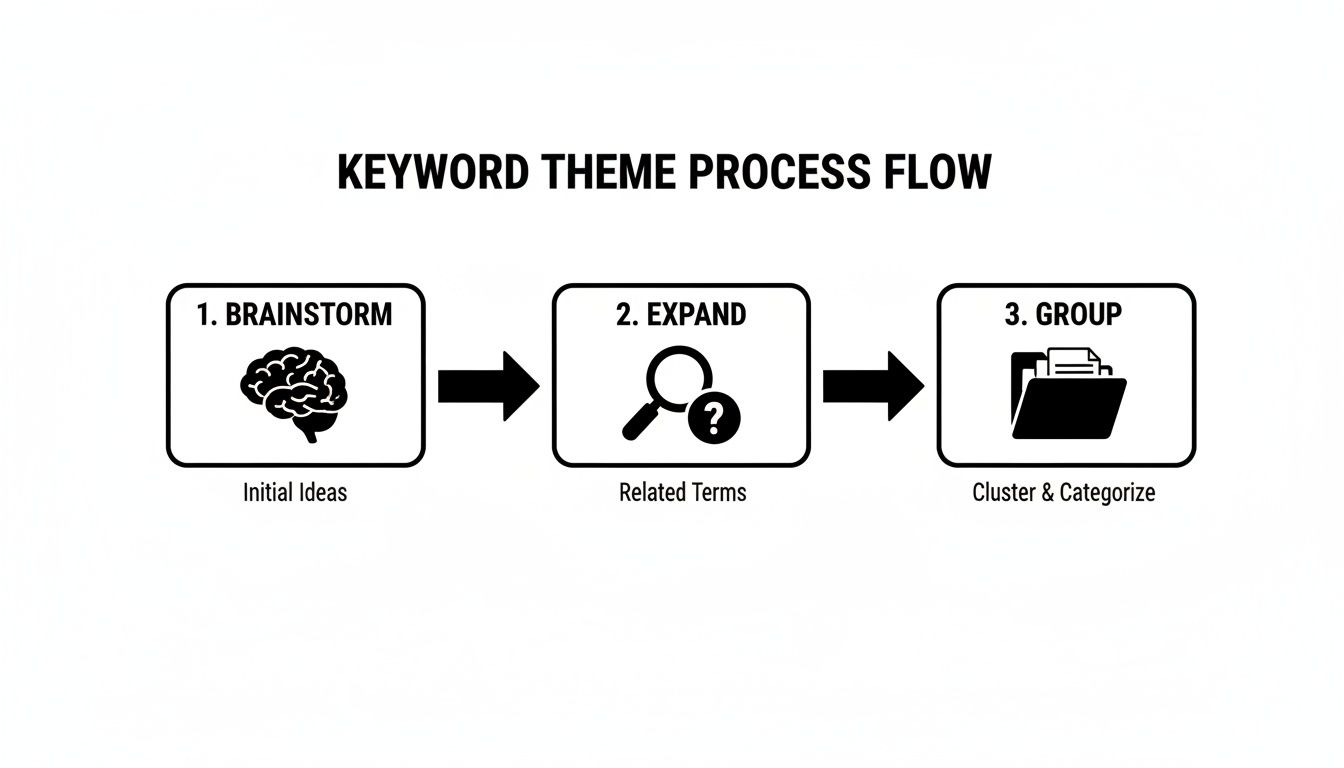
Think of it like this: you start with a brainstorm, expand on those ideas, and group them logically. But it’s the real-world data from your search terms that constantly feeds back into this process, making it smarter over time.
Turning Tedious Tasks into Quick Wins
Let's be real—nobody loves manually sifting through thousands of search terms in a spreadsheet. It’s slow, mind-numbing work. That’s where a good tool can completely change the game.
For example, the Keywordme Chrome plugin was built specifically to take the pain out of this process. It lets you analyze your Search Terms Report right inside the Google Ads interface. You can add a great new keyword to an ad group or flag a junk term as a negative with a single click. No more endless copy-pasting. It turns a dreaded manual task into a quick, easy part of your weekly optimization routine.
On top of refining your own data, you can get even more strategic by trying out a reverse keyword analysis to see what’s working for others and find opportunities you might have missed.
With Google Ads Search campaigns expected to take up a whopping 74.97% of global ad spend, you can't afford to be sloppy with your keywords. Especially when the average cost-per-click is $2.69 and a strong conversion rate hovers around 4.40%, every single click matters.
A well-oiled Search Terms Report is the engine that drives a high-performing account. To get even deeper into this, check out our guide to mastering the Google Ads Search Terms Report for more tips.
Structuring Ad Groups for Maximum Relevance
You can do all the keyword mining in the world, but if you just dump your shiny new keywords into one giant ad group, you’ve already lost. This is probably the single most common mistake I see people make, and it completely torpedoes otherwise promising campaigns. A great keyword list without a smart structure is just a mess waiting to happen.
The whole point of adwords keyword research bleeds directly into how you organize your account. Your job is to create a straight line from what someone types into Google to them clicking "buy" on your site. That line starts with tightly organized ad groups.
This brings us to a simple but incredibly effective concept: Single Theme Ad Groups (STAGs). The idea is that every single keyword in an ad group should be about the exact same thing. You're grouping by user intent. This is the secret to making your ads feel like they're reading the user's mind, which is precisely what Google rewards.
The Power of Themed Ad Groups
Let's go back to our running shoe store. A beginner might throw "men's running shoes," "buy trail running shoes online," and "what are the best marathon shoes" all into one bucket. What happens? You're forced to write a vague, generic ad that doesn't really speak to anyone, and you send them all to a generic landing page. It’s a recipe for wasted clicks.
Now, let's see how an expert would do it using STAGs.
- Ad Group A (Trail Running): This group is packed with keywords like "buy trail running shoes," "off-road running sneakers," and "best shoes for muddy trails." The ad copy talks about aggressive lugs, rock plates, and durability. Clicks go straight to the trail shoe category page.
- Ad Group B (Marathon Training): Here, you’ll find keywords like "high mileage running shoes," "marathon training footwear," and "durable long distance shoes." The ads will scream about cushioning, support, and lightweight performance for long runs. Naturally, users land on a page featuring marathon-ready models.
See the difference? This tight-knit structure has a massive impact on your core metrics.
When a person’s search query, your ad, and your landing page all tell the same story, your Click-Through Rate (CTR) and Quality Score will skyrocket. Better Quality Scores mean lower costs-per-click, which means your budget goes a lot further.
Think of each ad group as a specific answer to a specific question. If a keyword doesn't fit the "answer" provided by the ads in that group, it doesn't belong there. It needs its own ad group.
Building Your High-Relevance Ad Groups
Okay, so how do you actually build these from your keyword list? It's pretty straightforward. Just take those thematic keyword lists you already created. Each theme—like "Beginner Running Footwear" or "Racing Flats"—is your new ad group.
Next, you need to assign match types. I usually like to start with a mix of broad, phrase, and exact match keywords for the core terms in each group. This gives you a nice balance between casting a wide net and maintaining tight control.
For your "Trail Running" ad group, it might look like this:
- Broad Match:
trail running shoes(to discover new, long-tail searches) - Phrase Match:
"men's trail running shoes"(for more targeted, higher-intent searches) - Exact Match:
[buy hoka speedgoat 5](to capture people who know exactly what they want)
With your keywords and match types set, the last piece of the puzzle is writing at least two or three killer ads for each ad group. The beauty of the STAG method is that writing ad copy becomes almost effortless. Since all the keywords are about the same thing, you can write super-specific, persuasive ad copy that nails the user's intent.
Getting this process down is fundamental to success. If you want a more granular look at the mechanics, our guide on how to add keywords to Google Ads is a great resource. In the end, a clean, well-organized account is the only way to run profitable campaigns that you can actually scale over time.
Time to Automate and Scale Your Keyword Workflow
Let's get real for a minute. Everything we've covered—digging through search term reports, cleaning out the junk, and carefully assigning match types—is a massive time sink. It’s also incredibly easy to make a mistake, especially when you start juggling multiple campaigns or clients.
At some point, you're going to hit a ceiling. The manual work just isn't sustainable if you're serious about growing your accounts. You can either hire more people to handle the grunt work, or you can find a way to work smarter. This is all about working smarter.
Ditch the Spreadsheets and Speed Everything Up
Think about what it would be like to optimize an entire Google Ads account—we're talking cleaning thousands of search terms and sorting hundreds of new keyword candidates—in the time it takes to finish your morning coffee. That's what happens when you plug a real automation tool into your process.
This is exactly why tools like Keywordme exist. They’re built from the ground up to tackle the tedious, repetitive tasks that eat up a PPC manager's day. The whole point is to get you out of endless spreadsheets and back to thinking about high-level strategy.
Your real value isn't found in copying and pasting rows in Excel. It’s in analyzing performance, spotting the next big opportunity, and making the strategic calls that actually drive profit. The right tools simply clear the path for you to do that.
A Day in the Life of a PPC Specialist
Picture a typical PPC specialist managing five e-commerce clients. Every Monday morning is a slog. They have to export all the search term reports, pull them into Excel, and start wrestling with VLOOKUPs and pivot tables to flag which terms to add as keywords and which to add as negatives.
Before they know it, half the day is gone, eaten up by tedious data entry.
Now, let's see how that changes when they use something like the Keywordme Chrome plugin. Instead of exporting anything, they just open the Search Terms Report right inside the Google Ads interface.
- They spot a junk term like "free templates." One click, and it’s on the negative keyword list.
- They find a money-maker search term like "buy waterproof hiking boots size 10." A couple of clicks, and it's added as a phrase match keyword to the right ad group.
- They can highlight 50 irrelevant terms all at once and add them to the negative list in a single bulk action.
What used to be a four-hour headache is now done in about 20 minutes. That's a 90% reduction in optimization time. That specialist just got hours back to focus on writing better ad copy, refining bid strategies, or actually talking to their clients.
Putting Your Keyword Strategy on Autopilot
This isn’t just about saving a few hours here and there. It’s about building the confidence to scale your operations. When you can manage your accounts up to 10x faster, you can comfortably take on more clients or manage much bigger, more complex campaigns without needing to hire an army.
This shift completely changes what you're capable of:
- Bulk Actions: Instantly apply match types, build out negative lists, and clean up junk terms across hundreds or thousands of rows.
- Seamless Workflow: Working directly in the Google Ads UI means no more clunky exporting and importing of CSV files.
- Fewer Mistakes: Automation drastically cuts down on human error. No more accidentally pasting a keyword into the wrong campaign or messing up a formula.
By automating the most repetitive parts of your adwords keyword research and management, you’re not just moving faster. You're building a more efficient, scalable, and profitable system for your agency or your business.
A Few Common Questions About Google Ads Keyword Research
Whenever you're changing up your strategy, questions are bound to pop up. That's a good thing! It shows you're actually thinking about what you're doing. Let's clear the air on some of the most common questions I hear about modern Google Ads keyword research.
My goal is to give you the straight answers so you can get back to building campaigns that work.
How Many Keywords Should I Have in Each Ad Group?
This is probably the number one question I get, but the old advice is totally outdated. Stop worrying about hitting a magic number. The real goal is to create tightly-themed ad groups where every keyword is singing the same tune.
A perfectly good ad group might only have 5 to 20 keywords, but the critical part is that they all share the exact same user intent.
If you feel the urge to add a keyword that's even slightly different in meaning, that's your sign. Stop. Don't try to cram it in. That keyword needs its own home in a new ad group. This approach—often called "Single Theme Ad Groups" (STAGs)—is so much more effective than just dumping 50+ keywords into one messy bucket.
Is Broad Match Still a Good Idea Today?
You bet it is, but it comes with a huge asterisk. Broad match has become an absolute powerhouse with Google's AI, but only if you're using it with Smart Bidding and you're relentless with your negative keyword list.
Think of broad match as your engine for discovery. It's how you unearth all the weird and wonderful ways real people search for your stuff—queries you'd never dream up on your own.
The key is to live in your Search Terms Report. I'm talking at least once a week. You have to hunt for those irrelevant searches that are munching on your budget and immediately add them as negatives. This constant pruning is what turns broad match from a money pit into a money-maker.
Broad match without aggressive negative keyword management is like driving a race car without a steering wheel. You'll go fast, but you're probably heading for a wall.
How Often Should I Do Keyword Research?
Keyword research isn't a "set it and forget it" task. It's an ongoing process, a rhythm you get into to keep your account healthy. Here’s a good schedule to keep:
- When you first launch a campaign: This is your deep dive. You need a comprehensive research session to build the entire foundation.
- Every single week: Get into that Search Terms Report. This is your chance to spot new keyword ideas and, more importantly, find and block all the junk terms wasting your ad spend.
- Once a quarter: Step back and do a full-scale keyword refresh. Look for bigger market trends, think about new services or products you can target, and make sure your campaigns are still hitting the mark.
Google themselves have said that around 15% of daily searches are brand new. If you aren't doing ongoing research, you're missing out on a huge chunk of potential customers.
What Is More Important: Search Volume or Keyword Intent?
Intent. Full stop. It's not even a contest.
A keyword with 10,000 monthly searches might look impressive, but if the intent is just "I'm curious" (like "what is a running shoe"), it’s a terrible keyword for an e-commerce store. You'll just pay for clicks from tire-kickers, not actual buyers.
But a keyword with only 50 monthly searches that screams "I'm ready to buy!" (like "buy brooks adrenaline gts 23 size 11") is pure gold. Every single one of those searchers is a hot lead.
Always, always prioritize keywords that signal a user is ready to do something—buy, sign up, request a quote. The name of the game is positive Return on Ad Spend (ROAS), not just racking up a bunch of empty traffic.
Ready to stop wrestling with spreadsheets and speed up your entire optimization process? Keywordme turns hours of tedious work into minutes. Clean up junk terms, apply match types, and build powerful negative lists with just a few clicks. Start your free 7-day trial and see how much faster you can build profitable Google Ads campaigns.
.svg)