
Ad Group Management Made Simple and Scalable
Ad Group Management Made Simple and Scalable


You open Google Ads to make one small change and find three campaigns targeting the same service, overlapping keywords scattered across ad groups, and search terms that don't match the ads at all. One ad group has a strong click-through rate, but nobody can explain whether the result came from the latest bid change, a new keyword, or a search query that should have been excluded weeks ago.
That kind of account doesn't need more random restructuring. It needs a management system that connects relevance, bidding, reporting, and waste control. Modern query matching can expand reach beyond the neat keyword buckets many advertisers built years ago, so ad groups now need to function as control points, not just filing cabinets.
Introduction to Smarter Ad Group Management

I've cleaned up accounts where a single campaign contained ads for several unrelated services. The keywords technically belonged to the same broad business category, but the user intent varied so much that the ads sounded generic, landing pages lacked focus, and reporting offered no useful explanation. Other accounts had the opposite problem, with tiny ad groups split so aggressively that every change required repetitive editing and performance data became difficult to interpret.
The practical answer sits between those extremes. Ad group management works when each group has a clear job, the ads reflect that job, and the negative keyword strategy prevents irrelevant searches from crossing into it. You don't need a complicated naming convention for its own sake. You need a structure that helps you answer simple questions quickly:
- What intent does this ad group serve?
- Which ads and keywords belong together?
- Where should irrelevant queries be blocked?
- What changed before performance moved?
Google Ads describes an ad group as a container for one or more ads that share similar targets, with a bid set at the ad-group level when keywords trigger an ad to appear. That makes the ad group the place where campaign strategy becomes operational, rather than an administrative label. For a broader view of account organization, the Google Ads account management guide from Keywordme is a useful companion.
The system in this guide starts with the basic structure, then moves into match types, layered negatives, labels, audits, and scaling. The goal isn't to freeze your account into a perfect design. It's to create a workflow that keeps producing clear decisions as automated query matching brings new search behavior into view.
What an Ad Group Really Is and How It Works
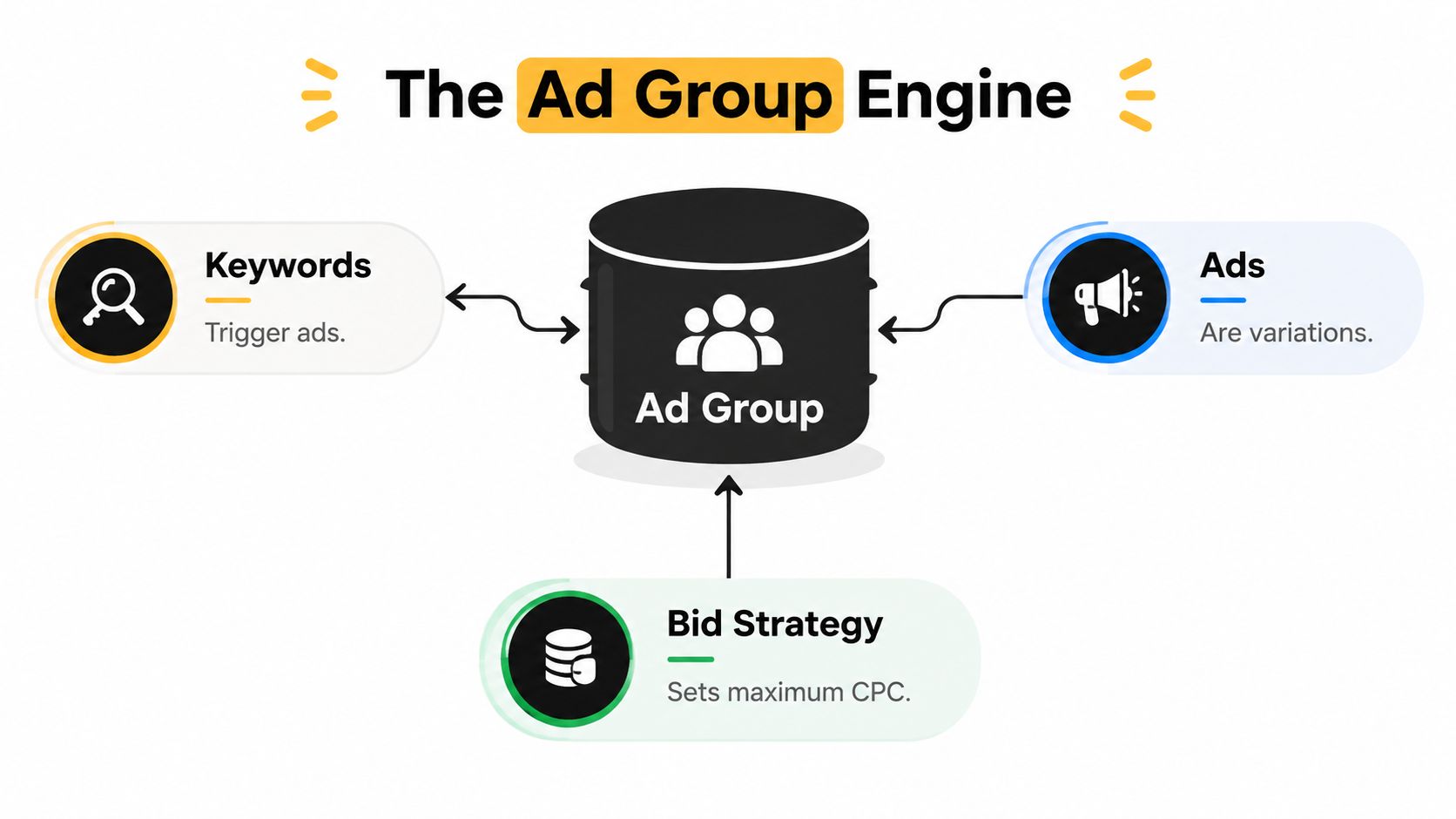
Think of a campaign as a department, an ad group as a focused team, and an ad as the message that team sends to a specific audience. Keywords describe the searches that may qualify, while the bid determines how aggressively the group can compete when those searches occur.
Google Ads puts the ad group at the center of that relationship. Its definition connects shared targeting, ads, and ad-group-level bidding, so a useful group should contain elements that make sense together. If someone searches for “emergency family lawyer,” an ad group built around that service can carry a much more relevant message than a general legal-services group.
The reporting loop
The structure also affects how you inspect performance. Google Ads surfaces performance in the Ad groups view by default, with the last 30 days of data shown there, and it lets advertisers compare results across time ranges, including percentage changes over time. You can use that view to compare groups without immediately dropping into individual keywords.
That reporting layer becomes much more useful when paired with Change History. Google retains campaign and ad-group edits, and advertisers can filter affected performance statistics by date range and scope. If a group suddenly loses conversions after a bid adjustment or negative keyword addition, you have a way to connect the result to a specific management action instead of relying on memory.
Practical rule: If you can't explain what an ad group is meant to capture and what it is meant to exclude, the group isn't ready for optimization.
The hierarchy matters because each level answers a different question. The campaign usually carries the larger budget, location, network, or bidding context. The ad group organizes a focused theme and its ads. The keywords and match types determine which searches may enter the auction, while the Search terms report shows what people searched.
A clear structure also helps specialists working across industries. For example, anyone planning paid acquisition for a legal practice can use this paid ads marketing guide for lawyers to connect service-specific intent with landing-page and campaign decisions.
The most important habit is to treat the ad group as a measurable operating unit. Build a theme, write matching ads, assign an appropriate bid or strategy, inspect the resulting searches, and record what changed. That loop turns organization into a repeatable form of account control.
How to Structure Ad Groups for Relevance and Scale
There isn't one correct ad group shape for every account. A tightly themed structure can make ad copy and search intent easier to align, while a consolidated structure can reduce duplication and simplify maintenance. The right choice depends on how different the user intents are and how much control your team needs over bidding, messaging, and exclusions.
Google's account-structure guidance describes bringing match types together by moving all match types for themed ad groups into one ad group, then simplifying through broad match. That approach can reduce fragmentation, but it doesn't mean every unrelated keyword belongs in one container. Consolidation should simplify a meaningful theme, not erase meaningful differences between services or audiences.
| Structure Model | Best For | Trade Off |
|---|---|---|
| Tightly themed groups | Services or queries that need distinct ads, landing pages, or exclusions | More groups to maintain and more potential for duplicated negatives |
| Consolidated themed groups | Closely related keywords with the same message and business intent | Less granular control over ads, bids, and reporting |
| Campaign-level segmentation with focused groups | Different budgets, locations, business lines, or bidding goals | More campaign administration and a greater risk of overlapping coverage |
Start with the ad, not the keyword list. Ask whether the same headline, offer, call to action, and landing page would make sense for every query in the proposed group. If the answer is no, split the theme. If the answer is yes and the only difference is match type, consolidation may be cleaner.
A practical decision test
Use a tighter group when:
- The promise changes: “24-hour emergency repair” needs a different message from routine maintenance.
- The landing page changes: Separate destination pages usually signal separate intent.
- The exclusion logic changes: A query that belongs in one theme may be harmful in another.
- The bid decision changes: If one segment deserves a distinctly different bidding approach, a separate group can preserve visibility.
Use consolidation when the keywords describe the same service, the ads can speak naturally to all of them, and separate groups would only duplicate management work.
Google's platform limits also influence planning. An account can contain up to 5 million ad group targeting items, while campaign-level targeting items are capped at 1 million per account, according to Google Ads account limits. Those ceilings are generous, but the operational warning is more important than the capacity itself. A structure can become difficult to audit long before it reaches a technical limit.
Smart campaigns make the architecture distinction even clearer. Google's API documentation notes that Smart campaigns are limited to a single ad group, which shows that the ad group remains a foundational unit even when campaign controls are heavily automated.
For clustering ideas before implementation, use this guide to grouping keywords by theme for ad groups. The best structure is the one that preserves intent while keeping routine changes manageable.
Match Type Strategies That Balance Reach and Relevance
Match types control how closely a search must align with a keyword before the ad can enter the auction. They don't replace good ad group structure. They determine how much traffic can flow through that structure, which means a loose match-type decision can undermine an otherwise sensible theme.
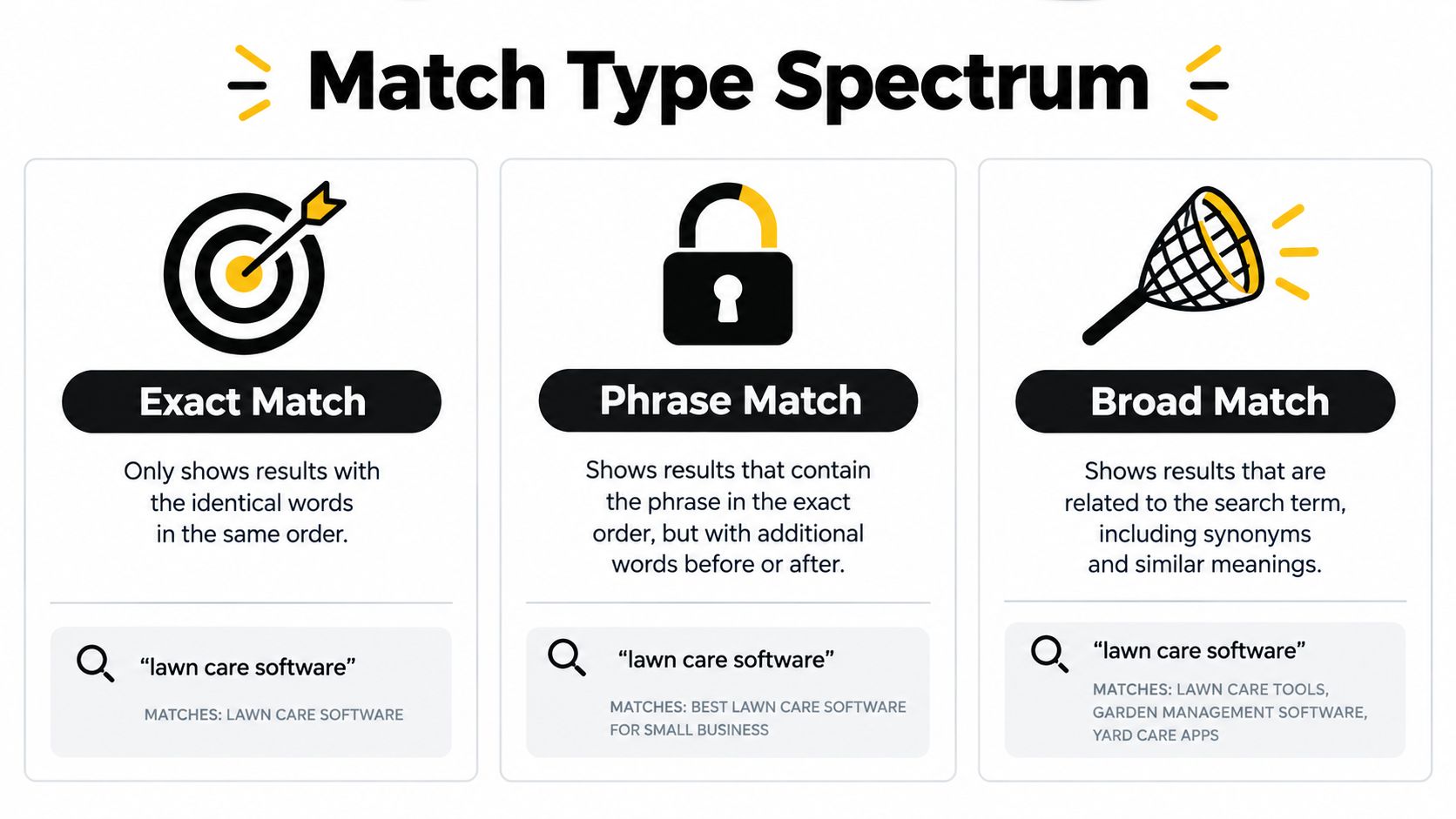
Google Ads uses broad, phrase, and exact match in Search campaigns, and the Search terms report includes a Match type column that shows the relationship between the query and the keyword that triggered the ad. That column is your reality check. The keyword you chose is only the starting rule. The search term reveals what the system matched.
Read the spectrum as a control dial
Exact match provides the narrowest intent control of the three Search match types. Use it when the wording or meaning needs close supervision, such as a high-value service with a very specific commercial intent.
Phrase match allows the keyword phrase to appear in the search in the same order, while surrounding words can expand the query. It can capture variations without abandoning the central concept.
Broad match gives the system the widest room to interpret intent, including related wording and adjacent searches. It can be useful for discovery and scale, but it demands active search-term review and a strong negative keyword process.
The goal isn't to choose one match type forever. It's to assign a role to each. For example, an ad group for “commercial roof repair” might use exact match for the core service, phrase match for natural variations, and broad match only where the business can review new intent and exclude poor fits.
Google also provides mechanics for match-type-specific templates. If a keyword template doesn't specify the full set of match types, a parent template can automatically generate negative keywords for the unspecified types, helping searches match only the intended exact-match keywords. This is a reminder that negative keywords can be generated as part of account architecture, not only added after a problem appears.
Use the Search terms report as the source of truth
Open the report and inspect:
- The actual search wording, not just the keyword.
- The Match type column, to see how the query entered.
- The ad group receiving the query, to identify misplaced intent.
- The action, whether to keep, expand, move, or exclude it.
For a plain-language explanation of the available options, see this Google Ads keyword match type guide. Match types are most effective when they support a clear ad group purpose rather than acting as a substitute for one.
Negative Keywords and Search Term Control at Every Level
A campaign can spend efficiently on its intended searches while paying for unrelated ones. Negative keywords turn ad group management into waste control and governance: automated matching can discover demand, but people still decide which queries are irrelevant, belong elsewhere, or should be excluded across the account.
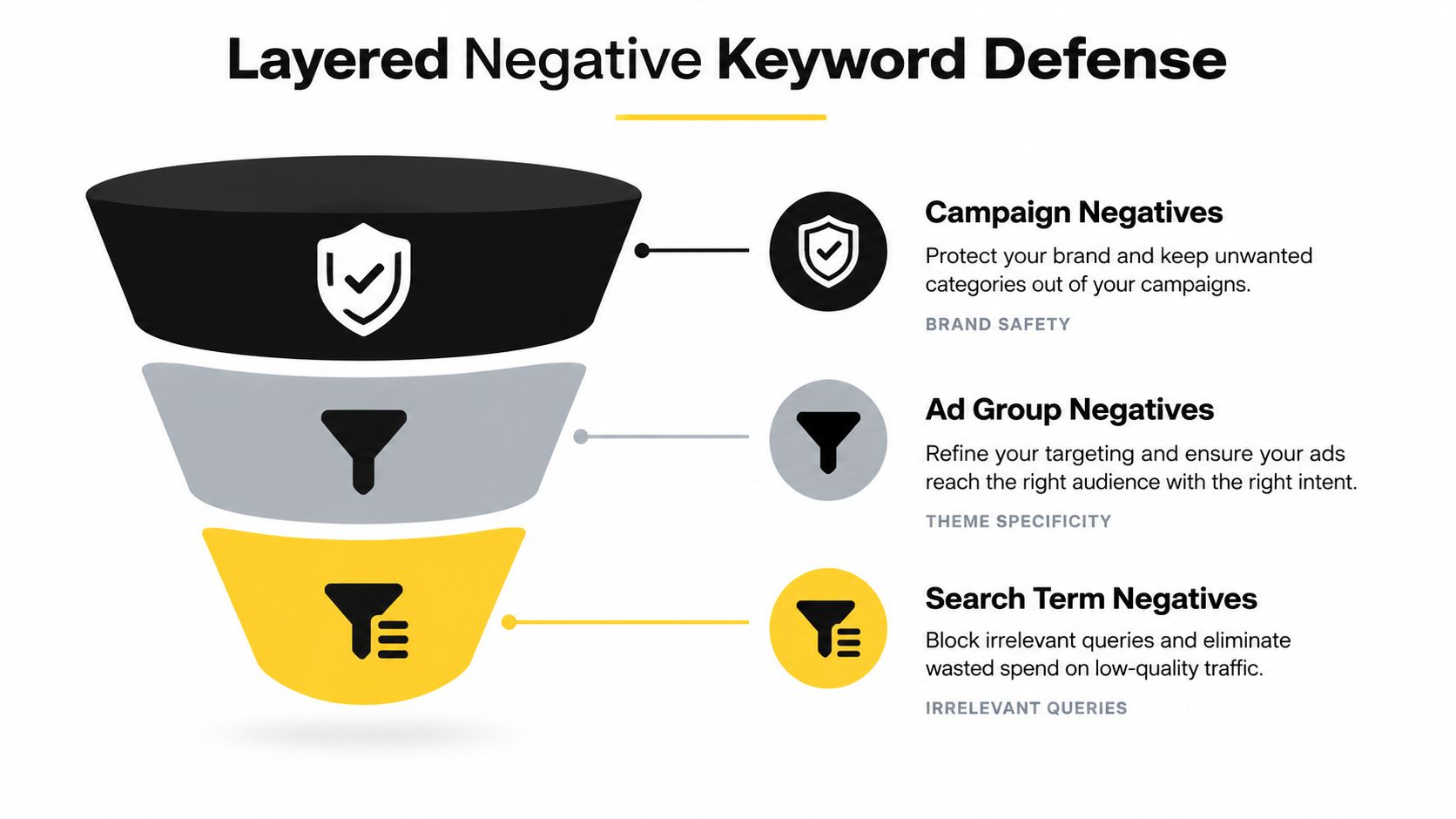
Google Ads lets advertisers identify poor-fit queries in the Search terms report and apply negative keywords at the ad-group, campaign, account-level list, or new negative keyword list level. These layers work like filters with different reach:
- Ad group negatives handle fine-grained theme control.
- Campaign negatives protect every ad group from searches outside the campaign's offer or objective.
- Shared account-level lists apply durable exclusions across selected campaigns.
- Search term review provides the evidence behind each decision.
Choose the narrowest useful layer
Suppose one ad group targets residential plumbing and another targets commercial plumbing. A query containing “commercial” may be a negative in the residential group, while remaining valuable to the commercial campaign. Keeping that exclusion at ad-group level protects relevance without cutting off useful demand elsewhere.
A query that conflicts with the entire campaign's offer belongs at campaign level. A term that should never qualify anywhere in the account may belong in a shared list. Wider coverage requires more checking, because one exclusion can affect several business lines and automated matching routes.
Negative match types also behave differently in Search campaigns:
- Broad negative keywords block an ad when a search contains all the negative terms, even if their order changes.
- Phrase negative keywords block a search when the terms appear in the same order.
- Exact negative keywords block only searches matching the exact terms without extra words.
Display and Video campaigns handle negative keywords differently and have their own account-level restriction, as explained in Google's negative keyword match type documentation. Check the campaign type before copying a Search exclusion process into another network.
Build a review habit, not a cleanup event
On high-spend accounts, review search terms regularly as offers, landing pages, and campaign structures change. N-gram analysis can expose recurring unwanted language. A reason tag such as “wrong service,” “research intent,” or “out of area” preserves the logic behind each exclusion for the next reviewer.
Over-negation creates a quieter form of waste. A broad negative can block a useful long-tail query merely because it contains the same word. Before applying a broad exclusion, check whether that wording appears in a converting context elsewhere. Duplicate negatives across groups also make troubleshooting harder, so place an exclusion at the broadest safe layer rather than copying it by habit.
As covered in the structure section, Google's account limits are generous. The constraint is governance: shared lists should reduce duplication, not become a dumping ground. Name each list by purpose, document its scope, and audit it when campaign strategy changes. The Google Ads limits documentation can confirm the current platform boundaries when account architecture changes.
The useful question is, “At which layer should this exclusion live, and what evidence supports it?”
Bidding Labeling and Everyday Optimization Workflows
A tidy account can still underperform if nobody knows what changed or why. The everyday workflow should connect bid decisions, labels, search-term actions, and Change History so that optimization remains fast without becoming anonymous.
Google's structure sets the bid at the ad-group level when keywords trigger an ad, but campaign bidding strategies can shape how that control is used in practice. Treat the bid as one part of the operating context, not as an isolated number. A group with a distinct commercial intent may deserve separate scrutiny even when an automated campaign strategy manages the final auction decisions.
A repeatable working rhythm
Start each review in the Search terms report. Sort findings into three practical buckets:
- Keep and monitor: The query fits the ad group and supports the intended offer.
- Expand: The query reveals useful language that deserves a keyword, a new match type, or a more focused group.
- Exclude: The query is irrelevant, unsuitable for the campaign, or better handled elsewhere.
Then label the action. A label such as “new service intent,” “negative, poor fit,” or “landing-page mismatch” gives future reviewers context that a raw edit cannot provide. When performance changes, use Change History to filter campaign and ad-group edits by date range and scope, then compare the timing with the affected statistics.
Bulk handling matters once several groups share a pattern. Apply one decision consistently where the scope is shared, but keep ad-group-specific exclusions local when intent differs. This avoids the two common extremes, manual copy-and-paste across every group and careless account-wide blocking.
For a different example of organizing paid acquisition around product and marketplace behavior, the guide to selling on Etsy provides useful context. The same operational lesson applies, define the target, inspect the actual query or audience signal, and document the decision.
Keywordme can support this workflow through its Chrome extension, which adds keyword clustering and grouping inside the Google Ads Search Terms Report, provides one-click campaign or ad-group negative keyword actions, and supports ad-group expansion with match-type assignment. Use any tool in that category as an aid to judgment, not as permission to skip review.
A solid weekly routine leaves you with three outputs: new relevant keyword ideas, a controlled negative-keyword update, and a traceable record of meaningful changes. That's how optimization becomes a process rather than a sequence of emergency fixes.
Scaling Ad Group Management Without Losing Control
A growing account can look tidy while blocking valuable searches. One new ad group adds keywords, ads, landing-page choices, bids, and exclusions that someone must own. Scaling therefore means preserving the connection between intent, message, exclusions, and evidence, while making waste-control decisions easy to review.
Platform limits are rarely the binding constraint. Unclear ownership of exclusions is. Give each rule a clear home, record why it exists, and review whether it still fits as query matching becomes more automated.
Use these guardrails:
- Keep themes meaningful: Split when the ad, landing page, bid decision, or exclusion logic changes.
- Consolidate deliberately: Do not create separate groups only because keywords use different match types.
- Escalate exclusions carefully: Move an ad-group negative to campaign level only when the same unwanted intent appears across that campaign's groups. Keep it local when another group could profit from the query.
- Record reasons: A negative without context becomes a future mystery.
- Audit for overblocking: Confirm that exclusions are not suppressing valuable intent.
- Use Change History: Trace performance shifts back to edits instead of guessing.
The useful governance question is not how many keywords belong in a group. Ask what each layer should allow, which decision it owns, and how the team will verify that choice without blocking legitimate demand.
Start with one campaign. Review its search terms, sort decisions into keep, expand, and exclude, then apply each exclusion at the narrowest appropriate level. Once the review is reliable, extend the same ownership rules across the account.
Keywordme brings keyword clustering, ad-group expansion, match-type assignment, and campaign or ad-group negative handling into a Chrome extension workflow built around the Google Ads Search Terms Report. Visit Keywordme to assess whether it can make search-term cleanup faster and more traceable.
.svg)