
Structured Snippet Extensions Made Simple
Structured Snippet Extensions Made Simple


You've written a strong Google Ads headline, tightened the description, added a clear call to action, and still feel like the ad doesn't show enough of what you sell. That's where structured snippet extensions can help. They add a compact, categorized list beneath the main ad copy, giving searchers more context without turning the description into a crowded inventory dump.
The useful mindset is simple: treat a structured snippet as a controlled relevance layer, not another sales pitch. It can help people understand your range, services, or features at a glance, but it won't replace keyword strategy, persuasive ad copy, a clear offer, or a focused landing page.
Why Structured Snippets Deserve a Place in Your Ad
A local skincare retailer may run the headline “Shop Professional Skincare” with a description about fast shipping and expert formulas. The ad can sound persuasive while leaving one practical question unanswered: does the store carry cleansers, serums, or moisturizers?
A structured snippet supplies that context beneath the ad. The headline works like a product name on a shelf, the description delivers the sales message, and the snippet acts like a shelf label showing the category's contents. It does not try to close the sale. It helps a shopper decide whether the offer fits the search before visiting the site.
Google calls these assets, replacing “extensions” in its documentation. The format developed from earlier dynamic structured snippets, which Google generated from website content, to a version that gives advertisers direct control over the displayed text. Google's structured snippet asset guidance explains how the asset is used and formatted.
Practical rule: Use the headline and description to persuade. Use the structured snippet to clarify.
That division matters because structured snippets are non-clickable. They cannot send a visitor to a product page, pricing page, or booking form. Use a sitelink when each destination needs its own path. For a wider view of how assets can support account efficiency, read this guide to Google Ads extensions for efficiency.
Structured snippets earn a place in an ad when the ad group includes several concrete options that prospects may want to scan. An agency might list service types, a hotel might show amenities, and an ecommerce store might identify brands. They add little when they repeat the headline, make a vague promise, or include unrelated products to fill available space.
For copy teams, the larger benefit is control. A shared library can store approved headers, relevant value sets, and reusable templates by account or campaign. Teams can then compare which categories clarify intent, which values appear across strong ad groups, and which combinations create confusion. The snippet becomes a controlled relevance layer and a testing signal, not another call to action.
Keep expectations realistic. A snippet can add useful context to a search ad, but it cannot correct loose targeting or an unclear landing page. If campaigns attract searches unrelated to the listed values, extra information may confuse rather than build confidence. Teams exploring visibility beyond traditional ad placement can review Nuwtonic Agentic AI Search Visibility for broader context. Structured snippets still have a narrower job inside Google Ads.
Understanding the Core Mechanics
A structured snippet has two required parts: a fixed header and a list of values. The header identifies the category, while the values provide the specific items that belong under it. Google's available format is deliberately constrained, so you're building a categorized label, not writing a second description.
For example:
- Header: Services
- Values: Audits, PPC Management, Landing Pages
Google's documentation for the structured snippet asset requires between 3 and 10 values, with each value limited to 25 characters. Google Ads separates individual entries with commas, and its policy guidance says to create a new value field for each item rather than typing the entire list into one field. You can review that rule in the structured snippet formatting guidance.
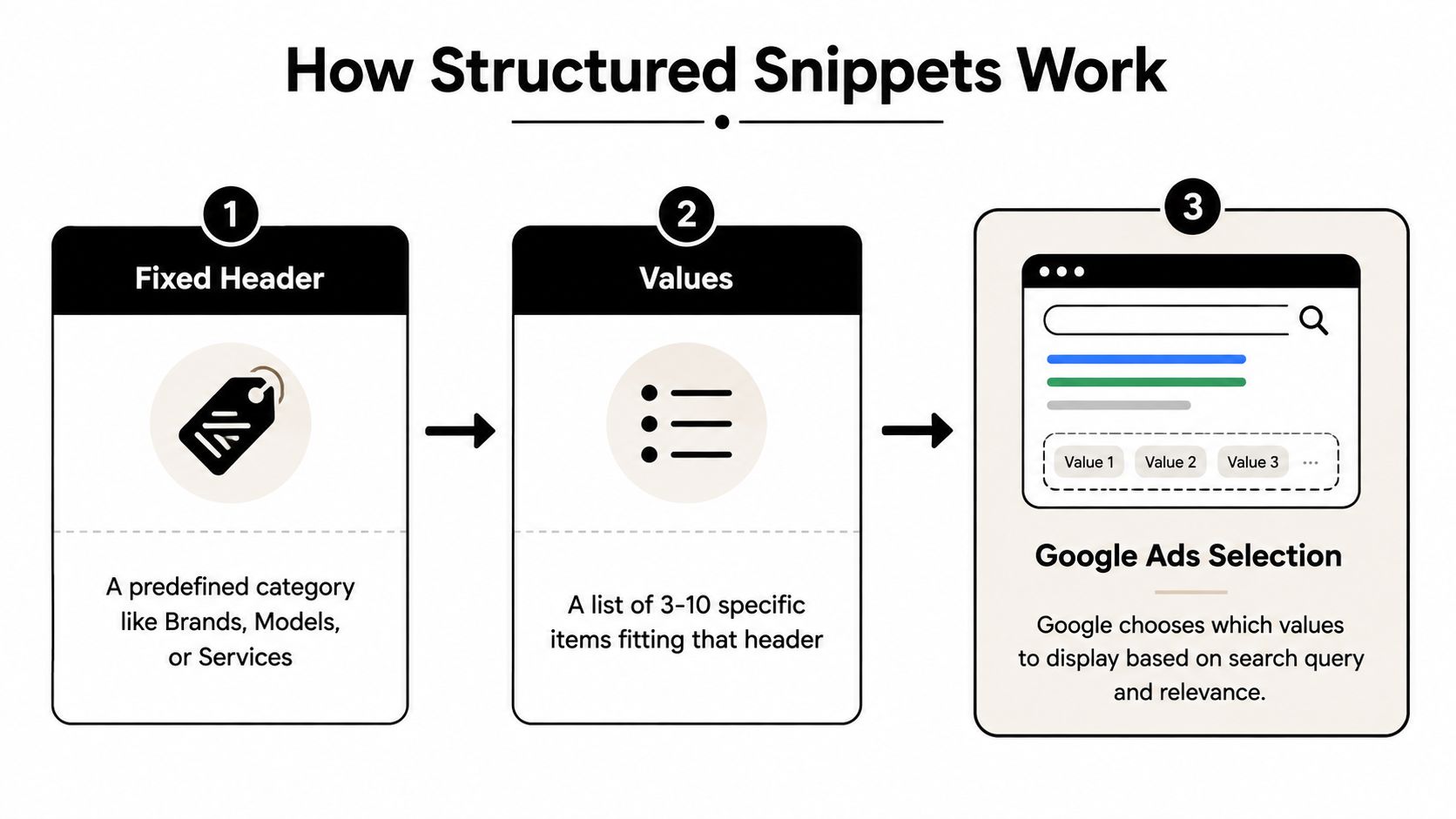
The four decisions behind every asset
You choose the header from Google's approved categories, then add values that fit that category. You also decide where the asset should apply. Google Ads supports structured snippets at the account, campaign, and ad-group levels, so the same asset can support a broad account theme or a tightly focused ad group, depending on how specific the message needs to be.
Google can associate up to 20 structured snippet assets with an account, campaign, or ad group, according to Search Ads 360's structured snippet documentation. That isn't a reason to create 20 random variations. Treat it as a planning constraint. Build a reusable library of relevant header and value combinations, then attach only the assets that fit each campaign's search theme.
| Component | Advertiser Input | Purpose |
|---|---|---|
| Header | One approved category | Defines the type of information |
| Values | 3 to 10 specific items | Gives the category practical meaning |
| Scope | Account, campaign, or ad group | Controls where the asset can apply |
| Association | Selected asset and ad relationship | Makes the asset eligible for relevant ads |
| Display | Google's eligible selection | Determines what may appear in limited space |
Eligibility isn't the same as visibility
Saving an asset doesn't guarantee that searchers will see it. Google selects relevant assets when space and context allow, so an asset may be approved or eligible without appearing on every impression. Google's guidance recommends using at least 4 values per header, while the format still requires a minimum of 3 and allows no more than 10.
That selection effect is why relevance beats volume. A short list of tightly matched values gives Google a clearer relationship between the query, ad group, header, and asset. A large collection of loosely related entries gives you more text, but not necessarily more useful coverage.
Choosing the Right Use Cases and Headers
A running-shoe ad group may need to answer, “Which brands are available?” A hotel ad group may need to show, “What amenities can guests use?” Start with that practical question, then choose the approved header that organizes the answer. Structured snippets work as a controlled relevance layer, not as another call to action.
An ecommerce advertiser could use Brands with values such as “Brooks,” “Hoka,” and “Saucony.” A marketing agency might use Types or Service Catalog for “PPC Audits,” “Search Campaigns,” and “Landing Pages.” A hotel could use Amenities for “Pool,” “Breakfast,” and “Parking.” A software company could use Features when that category fits both the available account options and the ad group theme.
The header labels the shelf. The values show what belongs on it.
Match the category to the search theme
Choose a header that helps the searcher qualify the offer quickly. Someone searching for “enterprise PPC agency” may benefit from a concise list of service types. Someone searching for a specific brand may need a brand-focused category rather than a broad list of company benefits.
Use this decision test before creating an asset:
- Can the values be grouped naturally? If the items do not belong under one approved category, choose another asset or leave the snippet out.
- Will a searcher understand the list quickly? Structured snippets support scanning, so the list should not require explanation.
- Does the list add information beyond the headline and description? Repeating existing copy uses space without giving the reader more context.
- Does the ad group target one coherent theme? An ad group covering unrelated products may make a shared snippet inaccurate.
Weak examples often read like sales slogans. “Great Products,” “Trusted Quality,” and “Best Support” do not identify a category of options. They are also persuasive claims better suited to the ad or landing page.
Locations can create a separate mismatch. If the search concerns nearby branches, a location-focused asset may fit better. City names should not be forced into a snippet meant to describe services, models, or product alternatives.
The strongest use cases compress a meaningful range into a small, readable list. That range may contain product styles, service types, software features, hotel amenities, or brands. Copy teams can turn these approved combinations into a reusable account library, then attach only the header and values that match each campaign or ad group. Testing which relevant combinations appear alongside different search themes can provide a useful signal for future asset choices.
A snippet earns its place when it clarifies the offer. Extra copy alone is not a reason to add one.
Writing Values That Stay Relevant and Scannable
The hardest part of structured snippet extensions usually isn't finding the setting in Google Ads. It's writing values that are specific enough to help and short enough to scan.
Consider a skincare ad group. “Skin care” is broad and repeats the category without telling the searcher much. “Cleansers,” “Serums,” and “Moisturizers” identify concrete product groups. A logistics advertiser gets the same benefit from “Ground,” “Air,” and “Ocean.” Each value gives the reader a useful alternative without turning into a sentence.
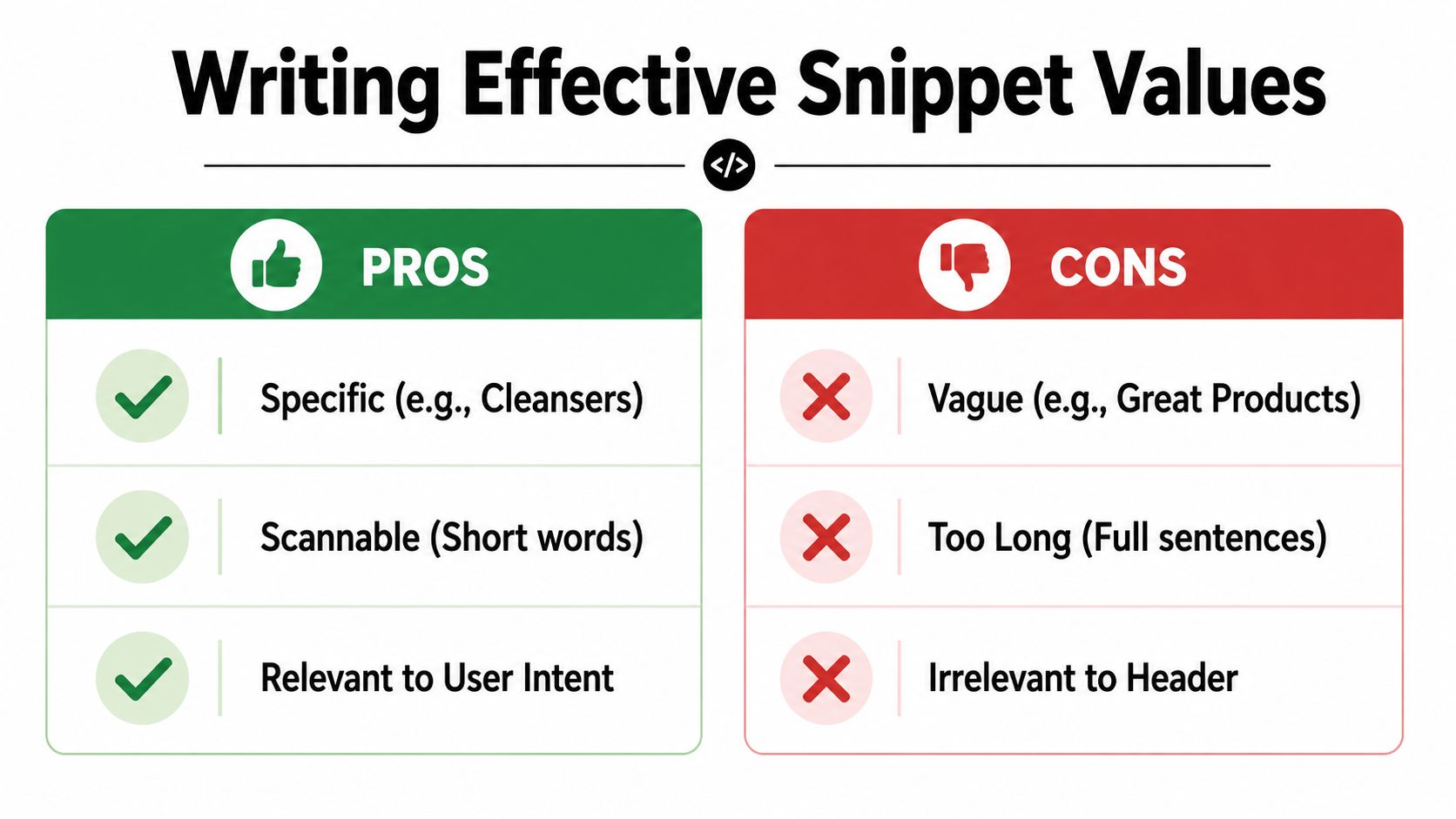
Build the list from the ad group outward
Start with the ad group's semantic theme, not with a master product catalog. Pull possible values from the actual searches, the landing page, and the offer represented in the ad. Then remove duplicates, unsupported claims, and items that belong to another category.
Google's specifications allow 3 to 10 values, with each value capped at 25 characters, as explained in the Google Ads API reference. When the category supports it, supplying at least 4 values gives the asset a fuller, more useful set, consistent with Google's recommendation in its asset guidance. More entries still don't guarantee that the asset will show, and ten weak values can make the message less focused.
Use this editing model:
- Name the item: “Cleansers,” not “High-Quality Skin Care.”
- Keep the phrase scannable: “Ground,” “Air,” and “Ocean” work better than full sentences.
- Match the header: A value should make sense immediately after the category.
- Remove duplication: Don't repeat a product or service already obvious from the ad.
- Avoid unsupported promises: “Fastest Delivery” belongs in a claim reviewed across the ad and landing page, not as a casual list item.
- Respect the limit: If a value exceeds the allowed length, shorten the wording without padding it with awkward abbreviations.
A useful template is:
Header: [approved category]
Values: [specific option], [specific option], [specific option], [specific option]
For service campaigns, that might become “Services: PPC Audits, Search Ads, Landing Pages, Reporting.” For product campaigns, it could be “Styles: Minimalist, Classic, Outdoor, Formal,” provided the category accurately reflects the products and the account's approved options.
Good values answer “what do you offer?” Poor values answer “why should I trust you?” Those are different copy jobs. For broader ad-writing ideas that complement, rather than duplicate, your snippet list, review these Google Ads ad copy examples.
Setting Up and Measuring Performance
A snippet can be perfectly written and still provide little evidence if it is attached too broadly or judged before approval. Start with the narrowest useful scope, such as an ad group with a clear search theme. Open the ads and assets area, select the structured snippet option, choose an approved header, and enter each value in its own field.
Google Ads displays those fields as comma-separated items. Do not paste a paragraph containing commas into one field, because the platform may treat it as a single value. Save the asset, then check its review and eligibility status before interpreting delivery or engagement.
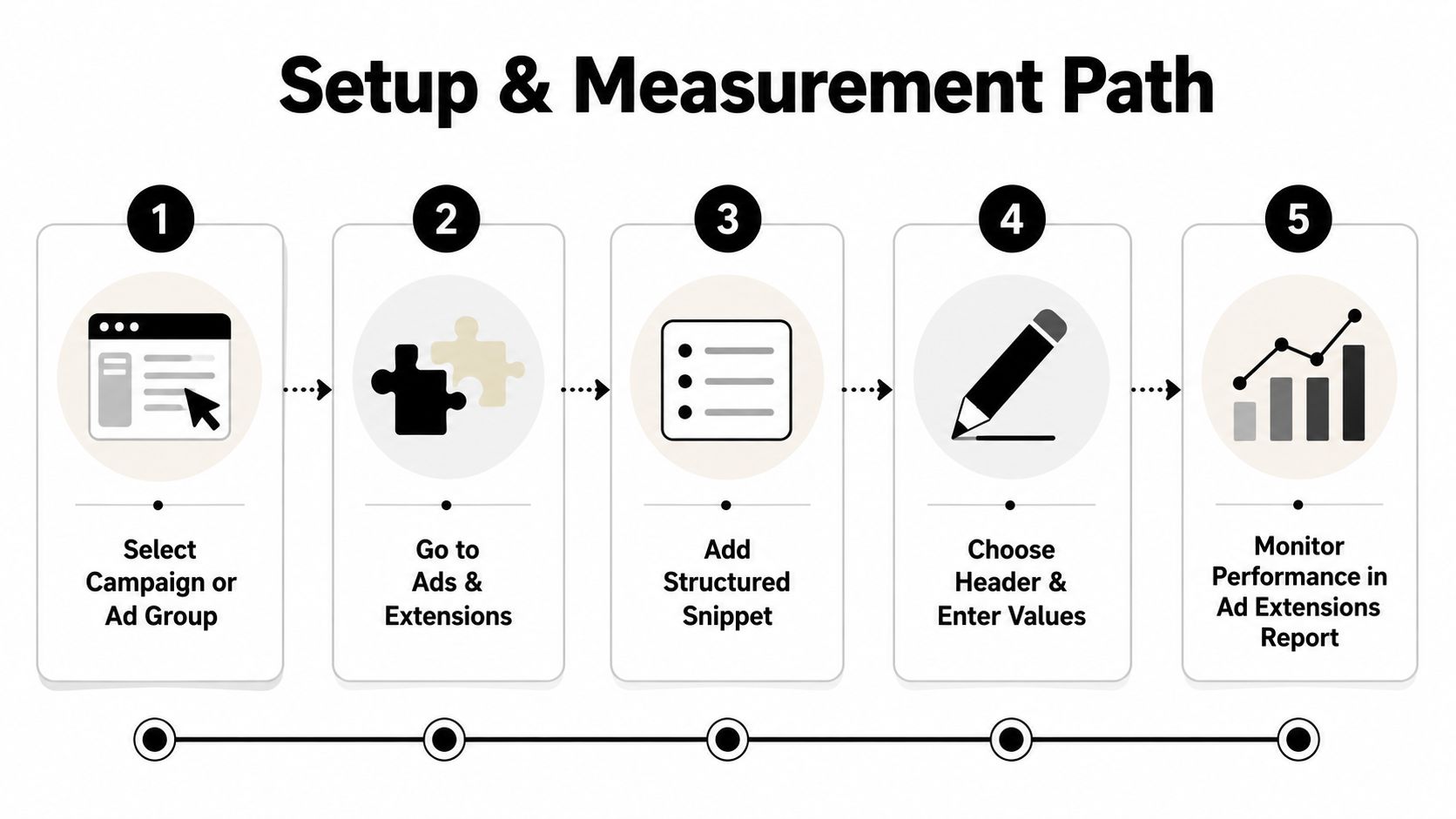
A practical launch path
- Choose the scope. Attach the asset where the search intent and landing-page offer are sufficiently consistent.
- Select the category. Use an approved header that accurately describes every value.
- Enter the values separately. Put each item in its own field and stay within the character limit.
- Save and review status. Check whether Google approved, restricted, or disapproved the asset.
- Inspect actual delivery. Eligibility means the asset may participate. It does not mean it appears on every impression.
| Stage | Check | What to Confirm |
|---|---|---|
| Planning | Search theme | The values fit the ad group and landing page |
| Creation | Header | The category accurately describes every value |
| Formatting | Value fields | Each item has its own field and meets the length rule |
| Review | Policy status | The asset isn't disapproved or restricted |
| Measurement | Asset reporting | You're comparing delivery and engagement in context |
Measure the combination, not isolated credit
Structured snippets add context beneath the ad, but they are not clickable response elements. A click or conversion comes through the broader ad experience. The asset can support relevance and engagement without functioning as an independent conversion button.
Use asset reporting to separate shown from eligible. Compare ad combinations that include the snippet with comparable combinations in the same ad group. Account for headline, description, keyword, device, landing-page, and offer changes. If several variables changed together, report an account-level observation rather than claiming the snippet alone caused the result.
Treat the snippet as a reusable relevance layer. Record its header, values, scope, approval status, and reporting window in a copy library. That record helps the team reuse a suitable set across related campaigns while keeping testing signals attached to the version that ran.
Conversion analysis depends on trustworthy underlying measurement. Review this guide to Google Ads conversion tracking before judging a snippet by lead or sale data.
Before launch, ask:
- Does every value fit the selected header?
- Does the list represent the landing page accurately?
- Is the asset attached at the intended level?
- Has Google reviewed it?
- Do you have a comparison period or comparable ad combination?
- Are search terms and negative keywords still aligned with the list?
Fitting Structured Snippets into Keyword Strategy
A structured snippet shouldn't sit apart from keyword management. Its values describe the offer shown to people entering through a particular search theme, so changes in search terms should influence whether the asset remains appropriate.
Suppose an ad group begins around “PPC audits” and later expands into campaign management, landing-page services, and reporting. A snippet built only around audits may no longer describe the full traffic mix. The opposite can happen too. An ad group may attract broad searches that make a detailed service list look more relevant than the actual audience warrants.
Use search terms as the editorial input
Review the queries that trigger the ad and group them by meaning. Look for repeated product categories, service types, features, or models that belong together. Then ask whether the current header and values reflect that group or whether the ad group needs tighter separation.
Negative keywords play a supporting role. If irrelevant searches keep entering the ad group, the snippet can't solve the targeting problem. Removing those terms helps preserve the relationship between the query, ad copy, landing page, and structured snippet.
Match types matter for the same reason. Changing an ad group from tightly controlled terms to broader coverage can introduce searches that weren't represented when the snippet was written. A value library should therefore be reviewed whenever you expand keywords, alter match-type assignments, or restructure campaigns.
Keywordme is a Google Ads management tool with a Chrome plugin interface for search-term cleanup, keyword expansion, match-type assignment, negative keyword list building, bulk handling, and campaign expansion based on real search term data, as described on the Keywordme product page. It can support the keyword workflow around a snippet, while the structured snippet itself is still created and managed in Google Ads.
A reusable process looks like this:
- Group real search terms by intent.
- Create or refine ad groups around coherent themes.
- Choose a header that matches each theme.
- Write values from the actual product or service set.
- Add negative keywords for traffic that doesn't belong.
- Recheck the asset when the campaign expands.
The strategic insight is easy to miss. Structured snippets don't create relevance from nothing. They make existing relevance more visible. If the keyword structure is messy, the snippet becomes a polished label attached to the wrong shelf.
Common Mistakes and Troubleshooting
Advertisers often assume that adding more structured snippet extensions will create more coverage. Google's selection system doesn't work that way. A relevant, policy-compliant asset may still not show when another asset better fits the query or when available ad space is limited.
Start troubleshooting with the mechanical checks, then move toward strategy.
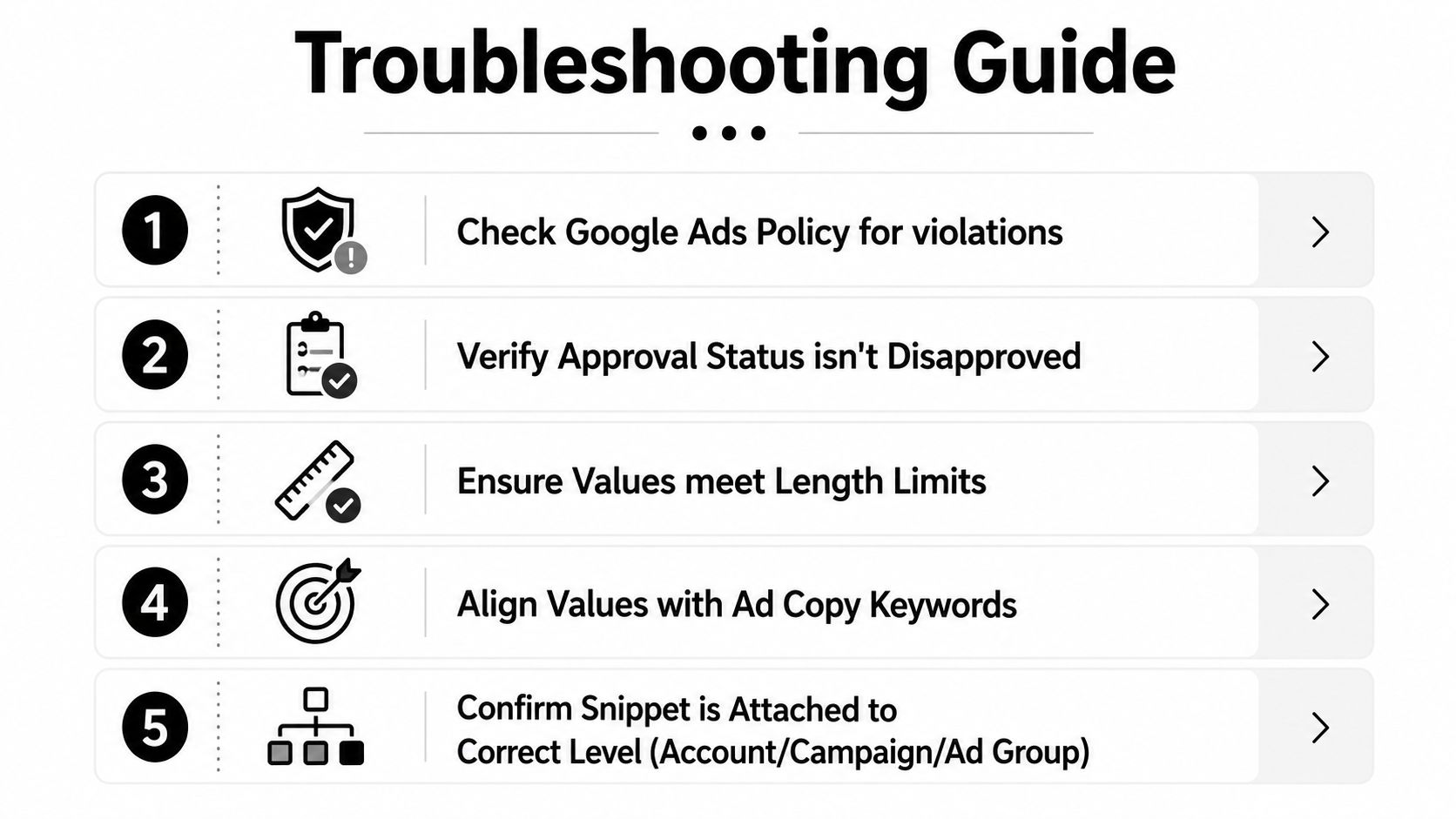
Three common situations
Saved but disapproved: Check policy status first. Review the header, each value, and the destination or business context connected to the ad. A value may be unsuitable even when the overall campaign is approved.
Eligible but not showing: Confirm the asset is attached to the intended account, campaign, or ad group level. Then check the query theme and actual ad delivery. Eligibility means Google may use the asset, not that it must display every time.
Showing but no measurable lift: Don't assume the snippet failed. Because it's non-clickable context, review the complete ad combination, search terms, device mix, offer, and landing page. The asset may be doing its job by clarifying the offer even when the final conversion depends on another part of the journey.
A quick do-and-don't check
- Do use specific alternatives: “Ground,” “Air,” and “Ocean” communicate distinct logistics services.
- Do keep values aligned: Every item should fit the selected header and the landing page.
- Don't use full sentences: Structured snippets aren't a place for mini descriptions.
- Don't repeat the headline: Add context rather than restating the ad's main promise.
- Do prune weak values: A shorter, clearer library is more useful than a crowded list.
- Don't use the asset as a CTA: Use persuasive ad copy or a clickable asset for the next action.
A simple maintenance routine keeps the format useful. Review search terms, remove values that no longer match the offer, confirm policy status, check attachment level, and evaluate performance alongside the complete ad. If the campaign changes substantially, treat the old snippet as a draft that needs review, not as permanent account furniture.
A Practical Takeaway for Google Ads Users
Choose one ad group with a stable search theme. Select one approved header, write 3 to 5 concrete values, attach the asset at the narrowest useful level, and check both eligibility and live visibility after launch. Review the asset alongside the full ad combination rather than rolling out every possible variation at once.
The format has also changed from earlier automatically generated dynamic snippets to a more advertiser-controlled asset, which is a good reason to revisit old assumptions. Use this template: Header: [category]. Values: [specific option], [specific option], [specific option]. Keep keyword research, negative keyword handling, and snippet values synchronized.
Keywordme helps Google Ads users clean search terms, expand keywords, assign match types, build negative keyword lists, handle bulk changes, and expand campaigns from real search-term data. Visit Keywordme to connect that workflow with the relevance decisions behind your structured snippet extensions.
.svg)