
PPC Management for Small Businesses: Your 2026 Guide
PPC Management for Small Businesses: Your 2026 Guide


Diving into paid ads without a solid plan is the fastest way I’ve seen small businesses burn through their marketing budget. Seriously. Effective PPC management for small businesses isn't about guesswork; it's about getting your foundation right before you ever spend a dime.
Let’s talk about building that foundation. It's the most critical part of the whole process, and getting it right from the start will save you a ton of headaches and money down the road.
Building Your Foundation for Smart PPC Management
Getting into paid ads can feel like you're just lighting money on fire, especially when you're watching every penny. I get it. But it doesn't have to be that way. We're going to build your pay-per-click (PPC) campaigns on solid ground, turning them from a gamble into a predictable source of growth.
Define Your Campaign Goals
First things first: what's the point? What do you actually want people to do after they click your ad? A vague goal like "get more traffic" is basically useless. We need specific, measurable actions that make your business money. These are your conversions.
Think about what a "win" looks like for you.
- Lead Generation: Are you a plumber, a consultant, or a B2B service? Your goal is probably getting a potential customer to fill out a contact form or, even better, call your business directly.
- Direct Sales: If you run an e-commerce store, it’s pretty straightforward. The main goal is almost always a completed purchase on your website.
- App Downloads: Got a mobile app? The objective is simple: get people to hit that "install" button.
Knowing your primary goal is everything. It shapes the keywords you bid on, the ad copy you write, and the landing page you send people to. If you want to go deeper on this, check out this excellent guide on Mastering Google Ads Management for Australian SMBs.
Set a Realistic Budget
Now, let's talk about the money. This is where most small business owners get anxious. How much do you need to spend?
The truth is, you don't need a Fortune 500 budget to get started. But you do need enough of a budget to collect meaningful data. If you spend too little, you'll never get enough clicks to figure out what’s working and what's a waste of time.
A great starting point for many small businesses is between $500 and $1,500 per month. This amount is typically enough to test the waters, identify winning keywords, and prove you can get a positive return on ad spend.
Think of your first few months' budget as an investment in data, not an immediate profit machine. Your goal is to learn. Once you find a formula that works and brings in more than it costs, you can confidently start reinvesting and scaling up.
This whole foundational process really flows in a specific order: figure out your goals, decide on a budget to achieve them, and then get your tracking installed so you can measure everything.
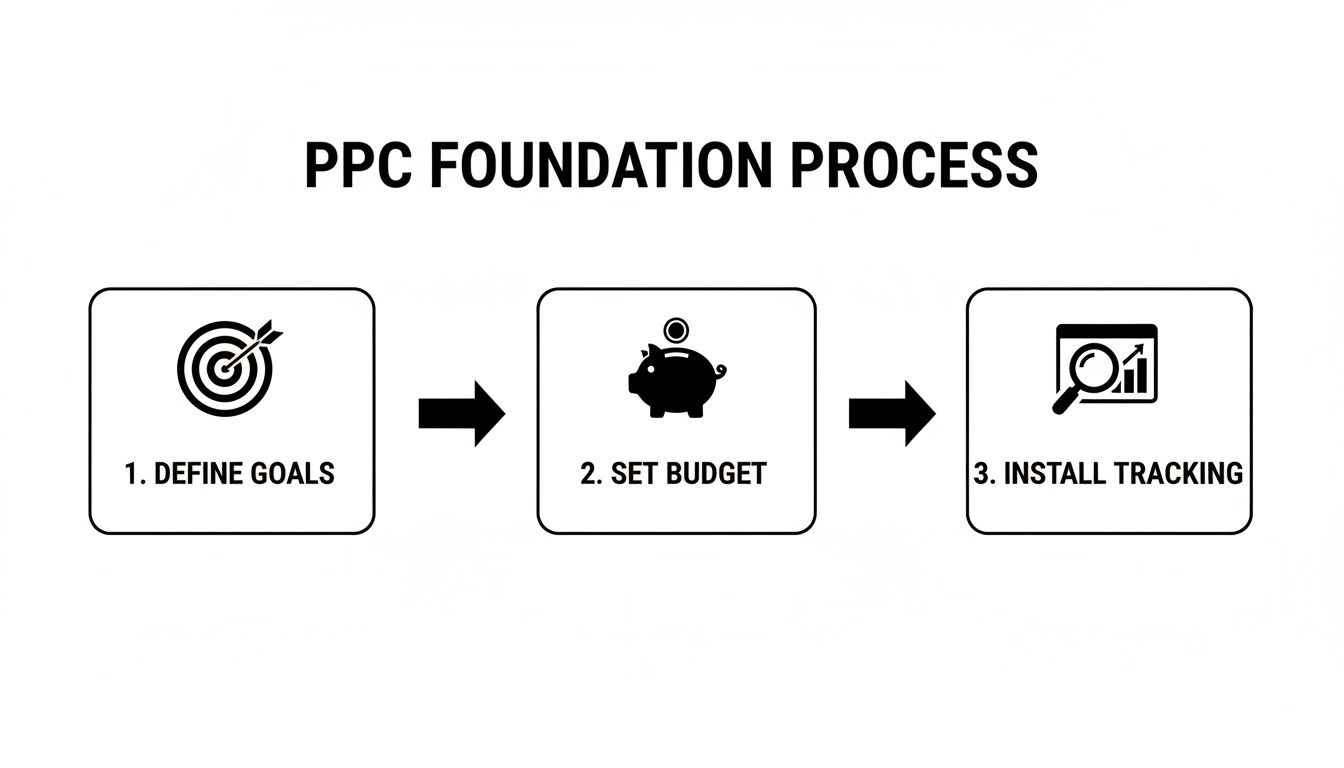
When you follow these steps, you're building a strategic framework from the get-go. This is how you stop gambling with your ad spend and start building a reliable engine for growth.
Alright, you've got your goals and a budget. Now for the part that makes or breaks your entire PPC campaign: finding the right keywords.
This isn't about getting a flood of cheap clicks. It’s about attracting the right people—the ones who are actually looking to buy what you're selling. For a small business, getting this right from the start is everything.

First things first, forget trying to compete with the big-box stores on super broad (and wildly expensive) keywords like "shoes" or "marketing." You'll burn through your budget in a day. Your secret weapon is specificity. You need to dig up the phrases that signal someone is ready to make a move.
The Underdog Advantage: Long-Tail Keywords
This is where long-tail keywords become your best friend. These are longer, more specific search queries, usually three words or more, that tell you exactly what someone is looking for.
Sure, they have less search volume, but their conversion rates are way higher because the searcher's intent is so clear. Think about it:
- Broad Keyword: "plumber" (High cost, low intent. This person could be a student doing research or just browsing.)
- Long-Tail Keyword: "emergency plumber for leaky pipe Austin" (Lower cost, high intent. This person has a problem and needs a solution now.)
Put yourself in your customer's shoes. What’s their immediate problem? What words would they use to describe it? Just brainstorming these phrases is your first step to building a keyword list that acts like a magnet for paying customers.
If you really want to go deep on this, we've got a full guide on how to conduct effective PPC keyword research that lays it all out.
Here's an interesting tidbit: small businesses actually have an edge here. About 65% of small and mid-sized businesses are running PPC campaigns, and they often see a higher average conversion rate (4.2%) than larger companies (3.75%). Why? Because they get laser-focused on niche and local keywords that the big guys completely ignore.
Taming Your Keywords With Match Types
Picking the right keywords is only half the job. Next, you have to tell Google how strictly you want it to match a person's search to your keyword. This is done with keyword match types, and understanding them is non-negotiable for protecting your budget.
There are three main ones you need to know:
Exact Match:
[24-hour local electrician]
Your ad only shows for this exact phrase or super close variations. It gives you the most control but has the smallest reach.Phrase Match:
"24-hour local electrician"
Your ad can appear for searches that include this phrase, even with other words before or after it (like "find a 24-hour local electrician near me"). This is a great middle-ground for balancing reach and relevance.Broad Match:
24-hour local electrician
Google can show your ad for searches it thinks are related. This gives you the widest reach but can be a quick way to waste money on totally irrelevant clicks if you aren't careful.
My advice for any small business starting out? Stick mostly to Phrase Match and Exact Match.
This simple strategy prevents you from throwing money away on searches that have nothing to do with your business—a classic mistake in PPC management for small businesses. It ensures your ads get in front of people who are genuinely searching for what you offer.
Getting Your Campaigns Structured for Maximum Control
Let's be honest: a messy Google Ads account is a straight shot to wasted money and a whole lot of frustration. So, I’m going to give you a simple, scalable way to organize your campaigns so they actually make sense and are a breeze to manage.
Think of your campaign structure like a digital filing cabinet for all your ads. If it's a jumbled mess, you'll never find what you need, and things will inevitably get lost. But with a solid system in place, everything runs smoothly. This is the real secret to effective PPC management for small businesses.
Why Tightly Themed Ad Groups Are Your Secret Weapon
The absolute foundation of any great campaign structure is building tightly-themed ad groups. All this really means is that each ad group should focus on one, and only one, specific theme or service you offer.
This means the keywords in an ad group, the ad copy you write, and the landing page you send people to must all be perfectly in sync.
For example, a roofer should never, ever lump "emergency roof repair" keywords into the same ad group as "new roof installation." They're completely different services for customers with very different needs and urgency. One is a panic-driven search, the other a considered purchase.
Getting this tight alignment right is non-negotiable, and here’s why:
- Sky-High Relevance: When your ad speaks directly to what someone just searched for, they're far more likely to click it. Simple as that.
- A Better Quality Score: Google sees this relevance and rewards you with a higher Quality Score.
- Lower Ad Costs: This is the big one. A higher Quality Score directly translates into a lower cost-per-click (CPC) and better ad positions on the page.
Think of it this way: a high Quality Score is basically Google giving you a discount for making its users happy. When you deliver a relevant, helpful experience, Google helps you get seen more often for less money.
I've seen it time and time again: properly structuring your account is one of the single most powerful things you can do to lower your ad costs. If you want to really go deep on this, check out our guide on how to create tight ad group structures for even better results.
Start Building Your Negative Keyword List from Day One
Okay, now for my favorite budget-protection tool: the negative keyword list. This is the bouncer for your ad campaigns. Its only job is to kick out all the irrelevant search queries that would otherwise chew through your budget with zero chance of turning into a sale.
A negative keyword is just a way to tell Google which search terms you don't want your ads to show for.
Let's say you sell premium, handcrafted furniture. The last thing you want is to pay for clicks from people searching for "free couch" or "cheap used bookshelf." You’d immediately add words like "free," "cheap," and "used" to your negative keyword list. This stops you from showing up to bargain hunters who were never going to buy from you anyway.
You absolutely need to start building this list from the moment your campaign goes live.
Make it a habit to regularly review your search term report. Find those irrelevant searches that triggered your ads, and add them as negatives. This is one of the most critical ongoing tasks in PPC, and it's what separates the pros from the amateurs. It ensures your hard-earned money is spent only on clicks from real, potential customers.
Getting Smart With Your Bids and Budget (Without Going Broke)
Let's talk about the money. Managing your bids and daily budget can feel like walking a tightrope, but this is where you can make every dollar count. The secret to effective ppc management for small businesses isn't about having the biggest wallet—it's about being the smartest person at the table.
It all comes down to confidently shifting funds toward what’s actually working and ruthlessly cutting the dead weight that’s just burning cash.
The biggest hurdle I see? A "set it and forget it" mindset. It's shocking, but a staggering 73% of small business PPC campaigns fail within the first 90 days. It's usually not from one big disaster, but a slow bleed from preventable issues like bad tracking or zero ongoing optimization. Even worse, research shows 72% of companies haven't even looked at their ad campaigns in over a month. That’s just asking for trouble.
Picking the Right Bidding Strategy for the Job
Google's menu of automated bidding strategies can feel a little overwhelming at first. Don’t sweat it. Let's cut through the noise and focus on what you actually need to know.
When you're brand new: Maximize Clicks. This is a solid starting point when you first launch a campaign. Your goal is just to get traffic in the door and see what people respond to. Just remember, Google's only job here is to get you clicks, not necessarily good clicks.
When you have data: Maximize Conversions. Once you have conversion tracking nailed down and you're seeing some leads or sales come through, you can graduate to this. You're telling Google, "Okay, now go find me more people who will do this."
When you know your numbers: Target CPA (Cost Per Acquisition). This is for when you've done the math and know exactly what a new lead is worth to your business. You set your target price, and Google's algorithm goes to work to hit that average. It’s a game-changer for controlling profitability.
For e-commerce: Target ROAS (Return on Ad Spend). If you’re selling products online, this is your best friend. You tell Google you want a specific return for every dollar you spend (like $5 in sales for every $1 in ads), and it will adjust bids to hit that goal.
Here’s a classic mistake: jumping to an automated strategy too soon. You need to give the algorithm some data to learn from. I always tell my clients to wait until they have at least 15-30 conversions in a 30-day window before making the switch.
A huge part of success is actively managing your ad spend to stop waste and pump up your ROI. If you feel like your budget is more of a wild guess than a strategy, there's a fantastic guide on optimizing your Google Ads budget that goes way deeper.
Common PPC Traps and How to Fix Them
I've seen the same handful of mistakes sink countless small business campaigns. Here’s a quick-reference table to help you spot these traps and, more importantly, get out of them.
| Common Failure Point | Why It Happens | Actionable Solution |
|---|---|---|
| No Conversion Tracking | Businesses often skip this "technical" step, meaning they have no idea which ads or keywords are actually generating leads or sales. | Install tracking before you spend a dime. Track form fills, phone calls, and purchases. If you don't know what's working, you're flying blind. |
| "Set It and Forget It" | Small business owners are busy. They launch a campaign and don't check in for weeks, letting poor performers burn through the budget. | Schedule 30-60 minutes every week to review your account. Look for high-spending, low-converting keywords and pause them. |
| Broad Keyword Chaos | Using only broad match keywords without a negative keyword strategy pulls in tons of irrelevant search traffic that costs money but never converts. | Use Phrase and Exact match for your core terms. Build a robust negative keyword list from day one and add to it weekly. |
| One Giant Ad Group | Lumping hundreds of different keywords into one ad group leads to generic ads that don't speak to the user's specific search query. | Create small, tightly-themed ad groups (SKAGs or themed groups) with 5-15 closely related keywords. This lets you write hyper-relevant ads. |
Avoiding these common pitfalls isn't about being a PPC genius; it's about putting basic, consistent processes in place. A little weekly maintenance goes a very long way.
A Simple Framework for Moving Your Budget
So, how do you decide where to put your money? You don't need a fancy algorithm. Just look at your campaign data and ask two simple questions:
- What’s working? Find the campaigns, ad groups, or keywords that are bringing in conversions at a cost you’re happy with. These are your winners. Feed them more budget.
- What’s not working? Find what’s spending money without bringing in results. These are your losers. Be ruthless—pause them or slash their budget right away.
It sounds almost too basic, but this is the heart of active budget management. You don’t need to make massive changes. Shifting just $10 a day from a losing campaign to a winning one can completely transform your account’s performance over a few months. It proves you don't need a massive budget to get a great return.
Let's be honest—as a small business owner, you're wearing a dozen different hats. The last thing you have time for is getting lost in a spreadsheet, manually digging through search term reports to find which clicks are burning through your ad budget. It’s painful, mind-numbing work.
This is where you have to stop working harder and start working smarter. We're not talking about some "set it and forget it" pipe dream. This is about using the right tech to amplify your own expertise. How you approach PPC management for small businesses is what makes the difference between getting stuck in the weeds and actually focusing on growth.
Get Hours of Your Day Back
What if you could turn that agonizing keyword cleanup into something that takes just a few clicks? That’s exactly what dedicated PPC tools are for. A specialized tool, like the Keywordme Chrome extension, can genuinely help you manage your campaigns up to 10x faster than doing it all by hand.
It plugs right into your Google Ads account, letting you make changes on the fly, directly within your reports.
- Zap bad keywords instantly. See a search term that's clearly a waste of money? One click adds it to your negative list. You never even have to leave the screen.
- Organize good keywords correctly. Find a great new search query that's converting? Pop it into the right ad group with the perfect match type, right then and there.
- Find hidden gems. You can also quickly spot those high-intent, long-tail keywords that signal someone is ready to pull out their wallet.
This isn't about taking you out of the driver's seat. It's about getting rid of the soul-crushing, manual copy-and-paste tasks that kill your momentum, so you can focus on the strategy that actually matters.
Swap Manual Drudgery for Smart Decisions
Think about the old-school workflow for a second. You download a search term report, spend an hour filtering and color-coding in Excel, build a pivot table, copy the bad terms, paste them into another list, and then finally upload them back into Google Ads. It’s an absolute time-vampire.
Automation tools completely sidestep that entire mess.
The point of automation isn't to replace you. It's to get you to the decision-making part faster. When you can spot and act on an opportunity in minutes instead of hours, you're already way ahead of the competition.
By automating the "grunt work" of PPC, you free up mental energy for the big picture. You can spend your time analyzing performance trends, testing new ad copy, or brainstorming your next great campaign—you know, the activities that actually move the needle. For a small business owner, that kind of efficiency isn't a nice-to-have; it's essential for survival and growth.
If you want to dive deeper into making your campaigns more efficient, you might find our article on the best PPC workflow automation tools really helpful. It’s packed with more ideas for streamlining your process and taking back your time.
Common PPC Questions from Small Businesses
Alright, let's talk about the questions that are probably on your mind. If you’re feeling a bit hesitant about jumping into paid ads, you're in good company. Every small business owner I've worked with has asked these same things.
It’s smart to be skeptical when every dollar counts. Getting a handle on the budget, the timeline, and who’s going to run the show is crucial for successful PPC management for small businesses. Let’s clear the air on these common worries.
How Much Should a Small Business Budget for PPC?
This is always the first question, and honestly, there's no magic number. But a solid starting point for most small businesses is somewhere between $500 and $1,500 per month. That's typically enough to get your feet wet and start collecting real-world data without risking the farm.
The real strategy here is to think of it as an investment, not an expense. Start small, prove the concept by getting a positive return, and then you can confidently reinvest your profits to scale things up. Your budget should grow with your success, not be some rigid number you're stuck with.
How Long Does It Take to See PPC Results?
This is the beauty of PPC compared to something like SEO. You can start seeing traffic almost immediately. But let's be realistic—seeing a stable, profitable return on your ad spend usually takes about 90 days.
I've seen so many people pull the plug way too early. The first three months are your testing ground. Month one is all about data collection. Month two is for aggressive optimization. By month three, you’ll have a much clearer idea of what’s working and what’s not.
Patience is your best friend here. Don't panic if you're not seeing huge profits in the first couple of weeks. That's completely normal.
Can I Do PPC Myself or Should I Hire Someone?
You absolutely can do this yourself. If you have more time than money and you're willing to get your hands dirty and learn, it’s a great way to go. This is especially true if you use tools that simplify the tedious parts of PPC management for small businesses, like the automation features in Keywordme.
But if you’re already wearing a dozen other hats in your business, bringing in an expert can be a game-changer. The one thing you absolutely cannot do is set your campaigns on autopilot and forget them. That's a guaranteed way to burn through your budget with nothing to show for it.
Ready to stop wasting time on manual ad tasks and take back control of your Google Ads? Keywordme makes it easy to clean up junk search terms and find high-converting keywords to expand your campaigns. Start your 7-day free trial and see how much faster you can optimize your ads.
.svg)