
Find the Best PPC Keyword Tool to Optimize Campaigns
Find the Best PPC Keyword Tool to Optimize Campaigns


Let's get real for a second. Trying to run a Google Ads account without a dedicated PPC keyword tool is like trying to navigate a maze in the dark. You might eventually find your way, but you'll hit a lot of dead ends and waste a ton of energy. A good tool is what turns the lights on, helping you find the right keywords, stop burning cash, and get your campaigns organized.
Why Going It Alone in PPC Is a Fast Track to Failure
The simple truth is that every single click costs you money, and those little mistakes add up—fast. If you're manually digging through search term reports, trying to spot negative keywords, and figuring out match types by hand, you're not just moving slowly. You're practically inviting budget drain. Spreadsheets just can't keep up with the pace.
And the numbers don't lie. By 2026, Google is projected to own a mind-boggling 94% of the search advertising market. With the average cost-per-click sitting around $2.69, every irrelevant click is another small hole in your budget. If you're curious about the bigger picture, you can dig into the state of PPC in 2026.
The Real Price of Doing Things the Hard Way
The biggest issue with manual management isn't just that it’s a time-suck. It's the opportunities you completely miss and the money you light on fire along the way. Without a solid PPC keyword tool, you’re almost guaranteed to be:
- Paying for useless clicks: Your ads keep showing up for weird, irrelevant searches because you can't filter out the junk fast enough.
- Missing out on golden keywords: There are high-intent terms buried deep in your data that could be driving sales, but you'll never find them.
- Wrestling with messy campaigns: Bad ad group structure tanks your Quality Scores, which means Google charges you more for every click.
Think of a smart tool as the expert assistant you wish you had. It instantly flags the garbage terms, unearths the hidden gems, and tidies up your campaigns so they run like a well-oiled machine.
This is exactly why a specialized tool like Keywordme feels less like a luxury and more like a necessity. It handles all that tedious grunt work so you can actually focus on strategy. And while a PPC tool is crucial for your paid ads, it's always smart to see how these efforts fit into your broader SEO strategies. At the end of the day, the goal is simple: stop the bleeding and start getting real results in a ridiculously competitive game.
What Really Makes a PPC Keyword Tool Great?
Here's the honest truth: most PPC tools aren't built for the people actually doing the work. They're great at spitting out massive lists of keyword ideas, but they leave you to handle the messy, time-consuming part. A truly game-changing PPC keyword tool does more than just give you data; it helps you act on it.
It should feel less like a research database and more like a command center for your campaigns. The goal isn't just to find more keywords—it's to make your entire workflow faster, smarter, and more profitable.
So, what separates a nice-to-have gadget from an indispensable part of your toolkit? It all comes down to features that turn hours of manual grunt work into a few satisfying clicks.
From Endless Suggestions to Decisive Action
A top-tier tool understands that your biggest enemy is wasted time. The real value isn't in another spreadsheet of possibilities; it's in features that help you manage the day-to-day grind of PPC with speed and precision.
Here are the non-negotiables you should be looking for:
- Automated Junk Term Filtering: Think of this as a smart bouncer for your campaigns. It automatically spots and helps you block irrelevant search terms that burn through your budget without ever leading to a sale.
- One-Click Match Type Assignments: Manually setting match types for new keywords is a soul-crushing chore. A great tool lets you find a winning search term and instantly add it as an exact, phrase, or broad match keyword right then and there.
- Bulk Search Term Processing: Nobody has time to sift through thousands of search terms one by one. The ability to grab hundreds of terms at once to negate or add as keywords is what separates the professional-grade tools from the toys.
- Seamless Ad Group Organization: A clean account structure is key to a high Quality Score. The right tool makes it simple to identify promising new keywords and move them into tight, relevant ad groups without ever leaving the dashboard.
The ultimate test for any PPC tool is simple: Does it save you time and make you more money? If it doesn’t help you cut waste and seize opportunities in minutes, it’s not earning its keep.
To make this even clearer, here’s a quick checklist of the features that matter most and why they’re so critical for effective campaign management.
Essential PPC Keyword Tool Feature Checklist
| Feature | What It Does | Why It's a Game-Changer |
|---|---|---|
| Automated Junk Filtering | Identifies and flags low-intent or irrelevant search terms based on predefined rules. | Stops budget waste before it happens and saves you hours of manual review. |
| One-Click Match Types | Lets you add a search term as a new keyword (exact, phrase, broad) with a single click. | Eliminates the tedious back-and-forth between your search term report and keyword lists. |
| Bulk Term Processing | Allows you to select and act on hundreds or thousands of search terms simultaneously. | Turns an entire day's work of filtering and negating into a five-minute task. |
| Smart Ad Grouping | Suggests or helps you create new, tightly-themed ad groups for promising keywords. | Improves your Quality Score, lowers your CPC, and boosts ad relevance effortlessly. |
These features are what bridge the gap between just having data and actually using it to get better results.
Why This Functionality Is So Important
These features aren't just about convenience—they're a direct assault on the biggest bottlenecks in PPC management. Without bulk processing, you’re stuck exporting massive reports to a spreadsheet, a process that’s not only slow but also ripe for human error.
By automating the filtering of junk traffic, you’re basically putting a protective shield around your ad spend. This ensures your budget is focused only on clicks that have a real shot at converting, which is the secret behind every highly profitable campaign.
If you’re looking to go even deeper on this, we've put together a guide on the top features to look for in PPC tools that explains how each one directly impacts your bottom line.
Alright, let's get into the nitty-gritty of where the real money is made—and saved—in PPC. Getting a solid list of keywords is just the starting line. The race is actually won with match types and negative keywords.
Even with all of Google's AI bells and whistles, this is where your manual control becomes your secret weapon for a profitable campaign.
Think about it this way: using broad match is like casting a massive net into the ocean. You'll catch something, sure, but you'll spend most of your day sorting through old boots and seaweed just to find a couple of keepers. Exact match, on the other hand, is like spear-fishing. You wait for the perfect target, strike with precision, and come back with exactly what you wanted.
The Power of Precision with Match Types
This isn't just a philosophical debate; it's how the pros protect their budgets. There's a reason why 78% of PPC experts still lean heavily on exact match—it offers unbeatable control and predictability. When you're responsible for a budget, you want every click to count.
A smart PPC keyword tool is what gives you the speed to act on this. Instead of getting lost in a spreadsheet, you can spot a winning search term and instantly turn it into a high-value exact match keyword. This puts your money directly behind what’s already proven to work.
With the constant pressure to hit performance goals, that kind of control isn't just nice to have; it's essential. The average cost-per-click is already $2.69 (and way higher in competitive industries!), so wasting money on vaguely related searches just isn't an option when the average cost per acquisition is pushing $40. If you want to dive deeper into these numbers, you can find more current PPC benchmarks and stats online.
Building Your Fortress with Negative Keywords
If match types are how you find the right customers, negative keywords are how you block the wrong ones. Think of them as the bouncer for your ad budget, turning away anyone who's just going to waste your time.
These are simply the terms you tell Google, "Hey, whatever you do, don't show my ad for this search." For instance, if you sell high-end leather shoes, you’d immediately add words like "cheap," "used," and "repair" to your negative keyword list. This stops you from paying for clicks from people who were never going to buy from you anyway.
Building out a strong negative keyword list is one of the fastest ways to boost your ROI, period. A good PPC keyword tool makes this almost effortless. You can scan through hundreds of irrelevant search terms, check a few boxes, and add them all to your negative lists in bulk. It’s a foundational practice, and you can learn exactly how to add negative keywords in Google Ads to start plugging those budget leaks.
Alright, let's talk about turning all this theory into real-world results. This is the exact workflow I use to dive into a Google Ads account and start making a difference, fast. It’s a practical game plan for using a solid PPC keyword tool to make smart, profitable decisions based on your own data.
Everything you need is waiting for you in your Search Terms Report.
Think of that report as a raw intelligence feed. It shows you every single search someone typed before they clicked your ad and spent your money. On its own, it’s just a giant, messy spreadsheet. But with a good tool, like Keywordme, it becomes your mission control for optimizing everything.
The whole process boils down to a simple three-step "campaign cleanup" mission: slash your wasted spend, double down on what works, and get everything organized for the long haul.
Step 1: Start with Junk Removal
First things first: you have to stop the bleeding. The quickest win is always to cut out the junk. You'll want to scan your search terms for anything that's clearly irrelevant or shows zero buying intent. I’m talking about searches that include words like “free,” “jobs,” “DIY,” or “how to” when you’re selling a finished product.
For example, if you sell "premium running shoes," you don't want to be paying for clicks from people searching for "free running shoe patterns" or "running shoe repair jobs." Those are just budget vampires. A good tool will let you grab hundreds of these useless terms at once and add them to your negative keyword list in a single click.
This one move is hands-down the fastest way to boost your ROI. You instantly stop showing ads to people who were never going to buy anyway. This means every dollar you do spend has a much better shot at finding an actual customer.
Step 2: Promote Your Winning Keywords
Once the waste is gone, it’s time to go prospecting for gold. As you look through your report, you’ll start seeing the exact phrases that are driving quality clicks and—most importantly—conversions. These are your proven winners. They aren't just guesses; they are the literal words your customers used right before they decided to buy from you.
Don't let these valuable phrases get lost in a generic broad-match ad group. A great PPC keyword tool lets you "promote" these search terms instantly. With just a click, you can take a high-performing search like "waterproof trail running shoes for men" and add it as a new exact match keyword to its most relevant ad group. This is how you deliberately push more of your budget behind what you know for a fact is already working.
Step 3: Organize for a Better Quality Score
The final piece of the puzzle is getting your account structure in order. A disorganized account with messy, catch-all ad groups is a direct path to a poor Quality Score. And a low Quality Score means Google will charge you more for every single click. Tightly themed ad groups are simply not optional if you want to be efficient.
This is where you take those keywords you just promoted and build new, hyper-focused ad groups around them. If you found a bunch of winning terms all related to "trail running," put them together in their own ad group. This lets you write ad copy and point to a landing page that perfectly matches what the user was searching for, which is something Google's algorithm absolutely rewards.
This simple diagram shows how you move from casting a wide net to precise targeting, all while protecting your budget.
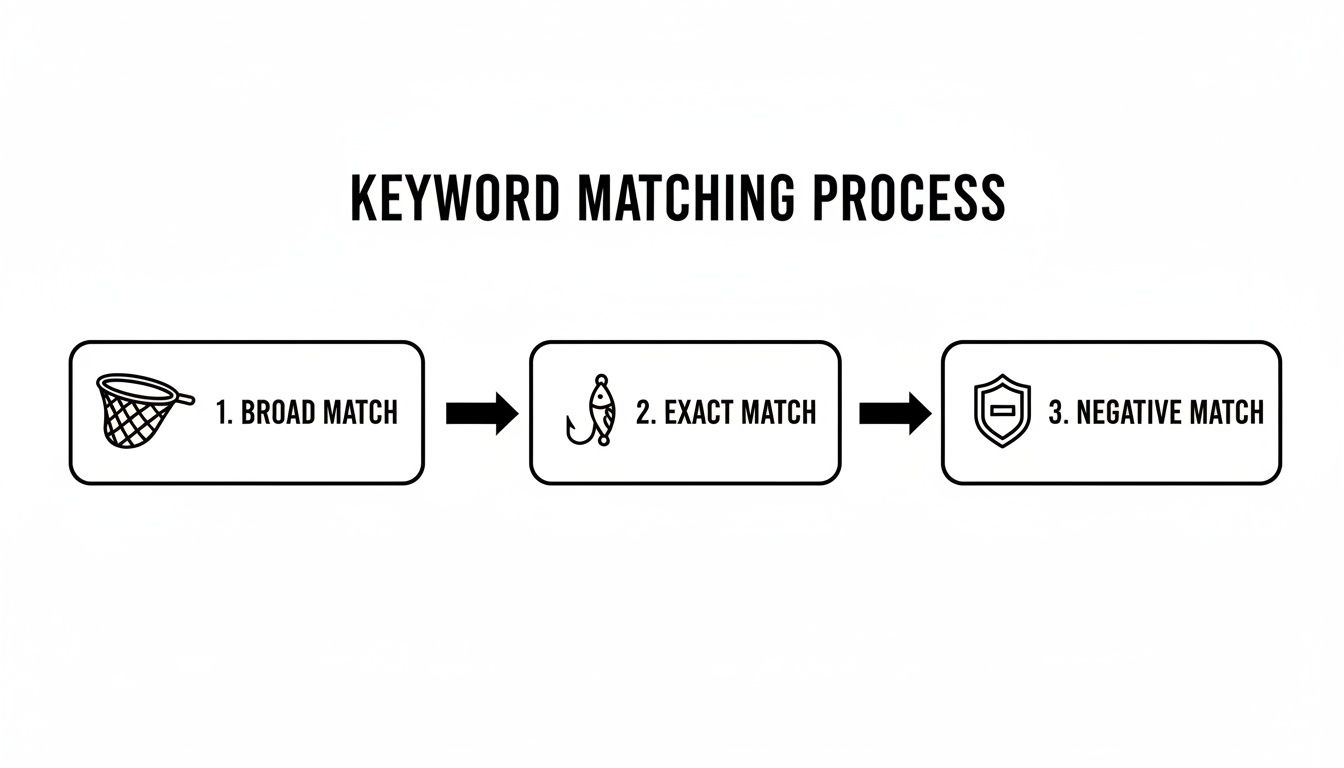
It’s a clear flow: you use broad match for discovery, promote the winners to exact match for high-intent targeting, and use negative keywords as a shield. This entire workflow, when powered by a tool, turns what used to be hours of spreadsheet hell into a few minutes of strategic, profitable action.
Bringing It All to Life with Keywordme
Okay, we've talked a lot about theory and best practices. But let's be honest, the real-world execution is where most PPC managers hit a wall. You end up in a frustrating loop of juggling spreadsheets, search term reports, and the Google Ads interface. It's a copy-paste nightmare that completely drains your productivity.
That exact frustration is why we built Keywordme. We wanted to take all these powerful workflows and build them into one simple tool.
Keywordme isn't just another browser tab you have to keep open. It’s a Chrome plugin that works directly inside your Google Ads account. This completely gets rid of that awful cycle of exporting data, messing with filters in a spreadsheet, and then manually uploading everything back into Google. All the tools you need are right there, inside your ad management screen.
This isn't just about saving a couple of minutes here and there. It makes your entire optimization workflow up to 10x faster. A good PPC keyword tool is a game-changer for serious PPC ad management, improving everything from keyword research to your bidding strategy.
Before and After Keywordme: A Quick Look
Let’s talk about a real-world example. One agency manager we know used to burn nearly four hours every single week just cleaning up search term reports for a few clients.
The Old Way:
- Step 1: Export the search term report as a CSV file.
- Step 2: Open it in Excel or Sheets and start the manual hunt for junk terms.
- Step 3: Copy and paste all that junk into a separate list to add as negative keywords.
- Step 4: Go back and sift through the remaining terms, trying to spot potential winners.
- Step 5: Copy those winners, head back to Google Ads, and manually create new keywords with the right match types.
Not only was this process mind-numbingly tedious, but it was also a recipe for mistakes.
Now, imagine that same screen but with Keywordme layered right on top. It adds a powerful, intuitive interface for managing all your keywords in a fraction of the time.
As you can see, Keywordme adds its features directly into the Google Ads search terms report, so you never have to leave to use a spreadsheet.
The New Way:
With Keywordme, that same manager gets the entire job done in about 20 minutes. They can select hundreds of irrelevant search terms right in the report and add them as negatives with a single click. In that same window, they can spot the high-performing terms and instantly add them as new exact match keywords to the right ad groups.
It’s a simple but powerful shift. Keywordme turns a messy, multi-step headache into a single, decisive action. You see the data, you make a call, and you execute it on the spot.
This does more than just save time—it gives you a real strategic edge. It frees you and your team up to focus on what actually grows the business, like writing better ad copy or thinking about the big picture. Instead of being buried in repetitive tasks, you can finally get ahead of the curve, slash your wasted ad spend, and start driving a much stronger ROI from your campaigns.
If you’re ready to ditch the spreadsheets, you can explore how Keywordme works and see the difference for yourself.
Got Questions About PPC Keyword Tools? We’ve Got Answers.
It's totally normal to have a few questions rattling around before you jump into using a new tool. When it comes to something as important as your ad budget, you want to be sure. We get it.
So, let's tackle some of the most common questions we hear from marketers and business owners. No fluff, just straight answers to help you get started with confidence.
Can't I Just Manage My PPC Keywords Manually?
You could, but it’s like trying to dig a foundation with a spoon. Technically possible? Sure. But it’s messy, slow, and you're almost guaranteed to miss something important.
Honestly, going it alone in today's ad world usually ends in a few predictable ways:
- Wasting money: You'll end up paying for clicks on totally irrelevant searches because you can't possibly catch and block them all by hand.
- Missing out on gold: Your search term reports are hiding some absolute gems—keywords that could bring in amazing customers—but they’ll stay buried in rows of data.
- Losing your mind in spreadsheets: You’ll spend way more time copying, pasting, and filtering in Excel than you will on actual strategy.
A good PPC keyword tool just automates all that tedious work. It frees you up to move from being a data entry clerk to a real campaign strategist.
How Exactly Does a Tool Help with Negative Keywords?
This is where these tools really shine. Think of a platform like Keywordme as a watchdog for your ad spend. It’s constantly sifting through your search term reports, looking for any queries that are just burning through your budget.
Instead of you having to manually scan for words like "free," "jobs," "DIY," or "pictures of," the tool flags them for you. It groups all that junk together so you can add them to your negative keyword lists with a single click. It's a simple move that immediately stops your ads from showing up for those useless searches.
A strong negative keyword strategy is the fastest path to a better ROI. When you stop irrelevant clicks, you make sure every dollar of your budget goes toward attracting people who actually want to buy what you're selling.
Will a PPC Tool Just Do Everything for Me?
Not a chance—and you wouldn't want it to! One of the biggest myths is that these tools are here to replace you. The truth is, they’re designed to make you way better and more efficient at your job.
Think of a PPC keyword tool as your super-smart assistant. It does the heavy lifting that humans are terrible at, like processing thousands of search terms in seconds and executing bulk changes without making mistakes.
This frees you up to do what you do best: think critically and make strategic decisions. The tool gives you clean data and the speed to act on it, but you're still the pilot in the cockpit. The tool is just your upgraded control panel.
Is This Type of Tool a Good Fit for Small Businesses or Agencies?
Absolutely. The core challenge of PPC is the same for everyone: get the most bang for your buck. It doesn’t matter if you're managing a $500/month budget or a $500,000/month one.
The best tools are built to help both.
- For Small Businesses: An intuitive tool like Keywordme is a lifesaver. It’s simple enough for a business owner to manage their own ads and avoid the common, expensive mistakes that sink new campaigns.
- For Agencies: For a pro, the same tool is a massive time-saver. It can easily shave off dozens of hours per client each month, which means you can either serve your current clients better or grow your agency.
It’s really an essential part of the modern PPC toolkit for anyone who’s serious about getting real results from their Google Ads budget.
Ready to swap spreadsheets for strategy and start making your campaigns more profitable? Keywordme plugs right into your Google Ads account and turns hours of tedious optimization work into minutes. Try it free for 7 days and see what you've been missing.
.svg)