
How to Post to Instagram Automatically the Reliable Way
How to Post to Instagram Automatically the Reliable Way


You queue up three Instagram posts on Friday, close your laptop, and expect the weekend to run itself. On Monday, the calendar looks fine until someone checks the profile. The posts never went live, nobody received an alert, and by Tuesday the missed publishing window has already distorted the week's content plan.
That's why post to Instagram automatically shouldn't be treated as a simple scheduling trick. It's a delivery system with account permissions, media validation, quotas, timing logic, and failure states. Instagram has over 2 billion monthly active users, so dependable publishing matters for brands, agencies, and creators managing serious content volume. The platform's move toward official professional publishing access made automated workflows practical, but it also introduced more technical dependencies than most quick tutorials mention. Meta's Instagram publishing documentation is the right starting point for understanding that shift.
You have four realistic routes: native Meta tools, third-party schedulers, direct Graph API publishing, and no-code workflows built with platforms such as Zapier or Make. The right choice depends on how many accounts you manage, how much control your team needs, and how much tolerance you have for silent failures. For a broader look at the evolving workflow, this guide to automating Instagram posts in 2026 adds useful context, but the operational question remains the same: will your system tell you when a post fails?
Why Most Auto-Posting Guides Set You Up to Fail
A generic guide says: connect the account, upload media, choose a time, and schedule. That works for light publishing, but leaves out the failures that matter at scale: a media container stuck in processing, an expired access token, the wrong timezone, or a queued post that vanishes without an alert.
The Monday morning problem
The marketing manager in the opening scenario may have configured the schedule correctly. The failure could have occurred during media validation, authentication, or the final publishing request. A team that compares its content calendar with the live profile only once a week can miss the window when recovery was still simple.
Practical rule: Treat a scheduled post as delivered only after the system verifies a live post ID from Instagram and confirms visibility on the intended account.
Reliability engineering is what confirms the outcome after automation makes the attempt. Post-to-Instagram auto-posting is a delivery system built on account permissions, media validation, quotas, timing logic, and failure states. Instagram has over 2 billion monthly active users, so dependable publishing matters for brands, agencies, and creators managing serious content volume. Meta's Instagram publishing documentation explains the platform's official publishing model and its technical dependencies.
Four routes cover most implementations: native Meta tools, third-party schedulers, direct Graph API publishing, and no-code workflows using Zapier or Make. The right route depends on account volume, required control, and tolerance for silent failures. This guide to automating Instagram posts in 2026 provides broader workflow context, while the operational test stays direct: will the system report a failed publish?
Choose by risk, not convenience
Native tools fit small teams that can review the calendar regularly. Third-party schedulers suit teams needing approvals, multiple contributors, media libraries, or consolidated reporting, though they still depend on Instagram's publishing infrastructure.
Direct API publishing gives engineering teams control over content databases, monitoring, retries, and account-level rules. Zapier and Make fit broader marketing processes, but immediate bursts can overwhelm a workflow unless it includes queues, quota awareness, retry limits, and alerts.
Track each post through distinct states: “queued,” “container created,” “published,” and “failed.” A workflow that cannot separate those states is not ready for unattended posting.
Setting Up Your Account and Native Meta Tools
Start with the account, not the scheduler. Instagram's official publishing workflow is available to Business and Creator accounts, while personal profiles aren't supported for API publishing. Meta's content publishing documentation confirms that professional-account status is a prerequisite for the official workflow.
Give a junior marketer this checklist
Convert the profile if necessary. In Instagram, open the account settings, choose the professional-account option, and select Business or Creator. Business is usually the cleaner fit for organizations, while Creator can suit individual public-facing brands.
Connect the professional profile to Meta's business environment. Use the relevant Meta Business Portfolio, which acts as the current container for business assets and permissions. Confirm that the Instagram profile, Facebook Page connection where required, and publishing assets sit under the same business structure.
Verify admin permissions. The person connecting the account needs access to the Instagram asset and the associated Meta business assets. Many connection problems are permission problems disguised as technical errors.
Check the publishing destination before scheduling. If a team manages several similar accounts, open the profile selector and confirm the handle before approving a batch.
For teams also running paid campaigns, keeping asset ownership and permissions organized supports the broader process described in this guide to advertising on Facebook and Instagram.
Use Meta Business Suite for the simple path
Meta Business Suite provides the planner, content calendar, drafts, and publishing controls in one place. Depending on the asset and current product behavior, it can support feed images, videos, carousels, and Reels previews. The planning horizon can extend to 75 days, although supported formats and interface behavior can change.
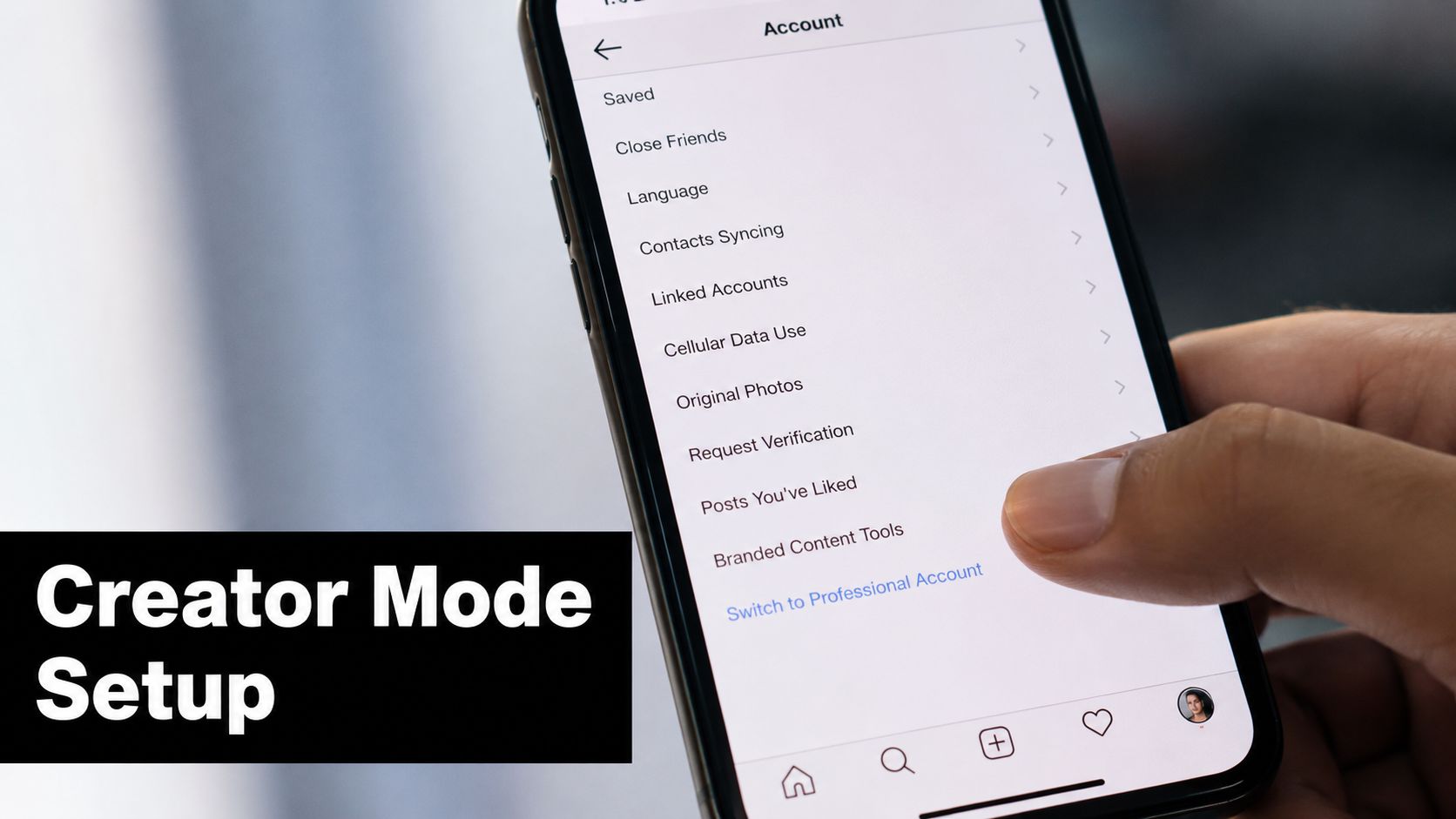
Some asset types still route the final action through the mobile app or require a notification-based handoff. For a Reel that needs a mobile-only sound, sticker, collaboration feature, or other unsupported element, prepare the media and caption on desktop, then complete the final publishing step from the phone.
Native tools work best when your team can accept Meta's interface and limited diagnostics. They don't give you the same retry queue, custom reconciliation, or detailed API event history that an engineered workflow can provide. That trade-off is acceptable for many small teams, but it becomes visible as soon as several accounts share a busy calendar.
Third-Party Schedulers Compared to Native Posting
A third-party scheduler earns its place by solving team problems, not by magically bypassing Instagram. Later and Buffer still rely on Meta's publishing endpoints for automatic publishing, so they inherit the platform's account, media, validation, and quota rules. Hootsuite's approval workflow can be more useful than the native interface for organizations where posts need review before they leave the queue.
A side-by-side view makes the trade-offs clearer:
| Criteria | Meta Business Suite / Creator Studio | Later | Buffer | Hootsuite |
|---|---|---|---|---|
| Publishing control | Native scheduling and basic planning | Strong visual planning with automatic or notification workflows | Automatic publishing or notification handoff, depending on account and media | Approval queues and structured team review |
| Media handling | Closest to Meta's supported formats | Convenient composer, but unsupported formats may require notification publishing | Automatic publishing depends on accepted media specifications | Broad workflow support, with Instagram's rules still applying |
| Analytics depth | Native account insights and platform context | Useful planning and reporting features vary by plan | Publishing and channel insights | Stronger cross-account and team reporting options |
| Collaboration | Basic business permissions and planner access | Designed for shared planning | Useful for shared queues and content workflows | Better fit for formal approvals and larger teams |
| Cost at scale | No separate scheduler subscription | Can become expensive if you need many profiles or advanced features | Costs rise with channels, users, and analytics requirements | More justified when approvals and reporting are core needs |
| Silent failure handling | Often requires manual checking | Notifications and status tools help, but verification remains necessary | Notification fallback can save unsupported posts, but it isn't automatic delivery | Approval and monitoring features reduce process gaps, not API failures |
Teams often overspend on visual calendars, unused analytics modules, or extra seats while leaving the core weakness untouched: nobody owns failed-post reconciliation. A scheduler can show a green queue status even when the final Instagram action needs attention.
For a wider comparison of automated publishing patterns, this social media auto posting guide is a useful reference. Still, the decision should come down to workflow fit. Pick the platform that makes ownership, approvals, and failure recovery obvious, not the one with the longest feature list.
Using the Instagram Graph API for Direct Publishing
A post can fail after your automation reports success. The Instagram Graph API requires a delivery pipeline that prepares media, waits for processing, sends the publish command, and records the final result.
The container pattern
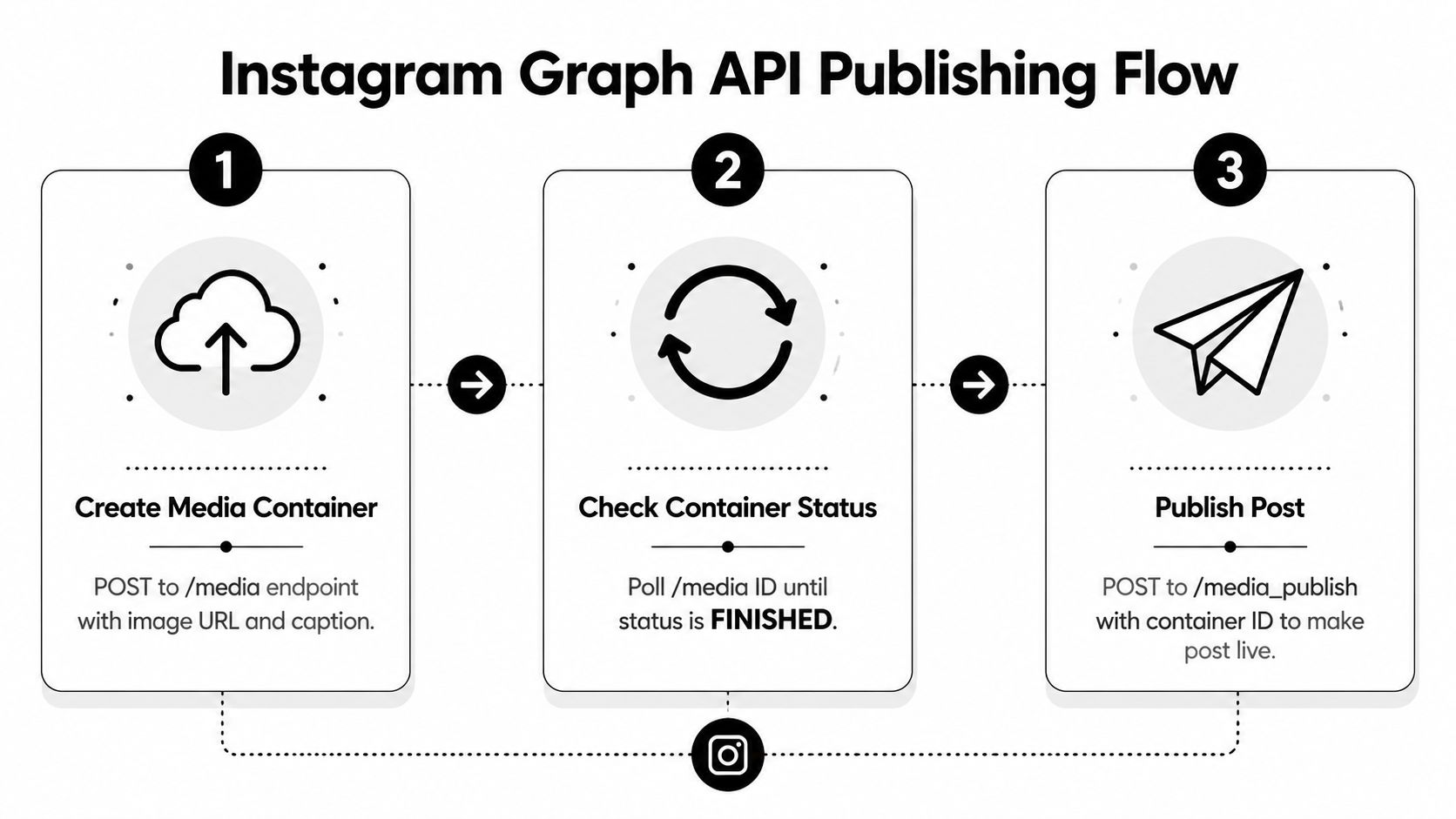
The publishing flow uses two main requests:
Create the media container. Send a
POSTrequest to/{ig-user-id}/mediawith the media URL, caption, and relevantmedia_type. Reels and other videos require the appropriate video configuration. For a carousel, prepare the child media objects before creating the parent container.Publish the container. After Instagram finishes processing the asset, send a
POSTrequest to/{ig-user-id}/media_publishwith the container ID.
Status polling controls the handoff between these requests. Poll the container until status_code='FINISHED', then send the publish request. A PROCESSING response means the media is still preparing, so the workflow must wait for FINISHED.
Treat scheduling as your responsibility
Meta's publishing workflow permits 50 API-published posts in a 24-hour moving period, with carousels counting as one post. The official publishing reference makes runtime quota tracking necessary for higher-volume systems. Keep a per-account counter and reserve capacity before creating a container.
The Graph API does not provide a dependable scheduled_publish_time equivalent for this workflow. A worker, cron process, or queue must wake at the target time, create or retrieve the container, poll its status, and publish it. Containers can expire after 24 hours, so creating them too far ahead creates another failure point.
Unsupported actions also need explicit handling. Stories, DMs, and branded content tags are outside this publishing flow. Video validation matters, and uploads longer than the permitted published duration can be rejected.
Persist every container_id. Retry a publish request after a transient 5xx response, but first check whether Instagram created the post before creating another container. Store the account ID, intended time, request status, API response, and final post ID. A fallback queue should surface jobs that remain processing, expire, or lack a confirmed post ID, preventing silent failures from becoming missing content.
Building Automation Workflows With Zapier and Make
A practical no-code workflow starts with a structured content record, not an RSS feed alone. Use a Notion database or Airtable table with fields for the caption, image URL, target account, publish time, approval status, and failure message.
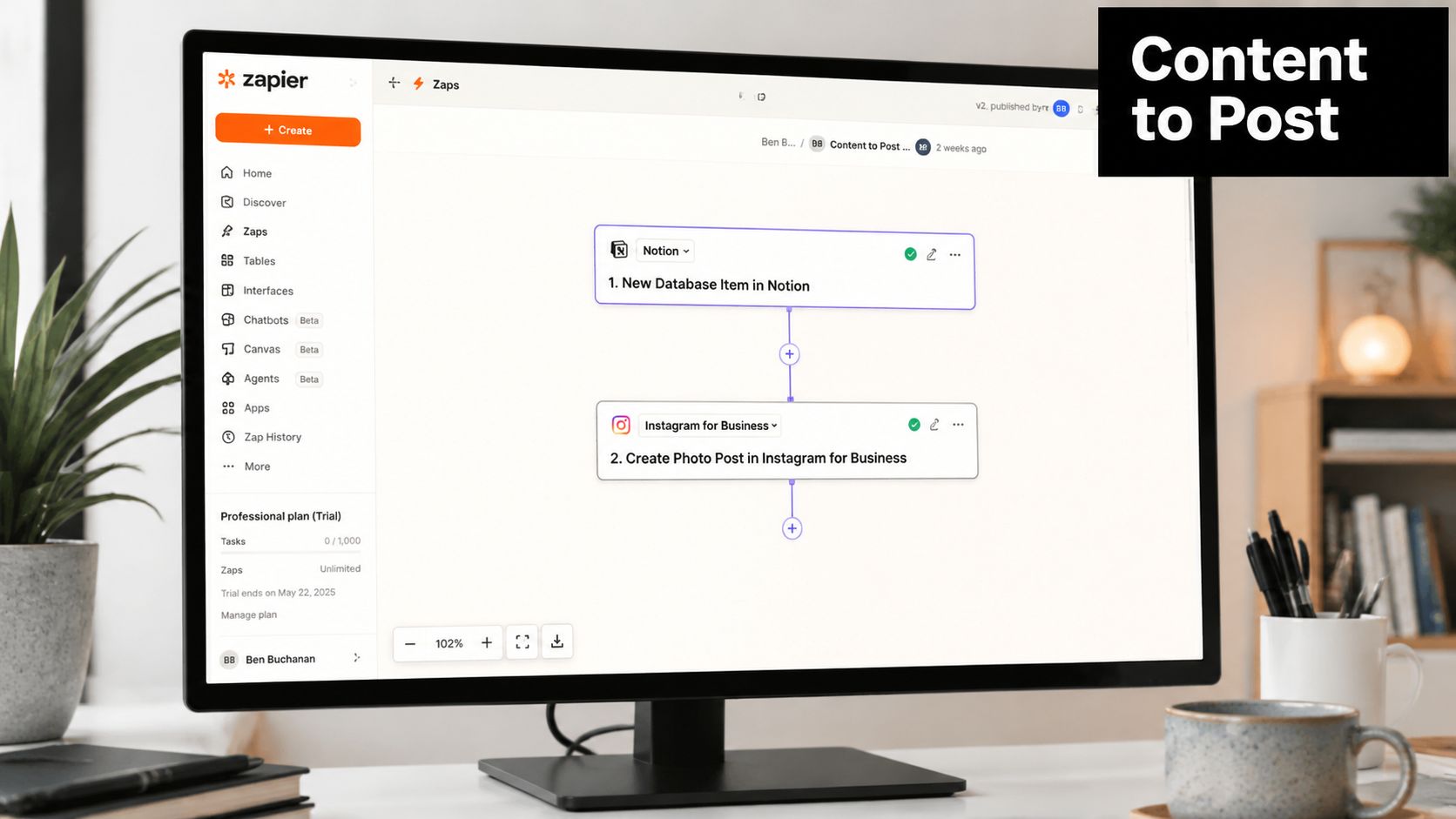
A replicable workflow
Set the record status to Approved, then let the automation run these actions:
Trigger on the approved row. Airtable or Notion sends the record into Zapier or Make only after a person has reviewed it.
Map the fields. Pass the caption, hashtag set, image URL, account identifier, and intended publish time into the workflow.
Validate the media URL. Confirm that the URL is reachable by Meta's servers and that the file matches the accepted format. Temporary URLs that expire too quickly are a common source of container failures.
Call the Graph API. Use a custom webhook or code step to create the media container. Save the returned container ID in the source row.
Schedule the publish action externally. Delay the publish step until the chosen time, or hand the job to a queue that can poll and retry independently.
Write back the result. Store the Instagram post ID, publish timestamp, response status, or error details in Airtable or Notion.
A Make scenario can be attractive for high-volume execution, while Zapier is often faster when you're connecting familiar SaaS tools and need a wide set of native integrations. Don't choose on task price alone. Compare the cost of monitoring, retries, storage, and the human time spent investigating failed runs. The same discipline applies to marketing automation best practices.
Burst execution creates avoidable problems. Rate-limit responses, image URL timeouts, and missing backoff behavior after a 429 can turn a seemingly successful scenario into a partial batch. Most no-code tools need an explicit retry queue, delayed reprocessing, and an alert route such as Slack or email.
This walkthrough is useful for teams exploring ways to boost engagement with revid.ai, especially when short-form creative enters the content pipeline. Keep the media-generation step separate from the publishing step so a creative failure doesn't look like an Instagram failure.
Captions, Hashtags, and Timing That Actually Convert
Automation preserves the content decision you made earlier. It doesn't improve a weak caption, rescue an irrelevant hashtag set, or make a generic publishing time correct for every audience.
Make the first line earn the tap
The opening line carries the practical burden because the rest of a caption sits behind the “more” interaction. Put the search-relevant phrase, audience problem, or clear promise first. Clever wording can follow, but the reader should understand the post's subject without expanding the caption.
Keep evergreen captions modular. Store the hook, explanation, proof point, and call to action as separate fields, then assemble them before approval. That makes revisions safer than editing a long block of text inside a scheduler.
Use a narrow hashtag set
Broad hashtag stuffing gives an automated workflow a false sense of completeness. A smaller set of niche, relevant hashtags is easier to review and less likely to make unrelated posts look templated. Match hashtags to the actual topic, audience, and offer rather than recycling one set across every content category.
| Lever | Best for Automation | Best for Manual |
|---|---|---|
| Caption | Evergreen hooks, structured education, repeatable calls to action | Trend-aware language, live reactions, sensitive wording |
| Hashtag | Stable niche groups mapped to content themes | Fast-changing conversations and event-specific tags |
| Timing | Consistent audience windows and recurring campaigns | Breaking news, live moments, and trend-sensitive posts |
Timing data should come from the account's own audience activity, not an industry average treated as universal truth. Consistency also matters because a reliable cadence gives the team a predictable operating rhythm. Save real-time trends, fast-moving hashtags, and culturally sensitive references for manual publishing where someone can check the context immediately.
Paid distribution needs a separate decision. Organic automation can keep the calendar moving, while promotion requires deliberate audience, creative, and budget choices. Teams combining both should keep the content workflow and the paid workflow connected but not blindly identical. This guide to getting more followers with Instagram ads provides related context for that distinction.
When Semi-Automated Beats Fully Automatic
A scheduled post can look successful in the workflow and still fail to appear on Instagram. The wrong asset may publish, a launch window may pass, or a timeout may create uncertainty about whether delivery happened. Full automation works for repeatable, low-risk content. Brand teams still need human review wherever a mistake could affect reputation, legal exposure, paid distribution, or timing.
Put the human at the right boundary
A reliable hybrid workflow separates predictable volume from decisions that require context.
- Evergreen education: Allow approved content to publish automatically after the system confirms the account and media status.
- Product launches: Send launch posts through a one-click approval step so the owner can verify pricing, links, claims, and timing.
- Crisis communications: Keep responses manual. The context can change faster than a scheduled queue can safely interpret.
- Paid tie-ins: Require review before publishing so organic copy, creative, audience, and promotion plans remain aligned.
- Trend participation: Use manual publishing when the post depends on a fast-moving conversation, audio, joke, or cultural reference.
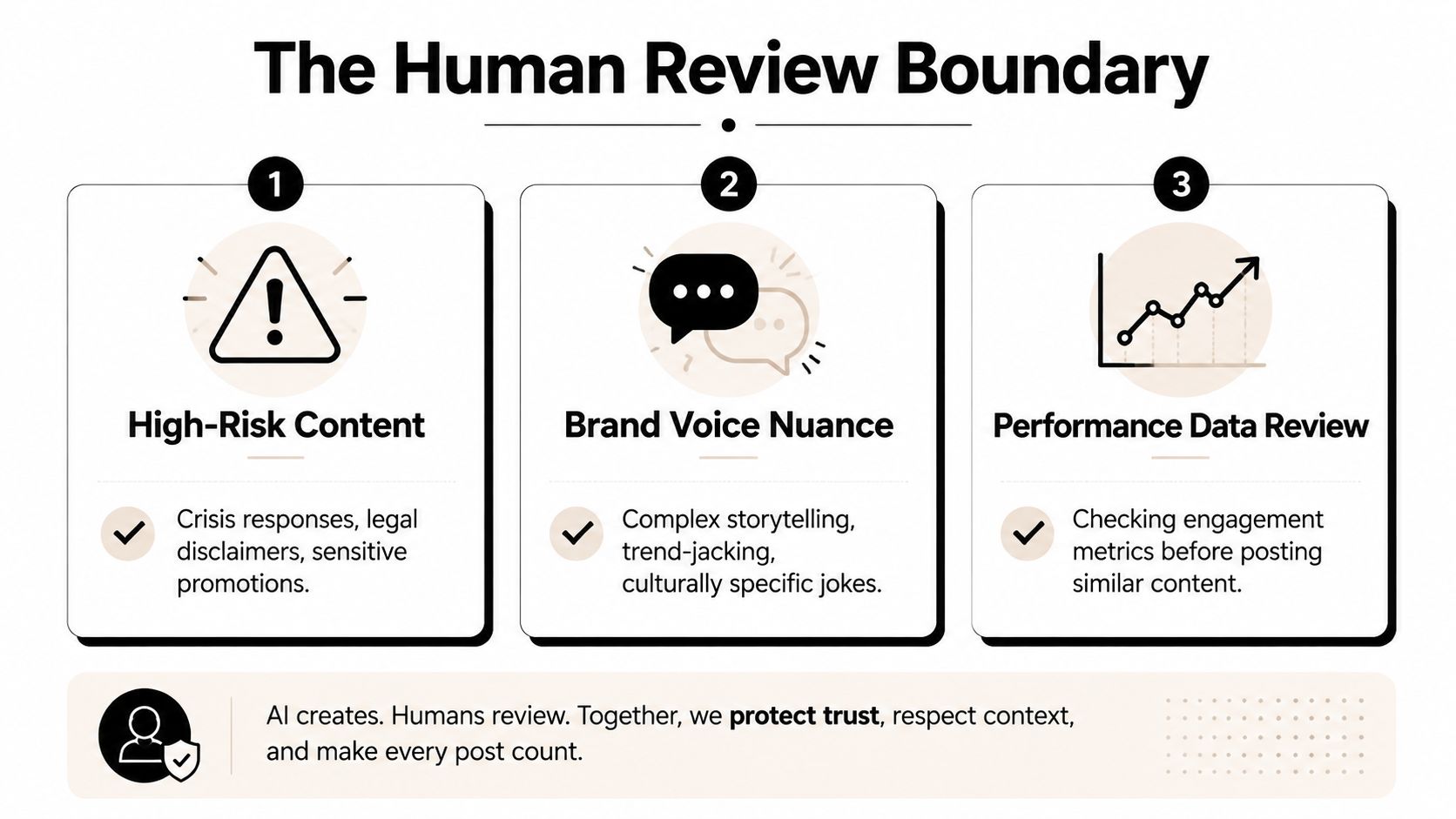
The approval step should be narrow and fast. A reviewer should see the account, visible handle, asset, caption, scheduled timezone, and intended publish time without opening several systems.
Design recovery before you need it
The failures that create the most operational work are usually predictable.
A media container can expire after 24 hours. The worker should reject stale containers and create a fresh one from the approved media record. If a publish request times out, do not immediately create a duplicate. First check whether Instagram created the post. Retry only when the stored state shows that delivery remains unresolved.
Rejected media can disappear from a queue when the workflow records only “job complete.” Add validation before container creation, and send a Slack alert when the API returns a validation response such as a 422. Include the account, media URL, caption record, and failure reason so an operator can correct the source instead of guessing.
Hashtag sets can also create risk when a team repeats them without checking relevance. Maintain approved groups by content theme, then route unusual combinations to the human lane. Timezone errors require the same control. Store the target audience timezone with the post, convert it once in the scheduling service, and show both local and UTC values to the reviewer.
A daily reconciliation job should compare expected posts with live post IDs. That catches silent misses a green automation run will not show. As noted in the Graph API section, the rolling limit remains 50 posts per 24 hours. Track usage as part of job state, reserve capacity for retries where possible, and alert before the queue reaches the limit.
The reliability checklist
Before enabling unattended delivery, verify:
- Account type: Confirm the profile is Business or Creator, not personal.
- Token health: Check permissions and maintain a documented 60-day refresh cadence for token management.
- Container age: Reject any container older than 24 hours.
- Media compliance: Validate file type, dimensions, duration, and supported publishing format.
- Hashtag relevance: Review the set against the content theme and brand risk.
- Timezone alignment: Match the scheduler's timezone to the intended audience window.
- Post confirmation: Record the final post ID and send a monitoring ping after publishing.
- Reconciliation: Compare scheduled, attempted, published, and failed states on a recurring job.
Treat each state transition as evidence, not as a success message. A queued job is not a published post, and an API response is not confirmation that the final post ID exists.
Questions that usually appear after launch
Can a personal account use any automatic path? Not through Instagram's official publishing API. A Business or Creator account is required. Notification-based workflows differ from true automatic publishing because a person still completes the final action.
Why did a scheduled post publish on the wrong account? The workflow may have stored a stale account mapping, reused a token connected to another profile, or allowed approval while the account selector was wrong. Store the Instagram user ID and visible handle together, then display both before approval.
What should happen when a container stays in PROCESSING? Continue polling within a bounded retry window, record every status response, and alert an operator when processing exceeds the expected period. Do not create a second container until the first one is confirmed unable to succeed.
What does Make versus Zapier cost at scale? The answer depends on the plan, task or operation model, connected apps, retries, and execution volume. Make can be more economical for complex, high-volume scenarios, while Zapier can reduce build time through native integrations. Compare a full month of successful runs, failed retries, and monitoring overhead rather than the advertised entry plan.
How should rate-limit responses be handled? Parse the HTTP status, response body, error code, request context, and retry guidance before labeling the job a failure. Put the job into delayed retry, update quota state, and prevent duplicate container creation. A 429 response changes scheduling decisions as well as error status.
Review the stack quarterly. Meta can change endpoints, permissions, and supported publishing behavior, while scheduler features can shift on a roughly six-month cadence. Audit tokens, account mappings, media validation, retry behavior, and reconciliation reports before a campaign depends on the pipeline.
Keywordme helps marketing teams reduce manual PPC operations through keyword research, negative keyword handling, match-type assignment, and bulk campaign workflows in one Chrome-based platform. Visit Keywordme to see how a cleaner search-term process can complement a more reliable social publishing stack.
.svg)