
Optimizer Google Ads: Boost ROI & Cut Waste in 2026
Optimizer Google Ads: Boost ROI & Cut Waste in 2026


Feeling like you're just lighting money on fire with your Google Ads? We've all been there. Let's talk about how to stop the bleed and start getting real results. Forget the old, painful ways of doing things—we're going to walk through what a smart, modern Google Ads optimization workflow actually looks like in 2026.
Your New Playbook For Optimizing Google Ads
If you’re still slogging through spreadsheets, manually copying and pasting keywords, you’re not just wasting time—you're actively leaving money on the table. Trust me, effective optimization isn't about endlessly fiddling with bids. It's about building a repeatable system that does the heavy lifting for you.
This frees you up to think about the big picture instead of getting lost in the weeds. This guide is our roadmap for creating that system, starting with a deep dive into your search terms and ending with smart campaign expansion. The goal here is simple: to completely change how you manage your ad accounts for the better.
The secret to a killer Google Ads account isn’t a one-time fix. It’s a constant cycle of auditing, filtering, and expanding. This is what separates the accounts that print money from the ones that just tread water.
The Modern Optimization Cycle
The whole playbook really boils down to a three-part cycle. It’s a simple framework, but it's the engine behind every high-performing account we've ever managed.
- Audit: First, you have to get your hands dirty in the Search Term Report. This is where you find out what people are actually searching for to trigger your ads. You'll uncover hidden gems and, more importantly, all the junk queries that are eating your budget.
- Filter: Next up is cleanup. You take all that junk you found and build out robust negative keyword lists. This is how you stop irrelevant searches from ever costing you a dime again.
- Expand: Finally, it's time to play offense. You find the search terms that are converting like crazy and turn them into new keywords. Using the right match types, you can capture more of that high-intent traffic and scale what's working.
This visual really brings it home, showing how these three steps—Audit, Filter, and Expand—create a powerful loop for continuous growth.
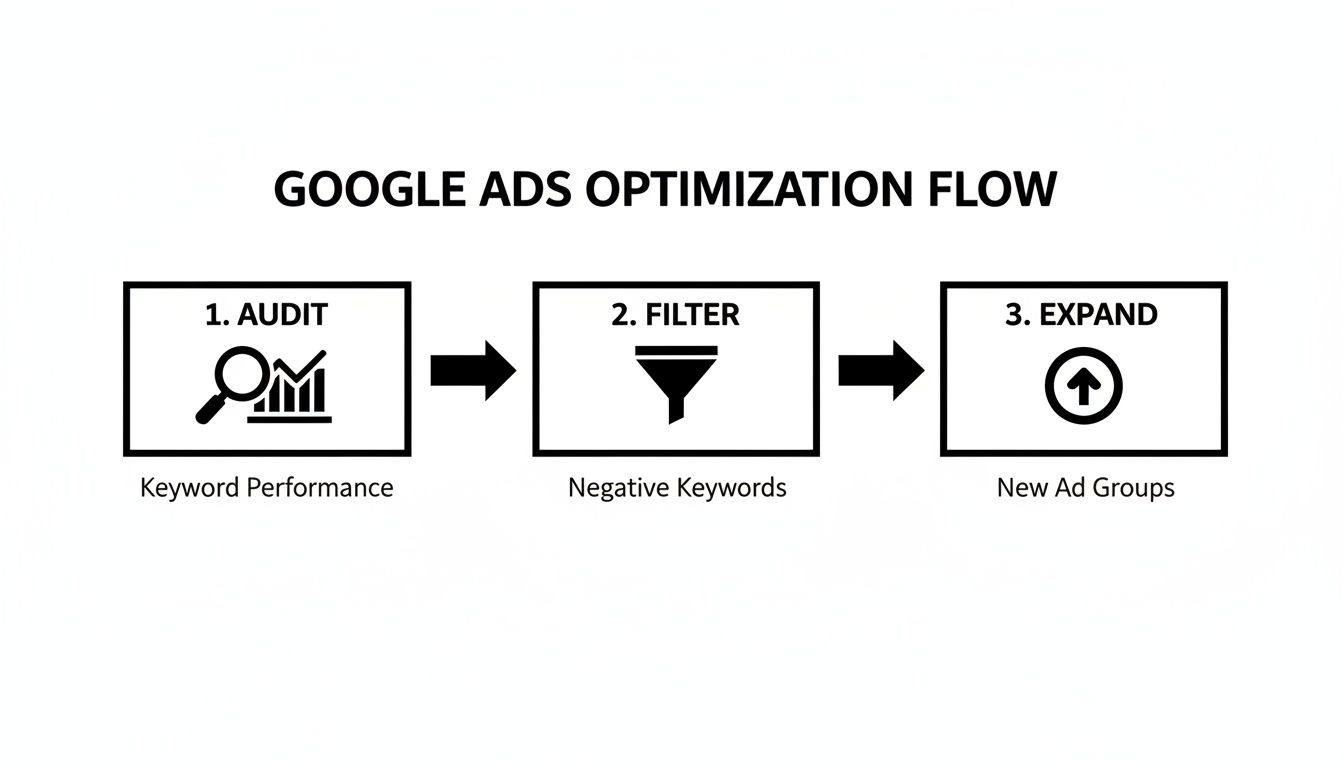
By constantly running this play, you're always refining your targeting and squeezing every last drop of value from your ad spend. And sure, you can do it all by hand, but tools can turn what used to take hours into just a few clicks.
For a broader look at the fundamentals, this ultimate guide to PPC is a great resource that covers strategies applicable to almost any industry.
Now, let's break down each of these stages with some real-world advice you can start using today.
Auditing Search Terms To Find Wasted Spend
If there’s one place we see accounts bleeding money, it’s the Search Term Report. It's a goldmine, for sure, but it's also where your ad budget goes to die if you're not paying attention. The first thing you absolutely have to do for a healthier Google Ads account is get your hands dirty in this report. You need to see what people are actually typing to trigger your ads.
This isn’t just about finding what works. It's about ruthlessly cutting what doesn't.
Think of it as detective work. You’re hunting for clues—those irrelevant, low-intent queries that are gobbling up your budget without giving you anything back. These junk terms are the silent killers of your ROI. A solid pay-per-click audit guide can give you a framework, but the goal is to build a quick, repeatable process to plug those leaks fast.
Sorting Queries Into Actionable Buckets
Staring at a wall of search terms is overwhelming. To make sense of the chaos, we immediately sort every query into one of three buckets. This system makes the whole process faster and way more decisive.
- High-Potential Winners: These are the slam dunks. The search terms are super relevant and scream "I'm ready to buy." These are your prime candidates to be added as exact match keywords.
- Definite Negatives: This is the junk pile, plain and simple. These queries are completely unrelated to what you sell. A classic example is seeing clicks from "running man movie poster" when you sell "men's running shoes." Add them to your negative list. No hesitation.
- The "Watch List": Now for the tricky ones. They aren't totally irrelevant, but their conversion rates are terrible, or the user's intent is just fuzzy. You'll want to keep a close eye on these before deciding whether to cut them or not.
This simple sorting method turns a messy spreadsheet into an actual action plan.
Let's be real: a good chunk of your initial ad spend, especially on broad or phrase match, is going to be wasted on irrelevant searches. It's inevitable. Your job is to perform surgery and remove that waste as quickly as possible. A systematic audit is the only way.
Using Google's Own Tools To Help
Don't forget that Google itself leaves you a trail of breadcrumbs. The built-in recommendations page has actually become pretty useful for spotting opportunities. It analyzes your account history and platform-wide trends to offer suggestions.
And it’s not just fluff. According to Google's own data, advertisers who boosted their account-level optimization score by just 10 points saw a median 14% increase in conversions. This score, which runs from 0-100%, is a great way to prioritize what to fix first and can be a fantastic starting point for your audit.
By pairing your own hands-on review with Google’s automated suggestions, you’re hitting wasted spend from two sides. This perfectly sets the stage for what we'll tackle next: building a rock-solid negative keyword strategy.
Building And Automating Your Negative Keyword Lists
Alright, so you’ve done the hard work of digging through your search term reports. You’ve separated the money-makers from the money-wasters. What now? It’s time to take out the trash for good.
A smart negative keyword strategy is the secret weapon of any profitable Google Ads account. It's what quietly works in the background, saving you a small fortune in wasted spend.
Let’s be honest, adding negative keywords one by one is a painfully slow process. Nobody has time for that. To make a real impact, you have to build and manage these lists efficiently. Think of it as putting up a shield that protects your budget from irrelevant clicks.
Every bad click you block is pure profit saved. It's not just about cutting costs; it's about freeing up that budget to double down on the keywords that actually bring in customers.
Account Level vs. Campaign Level Lists
One of the first calls you need to make is where to add your negatives. You’ve got two main options, and using the right one for the job is crucial.
Account-Level Lists: This is where you put your "never-in-a-million-years" negatives. These are the terms that will never be relevant to your business, no matter the campaign. If you sell high-end furniture, words like "free," "cheap," or "DIY" are perfect candidates for an account-level list.
Campaign-Level Lists: These lists are for surgical precision. They’re fantastic for preventing your own campaigns from cannibalizing each other. For example, say you have separate campaigns for "men's hiking boots" and "women's hiking boots." You’d add "women's" as a negative to the men's campaign and "men's" to the women's. Simple, but so effective.
Getting this structure right from the start saves a ton of headaches later. It keeps your campaigns in their own lanes and ensures your ad spend goes exactly where you want it to.
A well-managed negative keyword list is just as important as your list of targeted keywords. One drives traffic, and the other protects your profitability. Neglecting your negatives is like driving a race car with a hole in the gas tank.
Moving From Manual To Automated
Now, this is where you get your time back. The old way of doing things—exporting search terms to a spreadsheet, sorting through them, and then manually pasting them back into Google Ads—is a soul-crushing chore. It's the kind of busywork that has you questioning your career choices.
This is exactly why we built Keywordme. We got tired of that grind and wanted to turn that whole multi-step nightmare into a simple, one-click action.
Instead of wrestling with spreadsheets, you can just browse your search term report right inside the Google Ads interface. When you spot a junk term, our plugin lets you add it to a negative list instantly. No copying, no pasting, no wasted hours. It turns a tedious task into a quick, decisive action that immediately improves your bottom line.
This kind of automation is a total game-changer. For a deeper dive into the tech available, check out our guide on automated negative keyword tools, which explains how it can save you time and money.
By using data to block wasteful search terms before they can spend a dime, you’re not just cleaning up past mistakes—you’re preventing future ones. This is what a modern optimizer for Google Ads workflow looks like in 2026. It’s fast, it’s smart, and it lets you focus on strategy, not spreadsheets.
Expanding Your Campaigns By Turning Queries Into Keywords
Alright, you've spent the time cleaning up your search terms and building out your negative keyword lists. That’s the essential defensive work. Now for the fun part: going on the offense.
This is where we get to grow the account strategically. It’s not about just dumping a bunch of new keywords into the mix and hoping something sticks—that's a fast track to a bloated, messy account. The real magic happens when you let the data you already have point you toward your next big wins. We're talking about structuring your campaigns for better Quality Scores, lower ad spend, and, of course, more conversions.

Turning Winning Queries into All-Star Keywords
As you were digging through your search term reports, you no doubt found some absolute gems. These are the queries that are already driving clicks and conversions, even though you aren't bidding on them directly.
Leaving a golden search query like that buried inside a broad or phrase match ad group is a huge missed opportunity. When you "promote" that query to become its own keyword, you suddenly have total control. You can set a specific bid for it, write hyper-relevant ad copy that speaks directly to that search, and send users to the perfect landing page. This is how you take a good search term and make it great.
So, the process looks something like this:
- You spot a search term that's converting well.
- You add that exact term as a new keyword to its most relevant ad group.
- You'll typically want to add it as an exact match to lock in that performance and control.
Now, imagine doing that for hundreds of queries. The manual copy-and-paste job is a nightmare. This is where an optimizer for Google Ads like Keywordme really shines. It helps you grab all those winning terms and move them in bulk, applying the right match types in just a few clicks. Honestly, it's easily 10x faster than doing it the old-fashioned way.
Let Your Data Be Your Guide for Keyword Expansion
Guesswork has no place in a high-performing PPC account. Thanks to the historical data available through tools like Google's Keyword Planner and its API, we can make incredibly smart decisions.
This isn't just a vague "popularity" score. We get hard numbers: 12-month average monthly searches, competition levels, and top-of-page bid ranges. This data, which gets a refresh every month, lets you sift through thousands of potential keywords and quickly zero in on the ones with genuine potential. If you want to get into the weeds, you can explore how Google's API provides historical metrics yourself.
Don't just add keywords because they feel right. Prioritize based on what the data shows you. A query that converted one time on a random, low-volume search is not the same as a term that consistently drives conversions with solid search volume. Always focus your energy on the proven winners first.
When you let data lead the way, you stop guessing and start making calculated investments in keywords that have already shown you they can make you money.
Match Types in 2026: A Quick Guide
Google's AI has gotten much smarter over the years, and that has changed how we should approach match types. What used to be a rigid system is now more about guiding the machine.
Here's a quick reference table we use to decide which match type to use and when.
Match Type Strategy Quick Reference
This table breaks down how to use each Google Ads match type to get the right balance of campaign control and performance.
| Match Type | Best Used For | Control Level | Example Use Case |
|---|---|---|---|
| Exact Match | Capturing high-intent traffic for your most valuable, proven search terms. | High | Adding "men's leather work boots size 11" as a keyword after seeing it convert multiple times. |
| Phrase Match | Balancing reach and relevance to discover new, closely related search queries. | Medium | Using "leather work boots" to capture searches like "best leather work boots for construction." |
| Broad Match | Maximum reach and discovery, best paired with Smart Bidding to find unexpected customer queries. | Low | Using "work boots" in a discovery campaign to see all the different ways people search for your product. |
Think of it as a funnel. Broad match is at the top, discovering new opportunities. Phrase match is in the middle, helping you qualify those new queries. And exact match is at the bottom, laser-focused on converting your most valuable traffic. A truly effective optimizer for Google Ads workflow is all about moving search terms through this funnel, constantly refining your targeting to get the best possible return on your investment.
Automating Your Workflow With The Right Tools
Okay, we've walked through the whole optimization cycle, from digging into your search terms to expanding your winners. But let's be real: knowing the steps is one thing. Actually doing them, day in and day out, is another.
The secret weapon of the best PPC managers isn't just their strategy—it's their ruthless efficiency. Trying to manage a large Google Ads account by hand is a fast track to burnout and a graveyard of missed opportunities. This is where you bring it all together with smart automation.
Your entire workflow—auditing search terms, building out negative lists, and promoting winning keywords—can and should be handled without ever leaving the Google Ads interface. That's exactly what a modern optimizer for Google Ads should deliver.
Bringing Your Entire Workflow Under One Roof
Think about the old way of doing things. You were probably juggling a dozen spreadsheets, a few text files for your negatives, and who knows how many browser tabs. It was clunky, slow, and a single copy-paste error could cost you a fortune.
A dedicated tool, like the Keywordme Chrome plugin, changes the game by consolidating that entire mess into a single, clean overlay right inside Google Ads.
You can fly through your search term reports, add negatives on the spot, and push high-performing queries into new ad groups in seconds. A task that used to eat up an entire afternoon can now be knocked out before you finish your morning coffee.
The goal of automation isn't to make you obsolete. It's to free you from the mind-numbing manual labor that gets in the way of real strategy. When you're not drowning in spreadsheets, you have the headspace to focus on what matters: ad creative, landing pages, and big-picture growth.
This is the leap from being a good account manager to a great one. You stop being a data entry clerk and start being a strategist. If you're curious about other ways to automate your advertising, we've got a great breakdown of PPC workflow automation tools that dives deeper into this.
Why Automation Is No Longer Optional
Recent platform changes have made this kind of efficiency more critical than ever. Remember back in November 2025, when Google Ads suddenly limited access to historical data to just the past 11 years? That move sent a shockwave through the industry.
For teams using Keywordme, it just confirmed what we already knew: you need tools that bring fresh historical data directly into your workflow. Without proactive automation, like one-click match type assignments, your optimization speed can slow down by up to 10x as you wrestle with the interface.
In fact, after that change, we saw marketers using this kind of smart automation achieve a 14% median lift in conversions simply by being able to act on fresh historical data faster than their competitors. You can get more details on how Google's data limits impact strategy if you want to dig in.
Ultimately, using a dedicated optimizer isn't just about saving time. It’s about making smarter, data-backed decisions at a scale and speed that's simply impossible to match manually.
Frequently Asked Questions About Google Ads Optimization
Got a few more questions rattling around? Let's tackle some of the most common ones we hear from people trying to get their Google Ads accounts in shape.

How Often Should I Use an Optimizer for My Google Ads Account?
We've found the sweet spot for most active campaigns is checking in on the search term reports at least once a week. This cadence is frequent enough to catch and block irrelevant search queries before they waste too much of your ad spend.
If you’re running smaller accounts or your campaigns are pretty stable, you can probably get away with a bi-weekly check. The real win of using a good optimizer tool is that it turns this weekly chore into a quick, five-minute task.
Can I Automate the Entire Google Ads Optimization Process?
Not quite, and that's actually a good thing. A solid tool can automate maybe 90% of the grunt work—like building negative lists in bulk or finding new keywords—but your brain is still the most valuable asset. Automation handles the what, but you still need to drive the why.
An optimizer for Google Ads isn't meant to replace you. It’s there to be your force multiplier, handling the repetitive clicks so you can focus on strategy—like writing killer ad copy, refining your offers, or improving the landing page experience.
What Is the Biggest Mistake People Make with Negative Keywords?
Hands down, the most common mistake is being too aggressive with broad match negatives. It's a classic trap. You see the word "free" popping up in bad searches, so you add it as a broad negative.
The problem? You might have just blocked a perfect, high-intent query like "local delivery free of charge." Suddenly, a potential customer who was ready to buy can't find you.
To play it safe, stick to phrase or exact match for your negatives unless you are absolutely certain a word is always a money-waster. It's also a great idea to review your negative keywords every so often just to make sure you aren't accidentally choking off good traffic.
Ready to stop wasting time and start optimizing like a pro? The Keywordme Chrome plugin puts this entire workflow into a simple interface. It helps you clean out junk terms, spot winning keywords, and get your ad account under control in a fraction of the time. Grab your 7-day free trial and see what it feels like.
.svg)