
Optimize Google Ads Campaign: Boost ROI in 2026
Optimize Google Ads Campaign: Boost ROI in 2026


Before you touch a single keyword or write a new piece of ad copy, we need to talk about the most crucial first step: the audit. Seriously. Jumping straight into "optimizing" without a clear baseline is like trying to navigate a new city without a map. You'll spend a lot of time and money going in circles.
This initial review isn't about getting lost in spreadsheets for weeks. It's a quick, focused health check to see what’s working, what's broken, and where your money is actually going.
Your Starting Point for a High-Performing Campaign
Let’s be honest, logging into a Google Ads account can feel overwhelming. But before you get sidetracked by a million different metrics and settings, you have to get the fundamentals right. A solid audit is the only way to make sure you’re not just pouring more money into a leaky bucket.
Think of it as getting your house in order before you start renovating. We need to find the quick wins and stop any immediate bleeding.
Assess Your Core Campaign Health
First things first, look at your account structure. Are your campaigns and ad groups a jumbled mess of unrelated keywords? Or are they organized into tight, logical themes? A disorganized account is almost always the number one reason for wasted ad spend. It’s that simple.
From there, you can start spotting the most obvious red flags. These are usually hiding in plain sight:
- Low Quality Scores: This is Google's way of telling you there's a major disconnect between your keywords, your ads, and your landing pages.
- Sky-high bounce rates: People are clicking, hitting your page, and leaving immediately. This often means your ad made a promise your landing page couldn't keep.
- Lots of impressions but no clicks: If people see your ad but don’t click, your copy probably isn't compelling or relevant enough to grab their attention.
The goal here is simple: find the low-hanging fruit. We're looking for the quick fixes that can give you an immediate boost in performance before you tackle the bigger, more complex strategies.
While clicks and impressions are easy to look at, they don't pay the bills. The metrics that truly matter are the ones that tie back to your bottom line, like conversions and Return on Ad Spend (ROAS).
It's a nightmare scenario every marketer knows: you launch a campaign, and the budget just vanishes on clicks that go nowhere. Recent 2026 benchmarks show the average search ad click-through rate (CTR) is a solid 6.66%. But the global average conversion rate? It's just 4.40%. That means for every 100 clicks, you might only get 4 or 5 leads. That gap is precisely why we audit and refine.
This whole process is about creating a clear, repeatable workflow. You check the structure, analyze performance, and hunt down those red flags.
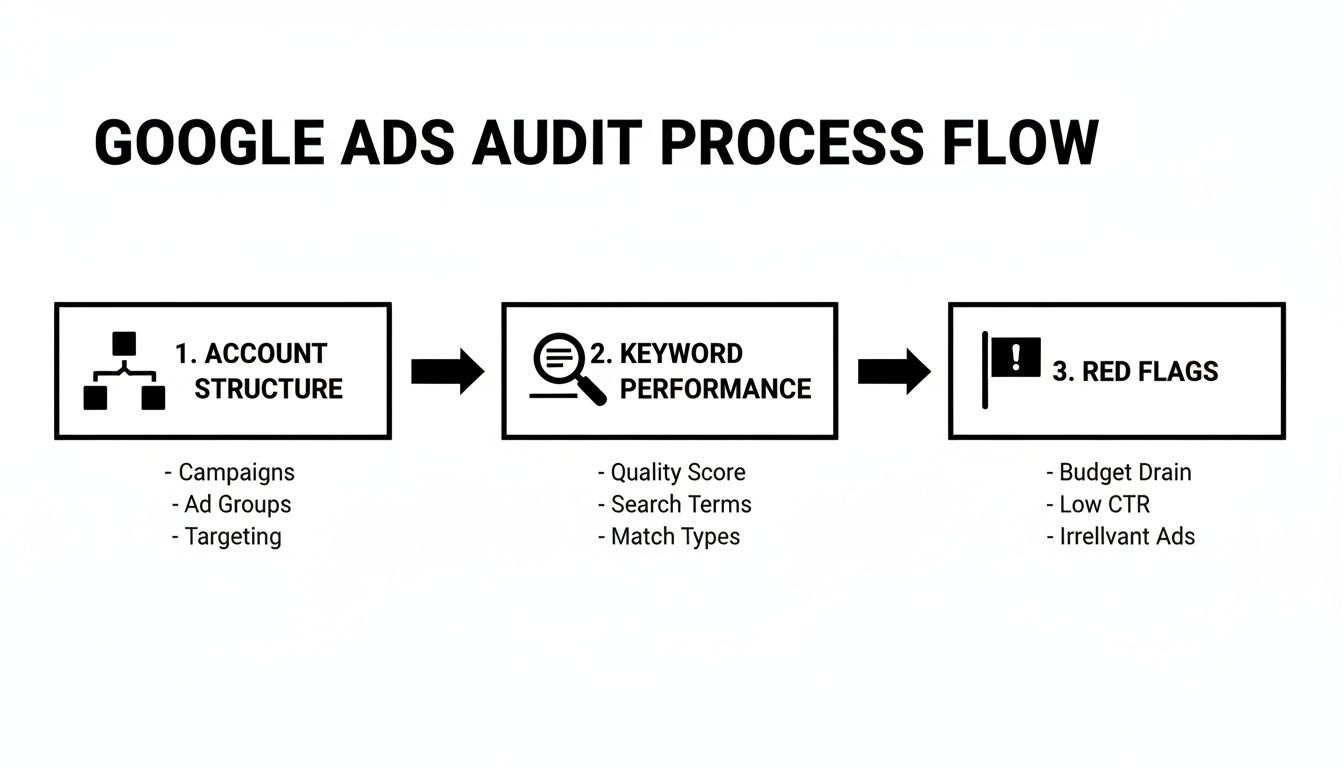
To get you started, here's a quick-reference checklist. Use this table to guide your initial look through the account and make sure you're not missing any of the big-picture items.
Initial Campaign Audit Checklist
| Audit Area | What to Check | Why It Matters |
|---|---|---|
| Account & Campaign Settings | Conversion tracking, location targeting, ad schedule, device targeting. | Incorrect settings are the fastest way to waste money on the wrong audience or at the wrong time. |
| Ad Group Structure | Are ad groups tightly themed (5-15 keywords max)? Is there a clear connection between keywords, ads, and landing pages? | A tight structure leads to higher Quality Scores, lower costs, and better ad relevance. |
| Keyword Performance | High-cost, low-converting keywords. Low Quality Scores. Obvious negative keyword opportunities in the search terms report. | This is where you find the biggest budget drains and the quickest opportunities for improvement. |
| Ad Copy & Extensions | Are you using all relevant ad extensions? Is your ad copy compelling and focused on user benefits? Do you have at least 3 ads per ad group for testing? | Strong ad copy and extensions increase CTR, improve ad rank, and give you more real estate on the SERP. |
Running through this checklist gives you a solid foundation and a clear to-do list.
This systematic approach makes sure nothing gets missed and sets you up for a much more strategic, data-driven optimization plan. If you want to see how we put these principles into practice, you can check out our Google Ads feature.
Mastering Keywords and Eliminating Wasted Spend
Alright, now we get to the good stuff. Once you've done a basic health check on your account, it's time to dig into the data that really separates the profitable campaigns from the ones that just drain your bank account. Your search terms report is an absolute goldmine here, showing you exactly what people are typing into Google right before they click your ad.
This report isn't just a list of words; it’s a direct line into your customers' thought processes. We're going to comb through this data to spot and kill off the "junk" search terms that are quietly eating up your budget. Honestly, this is the fastest way I know to immediately boost a campaign's profitability.
Finding the Good, the Bad, and the Ugly
I like to think of the search terms report as a battlefield. Your job is to find your allies (the search terms that lead to conversions) and get rid of the enemies (the totally irrelevant terms that just waste money). Every single click on a junk term is cash that could have been spent attracting a customer who was actually ready to buy.
You’ll see a lot of terms that are almost right, but not quite. For example, if you sell "premium men's running shoes," a click from someone searching for "free shoe repair" is a complete waste. This is where you need to get ruthless.
The secret weapon of every PPC pro I know is a ridiculously detailed negative keyword list. It’s not about finding more keywords to bid on; it’s about aggressively telling Google what not to show your ads for.
A solid negative keyword list is like a bouncer for your campaign, making sure only the most qualified people get in the door. This isn't just a best practice; it's fundamental if you want to truly optimize google ads campaign performance and see a real return on your investment.
From Spreadsheet Hell to One-Click Fixes
Let's be real: manually digging through thousands of search terms is a total grind. You have to export the data, mess around with it in a spreadsheet, and then painstakingly add terms as negatives or new keywords. It takes forever and it's easy to make mistakes.
This is where having a dedicated tool completely changes the game. You can see your entire search term universe in one place, making it way easier to spot the patterns and take action.
A dashboard like this turns hours of mind-numbing work into a simple, streamlined process. Instead of getting lost in endless rows of a spreadsheet, you can instantly see which terms are driving up costs without any conversions and shut them down with a single click.
Using Match Types for Surgical Control
So, you've found the right search terms. That's only half the battle. How you add them back into your campaign is just as critical. This is all about keyword match types.
- [Exact Match]: Use this for your slam-dunk terms—the ones you know convert. It gives you maximum control, showing your ad only for that precise search. Think
[red midi dress]. - "Phrase Match": This is your everyday workhorse. It strikes a great balance between reach and control, showing your ad when the search includes your keyword phrase. For instance,
"womens hats"could match a search forbuy womens hats online. - Broad Match: Be very, very careful with this one. Without Google's AI bidding features running full tilt, broad match can burn through your budget with irrelevant traffic. That said, if you manage it closely, it can be a decent way to discover new keyword ideas.
The goal is to be strategic. Add your top-performing search terms as exact or phrase match keywords to zero in on that intent. Shovel all the irrelevant stuff into your negative keyword list to stop the bleeding. Our guide on how to add negative keywords to Google Ads digs much deeper into building a list that will protect your budget. This level of control is what turns an average campaign into a money-making machine.
Let's Talk About Making Your Ads Actually Profitable

Look, anyone can get clicks. If you've got a credit card, you can light up your dashboard with traffic. But are those clicks turning into actual, profitable business? Or are you just funneling money to Google?
That's the entire game right there. It all comes down to Return on Ad Spend (ROAS). This is the one metric that separates a campaign that’s printing money from one that’s just a money pit. To really get this right, you have to move past the old days of manual bidding and start working with Google’s Smart Bidding. Used the right way, it's a total game-changer.
So, What's the Deal with tROAS?
Let’s get into the nitty-gritty of Target ROAS (tROAS), which is one of Google's smartest bidding tools. Forget setting a max cost-per-click (CPC). With tROAS, you just tell Google your goal. You say, "For every $1 I spend, I want to get $4 back in sales." That’s a 400% ROAS target.
Once you set that target, Google’s algorithm takes over. It crunches an insane amount of data for every single search—the user's device, their location, the time of day, their past browsing habits—to predict how likely they are to convert and for how much. Then, it bids up or down automatically to hit your goal.
I like to think of it as giving a professional stockbroker a clear profit target. You've set the overall strategy, and you’re trusting them to handle the thousands of split-second trades needed to get you there.
It's no surprise that with Google Search ads projected to pull in a staggering $198.08 billion globally by 2026, the sharpest advertisers are all focused on this. The best in the business are hitting a tROAS of 4:1 or better, and a huge part of that comes from getting their bidding strategy right. If you want a few more ideas on this, the team at Americaneagle.com has some great thoughts on how to optimize your campaigns for better ROI.
Start with Reality, Not a Wish List
The single biggest mistake I see people make with tROAS is setting a pie-in-the-sky target right out of the gate. You can't just tell Google you want a 1000% ROAS on day one and expect a miracle. The algorithm is smart, but it needs real data to learn from.
Here's a more grounded approach that actually works.
First, dig into your campaign's history from the last 30-45 days. What was your actual ROAS? If you were averaging 250%, that's your starting line. Set your initial tROAS target to 250%, or maybe just a hair above it, like 275%, to give it a little push.
Next, and this is crucial: walk away. Let it run. The algorithm needs a week or two for its "learning period." Don't go in and make a bunch of changes. Just let it gather data and figure things out.
Once the campaign is stable and consistently hitting that initial target, you can start to gently nudge it higher. Try increasing the target by 10% or 20%. Let it stabilize again. Then repeat. This way, you're working with the algorithm, guiding it toward better profitability, not fighting against it.
It All Starts with Knowing What a Conversion Is Worth
Here’s the thing about tROAS: it’s only as smart as the data you feed it. For it to work its magic, you absolutely need to be tracking conversion values. This is the engine that drives the whole strategy.
If you’re running an e-commerce store, this is pretty simple—the conversion value is just the total from the customer's shopping cart.
But for lead gen businesses, you have to get a little creative and assign values. For example, you might decide:
- A simple "contact us" form fill is worth $25.
- Someone who signs up for a demo is a much hotter lead, so that's worth $100.
- A phone call that lasts longer than two minutes? That person is serious. Let’s call that $150.
When you assign these values, you're giving Google a roadmap to your best customers. The AI learns what kind of person fills out the demo request form and starts bidding more aggressively to find more people just like them. This isn't just about getting more leads; it's about getting more of the right ones. We go way deeper on this in our guide to leveraging value-based bidding in Google Ads, and it’s worth a read if you’re serious about steering your ad spend toward your most profitable customers.
The Underrated Power of Quality Score and Ad Relevance
Alright, you've sorted out your keywords and have a solid bidding strategy in place. So what's next? Let's talk about a metric that quietly dictates whether your efforts to optimize google ads campaign performance will sink or swim: Quality Score.
Think of Quality Score as Google's internal report card on your ads. It gives you a rating from 1-to-10, but don't let that simple number fool you. Behind it, Google's algorithm is constantly judging the quality of your ads, keywords, and landing pages. A high score isn't just a vanity metric—it's your ticket to lower costs and better ad placements.
So many advertisers I see either completely ignore it or just don't get it. That's a massive mistake. A good Quality Score is one of the most powerful levers you can pull to make your entire account more efficient and, ultimately, more profitable.
Breaking Down the Three Pillars
Quality Score isn't some vague, mysterious metric. It’s actually made up of three distinct parts, and to improve your score, you have to nail all of them.
- Expected Click-Through Rate (CTR): This is all about prediction. Google looks at your past performance and predicts how likely people are to click your ad when it shows up for a specific keyword.
- Ad Relevance: This one is simple in theory but tricky in practice. How well does your ad copy actually match what the user is searching for? If they type in "blue running shoes," an ad for "general footwear" just isn't going to cut it.
- Landing Page Experience: The click is just the beginning. What happens next? Your landing page needs to deliver on the ad's promise. It should be fast, easy to use (especially on mobile), and give the user exactly what they came for.
The whole game is getting these three elements to sing in harmony. When they're aligned, your Quality Score goes up, and your campaign results will follow right behind.
Quality Score is the silent gatekeeper of Google Ads success. Low scores can jack up your costs per click by 2-4x, while a score of 8 or higher can slash them by up to 50% and help you rank higher. It's that impactful.
By 2026, this is more critical than ever. With the Google Ads and Display Network reaching 90% of all internet users across more than 2 million sites, you have to be sharp. While the global average search CTR sits around 3.17%, I’ve seen well-optimized campaigns hit 6.66% or even higher. Yet, a huge chunk of ad spend—sometimes as high as 40%—is still wasted on junk search terms that kill your relevance. This is precisely where you can optimize your Google Ads for better performance and get ahead.
The Connection Between Ad Groups and Relevance
If you want to nail Ad Relevance, the secret is building incredibly tight, single-theme ad groups. We’ve touched on this before, but it's so fundamental to Quality Score that it's worth hammering home.
Let’s say you're a plumber. I've seen countless accounts that lump keywords like "emergency plumber," "clogged drain repair," and "leaky faucet fix" into one ad group. That’s a recipe for disaster. Someone searching to fix a leaky faucet couldn't care less about your 24/7 emergency services.
Instead, you need to break it down.
- Ad Group 1: Keywords like
[leaky faucet repair]and"fix dripping tap". - Ad Group 2: Keywords like
[emergency plumber near me]and"24-hour plumbing service".
This structure is pure gold because it lets you write hyper-specific ad copy for each. The ad for the leaky faucet can talk about "stopping annoying drips fast." The emergency ad can scream "rapid response times, day or night." That perfect match between the user's search, your ad, and your landing page is exactly what Google's algorithm rewards with a higher relevance score.
This is where a tool like Keywordme can be a lifesaver. It helps you automate the process of building those tightly-themed ad groups and managing your match types. It basically feeds Google's algorithm all the right relevancy signals, turning a tedious manual task into a simple, repeatable workflow. It just makes getting those high Quality Scores—and a more profitable campaign—that much easier.
Scaling Success with Automation and Efficient Workflows

Constant optimization is the name of the game in PPC, but that doesn't mean it has to eat up your entire day. Honestly, once you've got the fundamentals dialed in, the secret to real growth is building efficient, scalable workflows. This is the part where you finally stop being a button-pusher and start thinking like a true strategist.
Whether you're a freelancer juggling a dozen clients or running a massive in-house account, automation is your new best friend. It’s all about using the right tools to handle the repetitive, time-sucking tasks in bulk. This frees you up to focus on the big-picture moves that actually drive results.
From Manual Grind to Automated Gains
Let's be real for a second. Nobody enjoys spending hours buried in a spreadsheet to clean up search terms, update match types, or build out negative keyword lists. It's tedious, mind-numbing work, and it's incredibly easy to make a costly mistake with a simple copy-paste error. We’ve all been there.
This is exactly why dedicated tools were invented. Imagine seeing all your search terms in one clean interface, quickly filtering out the junk, and adding hundreds of negative keywords to multiple campaigns with a single click. That’s not some futuristic fantasy; it’s what modern PPC management looks like.
The goal is to transform your workflow from a series of manual, error-prone tasks into a streamlined, automated process. This shift allows you to manage campaigns 10x faster, giving you more time for strategic planning and high-level analysis.
When you automate the grunt work, you're not just saving time. You're building a more consistent and reliable optimization process, which is absolutely critical when you try to optimize google ads campaign performance at scale. It takes human error out of the equation on crucial tasks and keeps your accounts running as efficiently as possible.
Consolidating Your Keyword Workflow
One of the biggest drags on any PPC manager's efficiency is jumping between the Google Ads interface, Google Sheets, and maybe a few other tools just to manage keywords. You download a search terms report, format it in a spreadsheet, then upload your changes back into the campaign. It’s a clunky, disjointed process that's begging for a better way.
A truly efficient workflow brings all these tasks under one roof. Think about it:
- Expanding ad groups: Find high-converting search terms and instantly add them as new keywords to the right ad group with the right match type.
- Applying match types: Spot a great new search term? Add it as a phrase or exact match on the fly, without ever leaving your report.
- Building negative lists: See an irrelevant term wasting your budget? Add it to a shared negative keyword list that protects all your campaigns instantly.
This kind of consolidated workflow is what separates the advertisers who are struggling to keep up from those who scale their success almost effortlessly. If you want to go deeper on this, we've put together a ton of info in our guide on PPC workflow automation tools.
The Power of Bulk Actions
Managing one small campaign is one thing. But what happens when you're responsible for a dozen campaigns, each with hundreds of ad groups? The manual approach completely falls apart. This is where bulk actions become your lifeline.
Tools like Keywordme are built around this exact principle. It takes the most common, repetitive keyword tasks and turns them into simple, bulk operations. Instead of updating negative keyword lists one by one across your entire account, you do it once. Instead of manually expanding ten different ad groups, you do it in a single, unified workflow.
This is how you unlock true scalability. It’s about building a system that works just as well for one campaign as it does for a hundred. By embracing automation and smarter workflows, you stop getting bogged down in the daily grind and start engineering consistent, long-term growth for your ad accounts.
Testing Measuring and Refining for Continuous Improvement
The best PPC marketers I know are all obsessed with one thing: testing. They have this unshakeable belief that a campaign left on autopilot is a campaign that's slowly dying. It's so true.
This isn't about throwing ideas at the wall and seeing what sticks. It's about running clean, controlled experiments right inside your Google Ads account to get cold, hard data. Which headline actually gets people to click? Does a different call-to-action get more people to fill out your form? This is how you find real answers instead of just guessing.
Establishing a Reliable Testing Rhythm
If you want to optimize google ads campaign performance for the long haul, you need a system. Don't just test random things whenever you feel inspired. That's a recipe for confusing results.
The golden rule is simple: isolate one variable at a time. If you change the headline, the description, and the landing page all at once, you'll have no idea what actually moved the needle. Was it the new headline? The slick landing page? You'll never know. Think of yourself as a scientist in a lab—change one thing, measure the result, and let the data tell you what to do next.
A solid click-through rate (CTR) for a search campaign is usually somewhere between 2-5%. I've seen a tiny lift in CTR from testing a new headline completely change the economics of an account, dramatically lowering the cost-per-acquisition over time.
This constant cycle of testing, measuring, and refining is what separates the pros from the people who just light money on fire. For some more practical ways to keep your campaigns sharp, you can find a ton of great PPC Optimization Tips that we live by. This discipline really is the key to winning in 2026.
Your Simple A/B Testing Framework
Getting started with testing doesn't need to feel like you're launching a rocket. The whole point is to set up a clean experiment where you can confidently point to a winner. For ad copy, this is surprisingly easy to do.
I always tell people to start with their highest-impact campaigns—the ones with the most traffic and, hopefully, the most conversions. Pick one thing to test, like your main headline, and create a clear challenger to your current champion.
Here's a dead-simple framework I use for my own clients to get started with ad copy testing.
Simple A/B Testing Framework For Ad Copy
| Test Element | Variation A (Control) | Variation B (Test) | Primary Metric to Measure |
|---|---|---|---|
| Headline 1 | "High-Quality Leather Wallets" | "Durable Wallets, Guaranteed for Life" | Click-Through Rate (CTR) |
| Headline 2 | "Shop Our Best-Sellers" | "Free Shipping On All Orders" | CTR & Conversion Rate |
| Description | Feature-focused (e.g., "Made with Italian leather...") | Benefit-focused (e.g., "Keep your cards safe and organized...") | Conversion Rate |
| Call-to-Action | "Shop Now" | "Find Your Perfect Wallet Today" | Conversions / CPA |
Once you hit "go" on your experiment, walk away! Please, don't check it every hour and call the test after a day or two. You need to let it run until you have enough data to make a statistically significant decision.
My rule of thumb is to aim for at least a few hundred clicks per ad variation before I even think about picking a winner. Once you have a clear winner, pause the loser and immediately create a new challenger. The cycle never ends, and that's exactly how you keep improving.
Questions We Hear All the Time
Got a question about optimizing your Google Ads? You're not alone. Here are the answers to a few of the most common questions that come up when people are trying to get their campaigns dialed in.
How Often Should I Actually Be Optimizing My Campaigns?
When you first launch a new campaign, you need to be in there every single day for at least the first week. Seriously. This is your prime window to catch junk search terms early and build out your negative keyword list before you waste too much money.
After that initial sprint, you can usually settle into a solid weekly rhythm. This is when you'll do your regular check-in: dive into the search terms report, see how your click-through rates and return on ad spend are looking, and pause any keywords or ads that are clearly dead weight.
Bigger strategic shifts, like a full campaign restructure, are best saved for a monthly or quarterly review.
What's a Good ROAS for Google Ads?
Ah, the million-dollar question. Everyone loves to throw around a 4:1 ratio ($4 back for every $1 spent) as the gold standard, but the honest answer is that it completely depends on your business's profit margins.
For an e-commerce store with thin margins on each product, a 10:1 ROAS might be the bare minimum to stay profitable. But if you're generating leads for a high-ticket consulting service, a 2:1 ROAS could be fantastic. The only number that matters is your own break-even point—calculate it, and then focus on beating it.
My Quality Score Is Terrible. How Do I Fix It?
A low Quality Score almost always comes down to a simple mismatch. Think of it as a three-legged stool: your keywords, your ad copy, and your landing page. If one leg is off, the whole thing wobbles.
To get things back in balance, zoom in on your ad groups. Make sure they're hyper-focused on one specific theme. Then, write ad copy that uses your core keywords and directly reflects what the user is searching for. Finally, double-check that your landing page delivers exactly what the ad promised, loads quickly, and is a breeze to use on a phone.
Tired of the manual grind of sorting through keywords? Keywordme pulls your entire workflow into one place, helping you build negative lists, expand winning ad groups, and manage match types up to 10x faster. Give the free trial a spin at keywordme.io and feel the difference.
.svg)