
Fix: Negative Keywords Not Working Google Ads in 2026
Fix: Negative Keywords Not Working Google Ads in 2026


When negative keywords stop blocking the searches you were sure you excluded, the first reaction is usually the same. Annoyance, then suspicion, then a quick trip into panic mode while you stare at the Search Terms report and wonder whether Google Ads has inexplicably gone off the rails.
Most of the time, it hasn't.
The issue of negative keywords not working Google Ads often stems from one of a few boring, fixable problems. The negative is the wrong match type. It's applied at the wrong level. The query that slipped through is a close variant your negative doesn't cover. Or the list itself has gotten messy over time and nobody has audited it in a while.
That matters, because random fixes make this worse. If you start adding broad negatives every time a weird query appears, you can block useful traffic just as easily as junk traffic. The fastest way out is a calm diagnostic pass, not a bigger negative list.
It's Not a Bug It's a Feature (Usually)
The frustrating part about negative keyword issues is that they feel obvious. You see a search term, you remember adding a negative that should've blocked it, and your brain jumps straight to "the platform is broken."
Usually, it isn't.
Google Ads negative matching has quirks that catch even experienced PPC managers. The system handles broad, phrase, and exact negatives differently from positive keywords, and a lot of "this should've been blocked" moments come down to that gap between what advertisers expect and how negative matching works.
What the failure usually looks like
A junior PPC manager will often show me a query and a negative side by side and say, "See? Same thing."
Then we look closer.
The leaked query might be a synonym. It might be singular when the negative is plural. It might contain the blocked word, but in a structure that doesn't meet the negative's match logic. Or the negative might be sitting in one ad group while the traffic is entering through another campaign entirely.
Practical rule: Treat negative keyword leaks like a diagnosis problem, not a platform drama problem.
There's also a second reality people don't love hearing. Negative keywords aren't permanent truth. Old exclusions age badly. Search behavior changes, offers change, and campaign intent shifts. A term that was dead weight before can become useful later, especially when seasonality or market conditions move.
Panic creates bad exclusions
The biggest mistake after spotting unwanted traffic is overcorrecting. Teams see a leak, add five new negatives, and move on without checking whether the fix matches the actual cause.
That approach creates a messy account fast.
A better mindset is simple:
- Find the exact query first: Work from the live search term, not your memory of what happened.
- Compare before you edit: Put the query and the existing negative side by side.
- Change one thing at a time: If you alter match type, scope, and list placement all at once, you won't know what fixed it.
- Re-check the next reporting window: A negative isn't "done" because you clicked save.
If you're dealing with negative keywords not working in Google Ads, the cure is almost always methodical inspection. The Search Terms report tells the truth. Start there.
Start Your Diagnosis in the Search Terms Report
The Search Terms report is where this whole problem either gets solved quickly or turns into guesswork.

If you haven't been reviewing it on a regular cadence, that's usually the first process issue to fix. Google Help Community guidance notes that negative keywords should be reviewed from the Search Query Report on a weekly, bi-weekly, or monthly schedule depending on account size, because inconsistencies and keyword conflicts can let unwanted queries through, as discussed in this Google Ads community thread on negative keywords stopping working correctly.
Pull the exact query that slipped through
Don't troubleshoot from memory. Open the report and isolate the actual search term that triggered the ad.
Then compare it against the negative keyword you expected to block it.
That side-by-side view is where most of the confusion clears up. If you need a refresher on finding and filtering those queries, Keywordme has a useful guide to the Google Ads Search Terms report.
Here's the quick checklist I use:
Filter for the unwanted query
Find the exact search term, not a similar one.Check the campaign and ad group
The traffic source matters because the negative may not exist at that level.Review the search term wording carefully
Look for pluralization, reordered words, or extra modifiers.Look at intent, not just wording
Sometimes the wording is different, but the intent pattern is the main issue.
Compare the query and the negative like a detective
A lot of advertisers look too fast. They see one shared word and assume coverage.
Slow down and check these common mismatch patterns:
| What you see in the report | What it often means |
|---|---|
| Same topic, different wording | You blocked one phrase, not the variant that actually searched |
| Singular vs plural | Your negative may not cover both forms |
| Longer query with extra words | Your negative match type may be too narrow |
| Query came from another campaign | The negative is applied in the wrong place |
One more thing. If your account is large, don't only hunt one query at a time. Group bad traffic by intent pattern. "Jobs," "free," "support," "definition," and "how to" often surface as patterns, not isolated searches.
After you've looked at a few examples, this walkthrough helps reinforce what to check inside the interface:
The Search Terms report isn't just where you find negatives to add. It's where you learn why the old ones failed.
When negative keywords not working in Google Ads becomes a recurring complaint, the root cause is often visible right there in the query data. You just need to compare the actual trigger against the actual exclusion, not the version you thought was in the account.
Master Negative Match Types and Close Variants
A lot of negative keyword troubleshooting stalls here.
The search term looks close enough to the negative in the interface, so the assumption is that Google ignored the exclusion. In practice, the account usually has a match logic problem. Negative keywords are stricter than positive keywords, and that difference catches even experienced advertisers when they are moving fast.
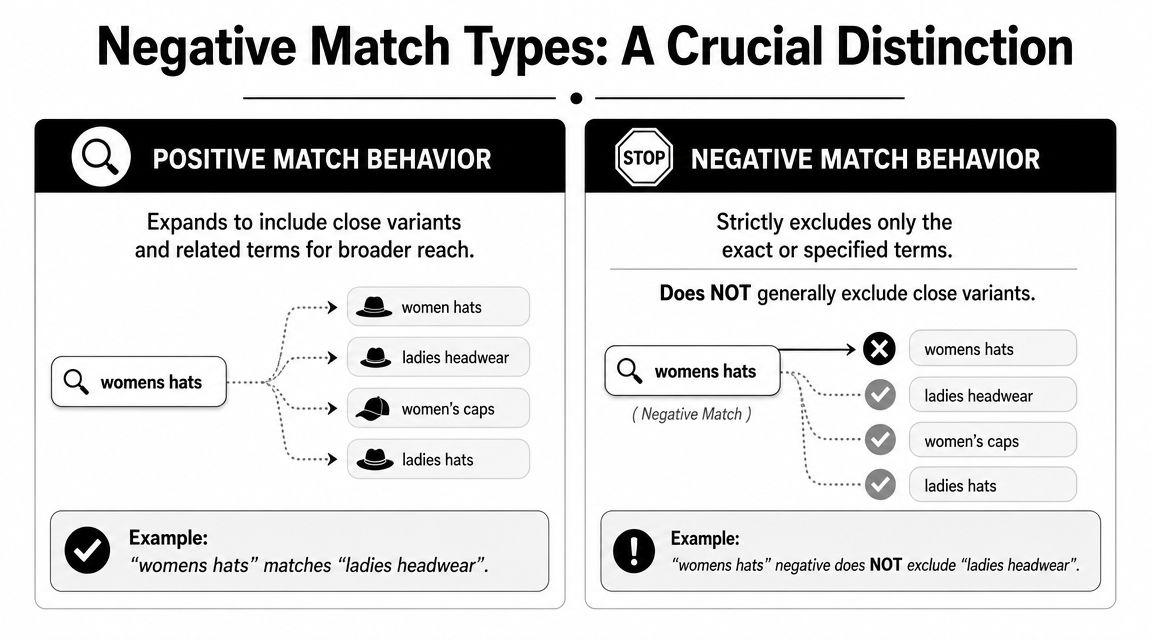
Google Ads supports broad, phrase, and exact negatives, but they do not expand the way positive keywords do. Synonyms, related meanings, and many close variants still need manual coverage. Google explains that in its documentation on how negative keywords work in Search campaigns. For a more practical breakdown, see Keywordme's guide on how negative keyword match types work.
What each negative match type actually blocks
Use this as the quick check:
- Broad negative blocks searches that include all of your negative terms, in any order.
- Phrase negative blocks searches that include the same phrase, in the same word order.
- Exact negative blocks the specific query you entered, with much less room for interpretation.
That sounds simple until you test it against real queries. A negative broad keyword for free trial can block searches containing both words, but it will not automatically block every related idea. A phrase negative for "customer support" can miss searches that express the same intent with different wording. An exact negative is safer when one repeated query is clearly bad and you do not want collateral damage.
Close variants are where the confusion starts
Positive keywords often train advertisers to expect Google to infer intent. Negatives do not work that way.
A blocked term may still allow traffic if the search uses:
- a synonym
- a singular or plural version you did not add
- extra words that change whether the phrase matches
- a different word order
- the same bad intent expressed with a different query pattern
That is why "just add the root word" is weak advice. Sometimes a broad negative cleans up waste fast. Sometimes it cuts off converting searches that happen to share that word.
I usually ask one question before adding any negative: am I blocking a clear intent pattern, or am I reacting to one annoying query? That distinction matters.
When not to add a negative
This is the part many checklists skip.
Do not add a negative just because a search looks irrelevant at first glance. If the query sits near commercial intent, compare its post-click behavior first. Terms like "cheap," "compare," "reviews," or even some informational modifiers can look messy in the report and still assist conversion paths in the right account.
A few examples:
| Search term pattern | Better response |
|---|---|
| One repeat offender with zero business value | Add the full query as an exact negative |
| Many waste queries built around the same phrase | Add a phrase negative |
| One shared word appears in both bad and good searches | Hold off on a broad negative and review more examples |
| The query looks irrelevant, but intent is still adjacent to your offer | Watch cost and conversion quality before excluding |
The safest fix for recurring leaks is often to block the whole query you know you do not want, not a fragment that might appear in useful searches too.
My practical workflow
When I troubleshoot this issue, I do not start by adding more negatives. I line up the search term, the negative, and the match type, then test the exact wording. If the query slipped through because of variant behavior, I decide whether the problem is isolated or part of a larger pattern. Only then do I add coverage.
That step saves accounts from bloated negative lists full of one-off reactions. It also shows when manual work is starting to break down. Once search volume gets large, human review gets inconsistent. Tools like Keywordme help by surfacing patterns, standardizing how negatives are applied, and reducing the missed variants that keep leaking spend.
If negative keywords not working in Google Ads keeps coming up in the same account, match type logic is usually the reason. Google followed the rule that was entered. The problem is that the rule was narrower than the intent you were trying to block.
Finding Where Your Negative Keyword Is Applied
You add a negative, expect the leak to stop, and the same junk query shows up again tomorrow. In a lot of accounts, the wording is fine. The negative is just applied in the wrong place.
Scope decides whether a negative can do anything at all. Google Ads can apply negatives at the ad group, campaign, or shared list level. If the search came through a different path than the one you blocked, Google did exactly what the setup allowed.
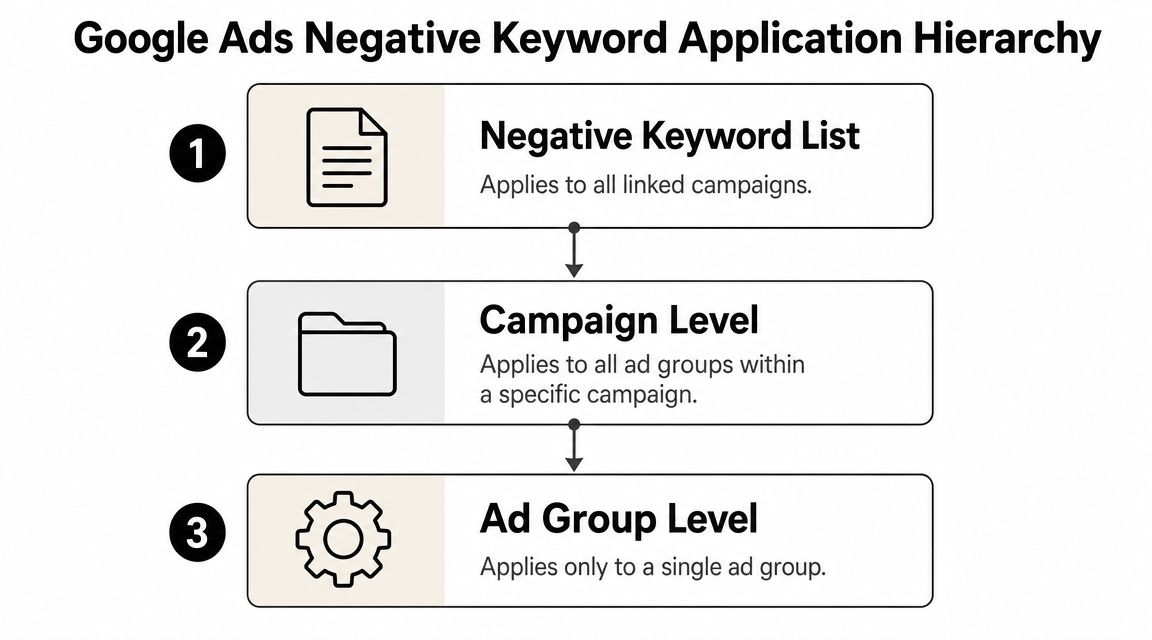
The hierarchy to check
Use this quick map:
| Level | What it controls |
|---|---|
| Negative keyword list | Multiple linked campaigns |
| Campaign level | Every ad group inside that campaign |
| Ad group level | Only that specific ad group |
The failure pattern is usually simple. Someone adds a negative in one ad group while the same bad query is entering through another ad group. Or the account uses shared lists, but a newer campaign was never attached to the right one.
I also see structure drift in larger accounts. One manager uses campaign negatives for everything. Another uses shared lists for brand safety terms and ad group negatives for intent control. Six months later, the account still runs, but nobody can tell where an exclusion is supposed to live. That is when "negative keywords not working google ads" starts showing up as a recurring complaint instead of a one-off mistake.
What to fix first
Start with the search term that slipped through and work backward from the serving path. Check the campaign and ad group that triggered the ad, then verify whether the negative exists at a level that covers that path.
If the same unwanted query appears across multiple campaigns, put the exclusion where it matches the problem. Shared lists are usually cleaner than copying the same negative by hand into ten campaigns. If the term is only harmful in one part of the account, keep it local so you do not block useful traffic somewhere else.
For teams trying to standardize that structure, this guide on how to apply account-level negative keywords lays out a cleaner way to manage coverage.
A fast audit workflow
When I check placement, I use this order:
- Find the exact serving location: Which campaign and ad group got the impression?
- Review ad group negatives: Confirm the exclusion exists there if the issue is isolated.
- Review campaign negatives: Make sure the campaign-level block covers all relevant ad groups.
- Check shared list attachment: Confirm the campaign is linked to the list you expected.
- Look for inconsistent ownership: See whether different managers used different rules in different parts of the account.
Automation helps here because human consistency breaks first. Once an account has enough campaigns, people forget to attach lists, duplicate negatives unevenly, or add exclusions at the narrowest level because they are in a hurry. Keywordme is useful for catching those pattern breaks before they keep leaking spend.
A negative that sits at the wrong level is not broken. It is just out of reach.
Uncovering Hidden Errors and Technical Glitches
If the query matches your intended exclusion and the negative sits in the right place, look for the annoying edge cases.
These don't happen every day, but when they do, they waste a lot of time because the setup appears correct at first glance.
The technical quirks worth checking
Google notes a few details that matter more than people think. Casing and misspellings are handled automatically, while symbols like periods and plus signs are ignored in negative matching. So if you're relying on punctuation to make a negative more specific, that won't help.
There's also a strange but real length issue. Google says an ad may still show on a search phrase longer than 16 words if the negative keyword appears after the 16th word, as documented in the same Google Ads help page referenced earlier.
That means a very long query can bypass a negative in a way that feels impossible until you count the words.
What to inspect when nothing else explains it
Use this checklist:
- Count the query length: If it's unusually long, see whether the blocked term appears after the 16-word boundary.
- Ignore punctuation assumptions: Symbols won't create a cleaner exclusion.
- Check for synonym leakage: The blocked word may not match the alternate wording in the query.
- Review singular and plural forms: If you didn't add both where needed, coverage may be incomplete.
- Confirm the actual saved negative text: Small formatting mistakes are easier to spot when you view the literal entry.
The fix is usually simple once you find the edge case
If the leaked traffic is a long-tail one-off, add the full query with the right match type. If it's a synonym pattern, expand coverage manually. If punctuation was doing all the work in your head, rebuild the negative around actual word matching.
When the account setup looks right but traffic still leaks, the issue is often a coverage gap hiding inside a technical rule.
This is the part of the process often skipped because it's tedious. It also happens to be where a lot of "Google Ads negative keywords not working" complaints finally make sense.
From Reactive Fixes to Proactive Prevention
Monday morning. You find the same irrelevant search theme wasting spend again, even though someone already added negatives last week. At that point, the problem usually is not one stubborn keyword. It is a process that keeps creating small mistakes.
That matters more in growing accounts than people expect. One person reviews search terms, another tags intent, someone else uploads negatives, and nobody checks whether they were applied at the right level. Then the team blames Google Ads when the same query pattern slips through again.
Prevention starts with restraint.
Do not add a negative just because a query looks ugly in isolation. Some terms are bad fits. Some are research intent that can still convert later. Some only look irrelevant because the ad group structure or landing page is doing a poor job qualifying traffic. If you block too early, you solve a noise problem by creating a volume problem.
A better workflow uses evidence first and exclusions second. Look for repeat patterns, wasted spend that keeps showing up, or themes that clearly conflict with the offer. If the case is weak, hold it for another review cycle. I would rather tolerate a little mess for a few days than cut off a term that Smart Bidding needed room to test.
The other mistake is treating every leak like it needs a new negative. It does not. Sometimes the right fix is a tighter keyword build, cleaner campaign separation, or better ad copy that filters weak intent before the click. If close variants are matching in ways you do not like, adding more fragments can make the account harder to control, not easier.
A preventive setup usually includes:
- a fixed search term review cadence
- clear rules for when a term becomes a negative
- documented match type rules by intent pattern
- a required check on campaign, ad group, or list placement before publishing
- a short validation step after changes go live
That last step gets skipped all the time. It is also where a lot of repeat waste starts. If nobody confirms where the negative landed, a clean decision upstream still turns into a bad outcome in the account.
Software helps because it reduces handoffs and copy-paste errors. Keywordme is useful for that practical part of the job. It helps teams clean search terms, assign match types, and apply negatives in bulk inside one workflow, which cuts down on the human mistakes that create these false "negative keywords not working" cases.
Consistency is the goal. Review queries on schedule. Add negatives only when the pattern is clear. Use account structure and ad messaging to do some of the filtering. Then verify the change affected the traffic source you meant to block.
That is how the work gets easier. Fewer emergency fixes. Fewer accidental exclusions. Fewer hours wasted trying to explain a problem that started with a rushed workflow, not a platform failure.
Your Negative Keyword Questions Answered
A few questions always come up after the basic troubleshooting is done. These are the ones that matter most in real accounts.
Should I remove old negative keywords?
Yes, some of them.
A practitioner guide from SavvyRevenue argues that negative keywords are not set-and-forget and recommends a yearly purge because terms that were unprofitable in the past can become useful later. The same piece says a healthy account's real wasted spend may be only 4 to 8%, which is why aggressive exclusions can remove valuable traffic if they're based on weak evidence instead of long-term data. It also recommends re-testing removed negatives over about 4 weeks so Smart Bidding can re-learn, as explained in their guide to managing and pruning negative keywords in Google Ads.
That's the part many teams miss. Old negatives feel safe because they're familiar. Some of them are inadvertently blocking searches you'd want today.
What if a blocked term still gets through after I've checked everything?
At that point, stop thinking in fragments.
Use the exact leaked query from the Search Terms report and add the full search term as a phrase or exact negative at the level where the traffic is entering. Then watch the next reporting window and confirm impressions on that query drop.
If it still appears, go back to the technical checks. Very long queries, manual coverage gaps, and hierarchy mistakes are usually behind the remaining weird cases.
Old negative lists deserve the same skepticism you give old ads and old landing pages. They age.
How do I avoid blocking traffic that might convert later?
Don't exclude based on irritation alone.
A lot of search terms look ugly before they gather enough data to judge. That's why the better approach is to wait for stronger evidence, review negatives on a schedule, and test removals carefully instead of assuming every low-quality-looking query belongs on a permanent block list.
The trade-off is simple:
- Move too slowly, and you let waste hang around.
- Move too fast, and you choke off useful demand.
The best PPC managers don't try to eliminate every imperfect query. They build a system that catches obvious waste, tests uncertain cases, and revisits old assumptions before those assumptions turn into hidden account drag.
If you're stuck on negative keywords not working in Google Ads, don't just ask whether the exclusion failed. Ask whether the account is using negatives as a living control system or as a dusty archive nobody wants to touch.
If your team is tired of cleaning search terms in spreadsheets and manually pushing negatives across campaigns, Keywordme is worth a look. It gives you a cleaner workflow for reviewing search terms, assigning match types, and applying negatives with less copy-paste and fewer placement mistakes.
.svg)