
Boost ROI With Negative Keywords in Google Ads
Boost ROI With Negative Keywords in Google Ads


Think of negative keywords in Google Ads as the "do not show" list for your campaigns. You're essentially telling Google, "Hey, if someone searches for this specific word or phrase, do not show them my ad." It's a simple but incredibly powerful way to filter out irrelevant searches and make sure your ad budget is only spent on clicks that actually matter. This is one of the foundational secrets to running a lean, mean, and profitable PPC machine.
Why Negative Keywords Are The Bouncer For Your Ad Spend

Let’s get creative for a second. Imagine your Google Ads campaign is an exclusive, high-end club. You’ve dropped a ton of cash on the decor (your ad creative), hired a world-class DJ (your killer ad copy), and perfected the vibe (your landing page). Your whole goal is to attract guests who will pay the cover charge, buy drinks, and keep your business booming.
Now, what if your ads start pulling in crowds of people looking for a free concert down the street? Or people who just want to use the bathroom? They're clogging up the entrance, taking up your staff's time, and they have zero intention of spending a dime. That's exactly what happens when you run campaigns without negative keywords. They are your bouncer at the velvet rope, politely but firmly turning away the wrong crowd.
Stop Wasting Your Budget
Every single irrelevant click is money straight down the drain. It’s that simple. If you sell premium, high-performance running shoes, the last thing you want is to pay for clicks from someone searching for "free running shoe repair" or "cheap running shoe reviews." By adding terms like "free," "repair," and "reviews" as negatives, you instantly stop your ads from showing for those budget-burning searches.
The financial hit from ignoring this is pretty staggering. Advertisers who don't stay on top of their negative keywords can easily waste 20-40% of their budget on clicks that will never convert. On the flip side, well-managed accounts with solid negative lists often see a 2.5x higher Return on Ad Spend (ROAS). They're just not wasting money on the noise. If you want to dig deeper, Launchcodex.com offers great insights on how this strategy improves overall PPC performance.
Sharpen Your Targeting And Boost Performance
Using negative keywords isn't just about saving money—it actively makes your campaigns stronger. When you filter out all that unqualified traffic, a few great things start to happen naturally:
- Higher Click-Through Rate (CTR): Your ads are shown to people who are actually looking for what you sell, so they’re far more likely to click.
- Improved Quality Score: Google sees that your ads are super relevant to the search queries and rewards you with a better Quality Score. This can lead to lower click costs and better ad rankings.
- Increased Conversion Rates: When the traffic hitting your site is already pre-qualified, you'll see more of those clicks turn into actual leads and sales.
Think of it this way: a bouncer doesn't just keep the wrong people out; they make the experience inside better for the right people. Negative keywords do the exact same thing for your campaigns.
This level of control is more crucial now than ever before, especially since Google's AI-driven broad match is the default. The system is built to cast a wide net, but without your guidance through negative keywords, it can easily drift into totally unprofitable waters. Mastering this skill turns your campaign from a leaky fishing net into a finely-tuned spear, hitting your ideal customer with precision. They aren't just an optional tweak; they are absolutely fundamental to success.
Understanding Negative Keyword Match Types
Just like with the keywords you bid on, negative keywords in Google Ads have their own match types. Getting these right is the difference between surgical precision and accidentally cutting off your most valuable customers. Think of them as different-sized nets for catching and removing unwanted clicks.
There are three main types, each offering a different level of control. Nailing the differences between them is fundamental to building a negative keyword strategy that actually saves you money without costing you leads.
Negative Broad Match
This is your biggest, most aggressive filter. When you add a negative broad match keyword, your ad won't show if someone's search contains all the words from your negative term, regardless of the order they're in.
Let's say you add running shoes as a negative broad match. Your ads would be blocked for searches like:
- best free running shoes
- shoes for running cheap
- where to repair running shoes
But here's the catch: your ad could still show up for "best running gear" or "fastest marathon shoes." As long as one of the words is missing, you're still in the game. It's a powerful tool, but be careful—it can be a bit of a sledgehammer when you might need a scalpel.
Negative Phrase Match
Negative phrase match gives you a lot more control. It blocks your ad whenever a search query includes your negative keyword phrase in the exact same order, even if there are other words tacked on to the beginning or end.
If you set "running shoes" as your negative phrase match keyword, you'd successfully block searches like:
- cheap running shoes for sale
- blue running shoes review
- best deals on running shoes
However, your ad could still pop up for "shoes for running" because the word order is different. This match type is fantastic for weeding out specific, multi-word phrases that you know are tire-kickers.
Key Takeaway: With negative phrase match, word order is everything. It's the perfect tool for blocking specific concepts while still allowing for variations around them.
Negative Exact Match
Just like it sounds, negative exact match is your most precise, laser-focused option. It only blocks your ad when the search query is an identical match to your negative keyword, with absolutely no extra words allowed.
Using [running shoes] as a negative exact match keyword will only stop your ad from showing for one single search:
- running shoes
That's it. It would not block "red running shoes," "buy running shoes," or even "running shoes sale." This level of precision is perfect when you find a very specific, high-volume search term that is totally irrelevant, while similar searches are still pure gold.
Want to go even deeper? Our detailed guide on negative keywords match type behavior can give you even more strategic insights.
Negative Keyword Match Type Behavior
To really see the difference, let’s look at how each match type would handle the negative keyword "free trial." Imagine you’re selling premium software and want to avoid clicks from users who are only looking for a freebie.
Choosing the right match type always comes back to your goal. Are you trying to block a general idea (broad), a specific phrase (phrase), or one single, problematic search term (exact)? Mastering this is a massive step toward running a more profitable Google Ads account.
How to Find High-Impact Negative Keywords
Finding the right negative keywords isn't about guesswork. It's more like good old-fashioned detective work. You have to roll up your sleeves, dig into your account data, and think like your customer to uncover the search terms that are quietly eating your budget. Think of it as a treasure hunt where the prize is a lower CPA and a much healthier ROAS.
The great news? Google Ads gives you the perfect starting point. The clues are all there, waiting for you to find them.
Start With Your Search Terms Report
Your first stop, and honestly the most important one, is the Search Terms Report inside Google Ads. This thing is an absolute goldmine. It shows you the actual, real-life search queries people typed into Google right before they clicked your ad. It's the raw, unfiltered truth about who you're paying to attract.
Make a habit of checking this report weekly. You're looking for queries that are an obviously terrible fit. For instance, if you sell high-end "leather briefcases," you might see clicks from searches like "how to repair leather briefcases" or "DIY leather briefcase." Boom. Those are perfect candidates to add to your negative keyword list.
Don't just look for one-off bad terms; look for patterns. If you see a bunch of searches related to "jobs" or "careers" in your industry, that's a huge signal to add those terms as negatives across the entire campaign, or even your whole account.
I'm not exaggerating when I say that this single report is where most advertisers find 80% of their wasteful spending. By combing through it regularly, you turn real user data into real budget savings.
This simple workflow breaks down the core process—using reports, your own brain, and some helpful tools to build out your lists.
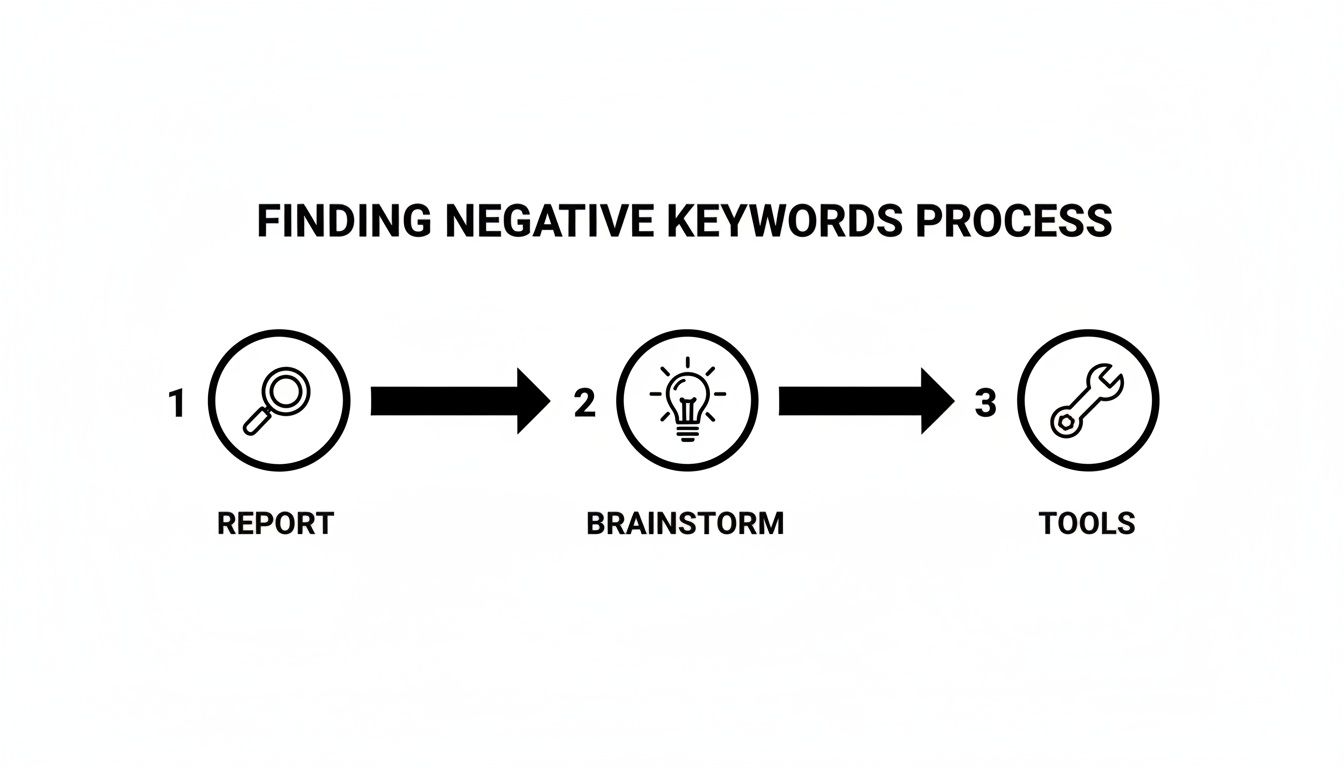
Moving from reacting to what's in your reports to proactively brainstorming and using tools is what separates a decent negative keyword strategy from a great one.
Brainstorm Common-Sense Negatives
Beyond digging through reports, you can get ahead of the game by building a list of "common-sense" negatives based on what you already know about your business. These are the terms you know you don't want to pay for, ever. They usually fall into a few common buckets.
Just think about words that signal someone is definitely not ready to buy what you're selling.
- Information Seekers: Words like "reviews," "what is," "how to," "guide," or "tutorial" usually mean someone's in research mode, not "add to cart" mode.
- Job Hunters: Unless you're actively recruiting through your ads, terms like "jobs," "careers," "hiring," or "salary" are money pits.
- Bargain Shoppers: If you're not a discount brand, terms like "free," "cheap," "clearance," or "craigslist" will attract the wrong kind of clicks.
- The DIY Crowd: Adding "DIY," "homemade," "template," or "examples" helps filter out people looking to build it themselves instead of buying your solution.
Putting together a foundational list of these terms is a massive step in the right direction. To get a head start, you can find a solid general negative keyword list that works for just about any industry.
Use Your Keyword Research Tools
Your keyword tools aren't just for finding keywords to bid on; they're also fantastic for sniffing out negatives before a campaign ever goes live. When you're researching a new keyword, pay close attention to all the related searches and long-tail variations that pop up.
For example, a tool might show that people searching for "CRM software" are also searching for "free CRM software for startups" or "CRM software open source." If you don't offer a free or open-source product, you've just found two perfect negative keywords to add from day one. You can stop that wasted spend before it even has a chance to happen.
This proactive approach is what it's all about. It lets you launch campaigns that are already lean and focused from the get-go. When you combine reactive analysis from your Search Terms Report with proactive brainstorming and tool-based research, you create a powerful, multi-layered defense against irrelevant clicks.
Watch Out for These Common Negative Keyword Mistakes
Even the most seasoned PPC pros can trip up on negative keywords. It's a bit like weeding a garden—a little neglect lets the weeds take over, but one clumsy move and you've accidentally pulled up your prize-winning tomatoes. Getting negative keywords in Google Ads right means learning not just what to do, but what not to do.
A lot of the classic mistakes aren't obvious until they've already started draining your budget. You might be using an old negative list from a past campaign that's now blocking your best new keywords. I've seen it happen: an advertiser blocks the word "free" across their whole account, then launches a new campaign for a "free software trial" and wonders why it gets zero traffic.
These slip-ups usually fall into a few predictable buckets. If you know what to look for, you can keep your campaigns healthy and your ad spend focused on what actually works.
Relying on Stale, Outdated Negative Lists
This is probably the biggest and most common pitfall. That negative keyword list you built two years ago could be actively sabotaging your current business goals. In the early days of Google Ads, advertisers often ignored negatives completely. Now, most people know they're important, but audits still show that up to 20-30% of ad budgets get torched on irrelevant queries because of sloppy management. A huge part of that is using old lists that conflict with new, valuable keywords you're trying to bid on. For a deeper dive into this and other expensive slip-ups, Search Engine Land has a great breakdown on avoiding costly Google Ads mistakes.
The only way to avoid this is to treat your negative keyword lists like living, breathing parts of your account.
- Audit Them Regularly: Put a recurring event on your calendar to review your account-level and campaign-level negative lists every quarter.
- Check for Conflicts: Anytime you launch new campaigns or ad groups, run your new keywords against your existing negative lists to make sure you aren't blocking yourself.
- Scrap Old Rules: Did your business model change? If you suddenly start offering free consultations, you'd better make sure "free" isn't on your master negative list anymore.
Going Overboard with Broad Match Negatives
Using a negative broad match keyword feels like a quick and easy win. You want to block searches related to "jobs"? Just add jobs as a negative broad match and call it a day, right? Not so fast. That broad-stroke approach can have some serious unintended consequences, especially with longer, more specific search queries.
Let's say you sell project management software. You add manager jobs as a negative broad match. Great, you've blocked searches for "project manager jobs." But you've also just blocked a potential customer searching for "software for a construction manager to assign jobs." Because the word order doesn't matter with broad match, your perfect, high-intent query gets caught in the net.
Pro Tip: Your default should almost always be negative phrase match ("manager jobs") or exact match (
[manager jobs]). Only use broad match when you are 100% certain you want to block every conceivable search that includes those words, in any order. This gives you so much more control.
Only Adding Negatives at the Ad Group Level
It's a common workflow: you're digging through a search term report, find a garbage query in an ad group, and add it as a negative right there. While that plugs one tiny leak, it completely misses the bigger picture.
If someone searches for "free CRM software" and triggers an ad in your "Small Business CRM" campaign, what's to stop them from doing a similar search that triggers an ad in your "Enterprise CRM" campaign? By applying the "free" negative only to that one ad group, you're basically waiting to pay for the same bad click all over again somewhere else in your account.
- Use Shared Lists: Get in the habit of using account-level negative lists for universal terms you never want to show for. Think: jobs, cheap, torrent, or "free" (if it doesn't apply to your business).
- Think Bigger: When you find a bad keyword, ask yourself: "Is this irrelevant to just this ad group, this entire campaign, or my whole business?" Apply it at the highest level that makes sense.
Avoiding these traps is the difference between playing defense and playing whack-a-mole. You’ll go from reacting to bad clicks to proactively building a fortress that protects your entire account and budget.
Working With Negative Keywords in an AI-Powered World
Automation isn't some far-off concept in Google Ads anymore—it's the engine running the whole show. With AI campaigns like Performance Max (PMax) in the driver's seat, we can reach people at a scale we couldn't before. But here’s the catch: you're handing the keys over to Google's AI, and let's be honest, it can take some bizarre and expensive detours.
This is exactly why your negative keyword strategy has become mission-critical. It's no longer about hand-picking every single keyword. Now, it’s about setting up the essential guardrails that keep these powerful, automated campaigns from driving right off a cliff and taking your budget with them.
The Performance Max "Black Box" Problem
One of the biggest headaches with PMax is its lack of transparency. You get very little data on the exact search terms that are triggering your ads, making it feel like a "black box." This is a huge problem because the AI might decide your ads are a great fit for searches you’d never in a million years want to pay for, burning cash on totally irrelevant clicks.
Since you can't see the full picture, you can't just play whack-a-mole by adding negatives one by one after the damage is done. You have to think bigger. You need to be proactive and set clear boundaries from day one to steer the AI where you want it to go.
Proactive Strategies to Steer AI Campaigns
To get back in control and make sure your automated campaigns stay on track, you've got to shift your mindset. Forget the days of obsessing over ad-group-level tweaks. It’s time to think about a high-level, account-wide strategy. It’s less about micromanaging and more about establishing the rules of the road for the AI.
Here’s how to do it:
Build a Master Account-Level Negative List: This is your first line of defense, and it’s non-negotiable. Create a comprehensive list of terms you never want your brand associated with—think "free," "jobs," "DIY," "torrent," or "reviews"—and apply it across your entire account. This simple move prevents PMax from wasting money on these dead-end searches, no matter how creative it gets.
Be Smart with Brand Exclusions: PMax loves to bid on your own brand terms. And while it might look great for your conversion numbers, you're often just paying for clicks you would've gotten for free from organic search. Use brand exclusions to stop PMax from spending money on searches for your company name. You can then manage that traffic with a separate, much cheaper Branded Search campaign.
Layer Your Negatives with a Strategic Eye: Don't just stop at single-word negatives. Think about all the ways the AI could misinterpret things. If you're a national e-commerce store but PMax keeps showing your ads to people looking for local shops, add a list of cities and states as negatives. Or if the AI matches a good keyword like "software" with a poor-performing synonym like "platform," block "platform" specifically.
When you shift from reactive tweaks to high-level guidance, you’re not fighting the AI—you're teaching it. You’re giving it the strategic framework it needs to find your perfect customers way more efficiently.
Google’s big push into AI means that automated campaigns and broad matching can pull in 2-3x more unexpected search queries than old-school campaigns. This means our negative lists need to be longer and smarter than ever before. In fact, one recent analysis showed that PMax can waste 30% of a campaign's budget without strong negatives, but adding a strategic list can boost CTR by 25% and slash CPA by 20%.
To truly get ahead, you have to blend these tactics with a solid grasp of what's happening in your market. This is where search marketing intelligence in the AI era comes in, giving you the insights to build a negative keyword strategy that turns a decent campaign into a fantastic one. By mastering these techniques, you'll reclaim control, protect your ad spend, and fine-tune your automated campaigns to perform at their absolute best.
Let Automation Handle the Heavy Lifting
Let's be honest: manually digging through search term reports, flagging junk queries, and adding them as negative keywords in Google Ads is a grind. It's a never-ending cycle of tedious busywork. When you're juggling dozens of campaigns, that time adds up fast—time that could be spent on actual strategy.
This is where automation stops being a "nice-to-have" and becomes absolutely essential for anyone serious about scaling their PPC efforts.
What if you could finally say goodbye to all that spreadsheet exporting and copy-pasting?
Meet Your New Automation Sidekick: Keywordme
Imagine a tool that lives right inside your Google Ads account, turning that clunky, multi-step chore into just a few clicks. That's precisely what Keywordme does. Its Chrome plugin slots directly into the Google Ads interface you already know, putting powerful automation right where you need it.
Instead of exporting reports, you just highlight the garbage search terms you see. With one click, you can build new negative keyword lists or add them to existing ones, then apply them across multiple campaigns or your entire account instantly. It’s a simple change that completely overhauls how you manage negative keywords in Google Ads, making the whole process faster and way more efficient.
Automation isn't just about saving time—it's about getting your focus back. It handles the monotonous stuff so you can pour your energy into the strategic moves that actually grow the business.
This mindset is a game-changer for any agency or in-house team trying to scale their PPC operations without burning out. To see how this fits into the bigger picture, you can explore the wider world of Workflow Automation. It shows how smart systems can optimize your entire marketing operation, not just keyword management.
Ready to get started? Our complete negative keyword tool guide dives deeper into the features that will make the biggest difference in your campaigns. It’s all about working smarter, not harder, and letting technology take care of the grunt work so your campaigns are always running at peak efficiency.
Got Questions About Negative Keywords? We've Got Answers.
Even after you've got the hang of the basics, a few questions always pop up. That's perfectly normal. Think of this section as your go-to FAQ for handling those nagging uncertainties about negative keywords in Google Ads.
Let's clear up some of the most common sticking points so you can manage your campaigns with confidence.
How Often Should I Be Updating My Negative Lists?
There isn't a one-size-fits-all answer, but building a solid routine is what matters most. If you've just launched a new campaign or you're managing a big budget, you should be digging into your search terms report at least once a week. This helps you stop budget leaks before they turn into a flood.
For older, more stable campaigns, checking in every two to four weeks usually does the trick. The key is to treat negative keyword management as an ongoing habit, not a "set it and forget it" task.
Can You Add Too Many Negative Keywords?
Oh, absolutely. It's a classic mistake called "over-negativizing," and it can silently suffocate your campaign's reach. Getting too aggressive, especially with broad match negatives, can easily block relevant, long-tail searches from people who were ready to convert.
The real danger here is that you're cutting off valuable traffic you never even knew you could have gotten. Before you add a new batch of negatives—especially at the account or campaign level—always check for conflicts to make sure you aren't accidentally blocking your own keywords.
What's the Difference Between Negative Keywords and Placement Exclusions?
Great question. This one trips up a lot of people, particularly when they're running Performance Max or Display campaigns. They both serve a similar purpose—blocking unwanted traffic—but they work in completely different environments.
- Negative Keywords: These are all about controlling which search queries trigger your ads on Google and its search partners. It’s about the words people are actually typing into the search bar.
- Placement Exclusions: These stop your ads from showing up on specific websites, YouTube channels, or mobile apps across the Google Display Network. It’s about where your ad shows up, not why.
Think of it this way: negative keywords guard the front door against bad search intent, while placement exclusions keep your brand out of the wrong online neighborhoods. You really need both to protect your ad spend effectively.
Tired of spending hours on manual, repetitive work? Keywordme plugs right into your Google Ads account, transforming tedious negative keyword management into a few quick clicks. Start your free trial and see just how fast you can boost your ROI. Start your 7-day free trial today!
.svg)