
Your Guide to Negative Keywords for Higher PPC ROI
Your Guide to Negative Keywords for Higher PPC ROI


Do you ever look at your PPC ad spend and feel like you're just setting money on fire? If so, you're not alone. The good news is, there's a simple, powerful tool to plug those leaks: negative keywords.
Think of them as the bouncers for your ad campaigns. They stand at the door and make sure only the right people get in, stopping your ads from showing up for searches that will never, ever lead to a sale.
Why Negative Keywords Are Your Secret PPC Weapon

Let me put it another way. Say you own a bait shop and you sell high-end salmon lures. You decide to run ads targeting the keyword “fishing gear.” Makes sense, right? But soon, you realize your budget is getting chewed up by clicks from people searching for “free fishing videos,” “deep sea fishing jobs,” and “DIY fishing rod repair.”
Those people aren't your customers. They’re just wasting your bait. It’s like casting a line hoping for a salmon and reeling in an old tire every single time.
This is exactly where negative keywords save the day. They're your "do not show" list for Google Ads. By adding words like “free,” “jobs,” and “DIY” as negative keywords, you’re telling Google, "Hey, if someone types this in, don't show them my ad. They're not my people."
The Direct Impact on Your Bottom Line
Every single one of those irrelevant clicks costs you money. In fact, a deep dive into thousands of ad accounts showed that savvy advertisers often add over 150+ negative keywords just to trim the fat and stop wasteful spending.
Each bad click you prevent is money you can either save or, even better, put toward a click from someone who's actually ready to buy.
By filtering out all that low-intent traffic, you make sure your ad budget is spent on one thing: reaching people who are actively looking for what you sell. It’s the fastest way to make your campaigns more efficient and profitable.
This isn’t just about trimming a few pennies from your budget; it’s about a fundamental shift in your PPC strategy. The benefits stack up quickly:
- Improved Click-Through Rate (CTR): When your ads are only shown to a super-relevant audience, more of them will click. Simple as that.
- Higher Quality Score: Google loves relevance. A better CTR helps boost your Quality Score, which can directly lower how much you pay for each click.
- Increased Conversion Rates: Getting your ads in front of high-intent searchers means you get more leads and sales from the same ad spend.
- Better Return on Ad Spend (ROAS): This is the end game. Less waste plus more conversions equals a much healthier return on your investment.
To really see how well your negative keyword strategy is working, you have to know your numbers. Make sure you know how to calculate your Return on Ad Spend and track your financial performance closely.
At the end of the day, mastering negative keywords isn't some optional "pro-level" tweak. It's a core part of any PPC strategy that actually works, turning your campaigns from a money pit into a money-making machine.
Understanding Negative Keyword Match Types
Think of negative keywords like this: they’re not all the same tool. Just like a good carpenter has more than a hammer, a sharp advertiser needs different negative keyword match types for different jobs.
Getting this right is the secret to surgical precision. Get it wrong, and you might accidentally block your best customers from ever finding you. You have three main tools for this, each with a different level of control—from casting a wide net to taking a sniper shot.
Let's break them down.
Negative Broad Match: The Wide Net
Negative broad match is your most restrictive option, and you need to be careful with it. Your ad won't show if a search includes all the words from your negative keyword, no matter what order they’re in.
This is a powerful way to block entire categories of searches you know are irrelevant. For example, if you sell new running shoes, you definitely don't want to pay for clicks from people looking for jobs.
- Negative Keyword:
running shoe jobs - It Blocks: "jobs hiring for running shoe store" and "what are the best running shoe design jobs"
- It Allows: "best running shoe" or "shoe repair jobs"
Only use this when you are absolutely sure you want to exclude any search containing that specific combination of words.
Negative Phrase Match: The Targeted Trap
This is where you start getting more specific. With a negative phrase match, your ad is blocked only if the search contains your exact negative keyword phrase, in that exact order. People can add words before or after it, but your core phrase has to be there, untouched.
This is perfect for filtering out unwanted variations of keywords that are otherwise good. Imagine you sell amazing, high-end coffee beans but don't offer any instant coffee.
Negative Keyword:
"instant coffee"
It Blocks: "best cheap instant coffee" and "how to make instant coffee taste better"
It Allows: "coffee that is instant to brew" or "instant delivery for coffee beans"
See how "instant coffee" is blocked, but a scrambled version like "coffee that is instant" still gets through? That’s the targeted control you're looking for.
Negative Exact Match: The Sniper's Rifle
This is your most precise tool, the sniper rifle in your toolkit. Negative exact match only blocks a search when the query is an exact match to your negative keyword—word for word, with nothing extra.
It's the safest match type by far. It's what you use when you spot a specific, low-performing search term that’s wasting your budget, and you want to cut it out without any risk of blocking similar, profitable searches. You can find a much deeper explanation of how negative keyword match types work in our detailed guide.
For instance, let's say you're a marketing agency, but you find you're burning cash on people who are only searching for a freebie.
- Negative Keyword:
[free marketing consultation] - It Blocks: "free marketing consultation"
- It Allows: "free marketing consultation guide" and "marketing consultation cost"
This lets you stop paying for that one exact, non-converting search term while still showing up for people who might be looking for information about free consultations or the cost of your actual services.
Negative Keyword Match Types at a Glance
To make it even simpler, here's a quick comparison of how each match type works in practice.
| Match Type | What It Does | Example Negative Keyword | Example Search It Blocks | Example Search It Allows |
|---|---|---|---|---|
| Broad | Blocks searches containing all your keywords in any order. | running shoes | "red running shoes" | "running shorts" |
| Phrase | Blocks searches containing your exact keyword phrase in order. | "running shoes" | "red running shoes" | "shoes for running" |
| Exact | Blocks searches that are an exact match to your keyword. | [running shoes] | "running shoes" | "red running shoes" |
Choosing the right match type is a core skill. It's what turns your negative keyword list from a blunt instrument into a finely-tuned machine for improving your ROI.
So, you get the theory behind negative keywords. Now let's get our hands dirty and actually build the lists that will start saving you cash and tightening up your campaign performance. This is where you build your first wall of defense against wasted ad spend.
The smartest way to start is by going broad before you get granular. We'll kick things off by creating a foundational "universal" list that you can slap onto almost any campaign. Then, we'll dig into the real goldmine—your Search Terms Report—to find those hyper-specific terms you need to block.
This diagram does a fantastic job of showing how the different negative match types work. Think of Broad match as a wide net, Phrase match as a more precise trap, and Exact match as a sniper shot.
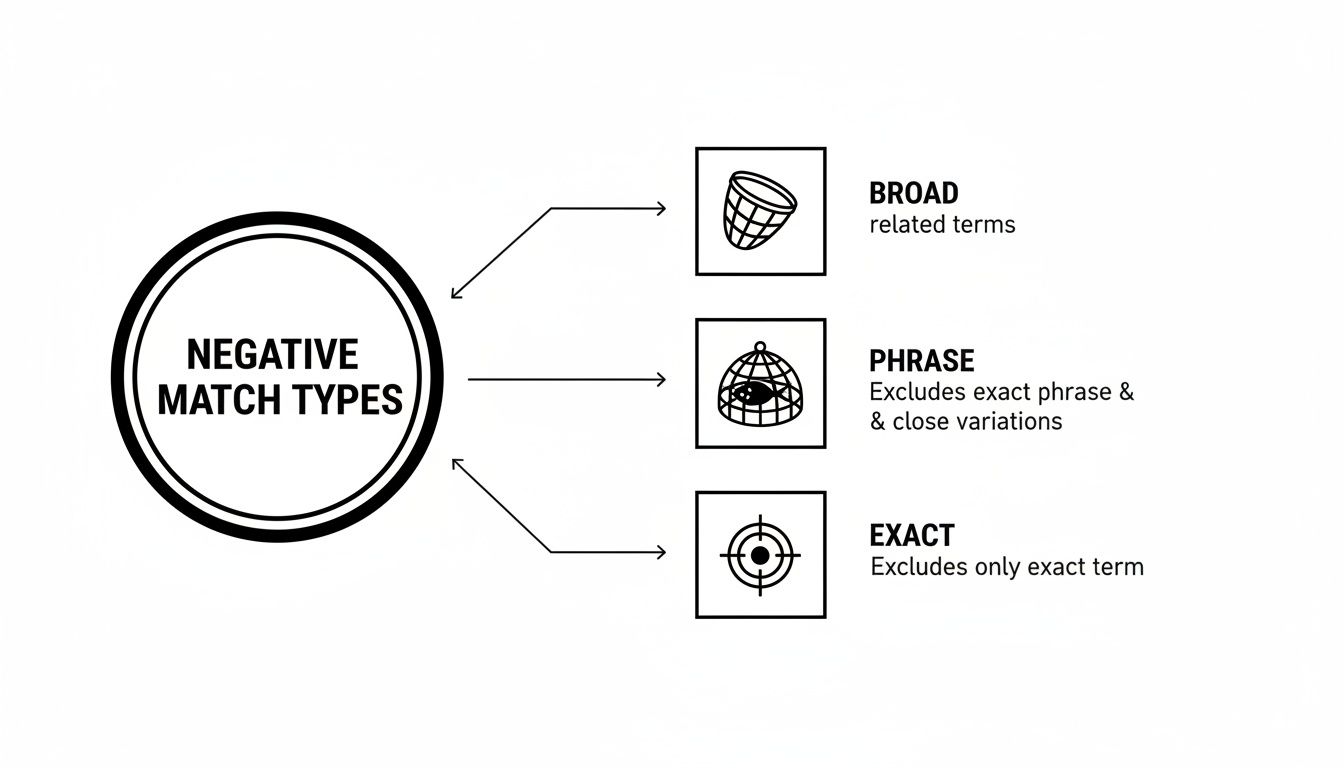
It’s a great visual reminder that the match type you pick gives you direct control over how much you block, from entire categories of searches down to a single, specific query.
Start with a Universal Negative List
A universal—or "master"—negative keyword list is your account's foundational shield. It's packed with common, low-intent terms that are almost always a waste of money, no matter what you're selling. This is your quickest win for making your account more efficient, right out of the gate.
These are the terms that practically scream, "I'm just browsing and definitely not buying!"
- Job-related terms:
jobs,careers,hiring,salary,internship - Informational/DIY queries:
how to,DIY,free,template,example,tutorial - Research/Educational terms:
study,research paper,statistics,university - Media-focused searches:
images,pictures,logo,video,pdf
A solid universal list is proactive, not reactive. Instead of waiting for bad clicks to pile up and then cleaning up the mess, you're preventing a massive chunk of them from ever happening.
Putting this list together takes some upfront work, but it pays you back for months, even years. And you’ll keep adding to it as you go. For a much deeper dive, check out our guide on how to build a master negative keyword list for more ideas.
Mine Your Search Terms Report for Gold
Okay, time to get surgical. The single most valuable treasure chest for finding negative keywords is your Google Ads Search Terms Report. This report isn't guesswork; it shows you the exact words people typed into Google right before clicking your ad.
This is pure data showing you precisely where every dollar is going. I know, staring down thousands of search terms can feel like a chore, but it’s where you’ll find the biggest opportunities to plug leaks in your budget. Your mission is simple: find the queries that have absolutely nothing to do with what you sell.
Here's a quick and easy process to get started:
- Find the Report: In your Google Ads account, head over to
Keywords > Search terms. - Set a Good Date Range: Don't just look at yesterday. Set the date range to the last 30-90 days to get a reliable picture of what's really going on.
- Scan for the Obvious Junk: Just read through the list. Does anything make you cringe or say, "Why on earth did my ad show for that?"
- Hunt for Patterns: Don't just zap one-off bad terms. Look for recurring words that signal bad intent. Are you constantly seeing words like "cheap," "reviews," or the names of competitors you have no interest in?
Once you find a query that's wasting money, you can just select it and add it as a negative keyword right from the report. Be smart with your match type—phrase or exact usually gives you the precision you need to cut out the bad traffic without accidentally blocking good customers.
Make this a weekly or bi-weekly ritual. It’s the fastest way to turn wasted ad spend into profitable clicks, and you can start today.
Managing Negative Keywords at Scale

Alright, so you're regularly digging through your Search Terms Report and building out your negative keyword lists. Fantastic. But if you’re running more than just a handful of campaigns, you've probably hit a wall. Updating lists one by one across your entire account is an absolute nightmare—it's tedious, slow, and practically begging for mistakes.
This is the point where you stop working harder and start working smarter. Scaling your negative keyword management isn't about brute force; it’s about using the right strategies and tools to do the heavy lifting for you.
When you're juggling dozens of campaigns, maybe for multiple clients, the sheer volume of negatives can get out of hand fast. Luckily, Google Ads has a built-in feature designed for this exact headache.
The Power of Shared Negative Keyword Lists
Think of a shared negative keyword list as a "master list" you can link to multiple campaigns at once. So, instead of painstakingly adding "free" or "jobs" to 20 different campaigns, you just add them to a single shared list.
Done. That list is now protecting all 20 campaigns.
Find a new irrelevant search term tomorrow? Add it to the shared list once, and—poof—every campaign connected to it is instantly updated. This is a massive time-saver and brings much-needed consistency to your account.
By centralizing your negatives into shared lists, you transform a repetitive chore into a single, efficient action. This is the first and most critical step to managing negative keywords at scale.
The real power comes from creating different lists for different purposes. This keeps your account organized and your strategy crystal clear. For those looking to go deeper, understanding the core principles of effective Google Ads management is a huge help when putting these ideas into practice.
Here are a few ways we structure lists that have worked wonders:
- Universal Negatives: This is your global "never show" list. It’s packed with terms like
free,torrent,DIY, andjobsthat have no business triggering your ads. Apply this one everywhere. - Competitor Negatives: Round up all your competitors' brand names into one list. You can apply this to your non-branded campaigns to stop paying for clicks from people who are explicitly looking for someone else.
- Product/Service Exclusions: Got separate campaigns for "Product A" and "Product B"? Create a negative list with "Product B" terms and apply it to the "Product A" campaign. This stops traffic from bleeding between campaigns and keeps everything hyper-relevant.
Moving Beyond Manual Spreadsheets
Shared lists are a game-changer, but finding, organizing, and adding those negatives can still feel like a grind. We’ve all been there—exporting the Search Terms Report, pasting it into a spreadsheet, sorting through it, and then uploading the new negatives back into Google Ads. It’s a clunky process where it’s way too easy to mess something up.
This is exactly where a tool like keywordme comes in and changes everything.
Instead of that awkward, multi-step dance, keywordme plugs right into your Google Ads account. As you're reviewing your search terms, you can add a wasteful keyword as a negative—using the correct match type—with just one click. No more spreadsheets. No more copy-pasting.
It turns a dreaded chore into a quick, high-impact task. You can clean up your ad traffic in real-time, right where you're looking at the data. For anyone managing multiple campaigns, this isn't just a small time-saver; it fundamentally changes how you optimize. We cover this in more detail in our guide on how to manage negative keyword lists efficiently.
And the need for this efficiency has only grown. In well-run Google Ads accounts as of 2026, it's common to see between 5,000 and 30,000 total negative keywords working behind the scenes. This became even more crucial after Google finally raised the Performance Max campaign negative limit from a tiny 100 to 10,000 and enabled shared lists. Tools like the keywordme Chrome plugin let you apply negatives directly from your search data, which can cut down manual work by up to 10x and immediately boost ROI by eliminating junk traffic.
Ultimately, managing negatives at scale is all about building a system. When you combine smartly organized shared lists with a powerful tool that automates the workflow, you can keep your campaigns running clean and lean without getting buried in manual tasks.
Common Negative Keyword Mistakes to Avoid
Getting started with negative keywords is a massive leap forward for any PPC account. But here's the catch: using them the wrong way can be just as bad—or worse—than not using them at all. Think of it like hiring a bouncer for your store who's a little too good at his job and starts turning away your regulars.
Let's walk through the most common, and often costly, blunders people make. Knowing what not to do is the first step to protecting your ad spend and making sure your campaigns aren't accidentally sabotaging themselves.
Being Too Aggressive with Your Negatives
When you first discover the power of negative keywords, it's easy to get a little trigger-happy. You see a seemingly irrelevant search term and BAM—it's blocked. But going overboard can backfire in a big way.
A classic mistake is blocking terms that look broad but actually have high intent. For example, a store selling premium hiking boots might add "price" as a negative to filter out bargain hunters. Seems logical, right? But what about the person searching for "danner hiking boot price"? That search is coming from someone with their wallet practically out, ready to buy!
Blocking terms like 'pricing,' 'cost,' or 'reviews' can eliminate buyers who are in the final stages of their decision-making process. The key is context, not just the word itself.
Instead of a blanket ban, dig into your Search Terms Report. Find the specific, low-value queries and block those. For instance, blocking the phrase "free hiking boots" is a no-brainer. But blocking the single word free could prevent you from showing up for a great search like "buy hiking boots get free socks".
Using the Wrong Match Type
This is probably the single biggest mistake we see time and time again. Using a broad match negative when you really needed a phrase or exact match can cause a shocking amount of collateral damage.
Let’s say you sell lawnmowers, but you don't offer repair services. You spot a click for "lawnmower repair" and add repair as a negative broad match keyword.
- The Mistake: Problem solved, right? Not quite. You've also just blocked your ads from showing on valuable searches like "self-repairing lawnmower features" or "lawnmower brands that need less repair." You’ve thrown the baby out with the bathwater.
- The Solution: Add
"lawnmower repair"as a negative phrase match instead. This nixes anyone looking for repair services without torpedoing your visibility for other relevant searches that just happen to use the word "repair."
Precision is the name of the game here. Use broad match negatives with extreme caution, saving them for words that are universally bad for your business (like jobs, torrent, or pictures). For almost everything else, the surgical precision of phrase and exact match is your best friend.
The Set It and Forget It Trap
Negative keyword lists aren't a crockpot recipe—you can't just set them and forget them. Your lists are living, breathing parts of your account that need regular care and attention to stay effective.
Search behavior changes, new slang pops up, and market trends are always shifting. The list that was perfect six months ago might be actively costing you money today. A term you blocked could now be a relevant product feature, or a whole new category of wasteful searches might be eating your budget.
Get into the habit of reviewing your negative lists at least once a quarter. More importantly, make your Search Terms Report a weekly or bi-weekly ritual. This is non-negotiable. Proactive maintenance is the only way to catch new wasteful terms while ensuring you haven't accidentally blocked good traffic. It’s how you keep your campaigns lean, mean, and profitable for the long haul.
Your Top Negative Keyword Questions, Answered
Okay, we've talked a lot about the what and the why of negative keywords. But in the real world, when you're managing campaigns and spending actual money, specific questions always come up.
This is where the rubber meets the road. I want to tackle the common questions I hear all the time from both new business owners and seasoned agency pros. Let's clear up the confusion so you can manage your account with confidence.
How Often Should I Update My Negative Keyword Lists?
This is a great question, and the honest-to-goodness answer is: it depends, but you can never just "set it and forget it." While there's no single magic number, a solid rule of thumb is to check in on your Search Terms Report weekly for high-spend campaigns and at least bi-weekly for smaller ones.
Think about it—the world changes fast. A new trend, a news story, or even a competitor launching a new product can send a wave of completely irrelevant search traffic your way overnight.
Regular check-ins are your defense against this. You get to spot those budget-draining terms before they do any real damage. And for brand-new campaigns? You should be in there daily for the first week. That initial period is your best chance to build a strong, stable foundation for performance.
Can I Use Negative Keywords in Performance Max Campaigns?
Yes, and you absolutely should! I know Performance Max (PMax) can feel like a "black box" since it's so automated, but you have more say than you might realize. Thankfully, Google has rolled out much-needed improvements here.
You can now apply both account-level negative keywords and your shared negative keyword lists to PMax campaigns. This was a long-awaited feature, and it’s a game-changer for controlling the AI.
This gives you the power to:
- Stop PMax from cannibalizing your brand searches. This is huge. It lets you force PMax to find new customers while your dedicated Brand Search campaign handles existing demand.
- Block universal waste. You can keep low-intent terms like "jobs," "free," or "how to" from eating up your budget across all of Google's networks.
- Exclude competitor brand names. If your strategy is to focus on pure discovery, you can tell the PMax algorithm not to chase users searching for your rivals.
While you still can't add campaign-level negatives directly to PMax (like you can with a standard Search campaign), using account-level and shared lists is the perfect way to give the AI some much-needed guardrails.
What’s the Difference Between a Negative Keyword and an Audience Exclusion?
This is a fantastic point, as it touches on two totally different ways to filter your traffic. The simplest way I explain this is the "what" versus the "who."
A negative keyword is all about what someone types into the search bar. You're filtering based on the search query itself—the actual words and the intent behind them.
Example: You sell premium software and add
"free trial"as a negative keyword. This stops your ad from showing when someone searches "your software free trial." You've filtered based on the words they typed.
An audience exclusion, on the other hand, is about who the person is. You're filtering based on user characteristics, not the words they're typing in that moment. It’s about their past behavior, their demographics, or their relationship with your business.
Example: You exclude your "Existing Customers" audience from a new-customer acquisition campaign. This stops your ads from showing to people who've already bought from you, no matter what they search for. You've filtered based on the person.
Both are tools for exclusion, but they work on different parts of the targeting puzzle. A truly dialed-in account uses both: negative keywords to control for intent and audience exclusions to control for the user.
I Accidentally Blocked a Good Search Term. What Should I Do?
First, don't panic. It happens to literally everyone, even PPC vets with a decade of experience. Honestly, it's a great way to learn. The fix is usually pretty simple once you find the culprit.
The first thing to do is figure out which negative keyword did the damage. Nine times out of ten, it’s an overly aggressive broad match negative. For example, let's say you sell high-end kitchen knives but not knife sharpeners. You might add sharpening as a broad match negative to block searches like "knife sharpening services."
The problem? You just accidentally blocked a golden search query like "kitchen knives that don't need sharpening." A customer who was ready to buy just became invisible to your campaign.
The fix is almost always to get more specific with your match types.
- Delete the problem negative. In our example, you'd get rid of the broad match
sharpening. - Replace it with something more precise. Add
"knife sharpening service"as a phrase match negative and[knife sharpener]as an exact match negative.
This surgical move lets you block the irrelevant searches you don't want without cutting off valuable traffic you do want. It's a great reminder to review your negative lists every so often to make sure they aren't working against you.
Ready to stop messing with spreadsheets and start optimizing your campaigns with real precision? keywordme plugs directly into your Google Ads account, letting you add the right negative keywords with the right match types in a single click. You can build and apply powerful lists in seconds, not hours. Cut your optimization time by up to 10x and turn that wasted ad spend into profit.
Start your free 7-day trial and see what you've been missing.
.svg)