
Negative Keyword List Google Ads Best Practices for 2026
Negative Keyword List Google Ads Best Practices for 2026


SEO Title: Negative Keyword List Google Ads Best Practices
Meta Description: Negative keyword list Google Ads best practices for cleaner traffic, tighter control, shared lists, match types, audits, and PMax governance.
Clicks look healthy. Spend is moving. The dashboard says your campaigns are active. Then you check leads, sales, or qualified calls and the whole thing starts to feel off.
That's the moment most advertisers realize Google Ads doesn't just need better targeting. It needs better filtering.
A lot of wasted spend doesn't come from bad bidding or weak ad copy. It comes from letting the wrong searches into the account in the first place. The fix usually isn't glamorous. It's a disciplined negative keyword system. Not a random cleanup. Not a one-time sweep. A system.
The best negative keyword list Google Ads best practices aren't about dumping a giant blocklist into every campaign and calling it done. They're about governance. You're building an immune system for the account so junk traffic gets rejected fast, useful search data still comes through, and scale doesn't turn into chaos.
Why Your Ad Spend Is Leaking Without You Knowing
A familiar pattern shows up in a lot of accounts. Search campaigns generate plenty of clicks, branded traffic masks weak performance, and non-brand campaigns look busy enough to avoid scrutiny. Then you open the Search Terms Report and see what's actually happening. People searching for jobs. People hunting freebies. People comparing products you don't sell. People looking for support, definitions, or DIY fixes instead of buying.
That's where margin disappears.
Negative keywords are the bouncer most accounts never staff properly. Positive keywords invite traffic in. Negative keywords decide who gets turned away before they eat budget, distort performance data, and send your optimization work in the wrong direction.
Good campaigns can still be inefficient
A campaign can “work” and still be sloppy. It can produce conversions even while funding irrelevant searches around the edges. That leakage matters because it trains you on bad data. If enough low-intent traffic slips in, your ad tests, landing page decisions, and bidding logic all start reacting to noise.
If you're trying to tie campaign performance back to business outcomes, a practical marketing ROI guide helps frame the bigger picture. The point isn't just lowering waste. It's knowing whether paid traffic is producing profitable outcomes after the obvious junk is filtered out.
Negative keywords don't just protect budget. They protect judgment.
The hidden problem with one-off cleanup
A lot of advertisers handle negatives like spring cleaning. They see a bad term, exclude it, move on, and repeat when performance dips again. That works for a week. It doesn't work for an account with multiple campaigns, multiple match types, changing promos, and different intent layers.
The accounts that stay efficient usually have a simple rule. They don't treat negatives as cleanup. They treat them as infrastructure.
Building Your First Line of Defense
Budget leaks often start with one preventable mistake. The account has no clear rule for what should be blocked at launch, so irrelevant queries get to spend first and ask questions later.
The first layer of defense should come from live search behavior, not brainstorming. Pull the Search Terms Report early, review it with intent in mind, and use that review to build a repeatable exclusion system. That matters more than catching one bad query. It gives the account an immune system that gets stronger as new campaigns, offers, and match types get added.

Start with the Search Terms Report
A good review asks a harder question than “did this convert?” Ask whether the query belonged in that auction at all.
That shift changes how you build negatives. Some terms are junk and should be excluded everywhere. Others signal real interest, but for the wrong campaign, wrong funnel stage, or wrong product line. If you treat all of them the same, you either waste spend or block useful demand.
Patterns usually show up fast:
- Employment intent like jobs, careers, salary, internships
- Free-seeker language like free, template, sample, cheap, discount, trial, depending on your offer
- Research-only modifiers like meaning, definition, examples, tutorial, what is
- DIY intent like how to build, how to fix, homemade, repair, if you sell done-for-you services or finished products
- Support intent like login, phone number, customer service, returns, warranty, if you're trying to drive new customer acquisition
- Competitor intent when conquesting is not part of the plan
If you want a starting point for universal exclusions, a general negative keyword list for Google Ads can help you spot common themes. Use it as a review aid, not a one-click solution.
Use evidence before you exclude
A sloppy negative can do as much damage as a sloppy keyword. I have seen accounts block terms that looked irrelevant, then spend weeks wondering why lead volume fell after the change.
Set a rule before you start adding exclusions. If the term is obviously wrong, such as jobs or customer support queries in a new business campaign, exclude it. If the term is only questionable, wait for a pattern. Review clicks, search intent, downstream behavior, and where that query should route inside the account.
That discipline matters most in newer campaigns. Early search term data is messy by nature. Some of your best future keywords will arrive looking broad, awkward, or low-intent at first glance.
Practical rule: Add negatives for bad intent, bad fit, or repeated waste. Do not add them just because a query looks annoying.
Sort search terms by governance, not gut feel
The fastest way to lose control is to review search terms line by line with no classification system. A better workflow is to sort each term into an action bucket that matches how the account is managed.
Block account-wide
Universal rejects such as jobs, unrelated categories, and support queries.Block at campaign level
Terms that are valid in the business but wrong for this campaign's goal.Route elsewhere
Queries that deserve their own ad group, campaign, or landing page.Watch list
Terms that are relevant enough to monitor but not ready for promotion or exclusion.
At this point, negative keywords stop being cleanup and start becoming governance. The point is not to make the Search Terms Report look tidy. The point is to create a system that tells every new query where it belongs.
What works in practice
Keep the first line of defense tight. Review recent search terms. Group obvious waste by theme. Add exclusions only where intent is clear. Log what you added and why, especially in accounts with multiple managers or agencies involved.
That last step gets overlooked. It should not. If nobody can explain why a negative was added, it becomes technical debt. Then Performance Max enters the mix, query visibility gets thinner, and old exclusions start conflicting with new campaign goals.
The strongest accounts are not the ones with the biggest negative lists. They are the ones with clear rules, named lists, ownership, and a review process that survives growth.
Organizing Your Lists for Scalable Growth
A negative keyword list stops being useful the moment nobody knows who owns it, why it exists, or where a new exclusion should go.
That is the point where wasted spend comes back. One manager adds a term at campaign level. Another adds the same term to a shared list. A third person launches Performance Max and assumes the old rules still cover everything. Six months later, lead volume looks unstable and nobody can tell whether the problem is bidding, targeting, or a pile of inherited negatives.
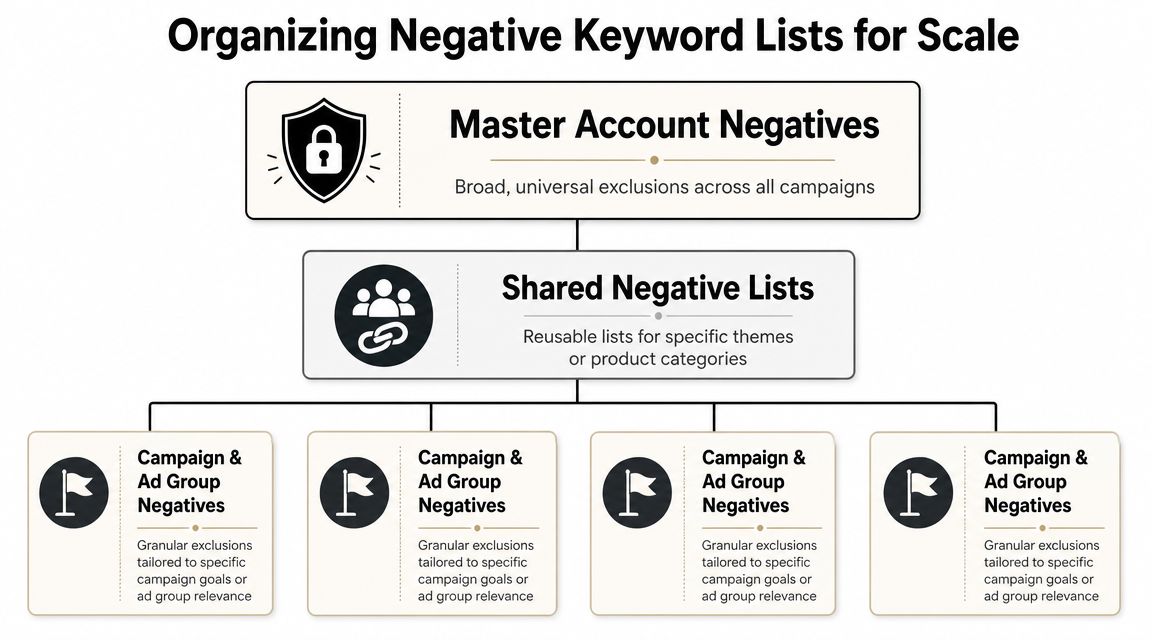
Build a tiered structure
Scalable accounts use list placement as a control system, not a storage bin. The job is simple. Put each negative at the lowest level that solves the problem without blocking valid traffic elsewhere.
| Level | Best use | What belongs here | Main caution |
|---|---|---|---|
| Account level | Universal exclusions | Terms that should never trigger any ad | Too broad for mixed-intent accounts |
| Campaign level | Intent control | Queries irrelevant to one campaign's goal | Easy to duplicate if naming is sloppy |
| Ad group level | Granular routing | Terms that help separate close themes | Can become hard to maintain manually |
Google Ads supports account-level negative keywords and shared lists, which is why mature accounts rely on them for repeatable control instead of manual one-off edits in every campaign (Google Ads account-level negative keywords).
The trade-off is real. Centralization reduces drift, but it also raises the cost of a bad decision. If you add a weak account-level negative because one campaign had poor traffic, you can inadvertently shut off good queries across the account.
Use list families, not one giant dump
I keep negative lists in families. That keeps the account readable and gives teams a clean way to review, approve, and retire exclusions.
The first family is permanent governance lists. These cover repeat offenders like hiring intent, support intent, DIY research terms, or irrelevant product classes that the business will not sell.
The second family is routing lists. These are there to protect structure. Brand campaigns block non-brand modifiers. High-intent campaigns block early research queries. Product-line campaigns block sibling categories that belong somewhere else.
The third family is temporary control lists. These support inventory issues, seasonal offers, compliance restrictions, or regional changes. They need an owner and an expiration check, or they turn into clutter.
If you need a starting framework, this general negative keyword list for Google Ads can help seed ideas. Use it as raw material. Do not paste it in and call the job done.
Naming conventions are operational controls
List names should answer three questions at a glance. What is the scope. What intent is being blocked. Who should care.
Try names like these:
- ACCT_IRRELEVANT_GLOBAL
- ACCT_SUPPORT_QUERIES
- CAMP_BRAND_BLOCK_NONBRAND
- CAMP_PMAX_INVENTORY_HOLD
- AG_SERVICE_A_ROUTE_OUT_SERVICE_B
Good naming does more than save time. It lowers the odds of accidental overlap, especially in accounts with multiple managers, agency handoffs, or frequent campaign launches.
A weak name like "Negative List 3" forces somebody to open it, inspect it, and guess. That is how bad exclusions survive for months.
Here's a visual way to think about the hierarchy:
Set rules before volume grows
Large accounts do not fail because they lack negatives. They fail because the negatives were added without rules.
Three rules prevent most of the mess:
Require a reason for every shared-list addition
A short note is enough. Blocked for support intent. Blocked due to job-seeker traffic. Blocked to preserve brand campaign purity.Assign an owner to each list family
Someone should be responsible for review, approvals, and cleanup.Review for expiry and conflict
Temporary exclusions should have a removal date. Routing negatives should be checked against current campaign goals. This matters even more once Performance Max is part of the account, because visibility is thinner and mistakes take longer to spot.
Shared lists are not just an efficiency tool. They are the account's immune system. If the system is clear, new campaigns inherit protection without inheriting confusion. If the system is sloppy, scale multiplies old mistakes.
Mastering Negative Keyword Match Types
A negative keyword can solve a problem or create one. Match type is usually the reason.
The mistake I see most often is using broad negatives when the advertiser really wanted phrase or exact control. Broad can be useful. It can also block more than expected if you apply it without thinking through variants and neighboring intent.
Negative Keyword Match Type Comparison
| Match Type | Syntax | When to Use It | Example | Primary Risk |
|---|---|---|---|---|
| Broad | no symbol | Block a concept you don't want anywhere in that scope | free | Can suppress useful variants if the concept overlaps with valid searches |
| Phrase | "keyword" | Block a repeating search pattern while keeping some flexibility | "customer service" | Can still miss adjacent versions with different wording |
| Exact | [keyword] | Block one very specific wasteful query with surgical control | [product manual] | Too narrow if bad traffic appears in many close variants |
How to choose in the real world
Use broad negative when the concept itself is the problem. If you never want job seekers, broad negatives around careers-related terms often make sense.
Use phrase negative when the wording pattern is the issue. This is common with support terms, return-policy searches, or educational modifiers that repeat in the same sequence.
Use exact negative when you've found one search query that wastes money but nearby queries might still be useful. Exact is ideal when you want to trim with a scalpel instead of a machete.
If you want a deeper walkthrough of how these behave inside Google Ads, this guide on negative keywords match type is worth keeping handy while you build lists.
A safer default for most accounts
If you're unsure, start narrower.
That usually means phrase or exact for ambiguous cases and broad only for absolutely universal junk. Broad negatives feel efficient because they reduce list size. But efficiency on paper isn't the same as precision in a live account.
The goal isn't to block more traffic. It's to block the wrong traffic without cutting off search terms that teach you something useful.
The Routine That Keeps Your Account Healthy
Negative keywords decay if nobody maintains them. Lists get bloated. Old exclusions stick around after promotions end. New junk terms creep in because search behavior changes rapidly, often outpacing regular review.
That's why the account needs a routine, not just a list.
Industry guidance summarized by Go Fish Digital recommends reviewing the Search Terms Report weekly for high-spend accounts, while lower-spend or evergreen campaigns can be reviewed biweekly or monthly. The larger point is the cadence itself. Negative keyword management works better as a repeatable process than as occasional cleanup (Go Fish Digital on negative keyword review cadence).
Weekly checks for active spend
Weekly reviews are for live traffic control. Don't overcomplicate them.
Use this short checklist:
- Scan fresh search terms for obvious intent mismatches
- Flag rising themes instead of only one-off queries
- Check campaign context before adding a negative globally
- Review spend concentration so you focus on terms causing actual waste
High-spend campaigns need this rhythm because bad traffic compounds quickly when budgets are moving every day.
Monthly reviews for conflicts and drift
Monthly maintenance is less about discovery and more about account hygiene. In this phase, you look for negatives that are fighting your targeting or contradicting the campaign's purpose.
Good monthly review questions:
- Did a shared list become too broad?
- Are old seasonal negatives still active?
- Did a campaign launch without the right linked lists?
- Are ad groups cannibalizing each other because routing negatives are missing?
A lot of lead volume problems come from accidental over-blocking, not from a lack of new ideas. Monthly checks catch that before performance gets blamed on bids or creative.
Quarterly audits for structure
Quarterly work is different. During this time, you zoom out and ask whether the system still reflects the business.
Run a deeper audit on:
List redundancy
Remove duplicates and overlapping lists that make governance harder.
Naming clarity
If list names don't instantly explain purpose and scope, fix them.
Scope creep
Account-level negatives often accumulate terms that should really sit at campaign level.
Business changes
New services, retired products, changed geographies, and updated offers all affect what should be excluded.
Accounts rarely break because one negative was wrong. They break because nobody noticed the system had drifted.
A healthy routine keeps your exclusions tight, understandable, and reversible.
Handling Negatives in Performance Max and Beyond
Performance Max changed the old negative keyword playbook because you don't get the same clean, campaign-by-campaign search control you have in standard Search. A lot of advertisers still manage negatives as if every campaign behaves the same way. That assumption causes problems.
With automation-heavy campaign types, negative keyword governance has to be stricter, not looser.

Why PMax needs a different mindset
In Search, you can often fix poor traffic by tightening campaign and ad group negatives. In Performance Max, your room to maneuver is narrower, so the wrong negative can remove useful demand more broadly than intended.
Google's Help Center documents hard limits that matter here, including 1,000 negatives per account, 5,000 per list, and 20 lists per account, which makes sprawl a real issue for large advertisers trying to govern exclusions across automation-heavy setups (Google Ads negative keyword list limits).
Those limits force discipline. You can't treat PMax negatives like an infinite junk drawer.
What to exclude and what to leave alone
For Performance Max, I'd reserve broad exclusions for terms that clearly violate account intent across the board. Think universal junk, brand safety concerns, or traffic classes that should never enter any campaign.
Be much more careful with product-adjacent terms, category language, and exploratory demand. Automation still needs room to find useful pockets of intent. If you over-block too early, you end up solving one leakage problem by creating an underdelivery problem.
A practical way to handle this is:
- Keep universal exclusions centralized
- Use customer-facing teams for input, especially support and sales, because they hear the irrelevant queries people use
- Review automation outputs regularly instead of assuming machine-led campaigns self-correct
- Separate business rules from optimization guesses
Tools matter more when governance gets messy
Once you're juggling Search, Shopping, and Performance Max, manual list building gets tedious fast. Purpose-built workflow tools offer assistance. Keywordme's guide to negative keywords in Performance Max is useful for understanding the campaign-specific side, and Keywordme itself is one option for turning search term data into organized negatives, assigning match types, and applying lists without the usual copy-and-paste mess.
That's not about convenience alone. It's about reducing operator error when account structure gets crowded.
Automation doesn't remove the need for negative keywords. It raises the cost of sloppy governance.
The old search-only mindset doesn't hold up anymore. If your account includes Performance Max, shopping traffic, and shared exclusions across multiple campaigns, your negative keyword process has to act like policy. Not cleanup.
Keywordme helps PPC teams turn raw search term data into usable negative keyword workflows without the usual manual formatting headache. If you want a faster way to organize exclusions, assign match types, and keep campaign governance cleaner across Google Ads, take a look at Keywordme.
.svg)