
Prevent Negative Keyword Conflicts: Google Ads Guide 2026
Prevent Negative Keyword Conflicts: Google Ads Guide 2026


SEO Title: Negative Keyword Conflicts in Google Ads
Meta Description: Negative keyword conflicts in Google Ads can block profitable traffic. Learn how to find, fix, and prevent them without hurting campaign structure.
A keyword is live. The ad group is active. Bids are fine. Search volume exists. And still, impressions barely move.
If you've managed Google Ads long enough, you know that feeling. You check match types, review budgets, scan targeting settings, and start wondering whether Google is just being Google. Then you find it. A negative keyword is blocking the exact traffic you meant to buy.
That's why negative keyword conflicts in Google Ads deserve more attention than they usually get. They're not some weird edge case. They show up when accounts grow, when shared lists pile up, when multiple people touch the account, or when bulk cleanup gets done too fast. The painful part is that the account can look clean on the surface while one hidden negative subtly shuts off valuable queries.
Why Your Best Keywords Might Be Blocked
The usual story goes like this. Someone mines the search terms report, finds junk traffic, adds negatives, and moves on. A week later, one of the campaigns that used to bring in strong leads starts fading. Nothing dramatic. Just fewer impressions, fewer clicks, and less useful data.
A lot of teams assume this means they need broader targeting, more budget, or a bidding adjustment. Sometimes the actual issue is simpler. A negative was added with the right intention but the wrong scope.
Waste control can turn into traffic loss
Negative keywords matter because they cut waste. Industry guidance reports that campaigns actively managing negative keyword lists can see 10 to 20% lower wasted spend on irrelevant clicks, but the same guidance warns that aggressive use can backfire. One expert recommendation is to use negatives only when there is long-term, statistically significant data, and it also notes that in a healthy account, true wasted spend may be only 4 to 8% of total spend. That's exactly why careless exclusions can remove traffic you had wanted (Keywordme's negative keyword guide).
That trade-off is where most damage happens. Good account managers want tighter traffic. Bad workflow turns that good instinct into accidental blocking.
Practical rule: Every negative keyword saves money only if it blocks the right intent. If it blocks wanted intent, it becomes a silent performance problem.
The conflict usually starts small
Most conflicts don't begin with some huge mistake. They start with normal account activity:
- Bulk cleanup after a search term review. Useful work, but risky when negatives get added too broadly.
- Inherited shared lists. A list that made sense for one campaign can choke another.
- Segmentation logic that nobody documented. One manager knew why a term was blocked. The next one doesn't.
The hardest part is that blocked demand often looks like weak demand. That's why these conflicts stick around longer than they should. You don't always see an error. You just see missing performance.
Understanding Negative Keyword Conflicts
A negative keyword conflict happens when a negative keyword blocks a search you want to trigger your ad. That negative can sit at the ad group level, the campaign level, or inside a shared list applied across multiple campaigns.
Two ways conflicts show up
It is like putting a do-not-enter sign in the wrong place.
A direct conflict is the obvious version. You target a keyword, then add the same term as a negative somewhere higher or lower in the structure. You're bidding with one hand and blocking with the other.
An indirect conflict is trickier. You add a negative that doesn't exactly match your target keyword, but it still blocks the search queries your positive keyword was supposed to capture. This usually shows up when broader targeting meets broader exclusions.
A direct conflict blocks the specific address. An indirect conflict blocks the street leading to it.
Where the conflict lives matters
Google Ads gives you plenty of room to build complex exclusion systems. You can use up to 10,000 negative keywords per campaign, and at the account level you can create up to 20 shared negative keyword lists with 5,000 negative keywords each. That scale is useful, but it also means one shared list can affect a lot of campaigns at once. Google may show a “Remove conflicting negative keywords” recommendation, but third-party analysis notes that it does not always catch shared negative list conflicts, so manual checks are still needed (Optmyzr's review of negative keyword limits and conflicts).
Conflict levels in plain English
Here's the practical version of the hierarchy:
- Ad group negatives are local. They affect what can trigger inside that ad group.
- Campaign negatives are broader. They can block anything inside that campaign.
- Shared negative lists reach across campaigns. That's where one cleanup action can create a much bigger mess.
When managers say, “I checked the campaign and didn't see the issue,” shared lists are often the missing piece.
Not every conflict is actually a mistake
Some conflicts are intentional. Advanced account structures often use negatives to steer traffic away from lower-priority campaigns and into higher-priority ones. That can be smart. It can also look identical to a bad setup if nobody documented the reason.
That distinction matters. You're not just hunting for overlap. You're deciding whether the overlap reflects good segmentation or sloppy account hygiene.
Finding Conflicts Hiding in Your Account
The fastest way to solve negative keyword conflicts in Google Ads is to stop treating them like a one-method problem. Manual checks help. Reports help. Scripts help. Each catches different failure points.

Start with the symptom check
If one keyword should be showing and isn't, use Google Ads' ad preview and diagnosis workflow. This is the quick gut check. You're looking for the message that tells you the ad isn't serving because of a negative keyword.
This works best when you already suspect a specific query. It's not an audit system. It's a spot check.
Then look for behavior changes
Search term reviews can reveal conflicts even before you confirm them directly. Watch for search themes that used to appear and then suddenly dry up after a cleanup pass or list update.
A few signs usually point in the right direction:
- Formerly relevant queries disappear after a bulk negative upload.
- A campaign loses useful volume unevenly while budget and bids stay stable.
- One ad group stops attracting expected variants while related groups still serve.
That pattern often tells you the issue isn't demand. It's filtering.
Shared lists require a different check
At this stage, manual review begins to fail. Campaign negatives and ad group negatives are visible enough if you know where to look. Shared lists are where people miss things because the blocking logic sits outside the campaign they're inspecting.
A more complete workflow is to run a conflict audit before or after bulk list changes. Google Ads Scripts can compare keywords against negatives and send conflict output to a Google Sheet for review. At MCC scale, teams use this approach because scripts can identify the client account and the exact negative list causing the conflict. That's especially helpful when shared lists are part of the problem (this walkthrough on auditing negative keyword conflicts with scripts).
If you want a practical checklist for the account, this guide on checking for conflicts in negative keyword lists is a useful companion.
Don't trust a single view of the account. A conflict can be invisible in the campaign you're inspecting if the blocker lives in a shared list.
What each method is good for
| Method | Best for | Weak spot |
|---|---|---|
| Ad preview and diagnosis | Confirming a suspected blocked query | Too narrow for account-wide auditing |
| Search term behavior review | Spotting pattern changes after edits | Doesn't identify the exact blocker by itself |
| Script-based audit | Finding overlap across levels and lists | Needs setup and review discipline |
The point isn't to pick one forever. It's to use the right method for the kind of problem in front of you.
Resolving Conflicts Without Breaking Your Campaigns
The worst fix is deleting every conflicting negative you find. That feels decisive. It also ignores why the negative was there in the first place.
Some conflicts are mistakes. Some are there to control routing. If you skip that distinction, you can solve one problem and create another.
First decide whether the conflict is intentional
Before changing anything, ask one question. Was this negative added to block bad traffic, or to force traffic into a different campaign or ad group?
If the answer is unclear, don't start deleting. Trace the term through the account. Look at where the query should land. Then decide whether the current block is protecting structure or damaging it.
Field note: A conflict tied to segmentation should be documented. If nobody can explain why the block exists, treat it as suspicious.
Use the smallest fix that solves the issue
Google Ads supports shared negative keyword lists at the account level, with up to 5,000 negatives per list and 20 lists per account. Operationally, the highest-impact workflow is usually to mine the search terms report, group exclusions by theme, and apply one shared list across multiple campaigns so a single update propagates everywhere. That reduces duplicate maintenance, but it also means resolution has to be deliberate when a shared list causes a conflict (Google Ads shared negative keyword list documentation).
That usually leads to one of these fixes:
Remove the negative entirely
Use this when the negative is clearly wrong and serves no structural purpose.Move the negative to a narrower level
If a campaign-level or shared-list negative is blocking wanted traffic in one place, move that exclusion into the specific ad group or campaign where it belongs.Refine the match type
Sometimes the concept is right, but the negative is too broad. Tightening the match type can preserve the exclusion without cutting off good searches.Split campaign intent more cleanly
When the same term is both wanted and unwanted depending on context, the account structure may be doing too much with too little separation.
Priority rules matter
Here's the part many teams skip. You can't fix conflicts well if you don't know which layer is winning.
| If Conflict Is Between... | The Winner Is... | Example |
|---|---|---|
| Ad group keyword and ad group negative | Negative keyword | The ad group targets a term, but the same ad group excludes it |
| Campaign keyword and campaign negative | Negative keyword | The campaign bids on a term and also blocks it at campaign level |
| Campaign keyword and shared negative list | Shared negative list application | The keyword exists in the campaign, but the linked list blocks matching traffic |
| Ad group keyword and campaign negative | Campaign negative | The lower-level keyword still gets blocked by the campaign exclusion |
This is why random cleanup causes damage. People inspect the keyword, don't see a local issue, and miss the higher-level negative doing the blocking.
A safer fix workflow
- Check the search intent first. Was the traffic good, or does the positive keyword need work too?
- Review the source of the negative. Ad group, campaign, or shared list.
- Make one change at a time. Don't edit the whole exclusion system in one pass.
- Re-test the affected term after the edit.
- Document the reason if the conflict was intentional and kept in place.
If you want a process built specifically for cleanup decisions, this guide on how to fix conflicting negative keywords lays out the mechanics well.
Preventing Conflicts Before They Cost You Money
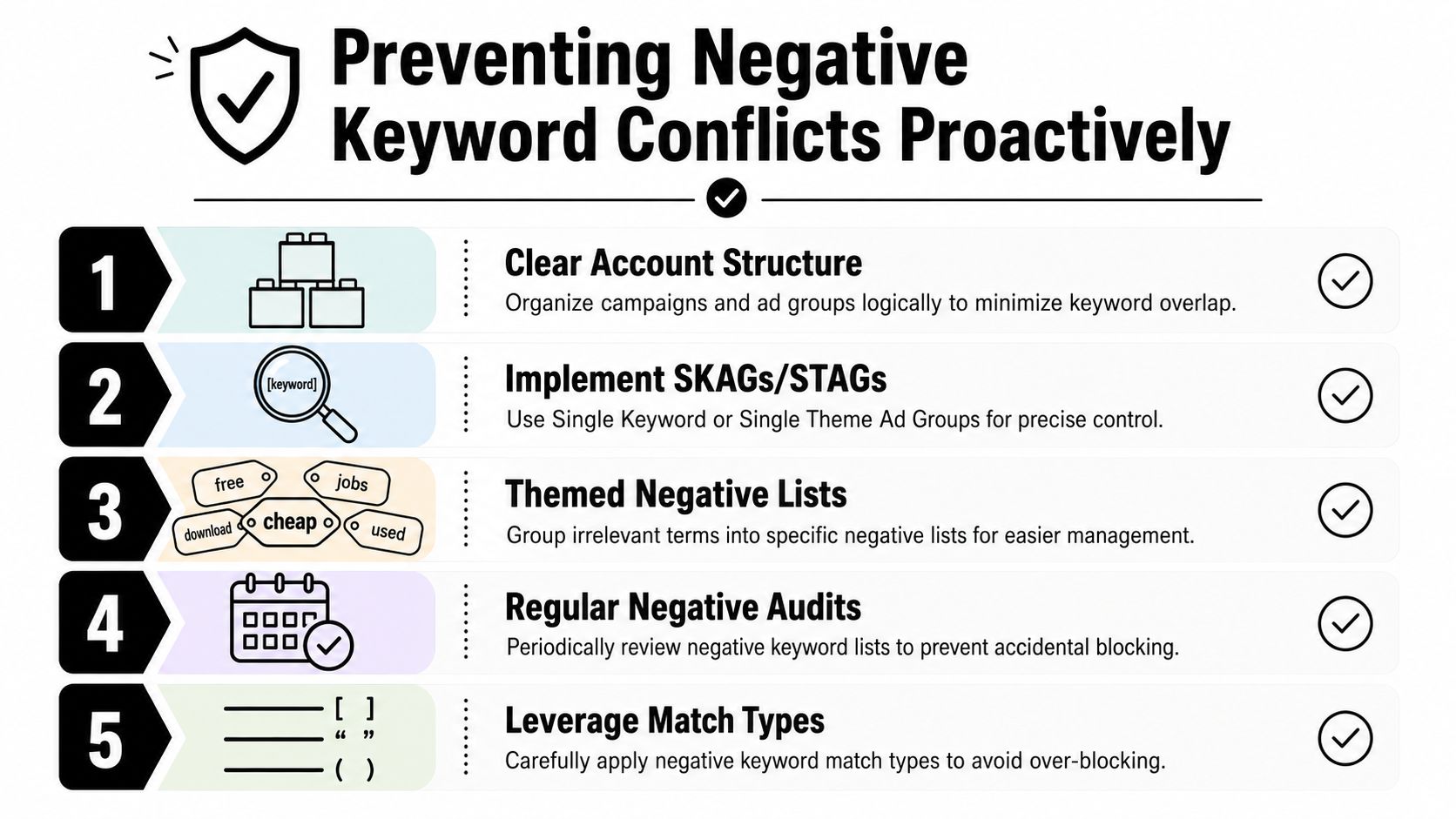
Most negative keyword conflicts in Google Ads are preventable. Not all of them, but most. The accounts that suffer the least from this problem usually have one thing in common. Their structure makes intent obvious.
Good architecture reduces cleanup mistakes
When campaigns are segmented clearly, you don't need as many defensive negatives. The more overlap you build into the account, the more exclusions you need to control routing, and the higher the chance of blocking good traffic by accident.
That's one reason some managers still prefer tightly themed ad groups. You don't need to turn every account into a museum piece, but you do need a structure where keyword intent and campaign purpose are easy to understand.
The same logic applies to automation. If you're leaning more on AI-driven workflows, account organization matters even more. This broader look at AI in advertising from Busylike is worth reading because it frames the bigger issue well. Automation works better when the inputs are clean and the control layers are intentional.
Three habits prevent most avoidable conflicts
Build themed negative lists
Don't dump everything into one master bucket. Group exclusions by purpose, such as job seekers, support intent, educational queries, or irrelevant locations. Themed lists are easier to review and safer to apply.Document shared-list intent
If a list is meant to steer traffic, say that plainly. If it's only for universal junk terms, note that too. Future you will need that context.Audit after meaningful changes
Bulk uploads, campaign launches, restructures, and inherited account transitions are all moments when conflicts appear.
Prevention is cheaper than diagnosis
A hidden conflict wastes time two ways. First, you lose wanted traffic. Second, you waste hours chasing symptoms in bids, ads, or landing pages when the blocker is sitting in the negative layer.
That's why I treat negative governance as part of account hygiene, not cleanup admin. Strong structure, disciplined list design, and regular audits protect performance without forcing you into constant firefighting.
Streamline Your Workflow with Smart Automation
Manual reviews still matter. Scripts still matter. But neither solves the whole workflow cleanly for every team.
Line-by-line search term review gets slow fast. Scripts are powerful, but they need maintenance and somebody has to trust the output enough to act on it. That's why more practitioners are shifting toward a hybrid approach where automation handles detection and pattern finding, and humans handle the strategic call.

Detection is no longer the real bottleneck
Recent practitioner guidance points out that n-gram analysis can surface negative candidates faster than line-by-line search-term review, and scripts can alert teams when positive keywords are blocked by negatives. At the same time, Google still treats negatives mostly as a manual control layer and doesn't provide a built-in workflow for systematic conflict auditing at scale. The bigger unresolved question is whether a conflict points to a simple list mistake or a structural issue in the account itself (Adalysis on steering automation with negative keywords).
That's the shift. Smart teams aren't just asking, “What term should I block?” They're asking, “Why does this conflict keep happening in this part of the account?”
What a modern workflow should do
A useful workflow should handle three jobs together:
- Surface bad search themes quickly so you're not stuck reading every query one by one
- Catch overlap before damage spreads across campaigns and shared lists
- Show whether the issue is tactical or structural so you know if the fix belongs in the list, the match type, or the campaign design
That's where tools built around search-term action can help. Keywordme's automation workflow for negative keyword management is one example of how teams are moving away from copy-paste maintenance and toward in-context cleanup. In practice, that means handling search term analysis, match type decisions, and negative application in one flow instead of bouncing between exports, sheets, and manual uploads.
Good automation doesn't replace judgment. It removes repetitive work so you can spend time on the judgment that actually matters.
The accounts that stay healthy usually aren't the ones with the biggest negative lists. They're the ones with the clearest systems for deciding what to exclude, where to exclude it, and when a conflict is warning you about a deeper structure problem rather than just a bad list entry.
If you want a faster way to review search terms, clean up negatives, and reduce the manual work behind conflict checks, take a look at Keywordme. It's built for Google Ads workflows that need tighter keyword handling without the usual spreadsheet-heavy process.
.svg)