
Manage Pay Per Click: Your 2026 Strategy Guide
Manage Pay Per Click: Your 2026 Strategy Guide


A lot of people try to manage pay per click from inside a noisy Google Ads account while the budget leaks in three places at once. Search terms are messy. Match types are inconsistent. Campaigns look organized on the surface, but no one can explain why one ad group has junk traffic and another never spends.
That’s normal. It also gets expensive fast.
PPC has been around long enough that the platform is mature, the competition is sharp, and sloppy management gets punished. Google’s 2000 launch of AdWords changed PPC by integrating sponsored links into search results, and by Google’s 2004 IPO the company was valued at $23.1 billion with $2.7 billion in annualized revenue primarily from PPC according to this history of PPC advertising. The channel works. It has worked for a long time. But it only works cleanly when the account is built and managed with discipline.
That’s why random “tips” usually fall short. A good PPC manager needs a repeatable operating system. Build the account so it’s easy to steer. Feed it clean keyword data. Review the right reports on a schedule. Cut wasted spend early. Push budget toward what earns its keep. Then tighten the workflow so you spend less time clicking around and more time making decisions.
If you’re also trying to reduce acquisition costs beyond the ad account itself, these proven CPA reduction strategies are worth reading because PPC performance often breaks on the handoff between keyword, ad, and landing page.
Introduction The PPC Management Playbook
Most PPC accounts don’t fail because the manager missed one secret tactic. They fail because the work happens in the wrong order.
The usual pattern goes like this. Someone launches campaigns quickly, uses broad targeting without guardrails, lets search terms pile up, and only starts optimizing after spend has already gone sideways. At that point, every fix takes longer because the account structure fights back.
A better workflow starts with control. Not control in the sense of micromanaging every click forever, but control in the sense that the account tells you what’s happening. When a keyword performs, you can see why. When a search term is junk, you can remove it without digging through a maze. When a landing page underperforms, the signal isn’t buried under irrelevant traffic.
Practical rule: If the account is hard to read, it’s hard to improve.
Good PPC management is operational. It has a rhythm. You build campaigns around real intent, not convenience. You choose match types on purpose. You treat negative keywords as a first-line filter, not cleanup after the fact. You bid for learning first, then efficiency. And every week, you review the same small set of reports that drive outcomes.
That’s the playbook experienced managers rely on. It isn’t flashy, but it’s durable. It scales from a small in-house account to a large agency portfolio because the logic stays the same even when the budget changes.
Laying the Foundation for PPC Success
Bad structure creates fake complexity. The account feels busy, but you can’t tell which part deserves more budget and which part needs to be paused.
That’s why account setup matters more than some might want to admit.

Structure campaigns by business reality
Campaigns should follow how the business sells. Not how the ad platform looks. Not how a spreadsheet was imported.
For an ecommerce store, that often means splitting campaigns by product line or margin profile. For a service business, it may mean separating by service category, geography, or lead value. For a B2B company, user intent usually matters more than product naming, so campaigns often work better when grouped by problem and solution stage.
A simple test helps here. Ask whether you’d want the same budget logic, ad message, and landing page for every keyword inside a campaign. If the answer is no, split it out.
Common campaign splits that hold up in practice:
- By product line: Useful when products have different margins, seasonality, or landing pages.
- By service area: Helpful for local and regional campaigns where performance differs by location.
- By intent bucket: Good for separating bottom-funnel searches from broader research terms.
- By brand versus non-brand: Important because those terms behave differently and can distort reporting.
Build ad groups that stay tight
The fastest way to make an account hard to manage is stuffing too many unrelated keywords into one ad group.
Tight ad groups create cleaner ad relevance and clearer optimization decisions. You don’t need to be dogmatic about one keyword per ad group, but you do need thematic discipline. If an ad group mixes different intents, your ad copy gets generic and your search term review becomes harder.
Think in clusters, not piles.
A healthy ad group usually contains close variants that deserve the same ad promise and the same landing page. If one keyword needs a different message, move it. If one theme consistently attracts lower-intent searches, isolate it so you can control bids and negatives more precisely.
The future version of you doing weekly optimization will either thank you for this structure or hate you for it.
Write ads and landing pages as a matched set
Too many accounts write ads first and hope the landing page can carry the rest. That’s backwards.
The keyword signals intent. The ad confirms relevance. The landing page closes the gap. If any one of those breaks, the campaign gets noisy. A search for a high-intent service should land on a page that speaks directly to that service, not a broad homepage with six competing calls to action.
When the message chain is clean, optimization gets easier because your metrics mean something. A low conversion rate points to a real problem. A poor CTR tells you the ad missed the search. You’re not troubleshooting through clutter.
Here’s a useful walkthrough if you want to see how strong account organization connects to day-to-day campaign management:
Build for decisions, not just launch
A launch-ready account is not the same as a manageable account.
Before you publish anything, check whether you can answer these questions quickly:
- Which campaigns deserve more budget if performance improves
- Which ad groups have a distinct intent signal
- Which landing page belongs to each keyword cluster
- Which negatives should apply account-wide versus locally
- Which segments need different bidding logic
If those answers are fuzzy, the structure isn’t done.
That’s the foundation for anyone who wants to manage pay per click without drowning in cleanup work later.
Mastering Keywords and Negative Keywords
A PPC account usually starts getting expensive in the search terms report, not in the bid settings.
You launch with a sensible keyword list. A week later, half the spend is coming from loose variants, research-heavy searches, and terms that sound related but will never convert. That is why keyword management is not a one-time setup task. It is an operating system. If you want to manage pay per click well, you need a repeatable way to choose targets, control matching, and cut waste fast.
Start with buying intent, then widen carefully
Volume is tempting. Intent pays the bills.
I sort keywords into intent buckets before I worry about match type or bids. The goal is simple. Keep searches with similar commercial value together so the ad, landing page, and budget expectations stay aligned. If you mix early research queries with late-stage buying terms, the campaign can still get clicks, but the performance data becomes harder to trust.
A practical split looks like this:
- Research intent: “best project management software for agencies”
- High intent: “agency project management software demo”
- Research intent: “how does payroll software work”
- High intent: “payroll software for small business pricing”
Research terms still have a place. They help with discovery, audience building, and top-of-funnel coverage. They just need tighter budgets, closer query review, or separate campaigns so they do not dilute the conversion picture for terms that are ready to buy.
Use match types based on workload, not ideology
Match types are control settings. Each one creates a different review burden.
Broad match can find valuable queries you would not have added on day one. It can also spend money on close-enough searches that never had a chance. Phrase match gives you room to expand while keeping the query closer to the meaning you want. Exact match is usually where reporting gets cleanest, especially for service lines or product terms with clear intent.
Here is how I frame the trade-off:
| Match Type | What It Does | Best Use |
|---|---|---|
| Broad | Reaches wider variations around a keyword theme | Discovery when you have time to review search terms and add negatives often |
| Phrase | Keeps queries closer to your intended meaning | Controlled expansion with moderate oversight |
| Exact | Targets highly specific searches with the most control | Core commercial terms, cleaner testing, and tighter message alignment |
Broad match is not reckless. Unsupervised broad match is.
If the team cannot check search terms consistently, use less freedom. If the account has strong conversion tracking, a healthy negative list, and enough volume to learn quickly, broad can earn its place.
Negative keywords protect budget and signal quality
Negative keywords do more than block junk traffic. They keep your data usable.
Once irrelevant searches start entering the funnel, everything downstream gets noisier. CTR drops. Conversion rate gets harder to read. Automated bidding starts learning from weaker inputs. That is why I build negatives early, then add to them every week. Waiting until “later” usually means paying for patterns you could have blocked after the first review.
Three buckets matter most:
- Irrelevant modifiers: terms that signal the wrong audience, education intent, jobs, free options, or unrelated use cases
- Low commercial intent: searches that suggest browsing, definitions, or early comparison with little buying urgency
- Operational mismatches: products, services, brands, features, or locations you do not offer
If you want the step-by-step process, this guide on how to add negative keywords in Google Ads covers the mechanics.
A key skill is deciding where each negative belongs. Some terms should be blocked account-wide. Others should only block overlap between close themes. For example, a software company might apply “free” broadly across the account, but use product-specific negatives at the ad group level to keep feature sets from competing with each other.
Build a keyword map you can manage every week
A long keyword list is not a strategy. A keyword map is.
Each intent cluster should point to a specific ad group, ad message, landing page, match type approach, and negative list. That structure turns weekly optimization into a review process instead of a rescue mission. It also makes delegation easier, which matters once the account grows beyond one person manually checking everything.
My workflow looks like this:
- List the commercial themes tied directly to what the business sells.
- Group keywords by intent and offer so buying terms are separated from research queries.
- Choose match types based on review capacity and how much query variation the campaign can tolerate.
- Add negatives at launch to block obvious waste before it spends.
- Review search terms weekly and either block weak queries or promote strong ones into managed keywords.
That last step is where the account gets sharper over time. Search term reports often reveal the phrasing real buyers use, which is not always the phrasing a team brainstormed during setup.
This is also where tools save hours. Keywordme helps turn raw query data into organized keyword clusters and negative keyword ideas much faster, which closes the gap between the plan on paper and the work PPC managers need to do every week. That matters because keyword management is rarely lost on theory. It is lost in skipped reviews, slow cleanup, and inconsistent execution.
Smart Bidding and Budget Management
Bidding scares newer PPC managers because it feels like one wrong move can burn through budget in a day. That fear is understandable. It also causes one of the most common early mistakes.
Managers bid too low, collect weak data, and spend weeks learning what they could have learned in days.
Bid for learning before you bid for efficiency
There’s a real trade-off here. Higher initial bids can feel uncomfortable, especially when the account is new and every click gets scrutinized. But low bids often keep you buried in weak positions with too little data to make confident decisions.
A common pitfall is bidding too low initially. Experts recommend starting with bids 3 to 5 times higher than Google’s suggestion so you can accumulate 50 to 100 clicks per ad group and identify winning keywords 2 to 3 times faster in this PPC bidding benchmark breakdown.
That doesn’t mean “bid aggressively forever.” It means buy learning speed early, then tighten once the account shows you where the value is.
Manual control versus automation
There’s no universal winner between manual CPC and automated bidding. Each has a job.
Manual control works well when:
- The account is new: You need to understand behavior before handing too much control to automation.
- Conversion tracking is shaky: Smart bidding can’t optimize well against muddy inputs.
- You want sharper segmentation: Manual bidding is often cleaner when campaigns vary a lot by intent or lead quality.
Automated bidding works better when:
- Tracking is reliable: The system has a real signal to optimize against.
- The account has enough history: You’re not forcing decisions from a thin data set.
- The campaign goal is stable: Volatile lead quality or changing offers can confuse automation.
For teams comparing approaches, this article on PPC bidding strategies gives a useful framework.
Allocate budget where proof exists
A lot of teams split budget by habit. That’s one of the quietest ways to waste money.
Budget should follow evidence. If one campaign produces qualified leads and another mostly drives curiosity clicks, they should not be protected equally just because they launched at the same time. Good managers reallocate based on conversion quality, not campaign age or internal politics.
A practical budget review usually includes:
- Check spend concentration: Find where budget is piling up without meaningful return.
- Protect efficient campaigns: Don’t let weaker campaigns throttle the ones doing the work.
- Separate discovery from core revenue: Broad testing is useful, but it needs a leash.
- Watch for budget limits on proven campaigns: If the account is constraining a performer, solve that before launching something new.
If a campaign hasn’t earned more room, it doesn’t get more room.
Pull bids back with intent
Once enough data comes in, the next move is rarely dramatic. It’s usually a controlled pullback.
Lower bids gradually where traffic is expensive but not differentiated. Keep stronger bids where rank, query quality, and conversion behavior justify them. If you’re using automated bidding, resist the urge to override the system every day. Give changes time to settle, then review with the same decision standard each week.
That’s how you manage pay per click without turning bidding into guesswork. You use bids to accelerate learning, then use budget to concentrate on proven demand.
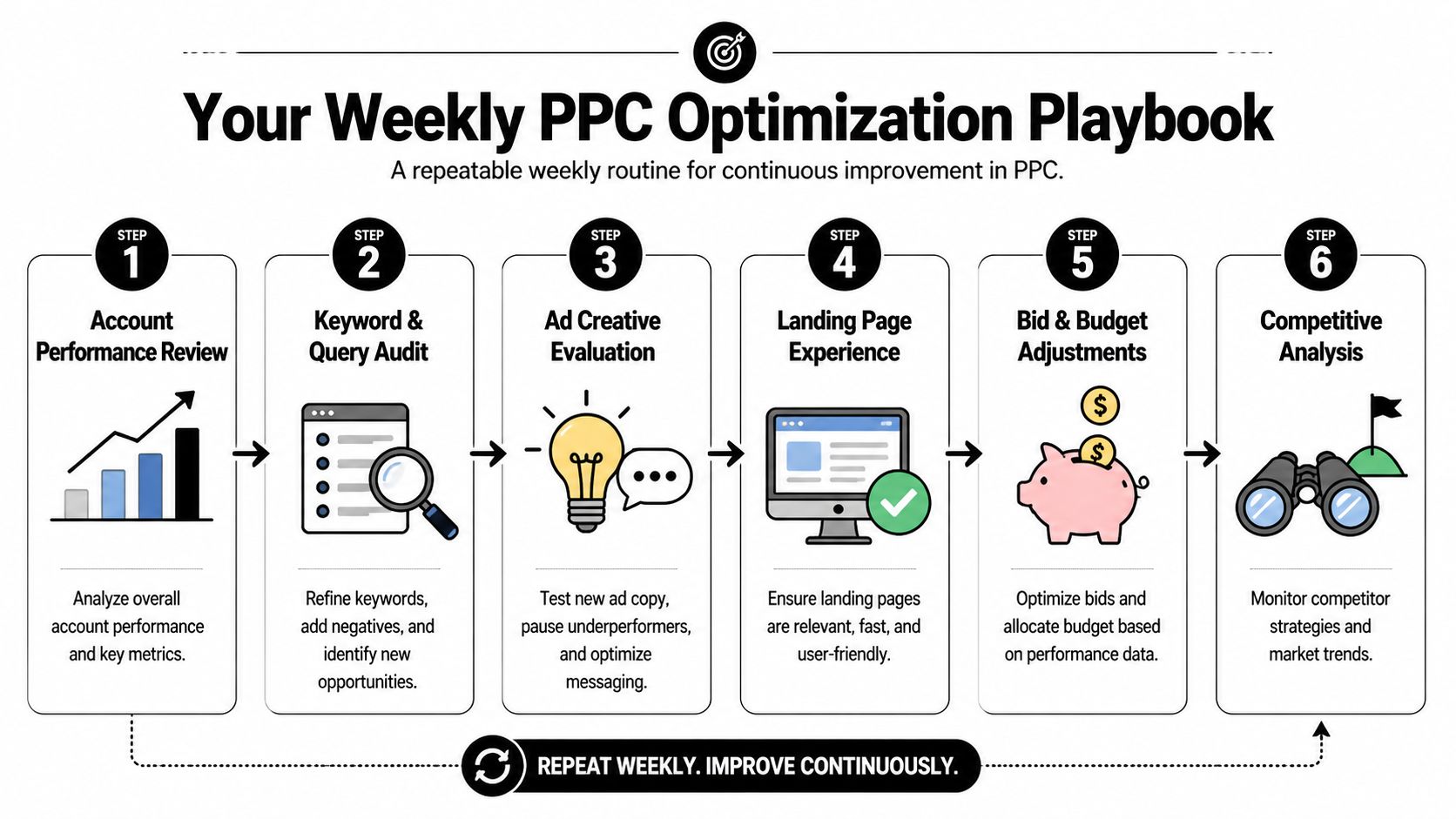
Your Weekly PPC Optimization Playbook
Monday morning is when weak PPC process shows up. Search terms drift, one ad starts slipping, a mobile segment wastes spend, and nobody catches it until the month-end report makes the problem look bigger than it needed to be.
Weekly optimization prevents that. The goal is a repeatable routine you can run fast, with the same decision standards each time, so the account improves in small, controlled steps instead of lurching between audits.
Start with the search term report
In most accounts, this is still the highest-return review of the week.
The search term report shows what users typed before clicking. That gives you two jobs right away. Remove waste. Then pull out the queries that have earned tighter control as managed keywords. As noted in this weekly PPC analysis guide, regular search term review often reveals a meaningful share of spend going to low-value traffic.
I sort terms into four buckets:
- Keep and monitor: Relevant traffic, but not enough signal yet to act.
- Promote: Queries with enough volume or conversion quality to deserve their own keyword.
- Negative out: Irrelevant, low-intent, or off-offer terms.
- Check landing page fit: Good query, weak post-click behavior.
That last bucket matters more than newer managers expect. Sometimes the keyword is fine and the page is the problem. If you treat every weak query as a targeting issue, you can cut traffic that should have converted with a better page match.
If you want this process to stay efficient, standardize the triage. Keywordme helps here by turning raw query review into a faster promote-or-block workflow instead of another export-cleanup spreadsheet session.
Review ads for fatigue, not just winners
Ad review should focus on change, not just rank-order performance.
A control ad can stay on top even as it weakens. CTR softens first. Conversion rate follows. CPA rises after that. By the time the whole campaign looks bad, you have usually been paying the penalty for at least a week or two.
Watch for patterns like these:
- Ad relevance: Does the message still match the query themes driving qualified traffic?
- Offer clarity: Is the call to action specific, believable, and aligned with the landing page?
- Fatigue: Has the longtime winner started losing ground against newer variations?
- Message drift: Are ads promising speed, price, or features the page does not support clearly?
Review ad performance by device, location, and keyword theme before rewriting copy. Aggregate numbers hide the real problem.
There is a trade-off here. Refresh ads too often and you reset learning before enough signal comes in. Wait too long and stale copy keeps draining spend. The fix is a simple threshold-based review process, not creative churn for its own sake.
Check segments that hide waste
Account averages are good at hiding expensive pockets of underperformance.
A campaign can look stable at the top line while one device, one city, or one audience burns through budget with weak post-click behavior. Weekly segment checks catch those leaks while they are still easy to fix.
Useful cuts to review each week:
- Device performance: Mobile and desktop rarely deserve the same assumptions.
- Location performance: Some geographies need lower bids, tighter targeting, or exclusion.
- Audience layers: Observation data often shows where generic traffic and qualified traffic split apart.
- Match type behavior: Broad traffic can be productive, but only with tight query review behind it.
- Time patterns: Day-of-week or hour-of-day waste is easy to miss in campaign totals.
This part of the workflow gets skipped when the account feels busy. That is usually a mistake. A ten-minute segment review can save more money than an hour spent tweaking ad copy that was never the main issue.
Keep the routine short and repeatable
Weekly PPC management should feel disciplined, not heroic.
Use the same order each time. Search terms first. Ads second. Segments third. Then log what changed so next week’s review starts with context instead of guesswork. A plain change log beats relying on memory, especially when multiple people touch the account.
The best weekly routines are a little boring. That is a feature. Boring means the process is clear, the checks are consistent, and the account is being managed by workflow instead of mood.
Automate Your Workflow with PPC Tools
Manual PPC work has a ceiling. Once the account gets busy, the drag comes from repetitive actions, not strategic thinking.
That’s where tools earn their place. Not by replacing judgment, but by removing the copy-paste work that wastes a manager’s best hours.

Automate the tasks that repeat every week
The search term review is a perfect example. In a manual workflow, you scan queries, export data, label terms, format lists, paste negatives, then rebuild match types by hand. None of that makes you smarter. It just slows you down.
Automation helps most with tasks like these:
- Bulk negative keyword handling: Faster cleanup from search term reviews.
- Match type application: Useful when promoting queries into managed keywords.
- Keyword expansion: Helpful when real search data reveals new themes.
- Workflow consolidation: Less jumping between spreadsheets and the Google Ads interface.
That’s also why broader stacks of marketing automation tools for small businesses can be useful. PPC rarely lives alone. The better your surrounding systems are, the easier it is to act on the demand your ads create.
Why this matters more in a weaker attribution environment
Attribution is getting harder, not easier.
A 2025 survey found that 62% of PPC managers struggle with attribution after the phase-out of third-party cookies, according to this cookieless PPC strategy article. When attribution gets murkier, actual search term data becomes more valuable because it tells you what users asked for before they clicked. That makes keyword cleanup and query management more important than ever.
If tracking is imperfect, you need stronger control over intent. That starts with what enters the funnel.
Use software where it removes friction
One practical option is PPC workflow automation tools. A tool like Keywordme works inside the Google Ads interface and handles repetitive keyword tasks such as cleaning junk search terms, building negative lists, expanding ad groups from real search data, and applying exact, phrase, or broad match in bulk. That kind of setup is useful when the bottleneck is execution speed, not strategy.
The trade-off is simple. Automation can make bad decisions faster if the manager doesn’t review intent carefully. So the right model is not blind automation. It’s human review plus software for the mechanical steps.
Use tools to compress the clicks, not to outsource the thinking.
That’s the line experienced managers keep in mind. If a task repeats every week and follows a clear rule, automate it. If a task depends on business context, keep a human in the loop.
Measuring What Matters for True ROI
Monday morning is when weak PPC reporting gets exposed. The dashboard shows more clicks, the platform says conversions are up, and the business still asks the only question that matters: are we buying profitable growth or just paying for activity?
That question changes how you report.
Good PPC measurement starts by separating diagnostic metrics from business metrics. Impressions, clicks, CTR, and CPC help explain what happened inside the account. They are useful because they point to delivery problems, relevance issues, or cost pressure. They do not tell a finance lead whether the campaign deserves more budget.
The report has to climb from attention to economics.
A practical way to structure it is a simple metric pyramid:
- Base layer: Impressions and clicks. These show whether ads entered enough auctions and earned traffic.
- Middle layer: CTR, CPC, and conversion rate. These show whether traffic was reasonably qualified and whether costs stayed under control.
- Top layer: CPA, ROAS, margin, pipeline value, or closed revenue. These decide whether the campaign should scale, hold, or get cut.
Benchmarks can give rough context, but account-level economics matter more. A high CPC may be acceptable in a category with strong close rates and high customer value. A low CPA can still be a bad result if those leads never turn into revenue. That trade-off is where junior managers usually get stuck. They optimize for the metric the ad platform makes easiest to see.
I care more about the chain between metrics than any isolated number:
- CTR shows whether the message matches the search well enough to earn the click.
- Conversion rate shows whether the landing page and offer carry that intent after the click.
- CPA shows what it costs to generate the action you want.
- ROAS, margin, or revenue per lead shows whether buying more of that action makes business sense.
If one number improves while the next one in the chain gets worse, the account is not improving. It is shifting the problem downstream.
That is why reporting has to include lead quality or revenue quality whenever possible. For lead generation accounts, I want to know more than form fills. I want sales-qualified lead rate, booked meeting rate, pipeline created, or close rate by campaign when the CRM setup allows it. For ecommerce, I want contribution margin or at least average order value and repeat purchase behavior, not just platform ROAS. Platform conversion columns are useful, but they can flatter a campaign that looks efficient only because the tracking setup is loose.
Keep the reporting structure tight. One view for stakeholders. One working view for the PPC manager.
The stakeholder version should answer a short list of questions:
- What did we spend?
- What did we get back?
- Is efficiency improving or slipping?
- What changed this period?
- What action are we taking next?
The manager view goes deeper. It should include campaign-level movement, conversion lag, search term quality shifts, landing page performance, and any tracking issues that make the topline numbers less trustworthy. That is the difference between a report used for decisions and a report built to fill space.
Post-click performance belongs in this discussion too. Many accounts hit a ceiling because the team keeps adjusting bids when the underlying problem sits on the landing page. If you need a stronger framework for that side of the funnel, these conversion optimization best practices are a useful reference.
One more practical rule. Report on trends, not single-week noise. PPC data is messy. Seasonality, sales cycles, conversion lag, and offline follow-up can distort short windows. A mature workflow compares the last period against a meaningful baseline and adds context for anything unusual.
That is also where process matters more than theory. The manager who wins long term is usually the one who can trace performance from query to click to conversion to revenue, then fix the bottleneck fast. Keywordme helps on the execution side by speeding up search term cleanup, match type updates, and negative list work inside Google Ads. That does not replace analysis. It gives you more time to do the analysis that affects ROI.
A useful PPC report should make the next budget decision easier. If it cannot do that, it is still measuring activity instead of return.
.svg)