
Find Actionable Keywords in Google Analytics
Find Actionable Keywords in Google Analytics


SEO Title: Find Actionable Keywords in Google Analytics
Meta Description: Find actionable keywords in Google Analytics using GA4, Search Console, paid search reports, UTMs, and site search for smarter optimization.
You open Google Analytics expecting answers. Instead, you get a familiar headache. Traffic is up, a landing page is moving, conversions changed, and the one thing you want to know, the keyword, is missing.
That gap trips up almost every serious SEO and PPC workflow. You can see visits, channels, events, and revenue paths, but raw keyword visibility isn't sitting neatly in one report anymore. If you're trying to work out which terms deserve more budget, which pages deserve a rewrite, or the search queries made on your own site, the old playbook just doesn't cut it.
The fix isn't to hunt for a hidden report that doesn't exist. The fix is to build a practical workflow across GA4, Google Search Console, paid search reporting, UTMs, and internal site search. Once you do that, keywords in Google Analytics stop being a dead end and start becoming usable again.
The Ghost in the Machine Why Your Keywords Vanished
A familiar scenario plays out in almost every analytics review. Organic traffic shifts, a landing page starts pulling in leads, and the first question from the team is simple: which keyword drove it? In GA4, that answer is usually missing.
Google removed native organic keyword visibility years ago after encrypting search queries for privacy. The result is the long-running (not provided) problem that still frustrates SEOs, content teams, and PPC managers who want one clean report.

That change made keyword analysis less convenient, but it also forced a better standard. Good analysis now ties search intent to landing pages, engagement, lead quality, and revenue instead of treating keyword rankings as the whole story.
What the missing data means
GA4 is not failing when organic keywords are absent. It is operating within the same privacy limits that ended the old keyword reports.
For working marketers, the job is rebuilding visibility from multiple sources so you can answer three practical questions:
- What people searched for: Organic queries, paid terms, and internal site search language.
- Where they landed: The page that matched that intent.
- What happened next: Engagement, form fills, purchases, and other conversion events.
That broader view matters because keyword reporting on its own rarely settles the budget question. Teams that want a clearer line from visibility to pipeline should read this piece on AI visibility to sales conversion, which focuses on how search exposure connects to business outcomes.
The modern fix is a workflow
The old model was one report. The current model is a stack.
Organic query data lives in Search Console. Paid search terms come from Google Ads and campaign tagging. Internal search terms come from site search tracking. GA4 becomes the place where those inputs meet landing-page behavior and conversion data.
That sounds less tidy, and it is. It is also more useful in practice.
For PPC professionals, this matters even more because the hard part is no longer collecting data. The hard part is turning scattered keyword signals into bidding decisions, negative keyword ideas, landing-page tests, and account structure changes. If you want the background on the privacy shift before building that process, this guide on handling keyword not provided in Analytics explains the problem clearly.
Unlock Organic Keywords with Google Search Console
Open GA4, click into organic traffic, and the keyword column still gives you almost nothing useful. That frustration is normal. Google removed query-level organic keyword reporting from Analytics years ago, so GA4 on its own cannot tell you which exact searches drove those visits.
Search Console is the practical fix. It gives you the query layer that GA4 no longer exposes, then lets you line those queries up with landing pages and on-site behavior. For anyone dealing with the analytics not provided keywords problem in Google Analytics, this is the first connection to set up.
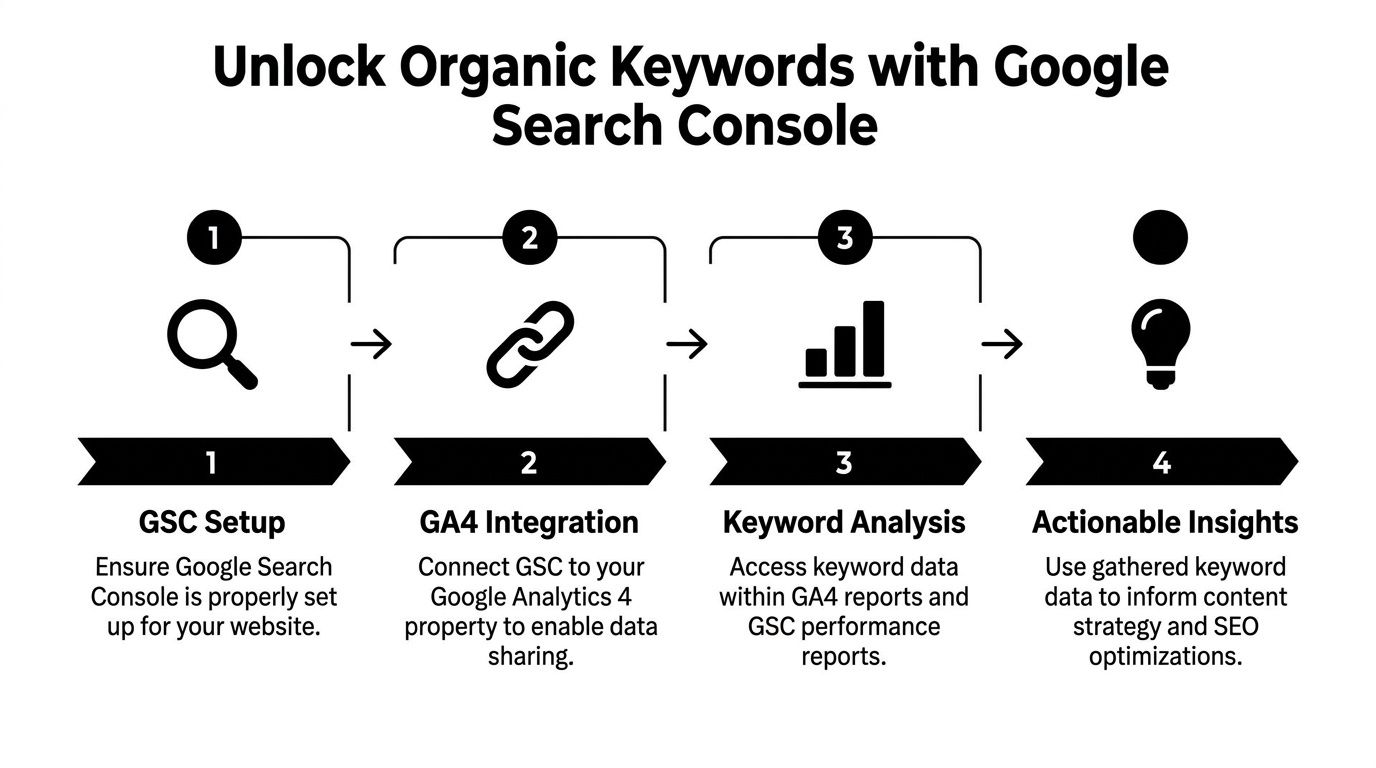
How to link Search Console to GA4
Set it up in GA4 Admin:
- Open Admin: Go to your GA4 property.
- Find Product Links: Open the Search Console linking area in the property column.
- Choose the correct property: Select the verified Search Console property for the same domain.
- Attach the web stream: Connect it to the right web data stream.
Once the link is active, GA4 adds Search Console reporting cards and reports tied to organic search performance. SEOmonitor's overview of GA4 and keyword visibility walks through that reporting setup clearly.
What you get after the link goes live
The useful part is context.
Search Console shows the queries and search metrics. GA4 shows what those visitors did after the click. Used together, you can stop asking, "What keywords do we rank for?" and start asking better questions about page intent, CTR, and conversion quality.
| Report | What it helps you answer |
|---|---|
| Google Organic Search Queries | Which search queries generated impressions and clicks |
| Google Organic Search Traffic | Which landing pages received organic visits from Google search |
Focus on these metrics first:
- Clicks: Which queries send traffic
- Impressions: Which topics have visibility but weak click-through
- Average position: Where your page tends to surface in results
- Landing page pairing: Which URL Google chose for that query set
The value isn't just seeing more rows. It is spotting pages with high impressions and weak CTR, queries that reach the wrong landing page, and terms that deserve their own page instead of being forced onto a generic one.
What this still does not solve
Search Console helps you recover organic query visibility. It does not give you a full keyword attribution system inside GA4.
That trade-off matters in practice. Search Console query data is limited compared with the old fantasy people still have of a complete keyword report inside Analytics. You get strong directional insight for SEO work, but you still need judgment. Analysts have to compare query themes, landing pages, engagement, and conversions to decide whether the problem is ranking, SERP appeal, or page fit.
For SEO teams, that is usually enough to prioritize content updates. For PPC teams, it is only one part of the workflow, because organic queries, paid terms, and internal site search all answer different questions. A useful keyword process pulls those signals together instead of treating Search Console as the whole solution.
Find Paid Search Keywords in Your GA4 Reports
A common PPC scenario looks like this. Google Ads shows a search term getting clicks at an acceptable CPC, but GA4 shows weak engagement, no meaningful events, and a quick exit from the landing page. The term is not missing. The problem is that the keyword, the visit quality, and the conversion path live in different places.
GA4 helps close that gap.
It does not replace Google Ads search term reporting, and it should not. Google Ads is still the system for bids, match types, search terms, and cost control. GA4 earns its place after the click. It shows whether traffic from a paid keyword theme read, explored, searched again, added to cart, submitted a lead, or disappeared.
What GA4 is actually useful for in PPC
The most practical use of GA4 is behavioral validation.
A paid term can look efficient inside Ads because it wins impressions and clicks. In GA4, that same term may map to a landing page with poor engagement, low scroll depth, repeat internal searches, or a weak conversion rate. That is the kind of mismatch PPC managers need to catch early, especially on broad match campaigns, non-brand expansion, and new offer tests.
The questions worth answering are simple:
- Did this keyword theme send qualified traffic?
- Did visitors reach the events that matter?
- Did the landing page match the ad intent?
- Did users search the site again because the page failed to answer the query?
A reporting workflow that holds up in real accounts
Start with your Google Ads and GA4 integration. Then read paid search performance across both tools instead of forcing either one to do the other's job.
A reliable workflow looks like this:
- Use Google Ads for the keyword view. Review search terms, match types, cost, clicks, and conversions recorded in the ad platform.
- Use GA4 for post-click behavior. Segment paid traffic by source, medium, campaign, and landing page to see what visitors did.
- Add landing page + query string where it helps. Some accounts pass useful clues through tagged URLs, which can help separate keyword themes or audience intent.
- Compare behavior against your primary conversion events. A term that drives sessions but no progress usually needs a bid change, tighter match type, a negative keyword, or a different page.
- Check internal search behavior. If paid visitors keep using the site search box after landing, the ad-to-page match is often off.
This is the trade-off PPC teams run into all the time. Google Ads can show that you bought traffic cheaply. GA4 can show that the traffic was weak, confused, or headed to the wrong page. Both views are needed.
What GA4 can and cannot tell you
What works well:
- Judging post-click traffic quality
- Spotting landing page mismatch by campaign or keyword theme
- Using event data to see whether paid traffic reaches meaningful milestones
- Catching signs of poor intent through bounce patterns, shallow engagement, or repeat internal searches
What requires caution:
- Trying to treat GA4 as a full search term report
- Assuming query strings will always contain usable keyword detail
- Making bid decisions from Analytics alone without checking the actual search terms in Google Ads
For many PPC analysts, the hard part is not getting one more report. It is reconciling Google Ads cost and term data with GA4 behavior quickly enough to make weekly optimizations. If that is your bottleneck, this guide on combining Google Ads and GA4 data lays out a cleaner process.
Teams running Microsoft Ads, paid social, email, or other tagged campaigns usually need one more layer. Custom parameters still matter, and AdStellar AI does a solid job explaining UTM parameters if your tagging discipline needs work.
Advanced Tracking with UTMs and Site Search
Once the standard integrations are in place, the next gains come from capturing keyword intent that GA4 won't organize for you automatically.
Two sources matter most here. First, UTM parameters for campaigns outside the usual Google setup. Second, your site's own internal search box, which is often a goldmine for demand signals.
Use UTM terms when platforms don't hand over enough detail
UTMs aren't glamorous, but they still solve real reporting problems.
If you're running Bing Ads, niche paid placements, email promotions, or sponsored social campaigns, the utm_term parameter gives you a controlled way to pass keyword or audience detail into analytics. That won't replace native Google Search Console query data, and it won't fix privacy restrictions around organic search, but it gives you a clean labeling system for non-organic traffic sources.
If your team needs a quick refresher on formatting and naming conventions, AdStellar AI does a good job explaining UTM parameters without turning it into a jargon dump.
A few rules keep UTM use sane:
- Stay consistent: Pick one naming convention and enforce it.
- Use
utm_termintentionally: Reserve it for keyword or targeting detail, not random notes. - Don't overstuff values: Keep terms readable enough for reporting later.
- Check your landing pages: Broken tagging creates messy acquisition reports.
Mine internal search terms inside GA4
Internal search is where people tell you, in their own words, what they expected to find.
According to Analytics Mania's guide to finding search terms in GA4, internal site search terms are tracked through the view_search_results event and appear after a 24-hour aggregation period. To view them, go to Reports > Engagement > Events, add the Search Term dimension, and filter Event Name to view_search_results.
That setup is useful for more than site search reporting. It exposes:
- Content gaps: Visitors search for something you don't cover well.
- Navigation friction: People use search because menus and internal links aren't helping.
- Product language: Users describe solutions differently than your team does.
- Commercial intent: Some internal queries reveal bottom-funnel demand very clearly.
Where this gets powerful
The best marketers don't treat UTMs and internal search as side tasks. They combine them.
A campaign brings a user in through a tagged term. That user lands on a page. Then they use site search to refine what they want. If you can see both steps, you stop guessing about intent drift.
Field note: Internal search terms often reveal the next page you should build or the missing section your current page needs.
That's why advanced tracking matters. Search behavior doesn't end at Google. It continues on your site, and GA4 can capture that if you look in the right place.
Putting It All Together Actionable Analysis Workflows
Data gets messy fast when every platform answers a different question. The way around that isn't more dashboards. It's a small set of repeatable workflows that turn keywords in Google Analytics into decisions you can make.
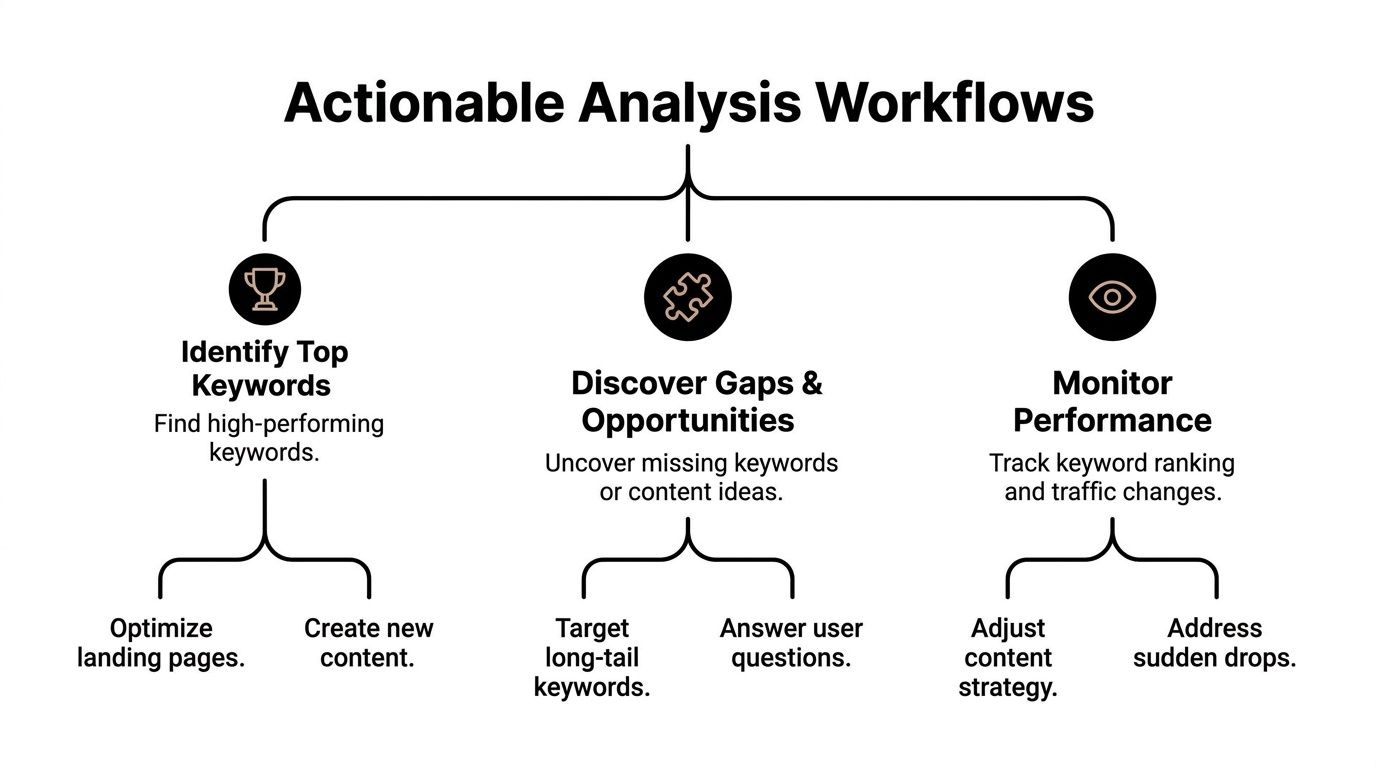
Workflow one for content gap detection
Start with organic query visibility from Search Console. Look for terms that get impressions but aren't earning the click response you want.
Then ask a simple question: does the current page deserve to rank for that query, or is Google testing your site because it can't find a better fit?
Use this pattern:
- High impressions, weak clicks: Review title tags and meta copy first.
- Relevant query, wrong page: Build or revise a page that better matches the intent.
- Several similar queries, scattered pages: Consolidate the topic into one stronger asset.
If you want inspiration for turning raw queries into practical themes, this example of expert keyword research for digital marketers is a useful planning reference.
Workflow two for landing page mismatch checks
This one saves a lot of wasted effort.
Take a page that attracts search traffic. Then compare the query intent with what the page delivers. The mismatch usually shows up in one of three ways:
| Signal | Likely issue | Typical fix |
|---|---|---|
| Users land and leave quickly | The page doesn't answer the query well | Rewrite the intro, structure, or offer |
| Users search internally right away | The page didn't surface the next step | Add clearer navigation or missing details |
| Conversions lag despite relevant traffic | The page satisfies curiosity, not action | Improve CTA fit and funnel progression |
You don't need a giant audit for this. Pick a handful of landing pages with meaningful search traffic and review them manually. That's often enough to find broken intent matching.
A page can rank for the right phrase and still lose the visitor because the page answers a slightly different question.
Workflow three for PPC search term mining
Here, SEO and PPC teams can help each other instead of working in separate silos.
Mine paid search terms and look for two buckets:
- Winners worth promoting
- Junk terms worth blocking
Winners often become:
- exact match candidates
- new ad group ideas
- future SEO content topics
- stronger landing page angles
Junk terms often become:
- negative keywords
- excluded themes
- ad copy warnings
- audience refinements
What makes this workflow valuable is the overlap. Paid search terms show live commercial language. Internal site search reveals what people still need after landing. Organic queries show where Google already associates your site with that topic. Put those three together and patterns become obvious much faster.
Beyond GA4 Tools to Accelerate Your Insights
A familiar scenario plays out after the reporting is done. GA4 points to the landing pages that matter. Search Console shows the queries behind organic demand. Google Ads exposes paid search terms. Then the actual work starts, and that is usually where time gets burned.
For PPC teams, the bottleneck is rarely finding a promising query. The bottleneck is turning that query into action without drowning in exports, filters, naming cleanups, match type decisions, and negative keyword lists that live in three different spreadsheets.
That is where specialized tools justify their cost. GA4 gives visibility. Search Console adds organic query context. A dedicated workflow tool handles the operational layer that native Google products leave to the analyst.
The trade-off is straightforward. Native reporting is reliable and free, but it stops short of execution. Third-party tools add speed, organization, and workflow control, especially once the account has enough search term volume that manual review becomes expensive.
In practice, the useful tools are the ones that help with tasks like these:
- Search term triage: Sort obvious junk from terms worth keeping
- Negative keyword workflows: Turn review decisions into shared lists faster
- Match type handling: Apply exact, phrase, or broad logic without spreadsheet cleanup
- Campaign buildout: Move strong search terms into new ad groups or campaigns with less rework
- Team consistency: Keep naming, exclusions, and promotion rules aligned across accounts
This matters more when you combine all three keyword sources discussed earlier. Organic queries show how Google already connects your site to a topic. Paid search terms show commercial language that converts or wastes spend. Internal site search shows what visitors still want after they land. The analysis gets better when those signals are reviewed together, but the admin load also increases.
I have found that small accounts can survive on manual exports for a while. Larger accounts usually cannot. Once search term reviews become a recurring operational chore, speed starts to affect account quality. Good terms sit too long before promotion. Bad terms keep spending because nobody has cleaned them up yet.
Keyword work gets expensive when the insight is clear but the implementation is slow. If you want a faster way to clean search terms, build negatives, expand winning queries, and manage match types inside a workflow built for Google Ads teams, try Keywordme.
.svg)