
How to Stop Google Ads Showing for Wrong Searches
How to Stop Google Ads Showing for Wrong Searches


You open the Search Terms report expecting a few odd matches. Instead, you find clicks from people looking for free tools, jobs, random research queries, and searches that were never going to turn into revenue. That's the moment most advertisers realize the problem isn't just “Google being a bit loose.” It's budget leakage.
If you're trying to figure out how to stop google ads showing for wrong searches, the fix isn't one checkbox or one negative keyword list. It's a system. You need to diagnose where the junk is coming from, block it fast, tighten campaign structure, and stop relying on defaults that favor reach over relevance.
Why Your Ads Are Wasting Money on Irrelevant Searches
A lot of advertisers assume wrong-search traffic is a minor annoyance. It isn't. It's one of the fastest ways to wreck campaign efficiency while making the account look busy.

The hard truth is that Google Ads will happily spend your money on “related” intent unless you force tighter control. That's why negative keywords can reduce wasted ad spend by up to 40%, and a 2023 WordStream analysis found that advertisers who actively managed negative keywords saw an average 32% drop in CPC and a 28% increase in conversion rates by cutting irrelevant traffic, according to this breakdown of irrelevant searches in Google Ads.
Why this happens in the first place
Google's matching logic is built to expand. That can help when you want discovery. It's terrible when you need control.
Most wasted spend comes from a few familiar sources:
- Loose keyword matching: Broad targeting gives Google too much room to interpret intent.
- Weak negative keyword hygiene: Teams add negatives occasionally, but not consistently enough to stop repeat waste.
- Bad account structure: Mixed intent inside one campaign makes junk harder to isolate.
- Default settings: If you leave networks and matching untouched, you're giving the platform permission to cast a wide net.
What wrong searches actually do to your account
Irrelevant clicks don't just waste spend. They muddy every signal you use to optimize.
They inflate click volume, drag down conversion rate, confuse bidding systems, and make good keywords look worse than they are. Then teams react the wrong way. They pause terms that aren't the problem, rewrite ads that were fine, or blame the landing page when the underlying issue was traffic quality.
Practical rule: If search intent is wrong, every downstream metric becomes less trustworthy.
That's why the right mindset is simple. Don't treat junk traffic as normal background noise. Treat it as a performance issue that needs a repeatable process.
Mastering the Search Terms Report to Find Junk Traffic
The Search Terms report is where the account stops hiding from you. Keywords tell you what you asked Google to target. Search terms tell you what people typed before your ad showed.
Start there.

Where to find it and what to look at first
In Google Ads, go to Keywords > Search Terms. If you work in a messy account, don't scan everything at once. Narrow the view.
My preferred order is:
- Sort by cost so the expensive mistakes show up first.
- Add conversions and cost per conversion columns if they're not visible.
- Filter for zero conversions or low-quality terms that have already spent enough to matter.
- Scan by theme, not just one-off terms.
You're not hunting for a single bad query. You're looking for patterns.
A B2B SaaS account might uncover junk like:
- Free
- Template
- Course
- Jobs
- Definition
An ecommerce account might find:
- Manual
- Repair
- Second hand
- Amazon
- How to make
A local service business often sees:
- Salary
- Training
- DIY
- Near [wrong city]
- Customer service
Read intent, not just words
Some bad search terms are obvious. Others look close enough to fool rushed account managers.
“Accounting software for students” might contain your keyword, but if you sell enterprise finance software, it's not a lead. “Emergency plumber job openings” might trigger for a plumbing company, but it's a hiring query, not a service request.
That's the skill. You're not filtering grammar. You're filtering intent.
The Search Terms report is less about what matched and more about why Google thought it was close enough.
If you want a deeper walk-through of the interface and filtering workflow, Keywordme has a useful guide to the Google Ads Search Terms report.
Build a junk traffic review habit
Don't just scroll and react. Use a simple review frame:
- High spend, no value: These terms get reviewed first.
- Repeat themes: If you see the same kind of bad query over and over, that points to structural targeting issues.
- Edge cases: Terms that look relevant on the surface but don't fit your offer.
- Source clusters: If bad terms come from a single ad group or campaign, the problem may be match type or campaign design.
A quick visual walk-through helps if you're training a team member or auditing a client account:
What not to do
A few mistakes show up constantly:
- Don't review only by clicks: Cost matters more than curiosity.
- Don't ignore low-volume junk: Small leaks add up when the pattern repeats.
- Don't make decisions in a rush: A term can be non-converting today and still relevant. Intent comes first.
- Don't stop at adding one negative: If five junk terms share the same root issue, solve the root issue.
Good account managers don't rely on guesses here. They work the report until irrelevant intent becomes visible in clusters.
Using Negative Keywords to Block Unwanted Clicks
Negative keywords are where you stop complaining about bad traffic and shut the door on it.
Used well, they don't just remove a few annoying searches. They create account-wide protection. Used badly, they either do nothing or block traffic you wanted.
According to this practitioner methodology on search term cleanup and match control, experienced teams start campaigns on phrase or exact match, pull irrelevant queries from the Search Terms report every 24–48 hours, and centralize them into account-level negative lists. That process can reduce irrelevant spend by 25–40% within 60 days.
Campaign-level versus account-level negatives
Structure is vital here.
Campaign-level negatives are for context-specific exclusions. Use them when one campaign should block a term but another campaign may still need it. A classic example is blocking “cheap” from a premium service campaign while allowing it in a budget-focused product line.
Account-level negative lists are for recurring junk. Terms like jobs, free, careers, training, meaning, and support often belong here if they're universally irrelevant to your business.
If you keep adding the same bad terms in random places, the account becomes impossible to maintain.
Add one-off negatives when needed. Build shared lists when the pattern is permanent.
Negative Keyword Match Types Explained
| Match Type | Syntax | What It Blocks | When to Use It |
|---|---|---|---|
| Broad | free | Searches containing that term in any order, depending on query context | Use for obvious junk themes that are never valuable |
| Phrase | "free trial" | Searches containing that phrase | Use when the unwanted meaning depends on the phrase, not one word alone |
| Exact | [crm jobs] | That specific query and very close variants | Use when a single search is bad, but the root words may still matter elsewhere |
The safest way to apply negatives
Most accounts should start narrower than they think.
For example, if you sell premium software:
- Add "free trial" as a phrase negative if trial-seekers are unqualified
- Add jobs as a broad negative if employment intent is always irrelevant
- Add [software engineer salary] as an exact negative if that single query slipped through
That approach gives you control without overblocking.
Here's the mistake I see all the time. Someone spots a bad term with a useful root word, gets annoyed, and adds a broad negative too aggressively. That can choke off valid long-tail searches later.
A cleaner workflow looks like this:
- Start with phrase negatives for high-volume junk themes
- Use exact negatives for isolated bad searches
- Reserve broad negatives for words that are consistently useless across the account
- Move repeat exclusions into shared lists so new campaigns inherit the protection
If you want examples of list-building and negative match handling, this guide on Google Ads negative keywords is worth keeping handy.
Proactive Campaign Fixes to Prevent Wrong Searches
Negative keywords are reactive by nature. They deal with what already slipped through. If you want fewer wrong searches in the first place, the account structure has to stop inviting them.
That starts with broad match.
According to this review of match type waste and network settings, Google's broad match keyword type causes ads to appear for 70-80% more irrelevant searches than phrase or exact match, and the share of budget wasted without intervention moved from 35% before 2021 to 52% after the update.

Fix your match types before you fix your bids
A lot of advertisers try to solve relevance issues with bidding strategy. That's backwards. If the keyword targeting is loose, bidding just helps you pay for bad clicks more efficiently.
A practical reset looks like this:
- Use exact match for high-intent commercial terms
- Use phrase match when you need controlled expansion
- Stop launching new campaigns on broad match unless you have a clear reason and tight monitoring
- Separate keyword themes by intent so negative logic stays clean
Broad match has its place in mature accounts with strong data and active oversight. It is not a safe default for advertisers trying to clean up irrelevant search traffic.
Check the network settings Google wants you to ignore
You also need to review campaign settings under Campaigns > Settings > Networks.
Two boxes deserve scrutiny:
- Search Partners
- Display Network
Both can widen reach beyond the traffic quality you want. If your goal is to stop Google Ads showing for wrong searches, these settings matter because they can introduce placements and query quality you didn't intend to buy.
If you want a straightforward companion checklist for these settings, this guide on how to stop wasting money on Google Ads covers the right areas to review.
A cleaner build from day one
The strongest campaigns usually follow a simple rule set:
- Build around tight keyword clusters.
- Keep ad copy aligned with specific intent.
- Match landing pages to that same intent.
- Exclude network settings you haven't explicitly chosen to test.
- Let search term data earn broader expansion, not the other way around.
Google's defaults are designed to maximize exposure. Advertisers need to decide whether that exposure is worth paying for. In many accounts, it isn't.
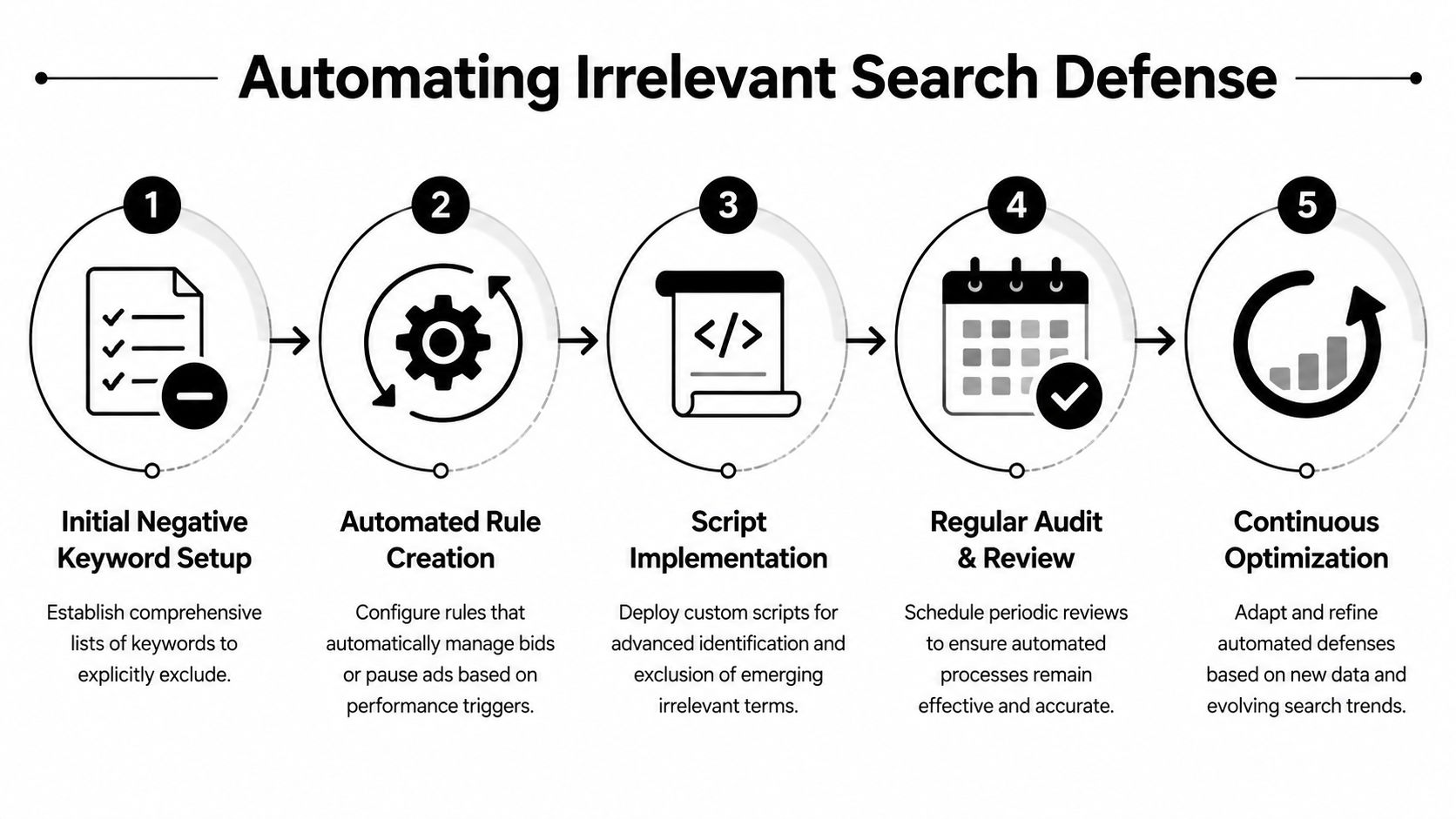
Automating Your Defense Against Irrelevant Searches
Manual search term reviews work. They just don't scale well.
If you manage one small account, daily cleanup is annoying but doable. If you run multiple campaigns across clients, regions, or product lines, that same task becomes repetitive, slow, and easy to neglect. That's when junk traffic starts creeping back in.
What native automation can handle
Google Ads gives you a few ways to reduce manual work:
- Automated Rules: Useful for flagging spend thresholds, pausing weak assets, or triggering alerts.
- Saved filters: Good for surfacing zero-conversion queries or recurring junk themes faster.
- Shared negative lists: Essential if you want one update to protect multiple campaigns at once.
These are solid building blocks. They help with visibility and consistency. They do not fully solve the problem.
Why automation got harder with AI-driven matching
The job changed when Smart Bidding and Performance Max became more aggressive with query expansion.
According to this analysis of hidden search term workarounds and AI-driven expansion, post-August 2024 updates to Smart Bidding and Performance Max led to a 35-50% increase in broad match expansions causing wrong searches, even as advertisers tried to rely on traditional match type and negative controls.
That matters because it breaks the old assumption that “I already tightened match types, so I'm safe.” You might not be.
Basic automation handles repetitive tasks. It doesn't always handle AI interpretation.
Where dedicated workflow tools fit
Purpose-built tooling starts to make sense in this context. A tool that works directly with search term cleanup, match assignment, and negative list handling removes a lot of copy-paste friction that Google Ads still leaves on the user.
For teams that want less manual formatting and faster cleanup, automatically adding negative keywords is one of the few workflows worth tightening early. Keywordme fits into that layer by letting users work from search term data, apply negative match types, and handle bulk actions without bouncing between spreadsheets and the Google Ads interface.
That's useful because good automation in PPC isn't about replacing judgment. It's about removing repetitive admin so you can spend more time deciding what should be blocked, segmented, or expanded.
Building a Routine for Lasting Ad Spend Efficiency
A bad search query blocked once is a fix. The same bad query blocked every week is a process.
That distinction matters. Accounts usually do not bleed budget because nobody knows negative keywords exist. They bleed budget because cleanup depends on memory, spare time, and whoever noticed the problem last. Once volume picks up, that approach breaks fast.
The accounts that stay efficient run on a set operating rhythm.
Daily and weekly habits that keep waste down
For active accounts, use a cadence tied to risk:
- Daily checks for volatile campaigns: Review fresh search terms in campaigns using automated bidding, broad match, or newer AI-heavy campaign types where query expansion can drift quickly.
- Weekly negative keyword maintenance: Move recurring junk into shared lists so one fix protects more than one campaign.
- Weekly settings review: Check network and placement settings when spend rises but lead quality does not.
- Monthly structure review: Rework ad groups, match types, and campaign boundaries when the same irrelevant themes keep appearing.
Routine beats intensity here. A three-hour cleanup once a month usually misses the spend leak that could have been stopped in ten minutes on Tuesday.
It also helps to widen the definition of "wrong searches." Search term waste does not always come from query matching alone. By 2025, it's projected that a meaningful share of irrelevant impressions will come from non-Google search partners and CTV placements, and analysts discussing partner and CTV leakage point to IP exclusions and content suitability filters as useful controls in some accounts, as noted in this discussion of partner and CTV leakage.
The routine that sticks
The routine has to be easy enough to repeat under pressure. If it requires exports, spreadsheet cleanup, manual formatting, and a dozen small decisions inside Google Ads, it gets skipped.
A workable system looks like this:
- Review search terms on a fixed schedule.
- Decide whether each term should be blocked, isolated, or allowed.
- Apply the right negative match type, not the fastest one.
- Push recurring exclusions into shared lists.
- Fix structural causes, not just the visible query.
- Use automation for bulk maintenance so the team can spend time on judgment.
Clean Google Ads accounts stay clean because someone maintains the rules every week.
That last point is where many teams stall. Manual cleanup does not scale well once broad match, Smart Bidding, and AI-led expansion start introducing more edge-case queries. Keywordme helps turn that work into a repeatable workflow by handling search term review, negative keyword application, and bulk actions without the usual copy-paste admin.
That is how spend efficiency lasts. Treat relevance control as part of campaign operations, not a rescue task after costs spike.
Keywordme helps turn search term cleanup into a repeatable workflow instead of a spreadsheet chore. If you want a faster way to build negative keyword lists, apply match types, and clean up junk traffic directly from your Google Ads workflow, take a look at Keywordme.
.svg)