
How to Find Negative Keywords: Boost ROI & Cut Ad Spend
How to Find Negative Keywords: Boost ROI & Cut Ad Spend


If you want to find negative keywords, the best place to start is your Google Ads Search Terms Report. It's a goldmine for spotting irrelevant queries that are eating your budget. You should also get ahead of the game by proactively brainstorming terms that scream "not a customer"—think words like jobs, free, DIY, or reviews. This two-pronged attack is the quickest way to stop wasting money and get your ads in front of people who are actually ready to buy.
Why Negative Keywords Are Your Secret Weapon for Higher ROI

Let’s be real—nobody wants to light money on fire. But that’s exactly what happens when you ignore negative keywords, one of the most powerful (and most overlooked) tools in your PPC toolkit. If you're serious about getting results from Google Ads, learning how to find and use negative keywords is non-negotiable.
This isn’t just about saving a few dollars. A well-tended negative keyword list is a strategic tool that sharpens your campaign's targeting, making sure your ads are only shown to people who are genuinely looking to make a purchase.
The Real Cost of Irrelevant Clicks
Think about it. If you sell premium "landscape design services," you absolutely do not want to pay for clicks from someone searching for "landscape design jobs" or "free landscape design software." The searcher’s intent is worlds away from what you offer, even though the query contains your core keyword.
These seemingly harmless searches are silent budget killers. They drain your ad spend, muddy your performance data, and make it nearly impossible to see what’s actually working.
I’ve seen it dozens of times: unchecked or outdated negative keyword lists can be responsible for up to 30% of wasted ad spend. That’s a massive, and completely preventable, leak in your marketing budget.
Digging into search term reports almost always uncovers hundreds of these junk clicks before a solid negative keyword strategy is in place. You can find more horror stories and insights on common Google Ads mistakes in detailed articles from places like Search Engine Land.
Common Categories of Wasted Ad Spend Keywords
To get you started, here’s a quick-reference table of the usual suspects. These are the types of terms you should almost always add as negatives to protect your budget from the get-go.
| Keyword Category | Example Terms | Reason to Exclude |
|---|---|---|
| Informational | how to, what is, tutorial, guide | These users are in research mode, not buying mode. |
| Employment | jobs, careers, salary, hiring, resume | Job seekers aren't customers. Don't pay for their clicks. |
| Free/DIY | free, torrent, download, DIY, homemade | These searchers are actively trying to avoid paying for a solution. |
| Academic/Student | college, university, research paper, study | Students and researchers are gathering info, not making purchases. |
| Reviews/Comparison | reviews, vs, comparison, alternative to | Unless you're a review site, these users are still high in the funnel. |
This table isn't exhaustive, but it’s a fantastic starting point for building a foundational negative keyword list that immediately filters out the most common budget-wasters.
From Budget Saver to Conversion Booster
But the benefits don't stop at cutting waste. When you filter out all that unqualified traffic, you concentrate your budget on the people who matter most—your future customers.
This simple shift has a powerful ripple effect:
- Higher Click-Through Rates (CTR): Your ads are suddenly way more relevant to the people seeing them.
- Improved Conversion Rates: You’re spending your time (and money) on users actively seeking your solution.
- Better Quality Scores: Google’s algorithm loves relevance and often rewards it with a lower cost-per-click.
It all funnels down to a much healthier return on investment (ROI). Truly effective PPC advertising campaign management is where a sharp negative keyword strategy shines brightest, helping turn your ad campaigns from a cost center into a reliable revenue driver.
Mining Your Search Terms Report for Hidden Gems
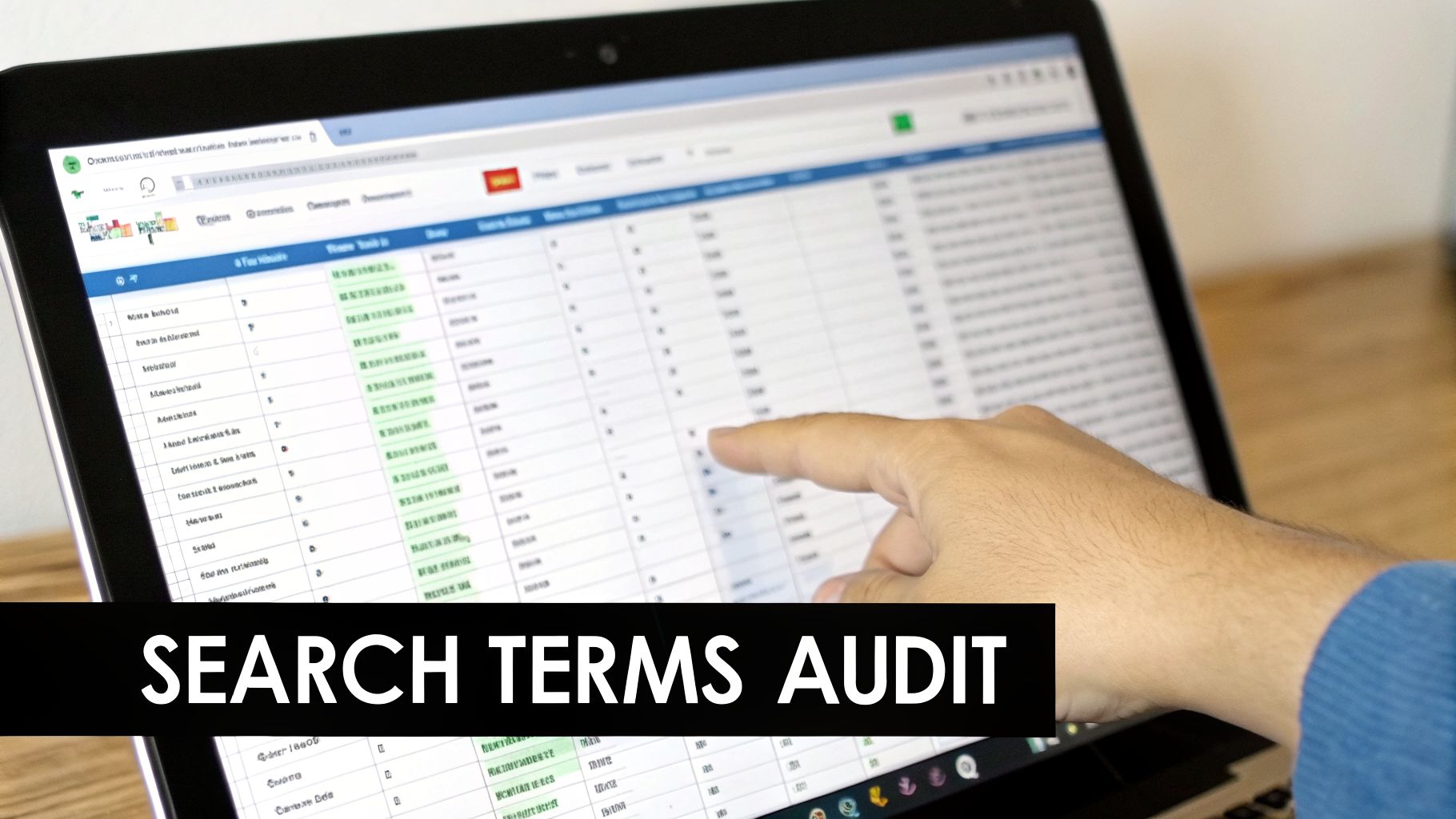
If there’s one place to strike gold when hunting for negative keywords, it’s your Google Ads Search Terms Report. This isn’t a guess—it's the raw, unfiltered list of what people actually typed into Google right before they clicked your ad.
Think of it as a direct line to your audience. It tells you what’s hitting the mark and, more importantly, what’s just burning through your budget.
But let's be real. Opening a spreadsheet with thousands of search terms is a headache. The trick isn't just to spot the obvious junk like "free" or "jobs." The real skill is finding the subtle mismatches in user intent that quietly bleed your account dry. This is where you graduate from just managing an account to truly optimizing it.
Sorting the Signal from the Noise
First things first, find the low-hanging fruit. Filter your report to show queries that got clicks but had zero conversions. These are the terms you paid for that gave you absolutely nothing in return. Sort that list by cost, from highest to lowest, to see which queries are doing the most damage.
Now, you have to put on your detective hat and analyze the intent behind each term. I always ask myself one simple question: "Was this person ever really going to buy from me?" Getting this right is what separates the average PPC managers from the great ones.
Here's something I've learned over the years: a keyword match is not an intent match. Your ad for "premium leather sofas" showing up for a search like "how to repair leather sofa tear" is a classic example of this expensive mistake.
Learning to spot buying intent is a skill in itself. For example, knowing how to find Amazon keywords that actually drive profit requires the same kind of thinking—you have to separate the shoppers from the researchers. You’ll want to bring that exact same mindset to your Google Ads report.
If you want to get more comfortable with this process, our guide to mastering the Google Ads Search Terms Report is a great place to start.
Speeding Up the Audit Process
Manually digging through thousands of search terms is brutally tedious. It’s the kind of task that’s easy to put off, but while you do, your ad spend keeps leaking. This is where a specialized tool can make a world of difference.
Tools like Keywordme, for instance, connect right to your Google Ads account and handle the heavy lifting for you. Instead of drowning in a spreadsheet for hours, you get a clean, organized breakdown of your search terms, making it incredibly fast to spot and block the irrelevant ones.
As you can see, this kind of setup transforms a manual, error-prone task into a simple, one-click job. You can flag dozens of bad terms and add them to your negative lists in a matter of seconds, not hours. It frees you up to think about bigger-picture strategy instead of getting bogged down in busywork.
Get Ahead of the Game: Find Negative Keywords Before You Launch
Why on earth would you wait to waste money? Seriously. The best PPC pros I know don't. While digging through search term reports is a must for keeping your campaigns healthy, the real power move is building a rock-solid negative keyword list before your campaign spends its first cent.
Shifting your mindset from reactive to proactive is one of the quickest ways to improve a new campaign’s performance right out of the gate. You're basically stopping budget leaks before they can even start.
Think Like an Anti-Customer
First things first, grab your main keywords and put on your "anti-customer" hat. For every keyword you want to target, start brainstorming all the ways someone could search for it with the completely wrong intention.
Let's say you're selling "CRM software for small business." What searches would make you cringe if you paid for the click?
- The Freebie Hunters: "free CRM software"
- The Job Seekers: "CRM software developer jobs"
- The DIY Crowd: "how to build a CRM in excel"
- The Tire Kickers: "CRM software reviews"
Just like that, you have a starting list of modifiers like "free," "jobs," "how to," and "reviews" to add as broad or phrase match negatives. Think about any term that signals someone is just looking for information, a job, or a freebie.
One of the most powerful assets you can build is a "universal" negative keyword list. This is your master list of terms you never want to show up for, no matter the campaign. It’s your first line of defense against the most common, budget-sucking clicks.
Build Your Universal Negative List
This universal list should be one of the very first things you create in a new Google Ads account. You can apply it at the account level, and boom—every new campaign you launch is automatically protected. It’s a set-it-and-forget-it (mostly) strategy.
Here are the non-negotiable categories I always include in my universal lists:
- Employment: jobs, careers, salary, hiring, resume, internship
- Academic: school, university, class, textbook, study, assignment
- Informational: what is, how to, define, example, tutorial, guide
- Branded (but not for you): logo, images, pictures, about us, investor relations
- Wrong Locations: If you only serve New York, add other states and major cities you don't serve.
Building this is simple. Just open a text file and start hammering out every term you can think of that screams "not a customer." You’ll add to this list over time, but starting with a solid 50-100 terms makes a world of difference.
Speed Things Up with the Right Tools
Brainstorming is a great start, but let's be honest—you can't possibly think of every weird variation people will search for. This is where you bring in the machines to do the heavy lifting for you, turning your good list into a truly comprehensive one.
Tools like Keywordme were built for exactly this. Instead of relying on your own imagination, you can feed it your core keywords and let the software generate massive lists of potential negatives. It's already analyzed common search patterns and will spit out hundreds of suggestions you'd never have thought of.
This takes the grunt work out of building a bulletproof list, protecting you from a much wider range of irrelevant searches from day one. It lets you get back to focusing on the strategy, not the tedious manual work.
Building and Scaling Your Negative Keyword Lists
Finding a few negative keywords is one thing. Actually managing them as your account scales? That's a whole different ballgame. A messy, disorganized list of negatives just won't cut it long-term. To truly stop wasting ad spend, you need a system.
This is where we go from just finding bad keywords to building a structured, powerful defense for your budget. The goal is to create lists that are simple to manage, easy to update, and can be rolled out across your entire account without a headache.
Matching Your Match Types
Just like your bidding keywords, negative keywords have match types. Picking the right one is absolutely critical. Get it wrong, and you'll either let junk traffic slip through the cracks or—even worse—block valuable long-tail searches that could have converted.
- Negative Broad Match: Be extremely careful with this one. If you add
freeas a broad match negative, any search containing that word gets blocked. While it’s great for universal negatives, it can backfire. Think about a term like "tax-free savings account"—you'd accidentally block a perfectly good query. - Negative Phrase Match: This is your workhorse. It blocks searches that include your exact negative phrase, in that specific order. For example, adding
"for sale"as a negative will block "used boats for sale," but it won't block "sale on used boats." It gives you control without being overly restrictive. - Negative Exact Match: This is your surgical tool. It only blocks searches that are an exact match to your negative keyword, with no other words. Use this to weed out specific, low-performing queries you've identified, without touching any similar variations.
When you're building your lists from scratch, a good process can make all the difference.
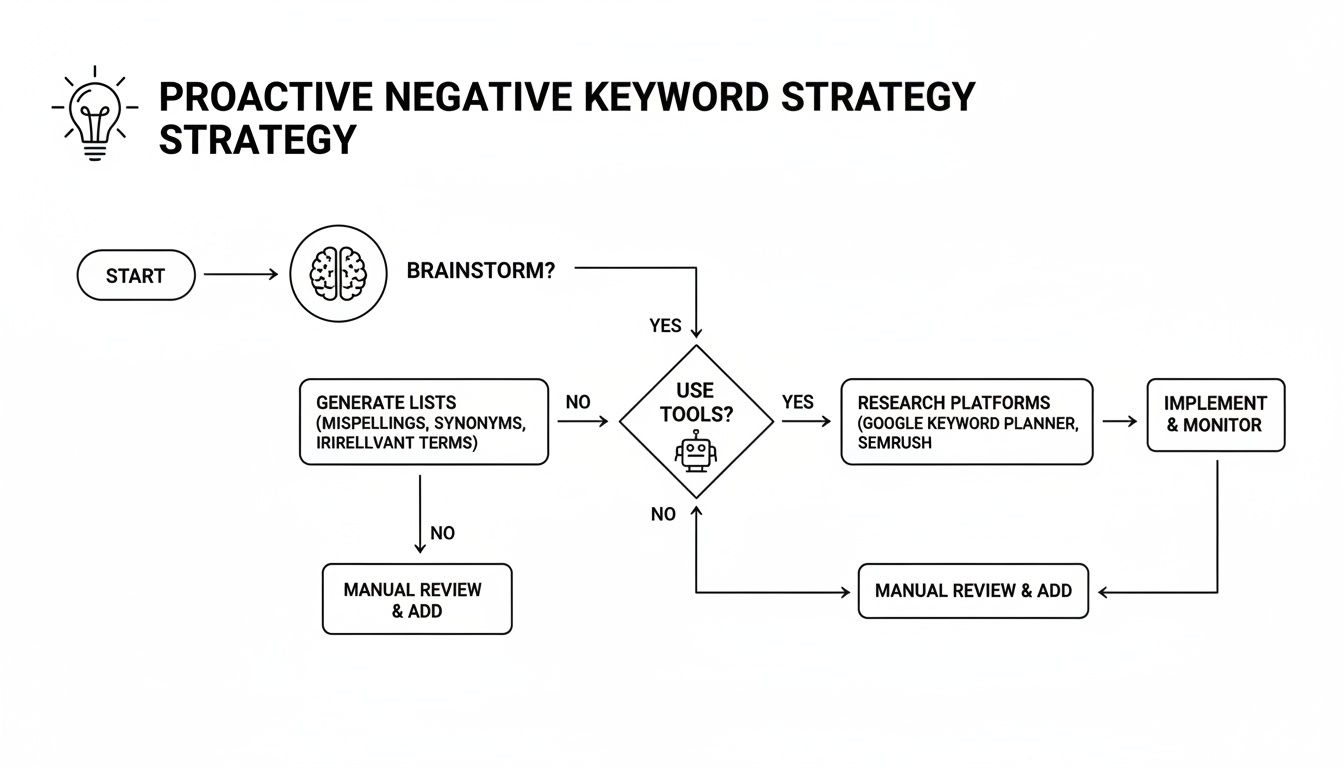
This flowchart lays out a solid path from brainstorming initial ideas to using tools and research. It's a great framework to follow as you build out your first set of negative lists.
Where to Put Your Negatives
Once you find a negative, you have to decide where it goes. Google Ads gives you a few different levels of control, and using them properly is the secret to efficient management.
The bigger your account gets, the more structure matters. A well-organized negative keyword strategy is what separates a clean, high-ROI account from a chaotic, money-wasting one.
- Account Level: This is home base for your "universal" negatives. These are the terms that will never be good for your business, no matter the campaign. Think jobs, free, pictures, or how to. Block them once at the account level and you're done.
- Campaign Level: This is perfect for when you have campaigns with different goals or product tiers. You might add "cheap" as a negative to your "premium services" campaign, but you'd want to allow it in your "budget options" campaign.
- Ad Group Level: Get super specific here. For instance, if you have an ad group for "red running shoes" but you've run out of a specific brand like Nike, you can add
nikeas a negative to just that ad group. This keeps you from paying for clicks you can't fulfill.
The scale of negative keyword management has exploded. In well-optimized Google Ads accounts, it's now common to see anywhere from 5,000 to 30,000 negative keywords. This shift was kicked into high gear when Google increased the Performance Max campaign negative limit from just 100 to 10,000 in March 2025.
If you’re ready to really dig in and organize your strategy, our guide on how to build a master negative keyword list has even more detailed tips to get you started.
Common Mistakes to Avoid When Adding Negatives
Adding negative keywords can feel like a game-changer for your ad account. But, it's a double-edged sword. It’s surprisingly easy to make a wrong move and accidentally cut off a stream of valuable traffic.
Knowing the common pitfalls is half the battle. Once you understand what not to do, you can start cleaning up your search terms with confidence, knowing you're helping, not hurting, your performance. It's all about finding that smart balance.
Being Too Aggressive with Broad Match
This is, without a doubt, the classic blunder I see all the time. In a rush to stop wasting money, people add a common word as a broad match negative. A few days later, they're wondering where all their leads went.
Let's say you sell high-end furniture and you see search terms like "free furniture pickup." Your first instinct might be to add free as a broad match negative. But what happens when a perfect customer searches for "sofas with free delivery and installation"? You just blocked them.
The rule of thumb here is pretty simple: be incredibly careful with broad match negatives. Only use them for words that have zero chance of ever being part of a good search, like "jobs," "torrent," or "pictures." For everything else, stick to phrase or exact match to be more surgical.
Going too heavy on broad match is the fastest way to tank your traffic. You'll log in one morning and see your impressions have fallen off a cliff. More often than not, a single, overly aggressive broad match negative is the culprit.
The 'Set It and Forget It' Mentality
Your negative keyword lists are not a "one and done" task. You can't just build a list, upload it, and walk away forever. The way people search is constantly evolving, which means new, irrelevant queries will always be popping up in your reports.
A list that was perfect six months ago is likely leaking budget today. You need to perform regular check-ups to keep your campaigns running lean. Think of it like weeding a garden—you have to do it consistently, or the weeds will take over and choke out your valuable plants.
This is where a simple routine becomes your best friend. I recommend setting aside time every single week to scan your search term reports, especially for newer campaigns. This consistent maintenance is key. If you're juggling a lot of campaigns, understanding the common mistakes in negative keyword management will save you a ton of headaches.
Neglecting Negative Keyword Conflicts
Here’s a sneaky one that’s easy to miss. A negative keyword conflict is when a negative keyword you’ve added accidentally blocks one of the keywords you're actually bidding on.
Imagine this scenario:
- Your Keyword:
“blue running shoes”(a phrase match keyword you want to show up for) - Your Negative:
running(added as a broad match negative)
Your broad match negative running will completely prevent your ad from showing for your target keyword "blue running shoes." You’re essentially telling Google, "Show my ad for this," and "Never show my ad for this," at the same time.
While Google Ads will often flag these conflicts, they can easily get lost in the noise of a large account. You'll be left scratching your head, wondering why a certain ad group is a ghost town. Always double-check that your new negatives don't clash with the keywords you actually want. It's a simple step that prevents you from fighting a battle against yourself.
Got Questions About Negative Keywords? We’ve Got Answers.
Even after you've got a solid strategy down, a few practical questions always seem to surface when you're in the trenches managing your campaigns. It's totally normal. Let's tackle some of the most common ones I hear so you can stop second-guessing and start managing your negatives with confidence.
Getting these right will help you sidestep some expensive, but very common, mistakes.
How Often Should I Be Looking for New Negative Keywords?
Ah, the million-dollar question. The honest answer is: it depends. The right rhythm really hinges on how old and how busy your campaigns are. There's no single magic number, but here’s a good rule of thumb that's served my clients well.
Brand new campaigns: For the first week, you need to be in that search terms report daily. It feels intense, but this is your chance to immediately chop out the most obvious budget-draining terms before they do any real harm.
Established campaigns: Once things have settled a bit, a weekly check-in is a great routine. This is frequent enough to spot and react to new search trends without driving yourself crazy.
Mature, stable campaigns: For those old, reliable campaigns, you can usually relax a bit and check in every two to four weeks.
But here's the real pro tip: if you ever see a sudden performance drop or a weird spike in costs, forget the schedule. Your search terms report should always be your first stop.
What’s the Difference Between Campaign and Account Level Negatives?
Getting your head around where to put your negatives is crucial for keeping your account tidy and effective. Think of it like a hierarchy.
An account-level negative keyword list is your "master list." It applies to every single Search and Shopping campaign in your Google Ads account. This is the perfect home for your universal "never-show" words—terms you never want to pay for, no matter the campaign. Think words like "jobs," "free," "resume," or "pictures."
A campaign-level negative list, just like the name says, only affects one specific campaign. This is incredibly powerful when you're running campaigns with different goals. For example, you might add "cheap" as a negative in your "Luxury Leather Handbags" campaign, but you'd definitely want to allow it in your "Discount Accessories" campaign.
Can I Add Too Many Negative Keywords?
Yes. Absolutely. But probably not in the way you're thinking.
While Google Ads has a technical limit of 10,000 keywords per list, you’ll likely never hit it. The real danger isn't the number—it's adding the wrong negatives. It is very possible to have too many bad negative keywords that are actually hurting your performance.
The goal is surgical precision, not sheer volume. A clean list of 100 well-researched phrase and exact match negatives will always outperform a bloated list of 1,000 lazy, broad-match ones that are secretly strangling your best traffic.
The most common trap is overusing broad match negatives. You might add one irrelevant term, but in doing so, you could accidentally block dozens of valuable, long-tail searches you never even knew you were getting. Quality always trumps quantity here.
Ready to stop guessing and make optimization easy? Keywordme turns the headache of finding negative keywords into a simple, one-click task. Clean up your junk traffic, find hidden opportunities, and get your valuable time back. Start your free trial at Keywordme.io and see what a difference it makes.
.svg)