
How to Expand Google Ads Campaign with New Keywords in 2026
How to Expand Google Ads Campaign with New Keywords in 2026


You're probably in the same spot most advertisers hit sooner or later. The campaign is stable, the easy keywords are already in place, and now growth feels harder than it should. You know there's more demand out there, but every time you add keywords too aggressively, query quality slips and the account starts bleeding budget.
That's the problem with learning how to expand Google Ads campaign with new keywords. Finding more terms isn't the hard part. Expanding without filling your search terms report with junk is the hard part.
Most beginner guides stop at “use keyword tools” and leave it there. In practice, expansion is an operating system. You mine search terms, sort intent, build structure, control match types, block waste, launch carefully, and only then think about scaling the workflow. That's how experienced PPC managers grow coverage without turning a clean account into a mess.
Uncover Hidden Gems in Your Search Terms Report
If you start expansion with outside tools before checking your own account data, you're skipping the most useful source you already have. Your Search terms report shows what people typed before your ads appeared. That makes it a better starting point than brainstorming because you're working from live behavior, not guesses.
Google Ads workflows commonly use the Search terms report to identify irrelevant queries and add them as negatives at the group, campaign, or account level. That matters because negative keywords are one of the main ways to broaden coverage safely without pulling in irrelevant traffic, as described in this practical walkthrough on improving Google Ads performance.

What to look for first
Don't scroll through the report randomly. Look for queries that signal one of these situations:
- Clear buying intent that isn't already a keyword in the ad group
- Repeat themes across multiple search terms that deserve their own ad group
- Irrelevant patterns that need to be blocked before you expand further
- Close variants that suggest your current match types are too tight or too loose
A search term becomes interesting when it tells you something new about demand. If several users keep searching a specific modifier, feature, service type, or use case, that's not noise. That's usually a market signal.
A practical review workflow
Use a simple pass-through process instead of trying to make every decision at once.
Pull the report by ad group
Start narrow. Expansion decisions make more sense when you look at search terms in the context of the ad group that triggered them.Tag queries by intent
Sort them into buckets like commercial, informational, competitor, support, or irrelevant. Intent sorting keeps you from shoving unlike terms into the same group.Promote only themes, not random one-offs
One weird but relevant query doesn't always deserve a keyword. A cluster of related queries usually does.Create negatives immediately
Don't keep a “maybe later” pile for obvious junk. If a query is wrong for the offer, block it now.
Practical rule: Promote repeatable intent into keywords. Block repeatable irrelevance with negatives.
That's the mindset new hires often miss. They treat the Search terms report like a discovery list only. It's really a discovery and cleanup system.
How to tell a hidden gem from a distraction
Here's a fast way to judge what you're seeing:
| Query type | What it usually means | Action |
|---|---|---|
| Specific service or product modifier | Strong candidate for expansion | Add as a keyword in a relevant ad group |
| Search with wrong intent | Wasted spend risk | Add as negative |
| Query that belongs to another offer | Structure problem | Move into a new ad group or campaign |
| Loose informational search | Mixed value | Watch carefully or exclude |
One of the best habits you can build is separating interesting from actionable. Plenty of search terms are interesting. Fewer deserve to become keywords.
If you want a deeper walkthrough on turning raw queries into new targets, this guide on finding new keywords from the search terms report is worth keeping in your process docs.
Go Beyond Your Data with Keyword Research Tools
Your own account data has limits. It only shows demand you've already touched. Once you've mined the obvious wins from search terms, you need outside discovery to find categories, modifiers, and use cases your campaigns haven't reached yet.
A lot of advertisers overcorrect. They dump large keyword exports straight into live campaigns and hope the algorithm sorts it out. That usually creates more work later. Research tools are useful, but they're best used as idea generators, not automatic approval engines.
When to use Keyword Planner
Google's own expansion workflow starts inside the platform. In Google Ads, advertisers can open Tools, then Keyword Planner, then Discover new keywords to generate ideas from seed terms. Google also introduced Dynamic Search Ads as another way to expand search coverage beyond manually added keywords, as described on Google's Keyword Planner page.
That combination matters because it gives you two very different discovery paths:
- Keyword Planner helps when you already know the market and want more seed-based ideas
- Dynamic Search Ads help when your landing pages cover demand that your keyword list still misses
Use Keyword Planner first when you need control. Use DSA when your site structure is strong and you want to uncover demand you didn't think to target manually.
Compare discovery methods before you add anything
Here's how I'd explain it to a new PPC specialist:
| Method | Best use case | Main trade-off |
|---|---|---|
| Search terms report | Expanding from proven account behavior | Limited to existing reach |
| Keyword Planner | Finding adjacent terms from seed ideas | Can surface broad ideas that need filtering |
| Dynamic Search Ads | Catching demand based on landing page content | Needs careful monitoring |
| Third-party keyword tools | Market mapping and competitor-style brainstorming | Can produce lots of irrelevant variations |
Third-party platforms still have a place. They're useful for market language, niche modifiers, and early-stage campaign planning. But they don't replace the judgment call you still need to make inside Google Ads.
Good research tools widen your view. They don't remove the need for filtering, grouping, and negative control.
If you're weighing native tools against outside platforms, this comparison of the best keyword tool for Google Ads helps frame where each one fits.
Don't confuse volume with opportunity
The trap here is simple. Bigger keyword lists feel productive. They often aren't.
A list of tightly related terms with obvious commercial intent is usually more useful than a giant export full of vague variants. Expansion works better when you're selective. Add keywords because they fit the offer, the landing page, and the campaign structure. Not because a tool suggested them.
That one decision saves a lot of cleanup later.
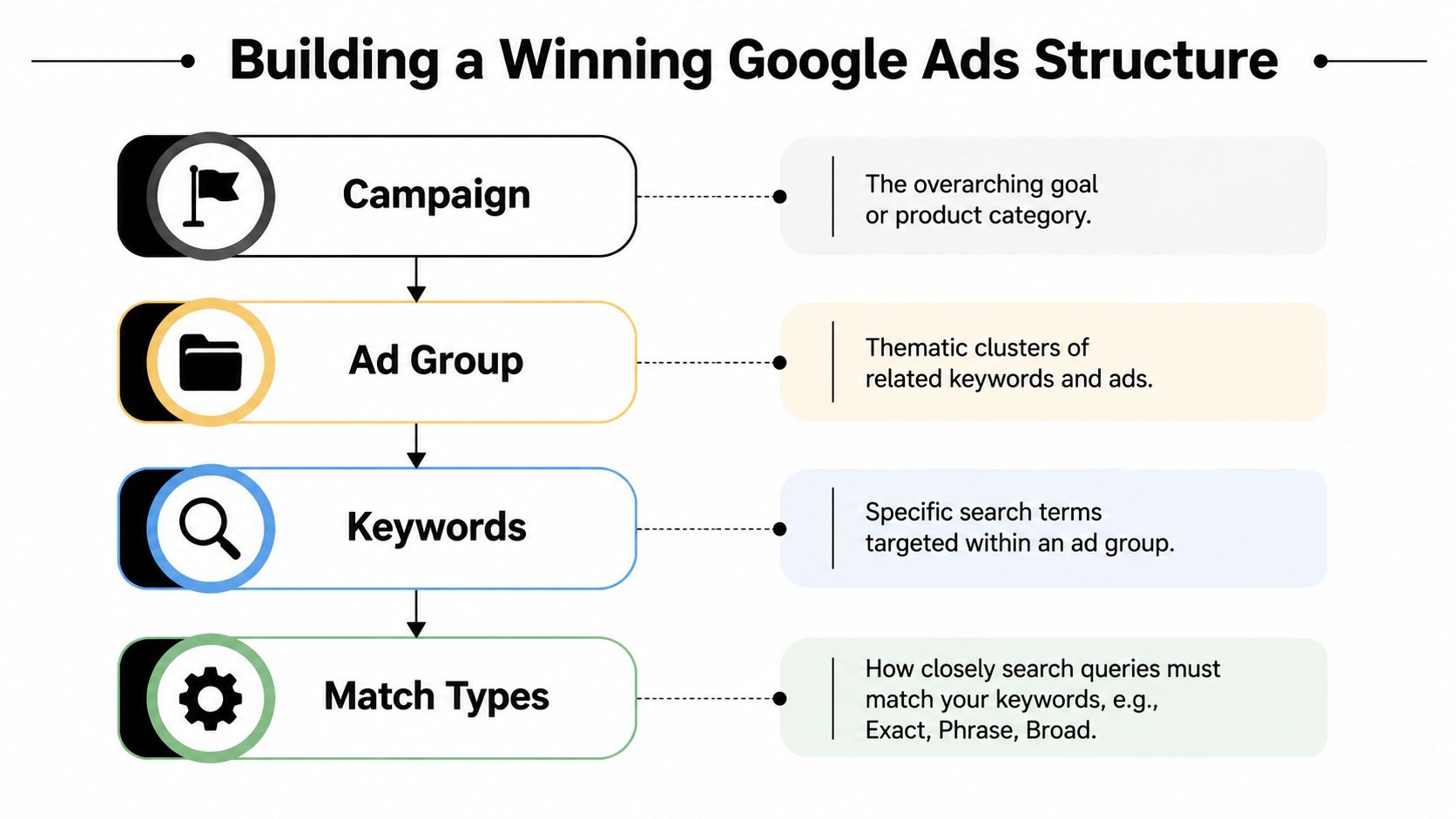
Build a Winning Structure with Ad Groups and Match Types
Most keyword expansion problems aren't research problems. They're structure problems. Teams find good terms, then dump them into broad ad groups with generic ads and wonder why performance gets muddy.
Google's campaign setup guidance is straightforward on this point. A practical workflow is to mine ideas, separate terms by intent, then add them into tightly themed ad groups with the right match types. Google also states that keywords are entered per ad group and that match types control which searches trigger ads, as outlined in Google Ads campaign setup guidance.
Group by intent, not by spreadsheet convenience
A tight ad group should reflect one clear theme. That usually means the same user intent, similar ad messaging, and the same landing page destination.
Here's the difference:
Messy grouping
One ad group contains brand terms, service modifiers, pricing intent, and research-style searches all mixed together.Tight grouping
One ad group targets a specific service angle, with ad copy and landing page language that match that angle.
Though it sounds basic, much wasted spend originates here. Loose groups make it harder to write relevant ads, harder to judge query quality, and harder to know which expansion move delivered results.
Themed ad groups vs SKAG thinking
You don't need to force every new keyword into a single-keyword ad group. That old habit still shows up in PPC circles, but it isn't always the cleanest way to scale.
A better rule is this:
- Use themed ad groups when several keywords share the same intent and can use the same ad copy
- Go narrower only when one keyword clearly deserves unique messaging or a dedicated landing page
The point isn't rigid purity. The point is relevance. If the searcher's intent changes, the ad group should change too.
For a deeper structural playbook, this guide on creating a tight ad group structure is a strong reference.
How to choose match types for new keywords
Expansion really takes shape with this. Match types decide how much freedom Google has when matching your keyword to a search.
A practical rollout usually looks like this:
| Match type | Best for | Risk level |
|---|---|---|
| Exact | High-confidence, high-intent terms | Lower query drift |
| Phrase | Controlled expansion around a core term | Moderate drift |
| Broad | Discovery and wider reach | Highest drift without tight monitoring |
If I'm expanding a mature campaign, I usually want new terms to earn their way into wider matching. That means starting with exact or phrase for the clearest commercial intent terms, then broadening only if the search terms report proves the traffic is useful.
Broad match isn't a shortcut to growth. It's a trade. You get more reach, and you accept more monitoring work.
A simple build standard for new additions
Before adding any new keyword, check these four items:
- Intent fit matches the ad group theme
- Ad copy fit is close enough that the keyword won't force vague messaging
- Landing page fit is obvious
- Match type fit reflects how much uncertainty you're willing to tolerate
If one of those breaks, don't add the keyword yet. Fix the structure first.
Good expansion isn't about packing more terms into the account. It's about giving each useful term the right home.
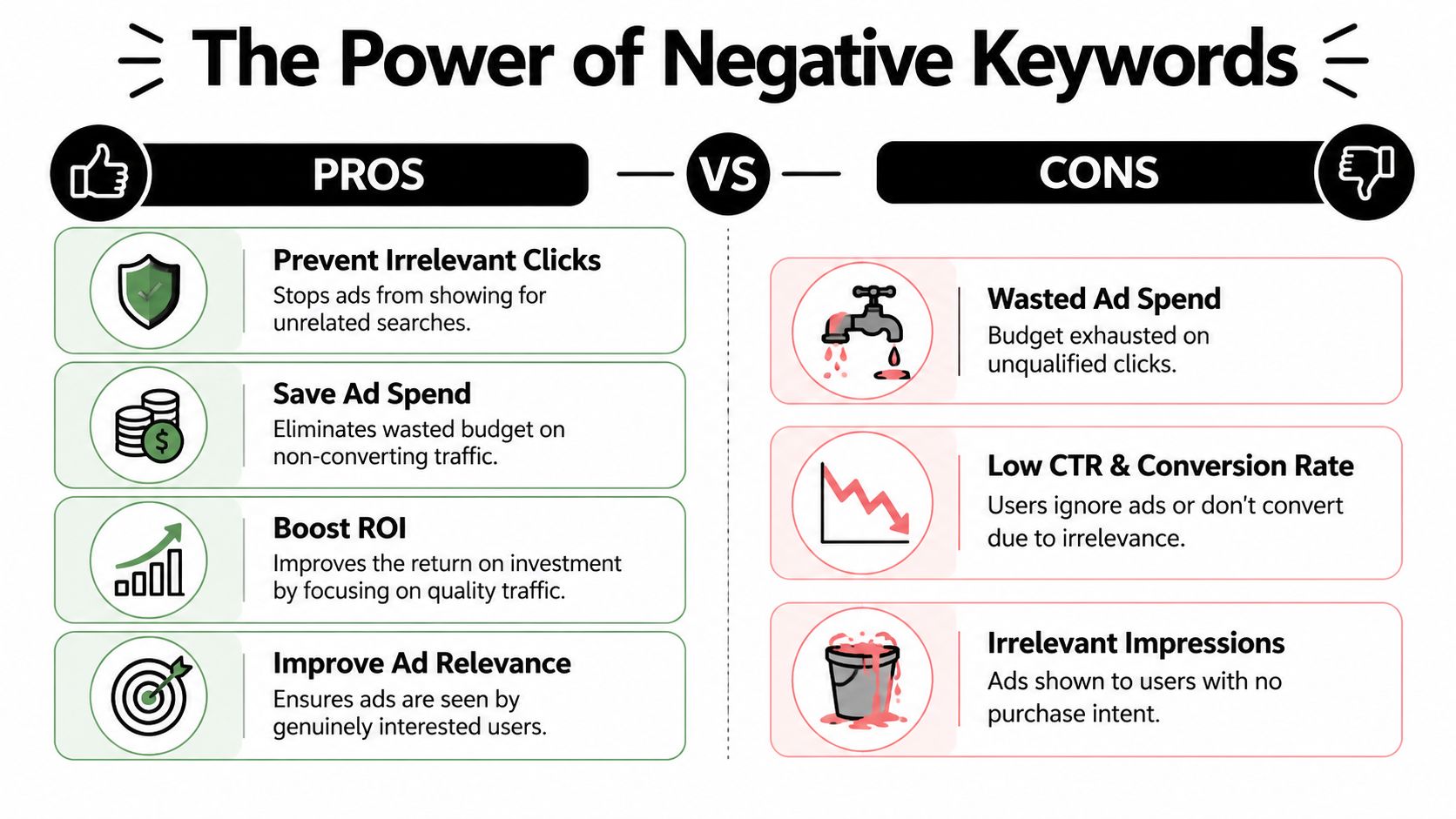
Use Negative Keywords to Cut Waste and Boost ROI
If keyword expansion is the accelerator, negative keywords are the brakes. You need both. A lot of accounts expand fine for a week or two, then performance slides because nobody built a proper exclusion system around the new traffic.
This gets even more important as you move into broader targeting. One of the biggest challenges in current Google Ads workflows is figuring out when broadening match types helps and when it merely increases irrelevant traffic. That gap is exactly why safe expansion needs stronger controls, as discussed in this Google Ads broad match and expansion discussion.
Where negative strategy usually breaks
Negatives are often used reactively. They wait for bad queries to pile up, then do a cleanup pass. That's better than nothing, but it's not enough once you start adding new keywords regularly.
A stronger system works at three levels:
- Account level for terms you never want anywhere
- Campaign level for offer-specific exclusions
- Ad group level for routing and traffic shaping between closely related groups
That hierarchy matters because not all bad queries are bad everywhere. Some are globally irrelevant. Others are just wrong for one campaign.
What safe expansion looks like in real life
Let's say you add broader service keywords into a campaign that was previously tight and exact-heavy. New search terms start appearing. Some are useful, some are adjacent, and some have the wrong intent entirely.
Without negatives, Google keeps testing into that gray area. You pay for the learning. Sometimes that's worth it. Often it isn't.
With negatives, you create boundaries:
- Filter out non-buying intent when you only want commercial traffic
- Block unrelated services that your ads should never cover
- Separate close themes so one ad group doesn't cannibalize another
- Protect premium offers from bargain-hunting searches if that traffic doesn't fit the business
The fastest way to ruin a promising expansion test is to judge the keyword while ignoring the bad queries attached to it.
That's the mistake. Advertisers pause the keyword too early when the actual issue was missing negatives.
Build a negative workflow, not a negative list
Lists matter, but workflow matters more. Use a repeatable process:
Review search terms soon after launch
Don't wait until the campaign has drifted for too long.Separate permanent negatives from situational ones
Some exclusions belong account-wide. Others only solve one routing issue.Document why a term was excluded
This helps when multiple people touch the account.Re-check after match type changes
Any move into phrase or broad can change what needs blocking.
Here's a useful mental model:
| Negative type | Purpose |
|---|---|
| Universal negatives | Block irrelevant themes across the account |
| Campaign negatives | Keep one offer focused |
| Ad group negatives | Steer traffic to the right ad group |
Safe expansion isn't just about adding more queries to the top of the funnel. It's about deciding which queries don't belong before they consume budget.
Launch Test and Measure Your Keyword Expansion
The launch phase is where discipline matters. A lot of advertisers do careful research, organize the account well, then wreck the test by rolling everything out too broadly and reading the results too quickly.
Google's own campaign guidance around setup and expansion puts an important clue in plain sight. Google says AI can recommend keywords to expand reach, but it also emphasizes setting up conversion tracking before launch, which tells you expansion should be tied to measurable outcomes rather than just adding more terms, as noted in Google's explanation of how Google Ads works.
Use a controlled launch checklist
Treat new keywords like a staged test, not a bulk upload victory lap.
- Confirm tracking first so you can evaluate real business outcomes instead of guessing from surface metrics
- Launch in small batches so you can tell which additions changed performance
- Keep budget control in mind because new keywords should not starve proven terms
- Watch search terms early since the first signs of trouble usually show up there before anything else
When teams ask me why expansion feels chaotic, the answer is usually simple. They changed too many variables at once.
What to watch after launch
You don't need a fancy framework. You need a useful sequence.
Early on, look for signs of fit:
- Are the new keywords triggering the kind of searches you expected?
- Do the ads make sense against those searches?
- Is traffic quality lining up with the landing page?
Later, judge commercial value:
- Are the new terms producing the kinds of conversions you care about?
- Are certain ad groups pulling in too much irrelevant traffic?
- Do any match types need tightening or broader testing?
New keywords rarely fail all at once. They usually show warning signs in relevance before they fail in conversion quality.
That's why rushing to top-level conclusions is dangerous. If the traffic looks wrong, fix routing and negatives first. If the traffic looks right but the page underperforms, the keyword may still be fine.
Keep your rollout practical
A simple launch rhythm works well for most accounts:
| Stage | Main focus |
|---|---|
| Initial rollout | Query relevance and clean traffic |
| Early optimization | Negative additions and structure fixes |
| Ongoing review | Match type decisions and scaling winners |
If you manage local campaigns or service businesses, it can help to compare your setup against local lead-gen examples. This resource on how to grow business with Google Ads in Brisbane is useful because it frames campaign growth around business outcomes instead of keyword volume alone.
Good launch management is boring in the best way. Small changes, clean measurement, and fewer surprises.
Scale Your Keyword Management with Automation
Manual keyword expansion works fine when the account is small. Once you're managing multiple campaigns, repeated ad group builds, ongoing search term mining, and constant negative updates, the manual process starts breaking down.
The issue isn't just time. It's consistency. Someone exports queries, someone formats them, someone applies match types, someone forgets to add negatives, and someone else uploads to the wrong ad group. That's how decent strategy turns into messy execution.

Where manual expansion starts to fail
You'll usually see the same bottlenecks:
- Search term review takes too long so negatives get added late
- Keyword promotion is inconsistent because different people use different rules
- Match types are applied unevenly across campaigns
- Bulk changes create errors when teams rely on spreadsheets and copy-paste steps
That's why the scaling question matters so much. Google's own guidance around expansion and AI recommendations points toward reach growth, but it also emphasizes conversion tracking before launch, which implies expansion should stay tied to measurable outcomes rather than keyword accumulation alone.
Build a repeatable system
The mature version of this workflow looks like a loop:
- Review search terms
- Promote useful queries
- Apply the right match types
- Add negatives for waste control
- Push changes cleanly
- Review outcomes and repeat
That loop is hard to maintain manually at scale. It's one reason advertisers start using workflow tools, scripts, shared processes, or browser-based utilities to reduce repetitive work.
One option in that stack is Keywordme, which is built around Google Ads keyword work inside the platform. It's designed to help advertisers turn search queries into new keywords, apply match types, expand ad groups, and build negative keyword lists without the usual formatting and copy-paste routine.
A quick product view helps if you want to see how that kind of workflow looks in practice:
Automation should reduce errors, not hide them
The right use of automation is operational, not blind. You still need judgment. You still need to decide which search terms deserve promotion, when broad match belongs in the mix, and what should be blocked.
What automation should do is remove the low-value manual friction:
- Standardize match type handling
- Speed up negative creation
- Reduce upload mistakes
- Make repeated expansion tasks easier to audit
That's the difference between “doing keyword work” and running a keyword management system. When your process is stable, scaling doesn't feel like chaos. It just feels like more volume moving through the same rules.
If you want a faster way to turn search terms into clean keyword additions and negatives inside Google Ads, take a look at Keywordme. It's a practical option for teams that want less spreadsheet work and more control over campaign expansion.
.svg)