
How to Avoid Keyword Cannibalization: A Unified Guide
How to Avoid Keyword Cannibalization: A Unified Guide


You publish a new page, it gets some traction, then rankings wobble. A week later, a different page from your own site starts showing for the same term. Then Google flips back again. In Search Console, impressions are split. In Google Ads, you're still paying to show up on that same query. Nothing looks broken, but performance feels messy.
That’s usually keyword cannibalization. Your site has more than one page trying to win the same search, often with the same intent. Google gets mixed signals, users land on the weaker page, and your authority gets spread across URLs that should have been working together.
The problem gets worse when SEO and PPC teams work in separate lanes. Organic is trying to rank one page. Paid is bidding on the same term. Content publishes another article that targets it again. The result isn't just diluted rankings. It's also wasted budget, messy reporting, and avoidable internal competition.
Most guides treat this as an SEO-only cleanup task. It isn't. The cleaner approach is a unified workflow that covers organic pages, Google Ads search terms, and the team process that creates both. If you want a useful outside perspective on the SEO side, Titan Blue has a solid piece on Addressing Keyword Cannibalization Issues that lines up with what practitioners see in real audits.
The Hidden Traffic Killer Sabotaging Your Site
A common version of this problem looks harmless at first. A company has one service page, one blog post, maybe an FAQ, and all three mention the same core keyword. None of them is spammy. None of them is duplicate content in the strict sense. But they overlap enough that Google keeps testing different URLs.
That swap is the signal.
One page ranks for a while, then another takes over, then both underperform because neither becomes the clear winner. On the paid side, the issue can be just as frustrating. If the organic listing already answers the query well, running ads on that same term without any coordination can pull clicks that didn't need to be bought.
Practical rule: If two URLs serve the same intent, one of them usually needs to become the primary page.
Cannibalization isn't always about exact-match keywords. It often shows up when teams create slightly different versions of the same idea. Think "divorce attorney" and "family law attorney" targeting the same local audience, or a category page and blog post both pushing toward the same commercial query.
What works is clarity. One intent, one primary URL, one reporting view that includes both SEO and PPC. What doesn't work is hoping Google figures out your content architecture for you.
Your Diagnostic Toolkit How to Find SEO Cannibalization
Most sites don't need an enterprise audit to find this. They need a disciplined one. Start with a manual check, then move into Search Console and your page inventory.

Start with a plain Google search
Type this into Google:
site:yourdomain.com "target keyword"
That search is still one of the fastest ways to spot overlap. You're looking for multiple pages from your domain that appear to target the same term or solve the same search intent.
Use it broadly first, then tighten the review:
- Check the obvious term: Search the exact phrase your page is meant to rank for.
- Check close variants: Similar commercial or informational phrases often expose overlap faster than the main keyword.
- Review title tags and snippets: If two pages look interchangeable in search results, Google may be treating them that way too.
This step is simple, but it catches more than people expect. A lot of cannibalization starts with old pages nobody remembered were still live.
Build the spreadsheet before you touch anything
The most useful audit asset is usually a spreadsheet. List every page, its URL, target keyword, current role, and whether it overlaps with another page.
According to Method & Metric, you should conduct a detailed site audit by creating a spreadsheet listing all pages, their URLs, and targeted keywords to visually identify overlaps where multiple pages compete for the same terms, then manually review pages using searches like site:yourdomain.com "keyword" and Search Console checks. The same source notes that 40% of sites have cannibalization affecting top keywords, dropping rankings by 5-10 positions on average, and that post-consolidation, sites see 15-25% ranking improvements within 4-6 weeks when the cleanup is done well, as cited in their summary of Moz benchmarks in their keyword cannibalization guide.
A basic audit sheet should include:
| Column | What to track |
|---|---|
| URL | The exact page address |
| Primary keyword | The main term the page is supposed to own |
| Search intent | Informational, commercial, transactional, navigational |
| Competing URL | Any other page targeting the same idea |
| Traffic or conversions | Enough data to judge the stronger page |
| Action | Keep, merge, redirect, retarget, canonical, noindex |
If your site is growing quickly, this sheet becomes your source of truth.
Use Search Console to confirm the conflict
The Google search operator finds candidates. Google Search Console confirms the behavior. Pull up the query you're investigating, then look at the Pages view. If more than one URL is collecting impressions or clicks for that query, you've got a real signal to analyze.
What matters here isn't just that multiple pages appear. It's whether they are:
- Trading visibility over time
- Splitting clicks for the same query
- Sending users to the wrong intent page
A pricing term going to an educational blog post is a classic example. So is a product query landing on a category archive when the product page should be winning.
Search Console tells you where Google is undecided. Your job is to remove the reasons for that indecision.
If you need a broader explanation of why regular audits matter beyond cannibalization, this summary of SEO audit benefits is a useful companion read.
Prioritize the pages that matter most
Not every overlap deserves immediate action. Some conflicts barely move the needle. Others affect your money pages.
I usually sort the hit list by business impact, not by how annoying the SEO issue looks. Review:
- Traffic contribution: Which page already attracts meaningful visits?
- Conversion role: Which page supports leads, sales, or qualified actions?
- Ranking stability: Which URL is the one Google keeps testing?
- Link and internal authority: Which page already has stronger support?
Teams often make a mistake here. They choose the newest page, or the one they personally prefer, instead of the page with the strongest proof. The page that should survive is the one that best matches intent and already performs.
Watch for false positives
Not every keyword overlap is cannibalization. One page can rank for many related keywords and that’s normal. The issue starts when multiple pages compete for the same intent and prevent a clear leader from emerging.
That distinction matters. If one article ranks for a family of related informational phrases, leave it alone. If two pages are both trying to own the same commercial term, fix it.
The Fix Consolidation and Technical SEO Solutions
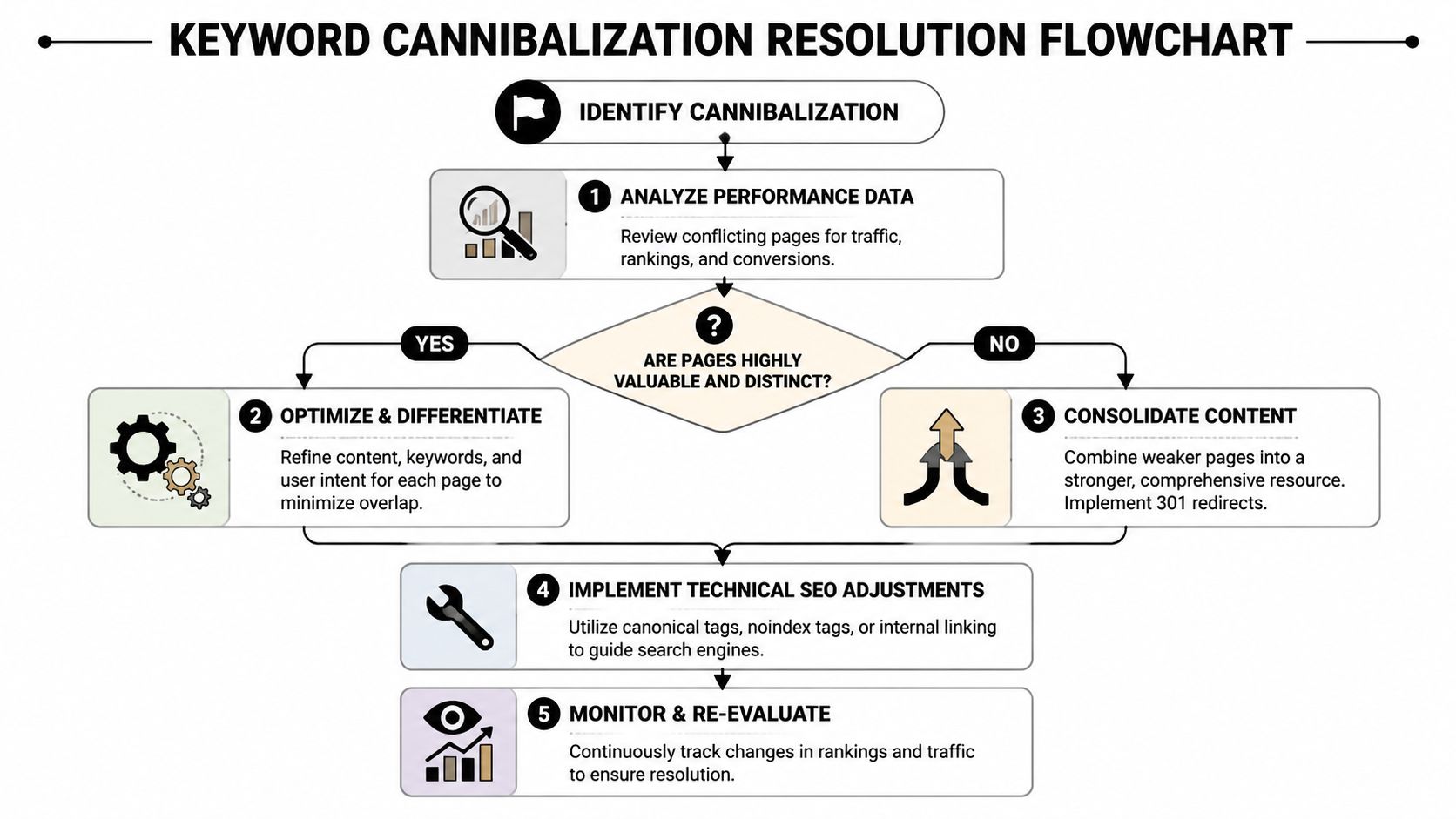
Once you've identified the conflict, the next step is choosing the right remedy. People often overcomplicate things here. Most cases fall into one of three buckets: merge the pages, retarget one of them, or use a technical signal because both URLs need to stay live.
When consolidation is the right move
If two pages cover the same topic and serve the same intent, consolidation is usually the cleanest fix. Keep the stronger URL as the primary page, pull in the best material from the weaker page, improve the structure, refresh the copy, then redirect the weaker URL.
This approach works well when you have:
- Near-duplicate blog posts: Same angle, slightly different wording
- Old and new versions of the same resource: One outdated, one incomplete
- Multiple service pages targeting one offer: Especially in local SEO
The logic is simple. One strong page beats two average pages that divide authority.
After the merge, use a 301 redirect from the retired URL to the page you've chosen to keep. If you delete without redirecting, you throw away value and create cleanup work later.
When to de-optimize instead of merge
Sometimes both pages deserve to exist. They just shouldn't target the same main term.
De-optimization helps. Keep both URLs, but rewrite one page so it targets a more specific query or a different stage of intent. A broad service page might keep the core commercial keyword, while the blog post shifts toward a narrower informational term.
A quick decision view helps:
| Situation | Better fix |
|---|---|
| Same topic, same intent, weak differentiation | Merge and 301 redirect |
| Same topic, different intent, both useful | Differentiate and retarget |
| Similar or duplicate versions must remain live | Canonical tag |
| Low-value page should stay accessible but not indexed | Noindex |
The mistake I see most often is using a canonical tag when the page should have been redirected. If a page no longer needs to exist as a search result, a redirect is cleaner.
Canonical tags and noindex have different jobs
A canonical tag tells Google which version you prefer when similar pages need to remain available. The format is straightforward: <link rel="canonical" href="preferred-url">. This is helpful for near-duplicates, filtered variations, or campaign pages with substantial overlap.
A noindex directive is different. It tells search engines not to index a page. Use it when the page still serves a user or business purpose, but you don't want it competing in search.
Use canonical when the pages are closely related and one should absorb ranking signals. Use noindex when the page shouldn't rank at all.
That distinction matters because Google treats the signals differently.
Match the page to the search intent
A lot of cannibalization is really an intent problem wearing an SEO label. The page isn't wrong because it uses a similar keyword. It's wrong because it answers the wrong type of query.
Before you finalize any fix, check whether the surviving page matches the SERP:
- Transactional query: Pricing, demo, buy, service, quote
- Informational query: How-to, guide, overview, explanation
- Comparative query: Best, alternatives, vs, comparison
If the query is commercial and your blog post keeps outranking the sales page, the answer usually isn't more internal links alone. The answer is making the right page the right fit.
A short walkthrough helps if you're training a team on the mechanics:
What doesn't work
A few fixes sound reasonable but rarely solve the root issue:
- Minor title tag tweaks: If the intent still overlaps, the conflict stays.
- Publishing yet another page: Adding a third URL usually makes the cluster worse.
- Ignoring internal links: Google needs consistent signals from your own site structure.
- Leaving legacy pages half-retired: If they stay indexable, they can keep competing.
The strongest resolution is the one that makes your preferred page obvious to users, to Google, and to your own team.
Beyond SEO Stopping PPC and Organic Cannibalization
Many audits stop too early. They clean up organic overlap and leave paid search untouched, even when Google Ads is bidding on the same terms the site already owns organically.
That split causes waste.

PPC ads can steal clicks from organic results for branded or high-intent terms, which can create 20-30% wasted ad spend on keywords where organic already converts well. The same source notes that only 5% of top cannibalization articles address this, even though a unified approach matters more as AI Overviews push more integrated SERP behavior, as summarized in Semrush's discussion of keyword cannibalization and cross-channel overlap.
Where paid and organic clash
The conflict usually appears in three places:
- Branded terms: You rank strongly already, but ads still buy traffic you may have won anyway.
- High-intent queries: Organic has the right landing page, but paid sends users to a parallel version.
- Informational searches: Ads trigger for top-of-funnel terms that your content already serves better.
None of that means branded PPC is always wrong. Sometimes teams intentionally want both placements. The problem is unmeasured overlap. If you can't explain why both channels are active on the same query, you're probably not making a deliberate choice.
What to do in Google Ads
A practical workflow looks like this:
- Pull your search terms report and identify terms where organic already owns the intent well.
- Review landing page overlap between ad groups and organic destination pages.
- Create or update shared negative keyword lists for terms that should be left to SEO.
- Tighten match types so close variants don't trigger internal paid competition.
- Separate branded from non-branded strategy so reporting is cleaner.
This is also where SEO and paid search alignment becomes a planning issue, not just a reporting one. If the SEO team owns an informational query and the PPC team still buys it broadly, somebody has to decide whether that duplication is strategic or accidental.
Good channel coordination isn't about choosing SEO or PPC. It's about choosing which channel should own which query.
How tools speed up the cleanup
Search term cleanup is tedious when you do it manually. Teams export reports, sort junk queries, identify overlaps, then spend too much time formatting negatives. A tool like Keywordme fits here because it handles search term analysis and negative keyword automation, including bulk exclusion of terms that are already strong organically. That makes PPC-SEO overlap easier to reduce without living in spreadsheets all day.
The more fragmented the account, the more this matters. Agencies often have separate ad groups, separate campaigns, and separate landing pages all brushing up against the same keyword set. If nobody is cleaning those overlaps regularly, paid cannibalization becomes normal.
What doesn't hold up in practice
Some habits look efficient but usually backfire:
| Habit | Why it causes trouble |
|---|---|
| Bidding broadly on everything important | It hides waste inside "coverage" |
| Letting every campaign use its own negatives | Overlap spreads between ad groups |
| Ignoring organic winners in paid planning | You pay for clicks your site already earns |
| Treating SEO and PPC reports separately | Nobody sees the full SERP picture |
The teams that handle this well don't obsess over channel loyalty. They care about query ownership, landing page fit, and whether each click needed to be paid for.
Building a Cannibalization-Proof Content Workflow
The cheapest cannibalization fix is the one you never have to do. That means building a workflow where new content, landing pages, and campaigns don't target the same thing by accident.

Preventive keyword mapping can cut cannibalization incidence by 50-60%, and the process starts by grouping keywords by topic and intent, then mapping each group to a single page before content is created. The same Mangools summary says meta titles under 60 characters can boost click-through by 20%, and that one study showed a 35% conversion increase when high-intent queries were directed to correctly optimized pages instead of competing URLs, as described in their guide to keyword cannibalization prevention.
Keep one master keyword map
Every team needs a shared document that answers one question fast: which URL owns this topic?
If that document doesn't exist, writers guess. PPC managers build around partial data. Old pages get forgotten. New pages go live with overlapping briefs.
A strong keyword map should include:
- Primary keyword and intent: Not just the phrase, but what the searcher wants
- Assigned URL: The page that owns the topic
- Secondary support terms: Useful variants that belong on the same page
- Content type: Blog, service page, category page, landing page
- Owner and status: So nobody launches a duplicate unknowingly
If your team needs a stronger process for clustering terms before they become briefs, this guide to advanced keyword grouping techniques is a helpful next step.
Use topic clusters without making them rigid
There's a balance here. Strict one-keyword-one-page thinking can become too stiff, especially on larger sites. You still need flexibility for related subtopics. What you don't want is two pages answering the same core question with only slight angle changes.
A better model is:
| Content role | Job |
|---|---|
| Pillar page | Own the broad topic and main intent |
| Cluster article | Cover a narrower subtopic |
| Commercial page | Handle service or product intent |
| Support asset | FAQ, case page, glossary, comparison |
That structure gives every page a role. It also makes internal linking clearer because the cluster page should strengthen the pillar, not compete with it.
Fix the brief before the content exists
Most accidental overlap starts in weak briefs. The brief says "write about local SEO pricing" and someone else already has a service page or guide targeting exactly that.
A usable brief should lock down:
- The primary keyword
- The search intent
- The existing page that this supports or differs from
- The internal links that should reinforce authority
- The title direction, with a title under 60 characters where appropriate
For teams that need a refresher on the foundation, this breakdown of effective keyword research is a practical companion because good mapping starts with good grouping, not random keyword collection.
If a writer can't explain why a new page deserves to exist separately from an old one, the page probably shouldn't be created yet.
Internal linking should reduce confusion
Internal links are often treated like an afterthought. They're not. They tell Google which page is the authority inside a topic cluster.
When a new article goes live, ask:
- Does it link to the primary page for the topic?
- Does the anchor text reinforce the right page?
- Does it accidentally use the same anchor text for two different URLs?
The goal isn't to stuff exact-match anchors everywhere. The goal is consistency. One topic should have one obvious destination.
If you're serious about how to avoid keyword cannibalization, this workflow matters more than any one cleanup sprint. Cleanup fixes yesterday's mess. Workflow stops next quarter's version of the same mess.
Monitoring and Maintenance Keeping Your Rankings Clean
Cannibalization comes back when teams assume the fix is permanent. It isn't. New content gets published, Google shifts what it prefers, ad accounts expand, and old pages unobtrusively re-enter the picture.
A simple maintenance rhythm works better than a huge annual cleanup.
Run a recurring review cycle
For agencies and large teams, 40% of cannibalization stems from uncoordinated content and PPC launches, according to Yoast's cited summary. The same source recommends bi-weekly SERP audits using site:domain keyword alongside Google Ads reports, and notes that flexible topic clusters can reduce cannibalization by 35% compared to rigid silos in collaborative workflows, as covered in Yoast's piece on keyword cannibalization.
A practical routine looks like this:
- Bi-weekly checks: Review top terms with a site search and compare against current Ads search terms.
- Monthly page review: Look for query-level URL swaps in Search Console.
- Quarterly cleanup: Revisit legacy content, redirects, canonicals, and page roles.
- Pre-publish check: Confirm the new page has a unique target and a justified place in the cluster.
Make reporting visible across teams
If SEO, content, and PPC each keep separate documents, overlap slips through. Shared dashboards help because everyone sees the same keyword ownership and URL assignments.
That's also where a standardized reporting process matters. A central view like an SEO keyword reporting workflow makes it easier to spot when one query starts spreading across multiple URLs or channels.
Keep the checklist short enough to use
The best monitoring process is the one the team will repeat. Mine stays simple:
- Check whether one keyword now has multiple live URLs.
- Check whether Google is swapping the ranking page.
- Check whether paid is buying the term unnecessarily.
- Check whether any new page ignored the keyword map.
That discipline keeps rankings cleaner than any heroic one-time fix.
Frequently Asked Questions
Is keyword cannibalization always bad
Usually, yes. But not every multi-result situation is a problem. If your brand intentionally owns more than one position for a branded search and each result serves a different purpose, that can be strategic. The issue is when multiple pages compete for the same intent and weaken each other.
What about e-commerce category and product pages
This is one of the most common edge cases. A category page should usually target the broader commercial term, while product pages target specific product-level searches. Problems start when the category copy and product copy both chase the same main keyword. Give each page a distinct role and keep internal links consistent.
Is one page ranking for many keywords cannibalization
No. That's normal SEO. A strong page should rank for a range of related queries. Cannibalization happens when multiple pages from the same site compete for the same query or intent. One page winning many terms is efficiency. Many pages fighting for one term is confusion.
Keyword cannibalization usually isn't one bug. It's a workflow problem that shows up in content, technical SEO, and paid search at the same time. If you want a faster way to clean up search term overlap, build negatives, and tighten PPC keyword control inside Google Ads, take a look at Keywordme.
.svg)