
Google Tracking Numbers: Complete 2026 Guide
Google Tracking Numbers: Complete 2026 Guide


SEO Title: Google Tracking Numbers Guide for 2026
Meta Description: Google tracking numbers explained for PPC teams. Learn setup, DNI, policy risks, pool exhaustion, and fixes that improve call attribution.
Phone calls are coming in. Sales is happy. Your reporting isn't.
You can see that people called, but you can't cleanly answer the question that matters in every PPC review: which campaign, ad group, keyword, or landing page drove those calls? That gap turns optimization into guesswork. Teams end up shifting budget based on form fills and imported CRM data while one of the highest-intent conversion actions stays fuzzy.
That's where Google tracking numbers stop being a technical side note and start becoming operationally important. If your business closes leads by phone, call attribution can't sit in a blind spot for long.
Why Your Call Conversions Are a Black Box
A common scenario looks like this. Google Ads shows clicks. GA4 shows traffic. The call log shows the phones rang. But when the account manager asks why branded search is getting more budget than non-brand, nobody can trace phone revenue back to the click path with confidence.
That black box gets expensive fast. If your team wants a practical way to quantify your missed call expenses, it helps frame why call tracking matters beyond reporting. Missed calls and unattributed calls create different problems, but both distort ROI.
Google's ecosystem is too big to ignore here. Google Analytics has an estimated global market share of 70.88%, and about 53% of all active websites use it according to Magefan's Google Analytics statistics roundup. That matters because professionals in marketing are already operating inside Google's measurement stack, whether they planned for phone attribution properly or not.
What the black box usually looks like in practice
- Calls show up outside ad data: The front desk says lead volume is strong, but campaign reports don't explain which traffic source produced the calls.
- Keywords get credit they didn't earn: Branded terms often look better than they are when phone conversions aren't tied back correctly.
- Landing page tests stall out: A page might generate stronger call intent, but the data doesn't clearly prove it.
Practical rule: If a phone call can turn into revenue, treat it like a conversion action you must attribute, not a side effect of traffic.
Sometimes the issue isn't call tracking itself. It's broken measurement around it. If your reporting feels stitched together, this guide on how to fix conversion tracking issues is worth reviewing before you touch call setup.
What Exactly Are Google Tracking Numbers
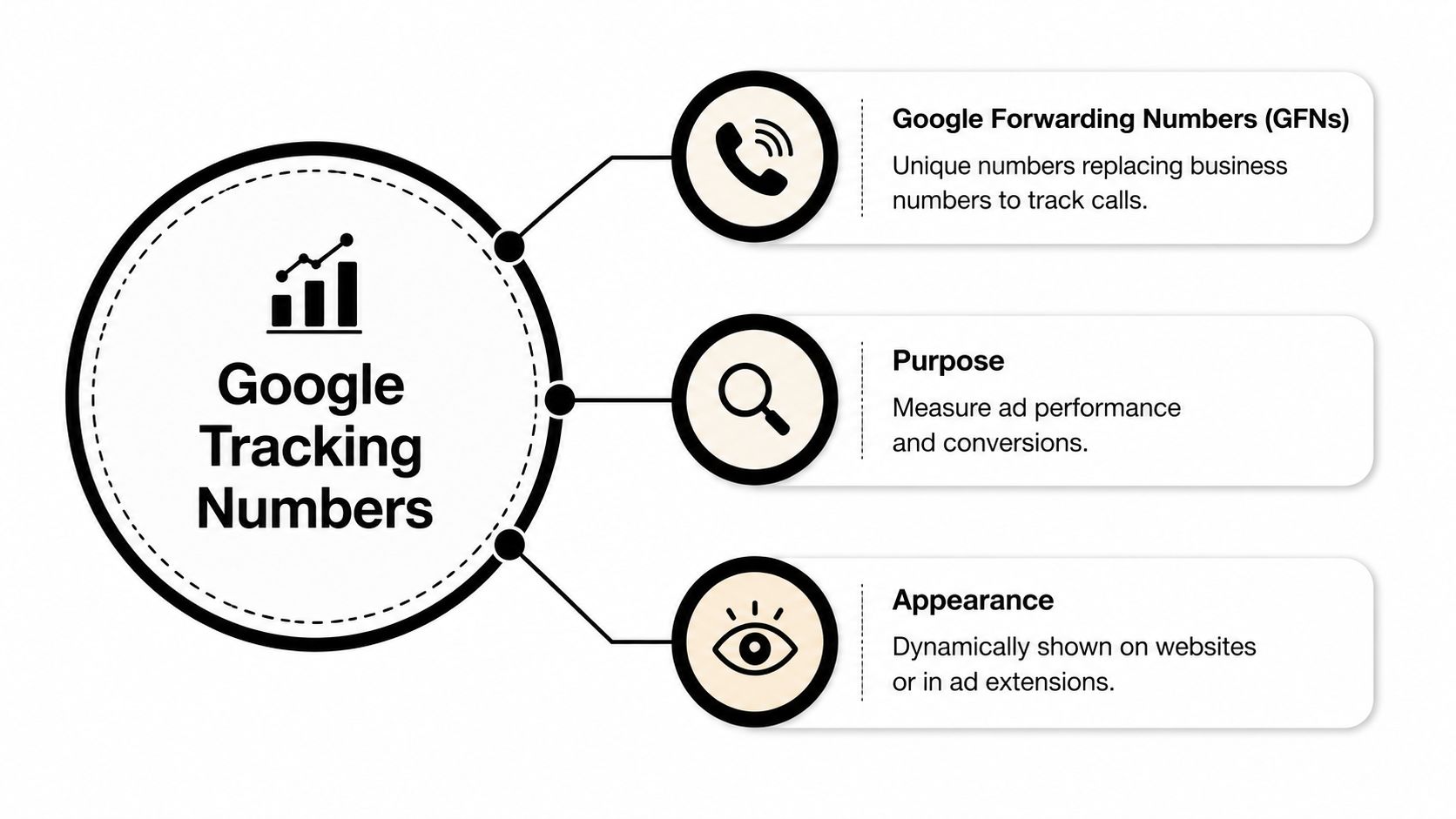
At the simplest level, Google tracking numbers are temporary numbers Google uses to connect a phone call back to ad activity. The key term is Google Forwarding Number, often shortened to GFN. It functions similarly to a temporary mail-forwarding address. The customer sees one number, calls it, and Google routes that call to your real business number while recording attribution data.
That only works because of Dynamic Number Insertion, or DNI. Instead of showing the same static phone number to every visitor, the site swaps in a different number for eligible visitors from Google Ads. If the right conditions are met, Google can tell which ad interaction led to the call.
Static number versus tracking number
A normal business number is stable. It's what lives on your website, business listings, email signatures, and printed material.
A Google tracking number is different:
- It's conditional: It appears when Google can associate the visit or ad interaction with call tracking.
- It's for attribution: Its job is to connect the call to ad data.
- It routes through Google first: The customer still reaches your business, but the path gives Google visibility into the call event.
If you keep only your regular number on the page, Google can't magically infer keyword-level phone attribution from that alone. You may still know calls happened. You won't know enough to optimize with confidence.
What marketers usually get wrong
The biggest misunderstanding is assuming Google tracking numbers are a replacement for your business number. They're not. They're a measurement layer.
Another mistake is treating every call tracking setup as identical. It helps to read a broader phone call tracking guide when you're deciding whether Google's native option is enough or whether a dedicated platform makes more sense for your workflow.
A static number tells customers how to call you. A tracking number tells marketers why they called.
How Google Call Tracking Actually Works
A paid click lands on your site. The visitor sees a phone number, calls, and sales says the lead came from "Google." That answer is too vague to manage budget. The key question is which ad, keyword, device, and landing page produced the call, and whether the tracking path held together long enough to record it.
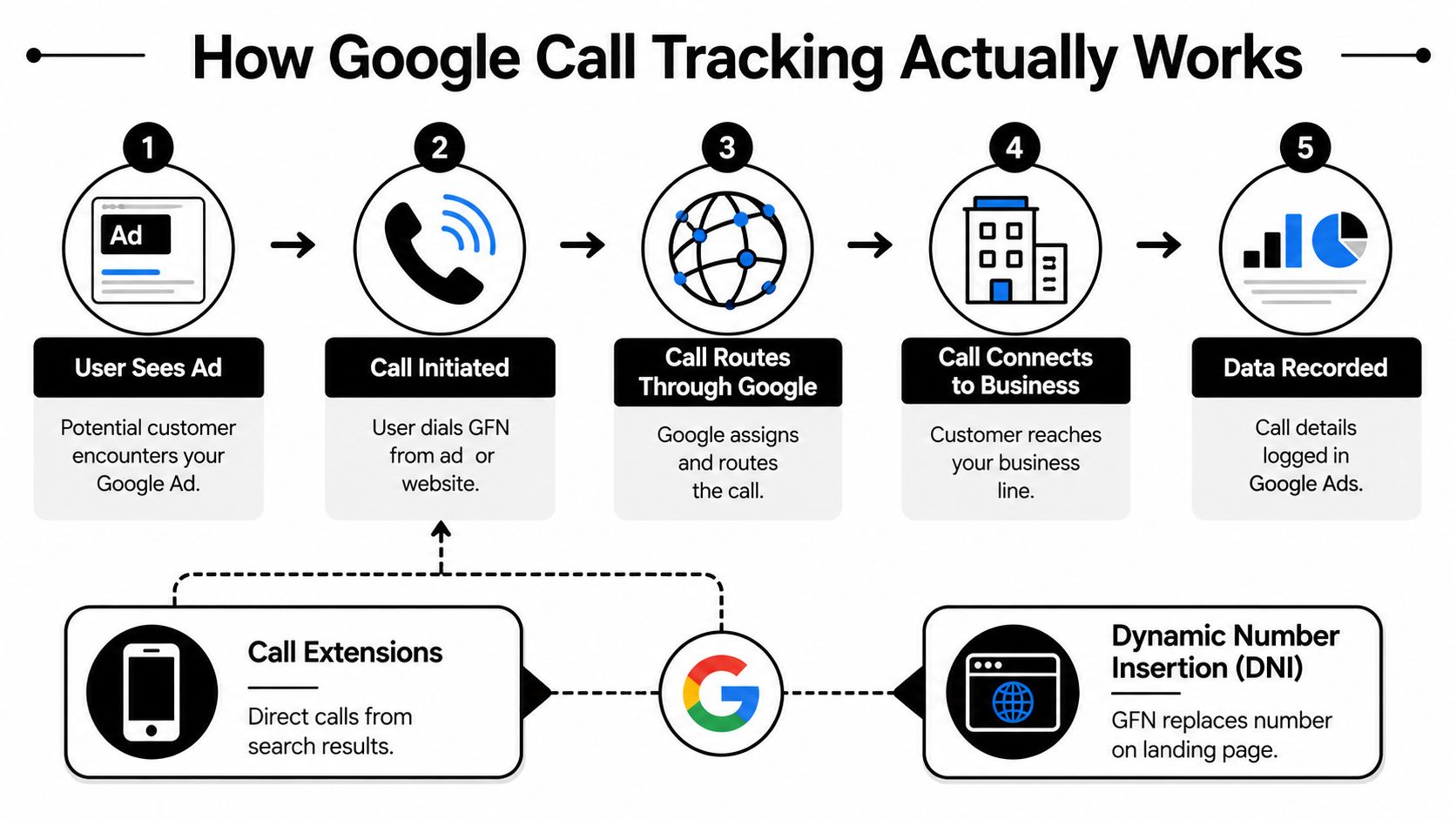
Google call tracking works through two separate paths. One covers calls placed directly from the ad unit. The other covers calls that happen after the click on your website through dynamic number insertion, or DNI. PPC teams miss this split all the time, then assume call reporting is complete when only one path is active.
Calls from ads
The ad-side path is the cleaner one. Google shows a forwarding number in supported call ads or call assets. If someone taps or dials that number from the ad experience, Google can tie the call back to the ad interaction inside Google Ads.
That setup is usually stable because Google controls the environment. Fewer site variables means fewer tracking failures.
Calls from your website
Website call tracking is more fragile because your site has to cooperate. After an ad click, Google uses a snippet on the page to swap your regular phone number with a Google forwarding number. If the visitor calls the swapped number, Google can attribute that call to the ad session that brought them in.
That is the core mechanic. No special mystery. The number shown on the page changes based on the visit context, and attribution depends on that swap happening correctly.
A few practical conditions have to line up. The visitor has to arrive through an eligible ad click. The script has to load. The phone number has to be in a format the script can find and replace. If your dev team buried the number inside a custom widget, rendered it late with JavaScript, or hard-coded different numbers across templates, tracking quality drops fast.
The moving parts that actually affect reporting
The technical setup matters because small implementation choices change what gets recorded. Google's snippet uses configuration settings to find the phone element, request a forwarding number, and decide what happens if that request fails. If the number is not returned in time, Google does not force attribution. It leaves the original number in place or fails to log the conversion, depending on the setup.
That trade-off is better than bad data, but it creates blind spots.
Here's what I tell junior PPC managers to check first:
- Markup consistency: The phone number needs a reliable selector or class on every tracked template.
- Load order: If the script fires before the phone element exists, the swap never happens.
- Traffic qualification: Organic, direct, and some repeat visits will not all behave like a fresh ad click.
- Session handoff: Redirects, broken auto-tagging, or sloppy URL parameters can break attribution before the page even loads.
- High-traffic concurrency: If too many visitors need tracked numbers at once, number reuse can muddy attribution. This problem gets worse in busy accounts and is one reason native tracking is not always enough for larger lead gen programs.
Campaign hygiene matters here too. If click identifiers and parameters are inconsistent, phone attribution gets harder to trust. Teams that need tighter tagging should review this guide to a Google tracking URL structure.
When Google call tracking "fails," the cause is usually operational. The number did not swap, the visit was not eligible, or the attribution chain broke before the call happened.
The Benefits and Critical Limitations You Must Know
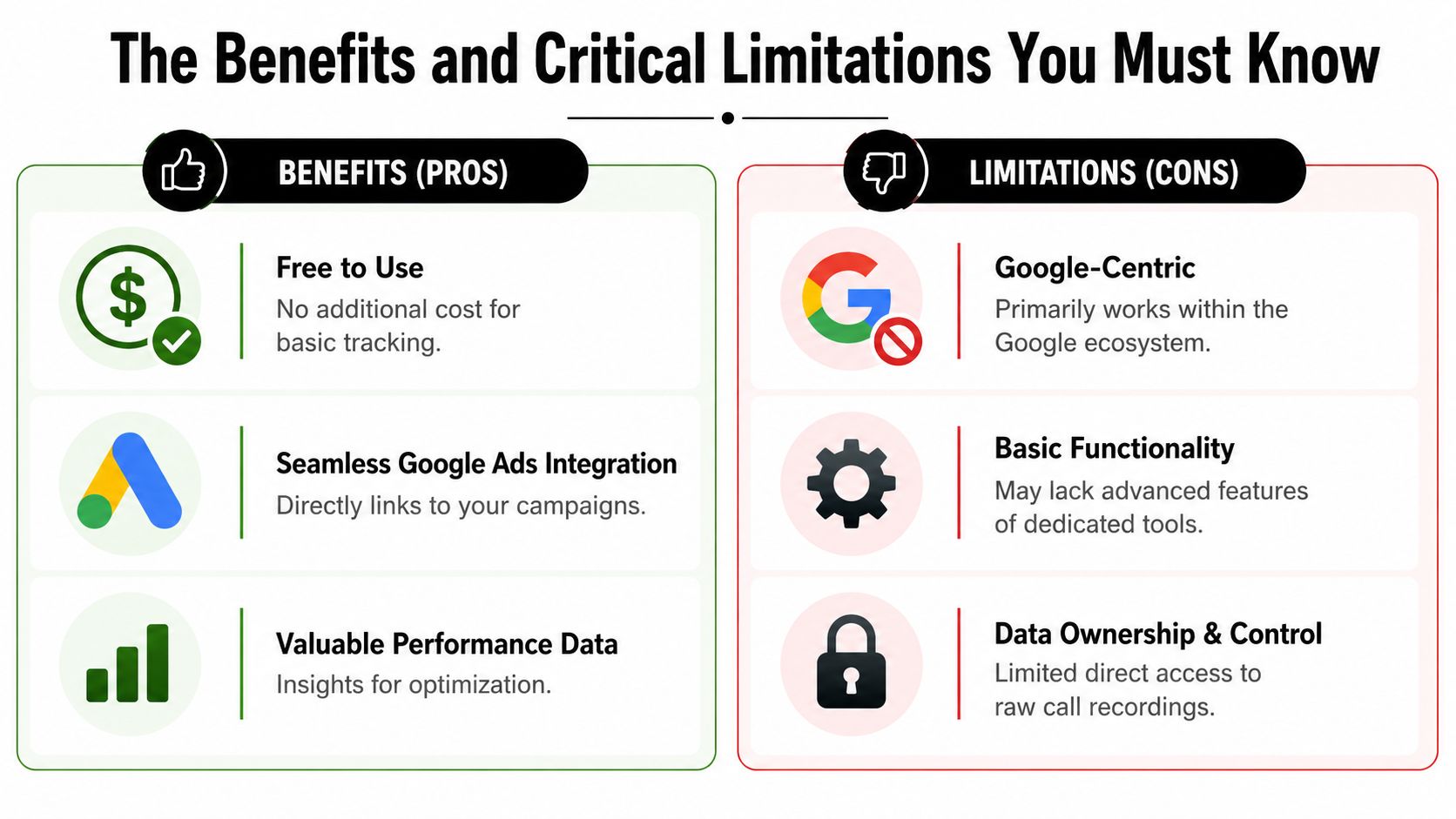
Google's native setup has real advantages. It's built into Google Ads, it's free to use for basic call measurement, and it gives you enough signal to optimize many lead gen campaigns without adding another vendor.
That said, native does not mean complete. If you treat it as a full call intelligence platform, you'll hit the ceiling quickly.
Where Google tracking numbers work well
A lean setup is usually enough when you need clean attribution for Google Ads phone leads and you don't need heavy call ops features.
| Fit | Why it works |
|---|---|
| Simple lead gen accounts | Native tracking gives direct ad-to-call visibility without extra software |
| Teams already deep in Google Ads | Reporting stays in one interface |
| Early-stage call tracking rollouts | It's easier to validate demand before adding more tools |
Where the cracks show up
The biggest limitation isn't just feature depth. It's scale and attribution quality under pressure.
A problem many teams miss is number pool exhaustion. In high-traffic situations, tracking numbers can get reused too aggressively, which causes attribution loss. According to North Country Growth's write-up on Google Ads call tracking for service businesses, 62% of service businesses encounter this issue.
That's not a small edge case. It's a structural weakness when traffic climbs and setup doesn't evolve with it.
The trade-offs most basic tutorials skip
- Google-centric reporting: Native tracking is strongest inside Google's own ecosystem. Cross-channel analysis is more limited.
- Less control over raw call workflows: If your sales team needs richer call handling, routing, or analysis, native tools can feel thin.
- Scaling risk: High-traffic campaigns can outgrow a basic number pool and lose precision.
If your account spends enough to justify keyword-level decisions, it also spends enough to justify checking whether attribution is being diluted.
What works is matching the tool to the account. For some advertisers, Google tracking numbers are all they need. For others, they're a good baseline but not the final system.
A Practical Guide to Setup and Troubleshooting
A common failure looks like this. The campaign is driving calls, the front desk is busy, and Google Ads reports almost nothing useful because the number never swapped, swapped inconsistently, or recorded calls against the wrong conversion action.
That is why setup has to start with the business outcome, not the tag.

Google's native website call tracking usually means four separate jobs: define the call conversion in Google Ads, install the right tag logic, make sure the phone number on the page can be replaced, and test the full path from ad click to recorded call. WhatConverts breaks down the mechanics in its guide to Google Ads call tracking.
The setup path that usually works
Create the right conversion action first
Decide what a qualified call means before touching the site. Duration threshold, reporting window, and value settings all affect bidding later. I have seen clean technical installs produce bad optimization because every short misdial counted as a conversion.Place the number where Google can swap it reliably
Hardcoded text usually works better than numbers injected late by another script. If the phone number sits inside a widget, image, iframe, or aggressive page builder element, the swap can fail even when the tag itself fires.Use Google Tag Manager with restraint
GTM helps with deployment, but it also creates messy setups fast. Two tags targeting the same number, a call tracking script from another vendor, or theme-level JavaScript can overwrite the swap logic. That is where a quick launch turns into an attribution cleanup project.Test the ad-click experience, not just the page load
Open the page from an actual Google Ads click or a properly tagged test session. A standard direct visit often will not trigger the same behavior, so teams end up approving broken installs because they tested the wrong scenario.
For a broader walkthrough, this resource on how to track phone calls in Google Ads is a useful companion. If you also need the wider conversion framework around forms, tags, and validation, Silva Marketing's Google Ads tracking setup is a practical reference.
The technical details that save debugging time
Two settings matter more than many teams realize: the callback that handles the swapped number and the timeout that controls how long the page waits for Google to return one. If that request does not complete in time, the number may never change. In practice, that fail-safe is better than showing a wrong number, but it can look like a random tracking bug if nobody checks browser behavior and load timing.
This is also where professional accounts start to separate from basic tutorials. A page can be "implemented" and still fail under real conditions. Slow scripts, consent tools, call widgets, regional routing rules, and reused templates all create edge cases that only show up on live traffic.
What to check when it isn't working
- Inspect the rendered page, not just the source code. JavaScript may rewrite the phone element after load.
- Check whether the number is plain text, a clickable tel link, or both. Google can only replace what it can identify consistently.
- Review CSS and selector logic. A slightly wrong selector can target the wrong element or nothing at all.
- Look for competing scripts. Call tracking vendors, chat tools, and dynamic headers often interfere with number replacement.
- Test key landing pages one by one. Template exceptions are common, especially on location pages and older service pages.
- Verify routing after the swap. A visible tracking number is only half the job. The call still has to reach the right team.
This walkthrough gives a visual sense of the process before you troubleshoot deeper:
Do not stop at "the tag fired." Confirm the visible number changed, place a test call, and check that the conversion appears in the reporting view your media team uses to make budget decisions.
Navigating Privacy Regulations and Google Policies
Good call tracking isn't only technical. It also has to survive policy review and legal review.
On the Google side, the key update is the Unacceptable phone numbers policy. The 2025 update bans premium numbers, vanity numbers, and unrelated virtual number services in the wrong contexts, but it does not change how Google handles legitimate DNI setups. Properly configured tracking with active, local, business-tied numbers remains compliant, as explained in this summary of Google's unacceptable phone number policy.
The policy side
That update matters because some advertisers got nervous that any tracked or swapped number would start failing verification. That isn't the takeaway. The practical issue is whether the displayed number is local or domestic to the target region, active, and connected to the advertised business.
The legal side
Call recording is separate from call tracking. Google attribution and your recording consent obligations are not the same thing.
Use a short checklist with clients and internal teams:
- Confirm consent rules by location: Recording laws vary by jurisdiction.
- Align scripts with operations: If calls are recorded, the notice needs to happen in the actual customer experience.
- Audit every number in rotation: Compliance falls apart when an old tracking line still routes somewhere odd.
If your team needs a broader refresher on conversion implementation before layering in compliance checks, Silva Marketing's piece on Google Ads tracking setup is a useful operational reference.
Frequently Asked Questions About Google Call Tracking
Can I use a tracking number in Google Business Profile without hurting local SEO
Yes, if you do it correctly. To maintain NAP consistency, put the tracking number in the Primary phone field and the local business number in the Additional phone field, as described in WildJar's guide to call tracking numbers in Google My Business.
That setup gives Google the tracking number for reporting while preserving the underlying local business number in the listing.
Can I use a vanity number with Google tracking
Be careful. Google's policy update specifically calls out vanity numbers as prohibited in the unacceptable phone number context covered earlier. If your setup depends on vanity formatting, review it before assuming it will pass long term.
Should I stick with Google's native setup or move to a third-party tool
Use Google's native option when your goal is straightforward Google Ads call attribution and your account doesn't need advanced call operations. Move beyond it when your team needs deeper reporting, stronger workflow control, or more resilience in higher-traffic environments.
A simple rule of thumb works well:
- Stay native if your main problem is basic attribution.
- Upgrade your stack if call handling is becoming part of sales operations, QA, or multi-channel reporting.
- Reassess regularly if the account is growing fast, because the limitations usually show up after growth, not before.
Why do some calls still feel hard to attribute cleanly
Because call tracking depends on routing logic, page behavior, traffic source eligibility, and correct implementation all working together. A single weak point can break the chain. When phone calls matter, treat the system like revenue infrastructure and test it like one.
Keywordme helps PPC teams clean up search terms, build negatives faster, expand ad groups with stronger keywords, and manage match types without the usual spreadsheet mess. If you want tighter Google Ads workflows around the clicks that lead to calls, explore Keywordme.
.svg)