
Google PPC Campaign Management: A Guide for Max ROI
Google PPC Campaign Management: A Guide for Max ROI


Forget all the "secret tricks" and "growth hacks" you've heard. Real, effective google ppc campaign management starts with a solid, logical foundation. It's about building a clean account structure from the get-go to stop wasting money and actually see a return. This setup is the difference between a profitable campaign and a money pit.
Build a Foundation for Winning Campaigns
Let's be real: a messy Google Ads account is a nightmare to manage and a black hole for your budget. The key to making this work isn't some complex algorithm; it's about building a clean, sensible account structure from day one. Think of it like building a house—you need a solid blueprint before you start putting up walls.
This foundational structure gives you control over where your money goes, helps you understand what’s actually working, and lets you scale your wins without creating total chaos. A disorganized account just leads to irrelevant clicks, terrible Quality Scores, and a pathetic return on your investment.
The Power of Granular Campaigns
One of the biggest mistakes I see is people lumping way too many different products or services into a single campaign. A much, much better approach is to create separate campaigns for each distinct category. This separation is what gives you pinpoint control over budgets and settings for every part of your business.
Take an online clothing store, for example. They shouldn't have one giant "Apparel" campaign. It's just asking for trouble. Instead, they should have separate campaigns like:
- Men's Shoes
- Women's Dresses
- Kids' Outerwear
This structure brings immediate clarity. You can throw more budget at "Women's Dresses" during prom season or just pause the "Kids' Outerwear" campaign when summer hits. It makes strategic decisions feel simple and intuitive, not like you're wrestling with a monster.
Your account structure is the single most important element for long-term PPC success. It dictates how relevant your ads are, how much you pay per click, and how easily you can optimize performance over time.
Ad Groups and User Intent
With your campaigns set, the real magic happens at the ad group level. Each ad group needs to be built around a small, tightly-themed cluster of keywords that all share a specific user intent. This is where so many advertisers drop the ball, stuffing dozens of loosely related keywords into one ad group and hoping for the best.
Let’s go back to our e-commerce store. Inside the "Men's Shoes" campaign, you wouldn’t just have one ad group. You’d break it down even further based on what people are actually searching for:
- Ad Group 1: "men's running shoes"
- Ad Group 2: "men's leather dress shoes"
- Ad Group 3: "waterproof hiking boots for men"
This level of detail is absolutely critical. It lets you write super-specific ad copy that speaks directly to each search. Someone looking for "waterproof hiking boots" gets an ad talking about durable, all-weather boots, not a generic "men's shoes" ad. That relevance shoots your click-through rate (CTR) and Quality Score through the roof, and Google rewards you with lower costs.
As you build this strong foundation, remember to connect it to your bigger business goals, especially if you're focused on effective lead generation strategies. This ensures every click is working toward something meaningful, making your management efforts far more impactful.
Find Keywords That Actually Convert

You can have the most perfectly structured account in the world, but it's all for nothing if you're bidding on the wrong keywords. This is where the real work in google ppc campaign management begins—it’s about finding the search terms that drive sales, not just attract window shoppers.
Forget those generic, one-word keyword lists. You need to get inside your customers' heads and uncover what they’re really typing into Google when they have their credit card in hand.
Targeting a broad term like "shoes" is a surefire way to burn through your budget with nothing to show for it. Instead, you want to get laser-focused on long-tail keywords that scream commercial intent, like "buy waterproof hiking boots for men." This level of specificity is what separates the pros from the amateurs, attracting qualified buyers and drastically improving your conversion rates.
Uncovering High-Intent Keywords
So, where do you find these golden nuggets? The best place to start is your own backyard: your website's internal search data and your existing Google Ads search terms report. Look for the exact phrases that are already leading to conversions. These are your proven winners.
From there, put on your customer hat. What problems does your product solve?
- What specific questions are they asking Google?
- Are they comparing your brand against a competitor?
- Do their searches include "buyer" words like "buy," "for sale," or "near me"?
This simple mindset shift helps you move from targeting vague topics to intercepting active buyers. If you want to go even deeper, our guide on how to find the best keywords for PPC has a ton of advanced strategies.
The Critical Role of Match Types
Okay, so you’ve got your keywords. Now you have to tell Google how strictly to interpret them. This is done with match types, and getting this wrong can drain your ad spend in a hurry.
Choosing the right match type is a constant balancing act between reach and relevance. You want to show up for every relevant search without wasting a dime on clicks that have zero chance of converting. It's a foundational skill for managing any Google Ads campaign.
Here’s a practical look at how each match type functions. Let's say you're selling high-end "ergonomic office chairs."
So, for "ergonomic office chairs":
- Broad Match:
ergonomic office chairs– Could show your ad for "comfortable desk seating" or even "cheap computer chairs." It casts a massive net but catches a lot of junk. Use with extreme caution. - Phrase Match:
"ergonomic office chairs"– Shows for searches like "buy ergonomic office chairs online" or "best ergonomic office chairs for home." This is usually the sweet spot, offering a great balance. - Exact Match:
[ergonomic office chairs]– Only shows for searches with the exact same meaning, like "ergonomic office chairs." This gives you ultimate control and typically brings in the best traffic.
This is why expert Google Ads campaign management is so valuable; the expertise often justifies the 12-30% of monthly ad spend it can cost. But when you consider that PPC can deliver a 200% ROI and paid search visitors are 50% more likely to buy than organic ones, it's an investment that pays for itself.
Trying to assign match types manually across thousands of keywords is a mind-numbing task. This is where the Keywordme Chrome plugin becomes a game-changer. You can analyze your search terms and apply the right match types in bulk with just a few clicks, turning hours of tedious spreadsheet work into a quick, strategic task. It saves a ton of time and ensures your budget is focused where it counts—on attracting your best customers.
Stop Bleeding Cash—Master Your Negative Keywords
If your main keywords are the "yes," then negative keywords are the "hell no." They are your campaign's bouncer, standing at the door to turn away all the junk traffic that wants to drink your budget dry. Every single irrelevant click is cash down the drain. A tight negative keyword strategy is how you plug those leaks.
Seriously, this isn't some optional "nice-to-have" tactic in Google PPC campaign management. It's absolutely fundamental to running a profitable account. Without it, you're just lighting money on fire for clicks from people searching for "free," "jobs," "reviews," or products you don't even carry.
Beyond just saving money, good negative keyword hygiene cleans up your data. When you filter out the garbage searches, your click-through and conversion rates start to reflect reality, giving you a much clearer picture of what's actually working.
Get Cozy with the Search Terms Report
So, where do you find these budget-killing terms? Your best friend is the Search Terms Report inside Google Ads. This is ground zero. It shows you the exact search queries that people typed into Google right before they clicked your ad. It's an absolute goldmine.
Your mission, should you choose to accept it, is to regularly comb through this report like a detective. Look for the searches that are just plain wrong for your business. Let's say you sell high-end "ergonomic office chairs." You’ll probably find your ads triggered by searches like:
- "ergonomic office chair repair"
- "diy ergonomic office chair"
- "office chair assembly instructions"
- "cheap used office chairs"
Not one of these people is about to buy a brand-new, premium chair from you. Every click is a total waste. Spot them, and add them to your negative keyword list immediately.
A weekly dive into your Search Terms Report is one of the highest-impact things you can do for your account. It's a simple, repeatable task that pays dividends, making your campaigns leaner and meaner every single time.
Build Proactive "Block Lists"
While the Search Terms Report is great for cleaning up messes, you can also get ahead of the game. How? By building proactive negative keyword lists before you even launch. Think of all the junk terms you know you don't want to show up for.
These lists are often universal and can be applied across multiple campaigns. Every advertiser should have a master "Do Not Show" list.
- Informational Intent: "how to," "what is," "DIY," "guide"
- Job Seekers: "jobs," "careers," "hiring," "salary"
- Tire Kickers: "free," "torrent," "download," "cheap"
- Unrelated Stuff: Competitor brands you don't sell or product categories you don't carry.
Building and maintaining these lists is a must. For a much deeper look at the strategy, you can learn more about Google Ads negative keywords in our article that gets into all the nitty-gritty details.
This ongoing "negative keyword hygiene" is what keeps your campaigns profitable. But let's be honest—digging through reports and copy-pasting terms is a slow, mind-numbing chore. This is where a tool like Keywordme completely changes the game. It plugs right into your account, letting you scan search terms and add them as negatives with a single click. It turns a tedious task into a quick, efficient part of your weekly routine, keeping your campaigns ruthlessly efficient.
Choose the Right Bidding and Budget Strategy
Alright, you’ve done the hard work of building a solid account structure and hunting down the right keywords. Now for the fun part: deciding how to spend your money. This is where your google ppc campaign management skills really start to shine, turning all that careful planning into actual results.
Choosing the right bidding and budget strategy isn’t a one-and-done decision. It's a constant balancing act between letting Google's powerful automation do its thing and knowing when you need to step in and take manual control. Nailing this is the key to scaling your campaigns without burning through cash.
Manual vs. Automated Bidding: What's the Right Call?
Google throws a ton of bidding strategies at you, but they really all come down to one simple choice: are you driving, or is the machine? There’s no single "best" answer here—the right move depends on where your campaign is at in its lifecycle.
Manual CPC (Cost-Per-Click) is exactly what it says on the tin. You tell Google the absolute maximum you’re willing to pay for a click. This gives you ultimate control, which is incredibly useful in a few key situations:
- Brand New Campaigns: When you have zero conversion data, automated strategies are just guessing. Manual bidding lets you collect that crucial initial data without the algorithm going on a spending spree.
- Tiny, Specific Budgets: If you need to be super precise with your spend on just a handful of critical keywords, manual is your best friend.
- Just Driving Traffic: If your main goal is getting eyeballs on a page for branding or awareness, and not necessarily a direct conversion, Manual CPC is simple and effective.
On the flip side, automated strategies use machine learning to optimize for specific goals, like leads or sales. The system crunches thousands of real-time signals to set the perfect bid—something no human could ever keep up with.
Don't let your ego get in the way of better performance. While manual bidding feels like you’re in total control, Google's smart bidding can often outperform even a seasoned pro once it has enough clean conversion data to learn from. The trick is knowing when it's time to hand over the keys.
Popular Automated Strategies, Unpacked
Once your campaign is consistently bringing in conversions (a good rule of thumb is at least 15-30 in the last 30 days), it's time to let the machine lend a hand. Here are the most common options you’ll be looking at:
- Maximize Conversions: This one’s pretty straightforward. You're telling Google, "Get me as many conversions as you can within my daily budget." It’s a fantastic starting point for lead gen or e-commerce campaigns where every conversion has a similar value.
- Target CPA (Cost Per Acquisition): With this, you set the price you're willing to pay for a single conversion. Google’s AI then works to hit that average cost. This is perfect when you know your numbers cold, like "I absolutely cannot spend more than $50 to acquire a new lead."
- Target ROAS (Return On Ad Spend): This is the holy grail for most e-commerce businesses. You set a target return for every dollar spent. For example, a 400% ROAS target means you're aiming to make $4 in revenue for every $1 you spend on ads.
If you’re just getting started with automation, our complete guide to choosing a PPC bidding strategy goes way deeper into the pros and cons of each.
Allocating Your Budget for Maximum Impact
Your daily budget is the gas in the tank for each campaign. A classic mistake I see all the time is spreading a small budget too thin across too many campaigns. You're far better off fully funding one or two of your rockstar campaigns than underfunding ten of them.
Think of it like watering plants. A tiny splash of water for ten different plants won't do much for any of them. It's much smarter to give two or three plants a good, deep watering so they can actually grow.
Start by funneling more of your budget into campaigns that target your highest-intent keywords or best-selling products. Keep a close eye on the "Impression Share" metric. If a profitable campaign is losing out on impressions because it’s running out of budget, that’s your clearest sign to give it more money. This data-first approach makes sure your winners always have the fuel they need to keep winning.
Optimize and Scale Campaigns for Long-Term Growth
Getting a Google Ads campaign live is just the starting line. The real work—the stuff that drives long-term growth—comes from consistent, data-driven optimization. This isn't about randomly tweaking bids and hoping for the best. It's about getting into a rhythm of analyzing, acting, and repeating.
Think of it as creating a feedback loop for your account. You test, you learn, you adjust, and you scale what's actually working. Without that commitment, even the best-structured campaigns will eventually go stale and get left behind by the competition.
Establishing an Optimization Cadence
To keep from getting overwhelmed by all the data, the best thing you can do is break your optimization tasks into a manageable schedule. A simple weekly, monthly, and quarterly checklist keeps you on track and ensures nothing important gets missed.
Here’s a simple routine I've used for years that just works:
- Weekly Check-In (The Pulse Check): This is your quick, high-level review. You're just looking for red flags or easy wins. I check my spend to make sure pacing is right, scan the search terms report for any obviously bad keywords to add as negatives, and glance at core metrics like CTR and conversion rate.
- Monthly Review (The Deep Dive): Now it's time to dig in a little. How did things perform over the last 30 days? I'll look for ad groups that are pulling ahead of the pack and maybe test a new ad copy headline in the ones that are lagging. This is also a great time to review device performance—are mobile clicks actually converting, or are they just eating up my budget?
- Quarterly Strategy Session (The Big Picture): Every three months, I step back and look at the entire strategy. Do our campaign goals still line up with the bigger business objectives? Is it time to finally test out that new automated bidding strategy? This is where you make the big moves that will guide your growth for the next quarter.
Reading Between the Lines of Your Data
Metrics like clicks and impressions are a start, but they don't tell you the whole story. Real optimization means looking past these surface-level numbers to understand the why behind your performance. For instance, a high click-through rate is awesome, but if none of those clicks are turning into leads or sales, you're just paying for window shoppers.
To truly optimize and scale your Google PPC campaigns for long-term growth, a robust approach to measuring marketing campaign effectiveness is indispensable, ensuring you track the right KPIs and prove your efforts' worth.
A classic mistake I see all the time is "death by a thousand optimizations." Don't change ten things at once. Make one significant change at a time. That way, you can clearly attribute any shifts in performance—good or bad—to that specific action.
The numbers don't lie. By 2026, Google Ads is expected to control about 80% of the global PPC market. With a staggering 74.97% of ad spend funneled into Search campaigns, the competition is no joke. The global average CPC hovers around $2.69, with Search Ad CTRs at 3.17% and conversion rates averaging a solid 4.40%. These benchmarks give you a target to shoot for and show what’s possible with sharp management.
Smart Scaling Without Wrecking Your ROI
Once you've dialed in a campaign and found a winning formula, the next logical step is to scale it. But be careful. Just cranking up the budget is often a recipe for disaster. It usually leads to a drop in ROI because you start reaching a wider, less-qualified audience. The key is to scale intelligently.
This flow shows the core decisions you make when managing bids and budgets, from hands-on manual control to letting the machines take over.
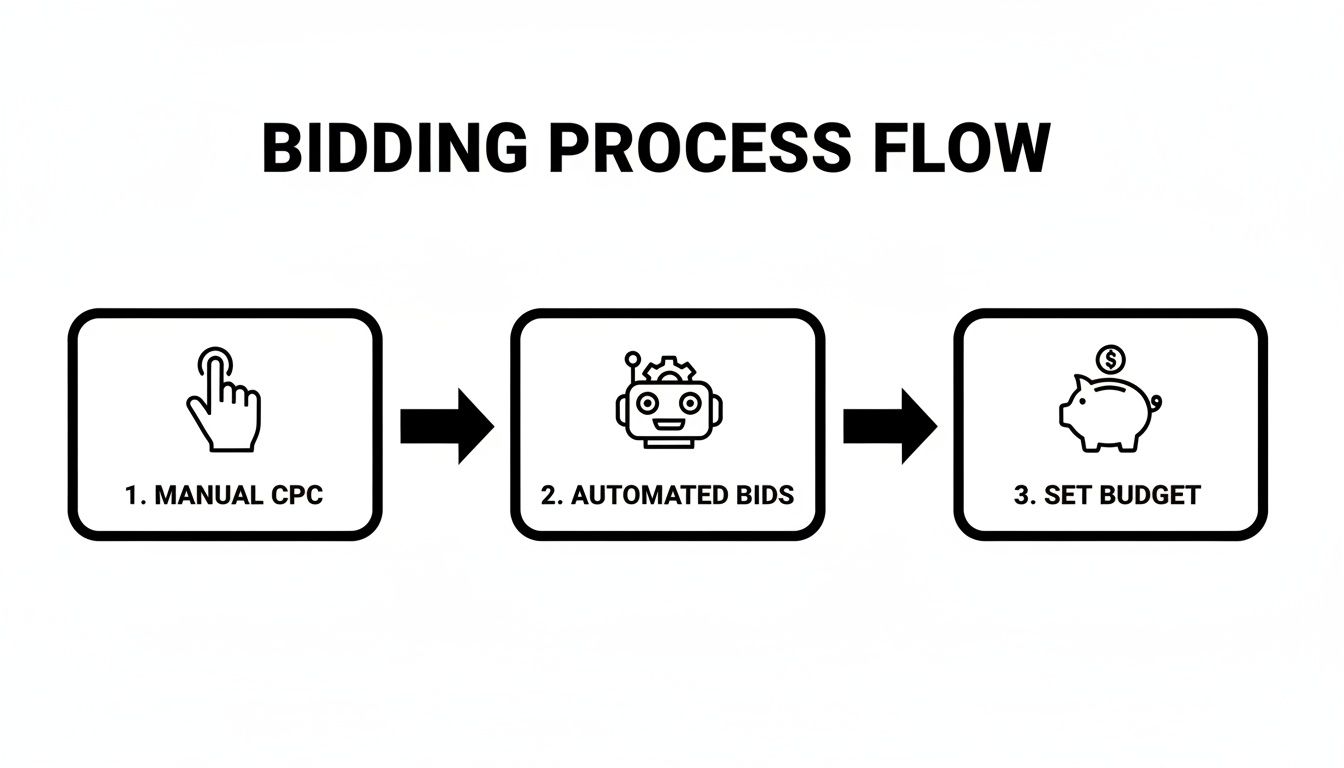
It really just illustrates that good management is about using the right tool for the job. You might start with controlled manual bids to gather data and then graduate to smart automation once you know what works.
One of the best ways to scale is by using your own data to unearth new opportunities. Go back to your search terms report, but this time, don't look for negatives. Hunt for new, high-converting keyword ideas that you aren't bidding on yet. These are terms real people are searching for that have already proven they can drive results.
This process can be a real grind, but this is where Keywordme makes a huge difference. You can analyze your search terms and instantly add those promising new keywords to the right ad groups with a single click. Instead of guessing what might work, you're using real user data to expand your reach with confidence and scale your account—all without trashing your ROI.
Google PPC Management FAQs: Your Burning Questions Answered
Let's clear the air and tackle some of the most common questions I hear from people managing their own Google PPC campaigns. Getting straight answers to these tricky spots can be a game-changer, helping you run your account with more confidence and way less guesswork.
Think of this as a quick-reference guide for the stuff that keeps advertisers up at night. The goal is to get you unstuck so you can get back to what actually matters—driving real results.
How Often Should I Actually Be Checking My Google Ads Campaigns?
This is a big one, and the right answer definitely isn't "all day, every day." When you first launch a brand-new campaign, you absolutely want to be in there daily for the first week or so. Your main job is to be the hawk watching your budget, ready to swoop in and stop any obvious money pits before they do real damage.
Once things have settled down and the campaign is stable, checking in on your key metrics 2-3 times per week is a great rhythm. This is frequent enough to spot new trends and opportunities but not so often that you start making knee-jerk reactions to normal daily ups and downs.
That said, some tasks need to be on a regular schedule:
- Your Weekly Deep Dive: Carve out time once a week to dig into your Search Terms Report. This is non-negotiable. It's where you'll find new negative keywords to block junk traffic and unearth potential keyword gems.
- Monthly & Quarterly Reviews: Use these for the big-picture stuff. Are you actually hitting your goals? Is it time to test a new bidding strategy? Should you shift budget from one campaign to another?
Consistency is king. The biggest mistake I see is advertisers who only check their accounts once every few weeks. That’s a perfect recipe for wasted ad spend and leaving money on the table.
What’s a Good Quality Score, and How Do I Fix a Bad One?
Think of Quality Score as Google's report card for your ad, keyword, and landing page combo. It's graded on a scale of 1 to 10. Anything 7 or higher is solid. If you're consistently seeing scores below 5, that's a huge red flag that something is fundamentally broken. A low score means you're paying more for clicks than your competitors. Simple as that.
Fixing a crummy Quality Score isn't about one magic fix; it's about systematically improving three core pieces:
- Ad Relevance: Does your ad copy actually match the keywords in the ad group? If someone searches for "men's leather dress shoes," your ad headline better reflect that, not just a generic "Men's Shoes on Sale."
- Expected Click-Through Rate (CTR): Is your ad interesting enough to make someone want to click it? You need strong calls to action, you should highlight benefits (not just features), and do whatever you can to stand out from the other ads on the page.
- Landing Page Experience: After someone clicks, does the page they land on deliver on the ad's promise? The page has to be super relevant to their search, load fast, and be a breeze to use, especially on a phone.
Nail these three areas, and you're showing Google you provide a great experience for its users. Your reward? Higher ad rankings and, most importantly, lower costs.
Should I Use Automated Bidding or Stick with Manual?
The "manual vs. auto" debate never really ends, but the real answer almost always comes down to your data. Manual bidding gives you total control, which is exactly what you want for new campaigns that have zero conversion history. It lets you gather that crucial initial data without letting Google's algorithm take a wild guess and blow your budget.
On the other hand, automated bidding strategies like Target CPA or Target ROAS can be incredibly powerful—once you have a solid history of conversions. A good rule of thumb from Google itself is to have at least 15-30 conversions within the last 30 days before you even think about switching. At that point, the machine has enough data to start making smart bidding decisions for you.
A pro-level approach is to start new campaigns on Manual CPC to set a performance baseline and gather that initial conversion data. Once you have a steady flow of conversions coming in, you can confidently flip the switch to an automated strategy and start scaling up.
Seriously, How Much Should I Spend on Google Ads?
Ah, the million-dollar question. The truth is, there's no magic number that works for every business. The best way to get a realistic starting point is to work backward.
First, figure out the average Cost Per Click (CPC) for your most important keywords. Tools like Google's Keyword Planner can give you a rough idea. Let's say the average CPC for your top keywords is $2.00. If your goal is to drive 100 clicks to your site each day, you're looking at a starting budget of around $200 per day.
Start with a test budget you're comfortable with. Focus it on a small, tightly-themed group of your highest-intent keywords, and track everything. Once you find a formula that's profitable, you can scale your budget with confidence.
Ready to stop wasting time on manual keyword chores and start optimizing like a pro? Keywordme turns hours of tedious work into a few simple clicks, helping you clean up junk traffic, find winning keywords, and manage your match types faster than ever.
Start your free 7-day trial of Keywordme today and see the difference it makes.
.svg)