
Google Keyword Alerts: Setup, Workflows, and Pro Tips
Google Keyword Alerts: Setup, Workflows, and Pro Tips


Most advice on Google Keyword Alerts treats them like a free safety net. Set a few phrases, wait for emails, and assume you've covered brand, competitors, and demand. That sounds efficient, but in real account work it's where teams start missing important mentions and drowning in junk.
The problem is simple. Google Alerts is an index-based notification system, not a real-time crawler, so it only fires when Google indexes new matching content. That's fine for broad awareness, but it's a weak substitute for serious monitoring when updates land on owned sites, social channels, or niche publications that don't get indexed quickly, or at all in the way you need. One cited study in independent reporting found it missed 46% of updates (analysis of Google Alerts failure modes).
Practical rule: if a term matters enough to affect spend, pipeline, or reputation, don't trust one alert source to catch everything.
The better move is layered monitoring. Use Google Alerts for broad discovery, pair it with Google Ads controls for performance-critical signals, and then route useful search-term insights into a workflow you can act on. That's the difference between a noisy inbox and a keyword system that earns its keep.
Why Most Google Keyword Alerts Fail Marketers
Google Alerts operates as an index-based notification system, so it only responds after Google has indexed new content that matches your query. In practice, that makes it useful for broad awareness and weak for anything that depends on speed or completeness. Edits to existing pages, social posts, and other fast-moving mentions can pass through without triggering anything at all.
The blind spots most teams ignore
The misses usually show up in the exact places marketers care about most. Owned-site updates do not always surface the way teams expect, and social channels are a poor fit for a tool built around indexed results. Niche industry publications can also surface slowly, which makes an alert feel late even when it technically fired.
That is why the usual “set it and forget it” habit fails. A query that looks tidy on day one can turn noisy fast, especially if the keyword is broad or common. The inbox fills up with mentions, but not the ones that deserve a response.
Coverage is the issue. Google Alerts still has a place, but only as one input in a wider monitoring stack, not as the final word on keyword tracking.
What the evidence says about reliability
Analysts have been blunt about the gap. Bhakuni's analysis, published on Medium, found that Google Alerts missed 46% of updates. That does not make the product useless, but it does make it unreliable as the only system for keyword monitoring.
For marketers, that failure mode matters because missed alerts are not just inconvenient. A competitor launch can go unnoticed, a brand issue can sit too long, or a promising keyword can never get reviewed. The question is whether the alert stream is complete enough for the decision in front of you.
A better workflow uses Google Alerts to surface candidates, then checks them against paid search data, search-term analysis, or page monitoring when the mention affects revenue or reputation. That layered setup keeps the free tool in the role it handles best, broad discovery, while other checks handle final judgment.
Setting Up Google Alerts for Keyword Monitoring
A useful alert starts with query design, not the settings panel. Exact phrases cut a lot of junk, exclusions keep obvious nonsense out, and domain filtering stops the same low-value site from hijacking your inbox. The difference shows up fast when you're tracking a brand name that also doubles as a common phrase.
Build cleaner queries first
Start with quoted phrases when you need exact matches, then add the minus operator to remove obvious noise. If one domain keeps producing irrelevant mentions, use -site: to exclude it. Google's own guidance and developer schema also document language and country restrictions, so split alerts by market instead of trying to cover every region with one global query (Google Alerts schema reference).
That matters more than many PPC teams think. Separate alerts by market give you cleaner signal, especially when the same term appears differently across languages or local publications. You get fewer false positives and a better shot at seeing which region deserves attention.
Source choice matters too. Google Alerts lets you narrow to NEWS or WEB, and delivery can be EMAIL or RSS. Email can work for your team, while RSS is cleaner if you want to batch-read multiple alerts without clogging your inbox. For frequency, Google documents hourly, daily, or weekly email delivery in current guidance.
Broad alerts create work. Tight alerts create decisions.
The last setting is quality. Google Alerts supports LOW or HIGH result quality in its schema, which is useful because the trade-off is always the same, more recall usually means more noise. I'd rather start slightly tighter, then loosen the filters only when I know I'm missing something important.
For a practical setup walkthrough that pairs well with this approach, the Google Keyword Planner guide on how to use the Google Keyword Planner is a solid companion.
Google Ads Alerts and Automated Rules Explained
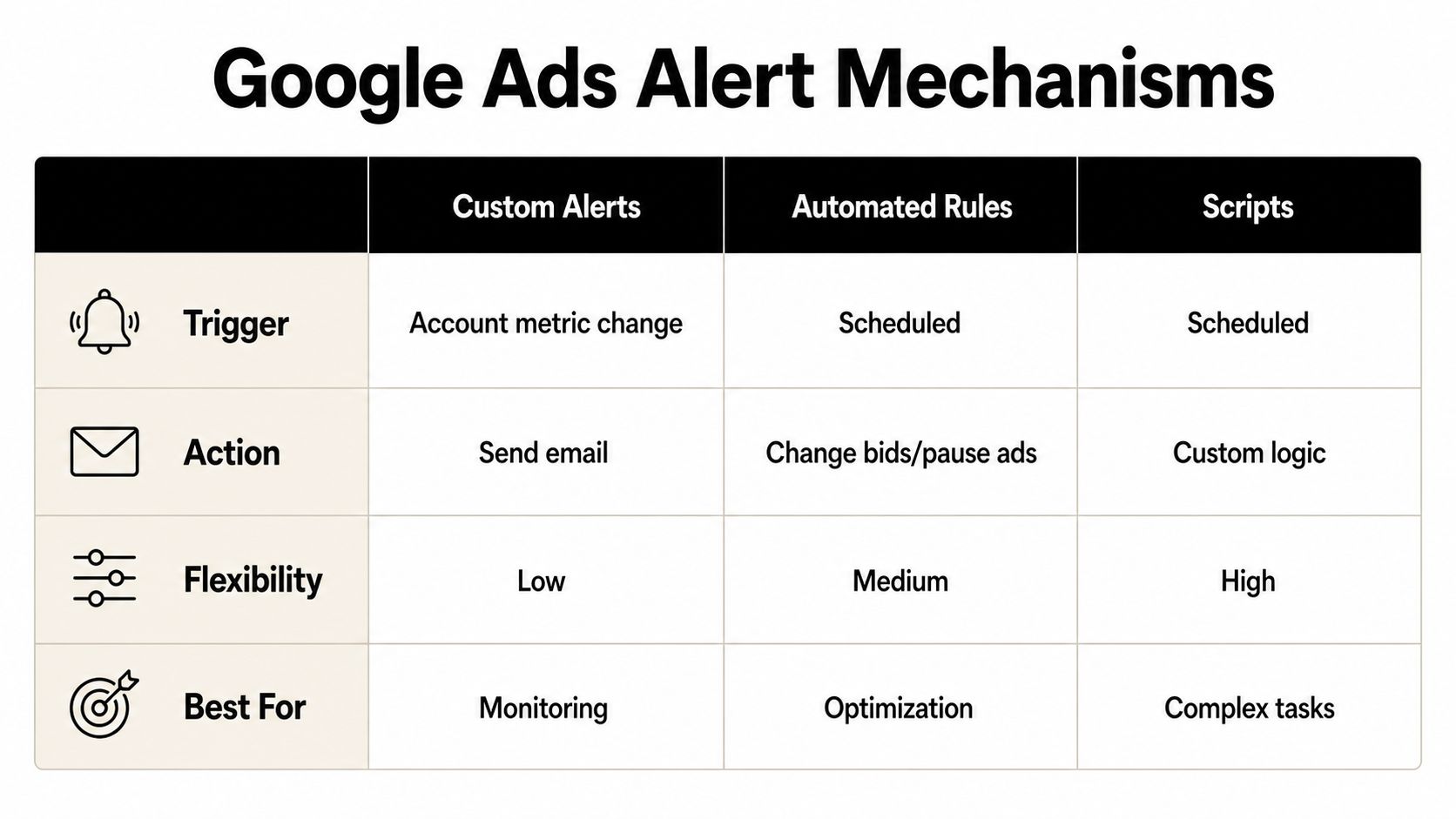
Free alerts are useful for discovery, but paid search needs faster guardrails. Inside Google Ads, the three mechanisms to know are custom alerts, automated rules, and scripts. They're not interchangeable, and in account management I've seen plenty of wasted spend come from teams using the wrong one for the job.
Custom alerts, rules, and scripts do different work
Custom alerts are the simplest layer. They notify you when an account metric crosses a threshold, which is useful when you need visibility, not intervention. Automated rules go a step further because they can change bids, pause ads, or make other scheduled actions when conditions are met. Scripts are the most flexible option, since they can run custom logic across accounts, campaigns, or search terms.
A practical example helps. If a keyword's cost per conversion gets ugly, an automated rule can pause it before the issue spreads. If search terms start recurring across multiple campaigns, a script can flag the pattern so you don't keep paying for the same bad query in different places. That's where Google Ads becomes more than a reporting surface.
Google also keeps durable account history in ways that matter for troubleshooting. Search Services History can be stored in a user's Google Account when enabled, and users can turn it off, delete it, or set automatic deletion windows of 3 months or 18 months. Google Ads change history preserves account, campaign, and ad group changes for the past 2 years, and Google Ads Keyword Planning historical metrics cover the past 12 months of average monthly searches, competition level, and bid ranges (Google Search history and Ads history guidance).
That combination matters because alerting is only half the job. You also need a record of what changed, when it changed, and whether the keyword still deserves attention months later.
Use the right layer for the right risk
If the task is monitoring, choose a custom alert. If the task is taking a repetitive action under clear conditions, use an automated rule. If the task needs logic, exceptions, or cross-campaign analysis, use a script. Over-automating the wrong thing usually creates cleanup work, not savings.
For teams that manage multiple markets, this is also where a more operational mindset pays off. The best setup is boring in the right way, alerts for visibility, rules for routine protection, scripts for edge cases.
A useful reference point for paid-search operators working across regions is Adwords management in Germany, especially if you're thinking about how alerting and account governance differ in localized markets.
Turning Alert Mentions into Search Demand Signals
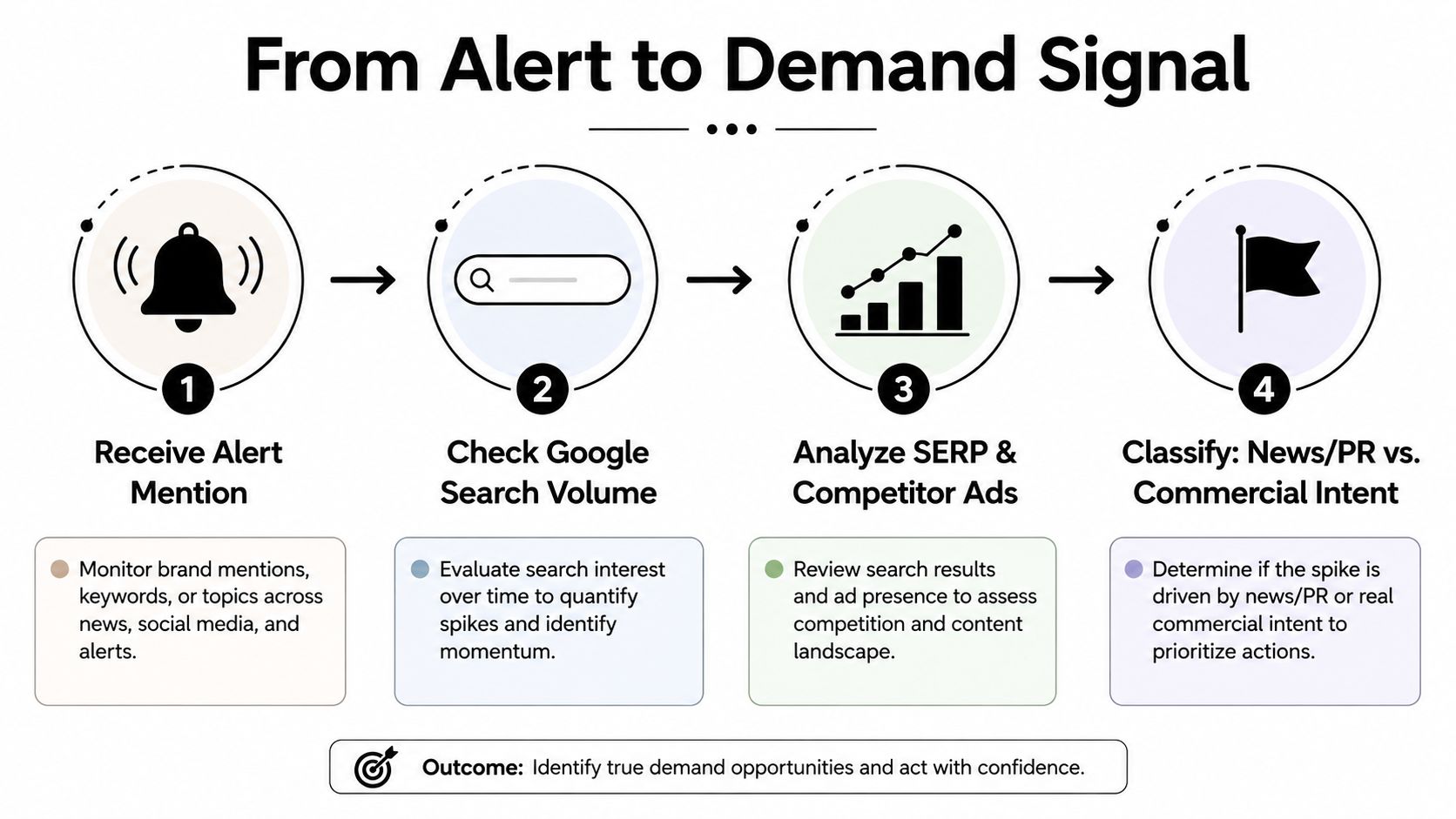
Alert volume alone can mislead you. A keyword can spike because of press, policy talk, or a passing social mention, then leave no usable demand behind. The safer move is to verify the term against keyword-planning data before you spend budget, brief content, or treat the alert as a real opportunity.
Validate the term before you act
Google Ads says Keyword Planner is meant for discovering and refining keyword ideas, and it also defines low search volume keywords as terms with too little traffic to show most ads (Google Ads keyword planning help). I use that filter early, because alert feeds often surface terms that are visible but commercially thin.
A practical check starts with three buckets. Some alerted terms are informational and belong in a watchlist. Some show enough demand to justify campaign tests or content support. Others need no further action after a quick review.
A simple validation rule works well:
- Meaningful volume and buying intent: move it into keyword research or campaign planning.
- Low or ambiguous volume: keep it on a watchlist.
- No obvious search demand: ignore it unless it points to a broader trend.
That keeps you from chasing every mention. An alert signals an event; search volume confirms demand.
Use demand data to avoid false positives
Google Alerts becomes more useful when you test whether the term has practical search demand. A mention can matter for PR or competitive awareness and still be a poor paid-search target. When the alert lines up with search volume, competition, and bid-range context, you have something worth testing with more confidence.
For teams that also watch social chatter, the hands-on Twitter monitoring guide is a useful contrast, because social mentions and search demand do not always move together. The same term can be active on social and quiet in search, or the reverse.
The next filter is workflow. Use the alert to find the term, then confirm whether search behavior supports it. If you need a cleaner path from search terms to new targets, this guide on finding new keywords from the search terms report shows how to turn raw queries into usable keyword ideas without relying on noise from alert feeds.
Alert Triage Workflow and Tool Integration
A good alert system fails gracefully. A bad one just fills your inbox faster. The day-to-day fix is simple structure, label the important stuff, archive the rest, and give every alert a decision path so you're not rereading the same messages over and over.
Use a triage rhythm, not a random inbox check
Brand terms deserve daily review because they often need a faster response. Industry keywords can usually sit in a weekly review queue, which keeps your attention on meaningful shifts instead of every passing mention. That split alone removes a lot of pressure from the workflow.
The triage decision is usually one of four outcomes:
- Negative keyword: the term is wasting spend and should be blocked.
- New ad group: the term has enough relevance to isolate.
- Content idea: the mention points to an information gap.
- Ignore: the alert is useful context, but not a task.
Once that's in place, the workflow becomes much cleaner. You're not asking whether an alert is interesting. You're asking what it should become.
Close the loop between discovery and action
Search-term cleanup tools earn their keep. Keywordme's Chrome plugin is built for the annoying part of the job, cleaning junk search terms, expanding ad groups with high-converting keywords, and applying match types in one click. It also supports automated negative keyword list building and bulk handling, which removes the copy-and-paste grind that slows down response time.
When an alert reveals a term that belongs in the account, the handoff should be fast. If it doesn't, the term should still leave behind something useful, maybe a negative, maybe a watchlist note, maybe a content angle. The point is to keep the alert from dying in the inbox.
For teams trying to systematize this kind of work, a guide to workflow automation for DTC brands is a useful reminder that process beats heroics when the volume starts rising. If you want to connect keyword data more tightly to your own systems, the API integration guide for keyword data is a practical next step.
Practical rule: if an alert shows up twice and still hasn't been triaged, your workflow is the problem, not the keyword.
Building a Layered Keyword Monitoring Strategy
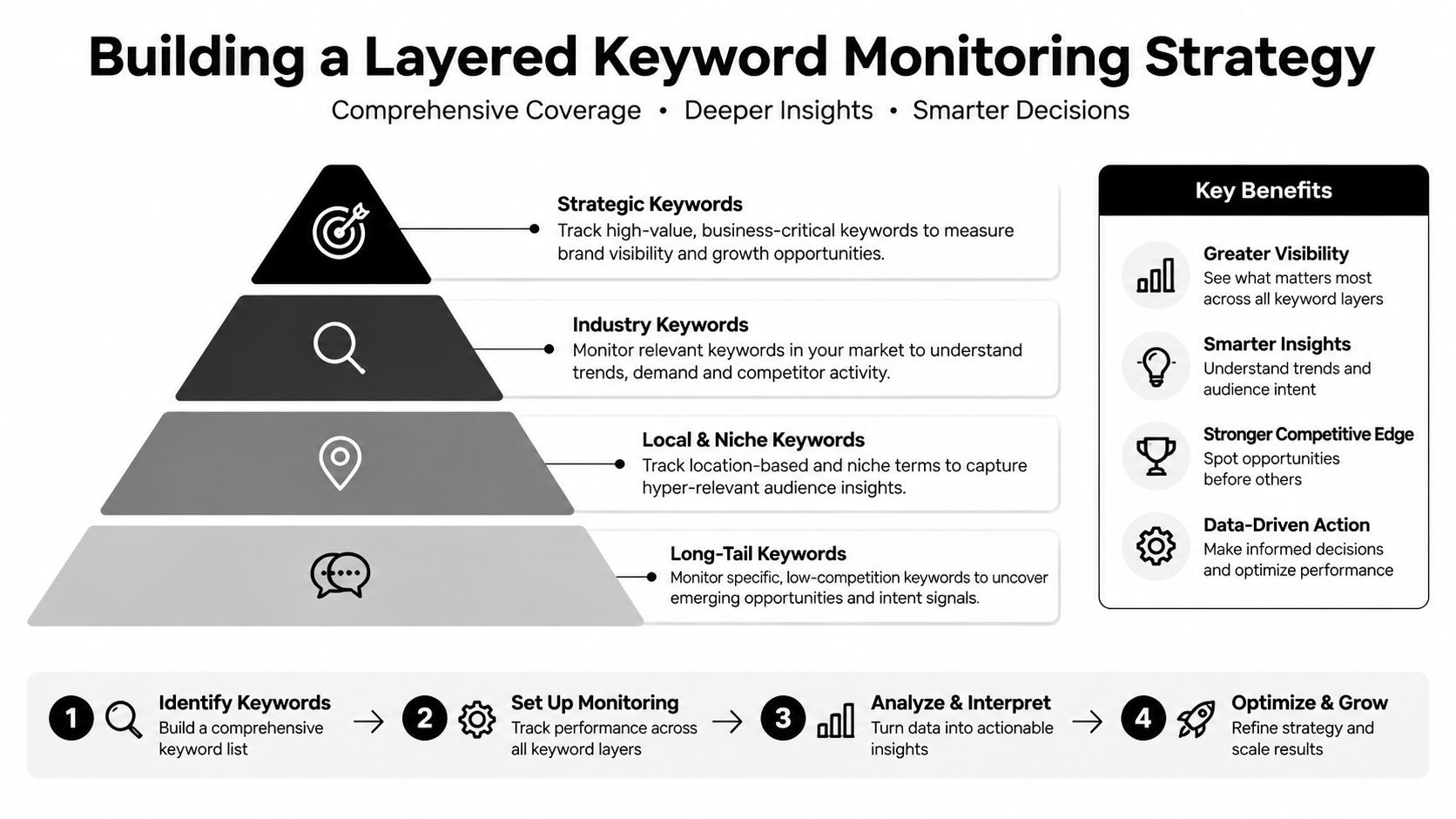
A layered setup beats a single-alert approach. Google Alerts gives broad web coverage, Google Ads rules and scripts watch performance thresholds, and a dedicated workflow tool turns search-term observations into account changes without extra friction. Used together, they give you reach, control, and speed in the same stack.
What to set up first
Start with three Google Alerts, one for brand, one for a competitor, and one for an industry topic that signals demand shifts. Add one Google Ads custom alert or automated rule for the metric that hurts you most when it moves. Then install the workflow tool that lets you clean up search terms and act quickly when a keyword deserves a real response.
Weekly, review the alerts most likely to turn into decisions. Monthly, audit the alert list itself, because stale queries are usually where the noise creeps in.
A better signal-to-noise ratio is the target across the whole monitoring stack. When that balance is in place, the inbox stays quiet and decisions get faster.
.svg)