
Google Ads Campaign Set Up: A Practical Walkthrough
Google Ads Campaign Set Up: A Practical Walkthrough


You can spot a rushed Google Ads campaign set up a mile away. Someone opens a blank account, clicks around for a few minutes, guesses on the goal, throws in too many keywords, and hopes the budget somehow survives the first week. That's not setup, that's expensive improvisation.
The accounts that hold up under pressure start differently. They define the business outcome first, set conversion tracking before launch, keep the structure tight, and treat every setting like it affects what happens after the click. That's the part most guides gloss over, even though it's the part that decides whether you get useful data or just a pile of spend. Google's own setup flow pushes you to add business info, choose a goal, create the ad, choose audience and budget, and only then launch, because the sequence itself shapes how the campaign can be optimized later for sales, leads, or awareness (Google Ads campaign setup guidance).
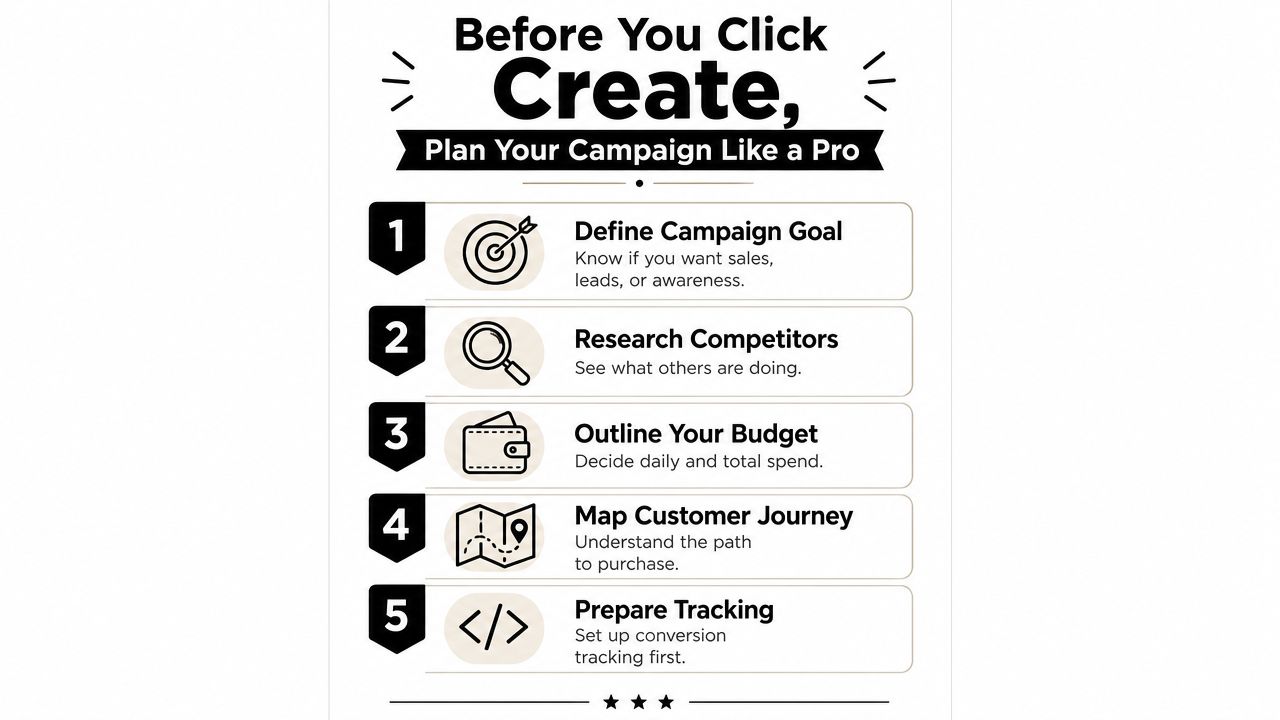
Before You Click Create, Plan Your Campaign Like a Pro
The fastest way to burn budget is to treat the first campaign like a form to fill out and move on. A marketer opens the Google Ads interface, a manager wants leads by Friday, and the account gets built around urgency instead of intent. That usually means mixed goals, weak tracking, and a landing page that never had a real chance to support the ad promise.
A better setup starts with one business outcome per campaign. Sales, leads, and awareness belong in separate campaigns because they need different bidding, different landing pages, and different ways to judge success. Google's setup flow points in the same direction. Build around a measurable action, not clicks for their own sake (Google Ads campaign setup guidance).
Start with the conversion, not the headline
If the goal is a form fill, don't start with a vague traffic objective and hope lead quality sorts itself out later. Google's own setup guidance says conversion tracking should be live before the campaign goes live, because optimization depends on what happens after the click, not clicks alone (Google Ads campaign setup guidance). That is the line between a campaign that can learn and one that only spends.
Campaign type comes next. Search works best when intent is explicit. Display and video fit broader reach, while Shopping and Performance Max make sense only when the product feed and account setup can support them. A weak landing page still hurts any format, but Search is usually the cleanest starting point for direct response because the searcher is already signaling demand.
Before you build, make the boring decisions on purpose:
- Define the outcome clearly. Pick one result the campaign should produce, then build around that.
- Check the landing page. If the page does not match the ad promise, fix the page first.
- Align the stakeholders. Sales, marketing, and operations should agree on what counts as success.
- Map the journey. Know what happens from search to click to conversion.
- Lock the tracking plan. If the conversion action is wrong, the campaign learns the wrong lesson.
For keyword organization before launch, use this guide to building keyword lists for Google Ads as a working reference. The first campaign often breaks at the list-building stage long before it breaks in the interface. Keyword selection, match intent, and grouping decisions shape the account before any ad ever serves.
One practical rule holds up. If the campaign cannot be explained in one sentence, it is not ready to launch.
The Step-by-Step Campaign Build Inside Google Ads
A clean build in Google Ads starts with the setup screens people usually skim past. Go to Campaigns, click the plus icon for New campaign, choose Sales, Leads, or Website traffic, then select Search as the campaign type (Google Ads campaign creation flow). That path is simple, but the choices inside it decide whether the account learns from useful signals or burns budget on noise.
Once the objective is set, the next screens start shaping delivery. Business info, location targeting, and budget control who can see the ads and how often they show. Google's setup guidance also points to the account statistics table for monitoring clicks and impressions, with device segmentation available so you can compare desktop and high-end mobile traffic later.
Build the controls before the keywords
The boring settings matter first. Start and end dates, ad schedule, location targeting, daily budget, and bidding strategy all shape how the campaign behaves before a single search term enters the account (Google Ads setup tutorial).
A starter budget example of $25 per day works for a small account that needs early signal without overcommitting (Google Ads setup tutorial). The number itself is not magic. The point is to set a budget you can manage. Too tight, and the campaign never gathers enough volume to learn. Too loose, and the account spends through learning money before the structure is proven.
A campaign that launches with clean settings is easier to read later, and easier to fix when the data gets messy.
The launch checklist is not glamorous, but it saves real budget. Verify that the conversion action matches the business outcome, then check for disapprovals, limited status, and broken landing-page links after the ads go live (American Eagle Google Ads campaign setup). If conversion tracking is wrong, every other optimization is built on the wrong lesson.
For a practical build order, keep it this simple:
- Create the account. Finish the setup steps that affect billing and measurement.
- Choose the campaign objective. Match it to the result the business wants.
- Select Search. It is the cleanest starting point for intent-heavy queries.
- Set delivery controls. Dates, schedule, budget, and locations should all be deliberate.
- Review before publishing. Fix issues before the campaign spends a cent.
If you want a tighter setup reference for structure and relevancy, use this guide to building ad groups for maximum relevancy while you map the account. The interface makes it easy to click through a build. The part that matters is whether the account is set up to learn from the right search behavior on day one.
Structuring Ad Groups and Picking Keywords That Convert
Most accounts do not fail because Google Ads is broken. They fail because the structure is muddy. Too many unrelated keywords get stuffed into one ad group, the ad copy turns generic, and the landing page no longer matches the query closely enough. That is how you spend money on traffic you cannot explain, and how budgets get burned before anyone knows what worked.
A tight structure usually keeps 5 to 15 closely related keywords per ad group, a range that shows up in campaign structure guidance as a practical balance between intent alignment and enough signal for Smart Bidding to learn (Google Ads campaign structure guide). Push far past that and relevance starts to blur. Go too narrow, and the ad group can run dry before it has enough data to be useful. The goal is not to obey a neat number for its own sake. The goal is to make the search term, the ad, and the landing page feel like the same answer.
Bullseye first, expansion second
A bullseye build starts with the core product or service and splits it by the highest-intent query patterns. A local plumber might put emergency repair, water heater service, and drain cleaning into separate ad groups. An e-commerce skincare brand would keep acne cleanser, retinol serum, and moisturizer apart, because each one needs its own promise and its own landing page angle.
Match type choice should follow the same logic. Broad match can work once Smart Bidding and conversion volume are in place, but phrase and exact match still make sense when control matters, especially for brand terms or legal-sensitive terms. The mistake is broad match with no restraint, no negatives, and no clear boundary around intent. For a closer look at how that separation holds together in practice, use the guide on how to structure Google Ads ad groups for maximum relevancy while you map the account.
Google Ads also allows 8 to 10 distinct headlines per Responsive Search Ad as a practical recommendation, with up to 15 allowed. That is a reminder that modern ads are built for structured variation, not one static message. If the ad group is too broad, those headlines end up doing too much at once.
Practical rule: if you cannot write one focused landing page angle for the ad group, the ad group is too broad.
A solid ad group is boring in the best way. It makes the search term obvious, the ad copy obvious, and the conversion path obvious. That is what gives the account room to scale without turning into a cleanup project.
Bidding Strategies and Budget Settings Without the Jargon
Bidding gets messy fast because people treat it like a theory exercise instead of a control system. A new account usually comes down to one practical choice. Do you want tighter control, or do you want Google to do more of the work? The answer depends on how much conversion data the account already has.
Manual CPC gives you direct bid control. Enhanced CPC keeps part of that control while still allowing Google to adjust around likely conversions. Target CPA, Maximize Conversions, and Target ROAS are more automated, but they need real conversion volume and clean measurement before they behave consistently. That is why brand-new accounts often stumble when they jump into automation too early, before tracking is set up and the signal quality is there. As noted earlier, the setup order matters more than the fancy bid label.
Control and automation each have a job
Manual CPC is useful when you need to learn the account and the data is still thin. Target CPA starts to make sense once the campaign is producing steady conversions and you want the system to optimize toward a cost per acquisition target. Maximize Conversions fits campaigns with enough volume for the algorithm to learn from. Target ROAS belongs in accounts where revenue value is tracked cleanly and the business cares about return, not just lead count.
Budget pacing matters just as much as bidding. A daily budget is a pacing tool, not a guarantee that spend will land perfectly on that number every day. Shared budgets can help spread spend across campaigns, but they also make it easier to let one campaign consume budget that should have gone somewhere else. Starter budgets need to be easy to justify and easy to watch.
A few setup choices are worth making early:
- Set the budget intentionally. Do not let the default become the plan.
- Match the bidding to the data. Automation without conversions is guesswork.
- Watch pacing daily at launch. Early spend patterns reveal problems quickly.
- Use shared budgets carefully. They simplify management, but they can blur priorities.
A new account should use the bid strategy that fits the data in front of it, not the one that sounds smartest in a meeting. If the campaign is still light on signals, control usually beats sophistication.
Writing Responsive Search Ads and Using Extensions
A keyword list can still miss the mark if the ad copy is flat. Responsive Search Ads work best when each headline earns its place, not when the asset set repeats the same promise in slightly different words. Pinning everything in place may make the ad look tidy in the editor, but it usually weakens performance by cutting off combinations that can win the click.
Give the system real material to work with. Headlines should cover the keyword, the benefit, the differentiator, and the action. Descriptions should expand the offer and remove friction, not fill space for the sake of it. Clean, direct copy makes the decision easier for the searcher and gives the auction less room to punish weak messaging.
Extensions are not decoration
Sitelinks, Callouts, Structured Snippets, and Call extensions give the ad more surface area and more ways into the business. A plumbing ad can use sitelinks for emergency service, pricing, and financing. A B2B ad can use callouts for support, onboarding, or setup speed. Structured snippets work when the product or service has clear categories, and call extensions matter when the phone is a real conversion path.
Headline pinning should stay limited. Pinning every message to one fixed position usually makes the ad weaker, because it stops the asset combinations from doing their job. Responsive Search Ads are built to test variations, so the copy needs enough useful parts to mix without turning into filler.
The setup checklist from major tutorials also points builders toward Optimize: Prefer best performing ads before publishing, along with the other practical delivery controls that shape how the account runs. That setting matters because it pushes the campaign toward performance instead of personal preference. For a quick reference, the Google Ads setup tutorial shows the same workflow in the interface.
Practical rule: if an extension does not help the searcher decide faster, it is probably not pulling its weight.
The ad should never read like six random headlines stapled together. It should feel like one useful answer to one useful query. That is what makes the click worth paying for.
A clean review process helps here too. The UFO Performance Marketing PPC audit is a useful baseline for checking whether the message, assets, and setup are pulling in the same direction.
Keywordme can help once the account starts producing enough search term data to organize. The negative keyword management automation workflow fits the broader cleanup process by turning messy query data into a more structured list. That matters because good ads do not save bad traffic.
Negative Keywords and Automating the Cleanup
The search terms report is one of the best parts of Google Ads because it shows what people typed, not what you hoped they meant. It's also where the mess starts if nobody cleans up the irrelevant queries.
Negative keywords are the fastest way to stop that bleed. A solid routine starts by reviewing search terms, marking out junk queries, and adding negatives at the campaign level or in shared lists when the same waste shows up across multiple campaigns. Search term cleanup is not glamorous, but it keeps the account from getting dragged into irrelevant intent.
Build the negative system early
The setup decision here is architectural. If the account is likely to attract the same irrelevant terms across different campaigns, shared negative lists make more sense. If the waste is specific to one campaign theme, campaign-level negatives are enough. The point is to design the cleanup path before the queries pile up.
That's also where tools start to matter. Keywordme is one option that works inside the Google Ads interface to help pull negatives from search terms and manage keyword lists without the usual copy-and-paste routine. It also fits the broader workflow of turning search term data into structured cleanup instead of spreadsheet churn. For a manual audit baseline, the UFO Performance Marketing PPC audit checklist is a solid external reference because it keeps the evaluation grounded in the usual account-level checks.
Traditional cleanup is tedious. Someone exports search terms, sorts by relevance, applies match types, and pastes negatives one by one. That works, but it burns time and makes it easier to miss patterns. A tool-assisted workflow compresses the same job into a tighter loop, which is exactly where operational gains show up.
The more important point is how much of the cleanup should be designed into the initial structure. If the account is built with focused ad groups and clear intent boundaries, the negative list stays manageable. If the build is sloppy, negatives become a permanent bandage.
This guide to automating negative keyword management is useful if you want a cleaner workflow for the repeat work. The accounts that scale well usually treat negatives as a system, not a cleanup task.
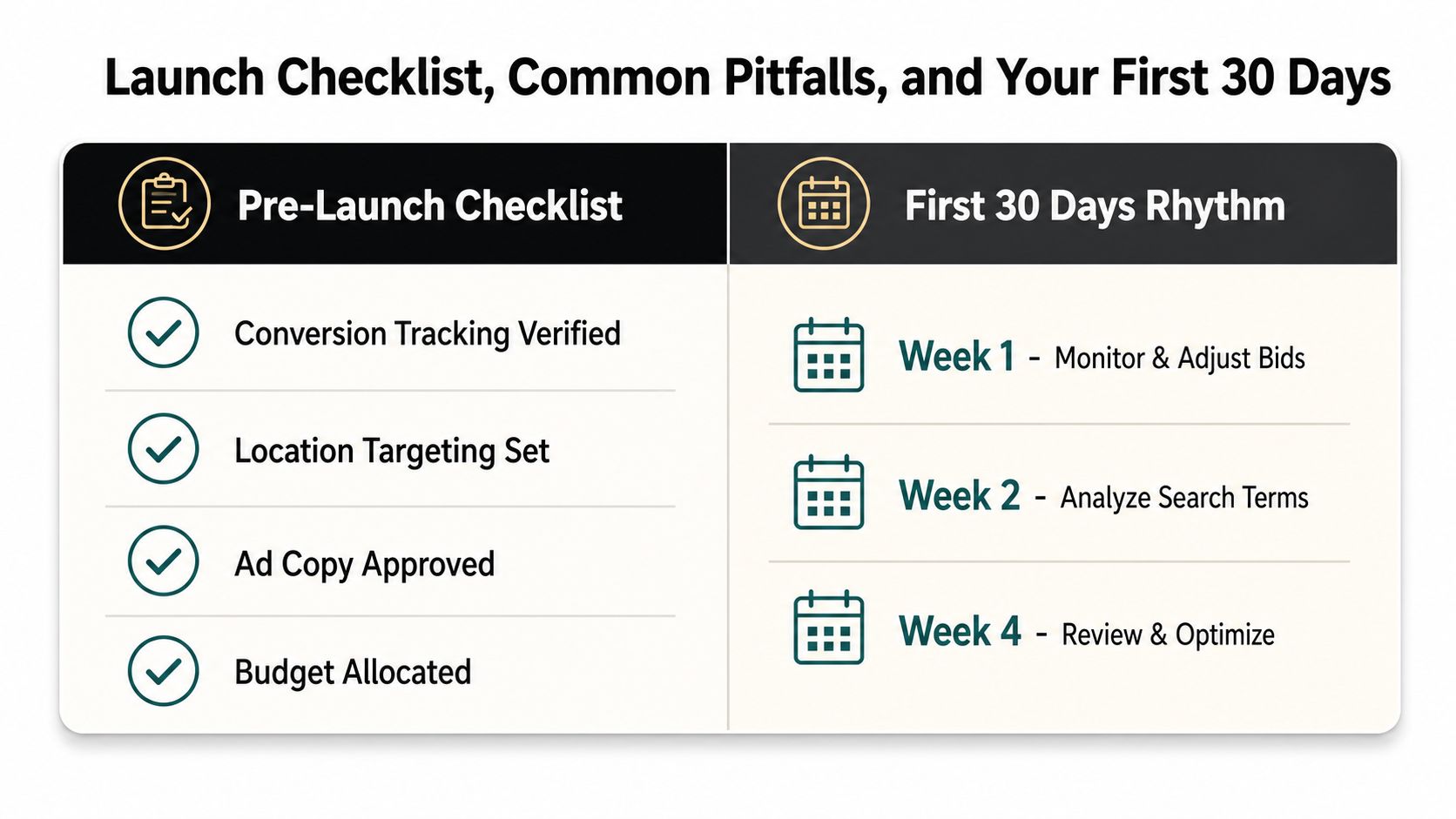
Launch Checklist, Common Pitfalls, and Your First 30 Days
Launch day should feel controlled, not ceremonial. A campaign that goes live without the basics checked is just a polished liability. The short list matters more than the long one.
The pre-launch check that saves money
Before hitting publish, verify conversion tracking, confirm location targeting, review the ad copy, seed the negative keywords, and check the budget one more time. Those checks are boring, which is exactly why people skip them. They are also the settings that keep a new build from wasting spend before you have usable data.
The first month should be about reading the account cleanly, not making dramatic changes every few hours. Daily checks in week one help catch broken links, disapprovals, and obvious mismatches. After that, weekly reviews are usually enough to spot search term waste, device differences, and ad copy drift without reacting to every small swing.
The mistakes are predictable:
- Launching without conversion tracking. That turns optimization into guesswork.
- Using broad match too early. Without negatives and structure, it wastes spend fast.
- Ignoring device performance. The account can behave very differently by device.
- Changing everything at once. If every setting moves, nothing can be diagnosed.
A new campaign does not need panic management, it needs a steady rhythm. Clean launch, measured checks, and small edits beat a chaotic rebuild every time.
The first 30 days are where the account shows whether the promise in the ad matches the page behind it. If those two do not line up, the issue shows up quickly, even if the clicks looked fine on day one. A tight launch checklist keeps that mismatch from draining budget while the account is still young.
If you want to tighten the parts of Google Ads that usually drain time, Keywordme helps with keyword lists, match-type handling, and negative keyword cleanup inside the workflow you are already using. Use Keywordme if you want to spend less time on copy-paste tasks and more time shaping campaigns that can hold up under real budget pressure.
.svg)