
Search Terms vs Keywords in Google Ads: What's Different
Search Terms vs Keywords in Google Ads: What's Different


A keyword is what you bid on, while a search term is what the shopper typed into Google. Google Ads offers three positive keyword match types, but none makes your keyword list a literal transcript of shoppers' searches.
You're checking a campaign because spend looks fine but sales don't. The keywords seem sensible, yet the searches behind them tell a messier story: some shoppers want what you sell, some want something adjacent, and some shouldn't have reached your ads at all.
That's where search terms vs keywords stops being a vocabulary question. You need to know which queries deserve their own targeting, which deserve an exclusion, and which haven't produced enough evidence for either decision.
Keywords and Search Terms Side by Side
Say you open the Keywords tab and find running shoes. Then you open the search terms report and discover that a shopper searched for women's trail running shoes near me.
Those entries describe different things. You chose a product category to target; the shopper supplied a more specific need, including product type, audience, and local intent.
Keywords and search terms compared
| Criteria | Keyword | Search term |
|---|---|---|
| Who creates it | You add it to an ad group | The shopper types it into Google |
| Can you edit it | Yes, change the text, match type or bid | No, you can only add it as a keyword or exclude it |
| What it does | Sets when an ad can enter the auction | Shows what actually triggered the ad |
| Where you see it | Keywords tab in the campaign | Search terms report |
| Best use | Planning targeting | Finding new keywords and negatives |
| How far to trust it | Your hypothesis about demand | Real but partial data |
The sharpest split is control: you control keywords directly, but search terms appear after the search, so you respond by adding targeting or exclusions rather than editing what someone typed. Changing keyword text may mean replacing the keyword, and bid control follows the bidding strategy you're using.
That distinction changes how you investigate performance. A tidy keyword list can still attract unrelated searches, while an awkwardly worded query can describe exactly the customer you want.
Read the shopper's request, not just the words
For the running-shoes query, ask whether your store sells women's trail shoes and whether the landing page supports local shopping. If you only sell road-running shoes online, the query contains a mismatch that the original keyword doesn't reveal.
Don't automatically exclude every modifier you didn't put in the account. A new modifier might be a useful expansion opportunity rather than a problem.
Try a small labeling exercise today:
- Planned inputs: Open a campaign and mark a handful of keyword rows as choices your team made.
- Observed searches: Mark a handful of search-term rows as requests shoppers made.
- Next action: Give each observed query a provisional label: relevant, irrelevant, or needs more evidence.
The exercise separates what you hoped to attract from what arrived. Keep the uncertain label available. Forcing every query into keep or block is how thin evidence becomes an expensive decision.
Reading the Search Terms Report Columns
In Google Ads, open the campaign's Keywords section and choose Search terms. Depending on your navigation layout, you may find it under Insights and reports instead; select the campaign before inspecting rows.
Start with a working review window, such as the last month, limit the view to one campaign, and sort Cost from highest to lowest. These are review settings, not rules about how much evidence you need.
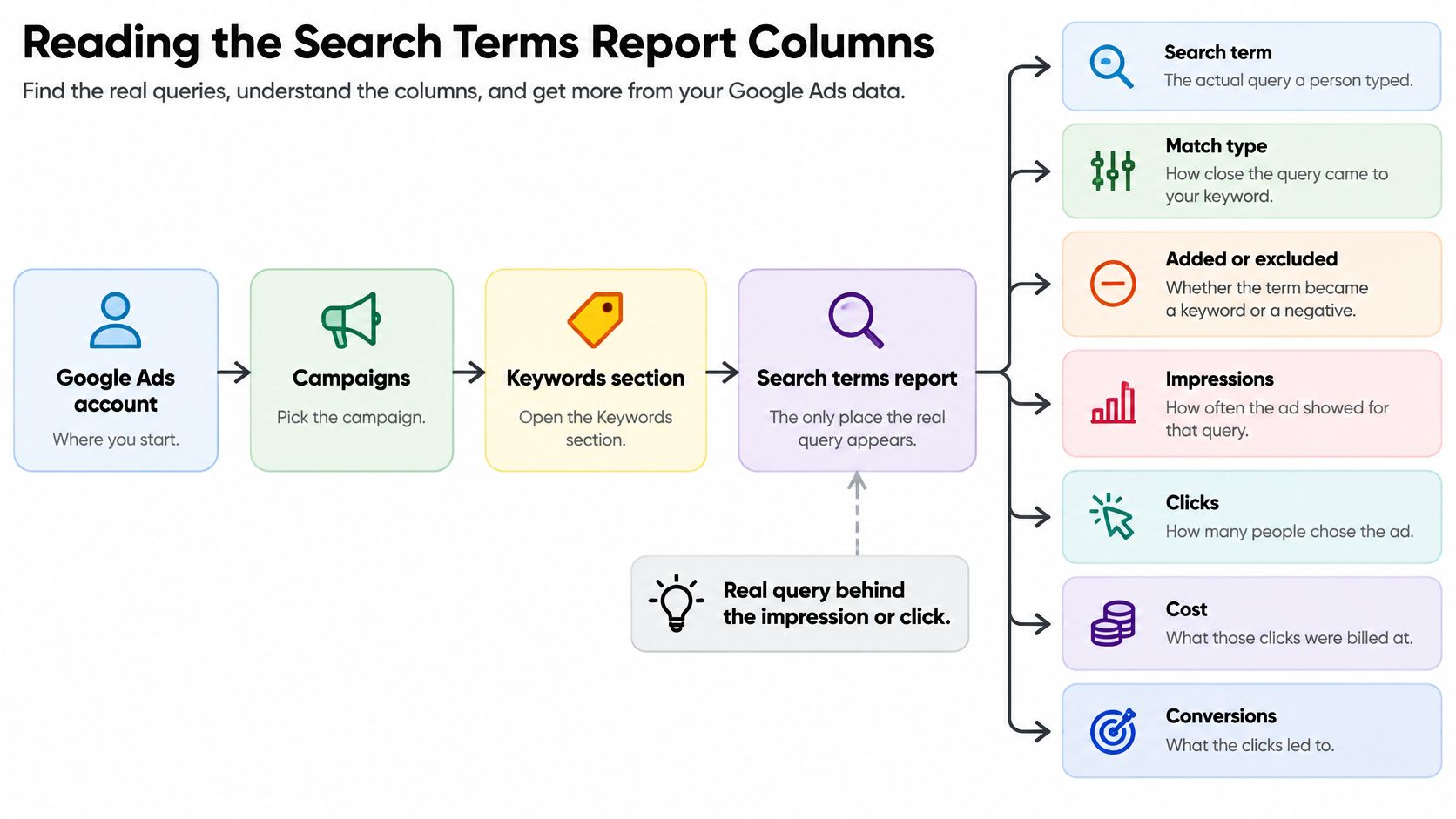
According to Google's search terms report guide, the report connects actual searches that generated ad activity with the account keywords that matched them. Add the Keyword column if it isn't visible, then read across the row in this order:
- Search term: What did the person want?
- Keyword: Which targeting choice admitted that search?
- Match type: How did Google classify the relationship?
- Impressions and clicks: Did the query generate exposure, engagement, or both?
- Cost: How much budget did that engagement consume?
- Conversions: What recorded business action followed?
- Added or excluded: Have you already acted on the term?
The running shoes keyword might connect to women's trail running shoes near me. Read the match-type column to understand that relationship, then compare the shopper's request with the ad and destination page.
Don't let an average clear every query
A profitable keyword can contain both strong buying intent and searches that don't fit your offer. Judge the search-term-to-keyword relationship, not just the keyword's average conversion rate.
For your first pass, identify a few queries with cost but no conversions and write an intent note beside each. Use descriptions such as seeks repair advice or wants a product we don't stock, rather than bad query. You're diagnosing before excluding.
Match Types Decide How Far a Keyword Reaches
Positive match types compared
| Match type | What it reaches | Good for | Example query it can catch |
|---|---|---|---|
| Exact | Fewest searches, including close variants like plurals and misspellings | Proven converters and brand terms | running shoe |
| Phrase | Searches preserving the keyword's meaning, with word order relevant when it changes that meaning | Themed groups where extra words are fine | trail running shoes for women |
| Broad | Widest set, including related searches and synonyms | Discovery with strong negatives and Smart Bidding | best sneakers for jogging |
These are illustrative eligible searches, not promises that a particular ad will serve. Match type controls the relationship between your keyword and potential queries; other eligibility and auction conditions still matter.
Google's keyword-matching documentation explains that its systems interpret spelling corrections, synonyms, and related concepts, while considering signals including landing pages, other ad-group keywords, previous searches, targeting, budget, and Ad Rank. That's why reading the keyword text alone won't explain every match.
Exact gives steering, not literal-only matching
An exact keyword can match searches with the same meaning, including close variations. Don't treat brackets as a guarantee that every shopper typed the same characters.
Phrase match also isn't a rigid string-containment setting. Word order matters when changing the order changes the meaning, but the practical question is whether the search retains the keyword's intended meaning.
Google's match-type guide identifies three positive match types and explains that broader types cover the searches available to narrower types, plus additional searches. You don't automatically need to duplicate the same keyword across every type.
Keep reach when the economics support it
Broad match earns its place when the additional searches produce useful conversions at acceptable economics. A broader query isn't a waste just because its wording surprised you.
Tighten targeting when the additional intent consistently fails your business test. You might use exact match for a proven request, restructure an ad group around a distinct product need, or exclude an irrelevant category.
Compare query clusters using conversion rate, acquisition cost, lead quality, and conversion value relative to cost. Use campaign-level impression-share information as context rather than assuming every query row has a usable impression-share measure.
Judge match types by the searches and business outcomes they bring in, not by whether their labels sound cautious or aggressive.
For more detail on those trade-offs, use our guide to how match types affect search-term targeting. Then inspect your most recent converting queries and note which match types brought them in, including whether the resulting leads or orders were valuable.
Negative Keywords Don't Block What You Think
A negative keyword applies a matching rule to searches, and the wrong choice can block useful traffic or leave unwanted searches eligible. Check the rule against real wording before saving an exclusion.
Use free shoes as the negative keyword in these examples.
Negative match types with the example free shoes
| Negative match | Blocks | Still lets through | Example with free shoes |
|---|---|---|---|
| Negative broad | Searches containing both words in any order | Searches with only one word, like free delivery | Blocks cheap shoes free shipping |
| Negative phrase | The full phrase in the same order, with extra words allowed around it | Searches where the words appear in a different order, like shoes free | Blocks free shoes near me |
| Negative exact | The exact terms in the same order, without extra words | Longer searches, such as free shoes near me | Blocks free shoes only |
Google's negative-keyword guide explains how these match types work. Negative matching can cover close variants, so test how the chosen match type handles spelling and plural forms before saving an exclusion. Don't assume that excluding free shoes will treat free shoe or a misspelling the way you expect.
Check what the exclusion would actually remove
The broad negative example deserves a pause. Cheap shoes free shipping contains both negative words, so it is blocked, even though the shopper may be looking for paid shoes with free delivery.
That's why a disappointing query shouldn't automatically become a negative keyword. Removing the whole query could also block searches with a useful product intent. Check which words trigger the exclusion and whether they appear in valuable queries.
Before saving an exclusion:
- Test the wording: Write a valuable query that contains the proposed negative. Would the selected match type block it?
- Check variants: Test relevant singular, plural, misspelled, or abbreviated forms that could express the same unwanted request. Don't assume they are all treated identically.
- Choose scope: Apply a product-specific exclusion at the appropriate ad-group level, rather than across unrelated offers.
For a practical check on this trade-off, see how to avoid blocking good traffic with negative keywords.
Set a waste threshold before adding a negative: require enough evidence from related searches to justify excluding them, and keep a query under review if the evidence is thin. A search terms report is a limited sample, not a complete record, so visible queries can help identify risks without proving that every similar search behaves the same way.
Why Search Term Data Never Shows Everything
The search terms report is incomplete. LSEO's analysis of search-term visibility reports that roughly 40% of search terms can remain unreported, highlighting difficulties inspecting long-tail and AI-influenced activity.
That's an industry analysis, not a fixed missing-query rate for your account, and it isn't a percentage of wasted spend. Treat the report as a biased sample, not a full transcript: the queries you can inspect aren't necessarily representative of those you can't.

A missing query isn't proof that the search never happened. Equally, unreported traffic isn't proof of waste, so don't multiply a visibility estimate by campaign spend and call the result lost budget.
Set a review threshold, not an automatic verdict
For a hypothetical operating rule, leave a lone query with two clicks and no sales pending. Escalate a cluster of similar queries with about fifteen clicks and no conversions for a waste review, rather than automatically excluding it.
Before approving that exclusion, check:
- Visible economics: Combine related-query cost and conversions.
- Business fit: Compare the shared intent with the offer and landing page.
- Measurement timing: Allow conversions to arrive and confirm tracking works.
- Campaign context: Check overall efficiency and available impression-share information.
The click threshold is a practitioner's review trigger, not a statistical guarantee. A relevant cluster in a low-conversion-rate business may need more evidence; a clearly unsupported service request may need less.
Practical rule: Act on clusters with demonstrated waste. Leave isolated, low-volume relevant queries pending until their economics become clearer.
Aggressive exclusions can remove valuable long-tail demand, particularly where broad matching or automated targeting supports discovery. Use our guide to hidden Google Ads search terms to investigate visibility gaps without treating every unseen search as a problem.
How to Turn Search Terms Into Keywords and Negatives
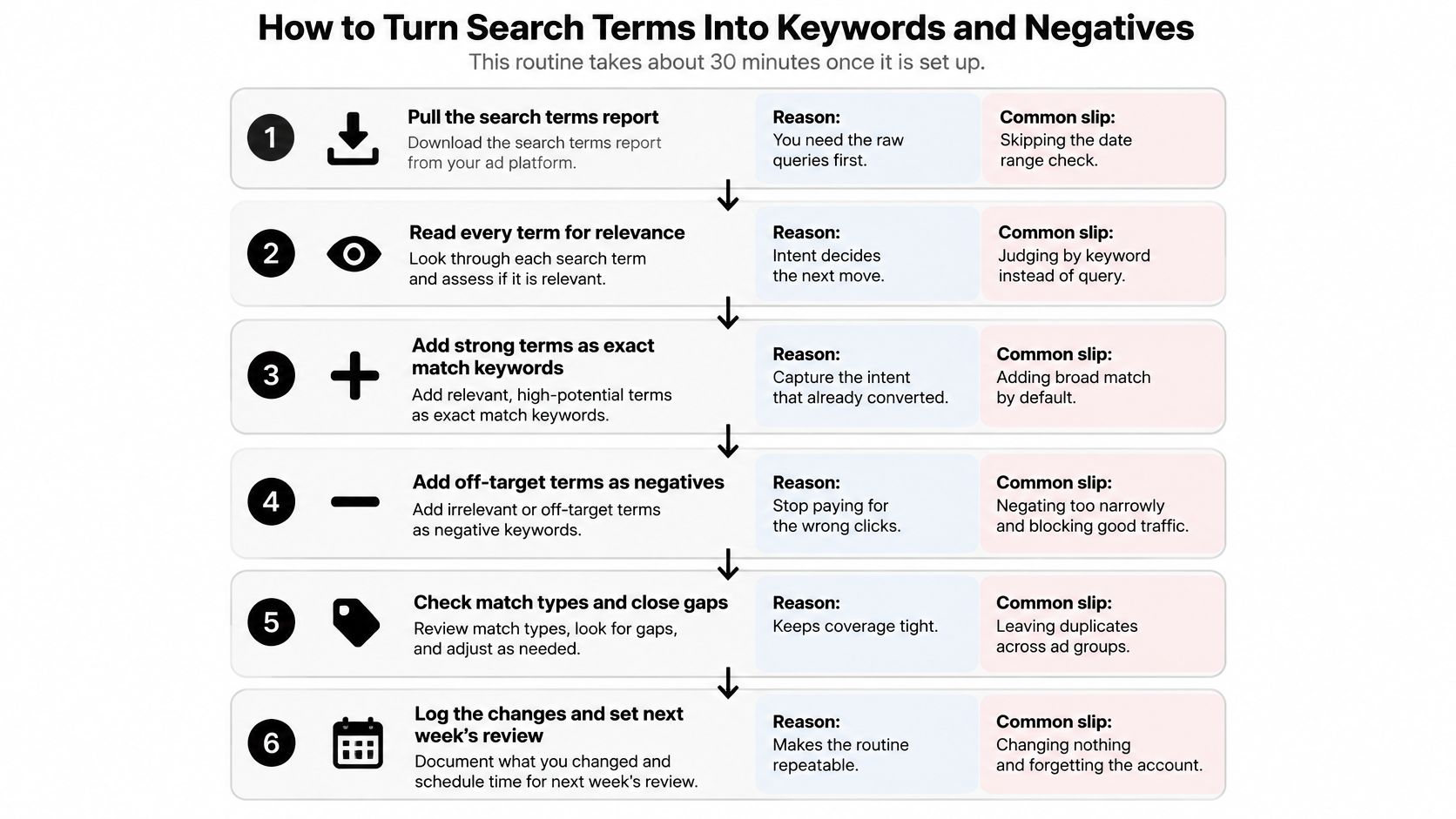
This is the weekly maintenance routine that's easy to postpone while you adjust bids and ads. Reserve about thirty minutes as an initial planning allowance, then adjust the session length to your account's volume rather than treating it as a guaranteed completion time.
The work is more than adding negatives. You're separating promising demand, clear waste, and unresolved cases.
Review, classify, then make changes
Pull a cost-sorted campaign view. As a starting workflow, select the last thirty days for one campaign and export or review its search terms. Expensive queries belong near the top because that's where an error can consume more budget. The usual slip is reading the whole account at once and losing the product context.
Flag credible converters. Look for repeated conversions, strong lead quality, or useful revenue per click. Check the conversion action before declaring a winner: a newsletter signup and a completed order don't carry the same business value. Don't promote a query solely because its conversion column isn't empty.
Promote winners deliberately. Add a strong query as an exact-match keyword in a tightly themed ad group, and make the ad and landing page answer that request. Check for existing coverage first. Leaving overlapping targeting scattered across groups complicates routing and reporting, even though your keywords aren't bidding against each other in the auction.
Flag potential wasters by spend. A proposed review trigger is a query or related cluster spending at least twice your target cost per acquisition without conversions. This is a management rule, not proof of statistical failure. Don't exclude a single row before examining neighboring queries with the same intent.
Approve the cluster before adding negatives. Apply both the click-evidence and spend checks, allow for conversion lag, and verify that the shared intent is unproductive. Then choose the negative match type and scope, checking close variants and potential valuable searches. If the evidence doesn't agree, keep the cluster pending.
Log changes and revisit them. Record the date, query cluster, action, scope, and reason. Use a monthly audit to review cumulative changes, with an extra check after a bidding-strategy switch or major ad-copy change. The common slip is making exclusions without leaving enough context to reverse them intelligently.
Keep the mechanical work separate from judgment
With Keywordme, high-converting keywords can be added straight from the search terms report, and junk keywords can be removed with a single click or a quick mouse highlight. We help with promoting and excluding queries; deciding whether a query deserves either action stays with you.
A healthy routine produces useful new keywords when evidence supports them, a smaller waste backlog, and fewer unexplained changes. It doesn't require adding something every week just to make the review look productive.
Run Your First Search Terms Review This Week
Where to start by account setup
| Account setup | Start with | Watch for |
|---|---|---|
| Small account with under 50 search terms | Review every query by hand every two weeks | Thin data, so avoid cutting too early |
| Growing account with one or two campaigns | Monthly review with exact-match winners | Over-negating broad-match campaigns |
| Large account with many ad groups | Weekly review by ad-group cluster | The same keyword duplicated across groups |
| Brand-heavy campaign | Separate brand queries from generic ones | Brand searches inflating conversion numbers |
Treat these as suggested operating schedules, not performance benchmarks. Choose review depth according to traffic and business risk, and check sooner when spend or lead quality changes unexpectedly.
Pick a campaign where you understand the products and conversion goals. Run the review with only a handful of proposed changes, then log each new keyword and negative with its date, scope, and reason.

Make the first pass small enough to evaluate
For a small account, reading every query is manageable, but the evidence may still be thin. Waiting is a valid decision when the search is relevant and the economics haven't settled.
For a larger account, cluster by product and intent before acting. Check existing keywords and exclusions across neighboring ad groups so that your cleanup doesn't create inconsistent targeting.
Keep a pending list alongside your changes. Uncertainty belongs in the workflow, not hidden behind an aggressive exclusion.
Keywordme runs AI scans to extract negative keywords, and our plugin works inside Google Ads, so you don't have to leave the account to use it. Treat suggested exclusions as candidates for review, not substitutes for checking relevance and scope.
Our Pro plan includes one-click negative keyword list building, instant keyword match-type configuration, positive and negative keyword management, search-term-based campaign expansion, help center access, and chat support. Those features handle account work after you've decided which demand to pursue or exclude.
Set a date for your first review, choose the campaign, and write down the first query you'll exclude if its cluster passes your evidence checks.
Keywordme helps you turn search-term decisions into positive keywords, negative lists, and match-type changes inside Google Ads. Visit Keywordme to put that workflow into practice, starting with one campaign and a short list of evidence-backed changes.
