
Using a Negative Keyword List Generator to Stop Waste
Using a Negative Keyword List Generator to Stop Waste


Let's be honest—we've all been there. You check your Google Ads account, and your heart sinks. A massive chunk of your budget has been eaten alive by clicks that were dead on arrival. It’s a budget killer.
This isn’t just a fluke. It's what happens when your ads for a premium service get shown to people searching for "free DIY" or "cheap alternative." These mismatches aren't just frustrating; they're a huge financial drain on your campaigns.
Stop Wasting Your Ad Spend on Bad Clicks
You know the feeling. You sell a high-end software suite, but you're paying for clicks from searches like 'free accounting spreadsheet'. Or you run a professional plumbing service, and your budget is getting torched by clicks for 'how to fix a leaky faucet yourself'.

Without a solid plan, you're constantly fighting off clicks that have zero chance of ever turning into a customer. That's where a proactive strategy and the right tools come in.
The Real Cost of Irrelevant Traffic
The money wasted on bad clicks isn't just pocket change. For many advertisers, it's a staggering 20-30% of their entire PPC budget. That's money you could be spending on qualified traffic that actually converts.
Think about it this way: getting rid of those unqualified clicks is one of the fastest ways to improve your ROI. When you stop wasting money on irrelevant searches, your ad spend immediately becomes more efficient. Learning how to calculate and lower your cost per lead (CPL) is essential, and eliminating this waste is a direct path to a healthier CPL.
From Manual Sifting to Smart Automation
For years, the only way to fight this was by manually digging through endless search term reports. It’s a soul-crushing, time-sucking task—like trying to bail water out of a sinking boat with a teaspoon. You might catch a few bad terms, but you know more are flooding in every single day.
This is where the game has changed. Let's compare the old way with the new.
Manual Review vs Generator Tool
| Task | Manual Process (The Old Way) | Using a Generator (The Smart Way) |
|---|---|---|
| Finding Bad Terms | Spend hours combing through Search Terms Reports. | Automatically analyzes data to find irrelevant, money-wasting terms. |
| Time Investment | Hours per week, every week. | Minutes to set up and run. |
| Accuracy | High risk of human error; easy to miss things. | Systematically catches patterns and terms you might overlook. |
| Scalability | Nearly impossible to manage effectively across multiple accounts. | Effortlessly scales to manage dozens or even hundreds of accounts. |
As you can see, sticking with the manual process just doesn't make sense anymore. It's inefficient and simply can't keep up.
A negative keyword list generator gets you out of the weeds. It turns that leaky bucket of a campaign into a finely-tuned machine by systematically finding and blocking budget-draining keywords before they cost you money.
A tool like a generator does the heavy lifting for you. It finds those money-wasters so you can stop paying for junk clicks and start focusing your budget on the searches that actually matter. This shift from manual grunt work to smart automation is how you reclaim your ad spend and build truly profitable campaigns.
How These Generators Actually Work
Ever wondered what’s going on under the hood of a good negative keyword list generator? It’s not magic, but it’s a pretty slick combination of smart data analysis and automation that gets the job done fast.
It all starts with the data you feed it. You're in control here—you can give it a list of your core business keywords, connect it straight to your Google Ads account, or even upload a search term report (STR) you've already downloaded. The more relevant data you provide, the better the output will be.
Sifting and Sorting Your Data
Once the tool has your data, its real work begins. This is where automated data processing comes into play. The software scans all your search terms, looking for common themes and patterns among the queries that just aren’t converting.
Think about all those recurring, low-intent words that waste your budget. The generator will quickly spot terms like:
- 'free'
- 'jobs' or 'salary'
- 'reviews'
- 'how to'
- 'template'
Instead of you manually combing through spreadsheets to find every variation, the tool groups these for you and suggests them for exclusion. It's fantastic at turning a messy pile of thousands of search queries into a clean, usable list. If you're looking to get really advanced with this, it's worth understanding how to build an AI workflow to find negative keywords.
Applying the Right Match Types
Just finding the words to block is only half the battle. The real secret to a great negative keyword strategy is applying the right match type. This is something I see advertisers struggle with all the time when they’re building lists by hand.
A smart generator doesn't just tell you what to block; it recommends how to block it for maximum impact. It will suggest whether a term works best as a broad, phrase, or exact match negative.
Let's say you sell high-end 'marketing software'. You definitely don't want your ads showing up for searches like 'free marketing software'.
Adding [free marketing software] as an exact match negative is a rookie mistake because it's way too specific. A generator will likely recommend adding "free" as a phrase match negative. This single move blocks any search query containing the word "free," saving you from hundreds of wasted clicks without you having to hunt down every last one. That’s how you stop irrelevant traffic without accidentally blocking good, high-intent searches.
Ready to build your first negative keyword list and stop wasting money? Let’s dive in. The whole thing starts with digging into your Google Ads search term report.
This report is the single best source of truth for what’s really happening in your account. It shows you the exact queries people typed before they clicked your ad. I’ve found the sweet spot is looking at the last 30 to 90 days—it gives you enough data to see patterns without getting completely buried. Your main targets are the search terms that racked up clicks but gave you zero conversions. Those are your money pits.
Turning Raw Data Into a Refined List
Once you have that search term report exported, it’s time to let a negative keyword list generator do the heavy lifting. Trust me, trying to manually sort through thousands of rows of search terms is a fast track to a massive headache. A good tool, like Keywordme, can process all that data in seconds.
The goal here is to spot those common wasteful terms, group them logically, and apply the right match types. For instance, if you sell high-end furniture, you'll probably see a ton of searches with words like 'free,' 'cheap,' or 'DIY.' A generator helps you bundle all those variations into one clean, effective list.
The process is actually pretty straightforward, even if the data is messy. It looks something like this:
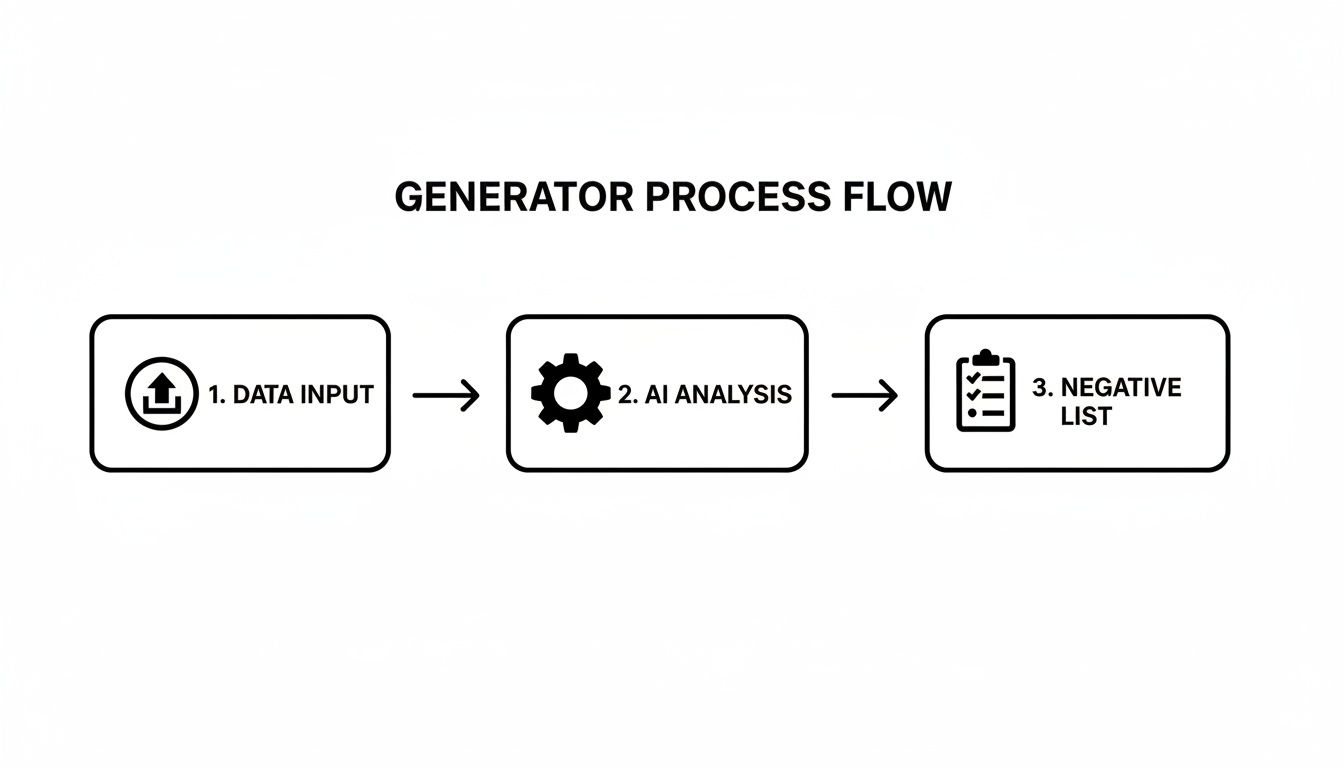
This is the core value right here. You feed it raw data, it applies some smart analysis, and out comes a list you can immediately put to work. It's a huge time-saver.
The Magic of Grouping and Match Types
This is where you get seriously efficient. Let's say your report shows 50 different search queries from job seekers, all containing the word 'salary.' Instead of adding 50 different negative keywords to your campaign, you can be much smarter about it.
By adding
"salary"as a phrase match negative, you block all 50 of those queries—and any future ones like them—with a single entry. This is the kind of leverage that transforms your account management.
This kind of strategic thinking became so much easier when Google Ads finally gave us shared negative keyword lists. Before 2018, I remember advertisers spending an average of 12-15 hours a month on this exact task. It was brutal. Today, these tools are so critical that 78% of marketers say their negative lists are responsible for at least a 25% improvement in ad spend efficiency. You can read more about the history and impact from industry resources like WordStream.
Exporting and Applying Your New List
Once you’ve built your shiny new list, the final step is getting it into Google Ads. But don't just add the keywords to a single campaign—that's playing small.
The absolute best practice is to export your negatives and upload them as a shared negative keyword list. This lets you apply one master list across multiple campaigns with just a couple of clicks. It keeps everything consistent and saves an unbelievable amount of time, especially as you scale. It’s the difference between having organized control and total data chaos.
For a deeper dive, we have a complete guide on how to create a general negative keyword list that can become the foundation for all your accounts.
Avoiding Common Traps: Pro-Level Best Practices
Getting your hands on a negative keyword list generator is a fantastic first step. But there's a world of difference between just using the tool and truly mastering it. A few smart habits can take your PPC results from just "good" to absolutely incredible. Let's get into the pro tips that separate the beginners from the seasoned experts.
The biggest mistake I see people make, time and time again, is the 'set it and forget it' mindset. Your negative keyword lists aren't stone tablets; they're living documents that need regular attention. Search trends shift, new irrelevant queries will always find a way in, and what worked last month might be leaking budget today. Get into the habit of routinely checking in and refining your lists.
Get Organized for Surgical Precision
Don't just throw all your negative keywords into one giant, messy list. Real efficiency comes from a tiered, organized approach. Think of it as creating layers of defense with a mix of account-level, campaign-level, and ad group-level negatives for the ultimate control.
This layered structure is seriously effective. I've seen firsthand how a blend of account-wide lists for universal negatives (like 'jobs,' 'free,' or 'pictures'), campaign-specific lists for context, and hyper-specific ad-group lists can lead to a massive 45% boost in overall efficiency. This setup stops you from accidentally blocking good traffic while still giving you maximum protection against waste. You can dig into the research on these efficiency gains to see exactly how it works.
A common pitfall is getting a little too aggressive and blocking a broad term that's part of a valuable long-tail keyword. For example, blocking the word 'reviews' across your entire account might seem smart at first. But you could easily miss out on a money-making search like "acme premium software reviews" from someone who's ready to buy.
Sidestep Sabotage with These Simple Rules
Careful review and strategic use of match types are your best friends here. A negative keyword list generator will give you great suggestions, but you're the one in the driver's seat. You have the final say.
Here’s a quick-fire list of best practices to keep you on the right path:
- Review Religiously: Carve out time every week or two to dive into your search term reports and hunt for new, wasteful queries.
- Master Your Match Types: Use phrase match for most of your negatives. Negative broad match can be way too restrictive, and exact match is often too narrow to be useful.
- Don't Block Your Brand (Usually): Be extremely careful about adding your own brand terms to negative lists. There are rare exceptions, but it's usually a bad idea.
- Think in Tiers: Use shared lists for account-wide negatives. Apply more specific negatives at the campaign or ad group level where they make the most sense.
The real goal of a negative keyword list isn't just to stop bad clicks. It's to sculpt your traffic, ensuring that the people who see your ads are the exact people most likely to become your customers.
At the end of the day, your negative keyword strategy should always be helping, never hurting. By sidestepping these common mistakes, you'll ensure your lists are a powerful asset, not a liability. For a deeper dive, check out our full article on the top mistakes to avoid when managing negative keywords.
Scaling Your Negative Keyword Strategy with Automation
If you're juggling multiple Google Ads accounts, you know the soul-crushing grind of manually updating negative keyword lists. It's one thing to keep a single campaign tidy, but when you're managing dozens—or even hundreds—of accounts, that manual process just doesn't fly. This is where you move from just doing maintenance to building a smart, scalable system.
Honestly, automation is the only way to stay sane. It's how you stop getting bogged down in reactive clean-up and start taking proactive control across all your accounts. You can finally stop the endless copy-pasting between spreadsheets and focus on strategy that actually grows the business.
Build Once, Deploy Everywhere
One of the biggest time-savers I've found is creating "master" negative keyword lists. Think of these as your foundational, go-to lists that you can plug into any new client account or campaign right from the start. For just about any business, there's a universal set of junk terms you never want to pay for.
Here are a few common ones I always start with:
- Job Seekers: These are your classic budget-wasters like "jobs," "hiring," "careers," "resume," and "salary."
- Information Gatherers: You can filter out a lot of non-buyers by blocking terms like "how to," "what is," "free," "template," and "tutorial."
- Irrelevant Intent: Queries that are clearly not looking for your product or service, such as "images," "PDF," "login," or "reviews" (unless you're specifically targeting those).
When you have these lists ready to go, you can instantly shield a new campaign from the most common sources of wasted ad spend. You’re not starting from zero; you’re starting from a position of strength and saving hours on setup.
A solid starter negative list is like an insurance policy for your ad budget. It stops predictable waste right in its tracks and gives you a baseline of efficiency you can build on with more specific terms later.
Working Smarter Inside Google Ads
The real game-changer is when you can manage all of this right inside the Google Ads interface. Constantly flipping between your ad account and a spreadsheet is a total workflow killer. This friction is exactly what tools like a Chrome plugin for keyword management are designed to eliminate.
Imagine having a dashboard that pulls all your important keyword data into one spot. You can see what's working and what's wasting money at a single glance.

This kind of unified view lets you see performance metrics right next to the search terms themselves. You can make informed decisions on what to add to your negative lists without ever leaving the platform. It turns a clunky, multi-step chore into a quick, one-click action.
A System That Grows With You
The beauty of setting up an automated, scalable system is that it works just as well for 1 campaign as it does for 100. The core principles don't change, just the volume. This approach frees you from the tedious, repetitive tasks that hold back real growth.
Instead of getting lost in the weeds of individual search term reports, you can spend your brainpower on what really moves the needle: analyzing performance trends, split-testing ad copy, and exploring new strategic directions. That’s the real payoff of scaling your negative keyword strategy—it gives you back your most valuable asset: your time.
A Few Lingering Questions About Negative Keywords
I get asked about negative keywords all the time. Even after you've run a negative keyword list generator a few times, some questions tend to pop up again and again. Let's clear the air on some of the most common ones.
How Often Should I Actually Update My Negative Keyword Lists?
Honestly, there's no single magic number, but a good rule of thumb is to base it on your account's traffic.
For busy accounts with active campaigns, a weekly review is the way to go. You'd be surprised how quickly new, irrelevant search terms can sneak in and start eating your budget. Catching them early is the name of the game.
If you're running more mature, stable campaigns or just don't have a ton of traffic, you can probably get away with a bi-weekly or even monthly check-in. The most important thing is consistency. Just make it a non-negotiable part of your regular PPC management routine.
What’s the Real Difference Between Negative Match Types?
This one trips up a lot of people, but it’s simpler than it sounds. Think of them as different levels of "strictness" for what you want to block.
Exact Match
[free software]: This is your surgical tool. It blocks only that exact search query. It’s useful for very specific, known-bad terms but is often too restrictive for building a broad list.Phrase Match
"free software": This is your workhorse and my personal go-to. It blocks any search that includes that exact phrase, in that order. So it would zap "download free software" and "best free software 2026," but it would still allow a search like "software that is free."Broad Match
free software: Use this one with extreme caution. It's the most aggressive and can block any search that contains both "free" and "software" in any order. The risk of accidentally blocking good, long-tail traffic is just too high for most situations.
For most of your negative list-building, phrase match hits the sweet spot. It gives you great protection without being so aggressive that it chokes off valuable search queries.
Can I Use a Generator for a Brand-New Google Ads Account?
Yes, and you absolutely should! This is a pro move that can save you a chunk of cash right from the start.
Even without any historical search term data, you can build a "preemptive" negative list based on common sense and universally bad terms. A solid negative keyword list generator is perfect for this.
Just brainstorm the kinds of searches you know you don't want. This is your first line of defense. Think about things like:
- Informational queries: 'how to,' 'what is,' 'example'
- Job seekers: 'jobs,' 'hiring,' 'salary'
- Bargain hunters: 'free,' 'cheap,' 'discount code'
- Competitor names (if you're not running a conquesting campaign)
Starting with a foundational list like this gives your new campaigns a crucial layer of protection against the most obvious budget-wasters from day one.
Ready to stop wasting time on manual spreadsheet work and start building powerful negative keyword lists in minutes? Try Keywordme and see how easy it is to clean up your campaigns, cut wasted ad spend, and focus on clicks that actually convert. Start your free 7-day trial of Keywordme today!
.svg)