
How to Manage PPC Campaigns for Maximum ROI
How to Manage PPC Campaigns for Maximum ROI


If you want to manage PPC campaigns effectively, you have to start with a solid account structure. This isn't just about being organized for the sake of it—it's about building a logical foundation that improves ad relevance, boosts your Quality Score, and gives you pinpoint control over your budget and messaging right from the get-go.
Think of it like building a house. You wouldn't just start throwing up walls randomly; you'd start with a detailed blueprint. A smart campaign structure is your blueprint for success, making everything that comes later more stable and so much easier to handle.
Building a Campaign Structure That Actually Works

Before you even think about keyword research or writing a single ad, your campaign structure needs your full attention. It’s the unsung hero of any high-performing PPC account, and trust me, getting it right from day one will save you countless hours and headaches down the road. A messy structure is like trying to find your way through a city with no street signs—you'll get lost, burn through your budget, and struggle to hit your goals.
A well-organized account is all about control and relevance. When you group everything logically, you create a seamless path from what someone searches for, to the ad they see, and finally to the landing page they hit. This tight alignment is exactly what Google's algorithm rewards with a higher Quality Score, which directly translates to lower costs-per-click (CPCs) and better ad positions. It’s a classic win-win.
The Hierarchical Approach to PPC Structure
I like to think of a PPC account as a big filing cabinet. The account is the cabinet itself, campaigns are the drawers, and ad groups are the folders inside each drawer. Each level has a specific job to do.
Account: This is the mothership. All your billing info, user access, and account-wide settings are handled here.
Campaigns: Think of these as your main buckets. Each campaign gets its own budget and should have a singular goal. You’ll want to create separate campaigns for different product lines, service categories, or even geographic locations.
Ad Groups: Inside each campaign, you’ll have ad groups. Each one should contain a small, tightly-knit cluster of very similar keywords and the ads that go with them.
Let's say you're a shoe retailer. You wouldn't just throw all your money into one giant "shoes" campaign. Instead, you'd be much better off creating distinct campaigns like "Men's Running Shoes" and "Women's Hiking Boots." This immediately gives you granular control over how much you spend and who you target for each product type.
Why Thematic Ad Groups Are Your Secret Weapon
Now let's drill down. Inside that "Men's Running Shoes" campaign, you’d get even more specific with your ad groups. You might have one for "men's trail running shoes" and a separate one for "men's marathon running shoes." This is where the magic really happens.
By keeping your ad groups hyper-focused on one theme, you can write ad copy that speaks directly to what the user is looking for. The ad for "trail running shoes" can talk up durability and grip, while the ad for "marathon shoes" can highlight its lightweight design and extra cushioning.
This level of specificity is everything. When a user’s search term is a perfect match for your keyword and your ad, they are so much more likely to click. Why? Because your ad feels like it was written just for them. That's the core of great PPC management.
I know setting all this up can feel a bit tedious, but the payoff is huge. It lets you analyze performance with total clarity, put your budget where it will work hardest, and scale your wins without everything devolving into chaos. To help you nail this from the start, we've put together a comprehensive resource you might find useful; check out our guide on the essential PPC campaign checklist for a step-by-step walkthrough. A disciplined structure is what separates the pros who know what’s working from the amateurs who are just guessing.
Mastering Keywords and Writing Ads That Convert
Alright, you've got your account structure sketched out. Now it's time to get into the real engine room of your PPC campaigns: your keywords and ad copy.
This is where the magic happens. Honestly, getting these two things right is what separates a campaign that just bleeds money from one that becomes a legit revenue machine.
Think of keywords as the actual language your customer is using to tell you what they need. Your whole job is to catch that intent and turn it into clicks and, more importantly, conversions. It’s not just about chasing the obvious, high-volume terms; it's about digging up the specific, high-intent phrases that scream, "I'm ready to buy!"
Uncovering High-Intent Keywords
Good keyword research is so much more than a quick brainstorming session. You've got to get your hands dirty and find out what people are actually typing into that little white search bar. This is where long-tail keywords come in—those longer, more specific phrases that almost always point to a user who’s way further down the buying path.
For example, someone searching "running shoes" is basically window shopping. But the person who types in "best lightweight running shoes for marathon"? They have a problem they need to solve right now. That's the gold you're looking for. A dedicated tool isn't just nice to have here; it's essential.
The screenshot below from Keywordme shows exactly how you can find related keywords and see their search volumes, which makes prioritizing your targets so much easier.
You can instantly see which terms have real traffic behind them, letting you build out ad groups around valuable phrases. If you want to go deeper on this, check out our guide on https://www.keywordme.io/blog/how-to-find-best-keywords-for-ppc to really dial in your strategy.
Choosing the Right Match Types
Got your keywords? Great. Now you have to tell Google how strictly it should stick to them. This is what match types are for, and picking the right ones is critical for keeping your traffic quality high and your budget in check.
Broad Match: This gives Google the most leash, letting it show your ads for searches it thinks are relevant, including synonyms and related topics. Be careful here. Without a rock-solid negative keyword list, you can burn through cash on irrelevant traffic fast.
Phrase Match: Your ad shows up for searches that include the meaning of your keyword. It's way more controlled than broad match but still gives you some flexibility. I find it’s a solid starting point for most new campaigns.
Exact Match: This is the tightest control you can have. Your ad only shows for searches with the exact same meaning or intent. This usually brings in the best traffic, but it can definitely limit your overall reach.
Don't fall into the trap of thinking there's one "best" match type. A healthy account uses a smart mix. I often use phrase and exact match for my core, money-making terms, while carefully testing broad match in its own campaign to fish for new keyword ideas.
Crafting Ad Copy That Gets the Right Clicks
Your ad copy is basically a three-second elevator pitch. Its job isn't just to get any click; it's to get the right click. That means attracting your ideal customer while gently pushing away everyone else. Every single word matters.
A killer ad speaks directly to what the searcher is struggling with and offers a clear, immediate solution. It needs to feel like an answer, not just another ad. This is precisely why tightly themed ad groups are so important—they let you write hyper-relevant copy. Someone searching for an "emergency plumber" needs to see a headline that says "24/7 Emergency Plumber," not something generic like "Local Plumbing Services."
I can't overstate how crucial this is. PPC is such a high-return channel because it connects with people at their exact moment of need. The numbers back this up: around 65% of high-intent searches end with a click on an ad, and on average, businesses see a $2 return for every $1 spent. It really hammers home why nailing your ad copy and targeting is non-negotiable.
Of course, your ads are only half the battle. They need to send people to a landing page that seamlessly continues the conversation. For B2B folks, these 10 actionable landing pages best practices for B2B lead generation are a fantastic resource for turning those clicks into actual leads.
And never forget to A/B test your headlines and descriptions. This constant loop of testing and tweaking is a cornerstone of how you manage PPC campaigns for long-term, sustainable success.
Bidding and Budgeting: Where the Rubber Meets the Road
Alright, let's talk money. How you bid and where you put your budget is what separates a finely-tuned PPC machine from a cash-burning furnace. This part can feel a little daunting, but it's really where you get to tell Google exactly what you want to achieve with every dollar.
Think of it like picking the right tool for the job. You wouldn't use a hammer to turn a screw, right? In the same way, you shouldn't use a "Maximize Clicks" strategy when what you really need are sales-qualified leads. Nailing this is a huge part of how you effectively manage PPC campaigns.
Manual vs. Automated Bidding: Who's in the Driver's Seat?
The first big decision is whether you want to take the wheel yourself with manual bidding or let Google's smart algorithms do the driving. Honestly, both have their place.
Manual CPC gives you the ultimate control. You set a hard cap on what you’re willing to pay for a click, and that’s it. This is my go-to for brand new campaigns that have zero conversion history. It lets you get a feel for the auction, see what your initial costs look like, and gather that precious data without letting an algorithm go wild with your credit card. The downside? It's a ton of work to manage once you start scaling up.
Automated (or Smart) Bidding, on the other hand, uses machine learning to do the heavy lifting. You just tell Google your goal—more conversions, a specific cost per lead, a target return—and its algorithm adjusts your bids in real-time for every single auction.
A few of the most popular automated strategies include:
- Maximize Conversions: Google goes all-out to get you the most conversions it can within your daily budget. It’s a great option if your main goal is just raw volume.
- Target CPA (Cost Per Acquisition): You tell Google what you're willing to pay for one conversion, and it works to hit that average. This is perfect for lead gen campaigns where you know exactly what a new lead is worth to your business.
- Target ROAS (Return On Ad Spend): This one's a favorite for e-commerce. You can set a target return, telling Google you want to make, say, $5 for every $1 spent on ads.
Here's the most important thing to remember: automated bidding needs data to work its magic. I always tell my clients to start with Manual CPC until they've collected at least 15-30 conversions in a 30-day window. Only then should you even think about switching to something like Target CPA. Feeding the algorithm bad or insufficient data is just a recipe for disaster.
This is just the tip of the iceberg. For a much deeper dive, you might find our complete guide to PPC bidding strategies really helpful—it breaks down every single option.
To help you decide what's right for your current campaign, here’s a quick-glance table comparing the most common strategies.
Choosing Your Bidding Strategy
Choosing the right strategy isn't a one-time decision; you'll likely want to revisit it as your account matures and your goals evolve.
How to Allocate Your Budget for Maximum Impact
Your budget isn't something you just set and forget. It's a dynamic tool that needs regular attention. Smart budget allocation is all about putting your money where it's actually working for you.
Start by setting daily budgets at the campaign level—this is non-negotiable. It stops one rogue ad group from blowing your entire monthly spend in a few days. The real question is, how do you decide those daily limits? You have to let the performance data guide you. Find your top-performing campaigns (the ones with high conversion rates and low CPAs) and don't be afraid to pull budget from underperformers to fuel your winners.
It also helps to keep an eye on industry benchmarks to see how you stack up. For instance, the average Google Ads cost-per-lead (CPL) across all industries recently climbed to about $70.11. But here's the interesting part: at the same time, average conversion rates actually improved by 6.84%. This tells us that while competition is heating up, smarter strategies are definitely paying off. You can dig into more numbers like these by checking out the latest PPC benchmarks and statistics. This kind of data just hammers home the need to be strategic, making sure every dollar is focused on driving real value, not just empty clicks.
Your Routine for Optimizing and Scaling PPC Campaigns
Launching a PPC campaign is just the starting line—the real race is won through consistent, smart optimization. If you take a "set it and forget it" approach, you might as well light your ad budget on fire. The secret to managing PPC campaigns effectively is building a repeatable routine to monitor, tweak, and scale what’s actually working.
This isn’t about gluing your eyes to a dashboard all day. It’s about knowing exactly what to check and when, so you can make confident, data-backed decisions that move the needle. Let's build that routine.
Digging for Gold in Your Search Terms Report
If there's one place to find quick wins, it's your search terms report. This is the raw, unfiltered list of what people actually typed into Google to see your ads. It's a goldmine for separating the good, the bad, and the downright ugly.
I make this a weekly ritual, no exceptions. Pop into each ad group, filter the search terms report for the last seven days, and put on your detective hat. You have two main objectives:
- Find the Winners: Look for high-intent queries that are driving conversions but aren't yet in your keyword list as an exact or phrase match. These are pure gold. Grab them and add them to the right ad group so you can bid on them directly and control their performance.
- Cut the Losers: Hunt down all the irrelevant or low-intent terms that are just eating up your budget. Selling premium software and seeing clicks for "free accounting tool"? Those have to go. Add "free" as a negative keyword immediately.
This simple process is the bedrock of good account hygiene. It tightens your targeting, boosts your ad relevance, and stops you from throwing money away.
Focus on Metrics That Actually Matter
It’s incredibly easy to get sidetracked by vanity metrics like clicks and impressions. Sure, they feel good, but they don't pay the bills. A truly successful PPC manager lives and breathes the key performance indicators (KPIs) that directly impact the bottom line.
These are the numbers that should dictate every move you make:
- Conversion Rate: What percentage of your clicks are actually turning into leads or sales? If your click-through rate is amazing but your conversion rate is in the gutter, you likely have a disconnect between your ad promise and your landing page reality.
- Cost Per Acquisition (CPA): Plain and simple, how much does it cost you to get one customer or lead? This is your efficiency metric. The game is to drive this number down without sacrificing your volume of conversions.
- Return On Ad Spend (ROAS): For every dollar you put in, how many dollars do you get back? For any e-commerce business, this is the ultimate measure of profitability.
By zeroing in on these three KPIs, you shift your entire mindset from just buying traffic to buying profitable traffic. It's the difference between being busy and being effective.
To see how these ideas play out in a bidding strategy, this flow chart shows how you can progress from manual control to automated, goal-driven bidding as you gather more data.
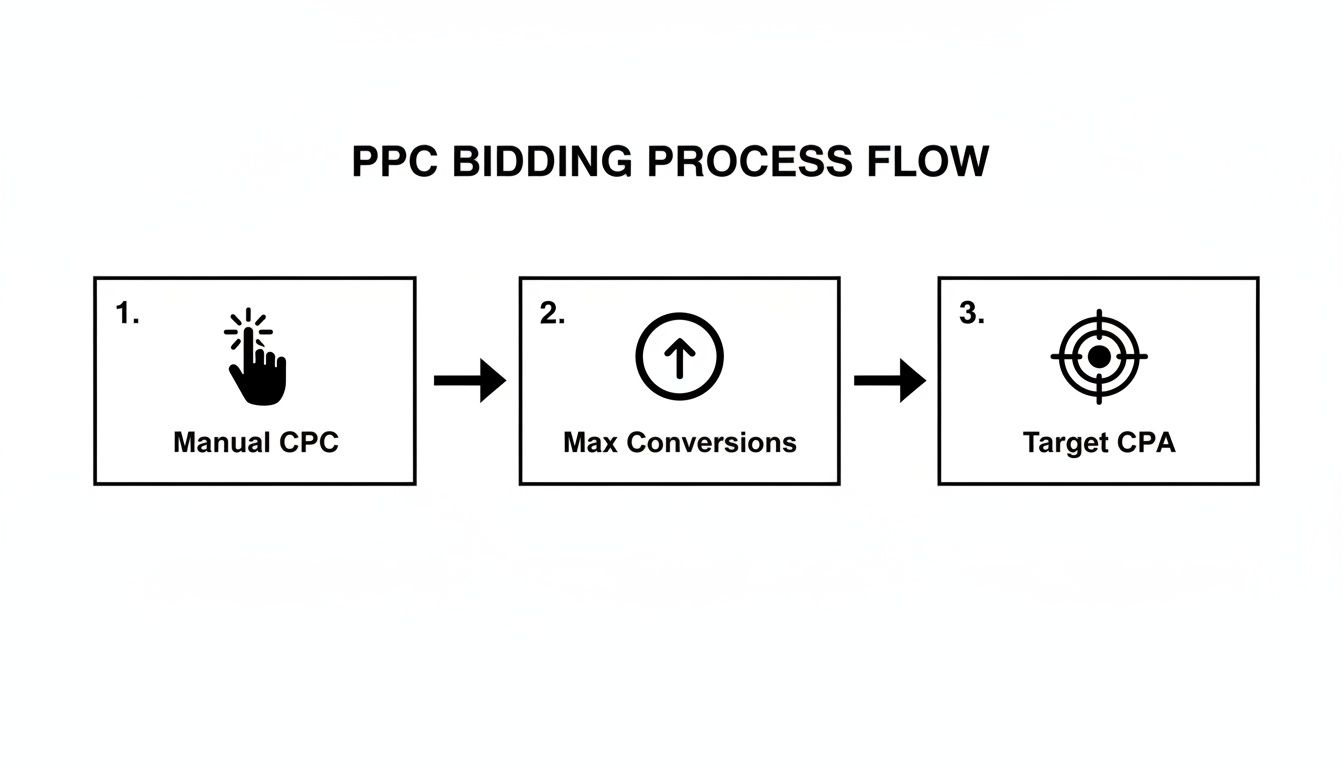
This visualizes the journey from gathering initial data with Manual CPC to letting the algorithm take over to chase conversions and, eventually, a specific target cost per acquisition.
Scaling Your Winners Without Breaking a Sweat
So you’ve got a campaign or ad group that's consistently crushing its targets. Awesome! Now it's time to scale up. But hold on—scaling isn't as simple as just cranking up the budget. Doing that can sometimes send the algorithm into a tailspin and tank your performance.
Instead, scale methodically. Start by bumping the daily budget on your winning campaigns by no more than 15-20% at a time. Then, give it a few days to settle and let performance stabilize before you touch it again. This slow-and-steady approach avoids any sudden shocks to the system.
Next, look for smart ways to expand. Could you duplicate your successful ad group and test out a new, closely related set of keywords? Or maybe experiment with a new audience segment? This kind of controlled expansion lets you grow your reach without messing with the core campaign that’s already a proven winner.
Once you hit a certain scale, automation becomes your best friend. With global search ad spend projected to hit around $351.5 billion, the platforms have built some seriously powerful tools. Google’s own data shows an average ~19% conversion lift for advertisers who pair responsive search ads with automated bidding. Better yet, agencies managing big accounts report that automation can slash routine optimization time by 30–50%.
If you're curious, you can learn more about these fascinating trends in PPC statistics. This isn't about letting robots take over; it’s about letting the machines handle the tedious number-crunching so you can focus on strategy and the big picture.
Using Automation and Tools to Work Smarter
Let's be real—as your campaigns grow, you simply can't do it all by yourself. Trying to manually manage every bid, keyword, and search term report is a one-way ticket to burnout and missed opportunities. This is where automation and the right tools stop being a "nice-to-have" and become absolutely essential to manage PPC campaigns without losing your mind.
The goal isn't to set your account on autopilot and walk away. It’s about letting technology handle the tedious, repetitive stuff. That way, you can get out of the weeds and focus on what truly matters: big-picture strategy, creative testing, and digging into the data that actually moves the needle.
Getting the Most Out of Google's Built-In Automation
Google knows you need help, which is why they’ve baked some pretty powerful automation features right into the platform. Tools like Performance Max and automated rules can be your best friends, but you have to know when to lean on them and when a more hands-on approach is better.
Take Performance Max (PMax), for example. It’s Google’s all-in-one campaign type that runs across all its channels, designed for simplicity. It can work wonders if you have crystal-clear conversion goals and strong creative assets to feed it.
The catch? PMax offers less granular control, which can be a real drawback if you need to manage your brand's messaging with surgical precision. It's the classic trade-off between control and convenience.
Automated rules are another fantastic built-in feature. You can set up simple "if-then" commands to handle routine tasks for you, like:
- Pausing keywords that have a dismal Quality Score.
- Increasing budgets on your best campaigns every Friday morning.
- Shooting you an email alert when your cost per conversion spikes above a certain threshold.
These little automations can save you hours of manual work each week, keeping your account in check even when you’re not staring at it.
Why Third-Party Tools Are a Game Changer
While Google's native tools are a great start, third-party platforms are where the real magic happens. They’re built specifically to fill the gaps and smooth out the clunky workflows you run into inside the Google Ads interface.
This is especially true for keyword management. Sifting through search term reports, finding new negative keywords, and building out new ad groups can feel like a never-ending chore.
A dedicated tool isn't just about saving time; it's about making smarter, faster decisions. When you can clean up junk search terms, find new high-converting keywords, and assign the correct match types with a few clicks, you completely change your optimization workflow.
For instance, using a tool like the Keywordme Chrome plugin lets you perform all these critical tasks directly inside your search term report. No more copying and pasting data between spreadsheets and the Ads editor. You can build negative keyword lists and expand ad groups on the fly, accelerating a core part of the optimization process by up to 10x.
By combining the strengths of Google's broad automation with the focused power of specialized tools, you create a seriously effective management system. This frees you from the mundane and lets you operate like a true strategist, guiding your campaigns to better and better results.
Got PPC Questions? Let’s Get Them Answered.
No matter how long you've been managing PPC campaigns, you're going to run into situations that make you scratch your head. It's just part of the job. Below are a few of the most common curveballs I've seen over the years, and a no-nonsense guide to handling them.
Think of this as a cheat sheet for those moments when you’re staring at a graph and thinking, "What on earth just happened?" Getting a handle on these scenarios is what separates the pros from the people who just guess.
"Help! My Campaign Performance Just Nosedived!"
We’ve all been there. That heart-sinking moment when you log in and see your beautiful, stable campaign has suddenly taken a dive. Before you hit the panic button, put on your detective hat.
Nine times out of ten, the answer is in your change history. Did you, or someone else with access, tweak something recently? A new bidding strategy, a different ad, a budget change? That's your first stop.
If the change history is clean, zoom out. Look at the data over a longer period. Is this a real, sustained drop, or just a Tuesday being a Tuesday? If it's a real trend, it's time to look at the world outside your account.
- Is it seasonal? Maybe it’s a holiday, or the time of year when demand naturally dips for what you offer.
- Who’s in the ring with you? Jump into the Auction Insights report. You might find a new competitor just showed up and is bidding aggressively, or an old one decided to crank up their budget.
- What's in the news? Sometimes, a major news story or a shift in the industry can completely change what people are searching for.
By working through this checklist, you can almost always pinpoint the problem. Then you can decide whether to roll back a change that didn't pan out or adapt your strategy to the new reality.
"How Long Do I Wait Before Changing Things?"
I get it. You launch something new and you want to start tinkering immediately. But in PPC, patience isn't just a virtue—it's a requirement. Ad platforms have a "learning period" after you make a big change, which can last from a few days up to a week.
Making snap judgments based on a day or two of data is probably the single biggest mistake new managers make. You’re just reacting to noise, not a real trend. You need to let the data pile up.
As a general rule, I don't touch bids or ad copy in a new ad group until I see at least 100 clicks. And if you're using an automated bidding strategy? Give it a solid two weeks to find its footing before you even think about judging its performance.
This gives the algorithm a fair chance to do its job and gives you enough data to make a call that’s actually backed by evidence.
"How Often Should I Really Be Checking My Accounts?"
This is a classic "it depends" question, mostly based on your budget and how complex your campaigns are. But for most accounts, a structured routine works best.
Here’s a schedule that keeps you in control without getting lost in the weeds:
- Daily Check-in (5-10 minutes): This is your morning coffee check. A quick look at spend, conversions, and CPA. Your only goal here is to make sure nothing is on fire. Did spend spike? Did conversions drop to zero? This is how you catch disasters before they drain your budget.
- Weekly Optimization (30-60 minutes): This is where the real work happens. Dive into search term reports to find new negative keywords and potential new ad groups. See how your ads are performing, check in on A/B tests, and peek at the Auction Insights.
- Monthly Strategy Review (1-2 hours): Time to zoom out. Look at the big picture. How did you perform against your monthly goals? What trends are you seeing? This is when you plan your major strategic moves for the next month.
This rhythm helps you manage PPC campaigns proactively, not reactively. You stay ahead of problems and can focus your energy on strategic growth instead of just putting out fires.
Ready to stop wrestling with spreadsheets and speed up your optimization process? The Keywordme Chrome plugin lets you clean up search terms, build negative lists, and expand ad groups up to 10x faster, directly inside Google Ads. Start your free 7-day trial and see the difference.
.svg)