
How to Manage Negative Keywords Across Multiple Campaigns
How to Manage Negative Keywords Across Multiple Campaigns


SEO Title: Manage Negative Keywords Across Campaigns
Meta Description: Learn how to manage negative keywords across multiple campaigns with audits, shared list governance, conflict checks, and smarter ongoing PPC upkeep.
If you're managing a Google Ads account with a handful of campaigns, negative keywords feel manageable. Once that account grows, things get messy fast. One person adds negatives at the ad group level, someone else builds a shared list, an old agency leaves behind naming chaos, and suddenly nobody knows why a good query stopped serving.
That's usually the point when teams start searching for how to manage negative keywords across multiple campaigns. The technical setup is the easy part. The main problem is operational. Who owns the lists, how changes get reviewed, and how you stop one “helpful” update from blocking valuable traffic in three different campaign types.
The playbook below is the one that holds up in larger accounts. It starts with cleanup, moves into structure, and then shifts into governance. That's the part most guides skip, and it's usually the part that determines whether your negative keyword system helps performance or undermines it.
Start with a Centralized Negative Keyword Audit
Most accounts don't have a negative keyword strategy. They have a negative keyword history.
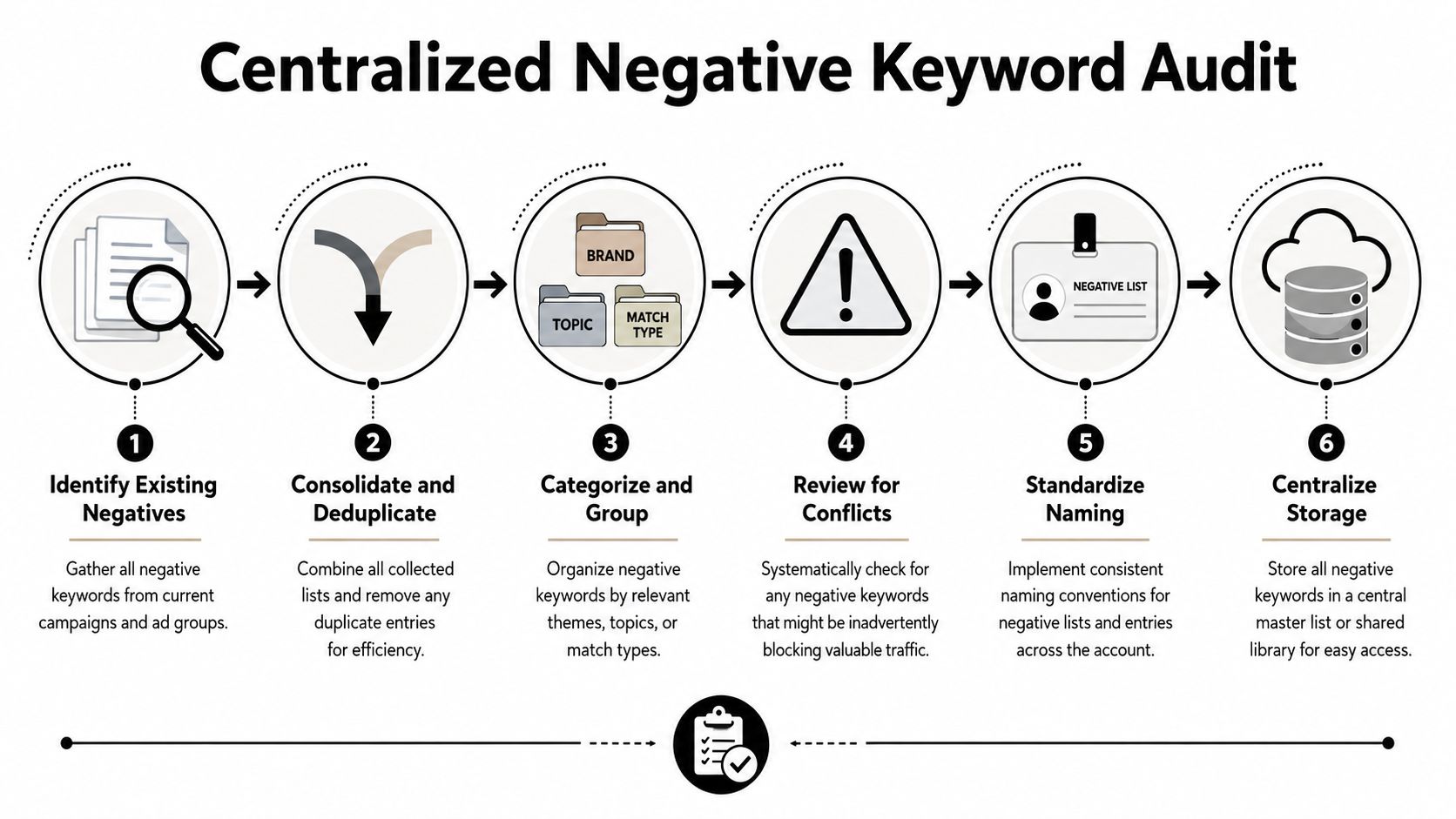
That history lives in campaign settings, ad groups, shared lists, old experiments, and random notes in someone's spreadsheet. Before you try to improve anything, pull it all into one place. A scalable way to manage negative keywords across multiple campaigns is to export all existing negatives from every campaign and ad group, consolidate them into a master spreadsheet, then classify each term by scope: campaign-level for one-off junk queries, shared lists for patterns that recur across campaigns, and universal negatives for terms that should never trigger anywhere, as outlined in Keywordme's guide on building a centralized negative keyword workflow.
Export first, judge later
Don't start by deleting anything. Start by collecting everything.
Pull negatives from:
- Campaign-level exclusions where teams often dump broad cleanup terms
- Ad group-level negatives that may still be doing useful routing work
- Shared lists that are already applied across parts of the account
- Legacy notes or backup sheets if previous managers tracked changes outside Google Ads
Once everything is in one spreadsheet, deduplicate exact repeats. Keep columns for source, match type, current scope, campaign names, ad group names, and a notes field. That notes column matters more than people think. If you don't record why a term exists, someone will remove it later because it “looks unnecessary.”
Classify by scope, not by convenience
A common mistake is treating every bad query the same way. They aren't the same.
Use a simple classification system:
- Campaign-only negatives for one-off cleanup tied to a specific setup
- Shared-list candidates for recurring themes across multiple campaigns
- Universal negatives for terms you never want anywhere in the account
The account starts to make sense again when you stop managing negatives as isolated edits and start managing them as an exclusion system.
Practical rule: if a term keeps showing up in different campaigns for the same reason, it probably belongs in a shared list, not as five separate manual exclusions.
Look for duplication and hidden contradictions
The spreadsheet will usually reveal two ugly patterns. First, the same term appears over and over in slightly different places. Second, a term is blocked in one part of the account and intentionally targeted somewhere else.
That second one is where wasted effort turns into suppressed demand. Brand campaigns, competitor campaigns, and non-brand campaigns often need different exclusion logic. If you flatten that nuance into one messy list, you create your own traffic problems.
A good audit also gives you a baseline for recurring reviews. If you want a useful framework for measuring whether exclusions are helping or overreaching, Keywordme's post on how to audit negative keyword performance is a strong companion read.
Design Your Shared Negative List Strategy
The fastest way to create long-term account pain is to build one giant master negative list and slap it on everything.
It sounds efficient. It isn't. It's blunt, hard to review, and almost guaranteed to create over-blocking once campaigns start diverging by funnel stage, audience, or intent.
Build lists around use cases
Google Ads supports applying one negative keyword list to multiple campaigns and allows up to 20 lists per account with up to 5,000 negatives per list, which makes coordination and governance critical as accounts grow, according to Google Ads help on shared negative keyword lists.
That limit isn't the interesting part. The interesting part is that you have enough room to be deliberate.
Instead of one oversized list, organize shared negatives by purpose. Typical buckets include competitor terms, brand protection, low-intent modifiers, irrelevant demographics, and geo exclusions. Industry guidance also tends to favor segmented lists over one all-in list because segmented application is easier to control.
Here's a naming framework that stays readable even when several people touch the account.
| List Type | Example Name | Description |
|---|---|---|
| Brand protection | NL - Brand Exclusions | Terms that should not trigger branded campaigns or internal overlap |
| Competitor control | NL - Competitor Terms | Competitor names or rival product lines excluded from selected campaigns |
| Low intent | NL - Low Intent Queries | Terms such as research-heavy or non-buying modifiers |
| Geography | NL - Irrelevant Geos | Locations the business doesn't serve |
| Audience mismatch | NL - Non-Customer Demographics | Terms tied to users who are clearly outside the offer |
Assign ownership before you add terms
This is the piece often skipped.
A shared list isn't just a settings object in Google Ads. It's a governance object. Once one list affects multiple campaigns, nobody should be editing it casually. Decide who owns the master sheet, who can request changes, who approves them, and where those requests are logged.
Without that, you get familiar problems:
- Unreviewed edits that accidentally suppress valuable traffic
- Agency and in-house overlap where both teams assume the other is watching list health
- List sprawl where new exclusions get added to whichever list feels closest
- No change history beyond whatever someone remembers in Slack
Shared lists save time only when someone is accountable for them. Otherwise they centralize risk, not control.
Keep architecture tighter than your campaign count
You don't need a list for every imaginable scenario. That creates its own maintenance burden.
A smaller set of clearly named lists usually works better, especially when paired with a naming taxonomy and a review process. The point is not to create more structure for its own sake. The point is to make list application predictable enough that another manager can understand the account without reverse-engineering every exclusion.
Building and Applying Lists The Smart Way
Once the architecture is clear, the build itself becomes straightforward. The part that still trips people up is not where to click in Google Ads. It's deciding what belongs in a shared list versus what should stay local, and which match type won't come back to bite you later.
Match types should follow risk
Broad negative match can look attractive because it feels all-encompassing. In practice, it's often too aggressive across multiple campaigns. Guidance from Optmyzr recommends using phrase and exact negatives more often than broad negatives because broad negatives can block more searches than expected across a larger account structure.
That lines up with what happens in real accounts. The more campaigns share a list, the more cautious you need to be.
Use this rule of thumb:
- Exact negative when a specific query is consistently junk
- Phrase negative when the same intent pattern appears in different query variations
- Broad negative only when the concept is universally irrelevant and you've thought through side effects
If there's any chance a term could be valuable in one campaign and harmful in another, don't solve it with a broad negative in a shared list.
Apply lists surgically
Google Ads supports shared negative keyword lists that can be applied across multiple campaigns, letting advertisers create up to 20 lists and deploy them to selected campaigns in a few clicks, turning a repetitive task into a centralized governance layer, as noted in this practitioner explainer on shared negative keyword list deployment.
That convenience is exactly why discipline matters. It's easy to apply the wrong list too widely.
A smarter pattern looks like this:
- General junk list applied broadly across most search campaigns
- Competitor list applied only where competitor filtering is intentional
- Brand protection list used where branded overlap would muddy intent
- Geo exclusion list tied to service area logic, not applied blindly account-wide
Build from the spreadsheet, not from memory
If your audit was done well, you already know which terms belong where. Build lists from that source of truth instead of trying to recreate logic inside the UI.
When you're doing this in bulk, a structured workflow matters more than speed. Add terms to lists, label ownership in your master sheet, record where each list is applied, and confirm that every campaign has the exclusions it needs. Keywordme's guide on how to build a master negative keyword list is useful for turning that spreadsheet logic into a repeatable build process.
Don't ask, “Can this term go in a shared list?” Ask, “Will this term still make sense when another campaign with different intent shares that same list?”
That question prevents a lot of damage.
The Critical Process for Finding Conflicts
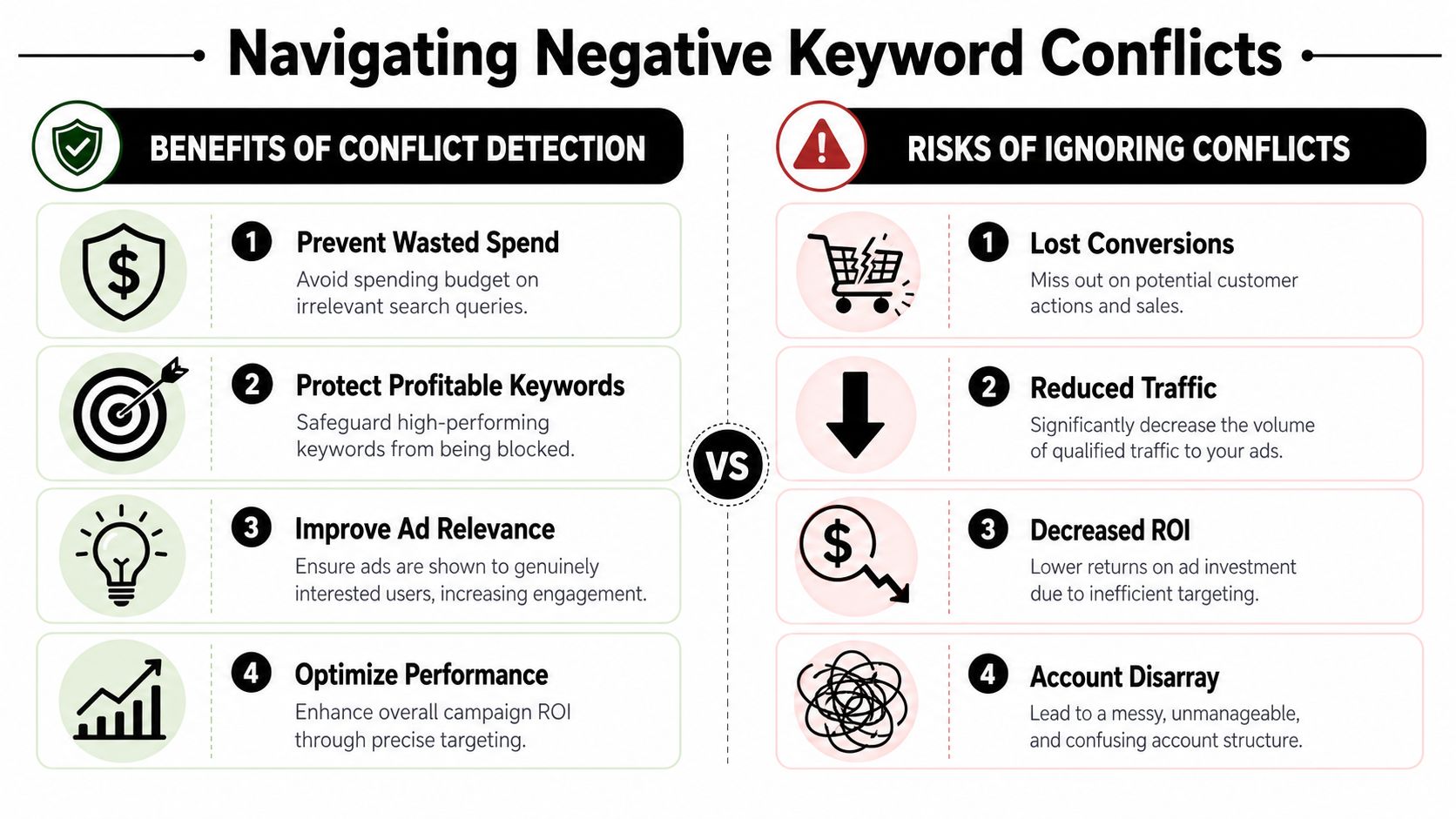
Negative keyword conflicts usually don't announce themselves. You notice a campaign softening, a keyword losing impressions, or brand traffic coming in oddly thin. Then you spend an hour checking bids and ad rank before realizing the culprit is a negative added somewhere else.
That's why conflict checking has to be a routine, not a rescue mission.
How conflicts usually happen
The pattern is almost always one of these:
- A shared list gets updated for one campaign need but affects several others
- A phrase or broad negative blocks a valuable query variant
- Campaign intent shifts over time, but old negatives stay in place
- Different managers work in different parts of the account without cross-checking
The risk gets worse when campaigns are segmented by audience, funnel stage, or match type. A term that's noise in one environment can be valuable in another.
What to check in practice
Run conflict reviews with both campaign logic and keyword logic in mind. A few useful checks:
Compare shared negatives against active keyword themes
Look for obvious overlap first. If your campaign targets premium service queries, don't assume “cheap” is always safe. In some accounts it filters poor-fit traffic. In others it blocks mid-intent searches you still want to test.Watch for impression drops without another explanation
If bids, budgets, and ad status all look normal but traffic disappears, check exclusion changes before you do anything else.Review brand, competitor, and non-brand boundaries
These are common conflict zones because teams often reuse similar root words across separate campaign intents.Use bulk tools when the account is large
Google Ads Editor can help surface pattern overlap faster than clicking campaign by campaign. Some teams also use scripts or spreadsheet matching logic to compare active keywords against negative lists.
A clean account can still have hidden conflicts. Neat naming doesn't guarantee safe application.
Resolve the root cause, not just the symptom
When you find a conflict, don't only remove the term and move on. Figure out why it happened.
Sometimes the fix is simple. The term belonged at campaign level, not in a shared list. Sometimes you need to split a list that became too broad over time. Other times the naming was fine, but ownership was fuzzy and nobody understood the downstream effect of a change.
The useful mindset here is operational, not technical. Conflict detection isn't just about finding blocked keywords. It's about making the system safer each time you uncover one.
Ongoing Maintenance and Performance Monitoring
Negative keyword management falls apart when teams treat it like a one-time cleanup. It works when it becomes a recurring operating rhythm.
The reason is simple. Search behavior changes, campaigns change, offers change, and old exclusions don't always age well. Some negatives are evergreen. Others are seasonal, temporary, or tied to a short-lived test.
Use a review cadence you can actually keep
Optmyzr recommends waiting for statistically meaningful search-term data before adding many negatives and suggests a threshold of at least 20 clicks before making a decision, while also recommending review cadences such as monthly checkups for shared lists. Their guidance on data-driven negative keyword decisions also separates evergreen negatives from seasonal negatives that should rotate in and out as business cycles change.
That's a practical standard because it stops teams from reacting to every weird query after a couple of clicks.
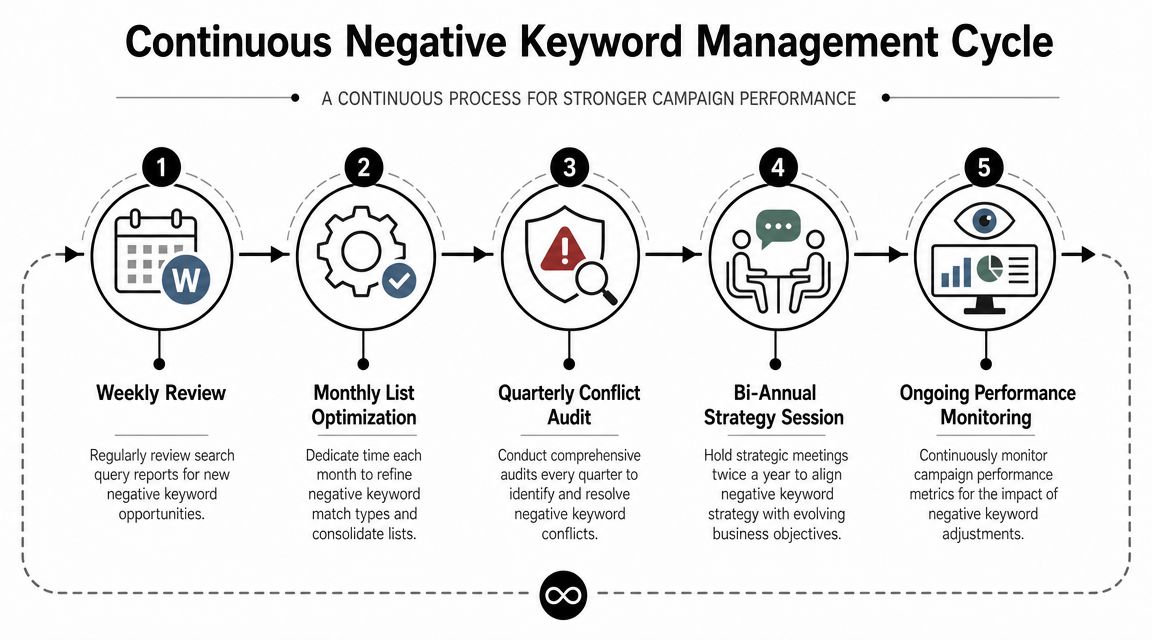
A workable cadence often looks like this:
- Weekly search term review for obvious junk and new patterns
- Monthly shared list review to refine match types and remove clutter
- Quarterly conflict audit to catch overlap and legacy exclusions
- Seasonal refreshes when promotions, inventory, or service focus changes
Decide with evidence, not irritation
Plenty of search terms are annoying. Not all of them deserve to become negatives.
A junior manager's instinct is often to negate terms the moment they look irrelevant. That feels productive, but it can cut off useful traffic before the data settles. Waiting for enough volume creates better decisions, especially in multi-campaign accounts where one exclusion can have wider impact.
Here's the difference in practice:
- Bad process means adding negatives because the query “looks wrong”
- Better process means reviewing query intent, click volume, campaign context, and list scope before changing anything
Separate evergreen from temporary negatives
This small distinction saves a lot of cleanup later.
Evergreen negatives usually include obvious misalignment. Think categories you never sell, audiences you never want, or competitor themes you've decided to block consistently. Temporary negatives are different. They're tied to seasonality, inventory gaps, or promotions that come and go.
If you mix both together, your shared lists get stale. Then you start carrying old exclusions that no longer fit the business.
Good negative keyword management is less about adding more terms and more about keeping the right terms active for the right amount of time.
Monitor impact after every meaningful change
Don't just add negatives and assume the account improved. Check what happened after the update.
Look for:
- Cleaner search term patterns in the campaigns where lists were applied
- Unexpected impression loss in campaigns that share list dependencies
- Shifts in lead quality or traffic quality from tighter query control
- Aging exclusions that haven't been reviewed in months
That habit is what turns maintenance into optimization instead of simple housekeeping.
Accelerate Your Workflow with Automation
Manual negative keyword management teaches good discipline. It also eats time.
Once an account gets large enough, the spreadsheet, audit, build, review, and conflict-check cycle starts pulling hours away from higher-value work. You still need the thinking. You just don't need the repetitive mechanics.

Automation helps when the process is already clear
If your structure is messy, automation just helps you move faster in the wrong direction. But if you've already cleaned up naming, ownership, and list scope, then tools can compress the manual workload.
That usually shows up in a few areas:
- Search term triage instead of endless export-and-filter work
- Bulk negative assignment without copy-paste errors
- Shared list updates applied consistently across selected campaigns
- Conflict spotting before a bad exclusion sits unnoticed
A tool like Keywordme's negative keyword automation workflow is built around those jobs. It helps teams work from live search term data, apply negatives with match-type control, and manage shared-list workflows without living in spreadsheets all day.
The real gain is focus
The strongest PPC managers don't win because they click faster inside Google Ads. They win because they spend more time on judgment and less time on admin.
That's the shift automation should create. You still decide whether a term is low intent, whether a list is too broad, and whether a conflict risk is acceptable. The tool handles the repetitive handling around those decisions.
For a quick visual walkthrough, this video gives useful context on a more efficient workflow:
If you're serious about how to manage negative keywords across multiple campaigns, that's where you want to end up. Not with more lists. With a system that's easier to trust, easier to review, and much harder to break.
If you want a cleaner way to manage shared lists, review search terms, and handle negative keyword workflows without the usual spreadsheet sprawl, take a look at Keywordme.
.svg)