
Google Ads Same Keywords in Different Campaigns Explained
Google Ads Same Keywords in Different Campaigns Explained


You search an account for “running shoes” and find the term in two campaigns. A few days later, the brand-defence campaign is collecting queries that belong in your generic performance campaign, while the generic campaign is missing the clean conversion story you expected. The team blames bidding, Quality Score, or Google's automation, but the account may have the same keyword in different campaigns without a clear ownership rule.
That setup isn't automatically wrong. Google Ads allows overlapping keywords across parts of an account, and sometimes marketers use that overlap deliberately for brand protection, geographic segmentation, landing page testing, or different intent strategies. The trouble starts when duplication happens without matching negatives, distinct landing pages, or a reporting plan. Understanding how Google resolves the overlap lets you turn a messy account structure into a controlled design decision.
The Duplicate Keyword Problem in Your Account
A junior marketer usually discovers the problem through an odd search-term result rather than through an account audit. Someone searches for “running shoes,” expecting the generic performance campaign to appear. Instead, the brand campaign serves an ad with defensive copy, a narrower landing page, and a bidding strategy designed for branded demand. The query may still receive an impression, but the campaign owner is wrong for the commercial intent.
That creates several headaches at once. The wrong campaign receives the impression, click, and conversion record. Ad messaging becomes less relevant to the query. Landing page analysis gets harder because the same search behavior is being evaluated under different campaign settings. The account hasn't necessarily lost traffic because a duplicate exists, but the team loses control over which campaign gets credit and which campaign shapes the user experience.
Google's own documentation confirms that identical keywords can exist in more than one ad group or campaign, and its Editor includes a “Find duplicate keywords” feature for locating them across an account or selected areas. The tool can filter by word order, match type, and duplicate location, which makes the practical point clear. Duplicate keywords are a recognized account-management pattern, not an unusual platform error. You can review Google's duplicate keyword guidance for Google Ads before changing a large account.
Practical rule: A duplicate keyword needs an owner, a reason, and a control. Without those three things, it's account noise.
The wider account-design problem is easy to underestimate. A small amount of overlap may look harmless in a spreadsheet, but it can spread as marketers copy ad groups, split markets, launch tests, or create new campaign types. That's one reason teams should also watch for broader Google Ads account bloat issues, where unnecessary structures make optimization and reporting less reliable.
The useful question isn't “Can Google Ads handle duplicate keywords?” It can. Ask instead, “Which campaign should own this query, and what prevents another campaign from taking it?” That question moves the discussion from platform mechanics to account architecture.
How Google Ads Resolves Same Keywords at Auction
Google doesn't serve two ads from your account for the same impression because two campaigns contain the same eligible keyword. When overlapping keywords match a search, Google selects a single keyword and ad combination for the auction. Google's documentation states that, when the same exact-match keyword exists in separate campaigns, only the keyword with the highest Ad Rank is sent to the auction, as explained in its keyword prioritization documentation.
A coffee-shop analogy helps. Two shops sit on the same street, and both sell the same espresso. A passerby won't buy the same drink from both shops during one visit. The shop the customer reaches through the relevant route gets the sale, while the other shop remains idle for that opportunity. In Google Ads, the “route” is determined by eligibility and auction selection, not by a simple rotation between campaigns.
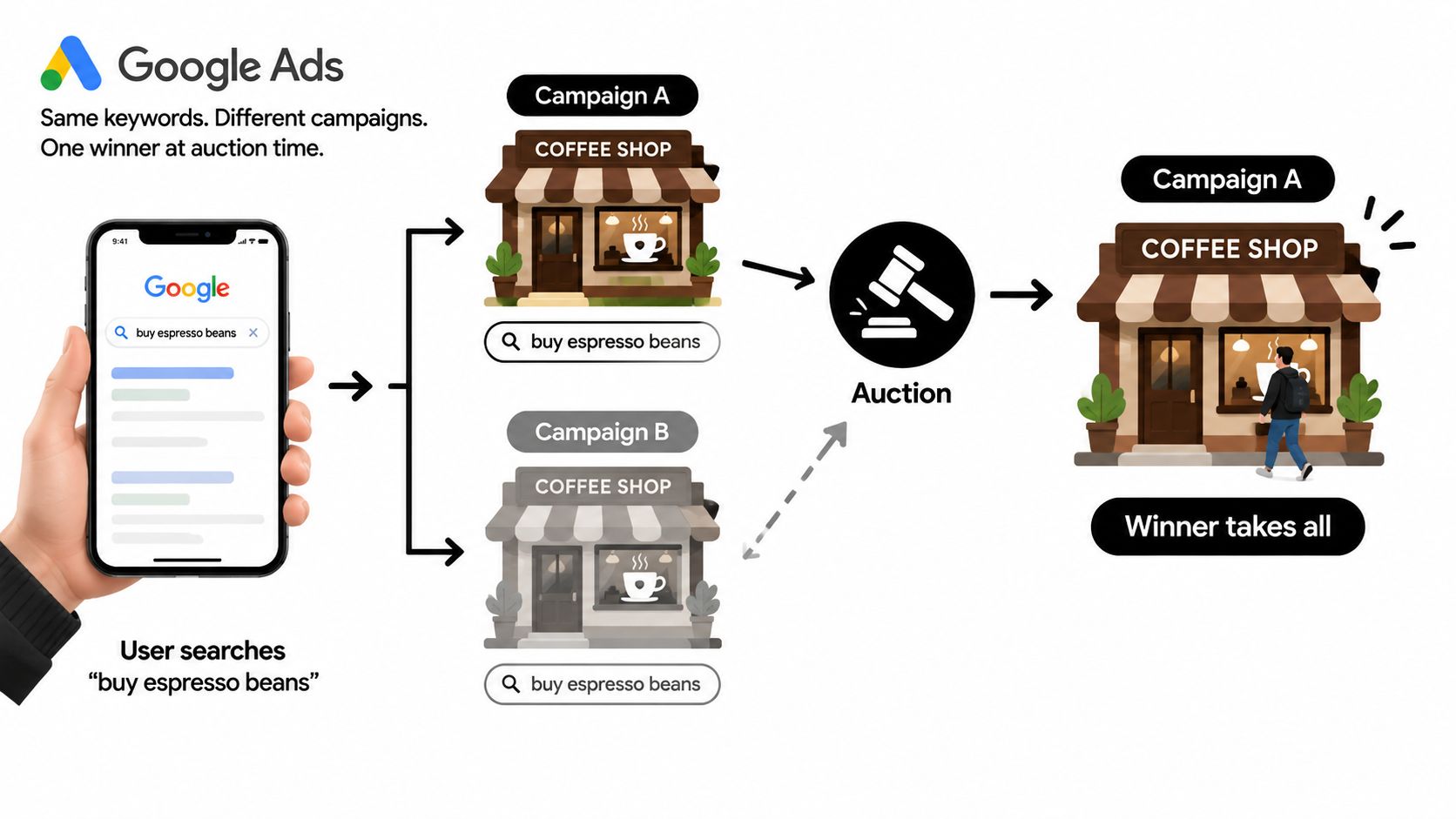
The auction sequence
Start with the user's search query. Google evaluates which keywords and campaign settings make the query eligible, including match behavior, location, language, device, audience conditions, budget, and policy status. If more than one part of your account can participate, Google resolves the overlap at auction time.
The eligible options then compete through Ad Rank. Your bid matters, but it isn't the only consideration. Ad relevance, landing page experience, expected impact from assets, and other auction signals contribute to the result. The winning keyword and ad combination gets the impression. The losing duplicate doesn't receive a second entry for that same impression.
That distinction matters because duplicate keywords don't create extra reach by appearing twice. They create a selection problem. One campaign collects the data, while the other doesn't, even though both may look eligible in the account interface.
Match type complicates the picture
Same-text keywords aren't always treated identically across match types. Google explains that phrase and broad match keywords, including AI Max or search themes, can share priority when they're identical to the search term, so the relationship depends on both the keyword type and the actual query. You can review the Google Ads keyword prioritization rules when diagnosing an overlap that doesn't behave as expected.
The operational lesson is straightforward. Don't assume Google will distribute impressions evenly, and don't read a duplicate keyword as a guaranteed second chance. Decide which campaign should win, then use structure and negatives to make that decision more predictable.
Allowed Duplicates vs Blocked Duplicates
Google Ads Editor draws an important line between local duplication and structural duplication. Two keywords with the same text and match type in one ad group are rejected as invalid duplicates. That setup gives the same ad group no useful strategic distinction, so Editor treats it as a conflict rather than allowing redundant entries.
Across different ad groups, the platform may allow the same keyword, even within one campaign. That arrangement can be operationally valid, but it often fragments click, conversion, and search-term data without adding a clear control. Across separate campaigns, duplication is also allowed, and that's where human account design becomes essential. Google's Editor conflict rules document the blocked same-text, same-match-type situation inside an ad group.
| Scope | Same Match Type Duplicate | What Happens |
|---|---|---|
| Same ad group | Not allowed | Google Ads Editor treats the keyword as an invalid duplicate. |
| Different ad groups in one campaign | Allowed | The account can contain the term, but reporting and ownership may become fragmented. |
| Different campaigns | Allowed | Google resolves eligible overlap at auction time, with one keyword and ad combination participating. |
Where accidental overlap appears
Consider a brand campaign and a non-brand campaign that both contain “acme pricing.” The brand campaign might have a dedicated landing page and defensive ad copy, while the generic campaign uses a broader product message. If both campaigns target the same market and remain eligible for the same query, Google decides which option enters the auction.
A geographic split creates a similar risk. A United States campaign and a Canada campaign might both contain “plumber near me.” If location settings and user signals make both campaigns eligible, the keyword text alone won't tell you which campaign should own the query. The same issue can appear when a Search campaign and a Performance Max campaign can draw demand from the same search behavior.
Editor blocks pointless redundancy inside one ad group, but it doesn't make strategic decisions for separate campaigns. That asymmetry explains why many accounts look clean at the ad-group level while still containing significant cross-campaign overlap.
When Duplicating Keywords Across Campaigns Actually Makes Sense
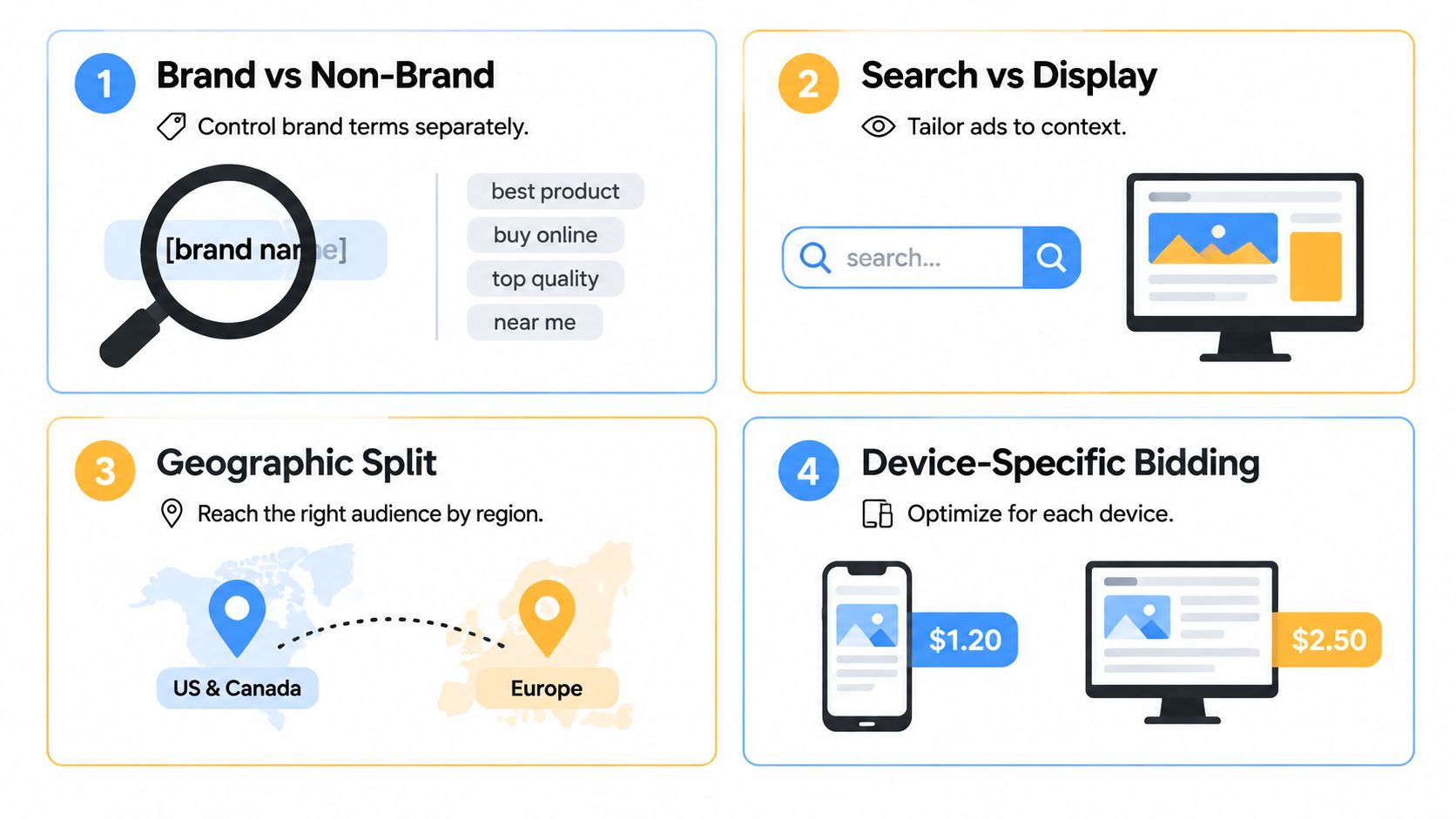
The blanket rule “never duplicate keywords” sounds tidy, but it's too blunt for real account management. Duplication can be useful when each campaign represents a different business decision, such as a distinct audience, geography, message, destination, or bidding environment. The test is whether the separation produces cleaner control and measurable ownership.
Brand and non-brand separation
A brand campaign may contain exact-match brand terms, tightly controlled ad copy, and a landing page built around known demand. A generic campaign can contain a broader version of the same root term to capture searches that include product, category, or competitor context. The benefit is not extra auction entries. It's the ability to control brand messaging separately and inspect branded performance without mixing it into generic acquisition reporting.
The proving metric is query ownership and reporting clarity. If the brand campaign receives the intended branded searches and the generic campaign captures its defined non-brand or exploratory traffic, the duplication has a purpose. If both campaigns repeatedly appear for the same commercial queries, add negatives or revise match-type ownership.
Geographic splits
A service keyword might appear in campaigns for Texas and California because each campaign uses different location settings, ad language, bids, and landing pages. The same term can then connect users with locally relevant information while keeping regional reporting separate.
The useful metric is performance by location under the correct campaign owner. Check whether searches from each region reach the intended ads and pages, and whether the campaign reports reflect the geography it was built to serve.
Landing page experiments
You can place an identical keyword in separate campaigns when each campaign routes traffic to a different landing page variant. That only makes sense if the experiment has a defined hypothesis, stable traffic allocation rules, and a planned decision point. Otherwise, the duplicate structure turns a page test into an uncontrolled campaign contest.
Measure the result by comparing conversion quality and landing page behavior under the same query intent. Keep the test isolated from unrelated bid, audience, and geographic changes.
Device or audience layering
Some teams separate campaigns to apply different device or audience controls. The same keyword may appear in a standard Search campaign and another Search campaign designed around an audience layer, with different bids, copy, or landing-page treatment.
The proving metric is incremental control, not a higher impression count. If the second campaign gives you a distinct audience or device decision that you can evaluate cleanly, duplication may earn its place.
Using Negative Keywords to Control Cross-Campaign Overlap
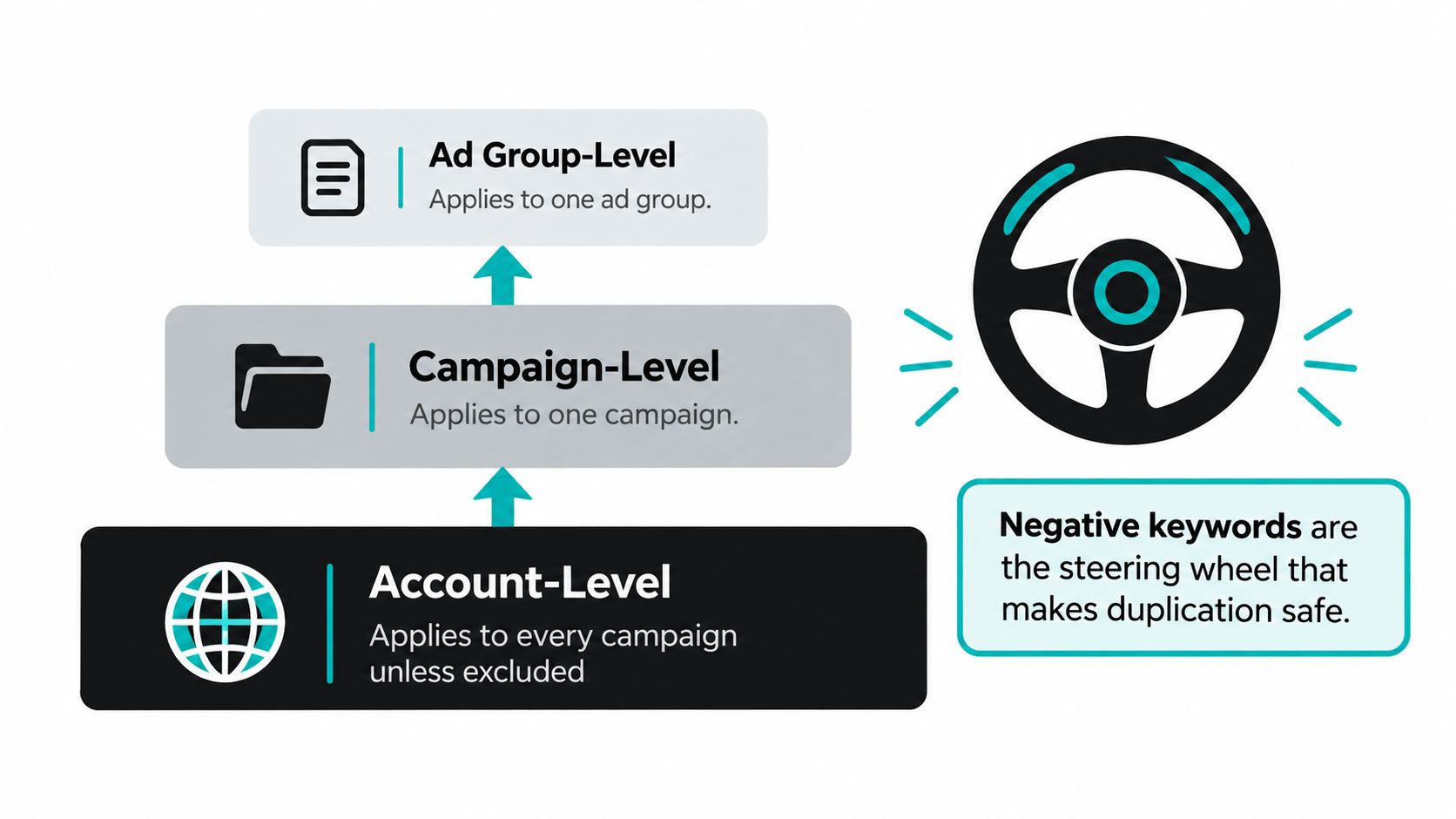
Negative keywords act like the steering wheel of a duplicated account. The positive keyword says, “This campaign may participate.” The negative keyword says, “Not for this kind of query.” Together, they let you keep separate campaigns while directing different search intents to the appropriate owner.
Choose the right negative scope
Google Ads accounts commonly use several levels of control:
- Account-level negatives: Apply broadly across eligible campaigns, unless the platform setup provides an applicable exception. Use this scope carefully because a broad exclusion can block a well-matched keyword everywhere.
- Campaign-level negatives: Restrict traffic in one campaign while leaving another campaign eligible. This is usually the most direct tool for cross-campaign ownership.
- Shared negative lists: Build a reusable collection and apply it to selected campaigns. This works well when several campaigns should exclude the same intent category.
A negative can override an otherwise relevant positive keyword. That means an account-level exclusion such as “support” can prevent a campaign from serving even when its positive keyword appears perfectly aligned. Scope isn't an administrative detail. It determines which campaign remains eligible.
For a brand-protection setup, the generic campaign might exclude terms such as “careers,” “jobs,” “login,” and “support.” The brand campaign can then own those navigational or existing-customer searches, while the generic campaign stays focused on commercial intent. This design is cleaner than waiting for irrelevant spend to appear and reacting one query at a time.
Build the exclusion system before launch
Start with a shared list for exclusions that apply to a defined group of campaigns. Add campaign-level negatives for exceptions, and reserve account-wide exclusions for terms that should be blocked across the account. Review the applied lists and campaign settings together, because a negative keyword can create an unexpected conflict several layers away from the positive keyword you're auditing.
The Google Ads negative keyword workflow is useful for organizing this review, especially when several campaigns share recurring exclusion themes.
Diagnostic habit: Pull a cross-campaign search-terms report, group repeated queries by campaign, and verify that every negative is sending traffic where you intended.
Don't add negatives only after the wrong campaign spends. Write the ownership rule first, apply the exclusions, then inspect the search-terms report for evidence that the steering system works.
Smart Account Structures That Make Duplication Work
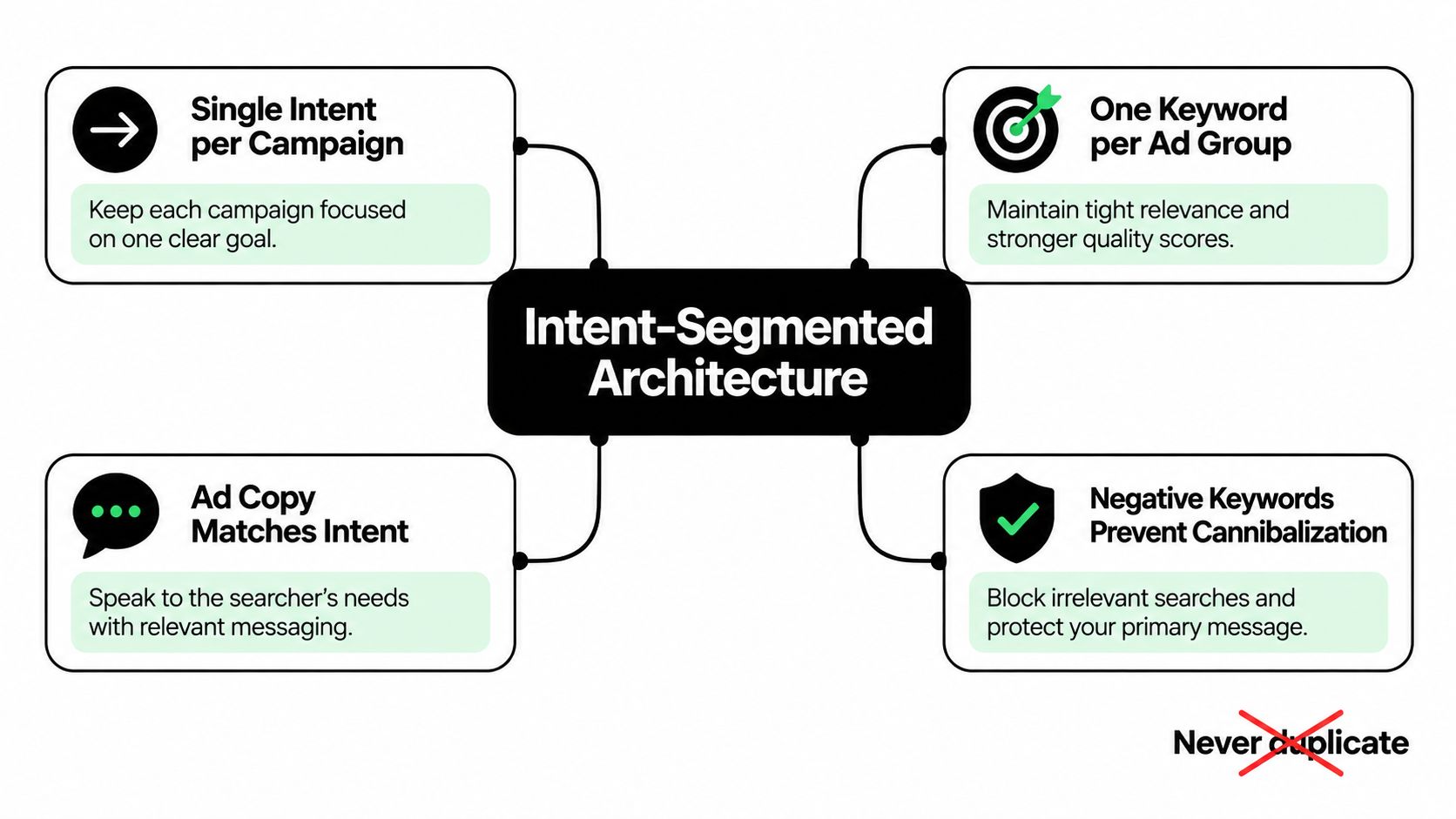
The smarter alternative to “never duplicate” is duplicate with intent. A campaign should represent a meaningful management decision, not just another container for the same list of terms. If two campaigns have different goals, bids, audiences, copy, or landing pages, repeating a root keyword may be reasonable. If they're identical in every meaningful way, consolidation is usually easier to manage.
Build around intent
A practical architecture might separate research, comparison, purchase, and brand defence. The same head keyword can appear across those intent buckets, but each campaign should use a different match-type role, ad message, landing page, and negative-keyword boundary.
For example, the commercial campaign can own the exact and phrase versions of a high-intent term. The research campaign can use a broad variant of the same root to discover related searches, while negatives prevent it from taking clearly commercial queries. The brand-defence campaign can own branded exact terms and exclude support or employment intent from acquisition campaigns.
This structure gives each campaign a job. It also lets you tune bidding, audiences, creative, and landing-page relevance without mixing different user needs in one large campaign. Google still resolves eligibility at auction time, but your negative strategy and match-type ownership make the desired winner more deliberate.
Give every repeated root a written owner
Document which campaign owns each intent. A simple ownership note can state that exact and phrase match versions belong to the purchase campaign, research owns discovery variants, and brand defence owns navigational brand searches. Then attach negatives that enforce the rule.
This approach beats a mega-campaign when the account needs different landing pages or messaging for different mental states. Someone researching a category needs a different experience from someone searching for pricing, and a branded user may need a different path again. The keyword structure should support that distinction rather than hide it.
For broader Google Ads account structure best practices, focus on readable campaign names, stable ownership rules, controlled match types, and landing pages that match the intent each campaign claims.
Fixing Duplicate Keywords With a Clear Workflow
Duplicate cleanup works best as a reconciliation exercise, not a mass deletion. The objective is to identify overlap, assign ownership, and add controls without disrupting useful segmentation.
Start with the account map
Open Google Ads Editor and run Find duplicate keywords across the campaigns you manage. Filter by word order, match type, and duplicate location so you can distinguish exact same-text conflicts from broader structural overlap. Export the results into a shared sheet and group each repeated term by campaign, match type, geography, audience, landing page, and business intent.
Then assign one owner using a written rule. A practical hierarchy can prioritize the campaign with the strongest intended role, then use historical efficiency and launch context as tie-breakers. Don't let a short-term performance swing reorder ownership in the middle of a planned review. Ownership should follow account strategy first, with performance used to validate or challenge the design later.
Apply controls in Editor
For every retained duplicate, decide what the other campaign should exclude. Add the matching campaign-level negative or shared-list entry, then review the Conflicts view before publishing. Use the Manage negative keywords panel to check that the exclusion has the expected scope and hasn't accidentally blocked the intended owner.
Watch for mirrored match types. Cleaning an exact-match duplicate doesn't automatically resolve a phrase or broad variant that can reach similar searches. Google's matching behavior depends on keyword type and query, so inspect the surrounding term family rather than closing the audit after one row disappears.
Verify after publishing
Push the changes through Editor, then review search terms across campaigns during the next monitoring period. Look for the same commercial query appearing under multiple campaign owners, unexpected drops in the intended campaign, and negatives that are blocking useful demand. If the account has frequent additions, schedule a monthly duplicate audit so new campaigns, copied ad groups, and match-type expansions don't recreate the same problem within a later planning cycle.
A lightweight tool such as Keywordme can support this kind of work inside Google Ads by helping manage keywords, search terms, match types, and negative-keyword lists. The tool should support the workflow, not replace the ownership decisions that make duplication strategic.
The final standard is simple. Keep a duplicate only when it represents a deliberate difference in intent, control, or experience. Otherwise, consolidate it, assign a clear owner, and make the negative-keyword system enforce that decision.
Keywordme helps PPC teams organize search terms, apply match types, build negative keyword lists, and manage keyword changes inside Google Ads. Visit Keywordme to bring duplicate-keyword audits and cross-campaign cleanup into a more consistent workflow.
.svg)