
Campaign Negative Keywords: A Practical 2026 Guide
Campaign Negative Keywords: A Practical 2026 Guide


Roughly $136,000 of spend in a single account landed on low-ROAS search terms, and the analysis Optmyzr covered estimated that only about 4% to 8% of spend could be removed with negative keywords. Put those two numbers side by side and the usual advice falls apart. The pile of ugly queries is enormous. The slice you can safely delete is thin.
That's the frame I use on every account: campaign negative keywords are a confidence decision, not a volume contest. Adding one is a claim that a query will never pay for itself. Sometimes a week of data proves it. Often it doesn't, and blocking anyway deletes the very evidence you'd need later.
So the work splits into two habits. Knowing what a negative blocks, and knowing when you don't have enough data to say.
What Campaign Negative Keywords Actually Do
Say a shoe shop runs one campaign built around running shoes and trail shoes. The search terms report will still hand it free running shoes, shoe shop jobs, and how to repair soles at home. Those are real people typing real queries. None of them is shopping, and the invoice doesn't care.
Campaign negative keywords are the door policy for that campaign. You give Google Ads a list of terms it must not match, and those queries lose before any ad group gets a chance to bid. Positive keywords are the guest list. Campaign negatives are the bouncer at the front door. Ad group negatives are the pickier rules enforced inside one room, and they only matter once somebody is already inside.
The waste this prevents runs bigger than many assume. A 2019-2020 study of small and medium advertising accounts analyzed more than 1.8 billion clicks across campaigns in over 70 countries and found roughly 14.1% were fraudulent or invalid. Typical small-business Google Ads spend in that research sat at $9,000 to $10,000 per month, or about $100,000 to $120,000 annually. Run 14.1% straight across that and you're at roughly $14,100 to $16,920 a year.
That's invalid traffic, which is a different animal from ordinary irrelevance. A negative can't stop a fraudulent click on a relevant query, and it won't refund you. What it can stop is free, jobs, and DIY from renting your budget every month, which is waste you created by matching loosely in the first place.
Once a term is junk on every campaign you run, it stops being a local question and becomes an account-wide negative keyword strategy problem. The caps, the match behavior, and a routine that doesn't outrun the data decide whether any of it works.
Google Ads Limits for Campaign Negatives
Here's the box you're working inside.
| Rule | Search campaigns | Display and Video | Shared negative lists |
|---|---|---|---|
| How many negatives | 10,000 per campaign | 1,000 considered | 5,000 per list |
| How many lists | Not a list cap | Not a list cap | 20 lists per account |
| Match type you can set | Broad, phrase, or exact | Broad match only | Applied as the campaign type allows |
| Close variants included | No | No | No |
Google Ads permits up to 10,000 negative keywords per campaign, an account can hold up to 20 negative keyword lists, and each list holds as many as 5,000 keywords, according to Google's account limits documentation. Read those as three separate budgets, because that's how they behave. The campaign cap limits what sits directly on one campaign. The list cap limits how much reusable exclusion you can carry. The list count limits how many distinct exclusion sets you can maintain.
Display and Video are tighter and stranger. Google treats every negative keyword in those campaign types as broad match, with no switch to phrase or exact, and it considers a maximum of 1,000 of them. If you built a careful phrase list for Search and copied it into a Display campaign, you didn't copy the match types. You copied broad terms.
Shared lists versus campaign-level negatives
The planning choice is simple once you name it. Recurring junk like jobs, free, and tutorial belongs on a shared list so you're not pasting the same exclusions into twelve campaigns and missing two of them. A query that only hurts one offer stays on that campaign, inside the 10,000 cap.
Planning rule: if a term is wrong for every campaign selling the same thing, it belongs on a list. If it's wrong for exactly one offer, it belongs on that campaign.
One capacity trap worth flagging early. Because negatives don't cover plurals and synonyms for you, a jobs exclusion may need job, careers, and employment as separate lines. Each line counts against your caps. A tidy-looking list of 400 entries can represent 120 real intents.
And a list that exists is not a list that's working. It has to be associated with specific campaigns before it changes a single auction. Hold that thought for the build routine.
Before any bulk paste, check the table. A 6,000-keyword brain dump aimed at a 5,000-keyword list bounces, and it usually bounces halfway, which is worse than not starting.
How Negative Match Types Really Behave
Negative keywords don't work like the positive keywords sitting next to them. You get broad, phrase, and exact in Search campaigns, but a negative doesn't expand to close variants, synonyms, singular and plural forms, or reordered queries the way a positive does. Google says so directly in its guide to negative keywords, and it's the single most common reason a cleanup looks finished and isn't.
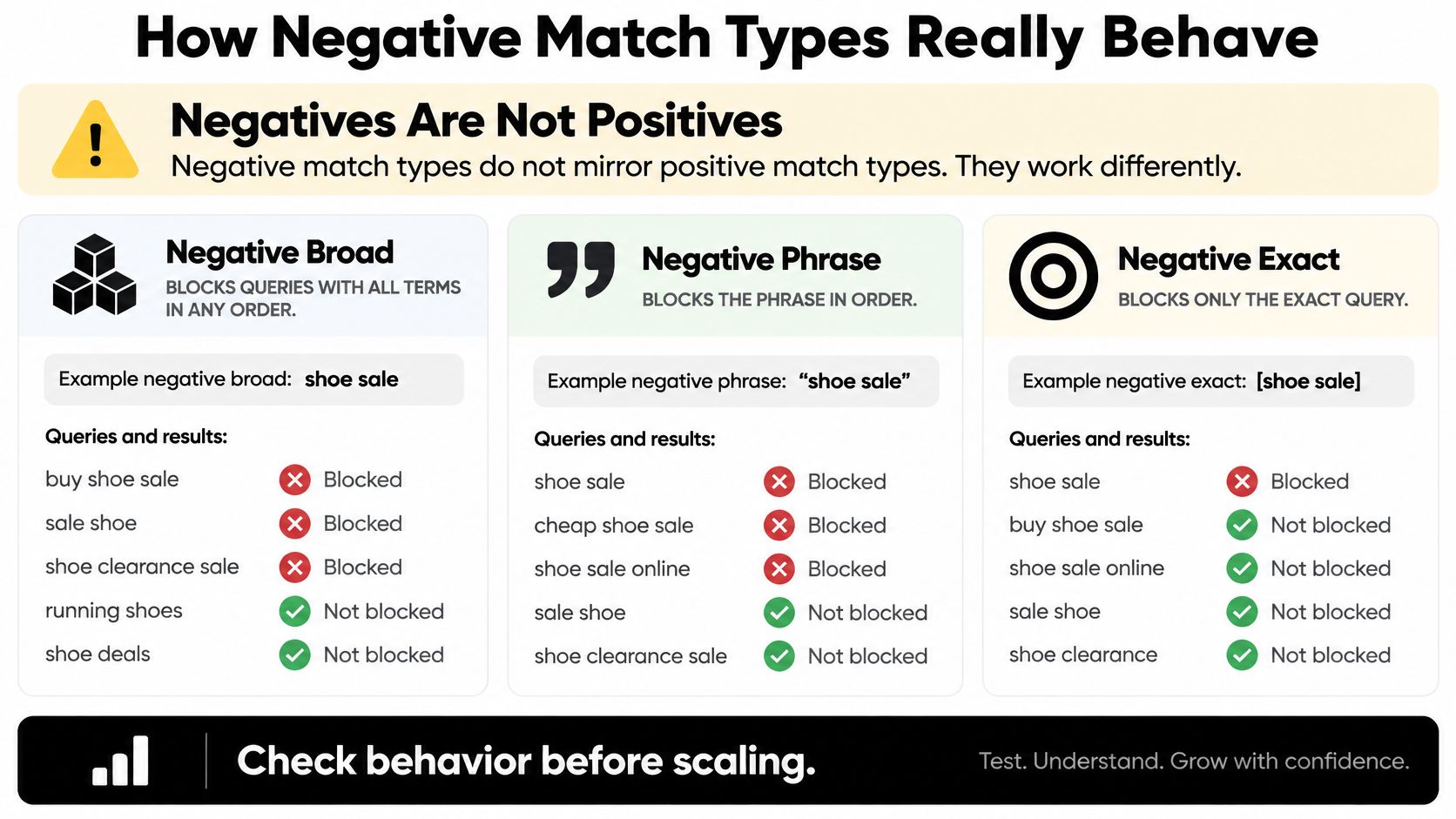
Google's own example is the cleanest way to feel it. Add flowers as a negative broad match and red flowers gets blocked while red flower still gets through. The plural never covers the singular for you. Nothing in the system reasons about what you obviously meant.
| Negative match | What it blocks | Overblock risk | Example |
|---|---|---|---|
| Broad | All the words, any order, extra words allowed | Highest | Negative broad flowers blocks red flowers but still allows red flower |
| Phrase | The phrase in that order, words before or after allowed | Medium | Phrase running shoes blocks best running shoes, not shoes for running |
| Exact | That query only | Lowest, but variants leak | Exact free running shoes leaves free shoes and shoe jobs untouched |
Broad is a wall. It blocks any query containing all your terms in any order with anything else tacked on, which is wide protection and the fastest way to smother a useful query that happens to share a word. Phrase is a wall with a gap at each end: running shoes as a phrase catches best running shoes but lets shoes for running through. Exact is a scalpel. It kills one query and nothing else, and it leaks the moment you stop at a single token.
The precision versus recall trade-off
Here's how I decide, in practice. A clearly junk pattern that keeps recurring gets promoted to phrase or broad, because repetition is evidence. A one-off query that happens to contain a word I still want to buy, like a brand or a core product name, gets exact only. That way I close the specific hole without bricking the useful traffic around it.
The part people miss: a negative on jobs does not catch job, careers, or employment. You add those on purpose, or you leave the leak in.
After any broad negative goes live, recheck impressions, clicks, cost, and conversions on the queries you meant to keep. A drop in impression share on your good terms is the signal that you overreached, and it shows up within days, not months.
How to Add Campaign Negative Keywords
Run this as one pass this week, not a project.
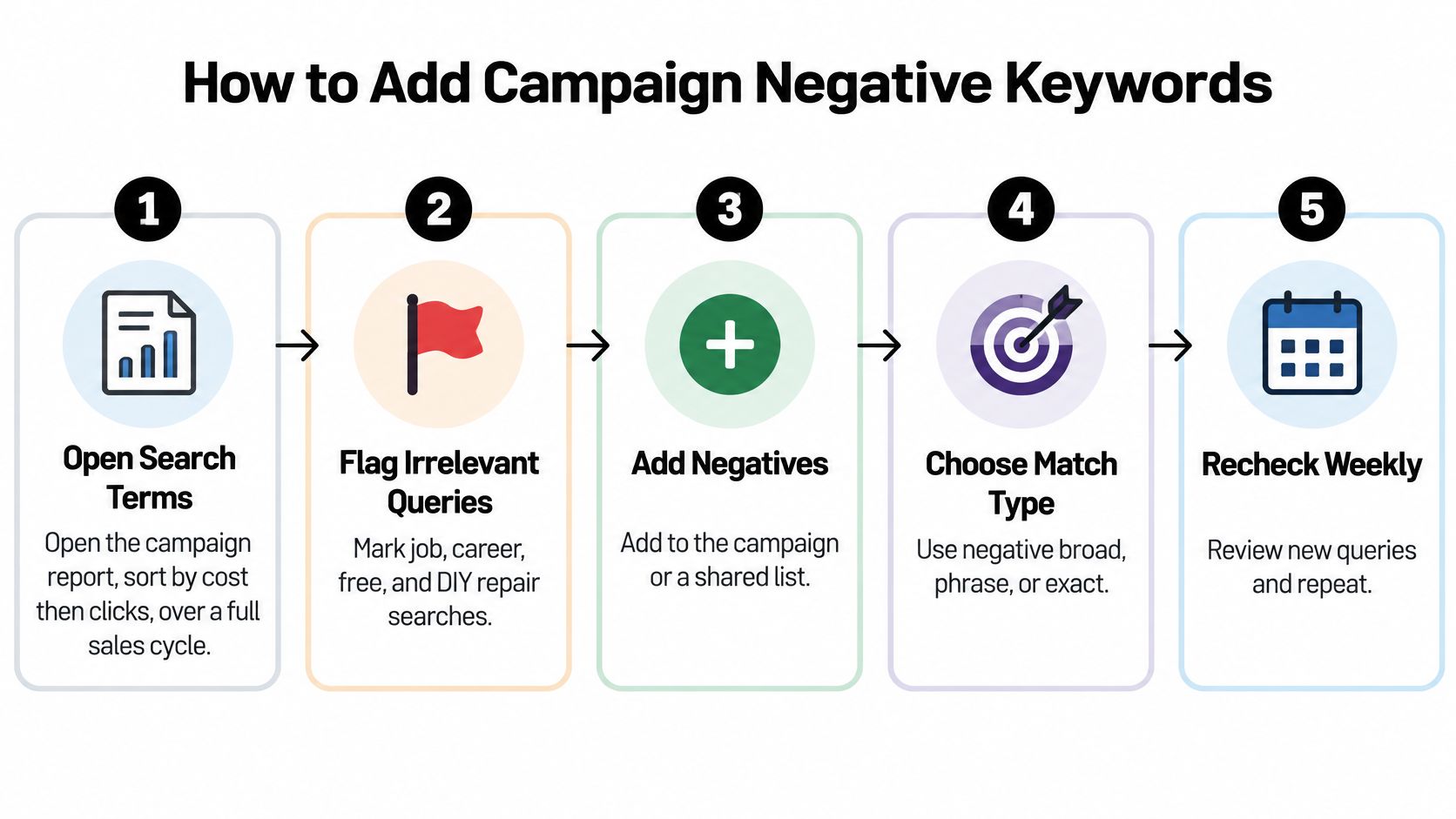
The nine-step pass
- Open the search terms report for the campaign and sort by cost, then by clicks, over a window long enough to include a normal sales cycle. A seven-day window on a considered purchase shows you noise and calls it evidence.
- Flag queries that are human but commercially useless for this offer. Employment, free, tutorial, or an unrelated product from the same brand. Ignore the single weird impression with no spend behind it, because it costs you nothing to leave alone.
- Pick the match type before you type the term. Phrase or broad for a repeating junk pattern, exact when the query shares a valuable word you still want.
- Add the variants yourself. Singular, plural, and the obvious synonyms. Google won't infer them, and this is the step that determines whether the exclusion holds.
- Decide the home. A shared negative list for terms that should die on every related campaign, or the campaign itself for a one-off.
- Associate the list with each campaign that should inherit it. Google is explicit that a negative keyword list must be associated with specific campaigns before it becomes active, per its documentation on negative keyword lists. A list floating in the account with no campaigns attached has never blocked anything.
- Confirm the negative is on the campaign, then note the date. Term selection and deployment control are both the job, and only one of them shows up in a report.
- Use Change history when an old report still shows clicks. Clicks recorded before the exclusion date will sit in the data forever and make you think the negative failed.
- Check back a few days later. Look for lost impressions on queries you still want, and watch for the same junk intent returning under a different spelling.
Why deployment counts as much as the term
The failure mode I see most often isn't a bad choice of term. It's a good term that got typed into a spreadsheet, agreed on in a call, and never attached to the campaigns that needed it. Weeks later the spend is unchanged and everyone blames the match type.
A negative that lives only in a spreadsheet is not a negative yet. It's a note.
The second-order effect matters too. Reusable lists create consistency across a portfolio, which is the point, but they also create a shared blast radius. One careless broad term on a list applied to nine campaigns mutes nine campaigns at once. Test a new broad negative on the campaign you understand best before you push it to the list.
When You Should Not Add a Negative
Only about 4% to 8% of spend may be removable, according to the Optmyzr analysis. So treat negatives as a confidence decision, not a volume contest. A query can look awkward and still be too uncertain to block.
Three clicks with no conversions are a thin sample, not proof of waste. Like flipping a coin three times, a short run can produce an unusual result without revealing the longer-term pattern.
| Label | Evidence you need | What you do | Example |
|---|---|---|---|
| Block now | Clear junk intent, enough clicks, zero conversions | Add as phrase or broad, plus variants | jobs on a paid product campaign |
| Monitor | Few clicks or a short window | Leave it and review next cycle | An odd query with one click |
| Test separately | Weak ROAS but a possible new category | Split into its own ad group or test | A product variant you don't sell yet |
| Protect | Shares a word you still want to buy | Exact negative only, or no negative | A query that contains your core product term |
Block now only when the intent is plainly wrong, the sample is large enough to trust, and conversions are still at zero. Monitor is often the better call for a handful of clicks or a date range that misses a full season.
A weak-ROAS query may point to a new product line, audience, or high-intent variant. Test separately by giving it its own ad group and a defined budget, rather than blocking it before you understand its potential. Protect queries that share words you still need elsewhere. An exact negative may limit the risk, but leaving the query alone can be safer.
The evidence check before you block
Ask five questions: How many clicks did it get? How does its conversion rate compare with the account baseline? What are its conversion value and margin? Does the reporting window cover a full season, or just a quiet fortnight? And is the query's intent wrong for this business, regardless of performance?
Blocking is a decision you make with evidence, not a reflex you have when a query looks strange.
A mistaken negative can erase a useful learning opportunity. The query may remain blocked until someone reviews the rule and restores it, so a low-confidence hunch can keep good traffic out.
Before adding a borderline term, review how to avoid blocking good traffic with negative keywords. After an exclusion, check whether the terms you meant to keep lose conversions or impression share.
Real Queries Worth Blocking at Campaign Level
Take a paid running-shoe campaign and open the search terms report on a normal Tuesday.
The queries that belong on the campaign or a shared list read like a list of people who want something else: running shoe jobs, careers in footwear, free running shoes, running shoes DIY, how to repair running shoes. Add a competitor's hiking boots if you don't stock that line, because that shopper isn't yours today and won't be tomorrow.
The variant set one token never catches
Here's where a single negative fails. Jobs needs job, careers, and employment added on purpose. Free needs the plural and the phrasing people type, like running shoes for free. One line for one intent is a guess, not a policy.
The match type alone won't save you either. Negative broad on flowers kills red flowers and still pays for red flower, and the identical singular-plural gap hits shoe versus shoes. That's the leak you close by writing variants down, not by picking a cleverer match type.
Variant-governance habit: every negative line gets a short note on why it exists and which variants came with it. Next month, shoe versus shoes is obvious instead of invisible.
When a second market changes the answer
A literal translation often misses the slang local shoppers type, which leaves junk flowing in a language you don't read fluently. A loose synonym does the opposite damage, blocking a query you'd have wanted. Keep universal junk like jobs and free on a shared list, and keep market spelling, accents, and local product words on a market-specific list so one country's exclusion doesn't mute another country's demand.
One query in that running-shoe report should not become a campaign-wide broad negative: best running shoes for flat feet. It reads like research, and it's a buyer with a problem. Monitor it or test it. Don't ban it for the whole campaign.
The audit you can copy
Six columns, one row per exclusion: language, campaign, junk intent, variants added, match type, date attached. That's enough to reconstruct any decision later, and it takes four minutes a week to maintain.
Clean Your Search Terms and Keep Going
The habit that holds is weekly and small. Once a week, open the search terms report, label each costly query block, monitor, test, or protect, and only then add campaign negative keywords. Most weeks you'll add two. Some weeks you'll add none and that's a correct outcome, not a lazy one.
Park recurring junk on a shared list, attach that list to every campaign that should inherit it, and check Change history when an old click is still staring at you from a report. Keep the short note of variants you added on purpose, so next month's shoe versus shoes leak is obvious in ten seconds. Then work the search terms report properly instead of skimming the top ten rows by cost.
When the copy-paste starts eating your afternoon, that's the part worth speeding up. Keywordme runs AI scans to extract negative keywords, and junk keywords come off the search terms report with a single click or a quick mouse highlight. The plugin works inside Google Ads, so you don't leave the account to clean it up, and hundreds of marketers use it daily for exactly this kind of hygiene.
Use it to make list building faster, not to skip the confidence check. A one-click negative is still the wrong move on a query with four clicks or a word you need to keep buying. The win is a campaign that keeps paying for buyers and stops renting clicks to job hunters, free seekers, and lookalikes.
Keywordme gives you a faster way to do the list work you already trust: AI scans pull negative keywords out of your search terms, and junk terms come off the report with a single click or a quick mouse highlight, all inside Google Ads. It's built for the weekly cleanup habit above, so the confidence check stays yours and the typing stops being. Head to Keywordme and run your next search terms pass in a fraction of the time.
